 knqyf263/ndff
심층 패킷 검사(Deep Packet Inspection)를 갖춘 플로우 기반 네트워크 모니터

ndff는 fluentd용 nDPI 라이브러리를 사용하는 플로우 수집기입니다.
ndff는 nDPI의 예제인 ndpiReader를 기반으로 구현되었습니다.
nDPI는 심층 패킷 검사(deep-packet inspection)를 위한 오픈소스 LGPLv3 라이브러리입니다. ndpiReader는 nDPI의 예제로, 다음과 같은 기능을 제공합니다.
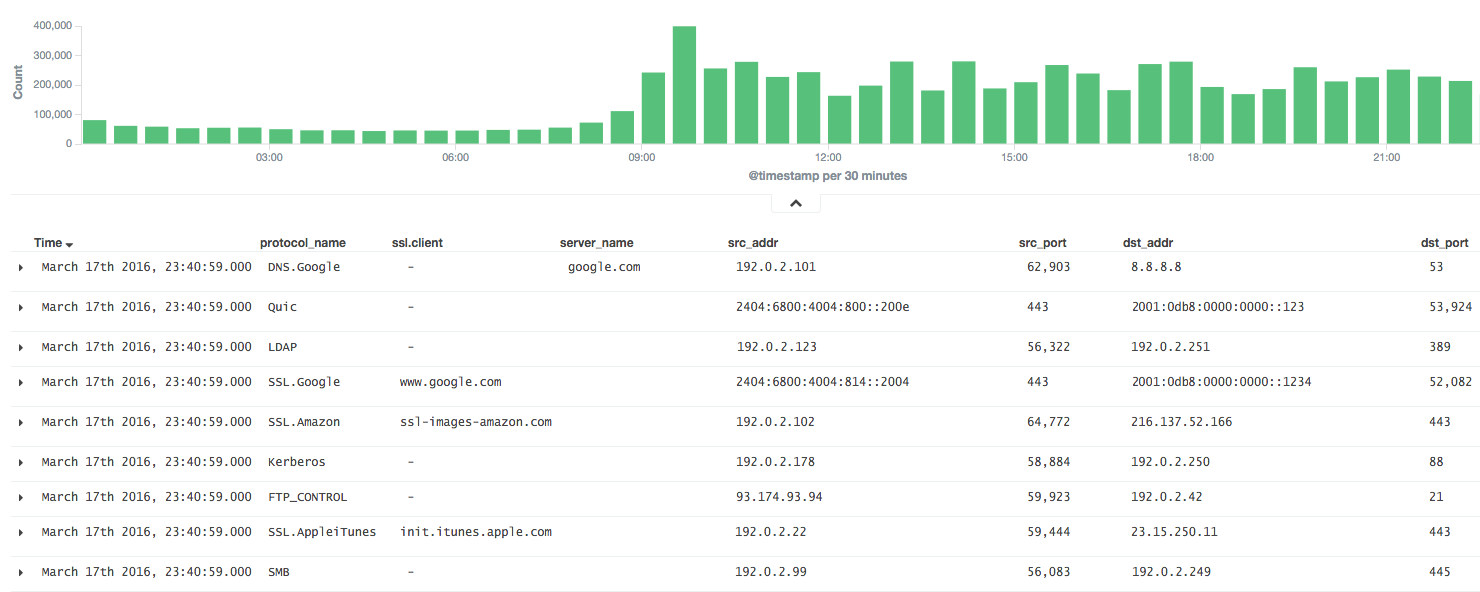
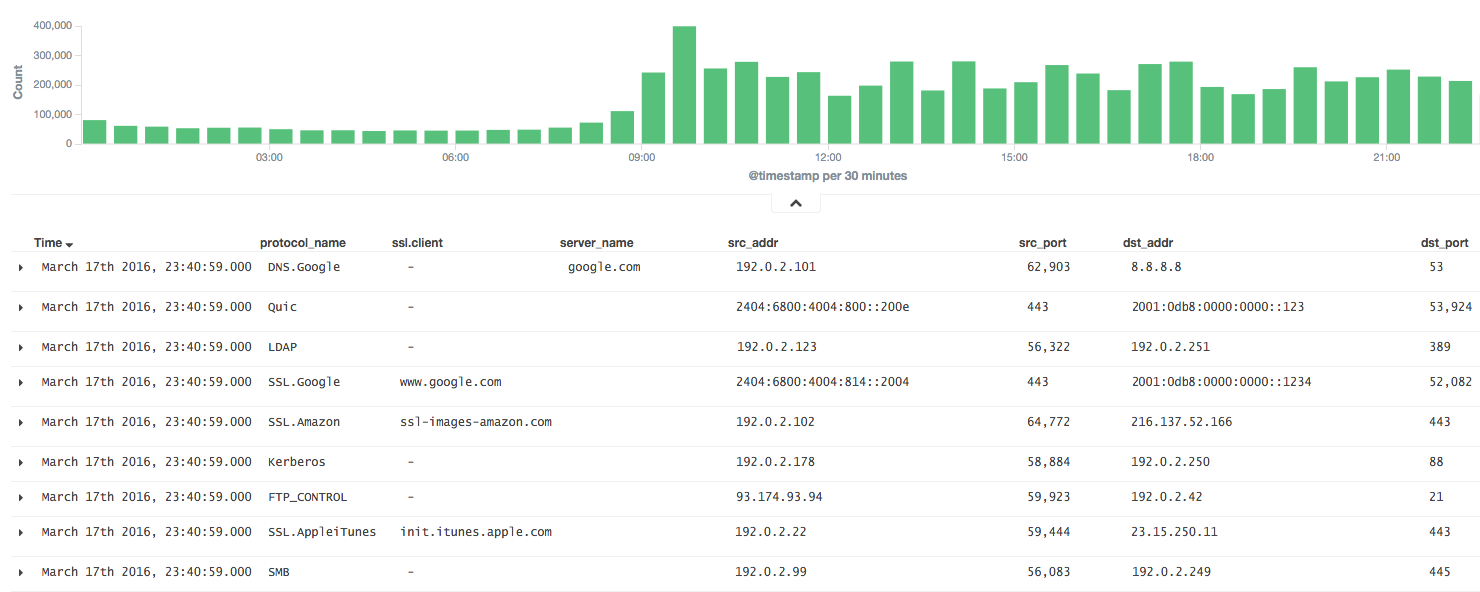
nDPI의 결과를 fluentd에서 분석할 수 있다면 매우 유용합니다.
그래서 ndff는 NetFlow처럼 패킷을 플로우로 집계하고, 결과를 JSON 또는 MessagePack 형태로 fluentd 서버에 전달합니다.
바이너리로 ndff 설치 (CentOS 6).
$ sudo yum -y install libpcap msgpack json-c
$ sudo rpm -ivh https://forensics.cert.org/centos/cert/6.5/x86_64/nDPI-1.7.1-1.el6.x86_64.rpm
$ sudo rpm -ivh https://github.com/knqyf263/ndff/releases/download/0.0.2/ndff-0.0.2-1.x86_64.rpm
그리고 실행합니다
$ sudo ndff -i eth0 -s 127.0.0.1 -p 24224 -m msgpack
INSTALL.md를 참조하세요.
그런 다음 json-c 또는 msgpack-c를 설치합니다.
json-c의 경우:
$ git clone https://github.com/json-c/json-c.git
$ cd json-c
$ sh autogen.sh
$ ./configure
$ make
$ make install
마지막으로 git 저장소에서 ndff를 설치합니다.
$ git clone https://github.com/knqyf263/ndff.git
$ cd ndff
$ ./autogen.sh
$ make
$ sudo make install
$ ndff
ndff -i <file|device> [-s <server>] [-m <json|msgpack>] [-f <filter>]
          [-p <port>][-P <protos>][-t <tag>][-q][-d][-D][-h][-T][-v <level>]
          [-n <threads>] [-w <file>]

Usage:
  -i <file.pcap|device>     | Specify a pcap file/playlist to read packets from or a device for live capture (comma-separated list)
  -m <json|msgpack>         | Specify a protocol to send messages to the server (json or msgpack)
  -f <BPF filter>           | Specify a BPF filter for filtering selected traffic
  -s <server>               | Specify a server for fluentd (If not, ndff runs in the dry-run mode)
  -p <port>                 | Specify a port for fluentd (default: 24224)
  -P <file>.protos          | Specify a protocol file (eg. protos.txt)
  -n <num threads>          | Number of threads. Default: number of interfaces in -i. Ignored with pcap files.
  -g <id:id...>             | Thread affinity mask (one core id per thread)
  -d                        | Daemonize (run in background)
  -D                        | Disable protocol guess and use only DPI
  -q                        | Quiet mode
  -t                        | Specify a tag for fluentd (default: ndpi.flow)
  -T                        | Dissect GTP/TZSP tunnels
  -r                        | Print nDPI version and git revision
  -w <path>                 | Write test output on the specified file. This is useful for
                            | testing purposes in order to compare results across runs
  -h                        | This help
  -v <1|2>                  | Verbose 'unknown protocol' packet print. 1=verbose, 2=very verbose
ndff를 포그라운드 또는 백그라운드로 실행합니다
결과를 stdout으로 내보냅니다.
$ sudo ndff -v 2 -i eth0
[WARN] No server is specified. This is dry-run mode.
[INFO] Capturing live traffic from device eth0...
[INFO] Running thread 0...

	1	ICMPV6 [2001:db8::253]:0 <-> [2001:db8::22]:0 [VLAN: 262][proto: 102/ICMPV6][1 pkts/90 bytes]
	2	UDP 192.0.2.10:1985 <-> 192.0.2.11:1985 [VLAN: 262][proto: 125/Skype][1 pkts/98 bytes]
	3	VRRP 192.0.2.10:0 <-> 192.0.2.11:0 [VLAN: 262][proto: 73/VRRP][1 pkts/60 bytes]
	4	UDP 192.0.2.12:1985 <-> 192.0.2.13:1985 [proto: 125/Skype][1 pkts/94 bytes]
	5	TCP 192.0.2.14:22 <-> 192.0.2.15:51462 [proto: 92/SSH][11 pkts/1510 bytes]
결과를 파일로 내보냅니다.
$ sudo ndff -v 2 -i tests/pcap/bittorrent.pcap -w bittorrent.txt
[WARN] No server is specified. This is dry-run mode.
[INFO] Reading packets from pcap file tests/pcap/bittorrent.pcap...
[INFO] Running thread 0...

$ head -n5 bittorrent.txt
        1       TCP 192.168.1.3:52888 <-> 82.58.216.115:38305 [proto: 37/BitTorrent][1 pkts/134 bytes][BT Hash: dcfcdccfb9e670ccc3dd40c78c161f2bea243126]
        2       TCP 192.168.1.3:52887 <-> 82.57.97.83:53137 [proto: 37/BitTorrent][1 pkts/134 bytes][BT Hash: dcfcdccfb9e670ccc3dd40c78c161f2bea243126]
        3       TCP 192.168.1.3:52895 <-> 83.216.184.241:51413 [proto: 37/BitTorrent][1 pkts/134 bytes][BT Hash: dcfcdccfb9e670ccc3dd40c78c161f2bea243126]
        4       TCP 79.53.228.2:14627 <-> 192.168.1.3:52896 [proto: 37/BitTorrent][1 pkts/134 bytes][BT Hash: dcfcdccfb9e670ccc3dd40c78c161f2bea243126]
        5       TCP 192.168.1.3:52894 <-> 120.62.33.241:39332 [proto: 37/BitTorrent][1 pkts/134 bytes][BT Hash: dcfcdccfb9e670ccc3dd40c78c161f2bea243126]
fluentd 서버로 전송합니다.
$ sudo ndff -q -i eth0 -s fluentd.example.com -p 22425 -t json.ndpi.flow -m json
Capturing live traffic from device eth0...
Running thread 0...
그러면 fluentd 서버에서 출력은 아래와 같습니다.
2016-03-29 14:41:23 +0900 ndpi.flow: {"protocol":"ICMPV6","src_addr":"2001:DB8::1234","src_port":0,"dst_addr":"2001:DB8::5678","dst_port":0,"detected_protocol":102,"protocol_name":"ICMPV6","out_pkts":1,"out_bytes":86,"in_pkts":0,"in_bytes":0,"first_switched":1459230083,"last_switched":1459230083,"server_name":""}
2016-03-29 14:41:00 +0900 ndpi.flow: {"protocol":"UDP","src_addr":"192.0.2.2","src_port":1985,"dst_addr":"192.0.2.3","dst_port":1985,"detected_protocol":125,"protocol_name":"Skype","out_pkts":16,"out_bytes":1568,"in_pkts":0,"in_bytes":0,"first_switched":1459230060,"last_switched":1459230100,"server_name":""}
2016-03-29 14:41:35 +0900 ndpi.flow: {"protocol":"TCP","src_addr":"192.0.2.4","src_port":49751,"dst_addr":"192.0.2.5","dst_port":80,"detected_protocol":7,"protocol_name":"HTTP","out_pkts":6,"out_bytes":514,"in_pkts":4,"in_bytes":816,"first_switched":1459230095,"last_switched":1459230096,"server_name":"google.co.jp"}
2016-03-29 14:41:35 +0900 ndpi.flow: {"protocol":"UDP","src_addr":"192.0.2.4,"src_port":36605,"dst_addr":"192.0.2.6","dst_port":53,"master_protocol":5,"detected_protocol":126,"protocol_name":"DNS.Google","out_pkts":2,"out_bytes":152,"in_pkts":2,"in_bytes":488,"first_switched":1459230095,"last_switched":1459230095,"server_name":"www.google.co.jp"}
$ sudo ndff -q -i eth0 -s fluentd.example.com -p 22425 -t msgpack.ndpi.flow -m msgpack
Capturing live traffic from device eth0...
Running thread 0...
