 kiralab/text4shell-scan
text4shell RCE CVE-2022-42889을 찾기 위한 완전 자동화된, 정확하고 광범위한 스캐너

2021년 Fullhunt의 예전 Log4j 스캐너를 기반으로 크게 제작되었으며(그들에게 큰 감사를 드립니다), 이 스캐닝 도구는 이제 Text4Shell RCE(CVE-2022-42889)를 발견하고 퍼징하는 데 사용됩니다. 보안 팀이 인프라에서 Text4Shell RCE를 스캔하고, 조직 환경에서 코드 실행을 초래할 수 있는 WAF 우회를 테스트하는 용도로 사용되어야 합니다.
별도의 설정 없이 DNS OOB 콜백을 기본 지원합니다. DNS 콜백 서버를 설정할 필요가 없습니다. 참고: 현재 interact.sh는 느리므로 사용을 권장하지 않습니다.
https://nvd.nist.gov/vuln/detail/CVE-2022-42889
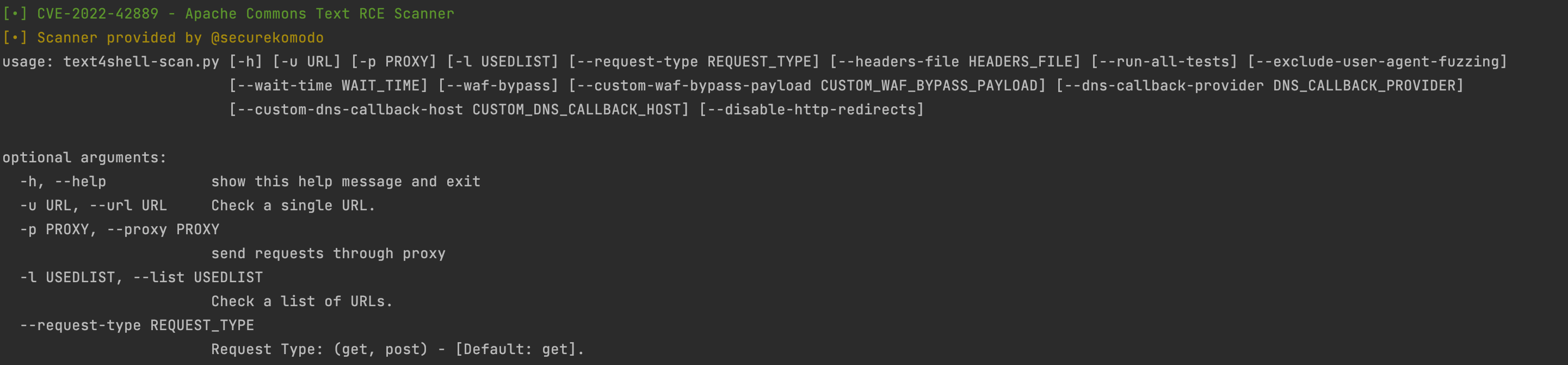
$ python3 text4shell-scan.py -h
[•] CVE-2022-42889 - Apache Commons Text RCE 스캐너
[•] 스캐너 제공: @securekomodo

usage: text4shell-scan.py [-h] [-u URL] [-p PROXY] [-l USEDLIST] [--request-type REQUEST_TYPE] [--headers-file HEADERS_FILE] [--run-all-tests] [--exclude-user-agent-fuzzing]
                     [--wait-time WAIT_TIME] [--waf-bypass] [--custom-waf-bypass-payload CUSTOM_WAF_BYPASS_PAYLOAD]
                     [--dns-callback-provider DNS_CALLBACK_PROVIDER] [--custom-dns-callback-host CUSTOM_DNS_CALLBACK_HOST] [--disable-http-redirects]

optional arguments:
  -h, --help            도움말 메시지 표시 후 종료
  -u URL, --url URL     단일 URL 확인
  -p PROXY, --proxy PROXY
                        프록시를 통해 요청 보내기
  -l USEDLIST, --list USEDLIST
                        URL 목록 확인
  --request-type REQUEST_TYPE
                        요청 유형: (get, post) - [기본값: get].
  --headers-file HEADERS_FILE
                        헤더 퍼징 목록 - [기본값: headers.txt].
  --run-all-tests       각 URL에 대해 사용 가능한 모든 테스트 실행
  --exclude-user-agent-fuzzing
                        User-Agent 헤더를 퍼징에서 제외 - 약한 User-Agent 검사 우회에 유용
  --wait-time WAIT_TIME
                        모든 URL 처리 후 대기 시간 (초) - [기본값: 5].
  --waf-bypass          WAF 우회 페이로드로 스캔 확장
  --custom-waf-bypass-payload CUSTOM_WAF_BYPASS_PAYLOAD
                        사용자 정의 WAF 우회 페이로드로 테스트
  --dns-callback-provider DNS_CALLBACK_PROVIDER
                        DNS 콜백 제공자 (옵션: dnslog.cn, interact.sh) - [기본값: interact.sh].
  --custom-dns-callback-host CUSTOM_DNS_CALLBACK_HOST
                        사용자 정의 DNS 콜백 호스트
  --disable-http-redirects
                        HTTP 리디렉션 비활성화. 참고: HTTP 리디렉션은 페이로드가 취약한 시스템에 도달할 가능성을 높이므로 유용함
$ python3 text4shell-scan.py -u https://<URL 입력>
$ python3 text4shell-scan.py -u https://<URL 입력> --run-all-tests
$ python3 text4shell-scan.py -u https://<URL 입력> --waf-bypass
$ python3 text4shell-scan.py -u https://<URL 입력> --custom-dns-callback-host <Collaborator 호스트 복사>
$ python3 text4shell-scan.py -l urls.txt
$ pip3 install -r requirements.txt
git clone [https://github.com/securekomodo/text4shell-scan.git](https://github.com/securekomodo/text4shell-scan.git)
cd text4shell-scan
sudo docker build -t text4shell-scan .
sudo docker run -it --rm text4shell-scan

# 현재 디렉토리에 "urls.txt" URL 목록이 있는 경우
docker run -it --rm -v $PWD:/data text4shell-Scan -l /data/urls.txt
이 프로젝트는 교육 및 윤리적 테스트 목적으로만 제작되었습니다. 사전 상호 동의 없이 대상을 공격하기 위해 text4shell-scan을 사용하는 것은 불법입니다. 최종 사용자는 모든 해당 지역, 주 및 연방 법률을 준수할 책임이 있습니다. 개발자는 어떠한 책임도 지지 않으며, 이 프로그램으로 인한 오용이나 피해에 대해 책임을 지지 않습니다.
이 프로젝트는 MIT 라이선스를 따릅니다.
Bryan Smith
