jpillora/chisel
SSH 암호화를 사용하는 HTTP 기반의 빠른 TCP/UDP 터널로, 역방향 포트 포워딩, SOCKS5 프록시, 클라이언트 인증을 지원하여 안전한 네트워크 통과 및 방화벽 우회를 가능하게 합니다.
# Chisel
[](https://godoc.org/github.com/jpillora/chisel) [](https://github.com/jpillora/chisel/actions?workflow=CI)
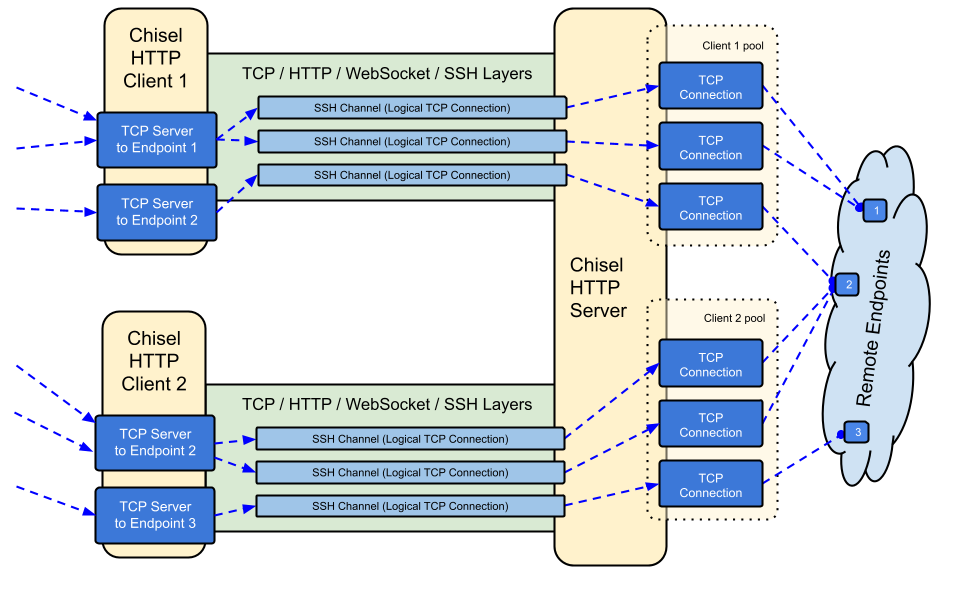
Chisel은 HTTP를 통해 전송되고 SSH로 보안이 강화된 빠른 TCP/UDP 터널입니다. 클라이언트와 서버를 모두 포함하는 단일 실행 파일입니다. Go(golang)로 작성되었습니다. Chisel은 주로 방화벽을 통과하는 데 유용하지만, 네트워크에 대한 보안 엔드포인트를 제공하는 데에도 사용할 수 있습니다.
## 목차
- [기능](#features)
- [설치](#install)
- [데모](#demo)
- [사용법](#usage)
- [기여](#contributing)
- [변경 이력](#changelog)
- [라이선스](#license)
## 기능
- 사용하기 쉬움
- [고성능](https://github.com/jpillora/chisel/blob/master/test/bench/perf.md)\*
- SSH 프로토콜을 사용한 [암호화된 연결](#security) (`crypto/ssh` 사용)
- [인증된 연결](#authentication); 사용자 구성 파일을 통한 인증된 클라이언트 연결, 지문 매칭을 통한 인증된 서버 연결.
- 클라이언트는 [지수 백오프](https://github.com/jpillora/backoff)를 통해 자동으로 재연결합니다 (`--min/max-retry-interval`로 조정 가능); keepalive 핑이 타임아웃되므로, 조용히 끊긴 연결(절전/복귀, NAT 타임아웃, 서버 재시작)이 감지되고 재설정됩니다
- 클라이언트는 하나의 TCP 연결을 통해 여러 터널 엔드포인트를 생성할 수 있습니다
- 클라이언트는 선택적으로 SOCKS 또는 HTTP CONNECT 프록시를 통과할 수 있습니다
- 역방향 포트 포워딩 (연결이 서버를 거쳐 클라이언트로 나갑니다)
- 서버는 선택적으로 [역방향 프록시](http://golang.org/pkg/net/http/httputil/#NewSingleHostReverseProxy) 역할을 겸할 수 있습니다
- 서버는 선택적으로 [SOCKS5](https://en.wikipedia.org/wiki/SOCKS) 연결을 허용할 수 있습니다 ([아래 가이드](#socks5-guide) 참조)
- 클라이언트는 선택적으로 역방향 포트 포워딩으로부터 [SOCKS5](https://en.wikipedia.org/wiki/SOCKS) 연결을 허용할 수 있습니다
- `ssh -o ProxyCommand`를 지원하는 stdio를 통한 클라이언트 연결로 HTTP를 통한 SSH 제공
## 설치
### 바이너리
[](https://github.com/jpillora/chisel/releases) [](https://github.com/jpillora/chisel/releases)
[최신 릴리스](https://github.com/jpillora/chisel/releases/latest)를 참조하거나 `curl https://i.jpillora.com/chisel! | bash`로 지금 다운로드하여 설치하세요
바이너리는 최신 Go 릴리스로 빌드되며, 이는 최소 OS 버전을 설정합니다: Windows 10 / Server 2016, macOS 12, Linux kernel 3.2, FreeBSD 12.2. 구형 시스템(예: Windows 7)의 경우 [릴리스 v1.8.1](https://github.com/jpillora/chisel/releases/tag/v1.8.1) 또는 그 이전 버전을 사용하세요.
### Docker
[](https://hub.docker.com/r/jpillora/chisel/) [](https://hub.docker.com/r/jpillora/chisel/tags)
```sh
docker run --rm -it jpillora/chisel --help
```
이미지는 멀티 아키텍처이며 Docker Hub(`jpillora/chisel`)와 GitHub Container Registry(`ghcr.io/jpillora/chisel`) 모두에 게시됩니다.
### Fedora
이 패키지는 Fedora 커뮤니티에서 유지 관리합니다. RPM 사용과 관련된 문제가 발생하면 이 [이슈 트래커](https://bugzilla.redhat.com/buglist.cgi?bug_status=NEW&bug_status=ASSIGNED&classification=Fedora&component=chisel&list_id=11614537&product=Fedora&product=Fedora%20EPEL)를 이용해 주세요.
```sh
sudo dnf -y install chisel
```
### 소스
```sh
$ go install github.com/jpillora/chisel@latest
```
## 데모
몇 분 만에 자신만의 데모 서버를 실행할 수 있습니다(예전 Heroku 데모는 Heroku의 무료 티어와 함께 사라졌습니다). [`example/fly.toml`](https://github.com/jpillora/chisel/blob/master/example/fly.toml)은 이 `chisel server`를 [fly.io](https://fly.io)의 무료 허용량에 배포합니다:
```sh
$ chisel server --port $PORT --backend http://example.com
# listens on $PORT, proxies normal web requests to http://example.com
```
`example/` 디렉터리에서 `fly launch --copy-config`로 배포한 다음, 서버 옆에서 실행 중인 모든 서비스로 터널링합니다. 예를 들어:
```sh
$ chisel client https://<your-app>.fly.dev 3000
# connects to your chisel server,
# tunnels your localhost:3000 to the server's localhost:3000
```
브라우저에서 앱의 URL을 방문하면 서버의 기본 백엔드 프록시로 연결되어 [example.com](http://example.com)의 복사본이 표시됩니다.
## 사용법
<!-- render these help texts by hand,
or use https://github.com/jpillora/md-tmpl
with $ md-tmpl -w README.md -->
<!--tmpl,code=plain:echo "$ chisel --help" && go run main.go --help | sed 's#0.0.0-src (go1\..*)#X.Y.Z#' -->
``` plain
$ chisel --help
Usage: chisel [command] [--help]
Version: X.Y.Z
Commands:
server - runs chisel in server mode
client - runs chisel in client mode
Read more:
https://github.com/jpillora/chisel
```
<!--/tmpl-->
<!--tmpl,code=plain:echo "$ chisel server --help" && go run main.go server --help | cat | sed 's#0.0.0-src (go1\..*)#X.Y.Z#' -->
``` plain
$ chisel server --help
Usage: chisel server [options]
Options:
--host, Defines the HTTP listening host – the network interface
(defaults the environment variable HOST and falls back to 0.0.0.0).
--port, -p, Defines the HTTP listening port (defaults to the environment
variable PORT and falls back to port 8080).
--key, (deprecated use --keygen and --keyfile instead)
An optional string to seed the generation of a ECDSA public
and private key pair. All communications will be secured using this
key pair. Share the subsequent fingerprint with clients to enable detection
of man-in-the-middle attacks (defaults to the CHISEL_KEY environment
variable, otherwise a new key is generate each run).
--keygen, A path to write a newly generated PEM-encoded SSH private key file.
If users depend on your --key fingerprint, you may also include your --key to
output your existing key. Use - (dash) to output the generated key to stdout.
--keyfile, An optional path to a PEM-encoded SSH private key. When
this flag is set, the --key option is ignored, and the provided private key
is used to secure all communications. (defaults to the CHISEL_KEY_FILE
environment variable). Since ECDSA keys are short, you may also set keyfile
to the inline key string itself, exactly as printed by --keygen (a base64
string with a "ck-" prefix); no extra base64 encoding is needed.
--authfile, An optional path to a users.json file. This file should
be an object with users defined like:
{
"<user:pass>": ["<addr-regex>","<addr-regex>"]
}
when <user> connects, their <pass> will be verified and then
each of the remote addresses will be compared against the list
of address regular expressions for a match. Patterns are NOT
anchored by default: "10.0.0.1:80" also matches
"210.0.0.1:8080", and "." matches any character. Anchor your
patterns, e.g. "^10\.0\.0\.1:80$". The empty string ""
matches every address. Addresses will
always come in the form "<remote-host>:<remote-port>" for normal remotes,
"R:<local-interface>:<local-port>" for reverse port forwarding
remotes, and "socks" for SOCKS5 proxy access. Note that SOCKS5
access previously bypassed this list; existing authfiles which
should allow SOCKS5 must add an entry matching "socks" (the
empty wildcard "" matches everything, including "socks"). This
file will be automatically reloaded on change. Reloads apply
to new connections and to new tunnels of connected clients;
established tunnels are not interrupted.
--auth, An optional string representing a single user with full
access, in the form of <user:pass>. It is equivalent to creating an
authfile with {"<user:pass>": [""]}. If unset, it will use the
environment variable AUTH.
--keepalive, An optional keepalive interval. Since the underlying
transport is HTTP, in many instances we'll be traversing through
proxies, often these proxies will close idle connections. You must
specify a time with a unit, for example '5s' or '2m'. Defaults
to '25s' (set to 0s to disable).
--backend, Specifies another HTTP server to proxy requests to when
chisel receives a normal HTTP request. Useful for hiding chisel in
plain sight. --proxy is accepted as an alias for this flag.
--socks5, Allow clients to access the internal SOCKS5 proxy. See
chisel client --help for more information.
--reverse, Allow clients to specify reverse port forwarding remotes
in addition to normal remotes.
--tls-key, Enables TLS and provides optional path to a PEM-encoded
TLS private key. When this flag is set, you must also set --tls-cert,
and you cannot set --tls-domain.
--tls-cert, Enables TLS and provides optional path to a PEM-encoded
TLS certificate. When this flag is set, you must also set --tls-key,
and you cannot set --tls-domain.
--tls-domain, Enables TLS and automatically acquires a TLS key and
certificate using LetsEncrypt. Setting --tls-domain requires port 443.
You may specify multiple --tls-domain flags to serve multiple domains.
The resulting files are cached in the "$HOME/.cache/chisel" directory.
You can modify this path by setting the CHISEL_LE_CACHE variable,
or disable caching by setting this variable to "-". You can optionally
provide a certificate notification email by setting CHISEL_LE_EMAIL.
--tls-ca, a path to a PEM encoded CA certificate bundle or a directory
holding multiple PEM encode CA certificate bundle files, which is used to
validate client connections. The provided CA certificates will be used
instead of the system roots. This is commonly used to implement mutual-TLS.
--pid Generate pid file in current working directory
-v, Enable verbose logging
--help, This help text
Signals:
The chisel process is listening for:
a SIGINT or SIGTERM to begin a graceful shutdown
(a second signal forces an immediate exit),
a SIGUSR2 to print process stats, and
a SIGHUP to short-circuit the client reconnect timer
Version:
X.Y.Z
Read more:
https://github.com/jpillora/chisel
```
<!--/tmpl-->
<!--tmpl,code=plain:echo "$ chisel client --help" && go run main.go client --help | sed 's#0.0.0-src (go1\..*)#X.Y.Z#' -->
``` plain
$ chisel client --help
Usage: chisel client [options] <server> <remote> [remote] [remote] ...
<server> is the URL to the chisel server.
<remote>s are remote connections tunneled through the server, each of
which come in the form:
<local-host>:<local-port>:<remote-host>:<remote-port>/<protocol>
■ local-host defaults to 0.0.0.0 (all interfaces).
■ local-port defaults to remote-port.
■ remote-port is required*.
■ remote-host defaults to 127.0.0.1 (server localhost).
■ protocol defaults to tcp.
which shares <remote-host>:<remote-port> from the server to the client
as <local-host>:<local-port>, or:
R:<local-interface>:<local-port>:<remote-host>:<remote-port>/<protocol>
which does reverse port forwarding, sharing <remote-host>:<remote-port>
from the client to the server's <local-interface>:<local-port>.
example remotes
3000
example.com:3000
3000:google.com:80
192.168.0.5:3000:google.com:80
socks
5000:socks
udpsocks
5000:udpsocks
R:2222:localhost:22
R:socks
R:5000:socks
R:5000:udpsocks
stdio:example.com:22
1.1.1.1:53/udp
When the chisel server has --socks5 enabled, remotes can
specify "socks" or "udpsocks" in place of remote-host and
remote-port. Both default to the local host and port
127.0.0.1:1080. Connections to this remote will terminate
at the server's internal SOCKS5 proxy. When the server also
has --authfile set, SOCKS5 access requires an entry matching
the token "socks" in the user's address list.
When the chisel server has --reverse enabled, remotes can
be prefixed with R to denote that they are reversed. That
is, the server will listen and accept connections, and they
will be proxied through the client which specified the remote.
Reverse remotes specifying "R:socks" will listen on the server's
default socks port (1080) and terminate the connection at the
client's internal SOCKS5 proxy.
The "socks" remote supports TCP CONNECT only. Use "udpsocks"
for TCP CONNECT and UDP ASSOCIATE, including "R:udpsocks".
It binds TCP and UDP on the same configured interface and port;
the UDP relay never uses a randomly allocated listening port.
UDP requires support on both Chisel peers. Destination names are
resolved at the exit node. If UDP cannot bind, TCP remains available
and UDP ASSOCIATE fails; no alternate port is used. Clients using
a zero UDP source port allow one pending association per source IP
until the first valid datagram pins it. BIND, UDP fragmentation,
and udpsocks over stdio are not supported.
When stdio is used as local-host, the tunnel will connect standard
input/output of this program with the remote. This is useful when
combined with ssh ProxyCommand. You can use
ssh -o ProxyCommand='chisel client chiselserver stdio:%h:%p' \
[email protected]
to connect to an SSH server through the tunnel.
Options:
--fingerprint, A *strongly recommended* fingerprint string
to perform host-key validation against the server's public key.
Fingerprint mismatches will close the connection.
Fingerprints are generated by hashing the ECDSA public key using
SHA256 and encoding the result in base64.
Fingerprints must be 44 characters containing a trailing equals (=).
Legacy MD5 colon fingerprints (deprecated) are still accepted,
but only in their full 16-octet form; truncated prefixes are
rejected.
--auth, An optional username and password (client authentication)
in the form: "<user>:<pass>". These credentials are compared to
the credentials inside the server's --authfile. defaults to the
AUTH environment variable.
--keepalive, An optional keepalive interval. Since the underlying
transport is HTTP, in many instances we'll be traversing through
proxies, often these proxies will close idle connections. You must
specify a time with a unit, for example '5s' or '2m'. Defaults
to '25s' (set to 0s to disable).
--max-retry-count, Maximum number of times to retry before exiting.
Defaults to unlimited.
--min-retry-interval, Minimum wait time before retrying after a
disconnection. Defaults to 1 second.
--max-retry-interval, Maximum wait time before retrying after a
disconnection. Defaults to 5 minutes.
--proxy, An optional HTTP CONNECT or SOCKS5 proxy which will be
used to reach the chisel server. Authentication can be specified
inside the URL. Credentials must be URL-encoded; for example a
"#" in the password must be written as "%23".
For example, http://admin:[email protected]:8081
or: socks://admin:[email protected]:1080
The socks://, socks5:// and socks5h:// schemes are equivalent:
DNS is always resolved by the proxy.
--header, Set a custom header in the form "HeaderName: HeaderContent".
Can be used multiple times. (e.g --header "Foo: Bar" --header "Hello: World")
--hostname, Optionally set the 'Host' header (defaults to the host
found in the server url).
--sni, Override the ServerName when using TLS (defaults to the
hostname).
--tls-ca, An optional root certificate bundle used to verify the
chisel server. Only valid when connecting to the server with
"https" or "wss". By default, the operating system CAs will be used.
--tls-skip-verify, Skip server TLS certificate verification of
chain and host name (if TLS is used for transport connections to
server). If set, client accepts any TLS certificate presented by
the server and any host name in that certificate. This only affects
transport https (wss) connection. Chisel server's public key
may be still verified (see --fingerprint) after inner connection
is established.
--tls-key, a path to a PEM encoded private key used for client
authentication (mutual-TLS).
--tls-cert, a path to a PEM encoded certificate matching the provided
private key. The certificate must have client authentication
enabled (mutual-TLS).
--pid Generate pid file in current working directory
-v, Enable verbose logging
--help, This help text
Signals:
The chisel process is listening for:
a SIGINT or SIGTERM to begin a graceful shutdown
(a second signal forces an immediate exit),
a SIGUSR2 to print process stats, and
a SIGHUP to short-circuit the client reconnect timer
Version:
X.Y.Z
Read more:
https://github.com/jpillora/chisel
```
<!--/tmpl-->
### 보안
암호화는 항상 활성화되어 있습니다. chisel 서버를 시작하면 메모리 내 ECDSA 공개/개인 키 쌍을 생성합니다. 공개 키 지문(base64로 인코딩된 SHA256)은 서버가 시작될 때 표시됩니다. 무작위 키를 생성하는 대신, 서버는 선택적으로 `--keyfile` 옵션을 사용하여 키 파일을 지정할 수 있습니다. 클라이언트가 연결할 때에도 서버의 공개 키 지문을 표시합니다. 클라이언트는 `--fingerprint` 옵션을 사용하여 특정 지문을 강제할 수 있습니다. 레거시 MD5 지문은 여전히 허용되지만 전체 16옥텟 콜론 형식이어야 하며, 잘린 접두사는 거부됩니다. 자세한 내용은 위의 `--help`를 참조하세요.
서버는 또한 인증 전에 인바운드 websocket 메시지 크기를 제한합니다(`CHISEL_WS_READ_LIMIT`, 기본값 512 KiB). 따라서 인증되지 않은 피어가 과대한 메시지로 메모리를 고갈시킬 수 없습니다. 기본값은 `x/crypto/ssh`의 최대 전송 패킷인 256 KiB보다 충분히 크므로 유효한 SSH 패킷이 거부되는 일은 없습니다. `0`만이 제한을 비활성화하며, 음수 값은 안전한 기본값으로 대체됩니다.
### 인증
`--authfile` 옵션을 사용하여 서버는 선택적으로 `user.json` 구성 파일을 제공하여 허용되는 사용자 목록을 생성할 수 있습니다. 그런 다음 클라이언트는 `--auth` 옵션을 사용하여 인증합니다. 예시 인증 구성 파일은 [users.json](https://github.com/jpillora/chisel/blob/master/example/users.json)을 참조하세요. 자세한 내용은 위의 `--help`를 참조하세요.
authfile 동작에 대한 참고 사항:
- 파일은 감시되며 **실시간으로 다시 로드**됩니다. 여기에는 이름 바꾸기를 통한 편집기 저장(vim)과 kubernetes configmap 업데이트가 포함됩니다. 다시 로드는 새 연결과 이미 연결된 클라이언트의 새 터널에 적용됩니다. 제거된 사용자는 즉시 새 터널에 대한 액세스 권한을 잃지만, 이미 설정된 터널은 중단되지 않습니다.
- 주소 패턴은 정규 표현식이며 **앵커링되지 않습니다**. `^`와 `$`로 앵커링하세요(서버는 로드 시 앵커링되지 않은 패턴에 대해 경고합니다). 빈 문자열 `""`은 모든 것과 일치합니다.
- SOCKS5 액세스는 토큰 `socks`와 일치하는 항목으로 제어됩니다. **호환성 깨짐**: SOCKS5는 이전에 authfile을 완전히 우회했습니다. `--socks5`와 `--authfile`을 함께 실행하는 서버는 프록시 액세스를 유지해야 하는 사용자에게 `socks`를 부여해야 합니다(와일드카드 `""` 항목은 계속 작동합니다).
- 콜론이 없는 인증 문자열(`user:pass`)은 이제 서버와 클라이언트 모두에서 **치명적인 시작 오류**입니다. 이전에는 인증을 조용히 비활성화했습니다.
- `--auth` 사용자는 authfile 다시 로드 후에도 유지되며 파일 사용자와의 이름 충돌에서 우선합니다.
내부적으로 이는 SSH에서 제공하는 _Password_ 인증 방법을 사용하여 수행됩니다. `crypto/ssh`에 대해 자세히 알아보려면 http://blog.gopheracademy.com/go-and-ssh/를 참조하세요. 세션 열기/닫기(사용자, 소스 주소 및 원격 포함)와 실패한 로그인 시도는 info 수준에서 기록됩니다.
### TLS 가이드
가장 간단한 보안 설정은 `--tls-domain`으로, LetsEncrypt 인증서를 자동으로 프로비저닝합니다(포트 443과 서버를 가리키는 DNS 레코드 필요):
```sh
chisel server --port 443 --tls-domain chisel.example.com --auth user:pass
chisel client --auth user:pass https://chisel.example.com R:2222:localhost:22
```
자체 인증서(자체 서명 또는 내부 CA)를 사용하려면 키/인증서 쌍을 생성하고 양쪽이 올바른 파일을 가리키도록 설정하십시오:
```sh
chisel server --port 443 --tls-key key.pem --tls-cert cert.pem
chisel client --tls-ca ca.pem https://chisel.example.com 3000
```
상호 TLS의 경우 서버에 `--tls-ca`를, 각 클라이언트에 `--tls-cert`/`--tls-key`를 전달합니다. TLS는 chisel의 전송 계층을 외부에서 감싸며, 내부 SSH 계층은 여전히 암호화와 인증을 수행하므로 `--fingerprint` 검증은 TLS 사용 여부와 관계없이 동작합니다.
### Docker를 사용한 SOCKS5 가이드
1. 터미널에 새 개인 키를 출력합니다
```sh
chisel server --keygen -
# 또는 디스크에 저장 --keygen /path/to/mykey
```
1. chisel 서버를 시작합니다
```sh
jpillora/chisel server --keyfile '<ck-base64 string or file path>' -p 9312 --socks5
```
1. chisel 클라이언트를 연결합니다 (서버의 fingerprint 사용)
```sh
chisel client --fingerprint '<see server output>' <server-address>:9312 socks
```
1. SOCKS5 클라이언트(예: OS/브라우저)를 다음으로 지정합니다:
```
<client-address>:1080
```
1. 이제 HTTP를 통한 암호화되고 인증된 SOCKS5 연결이 완성됩니다
참고: 서버가 `--authfile`도 사용하는 경우, 사용자는 프록시를 사용하기 위해 `socks` 토큰과 일치하는 항목이 필요합니다 ([Authentication](#authentication) 참조).
설정 명령, 리버스 모드, UDP 클라이언트 예제는 [SOCKS5 UDP 사용자 가이드](https://github.com/jpillora/chisel/blob/master/example/udpsocks.md)를 참조하세요.
일반 `socks` 리모트는 TCP CONNECT만 지원하며 UDP 소켓을 바인딩하지 않습니다. TCP CONNECT와 UDP ASSOCIATE를 모두 활성화하려면 `udpsocks`(리버스 모드의 경우 `R:udpsocks`)를 사용하세요. 예: `1080:udpsocks`. 두 유형 모두 기본값은 `127.0.0.1:1080`이며 동일한 SOCKS 접근 권한을 사용합니다. `udpsocks` 리스너는 구성된 동일한 인터페이스와 포트에서 TCP와 UDP를 바인딩하며, 무작위 리스닝 포트를 할당하지 않고 하나의 UDP 릴레이 소켓을 여러 어소시에이션 간에 공유합니다. UDP 클라이언트는 TCP 제어 연결을 열어 둔 채 해당 포트로 SOCKS 캡슐화 데이터그램을 전송합니다. 데이터그램 목적지 이름은 출구 노드에서 해석되며, UDP 트래픽은 암호화된 SSH 터널을 통해 이동합니다. UDP를 사용하려면 양쪽 Chisel 피어를 업그레이드하세요. TCP SOCKS는 이전 피어와의 호환성이 유지됩니다.
방화벽이나 컨테이너를 통해 `udpsocks` 리스너를 노출할 때는 구성된 포트에서 TCP와 UDP를 모두 허용하세요. UDP ASSOCIATE는 TCP 연결을 수락하는 로컬 IP를 반환하며, 이 IP는 SOCKS 클라이언트에서 접근 가능해야 합니다. Linux Docker 리스너의 경우 `--network host`와 리모트 `0.0.0.0:1080:udpsocks`를 함께 사용하여 격리된 컨테이너 주소가 광고되지 않도록 하세요. 컨테이너 포트 매핑에는 `-p 1080:1080/tcp`와 `-p 1080:1080/udp`가 모두 필요하며, 광고된 릴레이 IP에 대한 접근성도 필요합니다. UDP 포트가 사용 중이면 Chisel은 UDP를 사용할 수 없다고 로그를 남기고 TCP 서비스를 유지하며, 대체 포트를 사용하지 않고 UDP ASSOCIATE를 거부합니다. 포트를 확보한 후 프록시를 재시작하세요.
어소시에이션은 해당 TCP 피어의 IP에서 오는 패킷을 수락합니다. 선언된 UDP 소스 포트는 해당 엔드포인트를 예약하며, 소스 포트가 0인 경우 첫 번째 유효한 데이터그램에 의해 고정됩니다. IP당 고정되지 않은 어소시에이션은 하나만 허용되므로, 동일한 IP를 공유하는 클라이언트는 UDP 소스 포트를 선언하거나 다른 어소시에이션을 열기 전에 첫 번째 데이터그램을 전송해야 합니다. 중복된 소스 포트 예약은 거부됩니다. 제어 연결을 닫거나 SSH가 끊기면 어소시에이션이 종료되며, 재연결하려면 새로운 UDP ASSOCIATE가 필요합니다. BIND, UDP 단편화, `stdio:udpsocks`는 지원되지 않습니다.
### Authfile을 사용한 리버스 SOCKS
특정 클라이언트가 SOCKS 출구 노드 역할을 하도록 허용하려면 해당 클라이언트에 리버스 socks 리스너 주소를 부여하세요 (`R:socks`는 서버의 `127.0.0.1:1080`에서 리스닝합니다):
```json
{
"exituser:password": ["^R:127\\.0\\.0\\.1:1080$"]
}
```
```sh
chisel server --reverse --authfile users.json
chisel client --auth exituser:password <server-address> R:socks
# server-side consumers point SOCKS5 clients at 127.0.0.1:1080,
# and their traffic exits via the chisel client's network
```
클라이언트 명령에서 `R:udpsocks`를 사용하면 동일한 서버 포트에서 UDP ASSOCIATE도 활성화됩니다. authfile 권한 부여는 동일하게 유지됩니다.
단계별 [리버스 터널링 예제](https://github.com/jpillora/chisel/blob/master/example/reverse-tunneling-authenticated.md)도 참고하세요.
### CDN(Cloudflare) 뒤에서 실행하기
chisel은 WebSocket을 지원하는 CDN을 통해 작동합니다. Cloudflare의 경우: WebSocket을 활성화하고, DNS 레코드를 프록시(주황색 구름)로 설정하고, 클라이언트를 `https://`로 연결하세요. CDN이 TLS를 종료하지만, 내부 SSH 계층 덕분에 `--fingerprint` 검증이 여전히 chisel 서버를 종단 간 인증합니다. 즉, CDN은 터널링된 트래픽을 읽거나 수정할 수 없습니다. CDN 유휴 타임아웃에 걸리지 않도록 `--keepalive`를 기본값인 `25s`로 유지하고, `Upgrade` 헤더를 제거하는 프록시는 chisel을 전혀 전달할 수 없다는 점에 유의하세요.
### 환경 변수로 튜닝하기
덜 일반적인 설정값은 환경 변수이며, 모두 `CHISEL_` 접두사로 읽습니다(예: `CHISEL_WS_TIMEOUT=10s`):
| 변수 | 측면 | 기본값 | 용도 |
| --------------- | ----------- | ------------------ | -------------------------------------------------- |
| `WS_TIMEOUT` | 클라이언트 | `45s` | websocket 핸드셰이크 타임아웃 |
| `SSH_TIMEOUT` | 클라이언트 | `30s` | ssh 핸드셰이크 타임아웃 |
| `CONFIG_TIMEOUT`| 서버 | `10s` | 클라이언트의 config 요청 대기 |
| `SSH_WAIT` | 양쪽 | `35s` | 새 터널이 활성 연결을 기다리는 시간 |
| `PING_TIMEOUT` | 양쪽 | keepalive 간격 | keepalive ping 응답 타임아웃 (`--keepalive 0`이면 ping 없음) |
| `DIAL_TIMEOUT` | 양쪽 | `30s` | tcp 대상 dial, SOCKS 핸드셰이크, SOCKS UDP DNS 타임아웃 |
| `WS_READ_LIMIT` | 양쪽 | `524288` | 최대 인바운드 websocket 메시지 바이트 (0 = 제한 없음, 음수 = 기본값) |
| `WS_BUFF_SIZE` | 양쪽 | go 기본값 | websocket 읽기/쓰기 버퍼 크기 |
| `UDP_MAX_SIZE` | 양쪽 | `9012` | 최대 udp 패킷 바이트 (SOCKS UDP 헤더 포함) |
| `UDP_DEADLINE` | 양쪽 | `15s` | udp 흐름 읽기 데드라인 및 return-peer 만료, SOCKS UDP 목적지 유휴 타임아웃 |
| `UDP_MAX_CONNS` | 양쪽 | `100` | 최대 udp 흐름 또는 return peer, 리스너당 SOCKS UDP 연결 및 연결당 목적지 |
| `SHUTDOWN_GRACE`| 서버 | `5s` | 종료 시 http 요청 드레인 시간 |
`HOST`, `PORT`, `AUTH`, `CHISEL_KEY`/`CHISEL_KEY_FILE`은 위의 `--help` 텍스트에 문서화되어 있습니다.
SOCKS UDP는 하드 연결 및 목적지 제한을 사용하며 이를 초과하는 패킷은 버립니다. 각 연결은 최대 16개의 아웃바운드 데이터그램을 큐에 넣으며, 큐가 가득 차면 다른 클라이언트를 차단하지 않고 패킷을 버립니다. SOCKS UDP의 경우, 양수가 아닌 크기/연결 제한이나 유휴 데드라인은 기본값을 사용하며, 패킷 크기는 65507바이트로 제한됩니다. 운영 체제는 더 작은 UDP 전송 제한을 부과할 수 있습니다. macOS는 기본적으로 9216바이트(`net.inet.udp.maxdgram`)입니다. 기본 9012바이트 Chisel 제한은 이 범위 내에 들어갑니다.
#### 주의사항
WebSocket 지원이 필요하므로:
- IaaS 제공업체는 모두 WebSocket을 지원합니다 (지원하지 않는 HTTP 프록시가 앞에 강제로 배치된 경우는 제외인데, 그런 경우에는 PaaS로 강등되었다고 봐도 무방합니다)
- PaaS 제공업체는 WebSocket 지원이 다양합니다
- Heroku는 완전히 지원합니다
- Openshift는 완전히 지원하지만 연결이 포트 8443과 8080에서만 허용됩니다
- Google App Engine standard는 지원하지 **않습니다** (flexible 환경은 지원합니다)
## 기여
- http://golang.org/doc/code.html
- http://golang.org/doc/effective_go.html
- `github.com/jpillora/chisel/share`에는 공유 패키지가 있습니다
- `github.com/jpillora/chisel/server`에는 서버 패키지가 있습니다
- `github.com/jpillora/chisel/client`에는 클라이언트 패키지가 있습니다
## 변경 이력
- `1.0` - 최초 릴리스
- `1.1` - ECDSA SSH를 위한 단순 대칭 암호화 대체
- `1.2` - SOCKS5(서버) 및 HTTP CONNECT(클라이언트) 지원 추가
- `1.3` - 리버스 터널링 지원 추가
- `1.4` - 임의 HTTP 헤더 지원 추가
- `1.5` - 리버스 SOCKS 지원 추가 (@aus 제공)
- `1.6` - 클라이언트 stdio 지원 추가 (@BoleynSu 제공)
- `1.7` - UDP 지원 추가
- `1.8` - `scratch`Docker 이미지로 전환
- `1.9` - Go 1.21로 업그레이드. `--key` 시드에서 `--key{gen,file}`을 사용하는 P256 키 문자열로 전환 (@cmenginnz 제공)
- `1.10` - Go 1.22로 업그레이드. 릴리스에 `.rpm` `.deb` `.apk` 추가. 잘못된 버전 비교 수정.
- `1.11` - Go 1.25.1로 업그레이드. 모든 의존성 업데이트.
- `1.12` - 안정성 및 보안 개선:
- keepalive ping이 이제 타임아웃됩니다(`CHISEL_PING_TIMEOUT`). 따라서 절전/복귀, NAT 타임아웃, 서버 재시작 후 끊긴 연결이 신속하게 재연결됩니다
- authfile 재로드가 편집기 이름 변경과 kubernetes configmap 교체에도 유지되며, 연결된 클라이언트에 실시간 적용됩니다 (새 터널, 기존 터널은 중단되지 않음)
---
[Read more](https://github.com/jpillora/chisel)