
Skip to content
KitploitKITPLOIT
도구블로그
제출
도구블로그
제출

해킹, 침투 테스트 및 사이버 보안 도구를 당신의 보안 무기고에!

Kitploit은 해킹, 사이버 보안 및 침투 테스트 도구 디렉토리입니다. 최신 프로젝트 업데이트를 발견하여 취약점을 찾고, 시스템을 분석하고, 테스트를 자동화하고, 보안을 강화하세요.

··피드·문의·개인정보·© 2026 Kitploit

도구 디렉토리

카테고리

모든 카테고리 보기
Loading categories
ciso-assistant-community — 리스크 관리, 컴플라이언스, 감사를 위한 GRC 플랫폼으로, 200개 이상의 프레임워크, 자동 제어 매핑, 취약점 관리, 사고 대응 워크플로를 제공합니다. | Kitploit
도구/GitHubGitHub/intuitem/ciso-assistant-community
Defensive ToolsVulnerability AnalysisConfiguration AuditingPrivacyThreat IntelligenceIdentity & Access Management (IAM)Incident Response
GitHubintuitem/ciso-assistant-community

ciso-assistant-community

리스크 관리, 컴플라이언스, 감사를 위한 GRC 플랫폼으로, 200개 이상의 프레임워크, 자동 제어 매핑, 취약점 관리, 사고 대응 워크플로를 제공합니다.

저장소 보기
4.4k83741일 전Kitploit 검토 완료

인기

모두 보기 →

커뮤니티에서 가장 많이 사용되는 도구를 찾아보세요.

모든 도구 탐색

도구 컬렉션을 둘러보세요

모든 도구 보기 →
공유
웹사이트

프로젝트에 별을 눌러 🌟 릴리스 알림을 받고 커뮤니티 성장에 기여해 주세요!

intuitem%2Fciso-assistant-community | Trendshift
intuitem.com · SaaS 무료 체험 · 로드맵 · 문서 · 언어 · Discord · 프레임워크
GitHub Release GitHub contributors GitHub Repo stars GitHub forks Discord

CISO Assistant는 사이버보안 관리와 GRC(거버넌스, 리스크, 컴플라이언스) 실무에 새로운 관점을 제시합니다:
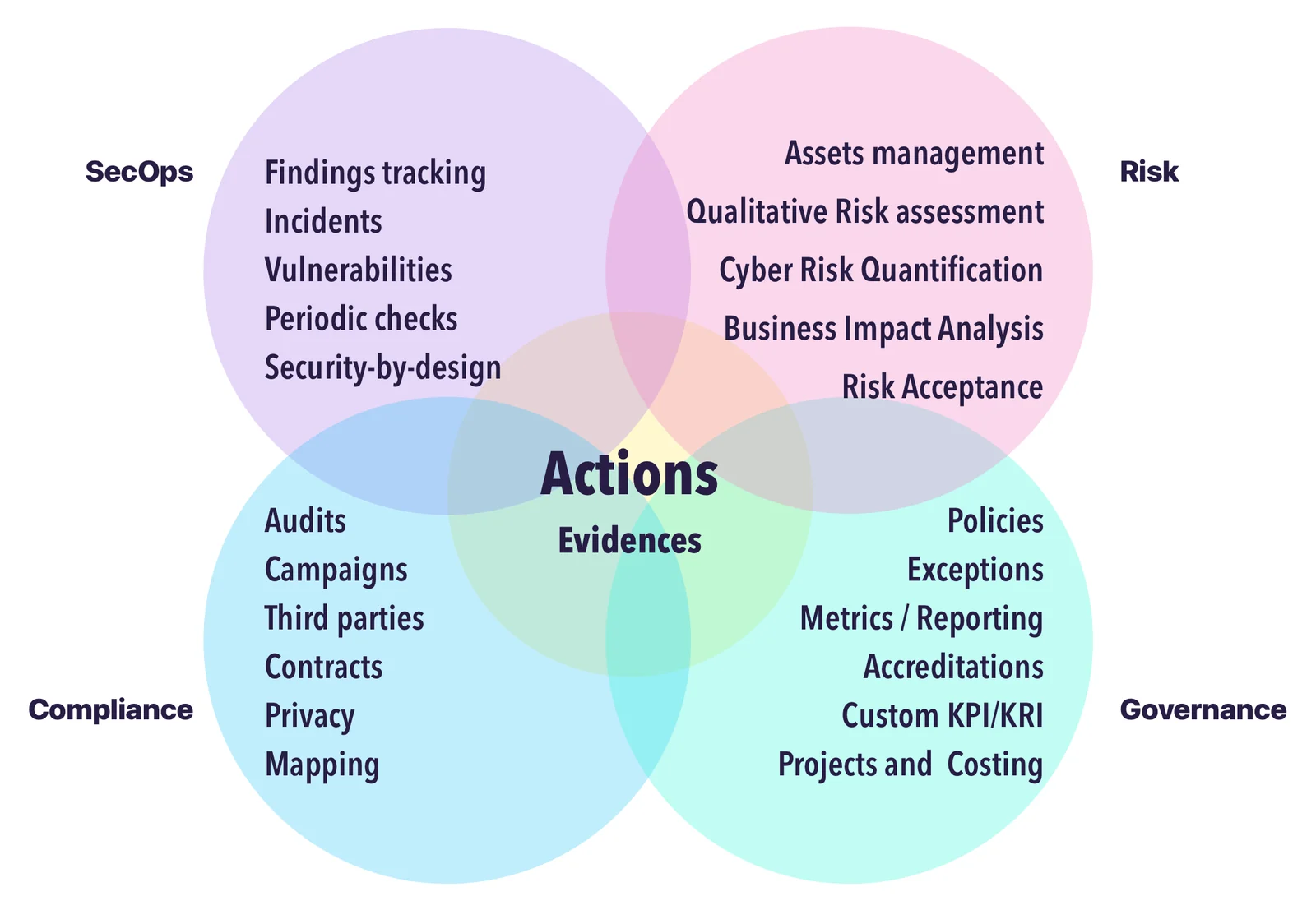
  • 여러 사이버보안 개념을 객체 간의 스마트한 연결로 이어주는 중앙 허브로 설계되었으며,
  • 다양한 배경, 방법론, 기대에 적응하는 멀티 패러다임 도구로 구축되었고,
  • 컴플라이언스를 사이버보안 통제로부터 명시적으로 분리하여 플랫폼 전반에서 재사용이 가능하게 하며,
  • 중복 작업 대신 재사용성과 상호 연결을 촉진하고,
  • UI 상호작용과 외부 자동화를 모두 지원하는 API 우선 접근 방식으로 개발되었으며,
  • 다양한 내장 표준, 보안 통제, 위협 라이브러리를 포함하고,
  • 자체 객체와 프레임워크를 사용자 정의하고 재사용할 수 있는 개방형 포맷을 제공하며,
  • 내장된 리스크 평가 및 개선 추적 워크플로를 포함하고,
  • 간단한 문법과 유연한 도구를 통해 사용자 정의 프레임워크를 지원하며,
  • 다양한 채널과 형식(UI, CLI, Kafka, 보고서 등)에 걸친 풍부한 가져오기/내보내기 기능을 제공합니다.

Single Hub

우리의 비전은 사이버보안 관리를 위한 원스톱 솔루션을 만드는 것입니다—단순화와 상호운용성을 통해 GRC를 현대화하는 것입니다.

사이버보안 및 IT 전문가들과 함께 일하는 실무자로서, 우리는 동일한 문제들에 직면해 왔습니다: 도구의 파편화, 데이터 중복, 그리고 직관적이고 통합된 솔루션의 부재. CISO Assistant는 이러한 교훈에서 탄생했으며, 우리는 실용적이고 상식적인 원칙을 중심으로 커뮤니티를 구축하고 있습니다.

우리는 사용자와 고객의 의견을 반영하여 끊임없이 발전하고 있습니다. 문어 🐙처럼 CISO Assistant는 계속해서 새로운 팔을 뻗어나가며—사이버보안 팀에 명확성, 자동화, 생산성을 제공하는 동시에 데이터 입력과 출력에 드는 수고를 줄여줍니다.

CodeFactor API Tests Functional Tests FOSSA Status Plumber Score


빠른 시작 🚀

[!TIP] 시작하는 가장 쉬운 방법은 여기에서 이용 가능한 클라우드 인스턴스 무료 체험을 이용하는 것입니다.

또는 워크스테이션이나 서버에 _Docker_와 _Docker-compose_가 설치되어 있다면:

저장소를 클론하세요:```sh git clone --single-branch -b main https://github.com/intuitem/ciso-assistant-community.git

root@kitploit:~
및 스타터 스크립트를 실행합니다```sh
./docker-compose.sh     # Linux/MacOS
./docker-compose.ps1    # Windows

셀프 호스팅을 위한 다른 설치 옵션을 찾고 있다면 config builder와 docs를 확인하세요.

[!NOTE] docker-compose 스크립트는 대부분의 표준 하드웨어 아키텍처를 지원하는 미리 빌드된 Docker 이미지를 사용합니다. Windows를 사용하는 경우 WSL2가 포함된 Docker Desktop이 설치되어 있는지 확인하고 PowerShell 스크립트를 실행하세요. 이 스크립트가 사용자를 대신하여 Docker Desktop에 피드를 제공합니다.

docker compose 파일은 설정에 맞게 추가 매개변수(예: Mailer 설정)를 전달하도록 조정할 수 있습니다.

[!WARNING] 이미지의 플랫폼이 호스트 플랫폼과 일치하지 않는다는 경고나 오류가 발생하면 세부 정보와 함께 이슈를 제기해 주시면 곧 추가하겠습니다. 또는 docker-compose-build.sh를 대신 사용하여(아래 참조) 특정 아키텍처용으로 빌드할 수도 있습니다.

[!CAUTION] main 브랜치 코드는 업스트림 병합 대상이며 개발 중에 호환성을 깨뜨리는 변경이 있을 수 있으므로 프로덕션에 직접 사용하지 마세요. 안정 버전의 경우 tags를 사용하거나 미리 빌드된 이미지를 사용하세요.


기능

Current features

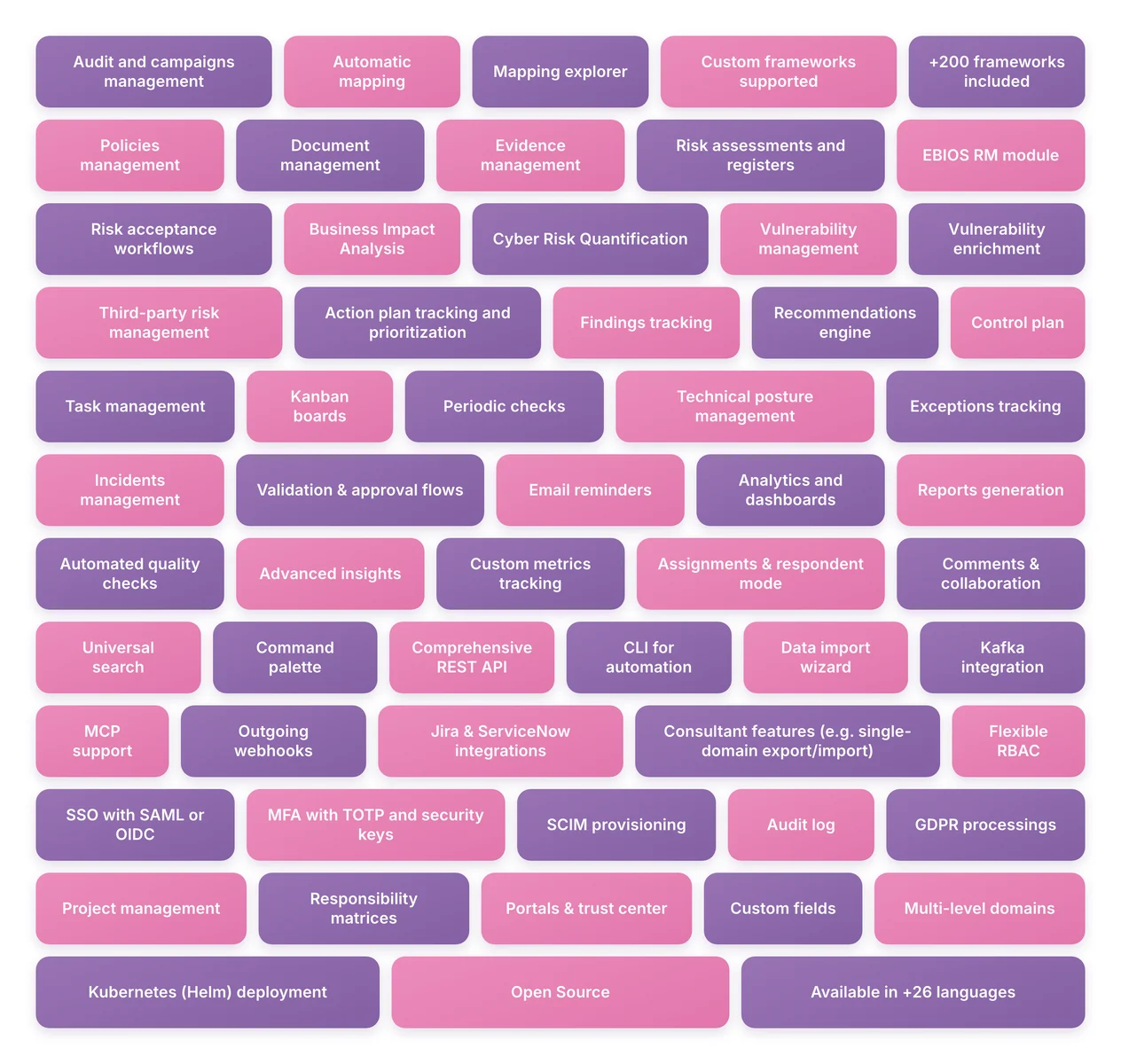
📋 전체 기능 목록 — 클릭하여 펼치기 (검색 가능, 59개 기능)

컴플라이언스 및 프레임워크

  • 감사 및 캠페인 관리
  • 자동 매핑
  • 매핑 탐색기
  • 사용자 정의 프레임워크 지원
  • 200개 이상의 프레임워크 포함
  • 정책 관리
  • 문서 관리
  • 증적 관리

리스크 관리

  • 리스크 평가 및 등록부
  • EBIOS RM 모듈
  • 리스크 수용 워크플로
  • 비즈니스 영향 분석
  • 사이버 리스크 정량화
  • 취약점 관리
  • 취약점 보강

제3자 리스크

  • 제3자 리스크 관리

운영 및 개선

  • 조치 계획 추적 및 우선순위 지정
  • 발견 사항 추적
  • 권고 엔진
  • 통제 계획
  • 작업 관리
  • 칸반 보드
  • 정기 점검
  • 기술적 태세 관리
  • 예외 추적
  • 사고 관리
  • 검증 및 승인 흐름
  • 이메일 알림

리포팅 및 분석

  • 분석 및 대시보드
  • 보고서 생성
  • 자동화된 품질 점검
  • 고급 인사이트
  • 사용자 정의 지표 추적

협업 및 생산성

  • 할당 및 응답자 모드
  • 댓글 및 협업
  • 통합 검색
  • 명령 팔레트

자동화 및 통합

  • 포괄적인 REST API
  • 자동화를 위한 CLI
  • 데이터 가져오기 마법사
  • Kafka 통합
  • MCP 지원
  • 발신 웹훅
  • Jira 및 ServiceNow 통합
  • 컨설턴트 기능 (예: 단일 도메인 내보내기/가져오기)

보안 및 접근

  • 유연한 RBAC
  • SAML 또는 OIDC를 통한 SSO
  • TOTP 및 보안 키를 통한 MFA
  • SCIM 프로비저닝
  • 감사 로그

프라이버시

  • GDPR 처리

프로그램 관리

  • 프로젝트 관리
  • 책임 매트릭스

플랫폼

  • 포털 및 신뢰 센터
  • 사용자 정의 필드
  • 다중 레벨 도메인
  • Kubernetes (Helm) 배포
  • 오픈 소스
  • 26개 이상의 언어로 제공

향후 기능은 로드맵에 나열되어 있습니다.

CISO Assistant는 사이버보안, 클라우드, 데이터/AI를 전문으로 하는 회사인 Intuitem에서 개발 및 유지 관리합니다.


핵심 개념

다음은 재사용성을 장려하는 디커플링 개념을 설명하기 위해 CISO Assistant의 구성 요소 중 일부를 발췌한 것입니다:
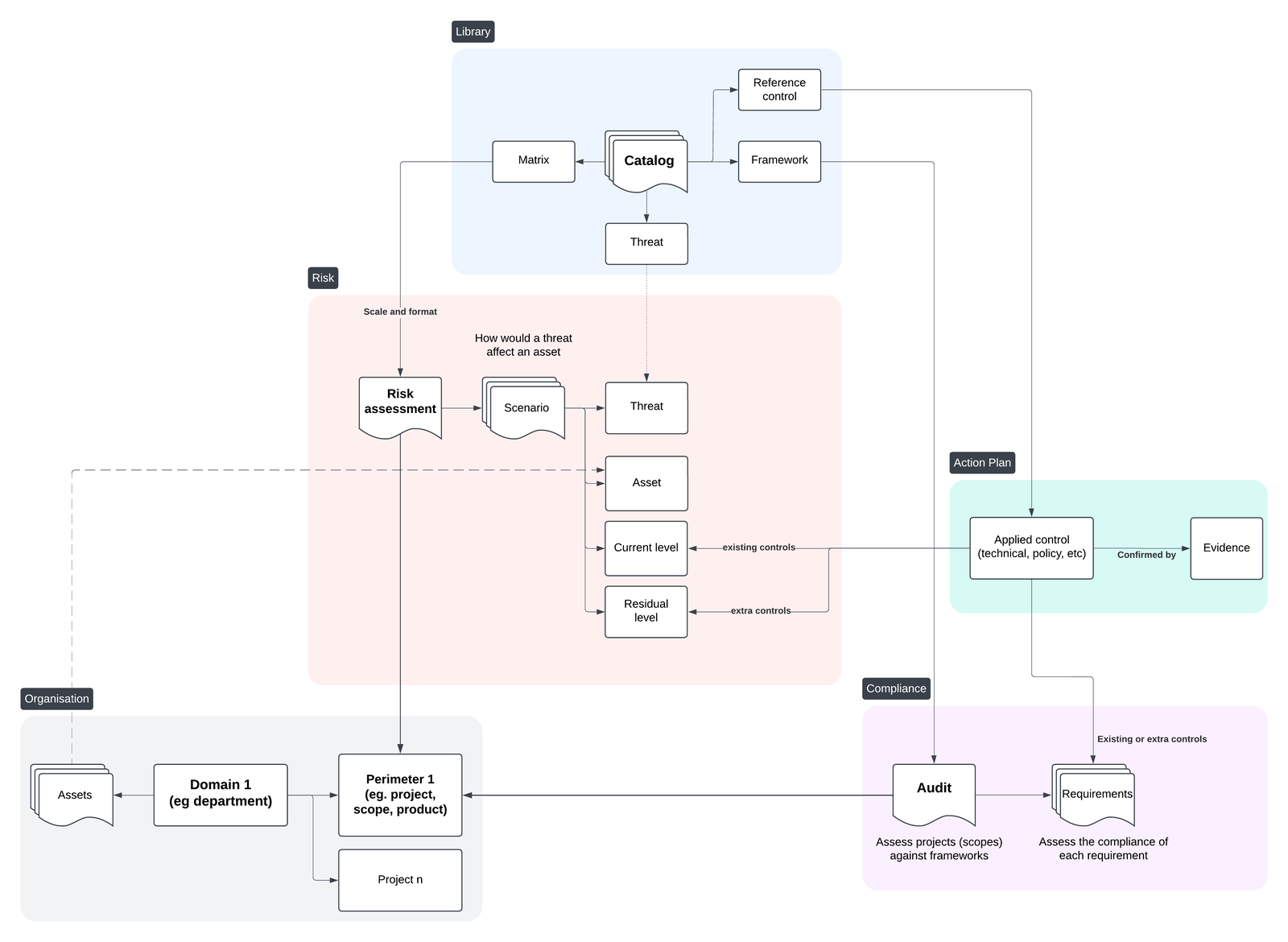
Core Objects

자세한 내용은 데이터 모델 문서를 확인하세요.


디커플링 개념

CISO Assistant의 핵심에는 디커플링 원칙이 있으며, 이는 강력한 사용 사례와 상당한 시간 절약을 가능하게 합니다:

  • 범위 또는 프레임워크 전반에 걸쳐 과거 평가를 재사용,
  • 단일 범위를 여러 프레임워크에 대해 동시에 평가,
  • CISO Assistant가 리포팅과 일관성 점검을 처리하도록 하여 개선에 집중,
  • 통제 구현과 컴플라이언스 추적을 분리.

다음은 디커플링 원칙과 그 이점을 보여주는 그림입니다:

https://github.com/user-attachments/assets/87bd4497-5cc2-4221-aeff-396f6b6ebe62
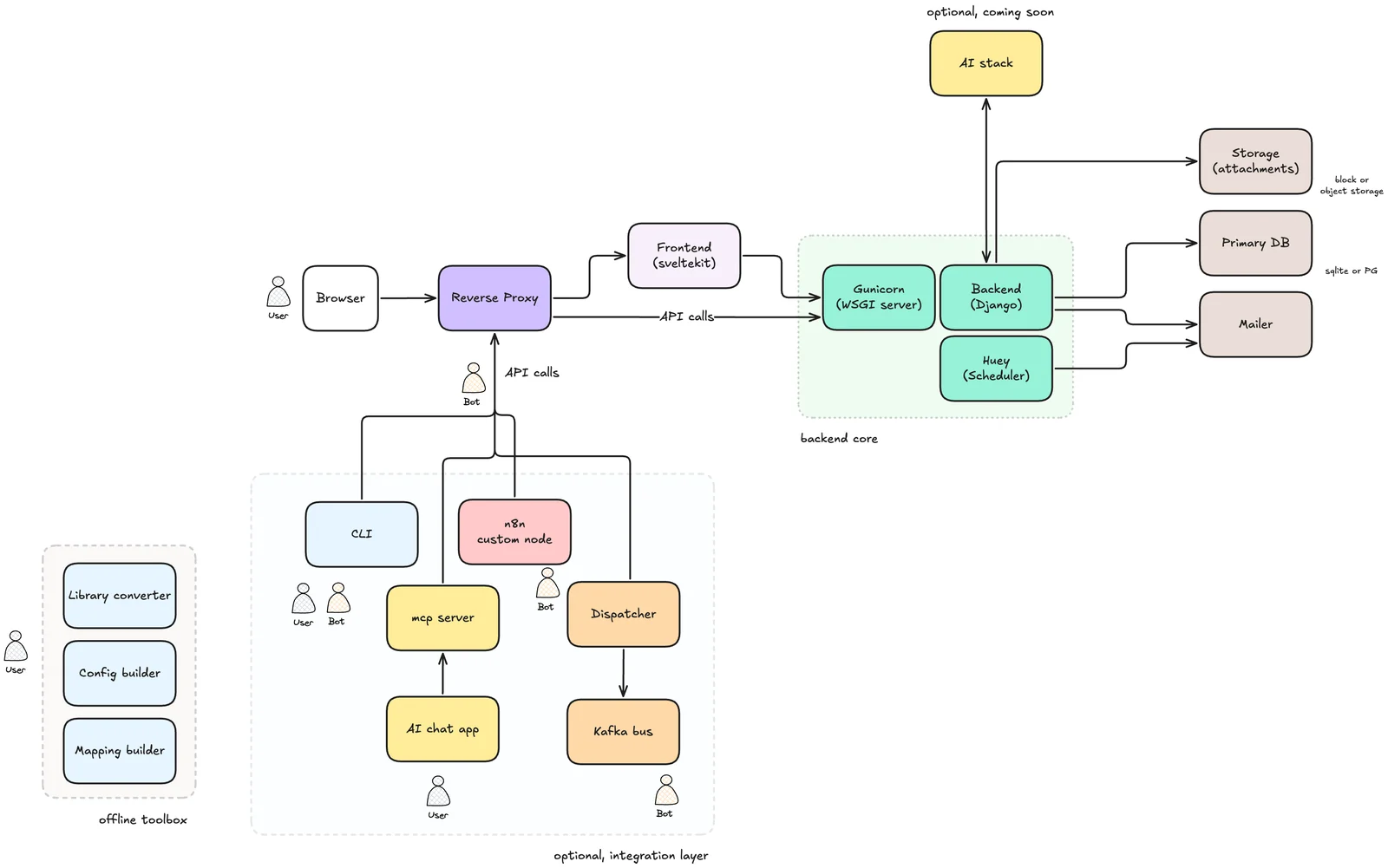
시스템 아키텍처

최종 사용자 문서

https://intuitem.gitbook.io/ciso-assistant에서 온라인 문서를 확인하세요.

로컬 AI 엔진 설정

자세한 내용은 여기에서 확인하세요: AI engine

지원되는 프레임워크 🐙

  1. ISO 27001:2013 & 27001:2022 🌐
  2. NIST Cyber Security Framework (CSF) v1.1 🇺🇸
  3. NIST Cyber Security Framework (CSF) v2.0 🇺🇸
  4. NIS2 🇪🇺
  5. SOC2 🇺🇸
  6. PCI DSS 4.0.1 💳
  7. CMMC v2 🇺🇸
  8. PSPF 🇦🇺
  9. General Data Protection Regulation (GDPR): Full text and checklist from GDPR.EU 🇪🇺
  10. Essential Eight 🇦🇺
  11. NYDFS 500 with 2023-11 amendments 🇺🇸
  12. DORA (Act, RTS, ITS and GL) 🇪🇺
  13. NIST AI Risk Management Framework 🇺🇸🤖
  14. NIST SP 800-53 rev5 🇺🇸
  15. Règles OIV - Secteur « Activités civiles de l'Etat » (2019) 🇫🇷
  16. CCB CyberFundamentals Framework 🇧🇪
  17. NIST SP-800-66 (HIPAA) 🏥
  18. HDS/HDH 🇫🇷
  19. OWASP Application Security Verification Standard (ASVS) 4 🐝🖥️
  20. RGS v2.0 🇫🇷
  21. AirCyber ✈️🌐
  22. Cyber Resilience Act (CRA) 🇪🇺
  23. TIBER-EU 🇪🇺
  24. NIST Privacy Framework 🇺🇸
  25. TISAX (VDA ISA) v5.1, v6.0 and v2027 🚘
  26. ANSSI hygiene guide 🇫🇷
  27. Essential Cybersecurity Controls (ECC) 🇸🇦
  28. CIS Controls v8* 🌐
  29. CSA CCM (Cloud Controls Matrix)* ☁️
  30. FADP (Federal Act on Data Protection) 🇨🇭
  31. NIST SP 800-171 rev2 (2021) 🇺🇸
  32. ANSSI : Recommandations de sécurité pour un système d'IA générative (v1.0) 🇫🇷🤖
  33. NIST SP 800-218: Secure Software Development Framework (SSDF) 🖥️
  34. GSA FedRAMP rev5 ☁️🇺🇸
  35. Cadre Conformité Cyber France (3CF) v1 (2021) ✈️🇫🇷
  36. ANSSI : SecNumCloud ☁️🇫🇷
  37. Cadre Conformité Cyber France (3CF) v2 (2024) ✈️🇫🇷
  38. ANSSI : outil d’autoévaluation de gestion de crise cyber 💥🇫🇷
  39. BSI: IT-Grundschutz-Kompendium 🇩🇪
  40. NIST SP 800-171 rev3 (2024) 🇺🇸
  41. ENISA: 5G Security Controls Matrix 🇪🇺
  42. OWASP Mobile Application Security Verification Standard (MASVS) 🐝📱
  43. Agile Security Framework (ASF) - baseline - by intuitem 🤗
  44. ISO 27001:2013 🌐 (For legacy and migration)
  45. EU AI Act 🇪🇺🤖
  46. FBI CJIS 🇺🇸👮
  47. Operational Technology Cybersecurity Controls (OTCC) 🇸🇦
  48. Secure Controls Framework (SCF) 🇺🇸🌐
  49. NCSC - Cyber Assessment Framework (CAF) v3.2 🇬🇧
  50. California Consumer Privacy Act (CCPA) 🇺🇸
  51. California Consumer Privacy Act Regulations 🇺🇸
  52. NCSC Cyber Essentials 🇬🇧
  53. Directive Nationale de la Sécurité des Systèmes d'Information (DNSSI) Maroc 🇲🇦

커뮤니티 기여

  1. PGSSI-S (Politique Générale de Sécurité des Systèmes d'Information de Santé) 🇫🇷
  2. ANSSI : Recommandations de configuration d'un système GNU/Linux (v2.0) 🇫🇷
  3. PSSI-MCAS (Politique de sécurité des systèmes d’information pour les ministères chargés des affaires sociales) 🇫🇷
  4. ANSSI : Recommandations pour la protection des systèmes d'information essentiels (v1.0) 🇫🇷
  5. ANSSI : Recommandations de sécurité pour l'architecture d'un système de journalisation (v2.0) 🇫🇷
  6. ANSSI : Recommandations de sécurité relatives à TLS (v1.2) 🇫🇷
  7. New Zealand Information Security Manual (NZISM) 🇳🇿
  8. Clausier de sécurité numérique du Club RSSI Santé 🇫🇷
  9. Référentiel National de Sécurité de l’Information (RNSI), MPT Algérie 🇩🇿
  10. Misure minime di sicurezza ICT per le pubbliche amministrazioni, AGID Italia 🇮🇹
  11. Framework Nazionale CyberSecurity v2, FNCS Italia 🇮🇹
  12. Framework Nazionale per la Cybersecurity e la Data Protection, ACN Italia 🇮🇹
  13. PSSIE du Bénin, ANSSI Bénin 🇧🇯
  14. IGI 1300 / II 901 - Liste des exigences pour la mise en oeuvre d'un SI classifié (ANSSI) 🇫🇷
  15. Référentiel Général de Sécurité 2.0 - Annexe B2 🇫🇷
  16. ANSSI : Recommandations sur la sécurisation des systèmes de contrôle d'accès physique et de vidéoprotection (v2.2) 🇫🇷
  17. ANSSI : Recommandations pour un usage sécurisé d’(Open)SSH (v1.3) 🇫🇷
  18. ANSSI : Recommandations de sécurité relatives à IPsec pour la protection des flux réseau (v1.1) 🇫🇷
  19. ANSSI : Recommandations relatives à l'interconnexion d'un système d'information à internet (v3.0) 🇫🇷
  20. Guides des mécanismes cryptographiques 🇫🇷
  21. Swift Customer Security Controls Framework (CSCF) v2025 🏦🌐
  22. OWASP Application Security Verification Standard (ASVS) 5 🐝🖥️
  23. NIST 800-82 (OT) - appendix 🏭🤖
  24. RBI Master Direction 2023 - india 🏦🇮🇳
  25. Loi 05-20 relative à la cybersécurité (Maroc) 🇲🇦
  26. Lithuanian NIS2 Cybersecurity Law (Kibernetinio saugumo įstatymas) 🇱🇹
  27. Prestataire d'audit de sécurité des systèmes d'information (PASSI) 🇫🇷
  28. ANS Programme CaRE - Domaine 2 (Continuité et reprise d'activité, sauvegarde) 🇫🇷🏥
  29. ANS HospiConnect HOP'EN2 (Sécurisation de l'accès au SIH) 🇫🇷🏥
  30. Loi n° 09-08 relative à la protection des personnes physiques 🇲🇦
  31. Checklist des exigences de la Loi n° 09-08 🇲🇦
  32. Référentiel des exigences de qualification des prestataires de services cloud ☁️🇲🇦
  33. AI Defense Matrix 🤖🌐
  34. Zero Trust for Operational Technology (ZT OT) 🇺🇸🏭
  35. T.C. CBDDO Bilgi ve İletişim Güvenliği Rehberi (BİGR) 🇹🇷

[!NOTE] *가 표시된 프레임워크는 라이선스가 직접 사용을 금지하므로 해당 웹사이트를 통해 최신 Excel 시트를 가져오는 추가 수동 단계가 필요합니다. Excel 시트를 라이브러리로 직접 로드할 수 있습니다.


사용된 도메인 특화 언어와 자체 정의 방법에 대해서는 library와 tools를 확인하세요.

출시 예정

  • Indonesia PDP 🇮🇩

  • OWASP SAMM

  • COBAC R-2024/01

  • ICO Data protection self-assessment 🇬🇧

  • ASD ISM 🇦🇺

  • 그리고 더 많은 것들: Discord에서 요청하세요. 오픈 표준이라면 무료로 만들어 드립니다 😉

자체 사용자 정의 라이브러리 추가

라이브러리는 프레임워크, 위협 카탈로그, 참조 통제 세트, 또는 사용자 정의 리스크 매트릭스를 나타낼 수 있습니다.

이제 라이브러리를 Excel 파일에서 직접 로드할 수 있습니다. 사전에 수동으로 YAML로 변환할 필요가 없으며, Excel 파일이 업로드될 때 변환이 내부적으로 처리됩니다.

tools 디렉터리와 그 전용 README를 살펴보세요. 여기에는 Excel 형식의 라이브러리 소스 파일의 예상 형식이 설명되어 있습니다. excel 하위 디렉터리에는 기존 라이브러리의 소스로 사용되는 예제 XLSX 파일이 포함되어 있으며, 자체 라이브러리를 만들기 위한 템플릿으로 사용할 수 있습니다.

Excel 파일에서 라이브러리를 로드하려면 Governance → Library 페이지로 이동하여 Load를 클릭하고 Excel 소스 파일을 선택하세요. 유효성 검사 또는 파싱 오류는 가져오기 과정에서 보고됩니다.

선택 사항: 라이브러리를 YAML로 변환

Excel 파일을 직접 로드할 수 있지만, 외부 Python 스크립트를 사용하여 라이브러리 소스 파일을 YAML로 변환하는 것도 여전히 가능합니다:

  • convert_library_v2.py는 간단한 Excel 파일에서 라이브러리를 생성하는 데 도움을 줍니다. 항목이 예상 형식으로 구성되면 스크립트를 실행하여 해당 YAML 파일을 생성하세요.
  • tools 디렉터리에는 특정 프레임워크(예: CIS 또는 CCM Controls)를 위한 특수 변환기도 포함되어 있습니다.

매핑 라이브러리 생성

프레임워크 간 매핑 생성을 용이하게 하기 위해 prepare_mapping_v2.py 도구를 사용할 수 있습니다. 이 도구는 YAML 형식의 기존 두 프레임워크 라이브러리를 기반으로 Excel 파일을 생성합니다. 매핑을 채운 후 결과 Excel 파일은 다음과 같이 사용할 수 있습니다:

  • 애플리케이션에 직접 로드하거나,
  • convert_library_v2.py를 사용하여 YAML로 변환.

커뮤니티

팀 및 다른 GRC 전문가들과 소통하려면 오픈 Discord 커뮤니티에 참여하세요.

클라우드 버전 테스트

시작하는 가장 빠르고 쉬운 방법은 여기에서 제공되는 클라우드 인스턴스 무료 체험을 이용하는 것입니다.

로컬에서 테스트 🚀

CISO Assistant를 로컬에서 간단하게 실행하려면 Docker compose를 사용할 수 있습니다.

  1. docker 업데이트

최신 버전의 docker(>= 27.0)가 있는지 확인하세요.

  1. 저장소 복제```sh git clone --single-branch -b main https://github.com/intuitem/ciso-assistant-community.git cd ciso-assistant-community
root@kitploit:~
2. 사전 빌드된 이미지를 위한 docker-compose 스크립트를 실행합니다:```sh
./docker-compose.sh     # Linux/MacOS
./docker-compose.ps1    # Windows

또는, 특정 아키텍처에 맞는 docker 이미지를 빌드하기 위해 이 변형을 사용할 수 있습니다:```sh ./docker-compose-build.sh # Linux/MacOS ./docker-compose-build.ps1 # Windows

root@kitploit:~
슈퍼유저의 이메일과 비밀번호를 입력하라는 메시지가 표시되면 입력하세요.

그런 다음 웹 브라우저에서 [https://localhost:8443/](https://localhost:8443/)을 통해 CISO Assistant에 접속할 수 있습니다.

다음 실행부터는 "docker compose up"을 직접 사용하세요.

## 개발용 CISO Assistant 설정

> [!WARNING]
>
> ### Windows 사용자를 위한 중요 안내
>
> **Windows**에서 개발하는 사용자를 위한 가장 잘 작동하는 해결책은 [WSL2](https://apps.microsoft.com/detail/9p9tqf7mrm4r)에 설치된 [Ubuntu](https://apps.microsoft.com/detail/9pdxgncfsczv)를 사용하는 것입니다 (Docker는 필요하지 않습니다).
>
> 이제 WSL2나 Docker 없이 Windows에서 네이티브로 CISO Assistant를 실행하고 개발하는 것도 가능하지만, 몇 가지 추가 단계가 필요합니다.
> Windows에서의 네이티브 실행은 여전히 **실험적 단계**에 있으며, 자신이 무엇을 하는지 확실하지 않거나 개발 전반에 걸쳐 안정성을 보장하고 싶다면 사용을 **권장하지 않습니다**.
> 그럼에도 불구하고, Windows 사용자의 개발 경험을 향상시키기 위한 제안을 언제든 환영합니다. 이에 관한 Issue/PR을 자유롭게 열어주세요!

### 요구 사항

- Python 3.14+
- pip 25.3+
- uv 0.9+
- node 24+
- npm 10.2+
- pnpm 10.30+
- yaml-cpp (`brew install yaml-cpp libyaml` 또는 `apt install libyaml-cpp-dev`)

<details>
<summary>[실험적] WSL2 없이 Windows에서 개발하기 위한 추가 요구 사항</summary>

WSL2 없이 프로젝트를 개발하려면 [MSYS2](https://www.msys2.org/)를 설치하고, `MSYS2 UCRT64` 바이너리를 [시스템 PATH 환경 변수](https://learn.microsoft.com/en-us/powershell/module/microsoft.powershell.core/about/about_environment_variables?view=powershell-7.6#set-environment-variables-in-the-system-control-panel)에 추가한 다음 (일반적으로 바이너리는 `C:\msys64\ucrt64\bin`에 있습니다), `MSYS2 UCRT64`를 사용하여 `pacman`을 통해 다음 종속성을 설치해야 합니다.```sh
pacman -S mingw-w64-ucrt-x86_64-file mingw-w64-ucrt-x86_64-pango

설치 후 다음 2개의 시스템 환경 변수도 추가해야 합니다:```conf MAGIC=Full path to the magic.mgc file (usually C:\msys64\ucrt64\share\misc\magic.mgc) WEASYPRINT_DLL_DIRECTORIES=Same path as your MSYS2 UCRT64 binaries

root@kitploit:~
Windows의 기본 인코딩은 `UTF-8`이 아니라 `cp1252`이기 때문에, 이모지와 같은 `UTF-8` 문자를 출력하는 특정 Python 스크립트는 경우에 따라(예: 라이브러리 가져오기) 백엔드 충돌이나 오작동을 일으킬 수 있습니다.
이 프로젝트에서 이 문제를 방지하려면 다음 2개의 사용자 환경 변수를 추가하여 `UTF-8` 인코딩을 강제하십시오:```conf
PYTHONUTF8=1
PYTHONIOENCODING=utf-8:replace

[!NOTE]

알려진 문제

  • Windows의 libmagic 라이브러리(MIME 감지)는 Excel 파일(.xlsx)의 처음 2048비트를 읽어 인식하는 데 어려움을 겪으며, Excel 라이브러리를 가져올 때 대부분 application/octet-stream을 반환합니다(백엔드에서 경고 메시지 [warning ] Invalid MIME type을 표시함). 이는 backend/library/views.py:StoredLibraryViewSet.upload_library의 대체 메서드 덕분에 Excel 파일 가져오기를 방해하지는 않습니다.

백엔드 실행

  1. 저장소를 복제합니다.```sh git clone [email protected]:intuitem/ciso-assistant-community.git cd ciso-assistant-community
root@kitploit:~
2. 상위 폴더(예: ../myvars)에 파일을 생성하고, 다음 코드를 복사 및 수정하여 `"<XXX>"`를 개인 값으로 바꿔 환경 변수를 저장하세요. 이 파일을 git 저장소에 커밋하지 않도록 주의하세요.

**필수 변수**

백엔드의 모든 변수에는 편리한 기본값이 있습니다.

**권장 변수**```sh
export DJANGO_DEBUG=True

# Default url is set to http://localhost:5173 but you can change it, e.g. to use https with a caddy proxy
export CISO_ASSISTANT_URL=https://localhost:8443

# Setup a development mailer with Mailpit for example
export EMAIL_HOST_USER=''
export EMAIL_HOST_PASSWORD=''
export [email protected]
export EMAIL_HOST=localhost
export EMAIL_PORT=1025
export EMAIL_USE_TLS=True  # true for STARTTLS
export EMAIL_USE_SSL=False # true for SMTPS

기타 변수```sh

CISO Assistant will use SQLite by default, but you can setup PostgreSQL by declaring these variables

export POSTGRES_NAME=ciso-assistant export POSTGRES_USER=ciso-assistantuser export POSTGRES_PASSWORD= export POSTGRES_PASSWORD_FILE= # alternative way to specify password export DB_HOST=localhost export DB_PORT=5432 # optional, default value is 5432

CISO Assistant will use filesystem storage backend by default.

Only one cloud storage backend can be active at a time (USE_S3 and USE_AZURE are mutually exclusive).

--- AWS S3 ---

You can use a S3 Bucket by declaring these variables

The S3 bucket must be created before starting CISO Assistant

export USE_S3=True export AWS_STORAGE_BUCKET_NAME= export AWS_S3_REGION_NAME= # optional, e.g., us-east-1

S3 Authentication Option 1: Access Key (for standalone deployments or S3-compatible services)

export AWS_ACCESS_KEY_ID= export AWS_SECRET_ACCESS_KEY= export AWS_S3_ENDPOINT_URL= # required for S3-compatible services (e.g., MinIO)

S3 Authentication Option 2: IRSA (for Kubernetes/EKS deployments)

When running on EKS with IAM Roles for Service Accounts (IRSA) enabled,

these environment variables are automatically injected by the pod's service account.

No explicit configuration is needed - just ensure USE_S3=True and AWS_STORAGE_BUCKET_NAME are set.

export AWS_WEB_IDENTITY_TOKEN_FILE=/var/run/secrets/eks.amazonaws.com/serviceaccount/token

export AWS_ROLE_ARN=arn:aws:iam::123456789012:role/ciso-assistant-s3-role

--- Azure Blob Storage ---

You can use an Azure Blob Storage container instead of S3.

The container must be created before starting CISO Assistant.

export USE_AZURE=True

export AZURE_CONTAINER= # default: ciso-assistant-container

export AZURE_CUSTOM_DOMAIN= # optional, e.g., cdn.example.com

export AZURE_LOCATION= # optional, path prefix within the container (e.g., "media")

Azure Authentication Option 1: Account Key

export AZURE_ACCOUNT_NAME=

export AZURE_ACCOUNT_KEY=

Azure Authentication Option 2: Connection String

export AZURE_CONNECTION_STRING=

Azure Authentication Option 3: Managed Identity (for Azure-hosted deployments)

Requires AZURE_ACCOUNT_NAME. The pod/VM's assigned managed identity is used automatically.

export AZURE_ACCOUNT_NAME=

export AZURE_USE_MANAGED_IDENTITY=True

Add a second backup mailer (will be deprecated, not recommended anymore)

export EMAIL_HOST_RESCUE= export EMAIL_PORT_RESCUE=587 export EMAIL_HOST_USER_RESCUE= export EMAIL_HOST_PASSWORD_RESCUE= export EMAIL_USE_TLS_RESCUE=True export EMAIL_USE_SSL_RESCUE=False

You can define the email of the first superuser, useful for automation. A mail is sent to the superuser for password initialization

export CISO_SUPERUSER_EMAIL=

By default, Django secret key is generated randomly at each start of CISO Assistant. This is convenient for quick test,

but not recommended for production, as it can break the sessions (see

this topic for more information).

To set a fixed secret key, use the environment variable DJANGO_SECRET_KEY.

export DJANGO_SECRET_KEY=...

Sandbox mode for running untrusted code (e.g. library excel files)

WARNING: Sandboxing must be enabled in production environments.

export ENABLE_SANDBOX=True # optional, default value is True in production enfironments (DJANGO_DEBUG=False) and False in development environments (DJANGO_DEBUG=True).

Logging configuration

export LOG_LEVEL=INFO # optional, default value is INFO. Available options: DEBUG, INFO, WARNING, ERROR, CRITICAL export LOG_FORMAT=plain # optional, default value is plain. Available options: json, plain

LOG_FORMAT=json emits one JSON object per line (timestamp, level, logger, event, ...),

which SIEMs (Splunk, Sentinel, ADX) ingest natively without custom parsing.

Set the same LOG_FORMAT=json on the frontend container to get structured JSON

from the SvelteKit SSR process (auth events, errors) on the same schema; the

backend and huey worker share this setting automatically.

Authentication options

export AUTH_TOKEN_TTL=3600 # optional, default value is 3600 seconds (60 minutes). It defines the time to live of the authentication token export AUTH_TOKEN_AUTO_REFRESH=True # optional, default value is True. It defines if the token TTL should be refreshed automatically after each request authenticated with the token export AUTH_TOKEN_AUTO_REFRESH_TTL=36000 # optional, default value is 36000 seconds (10 hours). It defines the time to live of the authentication token after auto refresh. You can disable it by setting it to 0.

root@kitploit:~
<details>
<summary>[실험적] WSL2 없이 Windows에서 개발하기 위한 기타 변수</summary>

PostgreSQL 사용자 정의 변수만 구성할 수 있습니다.

자세한 내용은 [`tools/.windows/README.md`](https://github.com/intuitem/ciso-assistant-community/blob/main/tools/.windows/README.md)에 문서화된 도우미 스크립트를 사용하십시오.

</details>


3. uv 설치

지침은 uv 웹사이트를 방문하십시오: <https://docs.astral.sh/uv/getting-started/installation/>

4. backend로 이동하여 필요한 종속성을 설치합니다.```sh
cd backend
uv sync
  1. 권장 사항: pre-commit 훅을 설치합니다.```sh pre-commit install
root@kitploit:~
6. Postgres를 설정하려면:

- 다음 명령 중 하나를 실행하여 Postgres에 접속합니다:
  - `psql as superadmin`
  - `sudo su postgres`
  - `psql`
- "ciso-assistant" 데이터베이스를 생성합니다
  - `create database ciso-assistant;`
- "ciso-assistantuser" 사용자를 생성하고 접근 권한을 부여합니다
  - `create user ciso-assistantuser with password '<POSTGRES_PASSWORD>';`
  - `grant all privileges on database ciso-assistant to ciso-assistantuser;`

<details>
<summary>[실험적] Windows에서 PostgreSQL 설정</summary>

자세한 내용은 [`tools/.windows/README.md`](https://github.com/intuitem/ciso-assistant-community/blob/main/tools/.windows/README.md)의 문서를 참조하세요.

</details>

7. s3 버킷을 설정하려면:

- s3 제공업체를 선택하거나 다음 명령으로 miniO를 사용하여 s3 기능을 테스트해 보세요:
  - `docker run -p 9000:9000 -p 9001:9001 -e "MINIO_ROOT_USER=XXX" -e "MINIO_ROOT_PASSWORD=XXX" quay.io/minio/minio server /data --console-address ":9001"`
- 이제 <http://localhost:9001>에서 버킷을 확인할 수 있습니다
  - docker run 환경 변수에 입력한 자격 증명으로 로그인하세요
- 백엔드 디렉터리에서 S3에 대해 요청된 모든 환경 변수를 내보냅니다
  - 권장 변수에서 위의 목록을 확인할 수 있습니다

8. 마이그레이션을 적용합니다.```sh
uv run python manage.py migrate
[실험적] WSL2 없이 Windows에서 마이그레이션 적용

자세한 내용은 tools/.windows/README.md의 문서를 참조하세요.

  1. CISO Assistant 관리자가 될 Django 슈퍼유저를 생성합니다.

메일러와 CISO_SUPERUSER_EMAIL 변수를 설정한 경우, 첫 시작 시 자동으로 생성되므로 createsuperuser로 Django 슈퍼유저를 생성할 필요가 없습니다. 비밀번호를 설정할 수 있는 링크가 포함된 이메일을 받게 됩니다.```sh uv run python manage.py createsuperuser

root@kitploit:~
<details>
<summary>[실험적] WSL2 없이 Windows에서 Django 슈퍼유저 생성</summary>

자세한 내용은 [`tools/.windows/README.md`](https://github.com/intuitem/ciso-assistant-community/blob/main/tools/.windows/README.md)의 문서를 참조하세요.

</details>

10. 개발 서버를 실행합니다.```sh
uv run python manage.py runserver
[EXPERIMENTAL] Windows에서 개발 서버를 네이티브로 실행하는 방법은?

Windows에서 Django의 개발 서버를 네이티브로 실행할 때, SvelteKit SSR이 서버의 작은 기본 listen backlog를 초과할 만큼 충분히 많은 동시 API 연결을 열 수 있습니다. 이로 인해 프론트엔드에서 간헐적으로 ECONNREFUSED / TypeError: fetch failed 오류가 발생할 수 있습니다.

네이티브 Windows 개발 설정을 위해서는 tools/.windows/README.md에 문서화된 헬퍼 스크립트를 사용하세요.

  1. Huey (작업 실행기)의 경우
  • 테스트용 메일러를 준비합니다.
  • 별도의 셸에서 python manage.py run_huey -w 2 -k process 또는 이에 상응하는 명령을 실행합니다.
  • 더 쉬운 디버깅을 위해 콘솔에서 메일을 확인하려면 MAIL_DEBUG를 사용할 수 있습니다

프론트엔드 실행하기

  1. frontend 디렉터리로 cd 합니다```shell cd frontend
root@kitploit:~
2. 종속성 설치```bash
npm install -g pnpm
pnpm install
  1. 개발 서버를 시작합니다 (django 앱이 실행 중인지 확인하세요)```bash pnpm run dev
root@kitploit:~
4. 프론트엔드에 <http://localhost:5173>로 접속합니다.

> [!NOTE]
> 이 설정에서는 Safari가 제대로 작동하지 않습니다. 보안 쿠키를 위해 https가 필요하기 때문입니다. 가장 간단한 해결책은 Chrome이나 Firefox를 사용하는 것입니다. 대안으로 caddy 프록시를 사용할 수 있습니다. 이에 대한 자세한 내용은 frontend 디렉터리의 [readme 파일](https://github.com/intuitem/ciso-assistant-community/blob/main/frontend/README.md)을 참조하세요.

5. 환경 변수

프론트엔드의 모든 변수에는 편리한 기본값이 있습니다.

프론트엔드를 다른 호스트로 옮기는 경우 다음 변수를 설정해야 합니다: `PUBLIC_BACKEND_API_URL`. 기본값은 <http://localhost:8000/api>입니다.

`PUBLIC_BACKEND_API_EXPOSED_URL`은 SSO가 제대로 작동하기 위해 필요합니다. 이는 브라우저에서 보이는 API의 URL을 가리킵니다. 이 값은 백엔드의 `CISO_ASSISTANT_URL`과 "/api"를 연결한 값과 같아야 합니다.

"pnpm run dev" 대신 "node server"를 실행하는 경우, ORIGIN 변수를 백엔드의 `CISO_ASSISTANT_URL`과 동일한 값(예: <http://localhost:3000>)으로 설정해야 합니다.

### 마이그레이션 관리

마이그레이션은 버전 관리로 추적됩니다, <https://docs.djangoproject.com/en/4.2/topics/migrations/#version-control>

제품의 첫 번째 버전에서는 깨끗한 마이그레이션에서 시작하는 것이 권장됩니다.

참고: 기존 마이그레이션을 정리하려면 다음을 입력하세요:```sh
find . -path "*/migrations/*.py" -not -name "__init__.py" -delete
find . -path "*/migrations/*.pyc"  -delete

변경(또는 정리) 후에는 마이그레이션 파일을 다시 생성해야 합니다:```sh uv run python manage.py makemigrations uv run python manage.py migrate

root@kitploit:~
이러한 마이그레이션 파일은 버전 관리로 추적해야 합니다.

### 테스트 스위트

백엔드에서 API 테스트를 실행하려면 백엔드 폴더의 셸에서 `uv run pytest`를 입력하기만 하면 됩니다.

프런트엔드에서 기능 테스트를 실행하려면 다음 작업을 수행하세요:

- 프런트엔드 폴더에서 다음 명령을 실행하세요:```shell
tests/e2e-tests.sh

테스트 하네스의 목표는 회귀를 방지하는 것, 즉 백엔드와 프런트엔드 모두에서 모든 테스트가 성공적으로 통과되도록 하는 것입니다.

API 및 Swagger

  • 대화형 API 문서(Swagger UI)는 개발 모드에서만 사용할 수 있습니다. 이를 활성화하려면 백엔드를 시작하기 전에 export DJANGO_DEBUG=True를 설정하세요.
  • 서버가 실행되면 문서는 <backend_endpoint>/api/schema/swagger/에서 접근할 수 있습니다. 예: http://127.0.0.1:8000/api/schema/swagger/.

Swagger 또는 직접 HTTP 호출을 통해 API와 상호작용하려면:

  1. 애플리케이션의 사용자 프로필에서 Personal Access Token(PAT)을 생성합니다.
  2. 이후 요청의 헤더에 이 토큰을 Authorization: Token <token> 형식으로 포함합니다.

⚠️ 참고: Bearer가 아니라 Token을 사용하세요.

PAT는 MFA를 준수합니다. PAT는 인증된 세션에서 발급되므로, MFA로 보호되는 계정은 계속 보호됩니다. 대화형/브라우저 흐름의 경우 인증은 표준 로그인(활성화된 경우 MFA를 강제함)을 통해 이루어집니다.

프로덕션용 CISO Assistant 설정

docker-compose.yml은 프런트엔드 앞에 Caddy 프록시를 두는 테스트에 적합한 구성을 보여줍니다. 이는 전체 API를 노출하므로 아직 프로덕션에는 권장되지 않습니다.

프로덕션의 경우 구성 빌더를 사용하여 더 강화되고 맞춤화된 docker-compose.yml 파일을 생성할 수 있지만, 여전히 여러 강화 단계가 필요합니다.

프로덕션에는 다음 권장 사항이 적용됩니다:

  • 보안상의 이유로 DJANGO_DEBUG=False를 설정하세요.
  • 모든 이미지(백엔드, 프런트엔드, 리버스 프록시)의 버전을 최신 프로덕션 버전으로 고정하세요.
  • 관련 포트만 노출하도록 네트워크 구성을 강화하고, 전체 API 접근을 신뢰할 수 있는 IP 범위로 제한하도록 URL을 필터링하세요. 공개 API 접근이 제한되고 SSO가 활성화된 경우, 다음 엔드포인트는 브라우저 또는 ID 공급자가 접근할 수 있도록 유지하세요:
    • /api/iam/sso/redirect/
    • /api/accounts/saml/0/acs/
    • /api/accounts/saml/0/acs/finish/
    • /api/accounts/oidc/openid_connect/login/callback/
    • /api/accounts/saml/0/sls/ (SAML 단일 로그아웃이 활성화된 경우에만)
  • 아래 설명된 대로 비루트 배포를 사용하세요.
  • 리버스 프록시에 유효한 인증서를 사용하세요.
  • 리버스 프록시가 백엔드 및 프런트엔드와 동일한 호스트에서 실행되지 않는 경우, 노드 간에 wireguard와 같은 VPN을 사용하세요.
  • 데이터베이스에 암호화된 볼륨을 사용하고, 암호화 키를 신중하게 관리하세요.
  • 시크릿을 docker-compose.yml 파일에 직접 넣지 말고 환경 변수로 관리하세요.

[!NOTE] 프런트엔드는 호스트를 자동으로 추론할 수 없으므로, ORIGIN 변수를 설정하거나 HOST_HEADER 및 PROTOCOL_HEADER 변수를 설정해야 합니다. 이 까다로운 문제에 대해서는 sveltekit 문서를 참조하세요. 이 접근 방식은 "pnpm run dev"에서는 작동하지 않는다는 점에 유의하세요. 프로덕션에서는 걱정할 필요가 없습니다.

[!NOTE] Caddy는 SNI 헤더를 수신해야 합니다. 따라서 공개 URL(CISO_ASSISTANT_URL에 선언된 URL)에는 IP 주소가 아닌 FQDN을 사용해야 합니다. 호스트가 IP 주소인 경우 브라우저에서 SNI를 전송하지 않기 때문입니다. 또 다른 까다로운 문제입니다!

[!NOTE] 이제 docker-compose 템플릿 파일은 백엔드, huey 및 프런트엔드를 비루트 모드로 실행합니다. 이전 docker-compose.yml 파일을 사용하는 경우 업데이트하는 것이 좋습니다. 컨테이너는 루트 및 비루트 모드 모두와 호환됩니다.

비루트 docker 컨테이너

docker-compose.yml은 이제 이미지에서 사용할 수 있는 비루트 사용자 1001:1001을 사용합니다. 이전 배포에서는 여전히 지원되는 루트 사용자를 사용합니다. 비루트로 전환하려면 호스트에서 다음 단계를 수행하세요:

  • docker compose down
  • docker-compose.yml 파일 업데이트
  • sudo chown -R 1001:1001 db
  • docker compose up -d

지원 언어 🌐

Translation progress

기준은 en.json이며, 커버리지 = 각 로케일 파일에 존재하는 기준 키의 비율입니다. 매일 자동 갱신됩니다. 전체 내역은 대시보드에서 확인하세요.

기여자 🤝

사용된 기술 💜

  • Django - Python 웹 개발 프레임워크
  • SvelteKit - 프런트엔드 프레임워크
  • eCharts - 차트 라이브러리
  • unovis - 보완 차트 라이브러리
  • Gunicorn - UNIX용 Python WSGI HTTP 서버
  • Caddy - 가장 멋진 리버스 프록시
  • Gitbook - 문서 플랫폼
  • PostgreSQL - 오픈 소스 RDBMS
  • SQLite - 오픈 소스 RDBMS
  • Docker - 컨테이너 엔진
  • inlang - 소프트웨어를 글로벌화하는 생태계
  • Huey - 경량 작업 큐

보안

보안 모범 사례를 준수하기 위해 각별히 주의했습니다. 문제가 있으면 [email protected]으로 보고해 주세요.

라이선스

이 저장소에는 AGPL v3에 따라 릴리스된 CISO Assistant의 오픈 소스 에디션(Community Edition) 소스 코드와 intuitem Commercial Software License에 따라 릴리스된 CISO Assistant의 상용 에디션(Pro 및 Enterprise Editions)이 모두 포함되어 있습니다. 이 모노 저장소 접근 방식은 단순성을 위해 채택되었습니다.

최상위 "enterprise" 디렉터리 내의 모든 파일은 intuitem Commercial Software License에 따라 릴리스됩니다.

최상위 "enterprise" 디렉터리 외부의 모든 파일은 AGPLv3에 따라 릴리스됩니다.

자세한 내용은 LICENSE.md를 참조하세요. 상용 에디션에 대한 자세한 내용은 [email protected]으로 문의하실 수 있습니다.

별도로 명시되지 않는 한, 모든 파일은 © intuitem입니다.

활동

Alt

도구 다운로드
  • Part-IS (Consolidated 16-10-2025) ✈️🇪🇺
  • ENS Esquema Nacional de seguridad 🇪🇸
  • Korea ISA ISMS-P 🇰🇷
  • Swiss ICT minimum standard 🇨🇭
  • Adobe Common Controls Framework (CCF) v5 🌐
  • BSI Cloud Computing Compliance Criteria Catalogue (C5) 🇩🇪
  • Référentiel d’Audit de la Sécurité des Systèmes d’Information, ANCS Tunisie 🇹🇳
  • ECB Cyber resilience oversight expectations for financial market infrastructures 🇪🇺
  • Mindeststandard-des-BSI-zur-Nutzung-externer-Cloud-Dienste (Version 2.1) 🇩🇪
  • Formulaire d'évaluation de la maturité - niveau fondamental (DGA) 🇫🇷
  • NIS2 technical and methodological requirements 2024/2690 🇪🇺
  • Saudi Arabian Monetary Authority (SAMA) Cybersecurity Framework 🇸🇦
  • Guide de sécurité des données (CNIL) 🇫🇷
  • International Traffic in Arms Regulations (ITAR) 🇺🇸
  • Federal Trade Commission (FTC) Standards for Safeguarding Customer Information 🇺🇸
  • OWASP's checklist for LLM governance and security 🌐
  • ANSSI : Recommandations pour les architectures des systèmes d’information sensibles ou à diffusion restreinte (v1.2) 🇫🇷
  • CIS Benchmarks — Kubernetes (v1.10, v2.0.1), AWS, Azure, GCP, Microsoft 365, Google Workspace, GitHub, GitLab, Debian 12/13, Ubuntu 24.04 LTS, Windows 11 🌐
  • De tekniske minimumskrav for statslige myndigheder 🇩🇰
  • Google SAIF framework 🤖
  • ANSSI : Recommandations relatives à l'administration sécurisée des SI (v3.0) 🇫🇷
  • Prudential Standard CPS 230 - Operational Risk Management (APRA) 🇦🇺
  • Prudential Standard CPS 234 - Information Security (APRA) 🇦🇺
  • Vehicle Cyber Security Audit (VCSA) v1.1 🚘
  • Cisco Cloud Controls Framework (CCF) v3.0 ☁️🌐
  • FINMA - Circular 2023/01 - Operational risks and resilience - Banks 🇨🇭
  • Post-Quantum Cryptography (PQC) Migration Roadmap (May 2025) 🔐
  • Cloud Sovereignty Framework - 1.2.1 - Oct 2025 🇪🇺
  • ISO 22301:2019 outline - Business continuity management systems 🌐
  • CCB CyberFundamentals Framework 2025 🇧🇪
  • Prestataires de détection des incidents de sécurité (PDIS) - Référentiel d’exigences 🇫🇷
  • Vendor Due Diligence - simple baseline - intuitem 🌐
  • ANSSI : Points de contrôle Active Directory (AD) (Avril 2026) 🇫🇷
  • ISO 42001:2023 outline - Artificial Intelligence Management System, including Annex A 🤖🌐
  • India's Digital Personal Data Protection Act (DPDPA) - 2023 🇮🇳
  • E-ITS (Estonia's national cyber security standard) - 2024 🇪🇪
  • Microsoft cloud security benchmark v1 - ☁️🌐
  • Baseline informatiebeveiliging Overheid 2 (BIO2) 🇳🇱
  • ANSSI : Questionnaire MonAideCyber 🇫🇷
  • ITSP.10.171 - Protecting specified information in non-Government of Canada systems and organizations 🇨🇦
  • CISA Vendor Supply Chain Risk Management (SCRM) Template 🇺🇸
  • European Sustainability Reporting Standards (ESRS) 🇪🇺
  • ITIL 4 Management Practices 🌐
  • NOREA - DORA in Control Framework v3.0 🇪🇺
  • NIS-1 transposition FR 🇫🇷
  • PSSI État 🇫🇷
  • Checklist de dossier d'homologation 🇫🇷
  • Cahier des charges Label EBIOS RM v3.1 🇫🇷
  • SecNumCloud v3.2 Annexe 2 : Recommandations aux commanditaires ☁️🇫🇷
  • CCB CyberFundamentals Small - Self assessment 🇧🇪
  • Mitre ATT&CK v19.1 - Threats and Mitigations catalog 🌐
  • Mitre D3FEND - Reference controls 🌐
  • OWASP Top 10 Web - Threat catalog 🐝🌐
  • OWASP MAS Threat Modelling Guide - Threat catalog 🐝📱
  • CISA Cybersecurity Performance Goals (CPG) v2.0 🇺🇸
  • ANSSI : Référentiel Cyber France pour la réglementation NIS2 (ReCyF) 🇫🇷
  • Cadre Conformité Cyber France (3CF) v3.1 (2026) ✈️🇫🇷
  • Règles OIV - Secteur « Transport aérien » (2016) ✈️🇫🇷
  • IEC 62443 series — parts 2-1, 2-4, 3-2, 3-3, 4-1, 4-2 🏭🌐
  • CER Directive (Critical Entities Resilience) 🇪🇺
  • EUDI ARF — EU Digital Identity Wallet High-Level Requirements (Annex 2.02) 🇪🇺
  • UK Defence Standard 05-138 Issue 4 🇬🇧
  • Référentiel HAS - Certification des établissements de santé pour la qualité des soins 🇫🇷🏥
  • Personal Data Protection Law (PDPL) 🇸🇦
  • NCSC - Cyber Assessment Framework (CAF) v4.0 🇬🇧
  • Algemene Beveiligingseisen voor Rijksoverheidsopdrachten (ABRO) 2026 🇳🇱
  • Algemene Beveiligingseisen voor Defensieopdrachten (ABDO) 2019 🇳🇱
  • ANSSI : Cybersécurité des systèmes industriels - Mesures détaillées 🇫🇷🏭
  • Cbw (NIS2) Control Framework v1.2 🇳🇱
  • ENISA SME Cyber Resilience Maturity Assessment (CRA) 🇪🇺
  • ISO 27701:2025 outline - Privacy Information Management System, including Annex A 🌐
  • Plumber CI/CD Security Checks 🖥️
  • UNESCO AI Maturity Framework 🤖🌐
  • NCA NCNICC-1:2025 🇸🇦
  • NCA ECC-2:2024 🇸🇦
  • NCA CCC-1:2020 🇸🇦