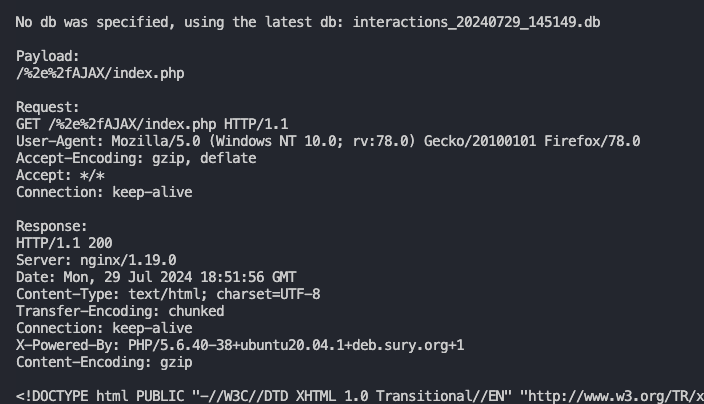
 intrudir/bypassfuzzer
401/403/404 페이지를 퍼징하여 우회(Bypass)를 찾기

The original 403fuzzer.py :)
==Note: This has been deprecated for my new, shiny burp extension that is 1000000% better. Thank you for using my tools!==
You can find the extension here: https://github.com/intrudir/BypassFuzzer-Burp
Fuzz 401/403ing endpoints for bypasses
헤더, 경로 정규화, HTTP 동사 등을 통해 다양한 검사를 수행하여 ACL 또는 URL 검증을 우회하려고 시도합니다.
If this tool helped get you a bounty or you'd just like to buy me a beer:

Follow me on twitter! @intrudir
# clone the repo (or download it as a zip!) then navigate to the directory
git clone https://github.com/NetSPI/BypassFuzzer.git
cd BypassFuzzer

# it is best practice to create a new virtual env.
python3 -m venv .venv

# activate the venv
source .venv/bin/activate

# install dependencies
python3 -m pip install -r requirements.txt
# clone the repo (or download it as a zip!) then navigate to the directory
# if you download the .zip, remember to extract it first
cd BypassFuzzer-main\

# it is best practice to create a new virtual env.
py -m venv .venv

# activate the venv
.venv\Scripts\activate

# install dependencies
# you need to use 'python' cmd in order to use the interpreter from this environment.
python -m pip install -r .\requirements.txt
For Windows, in order to use the script, make sure you use the python command. This ensures you are using the virtual environment.
See the help menu
bypassfuzzer.py -h
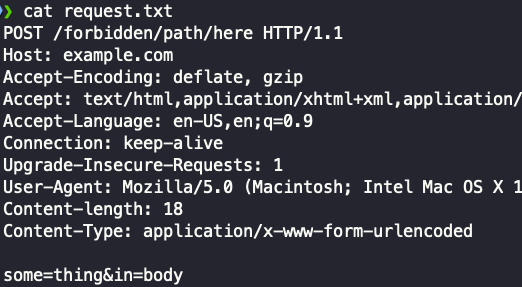
Simply paste the request into a file and run the script!
cookies & headers from the request.python3 bypassfuzzer.py -r request.txt
Specify a URL
python3 bypassfuzzer.py -u http://example.com/test1/test2/test3/forbidden.html
Specify cookies to use in requests:
some examples:
--cookies "cookie1=blah"
-c "cookie1=blah; cookie2=blah"
Specify a method/verb and body data to send
bypassfuzzer.py -u https://example.com/forbidden -m POST -d "param1=blah¶m2=blah2"
bypassfuzzer.py -u https://example.com/forbidden -m PUT -d "param1=blah¶m2=blah2"
Specify custom headers to use with every request
Maybe you need to add some kind of auth header like Authorization: bearer <token>
Specify -H "header: value" for each additional header you'd like to add:
bypassfuzzer.py -u https://example.com/forbidden -H "Some-Header: blah" -H "Authorization: Bearer 1234567"
Based on response code and length. If it sees a response 8 times or more it will automatically mute it.
Repeats are changeable in the code until I add an option to specify it in flag
NOTE: Can't be used simultaneously with -hc or -hl (yet)
# toggle smart filter on
bypassfuzzer.py -u https://example.com/forbidden --smart
Useful if you wanna proxy through Burp
bypassfuzzer.py -u https://example.com/forbidden --proxy http://127.0.0.1:8080
# skip sending header payloads
bypassfuzzer.py -u https://example.com/forbidden -sh
# or --skip-headers

# Skip sending path normailization payloads
bypassfuzzer.py -u https://example.com/forbidden -su
# or --skip-urls
Provide comma delimited lists without spaces. Examples:
# Hide response codes
bypassfuzzer.py -u https://example.com/forbidden -hc 403,404,400

# Hide response lengths of 638
bypassfuzzer.py -u https://example.com/forbidden -hl 638
Every successful (200 OK) request & response pair gets saved to a sqlite database.
Every payload includes an index number for easy querying.
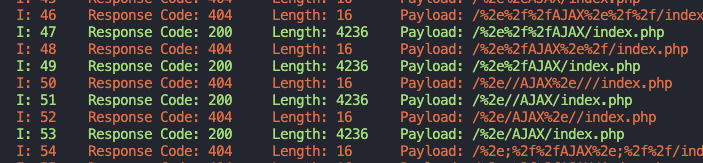
Once the attack is over, inspect your results and determine the index or payload of the data you'd like to see.
You must use BOTH of the following flags:
--display-by index or payload--display-interactions index number or payload string in quotes# display by index number
bypassfuzzer.py --display-by index --display-interactions 49
# display by payload
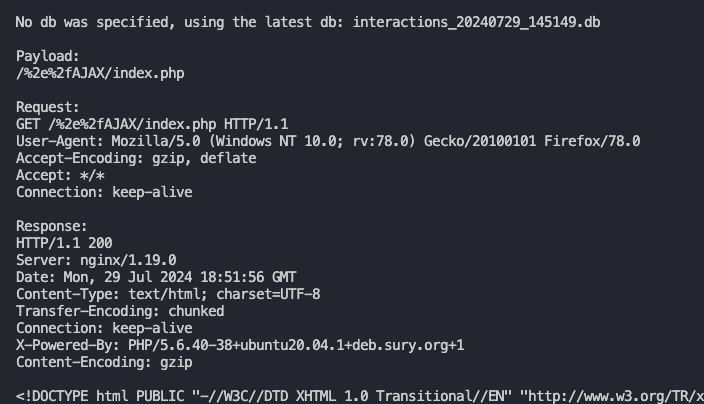
bypassfuzzer.py --display-by payload --display-interactions "/%2e%2fAJAX/index.php"
Result:
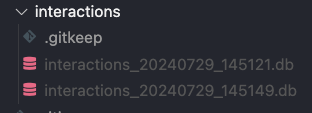
For simplicity's sake, every time you run the tool, a fresh db is created.
You can query a specific db via the --idb flag.
NOTE:
interactions dir to be useable.--idb, the newest one will be used by default.bypassfuzzer.py --display-by index --display-interactions 49 --idb interactions_20240729_145149.db
Provide the --oob flag with your collaborator or ISH domain
You need to check for pingbacks yourself as I currently have no way of doing that for you.
--oob abc123.oastify.com
