 flangvik/azurec2relay
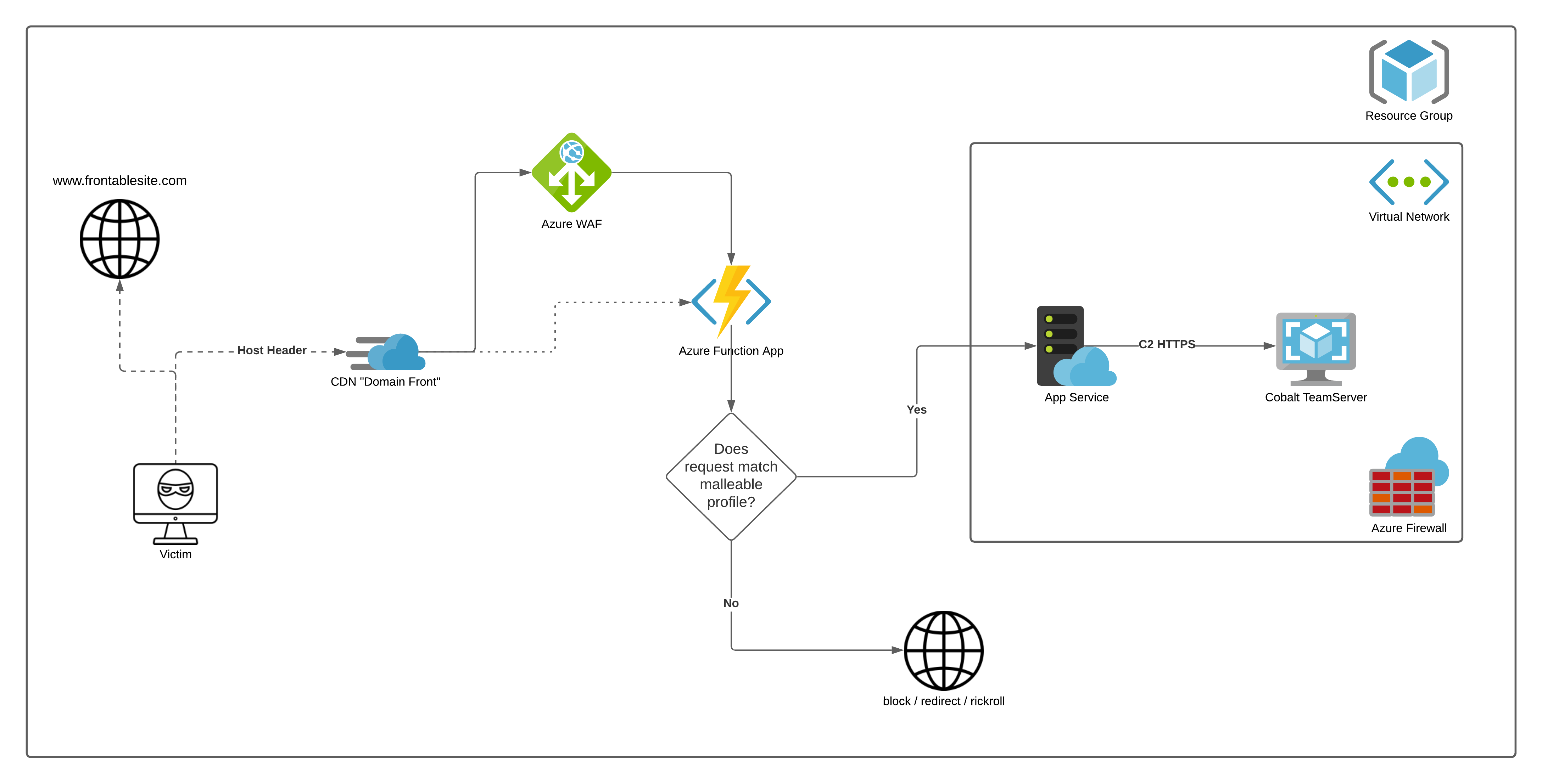
Azure Function that validates and relays Cobalt Strike beacon traffic using malleable C2 profiles, redirecting invalid requests to a decoy site and forwarding validated traffic to a team server over SSH.

AzureC2Relay는 Cobalt Strike Malleable C2 프로필을 기반으로 들어오는 요청을 검증하여 Cobalt Strike 비콘 트래픽을 확인하고 중계하는 Azure Function입니다. 프로필의 사용자 에이전트, URI 경로, 헤더 및 쿼리 매개변수와 일치하지 않는 모든 들어오는 요청은 구성 가능한 데코이 웹사이트로 리디렉션됩니다. 검증된 C2 트래픽은 동일한 가상 네트워크 내에 있는 팀 서버로 중계되며, 이 서버는 네트워크 보안 그룹에 의해 추가로 제한되어 VM이 SSH만 노출하도록 합니다.
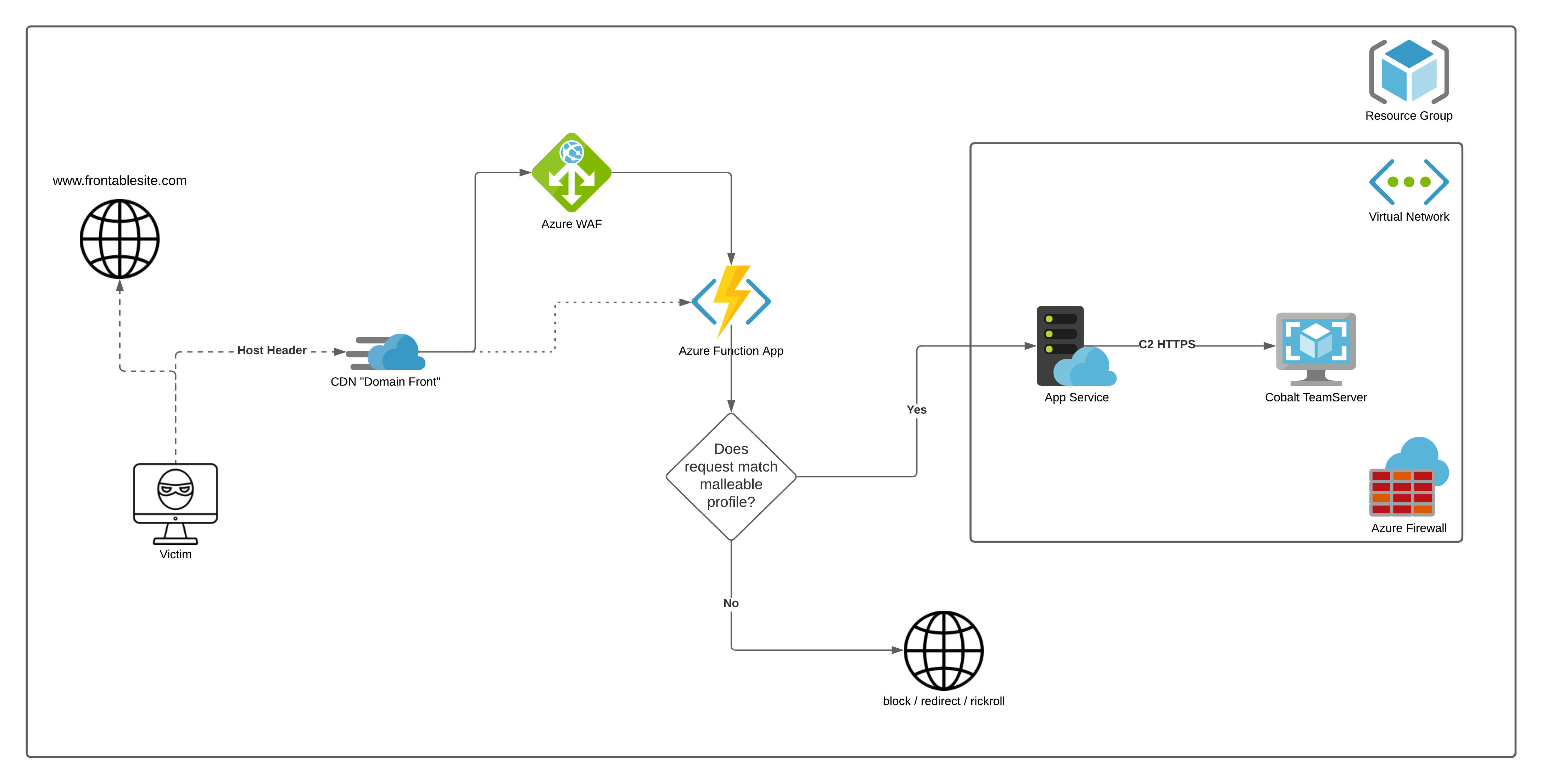
AzureC2Relay는 terraform azure 모듈과 몇 가지 로컬 az cli 명령어를 통해 배포됩니다.
terraform, az cli 및 dotnet core 3.1 런타임이 설치되어 있는지 확인하세요.
Windows (Powershell)
&([scriptblock]::Create((Invoke-WebRequest -UseBasicParsing 'https://dot.net/v1/dotnet-install.ps1'))) -runtime dotnet -version 3.1.0
Invoke-WebRequest 'https://releases.hashicorp.com/terraform/0.14.6/terraform_0.14.6_windows_amd64.zip'  -OutFile 'terraform.zip'
Expand-Archive -Path terraform.zip -DestinationPath "$([Environment]::GetFolderPath('ApplicationData'))\TerraForm\"
setx PATH "%PATH%;$([Environment]::GetFolderPath('ApplicationData'))\TerraForm\"
Invoke-WebRequest -Uri https://aka.ms/installazurecliwindows -OutFile .\AzureCLI.msi; Start-Process msiexec.exe -Wait -ArgumentList '/I AzureCLI.msi /quiet'; rm .\AzureCLI.msi
Mac
curl -L https://dot.net/v1/dotnet-install.sh | bash -s --  --runtime dotnet --version 3.1.0
brew update
brew tap hashicorp/tap
brew install hashicorp/tap/terraform
brew install azure-cli
Ubuntu , Debian
curl -L https://dot.net/v1/dotnet-install.sh | bash -s --  --runtime dotnet --version 3.1.0
wget https://releases.hashicorp.com/terraform/0.14.5/terraform_0.14.5_linux_amd64.zip
unzip terraform_0.14.5_linux_amd64.zip
sudo cp terraform /usr/local/bin/terraform
curl -sL https://aka.ms/InstallAzureCLIDeb | sudo bash
Kali
curl -L https://dot.net/v1/dotnet-install.sh | bash -s --  --runtime dotnet --version 3.1.0
wget https://releases.hashicorp.com/terraform/0.14.5/terraform_0.14.5_linux_amd64.zip
unzip terraform_0.14.5_linux_amd64.zip
sudo cp terraform /usr/local/bin/terraform
echo "deb [arch=amd64] https://packages.microsoft.com/repos/azure-cli/ stretch main" | sudo tee /etc/apt/sources.list.d/azure-cli.list
curl -L https://packages.microsoft.com/keys/microsoft.asc | sudo apt-key add -
sudo apt-get update && sudo apt-get install apt-transport-https azure-cli
config.tf에 정의된 첫 번째 변수들을 필요에 맞게 수정하세요.az loginterraform init 실행terraform apply -auto-approve 실행하여 인프라를 배포하세요.terraform이 완료되면 필요한 ssh 명령어가 제공됩니다. CobaltStrike 팀서버는 배포된 VM의 tmux 세션 내에서 실행됩니다.
인프라 사용을 마친 후에는 terraform destroy -auto-approve로 제거할 수 있습니다.
