 feder-cr/invisible_playwright
Playwright를 anti-bot이 감지할 수 없게 만들어 캡차가 필요 없습니다: 동일한 API, 안티 디텍트 스텔스 헤드리스 Firefox, 감지되지 않는 핑거프린트, 봇 탐지 우회, Python 웹 스크래핑 및 브라우저 자동화.

<div align="center">
<picture>
<source media="(max-width: 374px) and (prefers-color-scheme: dark)" srcset="https://raw.githubusercontent.com/feder-cr/invisible_playwright/main/docs/banner-small-dark.gif">
<source media="(max-width: 374px)" srcset="https://raw.githubusercontent.com/feder-cr/invisible_playwright/main/docs/banner-small-light.gif">
<source media="(max-width: 1239px) and (prefers-color-scheme: dark)" srcset="https://raw.githubusercontent.com/feder-cr/invisible_playwright/main/docs/banner-phone-dark.gif">
<source media="(max-width: 1239px)" srcset="https://raw.githubusercontent.com/feder-cr/invisible_playwright/main/docs/banner-phone-light.gif">
<source media="(prefers-color-scheme: dark)" srcset="https://raw.githubusercontent.com/feder-cr/invisible_playwright/main/docs/banner-dark.gif">
<img alt="invisible_playwright, 안티 디텍트 Firefox에서 실행되는 Playwright. 애니메이션: Playwright에서 두 줄로 전환되는 스위치, 엔진 내부에 설정된 핑거프린트, 손처럼 움직이는 마우스, 그리고 통과하는 봇 테스트." src="https://raw.githubusercontent.com/feder-cr/invisible_playwright/main/docs/banner-light.gif" width="100%">
</picture>
<h3 align="center">Playwright는 안티봇과 캡차에 탐지됩니다.<br>
이 도구는 탐지되지 않는 핑거프린트를 갖춘 안티 디텍트 Firefox에서 실행되며, 기존 Playwright 코드와 호환됩니다.</h3>
</div>
## 작동 방식
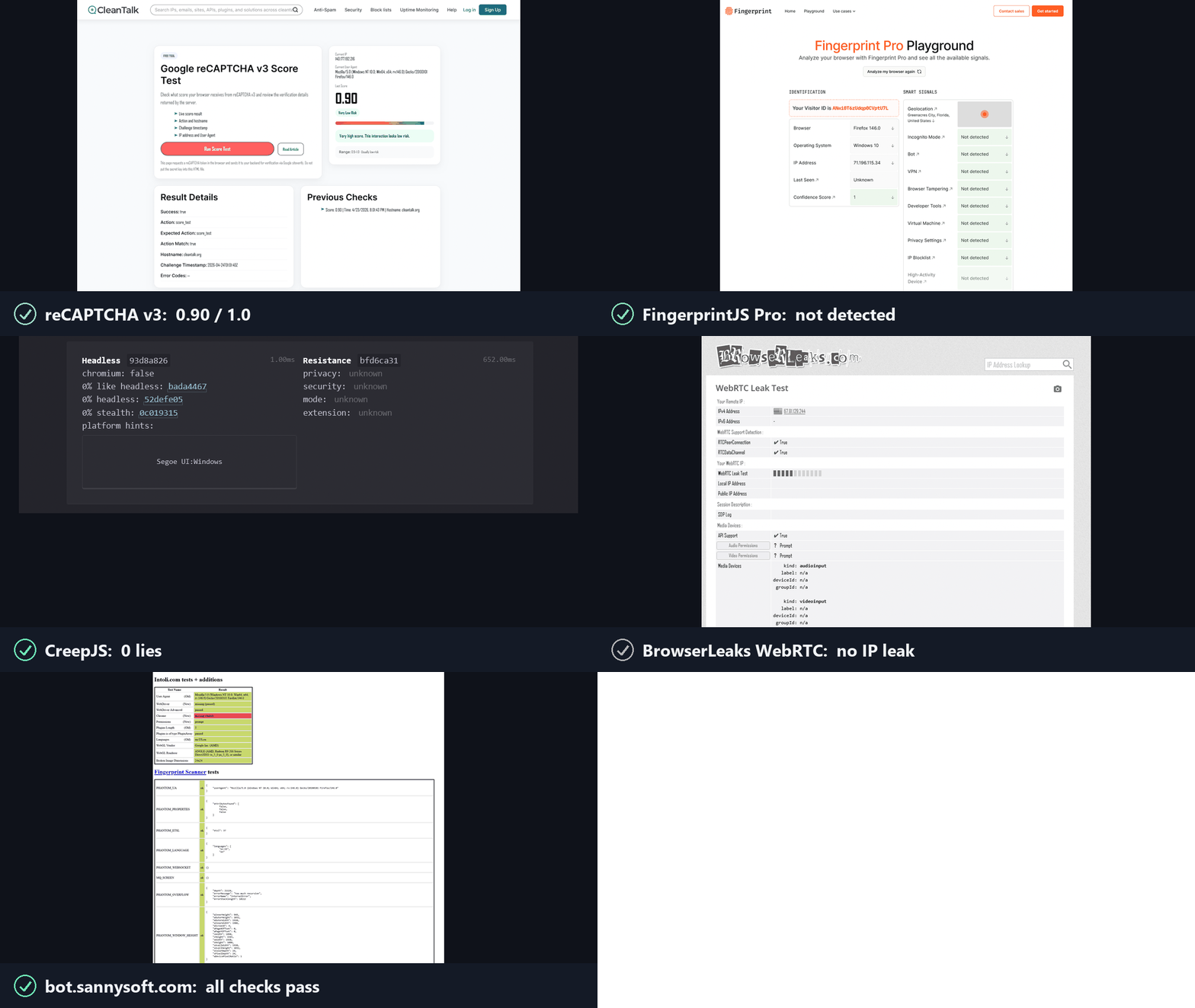
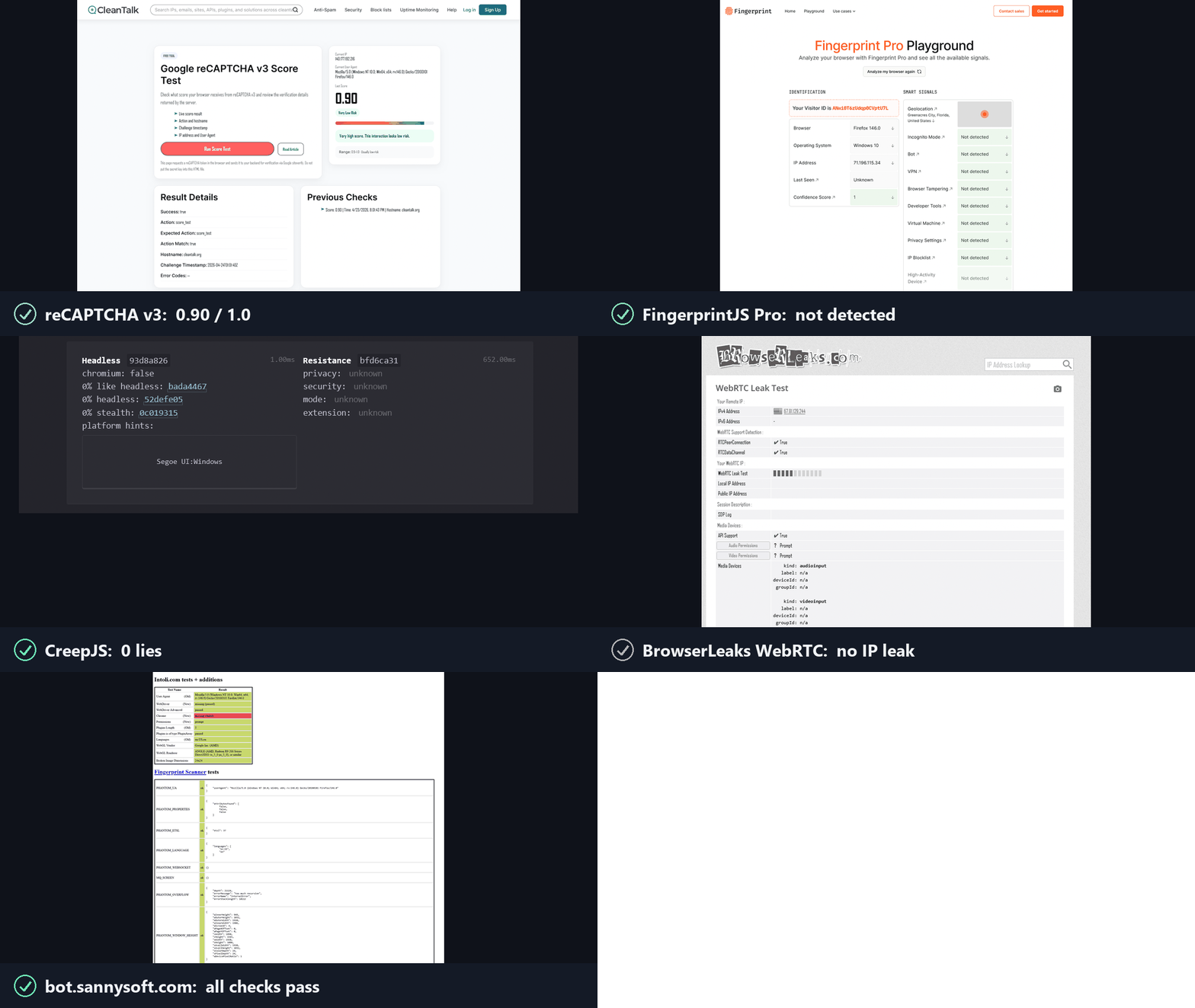
안티봇은 두 가지 질문을 던지고, reCAPTCHA, hCaptcha, Cloudflare Turnstile이 그 답변을 채점합니다. invisible_playwright는 두 질문 모두에 "예"라고 답합니다.
**1. 실제 브라우저인가?** 그렇습니다. C++ 소스 수준에서 패치된 Firefox입니다.
- 브라우저 핑거프린트는 페이지에 주입되는 것이 아니라 엔진 내부에서 설정됩니다: navigator, screen, GPU/WebGL, canvas, 폰트, 오디오, WebRTC, 타임존, 네트워크. 헤드리스든 헤디드든 값은 동일합니다.
- JS 심(shim)도, 오버라이드도, 읽힐 만한 이음새도 없습니다.
**2. 실제 사람이 사용 중인가?** 그렇습니다. 동작은 드라이버에서 인간화됩니다.
- 모든 클릭, 호버, 드래그는 인간적인 타이밍으로 자연스러운 마우스 경로를 따르며, 커서가 순간이동하지 않습니다.
- 각 입력은 실제 마우스와 바이트 단위로 동일합니다: 실제 입력 소스, 압력, 신뢰할 수 있는 이벤트.
---
## 설치
Windows, PowerShell에서:
```powershell
powershell -ExecutionPolicy ByPass -c "irm https://astral.sh/uv/install.ps1 | iex"
$env:Path = "$env:USERPROFILE\.local\bin;$env:Path"
uv init --python ">=3.11" my-project
cd my-project
uv add invisible-playwright
uv run invisible-playwright fetch # one-time download, sha256-verified: 240 MB, about 550 MB unpacked
```
Linux:
```bash
curl -LsSf https://astral.sh/uv/install.sh | sh
source $HOME/.local/bin/env
uv init --python ">=3.11" my-project
cd my-project
uv add invisible-playwright
uv run invisible-playwright fetch # one-time download, sha256-verified: 262 MB (x86_64) / 253 MB (arm64), about 550 MB unpacked
```
지원 플랫폼: **Windows x86_64**, **Linux x86_64 / arm64**.
그런 다음 아래 예제 중 하나를 `my-project`의 `main.py`로 저장하고 `uv run main.py`로 실행하세요.
---
## 사용법
### 세션별 무작위 지문
**코드 변경 없이 Playwright의 API를 동기 및 비동기로 사용합니다.** 동일한 객체, 동일한 호출, 동일한 반환 값입니다. 일부 표면은 범위 밖입니다 - 트레이싱, HAR, CDP, API 요청 컨텍스트 - 그리고 각각은 조용히 오작동하는 대신 그 이유를 설명하는 문장과 함께 거부합니다. 이미 Playwright를 사용하고 있다면, 전환은 두 줄이면 됩니다:
```diff
- from playwright.sync_api import sync_playwright
- with sync_playwright() as p:
- browser = p.firefox.launch()
+ from invisible_playwright import InvisiblePlaywright
+ with InvisiblePlaywright() as browser:
```
모든 세션은 고유한 지문(GPU, 오디오, 폰트, 화면, 약 200개 필드)과 베지어 곡선 마우스 움직임을 갖습니다.
**동기화**
```python
from invisible_playwright import InvisiblePlaywright
with InvisiblePlaywright(proxy={"server": "socks5://...", "username": "u", "password": "p"}) as browser:
page = browser.new_page()
page.goto("https://example.com")
page.click("#submit") # mouse arcs to the button on a Bezier curve
```
**비동기**
```python
from invisible_playwright.async_api import InvisiblePlaywright
async with InvisiblePlaywright(proxy={"server": "socks5://...", "username": "u", "password": "p"}) as browser:
page = await browser.new_page()
await page.goto("https://example.com")
await page.click("#submit")
```
`browser` 객체는 `playwright.sync_api.Browser` / `playwright.async_api.Browser`이며, 모든 Playwright 메서드가 그대로 작동합니다.
실행을 재현하기 위해 시드를 기록하세요:
```python
sf = InvisiblePlaywright()
with sf as browser:
print("seed =", sf.seed)
# ...
```
### 재현 가능한 지문
```python
with InvisiblePlaywright(seed=42) as browser:
... # same GPU, same canvas hash, same audio context, every run
```
### 프록시
```python
proxy = {
"server": "socks5://gate.example.com:1080",
"username": "user",
"password": "pass",
}
with InvisiblePlaywright(proxy=proxy) as browser:
...
```
지원되는 스킴: `socks5`, `socks4`, `http`, `https`. DNS는 기본적으로 프록시를 통해 라우팅되며, 로컬 유출은 없습니다.
### 시간대
브라우저 시간대는 `timezone=`을 따릅니다:
```python
# default: timezone is auto-derived from the egress IP (proxy egress if a
# proxy is set, otherwise the host's own public IP)
with InvisiblePlaywright(proxy=proxy) as browser:
...
# explicit IANA zone always wins, the only way to force a specific zone
with InvisiblePlaywright(proxy=proxy, timezone="America/New_York") as browser:
...
```
### 특정 지문 필드 고정하기
기본적으로 모든 값은 `seed`에서 파생됩니다. 나머지는 seed에서 파생된 상태로 특정 값만 강제하려면:
```python
with InvisiblePlaywright(
seed=42,
pin={
"gpu.renderer": "ANGLE (AMD, Radeon R9 200 Series Direct3D11 vs_5_0 ps_5_0, D3D11)",
"gpu.vendor": "Google Inc. (AMD)",
"screen.width": 2560,
"screen.height": 1440,
"hardware.concurrency": 16,
},
) as browser:
...
```
GPU pin은 자유 문자열을 설정하는 대신 검증된 페르소나 중 하나를 선택합니다. 그 이유는 약 81개의 `getParameter` 값과 확장 목록이 렌더러 이름과 함께 전달되며, 탐지기가 이를 렌더러 이름과 교차 검증하기 때문입니다. 풀이 보유하지 않은 이름을 지정하면 예외가 발생하며, 오류 메시지에 보유 중인 이름들이 나열됩니다.
고정 가능한 키의 전체 목록, 고정이 베이지안 샘플러와 상호작용하는 방식, 그리고 일반적인 패턴은 **[docs/pinning.md](https://github.com/feder-cr/invisible_playwright/blob/main/docs/pinning.md)**에 있습니다.
---
## CLI
설치되는 명령은 하이픈이 포함된 `invisible-playwright`입니다. `python -m
invisible_playwright`도 동일하게 작동하며 PATH에 아무것도 필요로 하지 않습니다.
```bash
invisible-playwright fetch # download the engine if missing, check every cached
# one against the seal, print the path
invisible-playwright version # wrapper, core and engine versions, and where the
# engine is cached
```
## 문서, 가이드 및 비교
**스크립트보다 프롬프트를 선호한다면.** 이 페이지는 Python 라이브러리로서의 엔진입니다. 코드를 작성하지 않고 사용하는 두 가지 방법이 있으며, 둘 다 한 줄입니다. 이미 가지고 있는 MCP 클라이언트(Claude Code, Claude Desktop, Cursor)에서 `claude mcp add stealth -- uvx aihawk`를 실행하거나 [MCP 서버 페이지](https://github.com/feder-cr/AIHawk/wiki/mcp-server)를 참고하세요. 또는 인터페이스와 모델이 포함되어 OpenRouter 키만 있으면 되는 `uvx aihawk ui --openrouter-key sk-or-...`를 사용하거나 [AIHawk](https://github.com/feder-cr/AIHawk)를 참고하세요. 내부 엔진은 동일하며, 두 번째는 첫 번째의 클라이언트입니다.
모든 내용은 **[위키](https://github.com/feder-cr/invisible_playwright/wiki)**에서 더 잘 읽히고 검색 가능하며, 하나의 평면적인 목록 대신 네 개의 섹션으로 구성되어 있습니다:
- **[문서](https://github.com/feder-cr/invisible_playwright/blob/main/docs/documentation.md)** -
설치, 일반 Playwright에서 두 줄로 전환하는 방법, 프록시/시간대
구성, 특정 필드 고정, CLI.
- **[가이드](https://github.com/feder-cr/invisible_playwright/blob/main/docs/guides.md)** - 탐지가 실제로 어떻게
작동하는지, 일곱 그룹으로 나누어 설명합니다: 브라우저 아이덴티티, canvas/WebGL/폰트/
오디오, 네트워크와 WebRTC, 자동화 계층, AI 에이전트, 소스에서 설명하는
탐지기 자체, 그리고 테스트.
- **[비교](https://github.com/feder-cr/invisible_playwright/blob/main/docs/comparisons.md)** -
Camoufox, Patchright, nodriver, playwright-stealth와의 비교, 그리고 일반적으로
Chromium보다 Firefox를 선택하는 이유.
- **[통합](https://github.com/feder-cr/invisible_playwright/blob/main/docs/integrations)** -
Scrapy, Crawlee, Robot Framework, CodeceptJS, 테스트 러너, Playwright MCP, 그리고
맞지 않는 프레임워크를 이름으로 명시합니다.
어디서 시작해야 할지 모르겠다면: [Playwright를 탐지되지 않게 만드는 세 가지 방법](https://github.com/feder-cr/invisible_playwright/blob/main/docs/playwright-stealth-levels.md)은
대부분의 다른 페이지가 다시 링크하는 지도이며, [한 사이트에서 Playwright가 봇으로 탐지됨](https://github.com/feder-cr/invisible_playwright/blob/main/docs/playwright-detected-as-bot.md)은
문제 해결 순서이고, [navigator.webdriver는 생각하는 그 단서가 아닙니다](https://github.com/feder-cr/invisible_playwright/blob/main/docs/navigator-webdriver-explained.md)는
이 분야에서 가장 유명한 속성과 그것만 패치하는 것이 거의 아무것도 얻지 못하는 이유를 설명합니다.
탐지기 섹션은 이제 상용 안티봇 제품을 이름으로 다루며, 각각 자체 문서나
확인된 리버스 엔지니어링에서 읽은 내용을 바탕으로 합니다:
[Cloudflare Bot Management](https://github.com/feder-cr/invisible_playwright/blob/main/docs/cloudflare-bot-management-explained.md)와
[Turnstile](https://github.com/feder-cr/invisible_playwright/blob/main/docs/cloudflare-turnstile-explained.md),
[DataDome](https://github.com/feder-cr/invisible_playwright/blob/main/docs/datadome-explained.md), [Kasada](https://github.com/feder-cr/invisible_playwright/blob/main/docs/kasada-explained.md),
[Akamai Bot Manager](https://github.com/feder-cr/invisible_playwright/blob/main/docs/akamai-bot-manager-explained.md),
[PerimeterX](https://github.com/feder-cr/invisible_playwright/blob/main/docs/perimeterx-explained.md), [hCaptcha](https://github.com/feder-cr/invisible_playwright/blob/main/docs/hcaptcha-explained.md),
[Imperva](https://github.com/feder-cr/invisible_playwright/blob/main/docs/imperva-incapsula-explained.md), 그리고
[나머지 세트](https://github.com/feder-cr/invisible_playwright/blob/main/docs/guides-detectors-explained.md)입니다.
## 관련 프로젝트
**이 프로젝트의 다른 구성 요소들.** 엔진은 셋 중 가운데에 있으며, 그 주변의
둘은 대부분의 사람들이 엔진에 도달하는 방법입니다:
- **[invisible_core](https://github.com/feder-cr/invisible_core)** - 시드에서
핑거프린트로, 다시 환경설정으로, 그리고 프록시와 지오로케이션. 이 패키지가 이를 고정합니다.
- **[AIHawk](https://github.com/feder-cr/AIHawk)** - 이 엔진을 MCP
서버로 제공하며(`uvx aihawk`, 자체 모델을 가져오는 모든 클라이언트용), 같은 패키지에서
한 명령으로 모델이 포함된 인터페이스도 제공합니다. 인터페이스는 서버의 클라이언트이며,
브라우저로 가는 비공개 경로는 없습니다.
**오픈소스 이웃들.** 어떤 것이 맞는지는 문제가 있는 계층과
Firefox가 필요한지 Chromium이 필요한지에 따라 달라집니다:
[Playwright를 탐지되지 않게 만드는 세 가지 방법](https://github.com/feder-cr/invisible_playwright/blob/main/docs/playwright-stealth-levels.md)은
각 계층이 무엇에 도달할 수 있는지 다루고, [AI 브라우저 에이전트와 스텔스](https://github.com/feder-cr/invisible_playwright/blob/main/docs/ai-browser-agents-stealth.md)는
CDP 대신 Chromium을 선택하는 프레임워크를 다룹니다.
**Firefox 쪽에서는**
- **[Camoufox](https://github.com/daijro/camoufox)** - C++도 패치하며, 더 넓은 표면을 다루고, 시드에서 파생하는 대신 지문 데이터베이스를 제공합니다. [비교](https://github.com/feder-cr/invisible_playwright/blob/main/docs/vs-camoufox.md).
- **[LibreWolf](https://librewolf.net)** - 자동화용이 아니라 탐색용으로 개인정보 보호 기본값이 설정된 Firefox입니다.
- **[arkenfox/user.js](https://github.com/arkenfox/user.js)** - 환경설정을 통한 강화. 환경설정으로 충분하다면 그것을 사용하세요.
**Chromium 쪽에서는**
- **[Patchright](https://github.com/Kaliiiiiiiiii-Vinyzu/patchright)** - 패치된 Playwright 포크로, 작업은 바이너리가 아닌 드라이버에서 이루어집니다. [비교](https://github.com/feder-cr/invisible_playwright/blob/main/docs/vs-patchright.md).
- **[nodriver](https://github.com/ultrafunkamsterdam/nodriver)** - `undetected-chromedriver`의 후속작으로, CDP를 통해 Chrome을 제어합니다. [비교](https://github.com/feder-cr/invisible_playwright/blob/main/docs/vs-nodriver.md).
- **[rebrowser-patches](https://github.com/rebrowser/rebrowser-patches)** - `Runtime.enable` CDP 누출을 수정합니다. [비교](https://github.com/feder-cr/invisible_playwright/blob/main/docs/vs-rebrowser-patches.md).
- **[fingerprint-suite](https://github.com/apify/fingerprint-suite)** - 베이지안 지문 생성기로, 이후 페이지에 주입됩니다. [비교](https://github.com/feder-cr/invisible_playwright/blob/main/docs/vs-fingerprint-suite.md).
- **[playwright-with-fingerprints](https://github.com/bablosoft/playwright-with-fingerprints)** - 유료 원격 서비스에서 값을 가져오며, Windows 전용입니다. [비교](https://github.com/feder-cr/invisible_playwright/blob/main/docs/vs-playwright-with-fingerprints.md).
- **[playwright-stealth](https://github.com/Mattwmaster58/playwright_stealth)** - init-script 패치로, 유지관리자는 이를 개념 증명(proof-of-concept)이라고 부릅니다. [비교](https://github.com/feder-cr/invisible_playwright/blob/main/docs/vs-playwright-stealth.md).
- **[puppeteer-extra-plugin-stealth](https://github.com/berstend/puppeteer-extra)** - 이 계보의 원조로, 마지막 실질적 커밋은 2024년 중반입니다. [의미하는 바](https://github.com/feder-cr/invisible_playwright/blob/main/docs/puppeteer-extra-stealth-unmaintained.md).
- **[selenium-stealth](https://github.com/diprajpatra/selenium-stealth)** - Selenium에서의 동일한 접근 방식으로, 마지막 커밋은 2021년 12월입니다. [의미하는 바](https://github.com/feder-cr/invisible_playwright/blob/main/docs/selenium-stealth-unmaintained.md).
- **[pyppeteer](https://github.com/pyppeteer/pyppeteer)** - 자체 README에서 유지관리되지 않는다고 밝히며 `playwright-python`을 가리킵니다. [해당 권장 사항의 의미](https://github.com/feder-cr/invisible_playwright/blob/main/docs/pyppeteer-unmaintained-playwright.md).
---
## 엔진에서 패치되는 것
아래의 모든 내용에 두 가지 규칙이 적용됩니다. 모든 값은 페이지가 **질의할 수 있기 전에** 브라우저 내부에서 결정되므로, 탐지할 수 있는 JavaScript 심(shim)이 존재하지 않습니다. 그리고 모든 값은 **하나의 프로필**에서 나오므로, 어떤 두 표면도 서로 모순되지 않습니다. 위장된 브라우저가 보통 적발되는 지점이 바로 이 모순입니다. 출처:
[feder-cr/firefox_antidetect_patch](https://github.com/feder-cr/firefox_antidetect_patch).
**아이덴티티**
- `navigator`, 사용자 에이전트, 클라이언트 힌트는 함께 파생되므로 서로 불일치할 수 없습니다: [Playwright가 navigator.webdriver를 설정하는가](https://github.com/feder-cr/invisible_playwright/blob/main/docs/does-playwright-set-navigator-webdriver.md), [클라이언트 힌트와 Sec-Fetch](https://github.com/feder-cr/invisible_playwright/blob/main/docs/client-hints-sec-fetch.md).
- `navigator.languages`와 `Accept-Language` 헤더는 동일한 선언으로, 전송되고 읽힙니다: [Accept-Language와 navigator.languages](https://github.com/feder-cr/invisible_playwright/blob/main/docs/accept-language-navigator-languages.md).
- 화면 기하 구조, `devicePixelRatio`, 그리고 이를 노출하는 미디어 쿼리는 호스트에서 읽는 것이 아니라 선언됩니다: [devicePixelRatio와 Firefox pref](https://github.com/feder-cr/invisible_playwright/blob/main/docs/devicepixelratio-firefox-pref.md), [CSS 미디어 쿼리 지문 채취](https://github.com/feder-cr/invisible_playwright/blob/main/docs/css-media-query-fingerprinting.md).
**렌더링**
- 캔버스 읽기 결과는 시드별로 결정적이며, 차단되거나 노이즈가 섞이는 대신 실제 형태를 유지합니다: [canvas fingerprint noise](https://github.com/feder-cr/invisible_playwright/blob/main/docs/canvas-fingerprint-noise.md), [why a canvas fingerprint changes every run](https://github.com/feder-cr/invisible_playwright/blob/main/docs/canvas-fingerprint-changes-every-run.md).
- WebGL은 일관된 GPU 페르소나를 보고합니다: 벤더, 렌더러 및 매개변수 한도가 상호 검증되며, 하나씩 개별적으로 설정되지 않습니다: [WebGL renderer strings](https://github.com/feder-cr/invisible_playwright/blob/main/docs/webgl-renderer-strings.md), [WebGL parameters are identical](https://github.com/feder-cr/invisible_playwright/blob/main/docs/webgl-parameters-are-identical.md).
- 폰트는 브라우저와 함께 제공되므로 모든 호스트에 동일한 서체가 존재하며, 플랫폼 폰트 엔진이 더 이상 선택하지 않습니다: [bundled fonts across platforms](https://github.com/feder-cr/invisible_playwright/blob/main/docs/bundled-fonts-cross-platform.md), [why headless browsers render different fonts](https://github.com/feder-cr/invisible_playwright/blob/main/docs/headless-fonts-differ.md), [detecting installed fonts from JavaScript](https://github.com/feder-cr/invisible_playwright/blob/main/docs/detect-installed-fonts-javascript.md).
- 텍스트 메트릭은 해당 폰트를 따릅니다: `measureText`는 권한 프롬프트 없이 한 번의 호출로 열 개 이상의 숫자를 반환합니다: [measureText and TextMetrics](https://github.com/feder-cr/invisible_playwright/blob/main/docs/measuretext-textmetrics-fingerprinting.md).
- 캔버스와 WebGL은 동일한 시드에 대해 운영 체제 전반에서 일치합니다: [cross-platform consistency](https://github.com/feder-cr/invisible_playwright/blob/main/docs/canvas-webgl-cross-platform-consistency.md), [canvas differs across operating systems](https://github.com/feder-cr/invisible_playwright/blob/main/docs/canvas-differs-across-operating-systems.md).
**오디오 및 미디어**
- 오디오 스택은 호스트 장치가 아닌 프로필에서 응답합니다: [AudioContext fingerprinting](https://github.com/feder-cr/invisible_playwright/blob/main/docs/audiocontext-fingerprinting.md), [sample rate and latency](https://github.com/feder-cr/invisible_playwright/blob/main/docs/audiocontext-samplerate-latency-fingerprint.md).
- 코덱 테이블이 선언되어 있으므로, Linux 호스트가 Windows 질문에 Linux 지원으로 응답하지 않습니다: [codec fingerprinting](https://github.com/feder-cr/invisible_playwright/blob/main/docs/codec-fingerprinting.md).
**네트워크**
- WebRTC는 실제 주소를 유출하거나 아무것도 제공하지 않는 대신(그 자체로 단서가 됨), 프록시 출구를 담은 하나의 합성 후보를 제공합니다: [WebRTC ICE candidate spoofing](https://github.com/feder-cr/invisible_playwright/blob/main/docs/webrtc-ice-candidate-spoofing.md), [does the WebRTC IP match the proxy exit](https://github.com/feder-cr/invisible_playwright/blob/main/docs/webrtc-ip-match-proxy-exit.md).
- DNS는 프록시를 통해 확인되며, 프록시가 환경설정에 없는 경우에도 마찬가지입니다: [does a proxy leak DNS](https://github.com/feder-cr/invisible_playwright/blob/main/docs/does-a-proxy-leak-dns-doh-explained.md), [how to check for a proxy IP leak](https://github.com/feder-cr/invisible_playwright/blob/main/docs/how-to-check-proxy-ip-leak.md).
- 시간대는 오프라인으로 확인된 출구 IP에서 가져오므로 출구와 일치합니다: [timezone and proxy mismatch](https://github.com/feder-cr/invisible_playwright/blob/main/docs/timezone-proxy-mismatch.md), [offline GeoIP timezone](https://github.com/feder-cr/invisible_playwright/blob/main/docs/offline-geoip-timezone-proxy.md).
**자동화 계층**
- 입력 이벤트는 실제 입력 경로에서 발생하므로, `isTrusted`는 실제로 참이기 때문에 참입니다: [Playwright clicks and isTrusted](https://github.com/feder-cr/invisible_playwright/blob/main/docs/playwright-clicks-istrusted.md).
- 포인터는 실제 장치가 생성할 수 있는 주기로 인간의 경로와 타이밍을 따릅니다: [human mouse movement](https://github.com/feder-cr/invisible_playwright/blob/main/docs/human-mouse-movement.md), [mouse dynamics as behavioural biometrics](https://github.com/feder-cr/invisible_playwright/blob/main/docs/mouse-dynamics-behavioural-biometrics.md).
- 디버거 표면은 자동화된 브라우저를 노출시키는 타이밍 질문에 응답하지 않습니다: [debugger timing detection](https://github.com/feder-cr/invisible_playwright/blob/main/docs/debugger-timing-detection.md).
- 닫힌 모드 섀도 루트에 접근할 수 있으며, 이는 기본 Playwright가 어느 엔진에서도 할 수 없는 일이지만 페이지는 여전히 `null`을 읽습니다: [closed shadow roots](https://github.com/feder-cr/invisible_playwright/blob/main/docs/closed-shadow-root-playwright.md).
---
## 라이선스
MIT - [LICENSE](https://github.com/feder-cr/invisible_playwright/blob/main/LICENSE)를 참조하세요. 패치된 Firefox 바이너리는 MPL-2.0(Firefox 업스트림 라이선스)에 따라 배포됩니다. 해당 바이너리를 생성하는 mozilla-central 대상 C++ 패치는 [feder-cr/firefox_antidetect_patch](https://github.com/feder-cr/firefox_antidetect_patch)에 있습니다.
---
## 면책 조항
이 프로젝트는 교육 목적으로만 제공됩니다. 어떠한 보증도 없이 있는 그대로 제공됩니다. 사용 방식에 대해 어떠한 책임도 지지 않습니다. 본인의 책임 하에, 그리고 관할 지역의 법률을 준수하여 사용하세요.
---
<p align="center">
<a href="https://it.linkedin.com/in/federico-elia-5199951b6">Federico Elia</a>가 제작
<a href="https://it.linkedin.com/in/federico-elia-5199951b6"><img src="https://raw.githubusercontent.com/feder-cr/invisible_playwright/main/docs/badges/linkedin.svg" alt="LinkedIn"></a>
</p>
<p align="center">
<a href="https://github.com/feder-cr/invisible_playwright/actions/workflows/tests.yml"><img src="https://github.com/feder-cr/invisible_playwright/actions/workflows/tests.yml/badge.svg" alt="tests"></a>
<a href="https://github.com/feder-cr/invisible_playwright/blob/main/LICENSE"><img src="https://raw.githubusercontent.com/feder-cr/invisible_playwright/main/docs/badges/license.svg" alt="License: MIT"></a>
<a href="https://www.python.org/downloads/"><img src="https://raw.githubusercontent.com/feder-cr/invisible_playwright/main/docs/badges/python.svg" alt="Python 3.11+"></a>
<a href="https://github.com/feder-cr/firefox_antidetect_patch/releases"><img src="https://raw.githubusercontent.com/feder-cr/invisible_playwright/main/docs/badges/firefox.svg" alt="Firefox 151.0"></a>
<img src="https://raw.githubusercontent.com/feder-cr/invisible_playwright/badges/docs/badges/launches.svg" alt="browser launches">
<a href="https://github.com/feder-cr/invisible_playwright/stargazers"><img src="https://raw.githubusercontent.com/feder-cr/invisible_playwright/badges/docs/badges/stars.svg" alt="GitHub stars"></a>
</p>