 dovughs/mora-hwbp
Hardware Breakpoint (DR0-DR7) based patch-less user-mode hooking & telemetry instrumentation engine (AMSI, WLDP & ETW PoC).

A security-research Proof-of-Concept (POC) demonstrating hardware-breakpoint (CPU debug register) based function hooking as an alternative to traditional in-memory code patching.
Purpose & Scope
This repository is published strictly for defensive security research, red-team/purple-team education, detection engineering, and academic study of Windows internals. It demonstrates how an attacker could abuse processor debug registers to neutralize user-mode security telemetry — and, equally important, what defenders should monitor for in order to detect such techniques. The author is not responsible for any misuse of this code. Usage of this technique against systems without explicit authorization is illegal and violates the relevant computer-fraud and abuse laws in most jurisdictions. Do not deploy this in any environment you do not own or have explicit written permission to test.
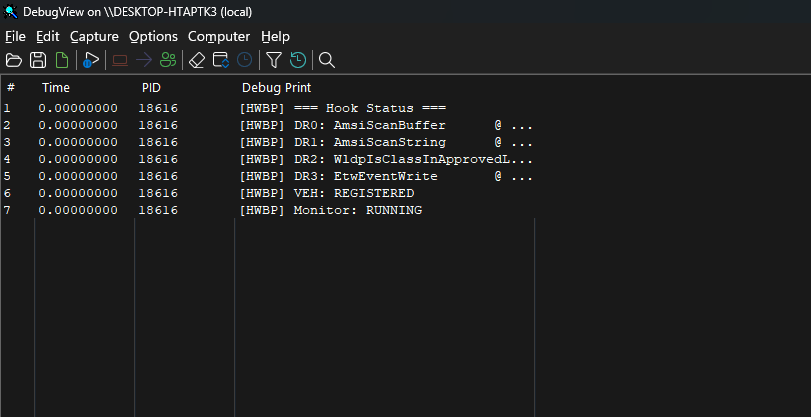
mora_hwbp.c implements a DLL that, once loaded/injected into a target process (e.g., a PowerShell host), hooks four user-mode functions exclusively through CPU hardware breakpoints stored in the architectural debug registers (DR0–DR7) of every thread in the process:
| Register | Hooked Function | Module | Purpose |
|---|---|---|---|
DR0 | AmsiScanBuffer | amsi.dll | Neutralize AMSI content scanning |
DR1 | AmsiScanString | amsi.dll | Neutralize AMSI string scanning |
DR2 | WldpIsClassInApprovedList | wldp.dll | Force WLDP class approval (Device Guard / WDAC) |
DR3 | NtTraceEvent | ntdll.dll | Cut the entire user-mode ETW stream |
A per-process Vectored Exception Handler (VEH) receives the EXCEPTION_SINGLE_STEP (0x80000004) faults raised by the debug registers, simulates the original function's successful return path by rewriting the exception context, and resumes execution — all without modifying a single byte of executable memory.
This makes the technique particularly interesting from both offensive and defensive perspectives:
.text sections (classic inline hooking, EAT/IAT patching, or Etwp* stubbing).GetThreadContext/SetThreadContext syscall patterns) that can be used for detection.Traditional user-mode hooking approaches — inline detours (5–14 byte overwrites), import address table (IAT) hooking, and export address table (EAT) hooking — share a common weakness: they modify memory that integrity scanners and ETW can observe.
Modern AV/EDR products implement:
pageguard/guard-page tricks, VirtualProtect transitions to PAGE_EXECUTE_READWRITE, and section hash mismatches.Hardware breakpoints sidestep all of this:
.text.SetThreadContext, which does not trigger the classic "memory modified" signals used by integrity scanners.This POC explores the efficacy and detectability of this technique against AMSI (Antimalware Scan Interface), WLDP (Windows Lockdown Policy), and ETW (Event Tracing for Windows) — the three most widely relied-upon user-mode security primitives in the modern Windows security stack.
AMSI is the Windows platform integration point that allows applications (PowerShell, Office, VBScript, .NET hosts, etc.) to request content scanning from registered antimalware providers. Two entry points are of primary interest:
AmsiScanBuffer(HANDLE hamsiContext, PVOID buffer, ULONG length, LPCWSTR contentName, HANDLE hamsiSession, AMSI_RESULT *pResult)AmsiScanString(HANDLE hamsiContext, LPCWSTR string, LPCWSTR contentName, HANDLE hamsiSession, AMSI_RESULT *pResult)By forcing the returned AMSI_RESULT to AMSI_RESULT_CLEAN (0), the script engine believes the content was inspected and found benign, so execution continues uninterrupted.
WLDP implements policy evaluation for Windows Defender Application Control (WDAC / Device Guard). WldpIsClassInApprovedList answers whether a given COM class (identified by GUID) is permitted under the current policy. AMSI internally consults WLDP to decide whether certain script/content classes are "trusted" (in the approved list). If the function reports the class as approved, AMSI may skip additional scrutiny for that content type.
The DLL sets the isApproved output parameter (RDX) to TRUE and returns S_OK, making the evaluated class appear trusted.
NtTraceEvent in ntdll.dll is the lowest-level user-mode entry point into the ETW subsystem — virtually all ETW event emission funnels through it (including EtwEventWrite and the higher-level Etw* APIs). Hooking it therefore cuts the entire ETW stream from user mode, with broad side effects relevant to security monitoring:
Microsoft-Windows-DotNETRuntime)The DLL simply returns STATUS_SUCCESS (0) without executing the real function.
