 bee-san/ciphey
⚡ 키나 암호를 몰라도 암호화를 자동으로 복호화하고, 인코딩을 디코딩하며, 해시를 크랙합니다 ⚡

<p align="center">
  <a href="https://cdn.jsdelivr.net/gh/bee-san/Ciphey@d41d19946234477346fede14dadf8c351cc469e6/media/tui-video/out/ciphey-tui-promo.mp4"><img src="https://assets.kitploit.com/production/public/readmes/673/7997e478fcffb1efb25627ba54c13073857f3927bc487f77bf4e905af8ee8e84/5c182b65ae7b92166bf4175c31e9540f3575bfef35204b2120acd9d42870f0be-display-v1.webp" alt="터미널에서의 Ciphey: 네 겹의 Base64가 입력되면, Ciphey가 'Ciphey peels back every layer of encoding'이 평문인지 묻고, Base64 → Base64 → Base64 → Base64 경로와 함께 출력합니다. 클릭하여 1분 투어를 시청하세요."></a>
</p>

<h1 align="center">Ciphey</h1>

<p align="center">
  <b>인코딩되거나 암호화된 텍스트를 붙여넣으세요. Ciphey가 방법을 알아내고 평문을 건네드립니다.</b><br>
  키도, 암호 이름도, 힌트도 필요 없습니다. Base64, hex, Caesar/ROT13, Vigenère, 모스 부호 등 19가지가 더 있으며, 여러 계층 깊이도 처리합니다.
</p>

<p align="center">
  <a href="https://crates.io/crates/ciphey"><img alt="crates.io" src="https://img.shields.io/crates/v/ciphey"></a>
  <a href="https://docs.rs/ciphey"><img alt="docs.rs" src="https://img.shields.io/docsrs/ciphey"></a>
  <a href="https://github.com/bee-san/ciphey/blob/master/LICENSE"><img alt="MIT license" src="https://img.shields.io/badge/license-MIT-blue"></a>
</p>

<p align="center">
  <a href="#install">설치</a> ·
  <a href="#quick-start">빠른 시작</a> ·
  <a href="#features">기능</a> ·
  <a href="#use-it-as-a-library">라이브러리</a> ·
  <a href="#mcp-server-ai-assistants">MCP</a> ·
  <a href="#documentation">문서</a> ·
  <a href="http://discord.skerritt.blog">Discord</a>
  <br><sub>▶ <a href="https://cdn.jsdelivr.net/gh/bee-san/Ciphey@d41d19946234477346fede14dadf8c351cc469e6/media/tui-video/out/ciphey-tui-promo.mp4">1분 투어 시청하기</a> (MP4, 61초)</sub>
</p>

## 설치

```bash
cargo install ciphey
```

Linux(x86_64), macOS(Intel 및 Apple silicon), Windows(x86_64)용 사전 빌드된 바이너리는 [릴리스 페이지](https://github.com/bee-san/Ciphey/releases/latest)에서 확인할 수 있으며, 각 바이너리에는 `.sha256` 체크섬이 함께 제공됩니다.

소스에서 빌드하려면 Rust 툴체인이 필요합니다:

```bash
git clone https://github.com/bee-san/Ciphey
cd Ciphey
cargo build --release    # the binary is target/release/ciphey
```

또는 설치를 건너뛰려면: [Discord 서버](http://discord.skerritt.blog)에 참여하여 `#bots`로 이동한 뒤 `$ciphey <your text>`를 입력하세요 (`$help`로 명령어 목록을 확인할 수 있습니다).

## 빠른 시작

```console
$ ciphey -t 'aGVsbG8gdGhlcmUgZ2VuZXJhbA=='
🕵️ I think the plaintext is Words.
Possible plaintext: 'hello there general' (y/N):
y

🥳 ciphey has decoded 64 times.

The plaintext is:
hello there general
the decoder used is Base64
```

처음 실행하면 짧은 설정 과정에서 색상 테마, 결과 표시 방식, 워드리스트 사용 여부를 묻고, 답변을 `~/.ciphey/config.toml`에 저장합니다.

```bash
ciphey -t 'NTA3NjYzNzU3MjZjMjA3NjY2MjA2OTcyNjU2YzIwNzM2ZTY2Njc='   # ROT13 → hex → Base64, nothing else needed
ciphey -f secret.txt                    # read the input from a file
ciphey -d -t '...'                      # no y/N prompt: take the first plaintext found (handy in scripts)
ciphey -c 15 -t '...'                   # keep searching for up to 15 seconds (the default is 5)
ciphey -r 'flag\{' -t '...'             # only accept plaintext that matches a regex (a crib)
ciphey --wordlist words.txt -t '...'    # also accept any exact match from a wordlist
```

`ciphey --help`는 모든 옵션을 나열합니다.

## 기능

### ⚡ 빠름

<a href="https://cdn.jsdelivr.net/gh/bee-san/Ciphey@d41d19946234477346fede14dadf8c351cc469e6/media/tui-video/out/fast.mp4"><img src="https://assets.kitploit.com/production/public/readmes/673/159bba837c593380b7087cd9b5854db1f11a641fc229e940d5aac07fcef4d8f2/44ee23ca554ede298904e43da81dc7795cb7856d7d8bd2c1de11b1e622c521b1-display-v1.webp" alt="A terminal runs time ciphey -d on a Base64 string. Ciphey prints 'Ciphey is very fast' and the path Base64 → Hexadecimal → caesar, and bash reports real 0m0.157s. A chart then compares Ciphey's 0.19 s (the median of 10 runs) with no answer after 60 s for Python Ciphey 5.14.0 on the same input."></a>

<sub>▶ <a href="https://cdn.jsdelivr.net/gh/bee-san/Ciphey@d41d19946234477346fede14dadf8c351cc469e6/media/tui-video/out/fast.mp4">클립 보기</a> (16초)</sub>

세 개의 계층(ROT13, 그다음 hex, 그다음 Base64)이 0.16초 만에 벗겨지며, 이는 실제 녹화에서 bash의 `time`으로 측정한 값입니다. 다음은 더 많은 입력에 대한 동일한 비교로, Ciphey가 대체하는 버전인 Python Ciphey 5.14와 비교한 것입니다:

| 입력 | Ciphey | Python Ciphey 5.14 |
| --- | --- | --- |
| Base64 | 0.11초 | 0.92초 |
| Hex → Base64 | 0.14초 | 1.02초 |
| ROT13 → Hex → Base64 | 0.19초 | 60초 내 답 없음 |
| URL → Base64 → Hex | 0.24초 | 1.15초 |
| Base64 ×4 | 0.41초 | 0.78초 |
| Hex → Base32 → Base64 → Hex | 0.54초 | 0.72초, 잘못된 답 |
| ROT13 → Hex → Base64 → Base32 | 1.15초 | 60초 내 답 없음 |

<sub>공유된 16-CPU Linux 머신에서 입력당 10회 실행(Python Ciphey: 3회)의 실측 중앙값이며, Ciphey는 47bd16d6에서 y/N 프롬프트를 끄고 실행마다 새로운 <code>$HOME</code>을 사용하여 캐시가 도움이 되지 않도록 했습니다. 모든 실행은 60초로 제한되었습니다. 스크립트와 원시 수치는 <code>media/readme-videos</code> 브랜치의 <a href="https://github.com/bee-san/Ciphey/tree/media/readme-videos/media/tui-video/bench"><code>media/tui-video/bench</code></a>에 있습니다.</sub>

둘 다 정답을 얻는 경우, Ciphey는 1.9배에서 8.6배 더 빠릅니다. 속도는 어디서 오는 걸까요?

- Rust로 작성되었습니다.
- A* 탐색이 가장 유망한 디코더 체인을 먼저 시도합니다.
- 모든 디코더는 [Rayon](https://github.com/rayon-rs/rayon)과 함께 병렬로 실행되며, 한 번에 최대 10개의 후보 텍스트를 처리합니다.
- 답은 `~/.ciphey/database.sqlite`에 캐시되므로, 동일한 입력을 두 번째로 넣으면 밀리초 만에 돌아옵니다.

### 🧅 계층을 거듭해도 키가 필요 없음

Ciphey는 무엇을 보고 있는지 알려줄 필요가 없습니다. 디코더 체인(ROT13 안의 hex 안의 Base64, 네 계층의 Base64 등)을 탐색하고 평문처럼 보이는 첫 번째 후보에서 멈춥니다. 기본적으로 그 후보를 보여주고 수락하기 전에 묻습니다(`-d`는 이를 끕니다). 이 페이지 상단의 클립은 네 계층 디코딩을 보여줍니다.

타이머도 있습니다: Ciphey가 5초 후에도 아무것도 찾지 못하면 멈추고 그렇게 알립니다(`-c`는 제한을 변경합니다).

24개의 디코더와 크래커를 알고 있습니다:

| 종류 | 디코더 |
| --- | --- |
| Base 인코딩 | Base64(표준 및 URL-safe), Base32, Base58(Bitcoin, Flickr, Monero, Ripple), Base91, Base65536, Z85 |
| 기타 인코딩 | 16진수, 2진수, URL(퍼센트 인코딩), 모스 부호, 점자, A1Z26, Citrix CTX1 |
| 암호 | Caesar(ROT13 포함), ROT47, Atbash, Vigenère(키를 스스로 알아냄), 레일 펜스, 역순 텍스트 |
| 기이한 것들 | Brainfuck(프로그램을 실행함), 다른 기호로 작성된 모스 또는 2진수 |

더 많은 것이 준비 중입니다: [#1030](https://github.com/bee-san/Ciphey/issues/1030)은 아직 포함되지 않은 109개의 디코더를 추적합니다.

### 🕵️ 무엇을 찾았는지 앎

<a href="https://cdn.jsdelivr.net/gh/bee-san/Ciphey@d41d19946234477346fede14dadf8c351cc469e6/media/tui-video/out/lemmeknow.mp4"><img src="https://assets.kitploit.com/production/public/readmes/673/84c20243d028a257087ba77f28e72c257dbf75119ee45f245ff2fc22dde12c3a/b020e730db61fb989370dcf80d464b8c2827a8382a10f9b94bc0cac445dd48f7-display-v1.webp" alt="Three Ciphey runs. Base64 decodes to 'mount -o username=bee,password=hunter2', identified as a Mount Command With Clear Credentials. Base64 decodes to an otpauth:// link, identified as a Time-Based One-Time Password (TOTP) URI. Hex decodes to 192.168.0.1, identified as an Internet Protocol (IP) Address Version 4."></a>

<sub>▶ <a href="https://cdn.jsdelivr.net/gh/bee-san/Ciphey@d41d19946234477346fede14dadf8c351cc469e6/media/tui-video/out/lemmeknow.mp4">클립 보기</a> (21초)</sub>

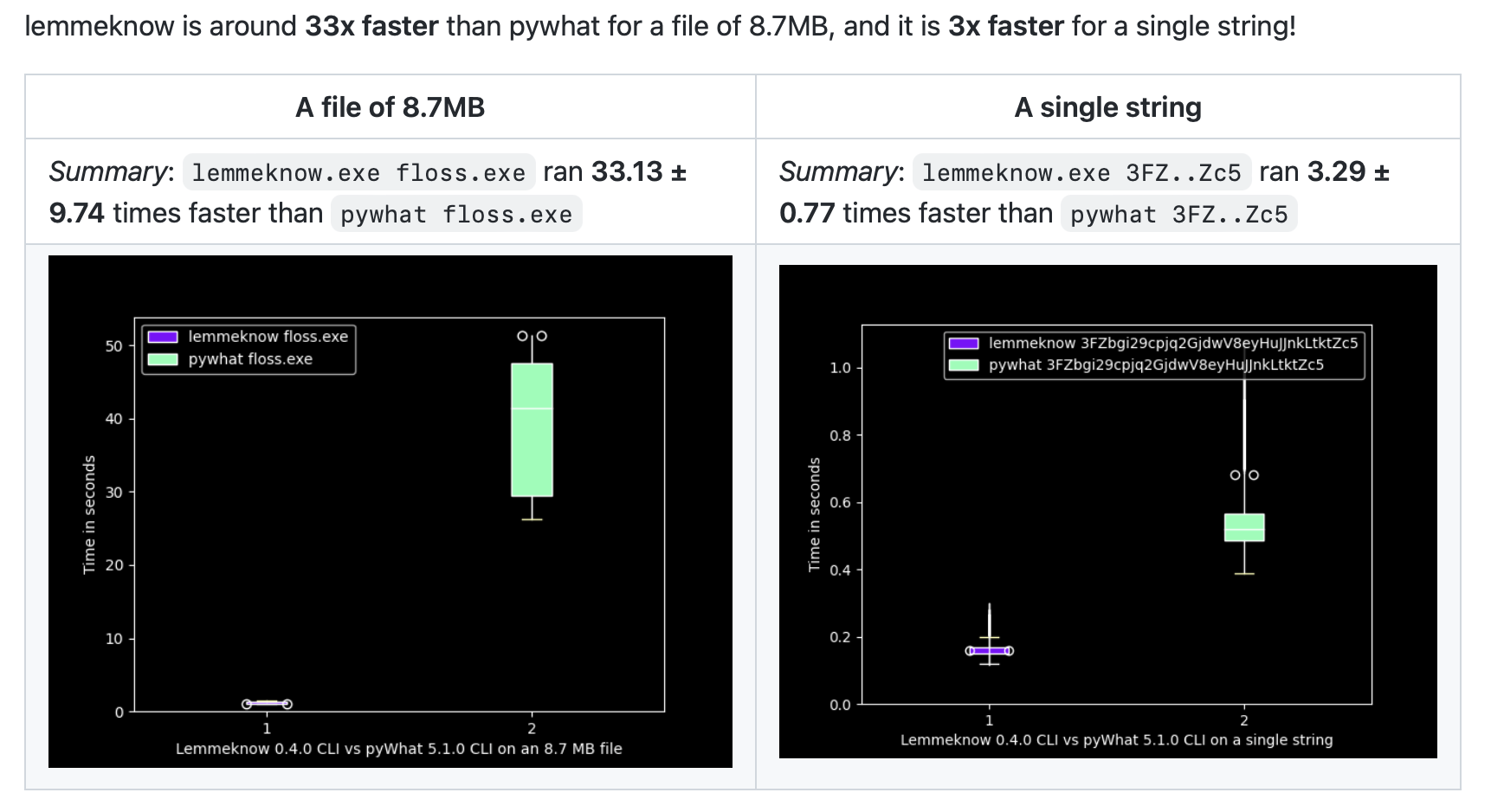
모든 후보 평문은 또한 [pyWhat](https://github.com/bee-san/pyWhat)의 Rust 포팅인 [LemmeKnow](https://github.com/swanandx/lemmeknow)를 거치며, 이는 120개 이상의 형식을 인식합니다. 따라서 Ciphey는 단순히 문자열을 디코딩하는 것이 아니라 그것이 무엇인지 알려줍니다: `mount` 또는 `sshpass` 명령의 비밀번호, TOTP 시크릿, GitHub 토큰 또는 Stripe 키, IP 또는 MAC 주소, 이메일 주소 또는 URL, 암호화폐 지갑, AWS ARN, JSON 또는 모든 형식의 CTF 플래그(`flag{…}`, `picoCTF{…}`, `DUCTF{…}`) 등입니다. 문자열에 어떤 문자가 있는지와 길이만 확인하는 LemmeKnow 패턴(예: 카드 및 전화번호)은 무시됩니다: 디코더 쓰레기 값이 항상 이런 패턴에 매칭되기 때문입니다.

```console
$ ciphey -t '3139322e3136382e302e31'
🕵️ I think the plaintext is Internet Protocol (IP) Address Version 4.
Possible plaintext: '192.168.0.1' (y/N):
```

### 🎯 Crib 및 정규식 모드

<a href="https://cdn.jsdelivr.net/gh/bee-san/Ciphey@d41d19946234477346fede14dadf8c351cc469e6/media/tui-video/out/crib.mp4"><img src="https://assets.kitploit.com/production/public/readmes/673/09c2bd5e4f4bf82d39a594ac92dbaefdc1546878abc64d4995bbd6484e8ee9bf/0bbe6aaae2adda71b0043dcc7d134c497722dfe5cf94815f5055e589162b27b3-display-v1.webp" alt="터미널에서 Base64 문자열에 대해 -r 'picoCTF\{' 옵션과 함께 ciphey -t를 실행합니다. Ciphey는 'Regex matched: picoCTF\{'를 보고하고, 'picoCTF{b4s3_64_1s_fun}'에 대해 질문한 뒤, Base64로 디코딩된 평문으로 출력합니다."></a>

<sub>▶ <a href="https://cdn.jsdelivr.net/gh/bee-san/Ciphey@d41d19946234477346fede14dadf8c351cc469e6/media/tui-video/out/crib.mp4">클립 보기</a> (14.5초)</sub>

정답의 일부(플래그 형식, 반드시 포함되어야 하는 단어, 시작 부분 등)를 알고 있다면 `-r`을 사용해 정규식으로 Ciphey에 알려주세요. 다른 검사기들은 꺼지고 일치하는 텍스트만 허용됩니다. 이렇게 하면 다른 검사기들이 지나칠 평문을 찾아내거나, 여러 후보가 평문처럼 보일 때 원하는 하나에서 멈출 수 있습니다. `-r 'picoCTF\{'`를 사용하면 `picoCTF{…}` 플래그만이 검색을 종료시킵니다.

`--wordlist words.txt`는 정확한 일치에 대해 같은 방식으로 작동합니다. 파일의 한 줄과 일치하는 후보는 평문으로 간주됩니다.

### 🎨 당신의 터미널을 위해 만들어졌습니다

첫 실행 설정에서 색상 테마(Capptucin, Darcula, GirlyPop, 기본값 또는 직접 지정한 RGB 값)를 선택하고, 각 평문에 대해 질문을 받을지 아니면 마지막에 후보 목록을 받을지 선택할 수 있습니다. [투어 영상](https://cdn.jsdelivr.net/gh/bee-san/Ciphey@d41d19946234477346fede14dadf8c351cc469e6/media/tui-video/out/ciphey-tui-promo.mp4)의 0:32부터 확인할 수 있습니다. 모든 설정은 `~/.ciphey/config.toml`에 저장되며, 나중에 편집할 수 있습니다.

### 📚 라이브러리 우선

`ciphey` 바이너리는 `ciphey` 크레이트를 감싸는 얇은 래퍼입니다. [Discord 봇](https://github.com/bee-san/discord-bot)도 이를 사용하며, 여러분의 코드에서도 사용할 수 있습니다.

## 라이브러리로 사용하기

`perform_cracking`은 `ciphey` 바이너리처럼 전체 검색을 실행합니다:

```rust
use ciphey::config::Config;
use ciphey::{perform_cracking, CipheyError};

fn main() {
    let mut config = Config::default();
    config.timeout = 5; // seconds
    config.human_checker_on = false; // never prompt on stdin
    config.api_mode = true; // don't print progress to stdout
    // config.regex = Some(r"flag\{".to_string()); // only accept plaintext matching a crib

    match perform_cracking("aGVsbG8gdGhlcmUgZ2VuZXJhbA==", config) {
        Ok(Some(result)) => {
            let path: Vec<&str> = result.path.iter().map(|step| step.decoder).collect();
            println!("{} (via {})", result.text[0], path.join(" → "));
        }
        Ok(None) => println!("no plaintext found"),
        Err(CipheyError::Timeout { secs }) => println!("gave up after {secs}s"),
        Err(e) => eprintln!("error: {e}"),
    }
}
```

`hello there general (via Base64)`를 출력합니다.

### 단일 디코더

무엇을 보고 있는지 안다면 해당 디코더를 호출하세요. 각 디코더는 `ciphey::decoders`의 함수입니다. 인코딩은 디코딩된 결과를 반환하고, 암호는 크래킹되며, 키를 받는 디코더는 여러분의 키로 복호화할 수 있습니다.

```rust
use ciphey::decoders;

let decoded = decoders::base64("aGVsbG8gd29ybGQ=");
assert_eq!(decoded.candidates[0].text, "hello world");

// No key: Ciphey tries every shift and marks the one its checks accept
let cracked = decoders::caesar("Uryyb jbeyq");
let plaintext = cracked.plaintext().expect("a shift reads as English");
assert_eq!(plaintext.text, "Hello world");
assert_eq!(plaintext.key.as_deref(), Some("13"));

// With the key
let decrypted = decoders::vigenere_with_key("Rijvs uyvjn", "KEY")?;
assert_eq!(decrypted.candidates[0].text, "Hello world");
```

런타임에 디코더를 선택하려면 `decode_with`에 디코더의 이름이나 별칭을 전달하며, `list_decoders`는 모든 디코더를 별칭, 태그, 그리고 각 디코더가 받는 키와 함께 나열합니다:

```rust
use ciphey::{decode_with, list_decoders, DecodeOptions};

let cracked = decode_with("rot13", "Uryyb jbeyq", &DecodeOptions::default())?;
let decrypted = decode_with("affine", "IHHWVC SWFRCP", &DecodeOptions::with_key("a=5, b=8"))?;

for decoder in list_decoders() {
    println!("{}: {}", decoder.name, decoder.key_format.unwrap_or("no key"));
}
```

아무것도 필터링되지 않는다. 디코더가 검색에 넘겨주는 것을 그대로 받는다. Ciphey의 평문 검사가 받아들이는 후보가 먼저 오고 `detection`을 함께 가진다. 만약 어느 것도 받아들이지 않으면, 표시 없이 디코딩 결과를 받아 판단하게 된다(예를 들어 25가지 Caesar 이동 모두. 다만 키가 많은 크래커는 최선의 몇 개만 넘긴다).

### 평문인가?

`detect_plaintext`는 검색이 사용하는 검사들(정규식 크리브, 단어 목록, LemmeKnow, JSON, 흔한 비밀번호, 영어 및 코드)을 실행하고, 어느 검사가 텍스트를 받아들였는지, 그리고 그것을 무엇으로 간주했는지 알려준다:

```rust
use ciphey::detection::{detect_plaintext, CheckerKind, DetectOptions, Sensitivity};

let found = detect_plaintext("192.168.0.1", &DetectOptions::default()).unwrap();
assert_eq!(found.checker, CheckerKind::LemmeKnow);
assert_eq!(found.description, "Internet Protocol (IP) Address Version 4");
assert_eq!(found.confidence, Some(0.7)); // the format's rarity in pyWhat

// Pick the checkers and how strict the English checker is, or give a crib
let english_only = DetectOptions::new()
    .checkers([CheckerKind::English])
    .sensitivity(Sensitivity::Low);
let crib = DetectOptions::new().regex(r"^flag\{")?;
```

`cargo run --example decode`는 이 모든 것을 둘러보며, `cargo run --example decode -- list`는 디코더 목록을 나열합니다.

- `perform_cracking`은 `master`에서 `Result<Option<DecoderResult>, CipheyError>`를 반환하며([#915](https://github.com/bee-san/Ciphey/pull/915)), 단일 디코더 및 탐지 함수는 현재 `master`에만 있습니다. crates.io의 마지막 릴리스(0.12.0)는 여전히 `Option<DecoderResult>`를 반환하므로, 다음 릴리스 전까지는 git 버전을 사용하세요: `ciphey = { git = "https://github.com/bee-san/Ciphey" }`.
- 설정은 프로세스 전역입니다. 첫 번째 호출의 `Config`가 이후 모든 호출에 사용되며, 단일 디코더도 이를 따릅니다(`regex` 크립, 단어 목록). 이들은 절대 프롬프트를 표시하지 않습니다.
- API는 [docs.rs](https://docs.rs/ciphey)에 문서화되어 있습니다.

## MCP 서버 (AI 어시스턴트)

<a href="https://cdn.jsdelivr.net/gh/bee-san/Ciphey@5aa9760b2912611755d037c01b9d2ed14fd3bf81/media/mcp-video/out/ciphey-mcp.mp4"><img src="https://assets.kitploit.com/production/public/readmes/673/67404d20c9782de7baa1586f0240cde7a50e100c9b6761f080c2104f94242d1d/dd2d9b2e27182c74582e74bca4cebf9ca58a72d35ff166f76ce1dc167f9b0b29-display-v1.webp" alt="AI 어시스턴트(Kiro CLI)가 CTF 챌린지의 Base64 문자열을 디코딩하도록 요청받습니다. MCP를 통해 ciphey의 decode 도구를 호출하면, 평문 flag{ciphey_speaks_mcp}와 사용된 디코더(Base64 → Hexadecimal → caesar with key 13)를 반환합니다. 그런 다음 어시스턴트가 플래그로 응답합니다. 30초 영상을 보려면 클릭하세요."></a>

<sub>▶ <a href="https://cdn.jsdelivr.net/gh/bee-san/Ciphey@5aa9760b2912611755d037c01b9d2ed14fd3bf81/media/mcp-video/out/ciphey-mcp.mp4">영상 보기</a> (29.5초). 채팅은 ciphey-mcp를 사용한 실제 Kiro CLI 세션을 재생합니다.</sub>

`ciphey-mcp`는 [Model Context Protocol](https://modelcontextprotocol.io) 서버로, Claude Desktop 및 Kiro와 같은 AI 어시스턴트가 Ciphey로 텍스트를 디코딩할 수 있게 합니다. 이는 `mcp` 기능 뒤에 있으므로 일반 `ciphey` 빌드에는 포함되지 않습니다:

```sh
cargo install ciphey --features mcp --bin ciphey-mcp
# or, from a clone of this repository:
cargo install --path . --features mcp --bin ciphey-mcp
```

`mcp` 기능은 아직 crates.io 릴리스에 포함되지 않았으므로(0.12.0이 최신 버전), 다음 릴리스 전까지는 git에서 설치하세요: `cargo install --git https://github.com/bee-san/Ciphey ciphey --features mcp --bin ciphey-mcp`.

이 기능은 네 가지 도구를 제공합니다:

- `decode`는 텍스트가 어떻게 인코딩되었는지 모를 때 `text`를 디코딩하고, `plaintext`와 사용된 디코더의 `path`를 반환하며, Caesar 시프트와 같은 키도 포함합니다. 선택적 인자: `timeout_secs`(1~30, 기본값 10)와 평문이 일치해야 하는 크립(crib)인 `regex`(예: `flag\{`).
- `decode_with`는 선택한 디코더 하나를 `text`에 실행합니다: `decoder`의 id, 이름 또는 별칭(`base64`, `rot13`, `vigenere`, `xor_single_byte`, ...)을 지정하세요. `key` 없이 실행하면 텍스트를 디코딩하거나 모든 키를 시도하여 암호를 크래킹하고, 키를 지정하면 키를 받는 암호에 대해 복호화합니다(`13`, `LEMON`, `a=5, b=8`, `rails=3, offset=1`). 모든 후보 디코딩 결과와 각 결과가 Ciphey의 평문 검사를 통과하는지 여부를 반환합니다. `regex`는 `decode`와 동일하게 동작합니다.
- `detect_plaintext`는 디코딩 없이 `text`가 이미 평문인지 확인하고, 어떤 검사기가 이를 승인했는지, 무엇으로 판단했는지, 그리고 LemmeKnow의 형식인 경우 얼마나 확신하는지를 알려줍니다. 선택적 인자: `checkers`(`lemmeknow`, `json`, `password`, `english`, `code` 중 선택, 기본값은 다섯 가지 모두), 영어 검사기의 `sensitivity`(`low`, `medium`, `high`)와 `regex` 크립.
- `list_decoders`는 Ciphey가 지원하는 인코딩과 암호를 나열하며, `decode_with`가 받는 id와 별칭, 그리고 키를 받는 각 암호의 키 형식을 보여줍니다.

`decode` 결과는 다음과 같습니다. `status`는 `decoded`, `not_found` 또는 `timed_out`입니다.

```json
{
  "status": "decoded",
  "plaintext": "hello there general",
  "path": [{ "decoder": "Base64", "key": null }],
  "checker": "English Checker",
  "timeout_secs": 10
}
```

`decode_with`에 `{"decoder": "rot13", "text": "Uryyb jbeyq"}`를 지정하면 아래와 같은 결과가 나옵니다. `status`는 `plaintext_found`, `no_plaintext`(어떤 후보도 검사를 통과하지 못했으므로 직접 판단해야 함) 또는 `no_candidates`(텍스트가 해당 디코더의 형식이 아님)입니다. 결과에는 최대 100개의 후보와 그 텍스트의 최대 65,536자가 포함되며, `total_candidates`는 후보가 몇 개였는지를 나타내고, 잘린 후보에는 `truncated`가 설정됩니다.

```json
{
  "decoder": "caesar",
  "status": "plaintext_found",
  "candidates": [
    {
      "text": "Hello world",
      "truncated": false,
      "key": "13",
      "is_plaintext": true,
      "detection": { "checker": "english", "description": "Words", "confidence": null }
    }
  ],
  "total_candidates": 1
}
```

`detect_plaintext`에 `{"text": "192.168.0.1"}`를 전달하면 다음이 반환됩니다:

```json
{
  "is_plaintext": true,
  "detection": {
    "checker": "lemmeknow",
    "description": "Internet Protocol (IP) Address Version 4",
    "confidence": 0.7
  },
  "checkers": ["lemmeknow", "json", "password", "english", "code"]
}
```

`list_decoders`를 제외한 모든 호출은 자체적인 단명 프로세스에서 실행됩니다. 입력은 65,536자(키 포함)로, 정규식은 1,000자로 제한됩니다. `decode`는 최대 30초 동안 검색하며 최대 1 GiB의 메모리를 사용할 수 있습니다. `decode_with` 호출은 30초, `detect_plaintext` 호출은 10초 동안 실행될 수 있으며 각각 256 MiB를 사용합니다. 최대 두 개의 decode와 네 개의 기타 호출이 동시에 실행됩니다. 서버는 `~/.ciphey`를 읽거나 쓰지 않으므로 구성 파일도 캐시도 없습니다.

### Claude Desktop

Settings → Developer → Edit Config를 열고 `claude_desktop_config.json`에 서버를 추가한 다음 Claude Desktop을 재시작하세요. Claude Desktop은 셸의 `PATH`를 인식하지 못할 수 있으므로 `which ciphey-mcp`가 출력하는 전체 경로를 사용하세요(Windows에서는 `where ciphey-mcp`, 예: `C:\\Users\\you\\.cargo\\bin\\ciphey-mcp.exe`).

```json
{
  "mcpServers": {
    "ciphey": {
      "command": "/Users/you/.cargo/bin/ciphey-mcp"
    }
  }
}
```

### Kiro

```sh
kiro-cli mcp add --name ciphey --command ciphey-mcp
```

또는 아래 항목을 `~/.kiro/settings/mcp.json`(모든 프로젝트) 또는 `.kiro/settings/mcp.json`(단일 프로젝트)에 추가하세요.

### 기타 클라이언트

대부분의 MCP 클라이언트는 동일한 `mcpServers` 항목을 사용합니다. 즉, 인수 없이 `ciphey-mcp`로 시작되는 stdio 서버입니다.

```json
{
  "mcpServers": {
    "ciphey": {
      "command": "ciphey-mcp",
      "args": []
    }
  }
}
```

## 알아두면 좋은 점

- 평문 탐지는 완벽하지 않습니다. 영어가 아닌 텍스트는 종종 놓치며, 거의 맞는 키(특히 Vigenère)도 영어로 통과할 수 있는 텍스트를 생성할 수 있습니다. [#1031](https://github.com/bee-san/Ciphey/issues/1031)에 평가 결과가 있습니다. 답에 대해 조금이라도 알고 있다면 crib(`-r`)나 단어 목록이 큰 도움이 됩니다.
- 접두사가 플래그 단어가 아닌 플래그(`…CTF{…}`나 `flag{…}`가 아닌 `SEKAI{…}`)는 그 자체의 Caesar 시프트와 동일하게 보이므로, Caesar, ROT13 또는 Atbash에서는 Ciphey가 어느 것이 맞는지 구별할 수 없습니다. 형식을 crib로 제공하세요: `-r 'SEKAI\{'`.
- 캐시된 답이 틀렸다면 `~/.ciphey/database.sqlite`를 삭제하여 캐시를 지우세요.
- 막혔다면 [Discord](http://discord.skerritt.blog)의 `#coded-messages`에서 질문하세요.

## 문서

- [docs.rs의 API 문서](https://docs.rs/ciphey)
- [`docs/` 폴더](https://github.com/bee-san/ciphey/blob/master/docs), 여기에는 [개요](https://github.com/bee-san/ciphey/blob/master/docs/ares_overview.md), [아키텍처](https://github.com/bee-san/ciphey/blob/master/docs/ares_architecture.md), [A* 검색 작동 방식](https://github.com/bee-san/ciphey/blob/master/docs/astar.md), [평문 탐지 방식](https://github.com/bee-san/ciphey/blob/master/docs/plaintext-detection.md)이 포함됩니다
- Notion의 [Ciphey 2 문서](https://broadleaf-angora-7db.notion.site/Ciphey2-32d5eea5d38b40c5b95a9442b4425710)
- Rust 재작성에 관한 블로그 글 [Introducing Ares](https://skerritt.blog/introducing-ares/) (Ciphey가 되기 전에는 Ares라고 불렸습니다)

## 기여

버그 보고, 아이디어, 풀 리퀘스트는 [이슈](https://github.com/bee-san/Ciphey/issues)에서 환영합니다. 새로운 디코더는 좋은 첫 기여입니다: [#1030](https://github.com/bee-san/Ciphey/issues/1030)에서 하나를 고르고 [`src/decoders/`](https://github.com/bee-san/ciphey/blob/master/src/decoders)에 있는 기존 디코더의 형태를 복사하세요. [프로젝트를 후원](https://github.com/sponsors/bee-san)할 수도 있습니다.

<a href="https://github.com/bee-san/Ciphey/graphs/contributors"><img src="https://contrib.rocks/image?repo=bee-san/Ciphey" alt="Ciphey에 기여한 사람들의 아바타"></a>

## 크레딧

- [@swanandx](https://github.com/swanandx)의 [LemmeKnow](https://github.com/swanandx/lemmeknow)는 Ciphey가 찾은 것을 식별하고, [gibberish-or-not](https://github.com/bee-san/gibberish-or-not)은 그것이 영어인지 판단합니다.
- [Rayon](https://github.com/rayon-rs/rayon)은 디코더를 병렬로 실행합니다.
- Ciphey는 Python 프로젝트로 시작했습니다; Python Ciphey 5.x는 여전히 [PyPI](https://pypi.org/project/ciphey/)에 있습니다. 작업해 주신 모든 분들께 감사드립니다.
- 동영상은 실제 터미널 녹화를 바탕으로 [HyperFrames](https://hyperframes.heygen.com/)로 제작되었습니다. 소스, 녹화본, 빌드 스크립트는 `media/readme-videos` 브랜치의 [`media/tui-video`](https://github.com/bee-san/Ciphey/tree/media/readme-videos/media/tui-video)에 있습니다.

## AI 사용

우리는 AI를 두 가지 용도로 사용합니다:

1. TUI는 전적으로 vibe coding으로 만들어졌습니다.
2. 저는 AI가 세상의 모든 CTF 챌린지를 조사하는 데 수 시간을 쓰게 했습니다. AI는 15,071개의 CTF 목록을 만들었습니다. 그런 다음 모든 CTF를 하나하나 살펴보며 라이트업을 찾았습니다. 그 라이트업에서 인코딩/디코딩과 관련된 모든 것을 찾았습니다. 그런 다음 그것들로 테스트를 만들었습니다. 이를 통해 테스트 커버리지를 늘리고 모든 CTF 인코딩/디코딩 챌린지가 이 도구로 풀릴 수 있도록 보장할 수 있었습니다.

## 라이선스

MIT. [LICENSE](https://github.com/bee-san/ciphey/blob/master/LICENSE)를 참조하세요.





