 azure/azure-sentinel
클라우드 네이티브 SIEM으로, 전체 엔터프라이즈를 위한 지능형 보안 분석 기능을 제공합니다.

통합된 Microsoft Sentinel 및 Microsoft 365 Defender 리포지토리에 오신 것을 환영합니다! 이 리포지토리에는 즉시 사용 가능한 탐지, 탐색 쿼리, 헌팅 쿼리, 통합 문서, 플레이북 등이 포함되어 있어 Microsoft Sentinel을 빠르게 시작하고 환경을 보호하며 위협을 헌팅하는 데 도움이 되는 보안 콘텐츠를 제공합니다. 헌팅 쿼리에는 Microsoft 365 Defender 및 Microsoft Sentinel의 고급 헌팅 시나리오를 위한 Microsoft 365 Defender 헌팅 쿼리도 포함됩니다. 또한 Microsoft Sentinel에 온보딩할 때 보고 싶은 샘플이나 리소스에 대해 이슈를 제출할 수 있습니다. 이 리포지토리는 기여를 환영하며, 시작하려면 이 리포지토리의 wiki를 참조하세요. 질문이나 피드백은 [email protected]으로 문의하세요.
귀하의 피드백을 소중히 생각합니다. 질문이나 피드백을 전달할 수 있는 몇 가지 채널은 다음과 같습니다.
이 프로젝트는 기여와 제안을 환영합니다. 대부분의 기여는 귀하가 기여를 사용할 권리가 있으며 실제로 사용할 권리를 부여한다는 것을 선언하는 기여자 라이선스 계약(CLA)에 동의해야 합니다. 자세한 내용은 https://cla.microsoft.com을 방문하세요.
참고: 이 리포지토리에 처음 기여하는 경우, 복제하기 전에 일반 GitHub 리포지토리 포크 가이드 또는 Sentinel 리포지토리 관련 단계를 참조하세요.
다음 방법을 통해 완전히 새롭거나 업데이트된 기여를 제출하세요.
PR 검사의 일환으로 YAML 구조의 필수 부분이 모두 포함되어 있는지 확인하는 구조 유효성 검사를 실행합니다. 탐지의 경우 반드시 포함해야 하는 새 섹션이 있습니다. 자세한 내용은 기여 지침을 참조하세요. 이 섹션 또는 다른 필수 섹션이 포함되지 않으면 아래와 같은 유효성 검사 오류가 발생합니다. 예시는 YAML에 entityMappings 섹션이 누락된 경우입니다.
A total of 1 test files matched the specified pattern.
[xUnit.net 00:00:00.95]     Kqlvalidations.Tests.DetectionTemplateStructureValidationTests.Validate_DetectionTemplates_HaveValidTemplateStructure(detectionsYamlFileName: "ExcessiveBlockedTrafficGeneratedbyUser.yaml") [FAIL]
  X Kqlvalidations.Tests.DetectionTemplateStructureValidationTests.Validate_DetectionTemplates_HaveValidTemplateStructure(detectionsYamlFileName: "ExcessiveBlockedTrafficGeneratedbyUser.yaml") [104ms]
  Error Message:
   Expected object to be <null>, but found System.ComponentModel.DataAnnotations.ValidationException with message "An old mapping for entity 'AccountCustomEntity' does not have a matching new mapping entry."
PR 검사의 일환으로 템플릿에 정의된 KQL 쿼리의 구문 유효성 검사를 실행합니다. 이 검사가 실패하면 PR의 checks 탭에서 오류 링크를 클릭하여 Azure Pipeline으로 이동하세요.
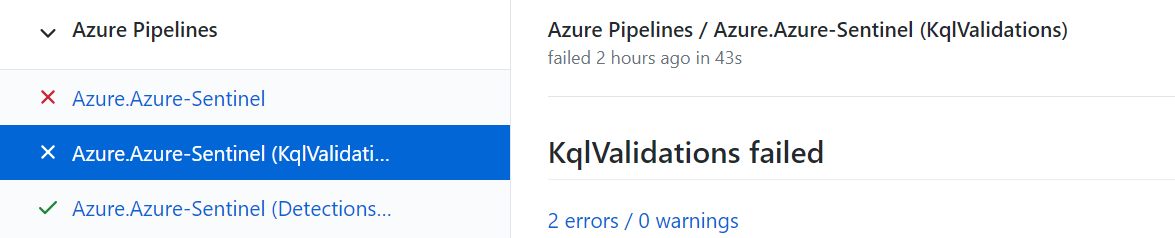 파이프라인에서 어떤 테스트가 실패했고 원인이 무엇인지 확인할 수 있습니다.
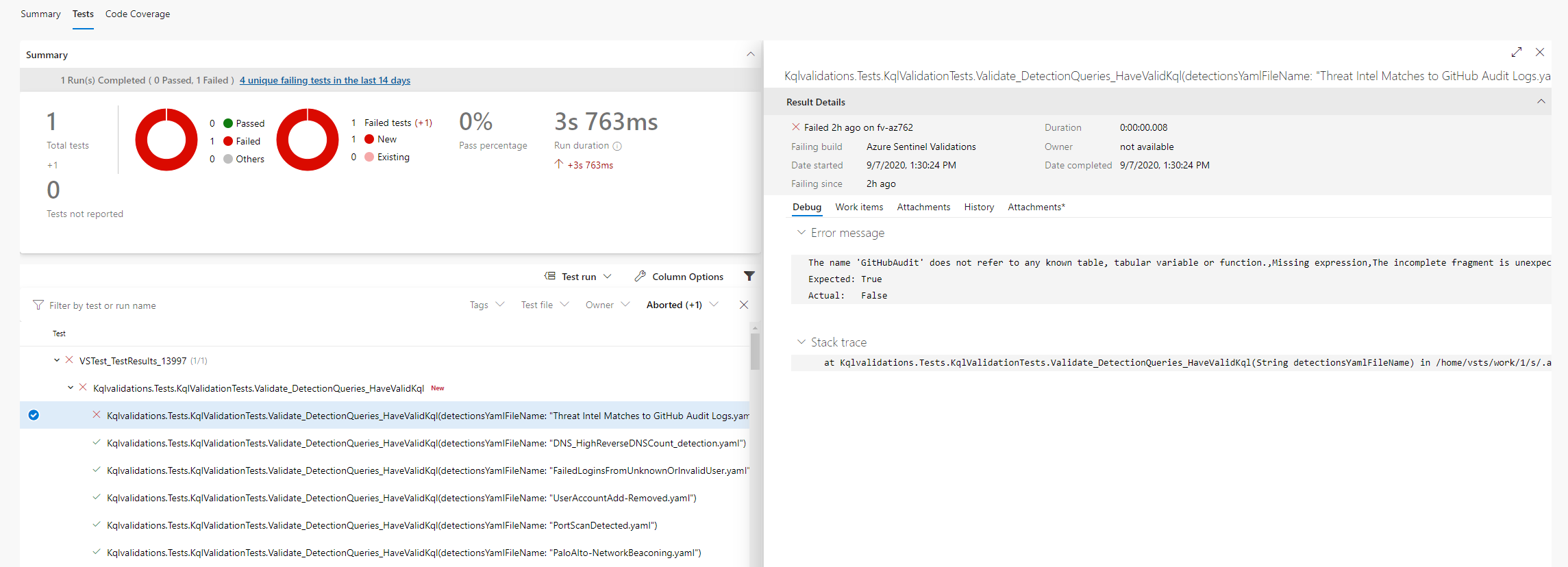
예시 오류 메시지:
A total of 1 test files matched the specified pattern.
[xUnit.net 00:00:01.81]     Kqlvalidations.Tests.KqlValidationTests.Validate_DetectionQueries_HaveValidKql(detectionsYamlFileName: "ExcessiveBlockedTrafficGeneratedbyUser.yaml") [FAIL]
  X Kqlvalidations.Tests.KqlValidationTests.Validate_DetectionQueries_HaveValidKql(detectionsYamlFileName: "ExcessiveBlockedTrafficGeneratedbyUser.yaml") [21ms]
  Error Message:
   Template Id:fa0ab69c-7124-4f62-acdd-61017cf6ce89 is not valid Errors:The name 'SymantecEndpointProtection' does not refer to any known table, tabular variable or function., Code: 'KS204', Severity: 'Error', Location: '67..93',The name 'SymantecEndpointProtection' does not refer to any known table, tabular variable or function., Code: 'KS204', Severity: 'Error', Location: '289..315'
사용자 지정 로그 테이블(기본적으로 모든 작업 영역에 정의되지 않은 테이블)을 사용하는 경우 테이블 스키마가 Azure-Sentinel\.script\tests\KqlvalidationsTests\CustomTables 폴더의 json 파일에 정의되어 있는지 확인하세요.
tablexyz.json 테이블 예시
{
  "Name": "tablexyz",
  "Properties": [
    {
      "Name": "SomeDateTimeColumn",
      "Type": "DateTime"
    },
    {
      "Name": "SomeStringColumn",
      "Type": "String"
    },
    {
      "Name": "SomeDynamicColumn",
      "Type": "Dynamic"
    }
  ]
}
Pull Request를 제출하기 전에 로컬 컴퓨터에서 KQL 유효성 검사를 실행하려면:
Azure-Sentinel\\.script\tests\KqlvalidationsTests\로 이동dotnet test 실행출력 예시 (Ubuntu):
Welcome to .NET Core 3.1!
----------------------
SDK Version: 3.1.403

Telemetry
---------
The .NET Core tools collect usage data in order to help us improve your experience. The data is anonymous. It is collected by Microsoft and shared with the community. You can opt-out of telemetry by setting the DOTNET_CLI_TELEMETRY_OPTOUT environment variable to '1' or 'true' using your favorite shell.

Read more about .NET Core CLI Tools telemetry: https://aka.ms/dotnet-cli-telemetry

----------------
Explore documentation: https://aka.ms/dotnet-docs
Report issues and find source on GitHub: https://github.com/dotnet/core
Find out what's new: https://aka.ms/dotnet-whats-new
Learn about the installed HTTPS developer cert: https://aka.ms/aspnet-core-https
Use 'dotnet --help' to see available commands or visit: https://aka.ms/dotnet-cli-docs
Write your first app: https://aka.ms/first-net-core-app
--------------------------------------------------------------------------------------
Test run for /mnt/c/git/Azure-Sentinel/.script/tests/KqlvalidationsTests/bin/Debug/netcoreapp3.1/Kqlvalidations.Tests.dll(.NETCoreApp,Version=v3.1)
Microsoft (R) Test Execution Command Line Tool Version 16.7.0
Copyright (c) Microsoft Corporation.  All rights reserved.

Starting test execution, please wait...
