 almet/signal-without-smartphone
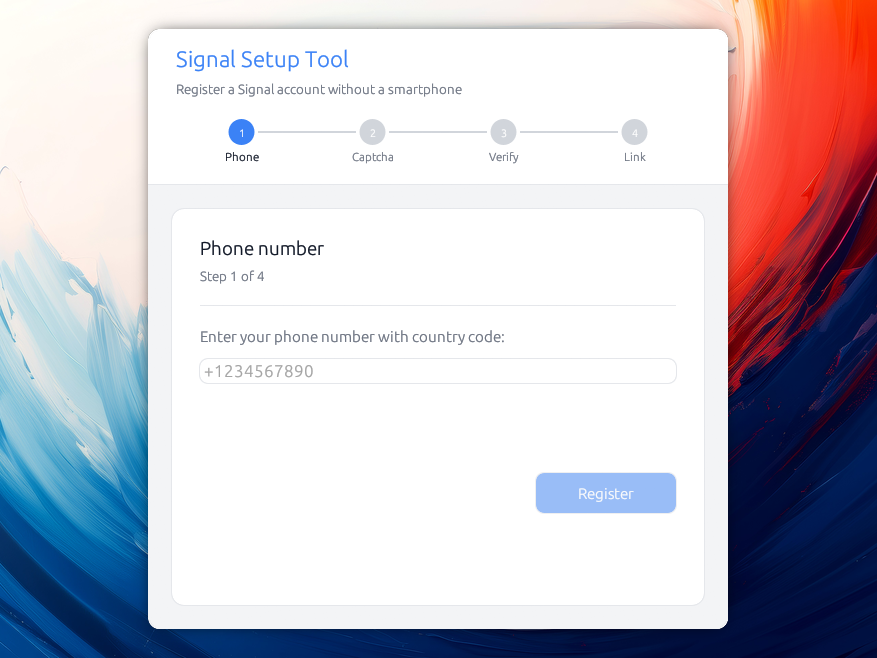
스마트폰 없이 Signal 계정을 등록하고 Signal Desktop을 연결할 수 있는 데스크톱 애플리케이션으로, Signal의 암호화 프로토콜을 사용하여 안전한 장치 프로비저닝을 제공합니다.


스마트폰 없이 Signal 계정을 등록하고 Signal Desktop과 연동하는 데스크톱 애플리케이션입니다.
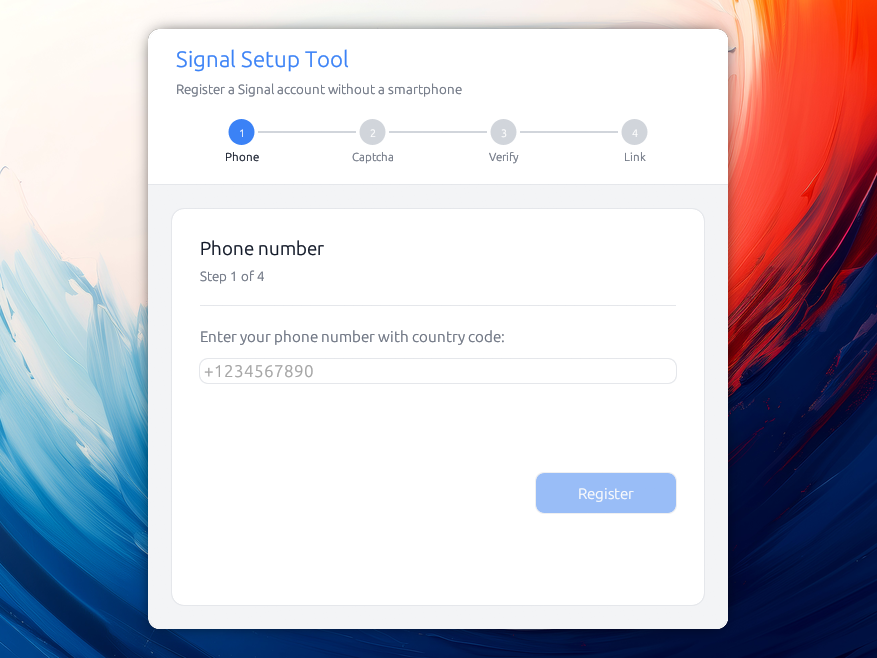
이 유틸리티는 스마트폰이 필요 없지만, 설정 단계에서 SMS 메시지를 받을 수 있는 방법은 여전히 필요합니다. Signal은 최근 번호 없는 계정을 도입했지만, 여전히 Android와 Google Play 서비스가 필요합니다. 향후 대체 결제 옵션을 제공할 가능성이 높습니다.
최신 릴리스를 받아보세요!
이 도구가 흥미로울 수 있는 이유는 여러 가지입니다:
Signal 대화의 보안은 설치된 기기의 보안만큼만 안전합니다:
기기가 잠겨 있지 않은 상태에서 분실되거나 도난당하면, 누군가 기기의 메시지를 읽을 수 있습니다. 마찬가지로, 법 집행 기관은 압수된 기기에 침입하기 위해 포렌식 도구를 사용하는 것으로 알려져 있으며, 이를 통해 메시지를 포함한 기기의 모든 내용을 읽을 수 있습니다.
어떤 사람들은 스마트폰이 없으며, 그들도 Signal을 사용할 수 있어야 합니다 :-)
이 도구는 계정의 기본 기기로 등록하고 Signal Desktop을 보조 기기로 연결합니다. Signal은 계정당 최대 5개의 연결된 기기를 허용하며, 이 도구는 그 모두를 연결하는 데 도움을 줄 수 있습니다. 예를 들어 동료와 Signal 계정을 공유하고 싶을 때 유용합니다.
현재 Signal Desktop은 계정을 설정하려면 전화번호와 스마트폰이 필요합니다. 이는 향후 변경될 수 있지만, 그때까지는 이 도구를 사용할 수 있습니다.
"질문하신 내용은 현재 Signal에 존재하는 전화번호 가입 방식에 관한 것이라고 생각합니다. 그것은 올해 말쯤 전화번호 없이 가입할 수 있는 방법을 추가하기를 바라며 검토하고 있는 사항입니다. [...]"
— Ehren Kret, Signal CTO, 2026년 7월 20일
릴리스 페이지에서 시스템에 맞는 파일을 다운로드하세요:
.dmg를 열고 Signal Setup을 Applications로 드래그하세요.AppImage: 실행 권한을 부여하고(chmod +x Signal_Setup-*.AppImage) 실행하세요. 원하시면 일반 signal-setup-linux-* 바이너리도 배포됩니다.릴리스는 유료 개발자 인증서(macOS의 경우 연 $99 USD, Windows는 그 이상)로 서명되지 않았기 때문에, 설치 후 시스템이 경고를 표시합니다:
macOS는 "확인되지 않은 개발자이기 때문에 열 수 없습니다"라고 표시합니다. 앱을 마우스 오른쪽 버튼으로 클릭하고 열기를 선택한 후 확인하세요. 이 작업은 한 번만 하면 됩니다. 앱이 "손상되었습니다"라고 보고하면 다운로드 격리 플래그를 제거하세요: xattr -dr com.apple.quarantine "/Applications/Signal Setup.app".
Windows SmartScreen은 "Windows에서 PC를 보호했습니다"라고 표시합니다. 추가 정보를 클릭한 다음 실행을 클릭하세요.
cargo build --release
./target/release/signal-setup
이 프로젝트는 두 개의 크레이트로 구성된 Cargo 워크스페이스입니다: signal-setup-core(Signal 등록 및 기기 연결 로직)와 signal-setup(이를 의존하는 데스크톱 GUI)입니다. 워크스페이스를 빌드하면 위의 signal-setup 바이너리가 생성됩니다.
Linux에서만 GPU/디스플레이를 위해 몇 가지 시스템 라이브러리가 유용합니다:
# Ubuntu / Debian
sudo apt install libxcb-render0-dev libxcb-shape0-dev libxcb-xfixes0-dev \
libxkbcommon-dev libssl-dev protobuf-compiler

# Fedora
sudo dnf install libxcb-devel libxkbcommon-devel openssl-devel protobuf-compiler

# Arch
sudo pacman -S libxcb libxkbcommon openssl protobuf
모든 계정은 "관리" 화면에서 키 파일로 내보낼 수 있습니다:
signal-account-<number>.json. 이 파일에는 해당 계정의 기본 기기로 동작하는 데 필요한 모든 것이
포함되어 있으며, 사용자가 선택한 암호 문구로 암호화됩니다.
백업으로 보관하세요. 그러면 다른 기기로 가져올 수 있습니다!
키 파일에는 마스터 키도 포함되어 있는데, 이는 잠금이 만료되기를 기다리지 않고 번호를 재등록하는 데 유용합니다.
프로덕션 대신 Signal의 스테이징 환경을 대상으로 도구를 실행할 수 있으며, 이는 실제 계정을 위험에 빠뜨리지 않고 개발 및 테스트하는 데 유용합니다:
./target/release/signal-setup --staging
기기 연결 단계를 완료하려면 스테이징 서버에도 연결된 Signal Desktop 인스턴스가 필요합니다. 소스에서 Signal Desktop을 빌드하면 기본적으로 이렇게 됩니다:
git clone https://github.com/signalapp/Signal-Desktop.git
cd Signal-Desktop
pnpm install
pnpm start
SIGNAL_SETUP_DEBUG=1을 설정하면 Signal의 인증 API에 대한 모든 응답(상태 및 본문)이 터미널에 출력되며, 등록이 진행되지 않을 때 가장 먼저 확인해야 할 항목입니다.
가짜 데이터를 사용한 완전한 오프라인 테스트(서버 불필요)를 위한 --demo 플래그도 사용할 수 있습니다. 데모 모드에서는 인증 코드 000000이 기기 이전이 가능한 계정을, 111111이 등록이 잠긴 번호를 시뮬레이션합니다.
이와 같은 작업을 수행할 수 있는 다른 도구들도 있습니다. 예를 들어 AsamK의 훌륭한 signal-cli가 있지만, 아쉽게도 그래픽 사용자 인터페이스를 제공하지 않습니다. 이 도구의 이전 버전은 내부적으로 이를 사용했지만, 실행하려면 사용자가 JVM을 설치해야 했습니다.
대신 — 그리고 더 쉬울 것이라고 생각했기 때문에 — 이 기회를 활용해 Signal의 암호화를 깊이 파고들었습니다.
다음은 동작 방식에 대한 개략적인 설명입니다(이 애플리케이션은 기본 Signal 기기로 등록한 다음, Signal Desktop을 보조 기기로 연결합니다).
흐름은 다음과 같습니다:
%%{init: {'theme':'default', 'themeVariables': {'background':'#ffffff'}}}%%
sequenceDiagram
    actor User
    participant App as App
    participant Server as Signal Server
    participant Desktop as Signal Desktop
    participant Store as Disk + Keyring

    Note over App: Step 0: Welcome (if saved accounts)

    rect rgb(235,245,255)
    Note over User,Server: Phase 1: Request verification code
    User->>App: Step 1: enter phone (+1234567890)
    App->>Server: POST /v1/verification/session
    Server-->>App: session.id (+ captcha_required?)
    alt Captcha required
        Note over App: Step 2 shown
        User->>App: solve captcha, paste it
        App->>Server: POST .../session/{id}/code (sms)
    else No captcha
        App->>Server: POST .../session/{id}/code (sms)
    end
    Server-->>User: SMS verification code
    end

    rect rgb(235,255,235)
    Note over User,Server: Phase 2: Verify & register account
    User->>App: Step 3: enter 6-digit code
    App->>Server: PUT .../session/{id}/code {code}
    Note over App: Generate keys: ACI/PNI identity,<br/>signed pre-keys, Kyber PQ keys,<br/>master/profile keys, password
    App->>Server: POST /v1/registration (account attrs + keys)
    alt 409 Device transfer available
        Server-->>App: 409 / DeviceTransferAvailable
        Note over App: warn, retry skipping device transfer
    else 423 Registration locked
        Server-->>App: 423 / RegistrationLocked
        Note over App: ask for the account's key file
    else Success
        Server-->>App: registered
        App->>Server: PUT /v1/accounts/registration_lock (HMAC of master key)
        App->>Store: save metadata (disk) + secrets (keyring)
    end
    end

    rect rgb(255,245,235)
    Note over User,Desktop: Phase 3: Link Signal Desktop
    User->>App: Step 4: launch Desktop, "Link to existing device"
    Desktop-->>User: shows QR code
    User->>App: paste QR image / link
    App->>Server: GET /v1/devices/provisioning/code
    Server-->>App: verification_code
    Note over App: Build ProvisionMessage (identity keys,<br/>profile/master key, code) →<br/>ECDH + HKDF + AES-256-CBC + HMAC
    App->>Server: PUT /v1/provisioning/{ephemeral_id} (envelope)
    Server-->>Desktop: deliver envelope / register as device N
    loop Poll until a new device id shows up
        App->>Server: GET /v1/devices
    end
    loop For every linked device
        App->>Server: GET /v2/keys/{aci}/{device}
        Server-->>App: device pre-keys
    end
    Note over App: send_linked_device_sync():<br/>X3DH + Double Ratchet session per device,<br/>encrypt empty contacts SyncMessage
    App->>Server: PUT /v1/messages/{aci} (encrypted sync, all linked devices)
    Server-->>Desktop: SyncMessage / leaves "Syncing…"
    end

    App-->>User: Step 5 : 🎉 Setup complete
Signal Without Smartphone
Copyright (C) 2026 Alexis Métaireau

This program is free software: you can redistribute it and/or modify
it under the terms of the GNU Affero General Public License as published
by the Free Software Foundation, either version 3 of the License, or
(at your option) any later version.

This program is distributed in the hope that it will be useful,
but WITHOUT ANY WARRANTY; without even the implied warranty of
MERCHANTABILITY or FITNESS FOR A PARTICULAR PURPOSE.  See the
GNU Affero General Public License for more details.

You should have received a copy of the GNU Affero General Public License
along with this program.  If not, see <https://www.gnu.org/licenses/>.
