 ahmed-alnassif/androsh
AndroSH No-Root Multi-Distro Linux on Android via Shizuku/ADB - 전체 시스템 통합, proot 격리, Termux:X11 GUI를 갖춘 Arch, Fedora, Alpine, Debian, Ubuntu, Kali, Void, Manjaro, OpenSUSE, Chimera 실행

# AndroSH - 안드로이드에서 Linux 배포판 실행 (루트 불필요, ADB/Shizuku 기반)
<div align="center">
**안드로이드 기기에서 루트 없이 완전한 Linux 배포판을 실행하고 관리하세요.**
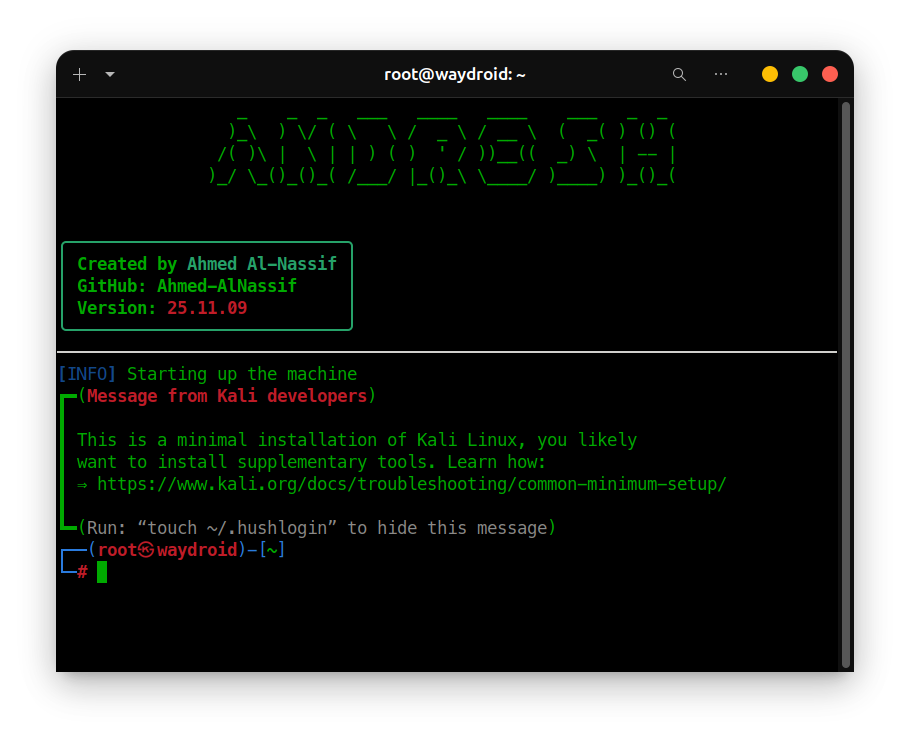
<img src="https://raw.githubusercontent.com/ahmed-alnassif/androsh/main/Assets/docs/AndroSH.png" alt="AndroSH" width="98%" />
[](https://github.com/ahmed-alnassif/AndroSH/actions/workflows/tests.yml)
[](https://github.com/ahmed-alnassif/AndroSH/stargazers)
[](https://github.com/ahmed-alnassif/AndroSH/releases)
[](https://python.org)
[](/LICENSE)
[](https://www.android.com)
<img src="https://assets.kitploit.com/production/public/readmes/9438/a4edb8815ebca0fde7738d96503897a680bcd0aaf4c21f1b329f30c3a56b6ec3.png" alt="AndroSH Mobile Showcase" width="90%" />
</div>
## 목차
- [빠른 시작](#빠른-시작)
- [기능](#기능)
- [지원 배포판](#지원-배포판)
- [개요](#개요)
- [스크린샷](#스크린샷)
- [아키텍처](#아키텍처)
- [설치](#설치)
- [업데이트](#업데이트)
- [사용법](#사용법)
- [사용 사례](#사용-사례)
- [보안 및 개인정보 보호](#보안-및-개인정보-보호)
- [구성 요소 및 소스](#구성-요소-및-소스)
- [문제 해결](#문제-해결)
- [기여](#기여)
- [라이선스](#라이선스)
- [작성자](#작성자)
- [지원](#지원)
## 빠른 시작
> [!Important]
> **시작하기 전에:** 먼저 [Shizuku](https://github.com/RikkaApps/Shizuku/releases/latest)를 설치하고 실행하세요. AndroSH가 처음이라면 아래의 전체 [설치](#설치) 섹션을 읽어보세요 - Shizuku 설정과 문제 해결을 다룹니다.
```bash
# In Termux
apt update && apt install -y python git
git clone --depth 1 https://github.com/ahmed-alnassif/AndroSH.git
cd AndroSH
pip install -r requirements.txt
python main.py install
androsh setup demo --distro debian --type stable
androsh launch demo
```
## 기능
- **멀티 배포판**: 여러 Linux 배포판을 동시에 실행 (Arch, Fedora, Alpine, Debian, Ubuntu, Kali, Void, Manjaro, Chimera, openSUSE)
- **ADB/Shizuku 기반 Linux**: 안드로이드의 권한 상승된 Shell 레이어를 통해 완전한 Linux 배포판을 실행하며, 안드로이드 시스템과 직접 통합 - 루트 불필요
- **SQLite 기반**: 환경을 빠르고 안정적으로 추적
- **격리됨**: 각 Linux 환경은 PRoot를 통해 사용자 공간 파일시스템/프로세스 격리로 실행
- **GUI 지원**: 전체 데스크톱 환경을 위해 Termux:X11과 함께 작동 - [설정 가이드](https://github.com/ahmed-alnassif/AndroSH/discussions/6#discussioncomment-15720947)
## 지원 배포판










위의 모든 배포판은 검증된 rootfs 소스에서 제공되며 격리된 proot 환경에서 실행됩니다 - 루트 불필요.
## 개요
AndroSH는 ADB/Shizuku 실행 레이어를 통해 PRoot를 실행함으로써 안드로이드에서 여러 개의 완전한 Linux 배포판을 배포하고 관리할 수 있게 해줍니다. 이를 통해 루트 없이 안드로이드 측의 권한 상승된 실행을 제공하면서도 Linux 환경 내부에서 안드로이드 시스템과 직접 통합을 유지합니다.
| 기능 | AndroSH | 일반적인 대안 |
|---|---|---|
| 동시에 여러 배포판 | 예 | 보통 하나의 배포판만 |
| 환경 관리 | SQLite + CLI | 수동 파일 처리 |
| 안드로이드 시스템 통합 | ADB/Shizuku 실행 | 솔루션마다 다름 |
| 여러 개의 격리된 인스턴스 | 예 | 단일 인스턴스 |
| 루트 필요 | 아니오 (ADB/Shizuku) | 종종 부트로더 언락 필요 |
## 스크린샷
| 명령어 | 미리보기 | 보여주는 내용 |
|---|:---:|---|
| `androsh launch kali` | [보기](https://github.com/ahmed-alnassif/androsh/blob/main/Assets/Screenshots/launch-kali.png) | Kali NetHunter 환경 실행 |
| `androsh list` | [보기](https://github.com/ahmed-alnassif/androsh/blob/main/Assets/Screenshots/list-available.png) | 사용 가능한 모든 배포판 |
| `androsh lsd` | [보기](https://github.com/ahmed-alnassif/androsh/blob/main/Assets/Screenshots/list-installed.png) | 이미 설치한 환경 |
## 아키텍처
```
Android Device → ADB/Shizuku Execution Context→ Proot Virtualization → Linux Environment(s)
```
```mermaid
graph TD
A[Android Device] --> B[ADB / Shizuku]
B --> C[Android Shell Execution Context]
C --> D[PRoot]
D --> E[Alpine]
D --> F[Debian]
D --> G[Ubuntu]
D --> H[Kali NetHunter]
E --> I[Android System Integration]
F --> I
G --> I
H --> I
I --> K[Android Command Execution]
I --> L[Android Filesystem Access]
I --> M[Android Network Access]
style D fill:#FF6B00,color:white
style I fill:#4CAF50,color:white
```
어떤 배포판 내부에서든 안드로이드 시스템에 직접 접근할 수 있습니다:
```bash
# List installed Android packages
pm list packages -f
# Kernel info
cat /proc/version
# Android system properties
getprop | grep version
# Network routes
ip route show
```
## 설치
### 요구 사항
- [Shizuku](https://github.com/RikkaApps/Shizuku/releases/latest)가 설치되어 실행 중인 안드로이드 기기
- Python 3.8+
- [Termux](https://github.com/termux/termux-app/releases/latest) 또는 호환되는 터미널 에뮬레이터
- 최소 2 GB의 여유 저장 공간
### 설정
```bash
# Install prerequisites in Termux
apt update && apt install -y python git
# Get AndroSH
git clone --depth 1 https://github.com/ahmed-alnassif/AndroSH.git
cd AndroSH
# Install dependencies
pip install -r requirements.txt
# Make the `androsh` command available globally
python main.py install
```
> [!Tip]
> `androsh setup`을 실행하면 AndroSH가 Shizuku가 올바르게 구성되었는지 자동으로 확인하고, 그렇지 않은 경우 수정 과정을 안내합니다.
## 업데이트
```bash
cd AndroSH
git pull
pip install -r requirements.txt
```
## 사용법
### 환경 배포
```bash
androsh setup production --distro debian --type stable
```
### 실행
```bash
androsh launch production
# You're now root inside the Debian environment
root@localhost:~# apt update && apt install python3 git
```
### 환경 관리
```bash
androsh list # See what's available to install
androsh lsd # See what's already installed
androsh clean production # Free up space / remove temp files
androsh remove production --force # Delete an environment
```
### 배포판 직접 관리
```bash
androsh distro list # List available distros
androsh distro info ubuntu # Get details on a distro
androsh distro download alpine --type alpine-minirootfs --file alpine-edge.tar.gz
```
### 전체 명령어 참조
모든 명령어와 플래그는 [AndroSH_Help.md](https://github.com/ahmed-alnassif/androsh/blob/main/Assets/docs/AndroSH_Help.md)를 참조하세요. 상세도 제어(`--verbose` / `--quiet`)와 타임스탬프 형식(`--time-style`)도 포함됩니다.
## 사용 사례
**Linux 학습**
```bash
androsh setup classroom --distro ubuntu --type stable
apt install gcc python3-dev git curl wget
```
**보안 연구 / 침투 테스트**
```bash
androsh setup pentest --distro kali-nethunter --type full
apt install nmap metasploit-framework wireshark
```
**경량 개발 환경**
```bash
androsh setup devops --distro alpine --type alpine-minirootfs
apk add build-base git nodejs npm docker-cli
```
**이동 중 워크스테이션**
```bash
androsh setup field --distro debian --type stable
apt install vim tmux htop net-tools
```
**여러 환경을 동시에 실행**
```bash
androsh setup frontend --distro ubuntu -t stable
androsh setup backend --distro debian -t stable
androsh setup security --distro kali-nethunter -t nano
androsh lsd
```
## 보안 및 개인정보 보호
- **안드로이드 권한 경계**: 안드로이드 측 작업은 ADB/Shizuku 실행 컨텍스트에서 사용 가능한 권한 내에서 실행되며, 안드로이드 루트는 필요하지 않습니다.
- **프로세스 격리**: 각 환경은 proot를 통해 샌드박스로 실행됩니다
- **무결성 검사**: SHA-256 체크섬으로 모든 다운로드를 검증합니다
- **텔레메트리 없음**: 데이터 수집이 전혀 없으며 모든 것이 기기에 로컬로 유지됩니다
- **오픈 소스**: 모든 구성 요소를 감사할 수 있습니다
## 구성 요소 및 소스
| 구성 요소 | 소스 | 목적 |
|---|---|---|
| PRoot | [ahmed-alnassif/proot](https://github.com/ahmed-alnassif/proot) | 정적 링크된, 안드로이드 최적화 자동 빌드 |
| BusyBox NDK | [Magisk-Modules-Repo/busybox-ndk](https://github.com/Magisk-Modules-Repo/busybox-ndk) | 안드로이드용 핵심 Unix 유틸리티 (tar, grep, awk 등) |
빌드 파이프라인: [PRoot builder](https://github.com/ahmed-alnassif/proot) · [BusyBox NDK sources](https://github.com/ahmed-alnassif/busybox) · [AndroSH core](https://github.com/ahmed-alnassif/AndroSH)
모든 의존성은 업스트림 소스로 추적 가능하며 보안 업데이트와 동기화 상태를 유지합니다.
## 문제 해결
**손상된 환경 초기화**
```bash
androsh setup <distro> --distro debian -t stable --resetup
```
**임시 파일 정리**
```bash
androsh clean <distro>
```
**전역 `androsh` 명령어 재설치**
```bash
cd AndroSH
python main.py install
```
**Shizuku 문제**
- Shizuku가 실행 중이고 AndroSH가 Shizuku에서 승인되었는지 확인하세요
- 문제가 지속되면 기기를 재부팅하여 Shizuku 서비스를 복원하세요
## 기여
모든 종류의 기여를 환영합니다 - 코드, 문서, 버그 보고, 기능 아이디어, 번역, 테스트, 또는 단순한 피드백 공유까지. 오타를 수정하든 새로운 배포판 지원을 추가하든, 모든 기여가 도움이 됩니다.
참여 방법:
- **코드**: 버그 수정, 기능 추가, 성능 개선
- **문서**: README 개선, 가이드 작성, 예제 추가
- **테스트**: 다양한 기기/안드로이드 버전에서 AndroSH를 시험하고 발견한 내용을 보고
- **버그 보고**: 명확한 재현 단계와 함께 이슈를 열어주세요
- **기능 요청**: 지원되었으면 하는 아이디어나 워크플로를 제안하세요
- **커뮤니티 지원**: 이슈/토론에서 질문에 답변해 주세요
너무 작은 기여는 없습니다 - 어디서 시작해야 할지 모르겠다면 이슈를 열고 물어보세요.
개발 환경 설정:
```bash
git clone https://github.com/ahmed-alnassif/AndroSH.git
cd AndroSH
python -m venv venv
source venv/bin/activate
pip install -r requirements.txt
```
## 기여자
[](https://github.com/ahmed-alnassif/AndroSH/graphs/contributors)
## 라이선스
GPLv3 - 상업적 및 연구 목적으로 무료 사용 가능.
## 작성자
**Ahmed Al-Nassif**
- GitHub: [@ahmed-alnassif](https://github.com/ahmed-alnassif)
## 지원
- **저장소에 스타를 눌러주세요** - 유용하다고 생각되면 다른 사람들이 프로젝트를 발견하는 데 도움이 됩니다
- **공유해 주세요** - AndroSH가 유용했다면 친구, 커뮤니티, 소셜 미디어에 알려주세요
- **이슈를 열어주세요** - 버그를 보고해 주세요
- **토론을 시작해 주세요** - 기능을 제안하거나 질문을 해주세요
- **사용 사례를 공유해 주세요** - AndroSH를 어떻게 사용하는지 알려주시면 향후 개발 방향을 정하는 데 도움이 됩니다
- **널리 알려주세요** - 글을 쓰거나, 영상을 만들거나, 안드로이드/Linux 애호가들이 모이는 곳에서 추천해 주세요
크든 작든 모든 지원이 프로젝트의 성장에 도움이 됩니다.
---
<div align="center">
*안드로이드 루트 없이, 주머니 속의 전문가용 Linux 환경.*
</div>