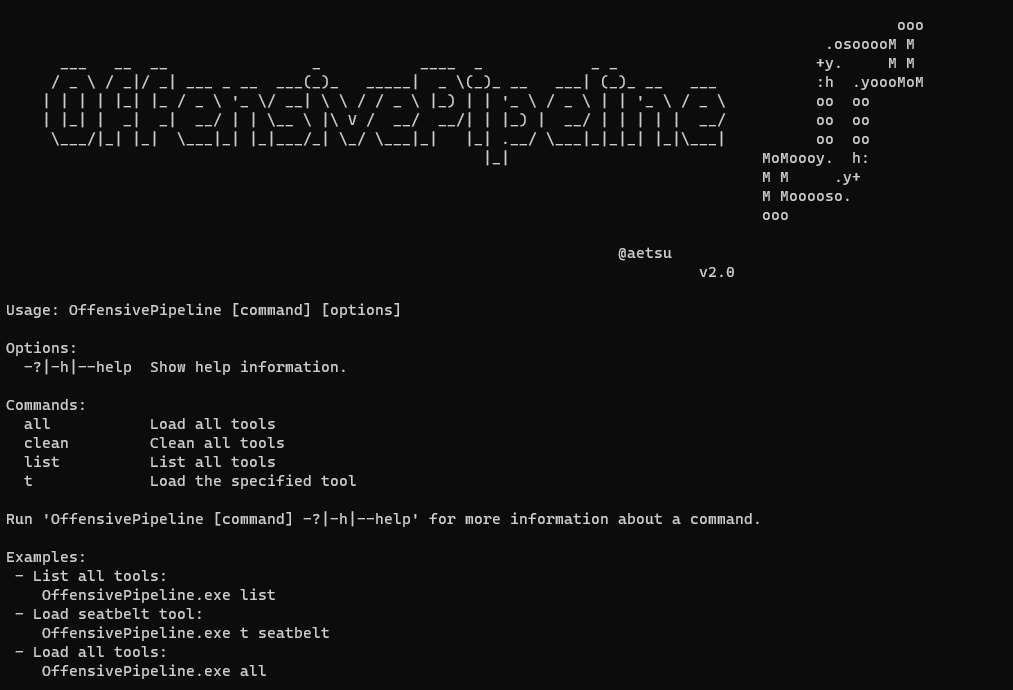

OfensivePipeline은 C# 도구를 다운로드 및 빌드하고, 레드 팀 연습을 위한 탐지 회피를 개선하기 위해 특정 수정을 적용할 수 있게 해줍니다.

OffensivePipeline를 사용하면 C# 도구를 다운로드하고 빌드하여 Red Team 훈련에서 탐지를 회피하기 위한 특정 수정 사항을 적용할 수 있습니다.
OffensivePipeline의 일반적인 사용법은 Git 저장소에서 도구를 다운로드하고, 프로젝트에서 특정 값을 무작위화하고, 빌드한 후, 결과 바이너리를 난독화하고 셸코드를 생성하는 것입니다.
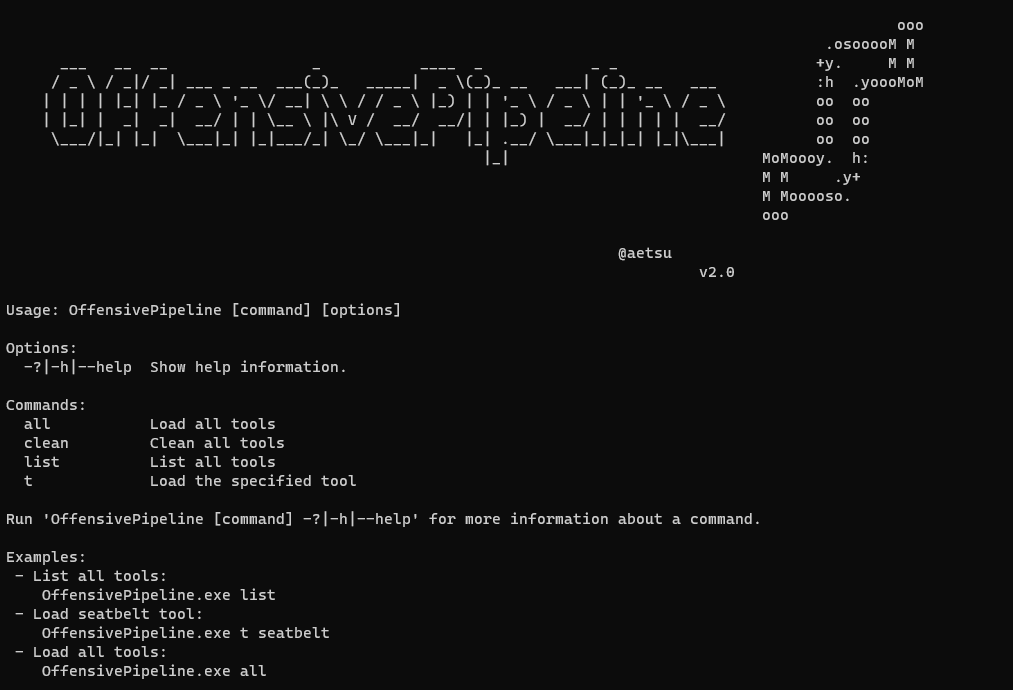
- 모든 도구 빌드:
OffensivePipeline.exe all
- 도구 구축```
OffensivePipeline.exe t toolName
### 출력 예시```
PS C:\OffensivePipeline> .\OffensivePipeline.exe t rubeus
ooo
.osooooM M
___ __ __ _ ____ _ _ _ +y. M M
/ _ \ / _|/ _| ___ _ __ ___(_)_ _____| _ \(_)_ __ ___| (_)_ __ ___ :h .yoooMoM
| | | | |_| |_ / _ \ '_ \/ __| \ \ / / _ \ |_) | | '_ \ / _ \ | | '_ \ / _ \ oo oo
| |_| | _| _| __/ | | \__ \ |\ V / __/ __/| | |_) | __/ | | | | | __/ oo oo
\___/|_| |_| \___|_| |_|___/_| \_/ \___|_| |_| .__/ \___|_|_|_| |_|\___| oo oo
|_| MoMoooy. h:
M M .y+
M Mooooso.
ooo
@aetsu
v2.0.0
[+] Loading tool: Rubeus
Clonnig repository: Rubeus into C:\OffensivePipeline\Git\Rubeus
Repository Rubeus cloned into C:\OffensivePipeline\Git\Rubeus
[+] Load RandomGuid module
Searching GUIDs...
> C:\OffensivePipeline\Git\Rubeus\Rubeus.sln
> C:\OffensivePipeline\Git\Rubeus\Rubeus\Rubeus.csproj
> C:\OffensivePipeline\Git\Rubeus\Rubeus\Properties\AssemblyInfo.cs
Replacing GUIDs...
File C:\OffensivePipeline\Git\Rubeus\Rubeus.sln:
> Replacing GUID 658C8B7F-3664-4A95-9572-A3E5871DFC06 with 3bd82351-ac9a-4403-b1e7-9660e698d286
> Replacing GUID FAE04EC0-301F-11D3-BF4B-00C04F79EFBC with 619876c2-5a8b-4c48-93c3-f87ca520ac5e
> Replacing GUID 658c8b7f-3664-4a95-9572-a3e5871dfc06 with 11e0084e-937f-46d7-83b5-38a496bf278a
[+] No errors!
File C:\OffensivePipeline\Git\Rubeus\Rubeus\Rubeus.csproj:
> Replacing GUID 658C8B7F-3664-4A95-9572-A3E5871DFC06 with 3bd82351-ac9a-4403-b1e7-9660e698d286
> Replacing GUID FAE04EC0-301F-11D3-BF4B-00C04F79EFBC with 619876c2-5a8b-4c48-93c3-f87ca520ac5e
> Replacing GUID 658c8b7f-3664-4a95-9572-a3e5871dfc06 with 11e0084e-937f-46d7-83b5-38a496bf278a
[+] No errors!
File C:\OffensivePipeline\Git\Rubeus\Rubeus\Properties\AssemblyInfo.cs:
> Replacing GUID 658C8B7F-3664-4A95-9572-A3E5871DFC06 with 3bd82351-ac9a-4403-b1e7-9660e698d286
> Replacing GUID FAE04EC0-301F-11D3-BF4B-00C04F79EFBC with 619876c2-5a8b-4c48-93c3-f87ca520ac5e
> Replacing GUID 658c8b7f-3664-4a95-9572-a3e5871dfc06 with 11e0084e-937f-46d7-83b5-38a496bf278a
[+] No errors!
[+] Load RandomAssemblyInfo module
Replacing strings in C:\OffensivePipeline\Git\Rubeus\Rubeus\Properties\AssemblyInfo.cs
[assembly: AssemblyTitle("Rubeus")] -> [assembly: AssemblyTitle("g4ef3fvphre")]
[assembly: AssemblyDescription("")] -> [assembly: AssemblyDescription("")]
[assembly: AssemblyConfiguration("")] -> [assembly: AssemblyConfiguration("")]
[assembly: AssemblyCompany("")] -> [assembly: AssemblyCompany("")]
[assembly: AssemblyProduct("Rubeus")] -> [assembly: AssemblyProduct("g4ef3fvphre")]
[assembly: AssemblyCopyright("Copyright © 2018")] -> [assembly: AssemblyCopyright("Copyright © 2018")]
[assembly: AssemblyTrademark("")] -> [assembly: AssemblyTrademark("")]
[assembly: AssemblyCulture("")] -> [assembly: AssemblyCulture("")]
[+] Load BuildCsharp module
[+] Checking requirements...
[*] Downloading nuget.exe from https://dist.nuget.org/win-x86-commandline/latest/nuget.exe
[+] Download OK - nuget.exe
[+] Path found - C:\Program Files (x86)\Microsoft Visual Studio\2022\BuildTools\Common7\Tools\VsDevCmd.bat
Solving dependences with nuget...
Building solution...
[+] No errors!
[+] Output folder: C:\OffensivePipeline\Output\Rubeus_vh00nc50xud
[+] Load ConfuserEx module
[+] Checking requirements...
[+] Downloading ConfuserEx from https://github.com/mkaring/ConfuserEx/releases/download/v1.6.0/ConfuserEx-CLI.zip
[+] Download OK - ConfuserEx
Confusing...
[+] No errors!
[+] Load Donut module
Generating shellcode...
Payload options:
Domain: RMM6XFC3
Runtime:v4.0.30319
Raw Payload: C:\OffensivePipeline\Output\Rubeus_vh00nc50xud\ConfuserEx\Donut\Rubeus.bin
B64 Payload: C:\OffensivePipeline\Output\Rubeus_vh00nc50xud\ConfuserEx\Donut\Rubeus.bin.b64
[+] No errors!
[+] Generating Sha256 hashes
Output file: C:\OffensivePipeline\Output\Rubeus_vh00nc50xud
-----------------------------------------------------------------
SUMMARY
- Rubeus
- RandomGuid: OK
- RandomAssemblyInfo: OK
- BuildCsharp: OK
- ConfuserEx: OK
- Donut: OK
-----------------------------------------------------------------
도구 다운로드 스크립트는 Tools 폴더 안에 yml 형식으로 있습니다. 새 도구는 다음 형식으로 새 yml 파일을 생성하여 추가할 수 있습니다:
Where:
- Name: 도구 이름
- Description: 도구 설명
- GitLink: git에서 클론할 링크
- SolutionPath: 솔루션(*.sln*) 파일 경로
- Language: 사용 언어(현재는 c#만 지원)
- Plugins: 이 도구 빌드 과정에서 사용할 플러그인
- AuthUser: github 사용자 이름(공개 저장소의 경우 사용 안 함)
- AuthToken: github 인증 토큰(공개 저장소의 경우 사용 안 함)
## 비공개 git에서 도구 추가하기```yml
tool:
- name: SharpHound3-Custom
description: C# Rewrite of the BloodHound Ingestor
gitLink: https://github.com/aaaaaaa/SharpHound3-Custom
solutionPath: SharpHound3-Custom\SharpHound3.sln
language: c#
plugins: RandomGuid, RandomAssemblyInfo, BuildCsharp, ConfuserEx, Donut
authUser: aaaaaaa
authToken: abcdefghijklmnopqrsthtnf
toolArguments: "-c All,GPOLocalGroup -d whatever.youlike.local"
설명:
tool:
여기서:
- Name: 도구 이름
- Description: 도구 설명
- GitLink: 도구가 위치한 경로
- SolutionPath: 솔루션(*.sln* 파일) 경로
- Language: 사용된 언어 (현재 c#만 지원)
- Plugins: 이 도구 빌드 프로세스에 사용할 플러그인
- AuthUser: github 사용자 이름 (로컬 저장소에서는 사용되지 않음)
- AuthToken: github 인증 토큰 (로컬 저장소에서는 사용되지 않음)
- toolArguments: donut 셸코드에 포함될 인수
## 릴리스 버전 요구 사항 (Visual Studio 2019/2022 필요 없음)
- Microsoft .NET Framework 3.5 서비스 팩 1 (일부 도구용): [https://www.microsoft.com/en-us/download/details.aspx?id=22](https://www.microsoft.com/en-us/download/details.aspx?id=22)
- Build Tools for Visual Studio 2022: [https://aka.ms/vs/17/release/vs_BuildTools.exe](https://aka.ms/vs/17/release/vs_BuildTools.exe)
- .NET 데스크톱 빌드 도구 설치

- (대안) Build Tools for Visual Studio 2019: [https://aka.ms/vs/16/release/vs_BuildTools.exe](https://aka.ms/vs/16/release/vs_BuildTools.exe)
- 바이러스 백신 비활성화 :D
- Windows 10 Pro - 버전 20H2 - 빌드 19045.2486에서 테스트 완료
**OffensivePipeline.dll.config** 파일에서 사용되는 빌드 도구 버전을 변경할 수 있습니다.
- Build Tools 2019:```xml
<add key="BuildCSharpTools" value="C:\Program Files (x86)\Microsoft Visual Studio\2019\BuildTools\Common7\Tools\VsDevCmd.bat"/>
## 빌드 요구사항
- .NET Framework 3.5.1 (일부 도구용): https://www.microsoft.com/en-us/download/details.aspx?id=22
- Visual Studio 2022 -> https://visualstudio.microsoft.com/thank-you-downloading-visual-studio/?sku=Community&rel=17
- .NET 데스크톱 빌드 도구 설치
- Donut 너겟을 수동으로 추가합니다. (@n1xbyte 님이 너겟(*DonutCore.1.0.1.nupkg*)을 제공해 주셨습니다.)
## 크레딧
- ConfuserEx 프로젝트: [https://github.com/mkaring/ConfuserEx](https://github.com/mkaring/ConfuserEx)
- Donut 프로젝트: [https://github.com/TheWover/donut](https://github.com/TheWover/donut)
- Donut C# 생성기: [https://github.com/n1xbyte/donutCS](https://github.com/n1xbyte/donutCS)
- SharpCollection: [https://github.com/Flangvik/SharpCollection](https://github.com/aetsu/offensivepipeline/blob/HEAD/SharpCollection)
## 지원되는 도구- **ADCollector**:
- 설명: ADCollector는 Active Directory 환경을 열거하여 가능한 공격 벡터를 식별하는 경량 도구입니다.
- 링크: [https://github.com/dev-2null/ADCollector](https://github.com/dev-2null/ADCollector)
- **ADCSPwn**:
- 설명: 머신 계정(Petitpotam)에서 인증을 강제하고 인증서 서비스로 릴레이하여 Active Directory 네트워크에서 권한을 상승시키는 도구입니다.
- 링크: [https://github.com/bats3c/ADCSPwn](https://github.com/bats3c/ADCSPwn)
- **ADFSDump**:
- 설명: AD FS에서 다양한 정보를 덤프하는 C# 도구
- 링크: [https://github.com/mandiant/ADFSDump](https://github.com/mandiant/ADFSDump)
- **ADSearch**:
- 설명: cobalt-strike의 execute-assembly 명령을 위해 작성된 도구로, AD를 보다 효율적으로 쿼리할 수 있습니다.
- 링크: [https://github.com/tomcarver16/ADSearch](https://github.com/tomcarver16/ADSearch)
- **BetterSafetyKatz**:
- 설명: 이 SafetyKatz의 수정된 포크는 gentilkiwi GitHub 저장소에서 최신 미리 컴파일된 Mimikatz 릴리스를 동적으로 가져오고, 감지된 서명에 대해 런타임 패치를 수행하며, SharpSploit DInvoke를 사용하여 메모리에 로드합니다.
- 링크: [https://github.com/Flangvik/BetterSafetyKatz](https://github.com/Flangvik/BetterSafetyKatz)
- **Certify**:
- 설명: Certify는 Active Directory 인증서 서비스(AD CS)의 잘못된 구성을 열거하고 악용하는 C# 도구입니다.
- 링크: [https://github.com/GhostPack/Certify](https://github.com/GhostPack/Certify)
- **DeployPrinterNightmare**:
- 설명: PrinterNightmare 버그를 악용하여 공유 네트워크 프린터를 설치하여 다른 네트워크 머신이 쉽게 권한 상승을 할 수 있게 하는 C# 도구!
- 링크: [https://github.com/Flangvik/DeployPrinterNightmare](https://github.com/Flangvik/DeployPrinterNightmare)
- **EDD**:
- 설명: Enumerate Domain Data는 PowerView와 유사하지만 .NET으로 설계되었습니다. PowerView는 본질적으로 궁극적인 도메인 열거 도구이며, 우리는 직접 작업한 .NET 구현을 원했습니다. 이 도구는 다양한 기존 프로젝트의 기능 구현을 살펴보고 이를 EDD로 결합하여 구성되었습니다.
- 링크: [https://github.com/FortyNorthSecurity/EDD](https://github.com/FortyNorthSecurity/EDD)
- **ForgeCert**:
- 설명: AD 그룹 정책에서 취약점을 찾는 C# 도구이며, Grouper2보다 더 잘 수행합니다.
- 링크: [https://github.com/GhostPack/ForgeCert](https://github.com/GhostPack/ForgeCert)
- **Group3r**:
- 설명: Rubeus는 원시 Kerberos 상호 작용 및 악용을 위한 C# 도구 세트입니다.
- 링크: [https://github.com/Group3r/Group3r](https://github.com/Group3r/Group3r)
- **KrbRelay**:
- 설명: Kerberos 릴레이를 위한 C# 프레임워크
- 링크: [https://github.com/cube0x0/KrbRelay](https://github.com/cube0x0/KrbRelay)
- **KrbRelayUp**:
- 설명: Rubeus 및 KrbRelay의 일부 기능을 감싼 간단한 래퍼
- 링크: [https://github.com/Dec0ne/KrbRelayUp](https://github.com/Dec0ne/KrbRelayUp)
- **LockLess**:
- 설명: LockLess는 열린 파일 핸들을 열거하고 잠긴 파일을 복사할 수 있는 C# 도구입니다.
- 링크: [https://github.com/GhostPack/LockLess](https://github.com/GhostPack/LockLess)
- **PassTheCert**:
- 설명: 인증서를 사용하여 LDAP/S 서버에 인증하고 다양한 공격 작업을 수행할 수 있는 소형 개념 증명 도구
- 링크: [https://github.com/AlmondOffSec/PassTheCert](https://github.com/AlmondOffSec/PassTheCert)
- **PurpleSharp**:
- 설명: PurpleSharp는 Windows Active Directory 환경에서 적대적 기술을 실행하는 오픈 소스 적대 시뮬레이션 도구입니다.
- 링크: [https://github.com/mvelazc0/PurpleSharp](https://github.com/mvelazc0/PurpleSharp)
- **Rubeus**:
- 설명: Rubeus는 원시 Kerberos 상호 작용 및 악용을 위한 C# 도구 세트입니다.
- 링크: [https://github.com/GhostPack/Rubeus](https://github.com/GhostPack/Rubeus)
- **SafetyKatz**:
- 설명: SafetyKatz는 @gentilkiwi의 Mimikatz 프로젝트의 약간 수정된 버전과 @subtee의 .NET PE 로더의 조합입니다.
- 링크: [https://github.com/GhostPack/SafetyKatz](https://github.com/GhostPack/SafetyKatz)
- **SauronEye**:
- 설명: SauronEye는 레드 팀이 특정 키워드를 포함하는 파일을 찾는 데 도움을 주기 위해 제작된 검색 도구입니다.
- 링크: [https://github.com/vivami/SauronEye](https://github.com/vivami/SauronEye)
- **SearchOutlook**:
- 설명: 실행 중인 Outlook 인스턴스에서 키워드를 검색하는 C# 도구
- 링크: [https://github.com/RedLectroid/SearchOutlook](https://github.com/RedLectroid/SearchOutlook)
- **Seatbelt**:
- 설명: Seatbelt는 공격 및 방어 보안 관점 모두에서 관련된 여러 보안 중심 호스트 조사 '안전 점검'을 수행하는 C# 프로젝트입니다.
- 링크: [https://github.com/GhostPack/Seatbelt](https://github.com/GhostPack/Seatbelt)
- Sharp-**SMBExec**:
- 설명: Kevin Robertson의 Invoke-SMBExec PowerShell 스크립트를 네이티브 C#으로 변환한 것입니다.
- 링크: [https://github.com/checkymander/Sharp-SMBExec](https://github.com/checkymander/Sharp-SMBExec)
- **SharpAppLocker**:
- 설명: 확장 기능이 포함된 Get-AppLockerPolicy PowerShell cmdlet의 C# 포트
- 링크: [https://github.com/Flangvik/SharpAppLocker](https://github.com/Flangvik/SharpAppLocker)
- **SharpBypassUAC**:
- 설명: UAC 우회를 위한 C# 도구
- 링크: [https://github.com/FatRodzianko/SharpBypassUAC](https://github.com/FatRodzianko/SharpBypassUAC)
- **SharpChisel**:
- 설명: https://github.com/jpillora/chisel의 Chisel을 감싼 C# 래퍼
- 링크: [https://github.com/shantanu561993/SharpChisel](https://github.com/shantanu561993/SharpChisel)
- **SharpChromium**:
- 설명: SharpChromium은 Google Chrome, Microsoft Edge 및 Microsoft Edge Beta에서 데이터를 검색하기 위한 .NET 4.0+ CLR 프로젝트입니다. 현재 추출할 수 있는 것은
- 링크: [https://github.com/djhohnstein/SharpChromium](https://github.com/djhohnstein/SharpChromium)
- **SharpCloud**:
- 설명: SharpCloud는 Amazon Web Services, Microsoft Azure 및 Google Compute와 관련된 자격 증명 파일의 존재 여부를 확인하는 간단한 C# 유틸리티입니다.
- 링크: [https://github.com/chrismaddalena/SharpCloud](https://github.com/chrismaddalena/SharpCloud)
- **SharpCOM**:
- 설명: SharpCOM은 Invoke-DCOM의 C# 포트입니다.
- 링크: [https://github.com/rvrsh3ll/SharpCOM](https://github.com/rvrsh3ll/SharpCOM)
- **SharpCookieMonster**:
- 설명: @defaultnamehere의 cookie-crimes 모듈을 Sharp로 포팅한 것입니다. 그들의 훌륭한 작업에 감사드립니다!
- 링크: [https://github.com/m0rv4i/SharpCookieMonster](https://github.com/m0rv4i/SharpCookieMonster)
- **SharpCrashEventLog**:
- 설명: OpenEventLogA/ElfClearEventLogFileW를 사용하여 로컬 또는 원격으로 Windows 이벤트 로그 서비스를 충돌시킵니다.
- 링크: [https://github.com/slyd0g/SharpCrashEventLog](https://github.com/slyd0g/SharpCrashEventLog)
- **SharpDir**:
- 설명: SharpDir은 dir.exe와 동일한 SMB 프로세스(TCP 포트 445 사용)를 사용하여 로컬 및 원격 파일 시스템에서 파일을 검색하는 간단한 코드 세트입니다.
- 링크: [https://github.com/jnqpblc/SharpDir](https://github.com/jnqpblc/SharpDir)
- **SharpDPAPI**:
- 설명: SharpDPAPI는 @gentilkiwi의 Mimikatz 프로젝트에서 일부 DPAPI 기능을 C#으로 포팅한 것입니다.
- 링크: [https://github.com/GhostPack/SharpDPAPI](https://github.com/GhostPack/SharpDPAPI)
- **SharpDump**:
- 설명: SharpDump는 PowerSploit의 Out-Minidump.ps1 기능을 C#으로 포팅한 것입니다.
- 링크: [https://github.com/GhostPack/SharpDump](https://github.com/GhostPack/SharpDump)
- **SharpEDRChecker**:
- 설명: 실행 중인 프로세스, 프로세스 메타데이터, 현재 프로세스에 로드된 DLL 및 각 DLL의 메타데이터, 일반적인 설치 디렉터리, 설치된 서비스 및 각 서비스 바이너리의 메타데이터, 설치된 드라이버 및 각 드라이버의 메타데이터를 확인하여 AV, EDR 및 로깅 도구와 같은 알려진 방어 제품의 존재 여부를 검사합니다.
- 링크: [https://github.com/PwnDexter/SharpEDRChecker](https://github.com/PwnDexter/SharpEDRChecker)
- **SharPersist**:
- 설명: C#으로 작성된 Windows 지속성 툴킷
- 링크: [https://github.com/mandiant/SharPersist](https://github.com/mandiant/SharPersist)
- **SharpExec**:
- 설명: SharpExec는 측면 이동을 지원하기 위해 설계된 공격적 보안 C# 도구입니다.
- 링크: [https://github.com/anthemtotheego/SharpExec](https://github.com/anthemtotheego/SharpExec)
- **SharpGPOAbuse**:
- 설명: SharpGPOAbuse는 C#으로 작성된 .NET 애플리케이션으로, 사용자의 그룹 정책 개체(GPO) 편집 권한을 이용하여 해당 GPO에 의해 제어되는 개체를 손상시키는 데 사용할 수 있습니다.
- 링크: [https://github.com/FSecureLABS/SharpGPOAbuse](https://github.com/FSecureLABS/SharpGPOAbuse)
- **SharpHandler**:
- 설명: 이 프로젝트는 lsass에 대한 열린 핸들을 재사용하여 lsass를 구문 분석하거나 미니덤프를 수행하므로, 상호 작용하기 위해 자체 lsass 핸들을 사용할 필요가 없습니다. (Dinvoke 버전)
- 링크: [https://github.com/jfmaes/SharpHandler](https://github.com/jfmaes/SharpHandler)
- **SharpHose**:
- 설명: SharpHose는 빠르고 안전하며 Cobalt Strike의 execute-assembly를 통해 사용할 수 있도록 설계된 C# 비밀번호 스프레이 도구입니다.
- 링크: [https://github.com/ustayready/SharpHose](https://github.com/ustayready/SharpHose)
- **SharpHound3**:
- 설명: BloodHound Ingestor의 C# 재작성
- 링크: [https://github.com/BloodHoundAD/SharpHound3](https://github.com/BloodHoundAD/SharpHound3)
- **SharpKatz**:
- 설명: mimikatz의 sekurlsa::logonpasswords, sekurlsa::ekeys 및 lsadump::dcsync 명령을 포팅한 것
- 링크: [https://github.com/b4rtik/SharpKatz](https://github.com/b4rtik/SharpKatz)
- **SharpLAPS**:
- 설명: 이 실행 파일은 Cobalt Strike 세션 내에서 execute-assembly를 사용하여 실행되도록 만들어졌습니다. Active Directory에서 LAPS 비밀번호를 검색합니다.
- 링크: [https://github.com/swisskyrepo/SharpLAPS](https://github.com/swisskyrepo/SharpLAPS)
- **SharpMapExec**:
- 설명: CrackMapExec의 Sharp 버전
- 링크: [https://github.com/cube0x0/SharpMapExec](https://github.com/cube0x0/SharpMapExec)
- **SharpMiniDump**:
- 설명: 메모리에서 LSASS 프로세스의 미니덤프를 생성합니다(Windows 10 - Windows Server 2016). 전체 프로세스는 동적 API 호출, 직접 시스템 콜 및 Native API 언후킹을 사용하여 AV/EDR 탐지를 회피합니다.
- 링크: [https://github.com/b4rtik/SharpMiniDump](https://github.com/b4rtik/SharpMiniDump)
- **SharpMove**:
- 설명: 원격 호스트에 대한 .NET 인증 실행
- 링크: [https://github.com/0xthirteen/SharpMove](https://github.com/0xthirteen/SharpMove)
- **SharpNamedPipePTH**:
- 설명: 이 프로젝트는 사용자 가장을 위해 로컬 명명된 파이프에서 인증에 Pass-the-Hash를 사용하는 C# 도구입니다. 이를 사용하려면 로컬 관리자 또는 SEImpersonate 권한이 필요합니다.
- 링크: [https://github.com/S3cur3Th1sSh1t/SharpNamedPipePTH](https://github.com/S3cur3Th1sSh1t/SharpNamedPipePTH)
- **SharpNoPSExec**:
- 설명: 측면 이동을 위한 파일리스 명령 실행
- 링크: [https://github.com/juliourena/SharpNoPSExec](https://github.com/juliourena/SharpNoPSExec)
- **SharpPrinter**:
- 설명: Printer는 ListNetworks의 수정된 콘솔 버전입니다.
- 링크: [https://github.com/rvrsh3ll/SharpPrinter](https://github.com/rvrsh3ll/SharpPrinter)
- **SharpRDP**:
- 설명: 인증된 명령 실행을 위한 원격 데스크톱 프로토콜 콘솔 애플리케이션
- 링크: [https://github.com/0xthirteen/SharpRDP](https://github.com/0xthirteen/SharpRDP)
- **SharpReg**:
- 설명: SharpReg는 reg.exe와 동일한 SMB 프로세스(TCP 포트 445 사용)를 사용하여 Remote Registry 서비스 API와 상호 작용하는 간단한 코드 세트입니다.
- 링크: [https://github.com/jnqpblc/SharpReg](https://github.com/jnqpblc/SharpReg)
- **SharpSCCM**:
- 설명: SharpSCCM은 SCCM 관리 콘솔 GUI에 액세스하지 않고도 측면 이동 및 자격 증명 수집을 위해 Microsoft Endpoint Configuration Manager(일명 ConfigMgr, 이전 SCCM)를 활용하도록 설계된 사후 침투 도구입니다.
- 링크: [https://github.com/Mayyhem/SharpSCCM](https://github.com/Mayyhem/SharpSCCM)
- **SharpScribbles**:
- 설명: Windows 스티커 메모 데이터베이스에서 데이터를 추출합니다. Windows 10 빌드 1607 이상에서 작동합니다. 이
- 링크: [https://github.com/V1V1/SharpScribbles](https://github.com/V1V1/SharpScribbles)
- **SharpSearch**:
- 설명: 파일 공유에서 원하는 정보를 위해 대상 파일을 빠르게 필터링하는 프로젝트
- 링크: [https://github.com/djhohnstein/SharpSearch](https://github.com/djhohnstein/SharpSearch)
- **SharpSecDump**:
- 설명: impacket의 secretsdump.py의 원격 SAM + LSA 시크릿 덤프 기능을 .Net으로 포팅한 것
- 링크: [https://github.com/G0ldenGunSec/SharpSecDump](https://github.com/G0ldenGunSec/SharpSecDump)
- **SharpShares**:
- 설명: 현재 도메인의 모든 머신에서 네트워크 공유 정보와 읽기 가능 여부를 나열하는 빠르고 간단한 바이너리
- 링크: [https://github.com/djhohnstein/SharpShares](https://github.com/djhohnstein/SharpShares)
- **SharpSniper**:
- 설명: SharpSniper는 이러한 사용자의 IP 주소를 찾아 해당 박스를 대상으로 삼을 수 있는 간단한 도구입니다.
- 링크: [https://github.com/HunnicCyber/SharpSniper](https://github.com/HunnicCyber/SharpSniper)
- **SharpSphere**:
- 설명: SharpSphere는 레드 팀원이 vCenter에서 관리하는 가상 머신의 게스트 운영 체제와 쉽게 상호 작용할 수 있는 기능을 제공합니다.
- 링크: [https://github.com/JamesCooteUK/SharpSphere](https://github.com/JamesCooteUK/SharpSphere)
- **SharpSpray**:
- 설명: SharpSpray는 LDAP을 사용하여 도메인의 모든 사용자에 대해 비밀번호 스프레이 공격을 수행하는 간단한 코드 세트이며 Cobalt Strike와 호환됩니다.
- 링크: [https://github.com/jnqpblc/SharpSpray](https://github.com/jnqpblc/SharpSpray)
- **SharpSQLPwn**:
- 설명: Active Directory 환경에서 MSSQL 인스턴스의 취약점을 식별하고 악용하는 C# 도구
- 링크: [https://github.com/lefayjey/SharpSQLPwn](https://github.com/lefayjey/SharpSQLPwn)
- **SharpStay**:
- 설명: .NET 지속성
- 링크: [https://github.com/0xthirteen/SharpStay](https://github.com/0xthirteen/SharpStay)
- **SharpSvc**:
- 설명: SharpSvc는 sc.exe와 동일한 DCERPC 프로세스(TCP 포트 135로 열리고 이후 임시 TCP 포트 사용)를 사용하여 SC Manager API와 상호 작용하는 간단한 코드 세트입니다.
- 링크: [https://github.com/jnqpblc/SharpSvc](https://github.com/jnqpblc/SharpSvc)
- **SharpTask**:
- 설명: SharpTask는 schtasks.exe와 동일한 DCERPC 프로세스(TCP 포트 135로 열리고 이후 임시 TCP 포트 사용)를 사용하여 Task Scheduler 서비스 API와 상호 작용하는 간단한 코드 세트입니다.
- 링크: [https://github.com/jnqpblc/SharpTask](https://github.com/jnqpblc/SharpTask)
- **SharpUp**:
- 설명: SharpUp는 다양한 PowerUp 기능의 C# 포트입니다.
- 링크: [https://github.com/GhostPack/SharpUp](https://github.com/GhostPack/SharpUp)
- **SharpView**:
- 설명: PowerView의 .NET 포트
- 링크: [https://github.com/tevora-threat/SharpView](https://github.com/tevora-threat/SharpView)
- **SharpWebServer**:
- 설명: 레드 팀 지향적인 간단한 HTTP 및 WebDAV 서버로, C#으로 작성되었으며 Net-NTLM 해시를 캡처하는 기능이 있습니다.
- 링크: [https://github.com/mgeeky/SharpWebServer](https://github.com/mgeeky/SharpWebServer)
- **SharpWifiGrabber**:
- 설명: 워크스테이션에 저장된 모든 WLAN 프로필에서 Wi-Fi 비밀번호를 일반 텍스트로 검색합니다.
- 링크: [https://github.com/r3nhat/SharpWifiGrabber](https://github.com/r3nhat/SharpWifiGrabber)
- **SharpWMI**:
- 설명: SharpWMI는 다양한 WMI 기능의 C# 구현입니다.
- 링크: [https://github.com/GhostPack/SharpWMI](https://github.com/GhostPack/SharpWMI)
- **SharpZeroLogon**:
- 설명: CVE-2020-1472(Zerologon)에 대한 익스플로잇입니다. 이 도구는 Netlogon의 암호화 취약점을 악용하여 인증 우회를 달성합니다.
- 링크: [https://github.com/nccgroup/nccfsas](https://github.com/nccgroup/nccfsas)
- **Shhmon**:
- 설명: Sysmon의 드라이버는 설치 시 이름을 변경할 수 있지만 항상 고도 385201에 로드됩니다. 이 도구의 목표는 방어 도구가 항상 이벤트를 수집한다는 가정에 도전하는 것입니다.
- 링크: [https://github.com/matterpreter/Shhmon](https://github.com/matterpreter/Shhmon)
- **Snaffler**:
- 설명: Snaffler는 펜테스터와 레드 팀원이 거대한 Windows/AD 환경이라는 지루한 건초 더미에서 맛있는 사탕 바늘(주로 자격 증명이지만 유연함)을 찾는 데 도움을 주는 도구입니다.
- 링크: [https://github.com/SnaffCon/Snaffler](https://github.com/SnaffCon/Snaffler)
- **SqlClient**:
- 설명: 비콘을 통해 데이터베이스 데이터에 액세스하기 위한 C# .NET mssql 클라이언트
- 링크: [https://github.com/FortyNorthSecurity/SqlClient](https://github.com/FortyNorthSecurity/SqlClient)
- **StandIn**:
- 설명: StandIn은 작은 AD 사후 침투 툴킷입니다.
- 링크: [https://github.com/FuzzySecurity/StandIn](https://github.com/FuzzySecurity/StandIn)
- **SweetPotato**:
- 설명: 서비스 계정에서 SYSTEM까지 다양한 네이티브 Windows 권한 상승 기술을 모은 컬렉션
- 링크: [https://github.com/CCob/SweetPotato](https://github.com/CCob/SweetPotato)
- **ThreatCheck**:
- 설명: Matterpreter의 DefenderCheck 수정 버전
- 링크: [https://github.com/rasta-mouse/ThreatCheck](https://github.com/rasta-mouse/ThreatCheck)
- **TokenStomp**:
- 설명: 보고된 토큰 권한 제거 결함에 대한 C# POC
- 링크: [https://github.com/MartinIngesen/TokenStomp](https://github.com/MartinIngesen/TokenStomp)
- **TruffleSnout**:
- 설명: 공격 운영자를 위한 반복적 AD 발견 툴킷
- 링크: [https://github.com/dsnezhkov/TruffleSnout](https://github.com/dsnezhkov/TruffleSnout)
- **Watson**:
- 설명: Watson은 누락된 KB를 열거하고 권한 상승 취약점에 대한 익스플로잇을 제안하도록 설계된 .NET 도구입니다.
- 링크: [https://github.com/rasta-mouse/Watson](https://github.com/rasta-mouse/Watson)
- **Whisker**:
- 설명: Whisker는 msDS-KeyCredentialLink 속성을 조작하여 Active Directory 사용자 및 컴퓨터 계정을 탈취하는 C# 도구로, 효과적으로 대상 계정에 '섀도 자격 증명'을 추가합니다.
- 링크: [https://github.com/eladshamir/Whisker](https://github.com/eladshamir/Whisker)
- **winPEAS**:
- 설명: 권한 상승 Awesome Scripts SUITE
- 링크: [https://github.com/carlospolop/privilege-escalation-awesome-scripts-suite](https://github.com/carlospolop/privilege-escalation-awesome-scripts-suite)
- **WMIReg**:
- 설명: Whisker는 msDS-KeyCredentialLink 속성을 조작하여 Active Directory 사용자 및 컴퓨터 계정을 탈취하는 C# 도구입니다.
- 링크: [https://github.com/airzero24/WMIReg](https://github.com/airzero24/WMIReg)