 acquiredsecurity/forensic-timeliner
DFIR 조사관을 위해 설계된 Windows 포렌식 아티팩트 CSV 출력용 고속 포렌식 타임라인 엔진입니다. 처리된 트라이지 증거에서 Eric Zimmerman (EZ Tools), Kape, Axiom, Hayabusa, Chainsaw 및 Nirsoft의 CSV 출력을 빠르게 통합하여 하나의 통합 타임라인으로 만듭니다.


DFIR 조사자를 위해 설계된 고속 포렌식 처리 엔진. 최고 수준의 트리아지 도구에서 생성된 CSV 출력을 필터링, 아티팩트 탐지, 날짜 필터링, 키워드 태깅, 중복 제거 기능이 내장된 통합 미니 타임라인으로 신속하게 통합합니다.






크로스 플랫폼 브라우저 기록 파싱
ForensicWebHistoryParser — forensic-webhistory (Rust 도구)에서 라이브 브라우저 기록 CSV 파싱복구된 브라우저 기록 지원
ForensicWebHistoryCarvedParser — 복구/삭제된 브라우저 항목 파싱코어 라이브러리 리팩토링
ForensicTimeliner.Core 클래스 라이브러리로 추출RowsFilteredByDate가 잘못 계산되어 모든 행이 "필터링됨"으로 표시되던 문제 해결RowCountAfterDedup)--NoPrompt 플래그 추가목차
다음 도구의 csv 출력 결합
YAML로 트리아지 디렉토리에서 CSV 자동 검색 (모두 구성 가능)
Timeline Explorer에서 사용할 수 있도록 키워드 태깅으로 타임라인 강화. CSV 출력에 대한 키워드 검색을 기반으로 TLE 세션 파일을 자동 생성.
Timeline Explorer와 같은 도구와의 호환성을 위한 RFC-4180 준수 내보내기
날짜 필터링 및 중복 제거 컨트롤
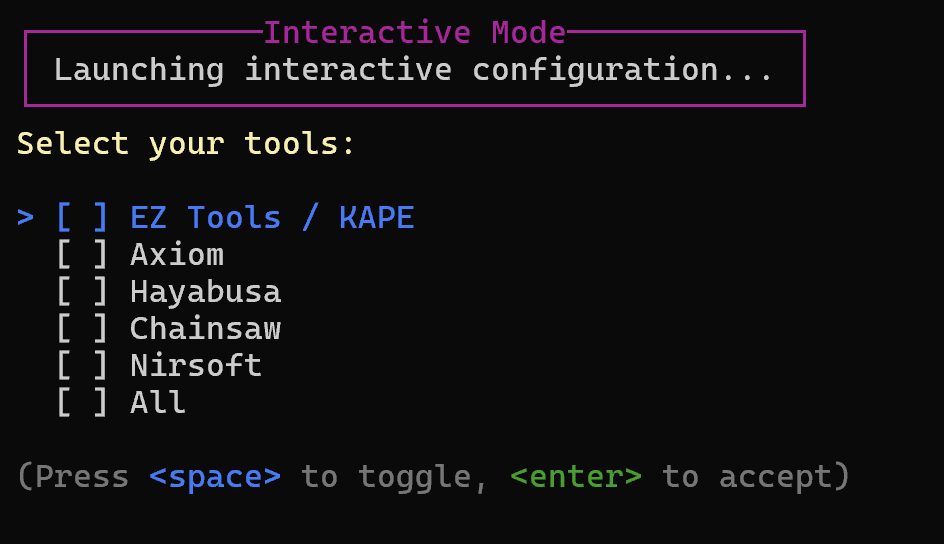
대화형 설정 및 Yaml 검색 미리보기
요약! Kape/EZ 포렌식 출력물을 확보하세요
exe를 다운로드하고 실행:
ForensicTimeliner.exe --Interactive
ForensicTimeliner.exe --BaseDir C:\triage\hostname --ALL --OutputFile C:\timeline.csv
.\ForensicTimeliner.exe --ProcessEZ --BaseDir "C:\Users\admin0x\Desktop\sample_data\host_t800" --OutputFile "C:\Users\admin0x\Desktop\test" --ExportFormat csv --EnableTagger
출력 디렉토리에서 TLE 세션 파일을 엽니다. 파일을 이동하면 세션 파일 경로를 업데이트해야 합니다.
csv 파일에 기본 명명 규칙을 사용하고 설정한 기본 디렉토리 안에 있는지 확인하세요. 파일 헤더를 기반으로 csv 파일을 자동 검색하는 폴백이 있으며, YAML 설정에서 파일 이름을 조정할 수도 있습니다.
--EnableTagger 기능을 사용하여 키워드 태깅을 기반으로 Timeline Explorer 세션 파일을 빌드하는 명령줄을 확인하세요. config\keywords\keywords.yaml에서 키워드를 조정하세요.
최신 릴리스: v2.3
테스트용 샘플 데이터는 여기에서 다운로드하세요.
대화형 메뉴
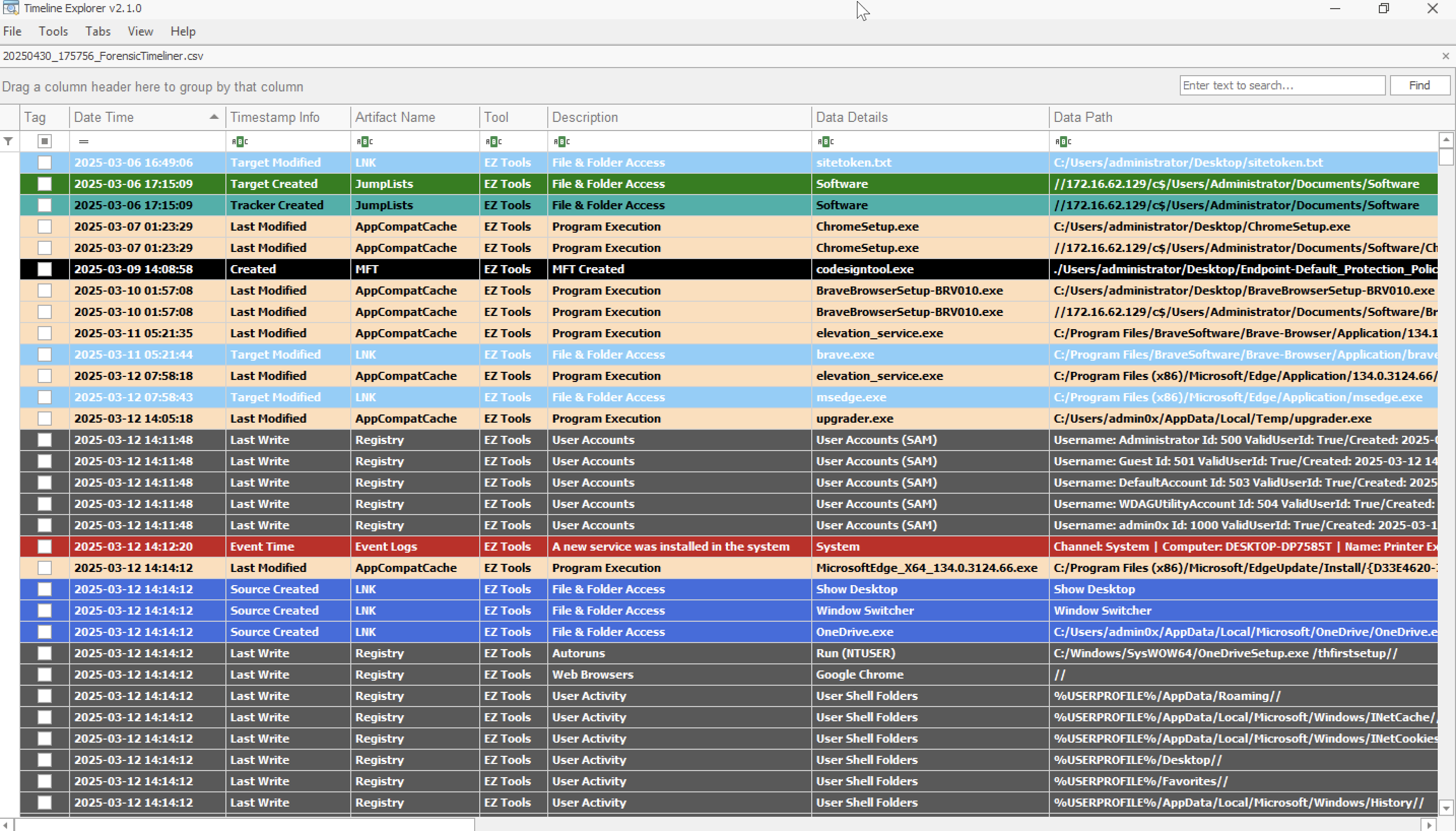
Timeline Explorer 지원
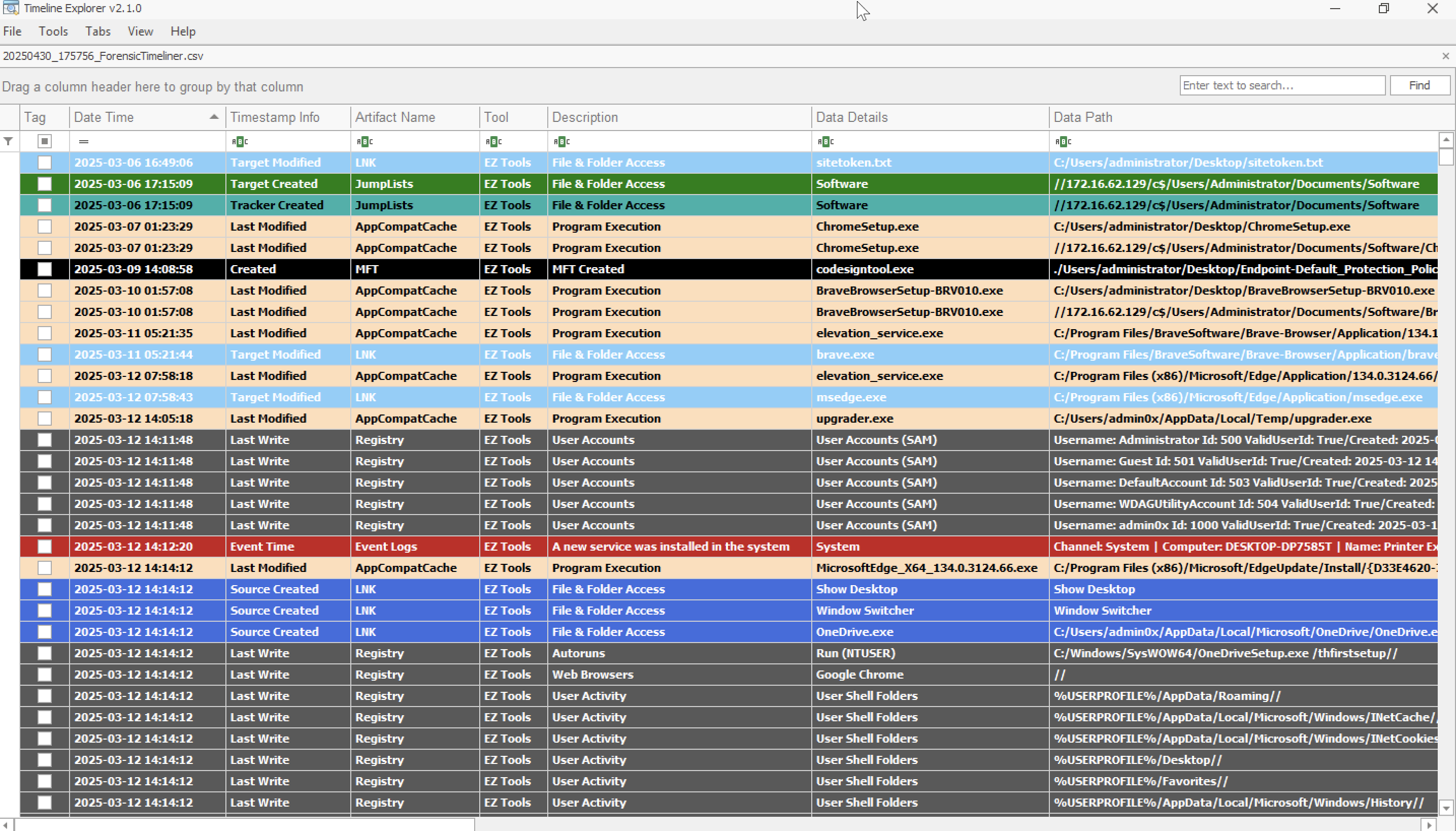
🧾 타임라인 출력 필드 구조 모든 출력은 RFC-4180 준수 CSV로 내보내지며 Timeline Explorer, Excel 또는 기타 포렌식 도구에서 검토할 준비가 됩니다.
각 타임라인 항목에는 다음 필드가 포함됩니다:
DateTime,TimestampInfo,ArtifactName,Tool,Description,DataDetails,DataPath,FileExtension,EventId,User,Computer,FileSize,IPAddress,SourceAddress,DestinationAddress,SHA1,Count,EvidencePath
타임라인 파서는 아티팩트별 YAML 정의로 사용자 지정할 수 있습니다. 다음을 제어합니다:
filename_patterns, foldername_patterns 등)event_channel_filters, provider_filters, paths, extensions)timestamp_fields) ** MFT 전용ignore_filters) ** MFT 및 이벤트 로그
각 지원 도구에 대한 자세한 문서로 아티팩트가 어떻게 파싱되고 통합 타임라인 형식으로 매핑되는지 보여줍니다:
각 문서 페이지에는 다음이 포함됩니다:
아래와 같이 YAML 구성에서 채널별 EventChannelFilters를 정의하세요. 필요에 따라 전체 이벤트 로그를 포함하려면 []를 지원합니다.
event_channel_filters:
  Application: []
  Microsoft-Windows-PowerShell/Operational: [4100, 4103, 4104]
  Microsoft-Windows-RemoteDesktopServices-RdpCoreTS/Operational: [72, 98, 104, 131, 140]
  Microsoft-Windows-TerminalServices-LocalSessionManager/Operational: [21, 22]
  Microsoft-Windows-TerminalServices-RemoteConnectionManager/Operational: [261, 1149]
  Microsoft-Windows-TaskScheduler/Operational: [106, 140, 141, 129, 200, 201]
  Microsoft-Windows-WinRM/Operational: [169]
  SentinelOne/Operational: [1, 31, 55, 57, 67, 68, 77, 81, 93, 97, 100, 101, 104, 110]
  Security: [1102, 4624, 4625, 4648, 4698, 4702, 4720, 4722, 4723, 4724, 4725, 4726, 4732, 4756]
  System: [7045]

provider_filters:
    edgeupdate: [0]
    SentinelHelperService: [0]
    brave: [0]
    Edge: [256]
    SentinelOne: [1, 31, 55, 57, 67, 68, 77, 81]
MFT 처리 및 필터링 MFT 파싱에는 자동 타임스탬프 정규화와 확장자/경로 필터링이 포함됩니다.
기본적으로 파일 생성 이벤트에 초점을 맞추고 전체 타임라인 크기를 제한하기 위해 Created0x10 타임스탬프만 포함됩니다.
기본 필터:
DEFAULT_EXTENSIONS = [".identifier", ".exe", ".ps1", ".zip", ".rar", ".7z"]
DEFAULT_PATHS = ["Users"]
크리에이티브 커먼즈 저작자표시-비영리 4.0 국제 (CC BY-NC 4.0)
| 인수 | 유형 | 기본값 | 설명 |
|---|
--BaseDir | string | C:\triage | 지원되는 아티팩트 CSV를 재귀적으로 검색할 루트 디렉토리 |
--OutputFile | string | "timeline.csv" | 내보낸 타임라인의 출력 파일 또는 폴더 |
--ExportFormat | string | csv | 내보내기 형식: csv, json 또는 jsonl |
--StartDate | datetime | null | 필터: 이 날짜 이후의 행만 포함 |
--EndDate | datetime | null | 필터: 이 날짜 이전의 행만 포함 |
--Deduplicate / -d | bool | false | 내보내기 후 중복 타임라인 행 제거 |
--EnableTagger | bool | false | config/keywords/keywords.yaml을 통한 키워드 기반 태깅 활성화 |
--IncludeRawData | bool | false | 원본 소스 행 내용(사용 가능한 경우)을 위한 RawData 열 추가 실험적 |
--NoBanner | bool | false | 시작 시 배너/로고 출력 건너뛰기 |
--NoPrompt | bool | false | 스크립트 또는 자동화 파이프라인과 함께 실행하기 위해 프롬프트 건너뛰기 |
--Help / -h | bool | false | 도움말 및 사용 정보 표시 |
--ALL / -a | bool | false | 아래 나열된 모든 도구 처리 (검색 기반) |
--Interactive / -i | bool | false | 사용자 지정 명령을 빌드하는 대화형 CLI 실행 |
--ProcessEZ | bool | false | EZ Tools 아티팩트 파싱 활성화 |
--ProcessAxiom | bool | false | Axiom 아티팩트 파싱 활성화 |
--ProcessChainsaw | bool | false | Chainsaw 아티팩트 파싱 활성화 |
--ProcessHayabusa | bool | false | Hayabusa 아티팩트 파싱 활성화 |
--ProcessNirsoft | bool | false | Nirsoft 아티팩트 파싱 활성화 |
--ProcessBrowserHistory | bool | false | 크로스 플랫폼 브라우저 기록 파싱 활성화 (forensic-webhistory) |
| 아티팩트 | 지원 도구 | 예시 파일 이름 |
|---|
| Amcache | EZ Tools, Axiom | UnAssociatedFileEntries.csv, AssociatedFileEntries.csv, AmCache File Entries.csv |
| AppCompatCache | EZ Tools, Axiom | AppCompatCache.csv, Shim Cache.csv |
| AutoRuns | Axiom | Autorun Items.csv |
| Chrome History | Axiom | Chrome Web History.csv |
| Deleted Files | EZ Tools | RBCmd_Output.csv |
| Edge History | Axiom | Edge Web Visits.csv, Edge Web History.csv |
| Event Logs | EZ Tools, Axiom | _EvtxECmd_Output.csv, Windows Event Logs.csv |
| Firefox History | Axiom | Firefox Web Visits.csv |
| IE History | Axiom | Edge-Internet Explorer 10-11 Main History.csv |
| JumpLists | EZ Tools, Axiom | AutomaticDestinations.csv, Jump Lists.csv |
| LNK Files | EZ Tools, Axiom | _LECmd_Output.csv, LNK Files.csv |
| MFT | EZ Tools, Chainsaw | MFTECmd$MFT_Output.csv, mft.csv |
| MRU Folder Access | Axiom | MRU Folder Access.csv |
| MRU Opened/Saved Files | Axiom | MRU Opened-Saved Files.csv |
| MRU Recent Files & Folders | Axiom | MRU Recent Files & Folders.csv |
| Opera History | Axiom | Opera Web Visits.csv |
| Persistence | Chainsaw | persistence.csv |
| Prefetch | EZ Tools, Axiom | _PECmd_Output.csv, Prefetch Files - Windows 8-10-11.csv |
| PowerShell Execution | Chainsaw | powershell.csv, powershell_script.csv |
| RDP Events | Chainsaw | rdp_events.csv |
| Recycle Bin | Axiom | Recycle Bin.csv |
| Registry | EZ Tools | _RECmd_Batch_Kroll_Batch_Output.csv |
| Service Installation | Chainsaw | service_installation.csv |
| Service Tampering | Chainsaw | service_tampering.csv |
| Shellbags | EZ Tools, Axiom | _UsrClass.csv, Shellbags.csv |
| Sigma Rule Matches | Chainsaw | sigma.csv |
| UserAssist | EZ Tools, Axiom | UserAssist.csv |
| TypedUrls | EZ Tools | *__TypedURLS__NTUSER.CSV |
| Threat Events (Chainsaw) | Chainsaw | account_tampering.csv, defense_evasion.csv, credential_access.csv |
| Web Browsing History | Nirsoft, Axiom, forensic-webhistory | WebResults.csv, Chrome/Firefox/Edge History.csv, forensic_webhistory*.csv |
| Carved Browser History | forensic-webhistory | forensic_webhistory_carved*.csv |
| VPN / RAS Logs | Chainsaw | microsoft_rasvpn_events.csv, microsoft_rds_events.csv |
| Login Attacks | Chainsaw | login_attacks.csv |
| Log Tampering | Chainsaw | log_tampering.csv |
| Antivirus Detections | Chainsaw | antivirus.csv |
| Applocker Events | Chainsaw | applocker.csv |
| Indicator Removal | Chainsaw | indicator_removal.csv |
| Lateral Movement | Chainsaw | lateral_movement.csv |

