 0x4d31/santamon
경량 macOS 탐지 에이전트로, Santa의 엔드포인트 보안 텔레메트리를 기반으로 구축되었습니다.


경량 macOS 탐지 사이드카로, Santa와 함께 동작하며 Endpoint Security 텔레메트리를 CEL 규칙으로 로컬에서 평가하고, 매칭된 탐지 신호만 백엔드 서버로 전달합니다.
실험적 단계. 홈 랩 및 소규모 플릿용으로 제작되었습니다. 초기 릴리스 – 버그 및 API 변경이 있을 수 있습니다.
Santamon은 Santa의 protobuf 텔레메트리 스트림을 읽고, CEL 표현식을 사용하여 탐지 규칙을 평가한 후, 보안 신호를 백엔드로 전송합니다. 원시 텔레메트리는 엔드포인트에 남으며, 탐지된 신호만 전달됩니다.
핵심 기능:
Santamon은 Santa의 탐지 사이드카이며, 또 다른 ESF 클라이언트가 아닙니다.
커스텀 ESF 도구를 구축하려면 Apple의 제한된 entitlements, 프로비저닝 프로파일, 그리고 대용량 Endpoint Security 이벤트의 신중한 처리가 필요합니다. Santa는 이미 이러한 작업을 수행하며 프로덕션에서 검증되었습니다.
Santamon의 가치:
Santa는 Endpoint Security 이벤트를 안정적이고 안전하게 수집하는 무거운 작업을 처리하며, Santamon은 탐지 로직과 신호 품질에 집중합니다.
Santa Spool → Watcher → Decoder → Rules Engine → Signal Generator → Shipper → Backend
                 ↓                      ↓
                ┌────────────────────────┐
                │ 상태 DB (BoltDB)       │
                │ • 상관관계 윈도우      │
                │ • 기준선 추적          │
                │ • 신호 큐              │
                └────────────────────────┘
                프로세스 계보: 인메모리 캐시 (1시간 TTL, 최대 50K)
데이터 흐름:
/var/db/santa/spool/new/)에서 새 protobuf 파일을 모니터링스풀 라이프사이클:
santa.archive_dir (기본값: /var/lib/santamon/spool_hits)로 보관프로세스 계보:
tcc_modification)은 macOS 15+ 필요)Santa가 protobuf 이벤트를 기록하도록 구성해야 합니다. 제공된 구성 프로필을 사용하세요:
# 검토 및 사용자 정의 후 시스템 설정을 통해 설치
open configs/examples/santa-config.mobileconfig

# 확인
santactl status | grep "Log Type"
# 출력: Log Type | protobuf
git clone https://github.com/0x4d31/santamon.git
cd santamon
make build
sudo make install
이 명령은 다음을 설치합니다:
/usr/local/bin/santamon/etc/santamon/config.yaml 및 rules.yaml/Library/LaunchDaemons/com.santamon.plist/var/lib/santamon//etc/santamon/config.yaml 편집:
shipper:
  endpoint: "https://your-backend.example.com:8443/ingest"
  api_key: "${SANTAMON_API_KEY}"
LaunchDaemon plist에 API 키 설정:
# 강력한 API 키 생성
openssl rand -hex 32

# LaunchDaemon 편집
sudo nano /Library/LaunchDaemons/com.santamon.plist

# EnvironmentVariables 아래에 추가:
<key>SANTAMON_API_KEY</key>
<string>your-generated-key-here</string>
# 서비스 시작
sudo make start

# 로그 모니터링
make logs
기본 설정: /etc/santamon/config.yaml
agent:
  id: "${HOSTNAME}"

shipper:
  endpoint: "https://backend.example.com:8443/ingest"
  api_key: "${SANTAMON_API_KEY}"
santa:
  spool_dir: "/var/db/santa/spool"      # Santa 스풀 위치
  archive_dir: "/var/lib/santamon/spool_hits"  # 알림을 생성한 스풀 파일 보관
  stability_wait: "2s"                  # 새 파일 읽기 전 대기 시간

rules:
  path: "/etc/santamon/rules.yaml"      # 파일 또는 디렉토리

state:
  db_path: "/var/lib/santamon/state.db"
  sync_writes: true                     # 쓰기 후 Fsync (더 안전하지만 느림)

  first_seen:
    max_entries: 10000                  # 기준선 규칙용 LRU 캐시

  windows:
    max_events: 1000                    # 상관관계 윈도우당 최대 이벤트 수

shipper:
  batch_size: 100                       # 배치당 신호 수
  flush_interval: "30s"                 # 플러시 간격
  timeout: "10s"                        # HTTP 요청 타임아웃
  tls_skip_verify: false                # 프로덕션에서는 절대 true로 설정 금지
자세한 주석이 포함된 모든 옵션은 configs/santamon.yaml을 참조하세요.
규칙은 Santa 이벤트를 평가하는 CEL 표현식입니다. 단순, 상관관계, 기준선 세 가지 유형이 지원됩니다.
rules:
  - id: SM-014
    title: "비대화형 프로세스에서 curl/wget 호출"
    description: |
      터미널이 아니고 패키지 관리자도 아닌 프로세스가 curl 또는 wget을 실행.
    expr: |
      kind == "execution" &&
      event.execution.target.executable.path in ["/usr/bin/curl", "/usr/bin/wget"] &&

      // 대화형 셸 제외
      !(
        event.execution.instigator.executable.path.startsWith("/bin/bash") ||
        event.execution.instigator.executable.path.startsWith("/bin/zsh") ||
        event.execution.instigator.executable.path.startsWith("/bin/sh")
      ) &&

      // curl을 자주 사용하는 Homebrew / 패키지 관리자 도우미 제외
      !(
        event.execution.instigator.executable.path.startsWith("/opt/homebrew/") ||
        event.execution.instigator.executable.path.contains("/Homebrew/")
      )
    severity: high
    tags: ["T1105", "command-and-control"]
    extra_context: ["event.execution.args"]
    include_process_tree: true
    enabled: true
correlations:
  - id: SM-COR-001
    title: "여러 자격 증명 저장소에 접근하는 프로세스"
    description: "단일 프로세스가 5분 내에 3개 이상의 자격 증명 저장소에 접근."
    expr: |
      kind == "file_access" &&
      event.file_access.policy_name in [
        "ChromeCookies", "CometCookies", "SSHPrivateKeys",
        "BrowserPasswords", "KeychainDB"
      ]
    window: "5m"
    group_by: ["event.file_access.instigator.executable.path"]
    count_distinct: "event.file_access.policy_name"
    threshold: 3
    severity: critical
    tags: ["T1539", "T1552", "credential-access"]
    enabled: true
baselines:
  - id: SM-BASE-001
    title: "사용자 경로에서 처음 실행되는 서명되지 않은 바이너리"
    description: "서명되지 않은 바이너리가 /Users 경로에서 처음 실행됨."
    expr: |
      kind == "execution" &&
      event.execution.decision == DECISION_ALLOW &&
      event.execution.target.executable.path.startsWith("/Users/") &&
      (
        !has(event.execution.target.code_signature) ||
        !has(event.execution.target.code_signature.team_id) ||
        event.execution.target.code_signature.team_id == ""
      )
    track: ["event.execution.target.executable.cdhash"]
    learning_period: "720h"
    severity: high
    tags: ["T1204.002", "initial-access"]
    enabled: true
규칙 구성: 단일 파일 (/etc/santamon/rules.yaml) 또는 다중 파일 디렉토리 구조.
배포 전 검증:
santamon rules validate
종합 가이드는 **RULES.md**를 참조하세요.
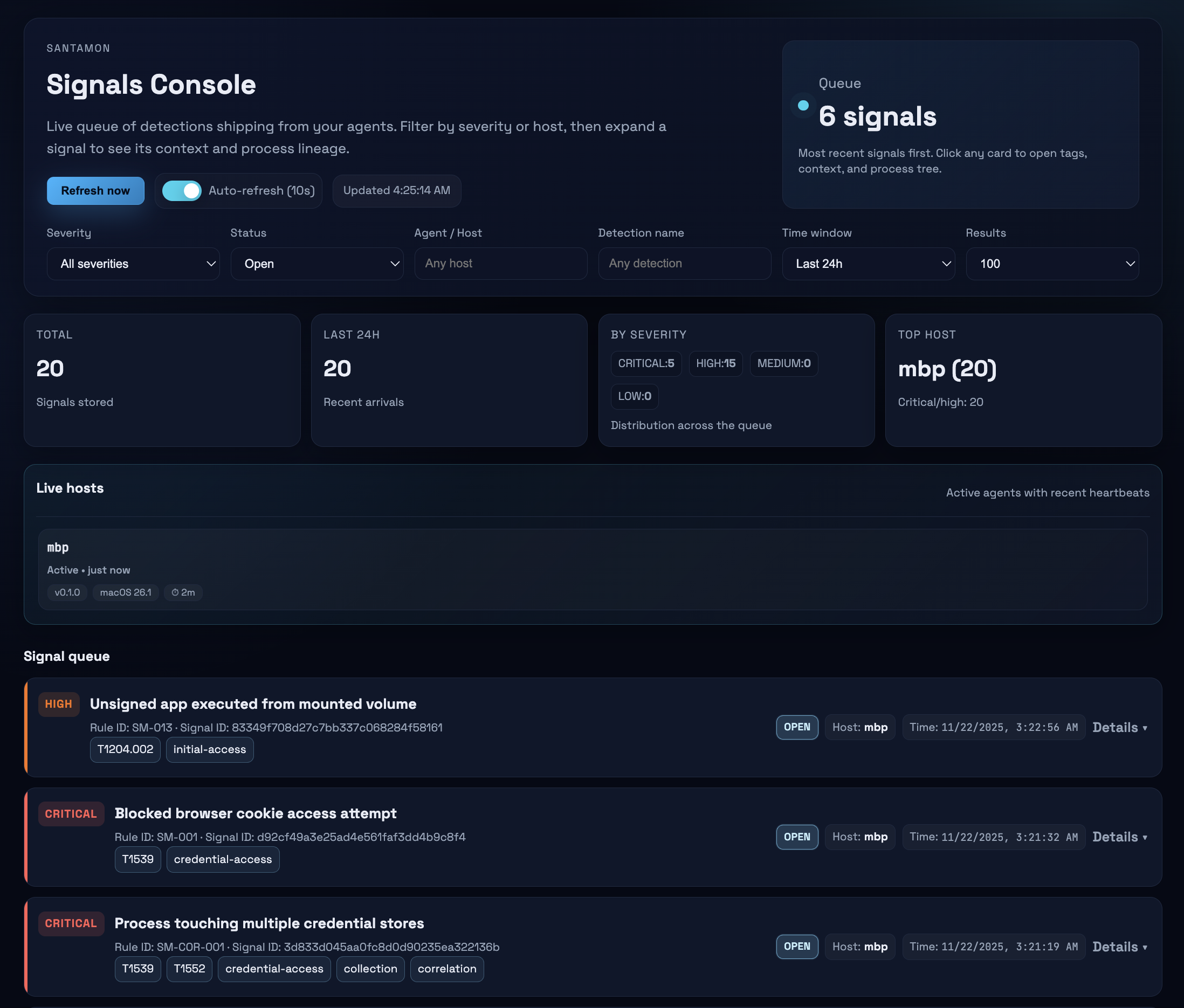
Santamon은 신호를 수신할 백엔드가 필요합니다. 최소 FastAPI 백엔드가 backend/에 포함되어 있습니다.
