cottage v0.6.7
팀을 위한 현대적인 git 기반 age 암호화 비밀 관리자입니다.

cottage는 팀이 git 저장소에서 age 암호화 비밀을 관리하기 위한 GitOps 도구입니다.
비밀의 암호화/복호화, 수신자(recipient) 관리, VCS를 통한 손쉬운 공유를 유지하면서 저장소에서 비밀을 제외시키는 간단한 워크플로우를 제공합니다. cottage는 또한 가시성을 높이기 위해 암호화된 비밀의 편집된(redacted) 미리보기를 생성하며, 비밀이 평문으로 커밋되지 않도록 보장하면서 영구 및 임시 복호화 워크플로우를 모두 지원합니다.

기능
- 노출 방지: Rust의 타입 시스템을 사용하여 버그로 인해 비밀이 우발적으로 노출될 수 없도록 보장합니다.
- 팀 친화적: 공개 키(수신자)는 저장소에서 공유하고, 개인 키(신원)는 로컬에 보관합니다.
- 접근 제어: 어떤 비밀이 어떤 수신자를 위해 암호화되는지 제어하는 간단한 허용/거부 규칙.
- .gitignore 관리: 암호화되지 않은 비밀이 저장소에 포함되지 않도록
.gitignore를 자동으로 업데이트합니다. - 미리보기: 가시성을 높이기 위해 타임스탬프가 포함된 편집된(redacted) 암호화 비밀 미리보기를 생성합니다.
- 풍부한 diff: git diff를 깔끔하고 검토 가능한 상태로 유지하며,
ctg diff는 로컬에서 수정된 비밀과 추적되는 암호화 대응 파일 간의 diff를 보여줍니다. - 체크섬 검증: 암호화된 비밀과 수신자 목록이 메타데이터와 일치하는지 확인하여 변조를 방지합니다.
- Git 훅: 커밋 전에 비밀을 자동으로 확인/암호화하고 체크아웃 후 복호화하도록 git 훅을 쉽게 설정할 수 있습니다.
- 영구 비밀 워크플로우:
ctg decrypt/edit/sync는 복호화된 비밀을 디스크에 유지합니다. - 임시 비밀 워크플로우:
ctg run(단축어ctgx)은 명령을 실행하기 위해 비밀을 임시로 복호화한 후, 명령의 성공 여부와 관계없이 삭제합니다. - 환경 변수 주입 워크플로우:
ctg env는 복호화된 비밀을 디스크에 전혀 쓰지 않고 환경 변수로 주입하여 명령을 실행합니다. - 정리:
ctg clean은 로컬 저장소에서 모든 복호화된 비밀을 삭제하여 AI 에이전트를 조금 더 안심하고 실행할 수 있게 해줍니다. - jj 및 비-git 디렉터리 지원:
ctg init은 모든 디렉터리를 비밀 저장소로 전환합니다. - 모든 제공자와 동기화: API가 있는 모든 제공자를 업스트림으로 구성하고
git pull/diff/push처럼ctg pull/diff/push를 사용할 수 있습니다. - 모든 기기와 동기화: cottage로 암호화되고 git 저장소에서 관리되는 비밀은 Cottage Sync를 통해 여러 기기에서 동기화할 수 있습니다.
설치
# rust: cargo-binstall/cargo
cargo binstall --locked cottage
cargo install --locked cottage
# python: pip/uv/uvx
pip install cottage
uv pip install cottage
uvx --from cottage ctg --version
# node: yarn/pnpm/npx
yarn global add @sayanarijit/cottage
pnpm add -g @sayanarijit/cottage
npx -p @sayanarijit/cottage ctg --version
Docker 이미지로도 제공됩니다:
# Docker
docker run --rm -v $PWD:/app sayanarijit/cottage --version
# Podman
podman run --rm -v $PWD:/app quay.io/sayanarijit/cottage --version
또는 GitHub에서 최신 릴리스를 다운로드하세요.
에디터 통합
VS Code 확장
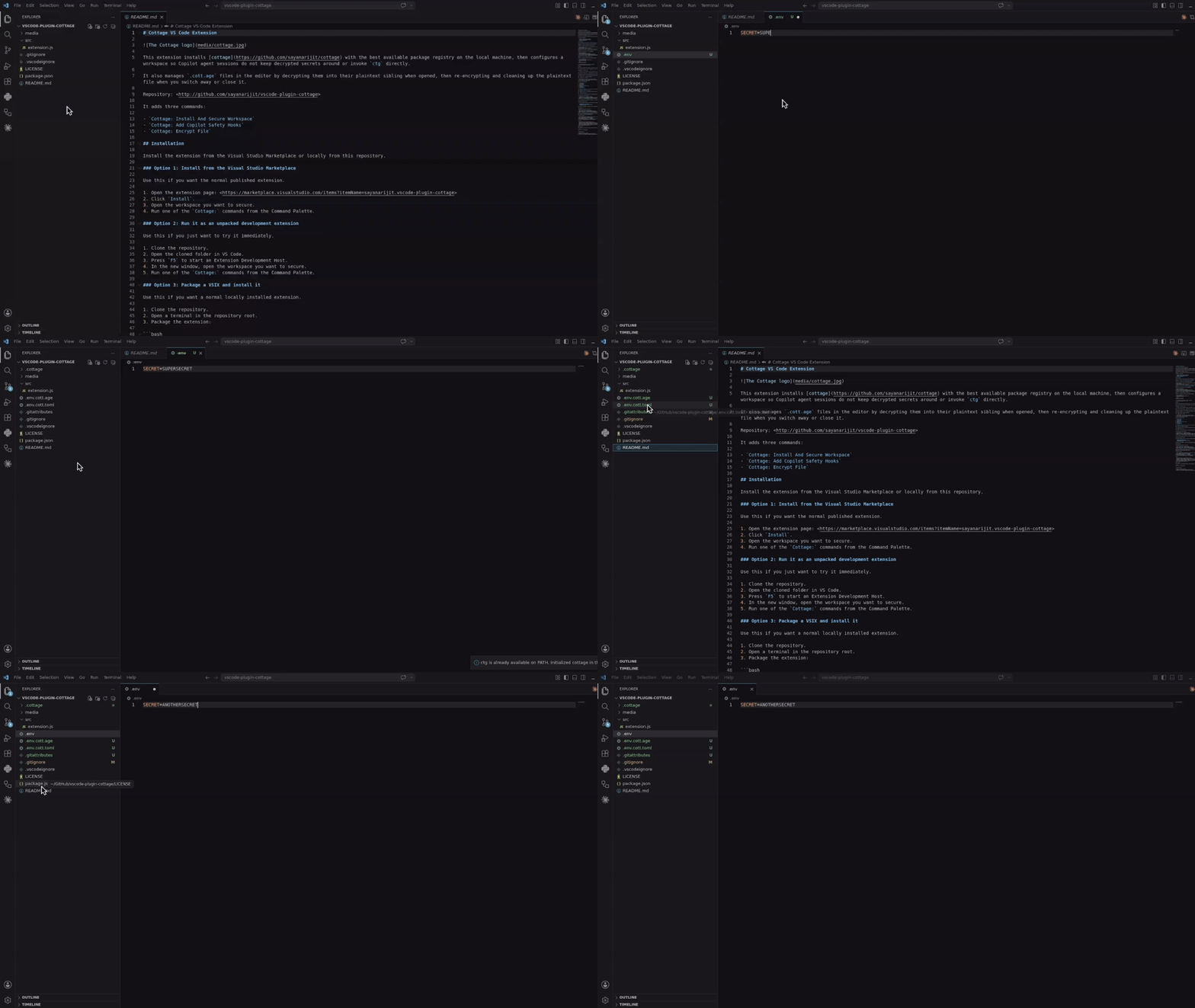
Cottage VS Code 확장을 사용하여 ctg를 설치하고, Copilot 안전 훅을 추가하고, 탐색기에서 파일을 암호화하고, 편집기 워크플로우를 통해 .cott.age 파일을 열 수 있습니다.
Visual Studio Marketplace에서 설치하거나, vscode-plugin-cottage에서 로컬로 빌드하여 설치하세요.
AI 에이전트 통합
아래의 모든 통합은 AI 에이전트가 ctg/ctgx를 직접 실행하거나 비밀 파일을 보거나 편집하는 것을 차단합니다: .cottage/ 내부의 모든 것, 모든 *.cott.* 파일(암호화된 *.cott.age 블롭과 편집된 *.cott.toml 미리보기), 그리고 디스크에 여전히 *.cott.age 대응 파일이 있는 모든 복호화된 파일입니다.
Claude Code 통합
Claude Code를 사용 중이라면 비밀이 있는 저장소에 .claude/settings.json과 .claude/hooks/deny-secrets.py를 추가하여 Claude Code 세션이 비밀을 안전하게 처리하도록 하거나, claude-plugin-cottage 플러그인을 설치하세요.
GitHub Copilot 통합
VS Code에서 GitHub Copilot을 사용 중이라면 비밀이 있는 저장소에 .github/hooks/ctg-policy.json과 .github/hooks/scripts/deny_ctg_command.py를 추가하여 Copilot 세션이 복호화된 파일을 정리하고, 직접적인 ctg 셸 명령을 차단하고, 비밀 파일에 대한 접근을 차단하도록 하거나, vscode-plugin-cottage 확장을 설치하여 VS Code에서 설정하세요.
VS Code는 .claude/settings.json 훅 정의도 로드합니다. 같은 저장소에 Claude와 Copilot 훅 파일을 모두 유지한다면, 동일한 정리 훅이 실수로 두 번 실행되지 않도록 주의하세요.
Codex 통합
Codex를 사용 중이라면 비밀이 있는 저장소에 .codex/hooks.json과 .codex/hooks/deny-ctg.py를 추가하여 Codex 세션이 비밀을 안전하게 처리하도록 하거나, codex-plugin-cottage 플러그인을 설치하세요.
Codex는 로컬 훅이 실행되기 전에 검토되어야 합니다. 파일을 추가한 후 저장소에서 Codex를 시작하고 /hooks를 사용하여 프로젝트 훅을 검토하고 신뢰하세요.
Antigravity (agy) 통합
Antigravity(agy)를 사용 중이라면 비밀이 있는 저장소에 .agents/hooks.json과 .agents/scripts/deny-ctg.py를 추가하여 Antigravity 세션이 비밀을 안전하게 처리하도록 하거나, agy-plugin-cottage 플러그인을 설치하세요.
Cursor 통합
Cursor를 사용 중이라면 비밀이 있는 저장소에 .cursor/hooks.json, .cursor/hooks/deny-ctg.py, .cursor/hooks/deny-read-secrets.py, .cursor/rules/deny-ctg.mdc, 그리고 .cursorignore를 추가하여 Cursor 세션이 비밀을 안전하게 처리하도록 하세요.
Cursor는 먼저 훅을 활성화해야 합니다. Cursor Settings > Hooks를 열고 훅을 활성화한 다음, 에이전트 세션을 다시 시작하여 프로젝트 훅이 적용되게 하세요. .cursorignore는 추가로 비밀 파일이 Cursor의 인덱싱과 에이전트의 컨텍스트에서 제외되도록 합니다.
빠른 시작
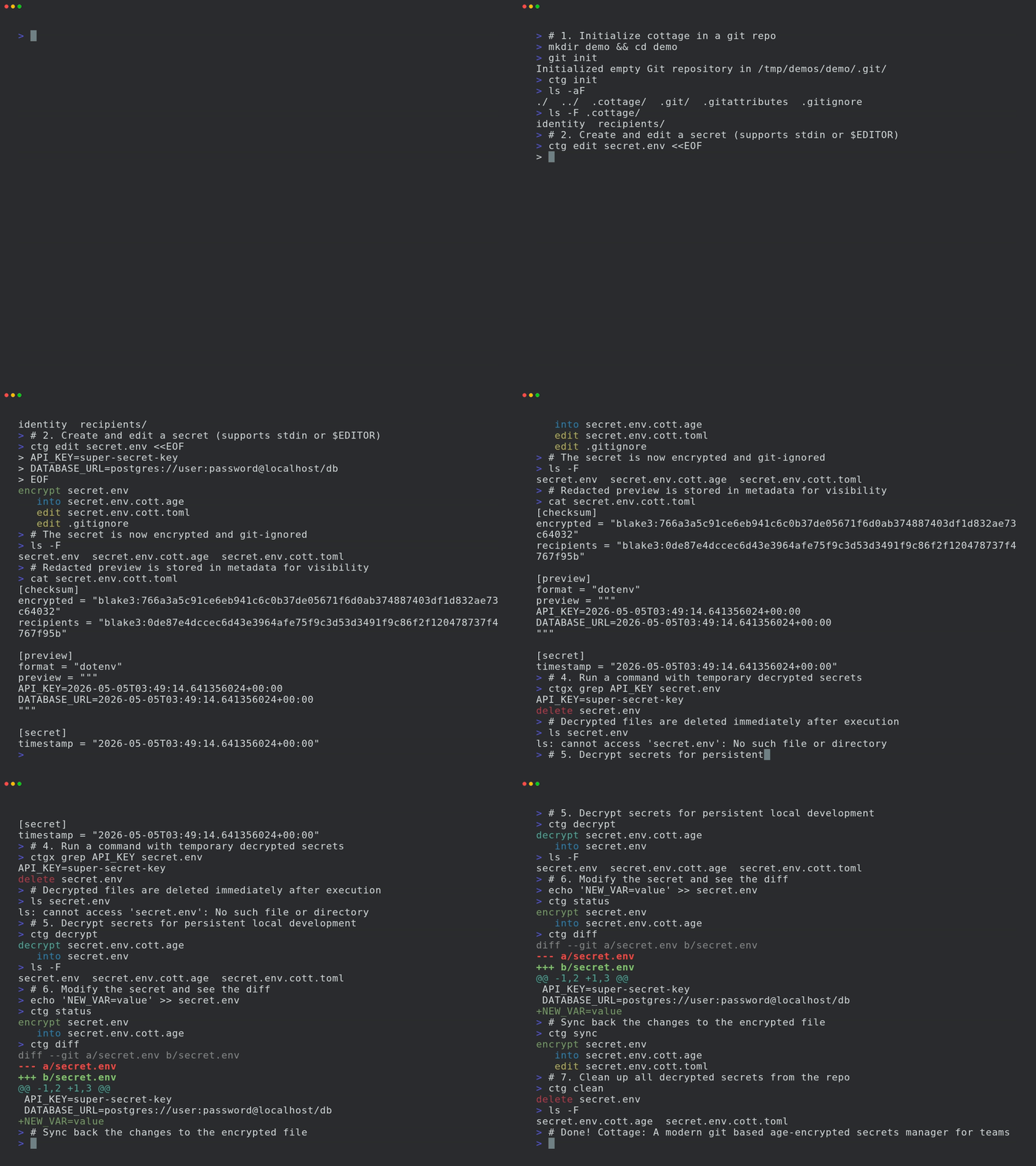
프로젝트 초기화:
mkdir project && cd project
git init # Optional, cottage works better with git but it's not required
ctg init # Sets up the .cottage directory and necessary files
tree -a
# .
# ├ .cottage/ <- Auto-generated by `ctg init`
# │ ├ identity <- Your private key, keep it safe. Move it to `~/.config/cottage/identity` to use it globally, or replace it with a soft link to one of your existing private keys.
# │ └ recipients/ <- This is where your team keeps the public keys of all the recipients.
# │ └ sayanarijit <- Your public key. Commit it. To use an existing public key, just copy (don't softlink) that key here.
# ├ .git/...
# ├ .gitattributes <- Added `*.cott.age binary export-ignore filter=cottage-encrypted -diff` to avoid polluting git diff
# └ .gitignore <- Added `/.cottage/identity` for obvious reasons
# You can run `ctg clean --all` anytime to clean up everything cottage ever did.
비밀 생성 또는 편집:
ctg edit secret.yml --clean # Opens secret.yml in $EDITOR
ctg encrypt secret.yml --clean # Another way to encrypt secrets
# encrypt secret.yml
# into secret.yml.cott.age
# edit secret.yml.cott.toml
# edit .gitignore
# delete secret.yml
임시 복호화된 비밀로 명령 실행:
cat secret.yml
# cat: secret.yml: No such file or directory
ctg run kubectl apply -f secret.yml # decrypts secret.yml.cott.age to secret.yml and runs the command
ctg run kubectl apply -f secret.yml.cott.age # also replaces the path argument with the decrypted file path
ctg run kubectl apply -f . # decrypts all .cott.age files in . and runs the command
ctg run ./deploy.sh # decrypts all .cott.age files in repo and runs the command
cat secret.yml
# cat: secret.yml: No such file or directory
또는 단축어를 사용하세요:
ctgx ./deploy.sh # same as ctg run -- ./deploy.sh
비밀을 디스크에 전혀 쓰지 않고 환경 변수로 주입하여 명령 실행:
ctg env -- ./deploy.sh # Export secrets from .env.cott.age (default) without writing them to disk, then run deploy.sh
ctg env -F .env.prod.cott.age -- ./deploy.sh # exports from .env.prod.cott.age instead of .env.cott.age
ctg env -F secrets.json.cott.age -- printenv COTTAGE_SECRET # Also supports non-dotenv files.
GitOps
비밀을 팀원들과 공유하려면 git 저장소에 푸시하기만 하면 됩니다.
git add .
git commit -m "Add secret.yml"
git push origin main
팀원들에게 공개 키를 .cottage/recipients에 추가하고 변경 사항을 푸시하도록 요청하세요. 그런 다음 풀하여 비밀을 팀원들을 위해 다시 암호화할 수 있습니다.
git pull origin main
ctg decrypt --skip-verify-recipients # Decrypt missing secrets for re-encryption
ctg encrypt # Re-encrypt all secrets
# encrypt secret.yml
# into secret.yml.cott.age
# edit secret.yml.cott.toml
ctg clean # optional
# delete secret.yml
# review changes, commit and push
git add .
git commit -m "Add new recipient to secrets"
git push origin main
이제 팀원들이 최신 변경 사항을 풀하고 비밀을 직접 복호화할 수 있습니다.
Git 훅
prek 또는 pre-commit을 사용하여 커밋 전에 비밀을 자동으로 확인/암호화하고 체크아웃 후 복호화하는 git 훅을 설정할 수 있습니다.
예제 prek 구성은 여기에서 확인하세요.
prek.toml 파일을 추가한 후 다음을 실행하세요:
prek install
prek install --hook-type post-checkout
prek install --hook-type post-merge
prek install --hook-type post-rewrite
접근 제어
규칙
메타데이터 파일에서 비밀이 어떤 수신자를 위해 암호화되어야 하는지 주석으로 지정할 수 있습니다. 이를 통해 환경별(예: 스테이징 vs 프로덕션)로 다른 비밀을 가지고 관련 수신자에게만 암호화할 수 있습니다.
# secret.yml.cott.toml
[secret]
allow = ["sayanarijit"] # Only encrypt for sayanarijit
# secret.yml.cott.toml
[secret]
deny = ["sayanarijit"] # Encrypt for everyone except sayanarijit
# secret.yml.cott.toml
[secret]
allow = ["env/staging/*"] # Supports glob patterns, only encrypt for recipients in env/staging
deny = ["env/staging/badservice"] # Encrypt for everyone in env/staging except badservice
거부 규칙은 허용 규칙보다 우선합니다.
자세한 내용은 메타데이터 사양을 참조하세요.
검증
CI에서 ctg verify를 실행하여 암호화된 비밀과 수신자 목록이 메타데이터 규칙과 일치하는지 검증하고 변조를 방지할 수 있습니다.
# .github/workflows/cottage-verify.yml
name: Cottage Verify
on: [push, pull_request]
permissions:
contents: read
jobs:
verify-secrets:
runs-on: ubuntu-latest
steps:
- uses: actions/checkout@v3
- name: Verify secrets
run: docker run --rm -v "${{ github.workspace }}:/app" ghcr.io/sayanarijit/cottage verify
모든 제공자를 업스트림으로
cottage를 사용하면 git뿐만 아니라 API가 있는 모든 제공자와 비밀을 동기화할 수 있습니다.
이를 위해 프로젝트 루트에 cottage.toml이라는 파일을 만들고 업스트림 설정을 구성하세요.
예제 cottage.toml은 여기, 비밀별 업스트림 구성은 여기에서 확인하세요.
예제 플러그인 구현은 여기에서 확인하세요.
워크플로우는 git과 유사하지만, git pull과 git push 대신 ctg pull과 ctg push를 실행하여 구성된 업스트림과 비밀을 동기화합니다.
예시:
# Pull latest changes into local encrypted secrets
# Similar to `git pull origin`
ctg pull myvault
# Compare diff with local decrypted secrets
ctg diff
# Sync local decrypted secrets with local encrypted secrets
ctg sync
# Push changes from local encrypted secrets to upstream
# Similar to `git push origin main`
ctg push myvault
자세한 내용은 업스트림 구성 사양을 참조하세요.
예제 플러그인
Cottage는 비밀을 동기화하기 위한 다양한 플러그인 제공자를 지원합니다. 바로 사용할 수 있는 플러그인 스크립트는 examples/plugins 디렉터리에서 확인할 수 있습니다:
- 1Password
- AWS Secrets Manager
- Azure Key Vault
- Bitwarden
- Dashlane
- Doppler
- ejson
- Google Cloud Secret Manager
- HashiCorp Vault (또한 Kubernetes의 Vault 참조)
- Keeper Security
- KeePass (Passhole)
- LastPass
- pass (password-store)
- Proton Pass
- System Keyring
- Zoho Vault
모든 기기와 동기화
Cottage Sync를 사용하여 여러 기기에서 비밀을 동기화하고 CLI 없이 탐색하세요.
더 알아보기
더 많은 사용 예제는 examples 디렉터리에서 확인하세요.
문제 해결
# See debug logs with -v, -vv or -vvv
ctg run -vvv -- ./deploy.sh
비교
age vs 기타 암호화
age는 보안 파일 암호화에 최적화된 현대적이고 간단한 알고리즘을 사용하며, 사용성과 최소한의 공격 표면에 초점을 맞춥니다. 또한 SSH RSA 및 Ed25519 키를 지원하지만, 용도와 범위가 다른 경우 서로 다른 키를 사용하는 것이 권장됩니다.
cottage vs SOPS
SOPS와 cottage는 겹치는 기능이 많지만, cottage는 다음과 같은 장점이 있습니다:
- 암호화되지 않은 비밀이 git에 커밋되지 않도록 .gitignore를 자동 관리합니다.
- 암호화된 비밀이 순수 age 암호화 .age 파일이므로 더 넓은 도구 생태계와의 상호 운용성이 향상됩니다.
- 더 깔끔한 diff - 실제 변경이 수신자 추가/제거뿐이어도 모든 비밀의 모든 값에 대해 diff를 생성하는 SOPS와 달리, cottage는 파일당 하나의 diff만 생성하며 수신자 체크섬의 변경을 명시적으로 지적합니다.
cottage vs dotenvx
cottage는 dotenvx에서 ctg env API를 차용했습니다.
- dotenv 파일뿐만 아니라 모든 파일 형식을 지원합니다.
- 저장소에서 여러 비밀을 관리합니다.
- 특정 수신자를 위해 비밀을 암호화하는 접근 제어 규칙.
- 더 깔끔한 diff - cottage vs SOPS 참조.