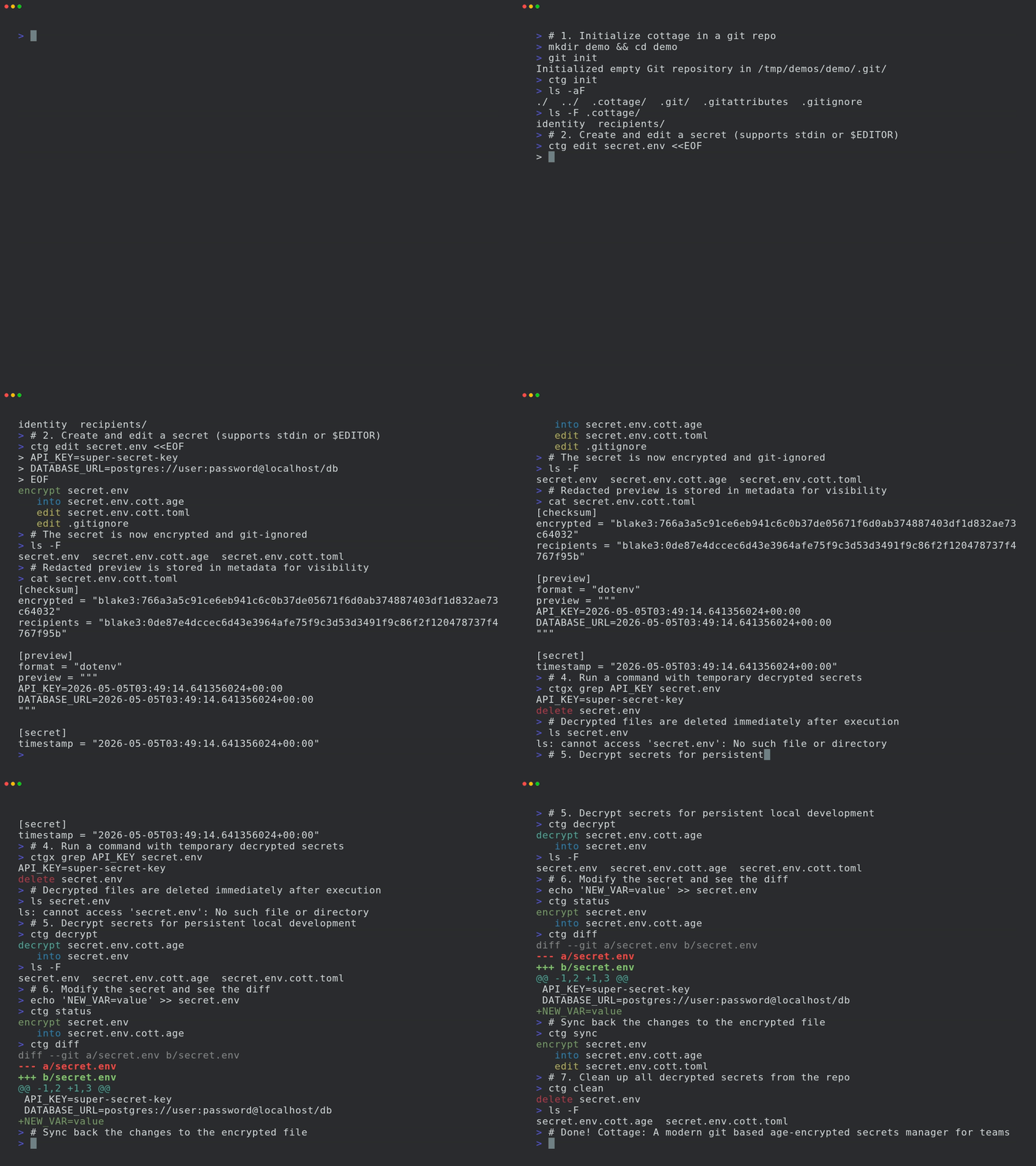

팀을 위한 현대적인 git 기반 age 암호화 비밀 관리자입니다.
<p align="center">
<picture>
<source media="(prefers-color-scheme: dark)" srcset="https://s13.gifyu.com/images/b7mxd.webp">
<source media="(prefers-color-scheme: light)" srcset="https://s13.gifyu.com/images/b7mxl.webp">
<img alt="The cottage logo" width="600" src="https://assets.kitploit.com/production/public/readmes/7490/2c8e4c6f8fa352cb9dcf2d8f22c3d84926c09a69fca9a6632d008c61b5417c28.webp">
</picture>
</p>
[](https://github.com/sayanarijit/cottage/actions/workflows/cottage-verify.yml)
[](https://crates.io/crates/cottage)
[](https://pypi.org/project/cottage/)
[](https://www.npmjs.com/package/@sayanarijit/cottage)
[](https://hub.docker.com/r/sayanarijit/cottage)
**cott*age***는 팀이 git 저장소에서 [age로 암호화된](https://age-encryption.org/) 시크릿을 관리할 수 있게 해주는 GitOps 도구입니다.
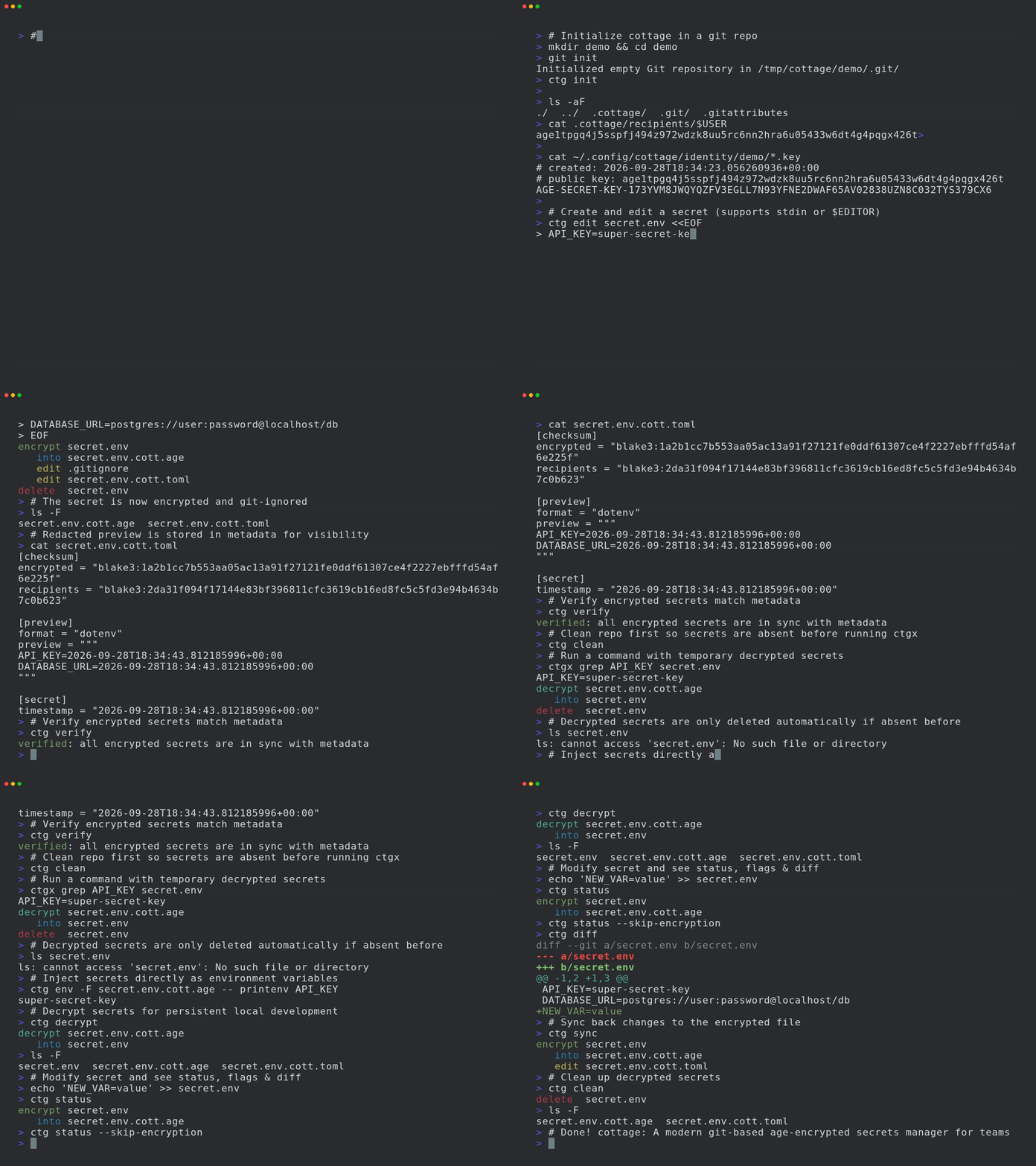
시크릿을 암호화/복호화하고, 수신자를 관리하며, VCS를 통한 손쉬운 공유를 허용하면서도 시크릿을 저장소 밖에 유지하는 간단한 워크플로를 제공합니다. cottage는 또한 더 나은 가시성을 위해 암호화된 시크릿의 마스킹된 미리보기를 생성하고, 영구적 및 임시적 복호화 워크플로를 모두 지원하며, 시크릿이 평문으로 커밋되지 않도록 보장합니다.
1. [기능](#features)
2. [설치](#installation)
3. [에디터 통합](#editor-integrations)
1. [VS Code 확장](#vs-code-extension)
2. [Cursor 및 Eclipse 확장](#cursor-and-eclipse-extension)
3. [Vim 플러그인](#vim-plugin)
4. [AI 에이전트 통합](#ai-agent-integrations)
1. [Claude Code 통합](#claude-code-integration)
2. [GitHub Copilot 통합](#github-copilot-integration)
3. [Codex 통합](#codex-integration)
4. [Antigravity (agy) 통합](https://github.com/sayanarijit/cottage/blob/main/%3C#antigravity-(agy)-integration>)
5. [Cursor 통합](#cursor-integration)
5. [빠른 시작](#quick-start)
6. [GitOps](#gitops)
7. [Git 훅](#git-hooks)
8. [접근 제어](#access-control)
1. [규칙](#rules)
2. [검증](#verification)
9. [모든 제공자를 업스트림으로 사용](#any-provider-as-upstream)
1. [예제 플러그인](#example-plugins)
10. [모든 기기와 동기화](#sync-with-any-device)
11. [더 알아보기](#learn-more)
12. [문제 해결](#troubleshooting)
13. [비교](#comparison)
1. [age vs 다른 암호화](#age-vs-other-encryption)
2. [cottage vs SOPS](#cottage-vs-sops)
3. [cottage vs dotenvx](#cottage-vs-dotenvx)
4. [cottage vs agebox](#cottage-vs-agebox)
## 기능
- **노출 안전**: Rust의 타입 시스템을 사용하여 버그로 인해 실수로 시크릿이 노출되는 일이 없도록 보장합니다.
- **팀 친화적**: 공개 키(수신자)는 저장소에 공유하고, 개인 키(아이덴티티)는 로컬에 보관합니다.
- **접근 제어**: 어떤 시크릿을 어떤 수신자에 대해 암호화할지 제어하는 간단한 허용/거부 규칙입니다.
- **.gitignore 관리**: `.gitignore`를 자동으로 업데이트하여 암호화되지 않은 시크릿이 저장소에 들어가지 않도록 합니다.
- **미리보기**: 더 나은 가시성을 위해 암호화된 시크릿의 타임스탬프가 포함된 마스킹된 미리보기를 생성합니다.
- **풍부한 diff**: git diff를 깔끔하고 검토 가능하게 유지하며, `ctg diff`는 로컬에서 수정된 시크릿과 추적 중인 암호화된 대응 파일의 diff를 보여줍니다.
- **체크섬 검증**: 암호화된 시크릿과 수신자 목록이 메타데이터와 일치하는지 검증하여 변조를 방지합니다.
- **Git 훅**: 커밋 전에 시크릿을 자동으로 확인/암호화하고 체크아웃 후에 복호화하는 git 훅을 쉽게 설정할 수 있습니다.
- **영구 시크릿 워크플로**: `ctg decrypt/sync`는 복호화된 시크릿을 디스크에 유지합니다.
- **스마트 정리 라이프사이클**: `ctg run`(단축 명령 `ctgx`)과 `ctg edit`는 작업 전에 시크릿을 복호화하고, 사전에 이미 존재했다면 디스크에 유지하며, 그렇지 않았다면 작업 후 자동으로 정리합니다.
- **완료 시 정리**: `ctg encrypt --clean`, `ctg run --clean`, `ctg edit --clean`은 복호화된 파일이 사전에 존재했더라도 디스크에서 정리되도록 보장합니다.
- **환경 변수 주입 워크플로**: `ctg env`는 복호화된 시크릿을 환경 변수로 주입하여 명령을 실행하며, 디스크에 전혀 기록하지 않습니다.
- **안전한 시크릿 파이핑**: `ctg cat PATH`는 메모리에서 복호화하여 stdout으로 출력하므로 다른 도구로 직접 stdin 파이핑할 수 있습니다.
- **정리**: `ctg clean`은 로컬 저장소에서 모든 복호화된 시크릿을 삭제하여 AI 에이전트를 조금 더 안심하고 실행할 수 있게 해줍니다.
- **jj 및 비-git 디렉터리 지원**: `ctg init`은 어떤 디렉터리든 시크릿 저장소로 만들어 줍니다.
- **모든 제공자와 동기화**: API가 있는 모든 제공자를 업스트림으로 구성하고 `git pull/diff/push`처럼 `ctg pull/diff/push`를 사용할 수 있습니다.
- **모든 기기와 동기화**: cottage로 암호화되어 git 저장소에서 관리되는 시크릿은 [Cottage Sync](https://cottage-sync.github.io)를 통해 여러 기기 간에 동기화할 수 있습니다.
## 설치
```bash
# rust: cargo-binstall/cargo
cargo binstall --locked cottage
cargo install --locked cottage
# python: pip/uv/uvx
pip install cottage
uv pip install cottage
uvx --from cottage ctg --version
# node: yarn/pnpm/npx
yarn global add @sayanarijit/cottage
pnpm add -g @sayanarijit/cottage
npx -p @sayanarijit/cottage ctg --version
```
Docker 이미지로도 사용할 수 있습니다:
```bash
# Docker
docker run --rm -v $PWD:/app sayanarijit/cottage --version
# Podman
podman run --rm -v $PWD:/app quay.io/sayanarijit/cottage --version
```
또는 [GitHub](https://github.com/sayanarijit/cottage/releases)에서 최신 릴리스를 다운로드하세요.
## 에디터 통합
### VS Code 확장
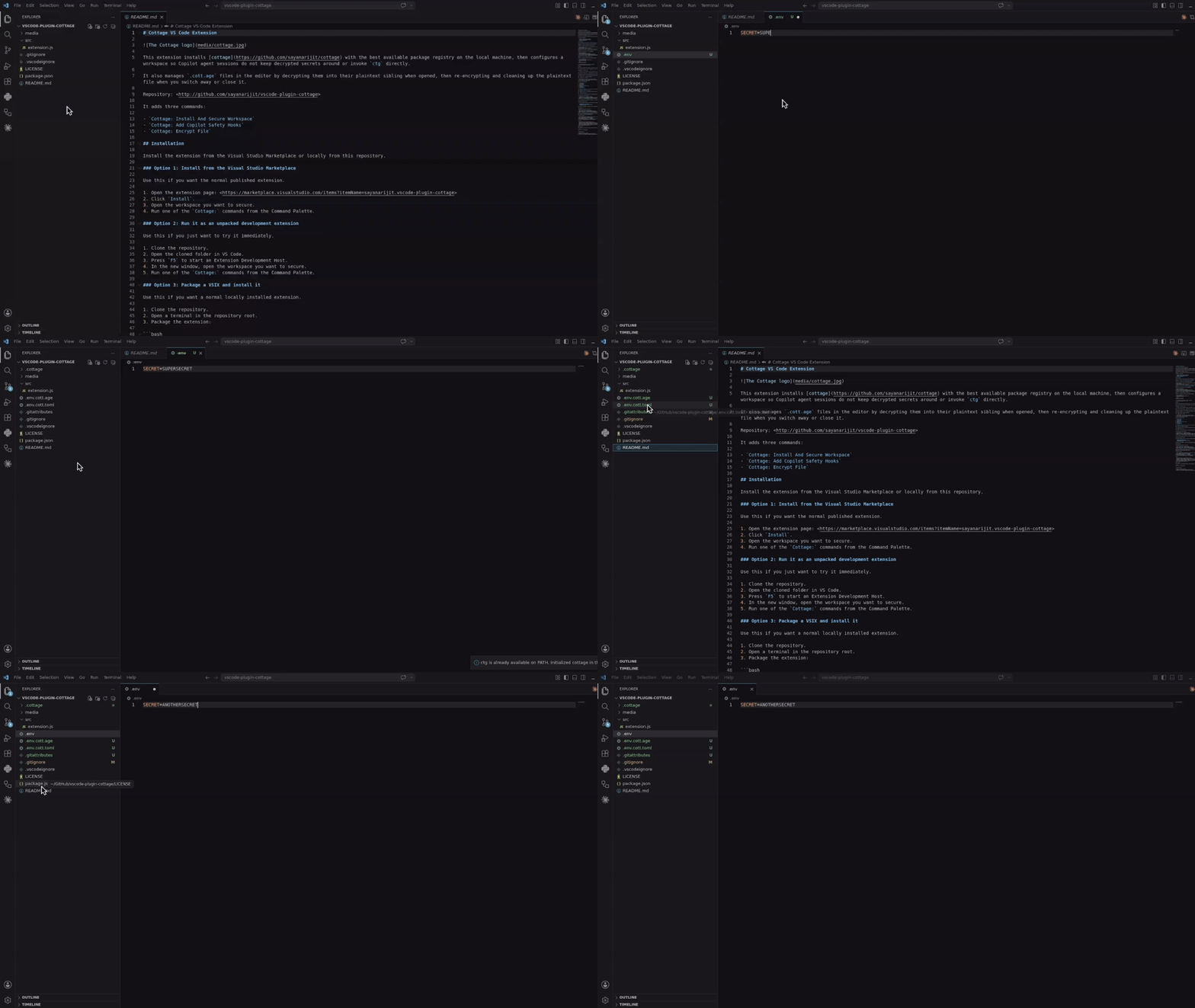
[Cottage VS Code 확장](https://github.com/sayanarijit/vscode-plugin-cottage)을 사용하여 `ctg`를 설치하고, Copilot 안전 훅을 추가하고, Explorer에서 파일을 암호화하고, 에디터 워크플로를 통해 `.cott.age` 파일을 열 수 있습니다.
[](https://marketplace.visualstudio.com/items?itemName=sayanarijit.vscode-plugin-cottage)
[Visual Studio Marketplace](https://marketplace.visualstudio.com/items?itemName=sayanarijit.vscode-plugin-cottage)에서 설치하거나, [`vscode-plugin-cottage`](https://github.com/sayanarijit/vscode-plugin-cottage)에서 로컬로 빌드하여 설치하세요.
### Cursor 및 Eclipse 확장
[VSX 파일](https://open-vsx.org/extension/sayanarijit/vscode-plugin-cottage)을 다운로드하여 Cursor 또는 Eclipse IDE에 설치하세요. VS Code 확장과 유사하게 작동합니다.
### Vim 플러그인
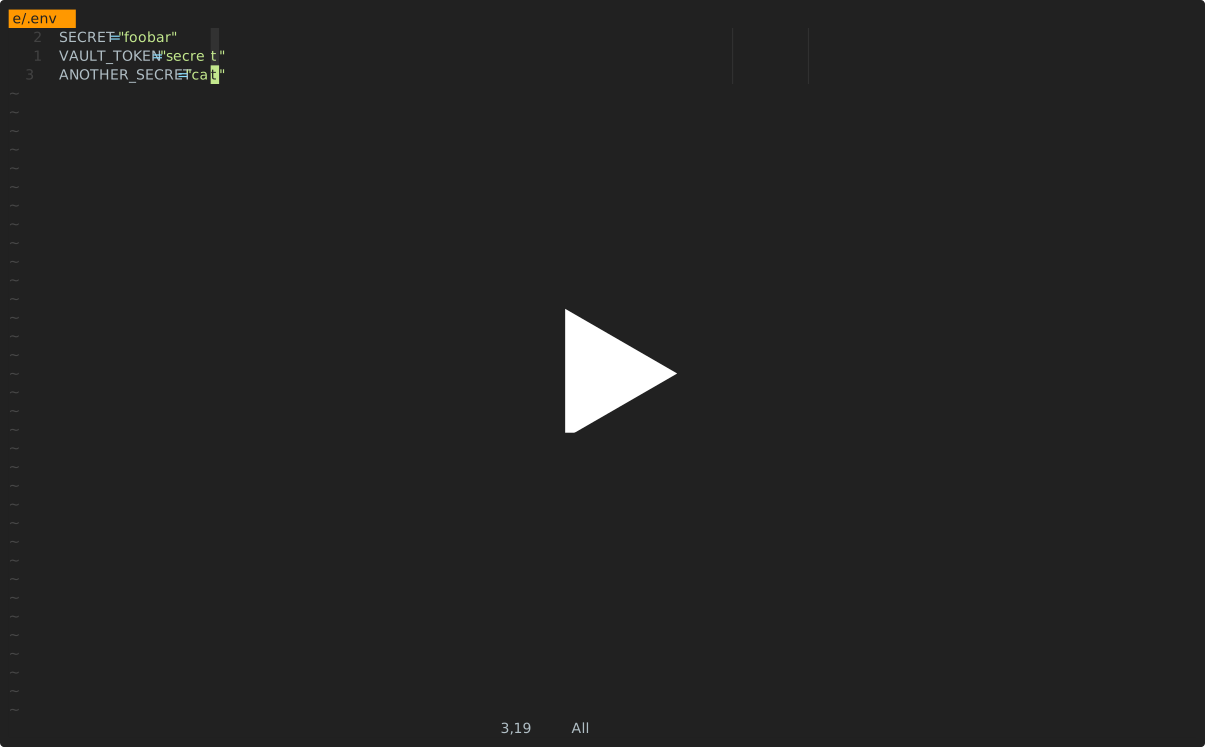
[cottage.vim](https://github.com/sayanarijit/cottage.vim) 플러그인을 사용하여 Vim 또는 Neovim에서 시크릿을 암호화/복호화하세요.
[](https://asciinema.org/a/1264076)
## AI 에이전트 통합
아래의 모든 통합은 AI 에이전트가 `ctg`/`ctgx`를 직접 실행하거나 시크릿 파일을 보거나 편집하는 것을 방지합니다. 여기에는 `.cottage/` 내부의 모든 것, 모든 `*.cott.*` 파일(암호화된 `*.cott.age` 블롭과 마스킹된 `*.cott.toml` 미리보기), 그리고 디스크에 `*.cott.age` 대응 파일이 여전히 존재하는 모든 복호화된 파일이 포함됩니다.
### Claude Code 통합
Claude Code를 사용하는 경우, 시크릿이 있는 저장소에 [`.claude/settings.json`](https://github.com/sayanarijit/cottage/blob/main/.claude/settings.json)과 [`.claude/hooks/deny-secrets.py`](https://github.com/sayanarijit/cottage/blob/main/.claude/hooks/deny-secrets.py)를 추가하여 Claude Code 세션이 시크릿을 안전하게 처리하도록 하거나, [claude-plugin-cottage](https://github.com/sayanarijit/claude-plugin-cottage) 플러그인을 설치하세요.
### GitHub Copilot 통합
VS Code에서 GitHub Copilot을 사용하는 경우, 시크릿이 있는 저장소에 [`.github/hooks/ctg-policy.json`](https://github.com/sayanarijit/cottage/blob/main/.github/hooks/ctg-policy.json)과 [`.github/hooks/scripts/deny_ctg_command.py`](https://github.com/sayanarijit/cottage/blob/main/.github/hooks/scripts/deny_ctg_command.py)를 추가하여 Copilot 세션이 복호화된 파일을 정리하고, 직접적인 `ctg` 셸 명령을 차단하고, 시크릿 파일 접근을 차단하도록 하거나, [vscode-plugin-cottage](https://github.com/sayanarijit/vscode-plugin-cottage) 확장을 설치하여 VS Code에서 설정하세요.
VS Code는 [`.claude/settings.json`](https://github.com/sayanarijit/cottage/blob/main/.claude/settings.json) 훅 정의도 로드합니다. 같은 저장소에 Claude와 Copilot 훅 파일을 모두 두는 경우, 동일한 정리 훅을 실수로 두 번 실행하지 않도록 주의하세요.
### Codex 통합
Codex를 사용하는 경우, 시크릿이 있는 저장소에 [`.codex/hooks.json`](https://github.com/sayanarijit/cottage/blob/main/.codex/hooks.json)과 [`.codex/hooks/deny-ctg.py`](https://github.com/sayanarijit/cottage/blob/main/.codex/hooks/deny-ctg.py)를 추가하여 Codex 세션이 시크릿을 안전하게 처리하도록 하거나, [codex-plugin-cottage](https://github.com/sayanarijit/codex-plugin-cottage) 플러그인을 설치하세요.
Codex는 로컬 훅을 실행하기 전에 검토를 요구합니다. 파일을 추가한 후 저장소에서 Codex를 시작하고 `/hooks`를 사용하여 프로젝트 훅을 검토하고 신뢰하세요.
### Antigravity (agy) 통합
Antigravity(`agy`)를 사용하는 경우, 시크릿이 있는 저장소에 [`.agents/hooks.json`](https://github.com/sayanarijit/cottage/blob/main/.agents/hooks.json)과 [`.agents/scripts/deny-ctg.py`](https://github.com/sayanarijit/cottage/blob/main/.agents/scripts/deny-ctg.py)를 추가하여 Antigravity 세션이 시크릿을 안전하게 처리하도록 하거나, [agy-plugin-cottage](https://github.com/sayanarijit/agy-plugin-cottage) 플러그인을 설치하세요.
### Cursor 통합
Cursor를 사용하는 경우, 시크릿이 있는 저장소에 [`.cursor/hooks.json`](https://github.com/sayanarijit/cottage/blob/main/.cursor/hooks.json), [`.cursor/hooks/deny-ctg.py`](https://github.com/sayanarijit/cottage/blob/main/.cursor/hooks/deny-ctg.py), [`.cursor/hooks/deny-read-secrets.py`](https://github.com/sayanarijit/cottage/blob/main/.cursor/hooks/deny-read-secrets.py), [`.cursor/rules/deny-ctg.mdc`](https://github.com/sayanarijit/cottage/blob/main/.cursor/rules/deny-ctg.mdc), [`.cursorignore`](https://github.com/sayanarijit/cottage/blob/main/.cursorignore)를 추가하여 Cursor 세션이 시크릿을 안전하게 처리하도록 하세요.
Cursor는 훅을 먼저 활성화해야 합니다. Cursor Settings > Hooks를 열고 훅을 활성화한 다음, 에이전트 세션을 재시작하여 프로젝트 훅이 적용되도록 하세요. `.cursorignore`는 추가로 시크릿 파일을 Cursor의 인덱싱과 에이전트의 컨텍스트에서 제외합니다.
## 빠른 시작
프로젝트 초기화:
```bash
mkdir project && cd project
git init # Optional, cottage works better with git but it's not required
ctg init # Sets up the .cottage directory and necessary files
tree -a
# .
# ├ .cottage/ <- Auto-generated by `ctg init`
# │ └ recipients/ <- This is where your team keeps the public keys of all the recipients.
# │ └ sayanarijit <- Your public key. Commit it. To use an existing public key, just copy that key here.
# ├ .git/...
# └ .gitattributes <- Added `*.cott.age binary linguist-generated filter=cottage-encrypted -diff` to avoid polluting git diff
# Your private key is stored safely in `~/.config/cottage/identity/<dirname>/<timestamp>.key`.
# You can run `ctg clean --all` anytime to clean up everything cottage ever did.
```
시크릿 생성 또는 편집:
```bash
# `ctg edit` decrypts the file before opening in $EDITOR and re-encrypts upon save.
# If the decrypted file was not present on disk before running `ctg edit`, it is cleaned up afterwards.
# If it was already present, it is kept on disk.
ctg edit secret.yml
# Use `--clean` with `ctg edit` or `ctg encrypt` to ensure decrypted files are deleted even if present before
ctg edit secret.yml --clean # Opens in $EDITOR, encrypts on save, and cleans up
ctg encrypt secret.yml --clean # Encrypts secret.yml and cleans up
# encrypt secret.yml
# into secret.yml.cott.age
# edit secret.yml.cott.toml
# edit .gitignore
# delete secret.yml
```
복호화된 시크릿으로 명령 실행:
```bash
cat secret.yml
# cat: secret.yml: No such file or directory
# `ctg run` (or shortcut `ctgx`) decrypts secrets before running the command.
# If the decrypted files were not present on disk beforehand, they are automatically cleaned up after the command finishes.
# If they were already present beforehand, they are kept on disk.
ctg run -- kubectl apply -f secret.yml # decrypts secret.yml.cott.age to secret.yml and runs the command
ctg run -- kubectl apply -f secret.yml.cott.age # also replaces the path argument with the decrypted file path
ctg run -- kubectl apply -f . # decrypts all .cott.age files in . and runs the command
ctg run -- ./deploy.sh # decrypts all .cott.age files in repo and runs the command
cat secret.yml
# cat: secret.yml: No such file or directory
# Use `--clean` to ensure decrypted files are cleaned up even if they were present before
ctg run --clean ./deploy.sh
```
또는 단축 명령 사용:
```bash
ctgx -- ./deploy.sh
ctgx --clean -- ./deploy.sh
```
디스크에 기록하지 않고 복호화된 시크릿을 읽고 파이핑:
```bash
ctg cat secret.yml.cott.age
ctg cat secret.yml | kubectl apply -f -
ctg cat .env.prod | docker run --rm --env-file /dev/stdin my-image:latest
```
디스크에 전혀 기록하지 않고 시크릿을 환경 변수로 주입하여 명령 실행:
```bash
ctg env -- ./deploy.sh # Export secrets from .env.cott.age (default) without writing them to disk, then run deploy.sh
ctg env -F .env.prod.cott.age -- ./deploy.sh # exports from .env.prod.cott.age instead of .env.cott.age
ctg env -F secrets.json.cott.age -- printenv COTTAGE_SECRET # Also supports non-dotenv files.
```
## GitOps
팀원과 시크릿을 공유하려면 git 저장소에 푸시하기만 하면 됩니다.
```bash
git add .
git commit -m "Add secret.yml"
git push origin main
```
팀원에게 공개 키를 `.cottage/recipients`에 추가하고 변경 사항을 푸시하도록 요청하세요. 그런 다음 풀하고 그들을 위해 시크릿을 다시 암호화할 수 있습니다.
```bash
git pull origin main
ctg decrypt --skip-verify-recipients # Decrypt missing secrets for re-encryption
ctg encrypt # Re-encrypt all secrets
# encrypt secret.yml
# into secret.yml.cott.age
# edit secret.yml.cott.toml
ctg clean # optional
# delete secret.yml
# review changes, commit and push
git add .
git commit -m "Add new recipient to secrets"
git push origin main
```
이제 팀원들이 최신 변경 사항을 풀하고 스스로 시크릿을 복호화할 수 있습니다.
## Git 훅
[prek](https://github.com/j178/prek) 또는 [pre-commit](https://pre-commit.com/)을 사용하여 커밋 전에 시크릿을 자동으로 확인/암호화하고 체크아웃 후에 복호화하는 git 훅을 설정할 수 있습니다.
[예제 prek 구성은 여기](https://github.com/sayanarijit/cottage/blob/main/examples/prek.toml)를 참조하세요.
`prek.toml` 파일을 추가한 후 다음을 실행하세요:
```bash
prek install
prek install --hook-type post-checkout
prek install --hook-type post-merge
prek install --hook-type post-rewrite
```
## 접근 제어
### 규칙
메타데이터 파일에서 시크릿을 어떤 수신자에 대해 암호화할지 주석으로 지정할 수 있습니다. 이를 통해 서로 다른 환경(예: 스테이징 vs 프로덕션)에 대해 서로 다른 시크릿을 가질 수 있고 관련 수신자에 대해서만 암호화할 수 있습니다.
```toml
# secret.yml.cott.toml
[secret]
allow = ["sayanarijit"] # Only encrypt for sayanarijit
```
```toml
# secret.yml.cott.toml
[secret]
deny = ["sayanarijit"] # Encrypt for everyone except sayanarijit
```
```toml
# secret.yml.cott.toml
[secret]
allow = ["env/staging/*"] # Supports glob patterns, only encrypt for recipients in env/staging
deny = ["env/staging/badservice"] # Encrypt for everyone in env/staging except badservice
```
거부 규칙은 허용 규칙보다 우선합니다.
자세한 내용은 [메타데이터 명세](https://github.com/sayanarijit/cottage/blob/main/SPECIFICATION.md#secretmetadata)를 참조하세요.
### 검증
CI에서 `ctg verify`를 실행하여 암호화된 시크릿과 수신자 목록이 메타데이터 규칙과 일치하는지 검증하여 변조를 방지할 수 있습니다.
```yaml
# .github/workflows/cottage-verify.yml
name: Cottage Verify
on: [push, pull_request]
permissions:
contents: read
jobs:
verify-secrets:
runs-on: ubuntu-latest
steps:
- uses: actions/checkout@v3
- name: Verify secrets
run: docker run --rm -v "${{ github.workspace }}:/app" ghcr.io/sayanarijit/cottage verify
```
## 모든 제공자를 업스트림으로 사용
cottage를 사용하면 git뿐만 아니라 API가 있는 모든 제공자와 시크릿을 동기화할 수 있습니다.
이를 위해 프로젝트 루트에 `cottage.toml`이라는 파일을 만들고 업스트림 설정을 구성하세요.
[예제 `cottage.toml`은 여기](https://github.com/sayanarijit/cottage/blob/main/cottage.toml)와 [시크릿별 업스트림 구성은 여기](https://github.com/sayanarijit/cottage/blob/main/examples/secrets/secret.json.cott.toml)를 참조하세요.
[예제 플러그인 구현은 여기](https://github.com/sayanarijit/cottage/blob/main/examples/plugins/cottage-plugin-vault-in-kubernetes.py)를 참조하세요.
워크플로는 git과 유사하지만, `git pull`과 `git push` 대신 `ctg pull`과 `ctg push`를 실행하여 구성된 업스트림과 시크릿을 동기화합니다.
예제:
```bash
# Pull latest changes into local encrypted secrets
# Similar to `git pull origin`
ctg pull myvault
# Compare diff with local decrypted secrets
ctg diff
# Sync local decrypted secrets with local encrypted secrets
ctg sync
# Push changes from local encrypted secrets to upstream
# Similar to `git push origin main`
ctg push myvault
```
자세한 내용은 [업스트림 구성 명세](https://github.com/sayanarijit/cottage/blob/main/SPECIFICATION.md#upstreamconfig)를 참조하세요.
### 예제 플러그인
Cottage는 시크릿을 동기화하기 위한 다양한 플러그인 제공자를 지원합니다. 바로 사용할 수 있는 플러그인 스크립트는 [examples/plugins](https://github.com/sayanarijit/cottage/blob/main/examples/plugins) 디렉터리에서 사용할 수 있습니다:
- [1Password](https://github.com/sayanarijit/cottage/blob/main/examples/plugins/cottage-plugin-onepassword.py)
- [AWS Secrets Manager](https://github.com/sayanarijit/cottage/blob/main/examples/plugins/cottage-plugin-aws-secretsmanager.py)
- [Azure Key Vault](https://github.com/sayanarijit/cottage/blob/main/examples/plugins/cottage-plugin-azure-keyvault.py)
- [Bitwarden](https://github.com/sayanarijit/cottage/blob/main/examples/plugins/cottage-plugin-bitwarden.py)
- [Dashlane](https://github.com/sayanarijit/cottage/blob/main/examples/plugins/cottage-plugin-dashlane.py)
- [Doppler](https://github.com/sayanarijit/cottage/blob/main/examples/plugins/cottage-plugin-doppler.py)
- [ejson](https://github.com/sayanarijit/cottage/blob/main/examples/plugins/cottage-plugin-ejson.py)
- [GitHub Secrets](https://github.com/sayanarijit/cottage/blob/main/examples/plugins/cottage-plugin-github-secrets.py)
- [Google Cloud Secret Manager](https://github.com/sayanarijit/cottage/blob/main/examples/plugins/cottage-plugin-gcp-secretmanager.py)
- [HashiCorp Vault](https://github.com/sayanarijit/cottage/blob/main/examples/plugins/cottage-plugin-vault.py) (also see [Vault in Kubernetes](https://github.com/sayanarijit/cottage/blob/main/examples/plugins/cottage-plugin-vault-in-kubernetes.py))
- [Keeper Security](https://github.com/sayanarijit/cottage/blob/main/examples/plugins/cottage-plugin-keeper.py)
- [KeePass (Passhole)](https://github.com/sayanarijit/cottage/blob/main/examples/plugins/cottage-plugin-passhole.py)
- [LastPass](https://github.com/sayanarijit/cottage/blob/main/examples/plugins/cottage-plugin-lastpass.py)
- [pass (password-store)](https://github.com/sayanarijit/cottage/blob/main/examples/plugins/cottage-plugin-pass.py)
- [Proton Pass](https://github.com/sayanarijit/cottage/blob/main/examples/plugins/cottage-plugin-protonpass.py)
- [System Keyring](https://github.com/sayanarijit/cottage/blob/main/examples/plugins/cottage-plugin-keyring.py)
- [Zoho Vault](https://github.com/sayanarijit/cottage/blob/main/examples/plugins/cottage-plugin-zoho-vault.py)
## 모든 기기와 동기화
[Cottage Sync](https://cottage-sync.github.io)를 사용하여 CLI 없이 여러 기기에서 시크릿을 동기화하고 탐색하세요.
## 더 알아보기
더 많은 사용 예제는 [examples](https://github.com/sayanarijit/cottage/blob/main/examples) 디렉터리를 참조하세요.
## 문제 해결
```bash
# See debug logs with -v, -vv or -vvv
ctg run -vvv -- ./deploy.sh
```
## 비교
### age vs 다른 암호화
[age](https://age-encryption.org)는 안전한 파일 암호화에 최적화된 현대적이고 간단한 알고리즘을 사용하며, 사용성과 최소한의 공격 표면에 중점을 둡니다. 또한 [SSH RSA 및 Ed25519 키를 지원](https://words.filippo.io/using-ed25519-keys-for-encryption/)하지만, 별도의 목적과 범위에는 다른 키를 사용하는 것이 권장됩니다.
### cottage vs SOPS
[SOPS](https://getsops.io/)와 cottage는 많은 기능이 겹치지만, cottage는 다음과 같은 장점이 있습니다:
- 암호화되지 않은 시크릿이 git에 절대 커밋되지 않도록 .gitignore를 자동 관리합니다.
- 암호화된 시크릿이 순수한 age 암호화 .age 파일이므로 더 넓은 도구 생태계와의 상호 운용성이 향상됩니다.
- 더 깔끔한 diff - 실제 변경이 수신자를 추가/제거하는 것뿐이더라도 모든 시크릿의 모든 값에 대해 diff를 생성하는 SOPS와 달리, cottage는 파일당 하나의 diff만 생성하며 수신자 체크섬의 변경을 명시적으로 지적합니다.
### cottage vs dotenvx
cottage는 [dotenvx](https://dotenvx.com)에서 `ctg env` API를 차용했습니다.
- dotenv 파일뿐만 아니라 모든 파일 유형을 지원합니다.
- 저장소에서 여러 시크릿을 관리합니다.
- 특정 수신자에 대해 시크릿을 암호화하는 접근 제어 규칙을 제공합니다.
- 더 깔끔한 diff - [cottage vs SOPS](#cottage-vs-sops)를 참조하세요.
### cottage vs agebox
[agebox](https://github.com/slok/agebox)는 핵심 철학에서 cottage와 매우 유사하지만 많은 [기능](#features)이 부족합니다.
