
agentic-threat-hunting-framework v0.18.0
ATHF는 에이전틱 위협 헌팅을 위한 프레임워크입니다 - 기억하고, 학습하며, 점진적 자율성을 가지고 행동하는 시스템을 구축합니다.
Agentic Threat Hunting Framework (ATHF)




위협 헌팅 프로그램에 기억과 자율성을 부여하세요.
Agentic Threat Hunting Framework (ATHF) 는 위협 헌팅 프로그램을 위한 기억 및 자동화 계층입니다. 헌팅에 구조, 지속성, 그리고 컨텍스트를 부여하여 과거의 모든 조사를 사람과 AI 모두가 접근할 수 있게 만듭니다.
ATHF는 모든 헌팅 방법론(PEAK, TaHiTI 또는 자체 프로세스)과 함께 작동합니다. 이는 대체물이 아니라, 기존 프로세스를 AI에 적합하게 만드는 계층입니다.
ATHF란 무엇인가?
ATHF는 위협 헌팅 프로그램에 구조와 지속성을 제공합니다. 다음과 같은 마크다운 기반 프레임워크입니다:
- LOCK 패턴(Learn → Observe → Check → Keep)을 사용하여 헌팅을 문서화
- 과거 조사에 대한 검색 가능한 저장소 유지
- AI 어시스턴트가 사용자 환경과 이전 작업을 참조할 수 있도록 지원
- 모든 SIEM/EDR 플랫폼과 호환
- 신규: AI 기반 리서치 및 가설 생성 에이전트 포함 (v0.3.0+)
문제점
대부분의 위협 헌팅 프로그램은 헌팅이 끝나면 귀중한 컨텍스트를 잃습니다. 노트는 Slack이나 티켓에 흩어져 있고, 쿼리는 한 번 작성되고 잊히며, 교훈은 분석가의 머릿속에만 존재합니다.
AI 도구조차도 사용자 환경, 데이터, 과거 헌팅에 대한 접근 없이는 매번 처음부터 시작합니다.
ATHF는 헌팅에 구조, 지속성, 컨텍스트를 부여함으로써 이를 바꿉니다.
더 읽어보기: docs/why-athf.md
LOCK 패턴
모든 위협 헌팅은 동일한 기본 루프를 따릅니다: Learn → Observe → Check → Keep.
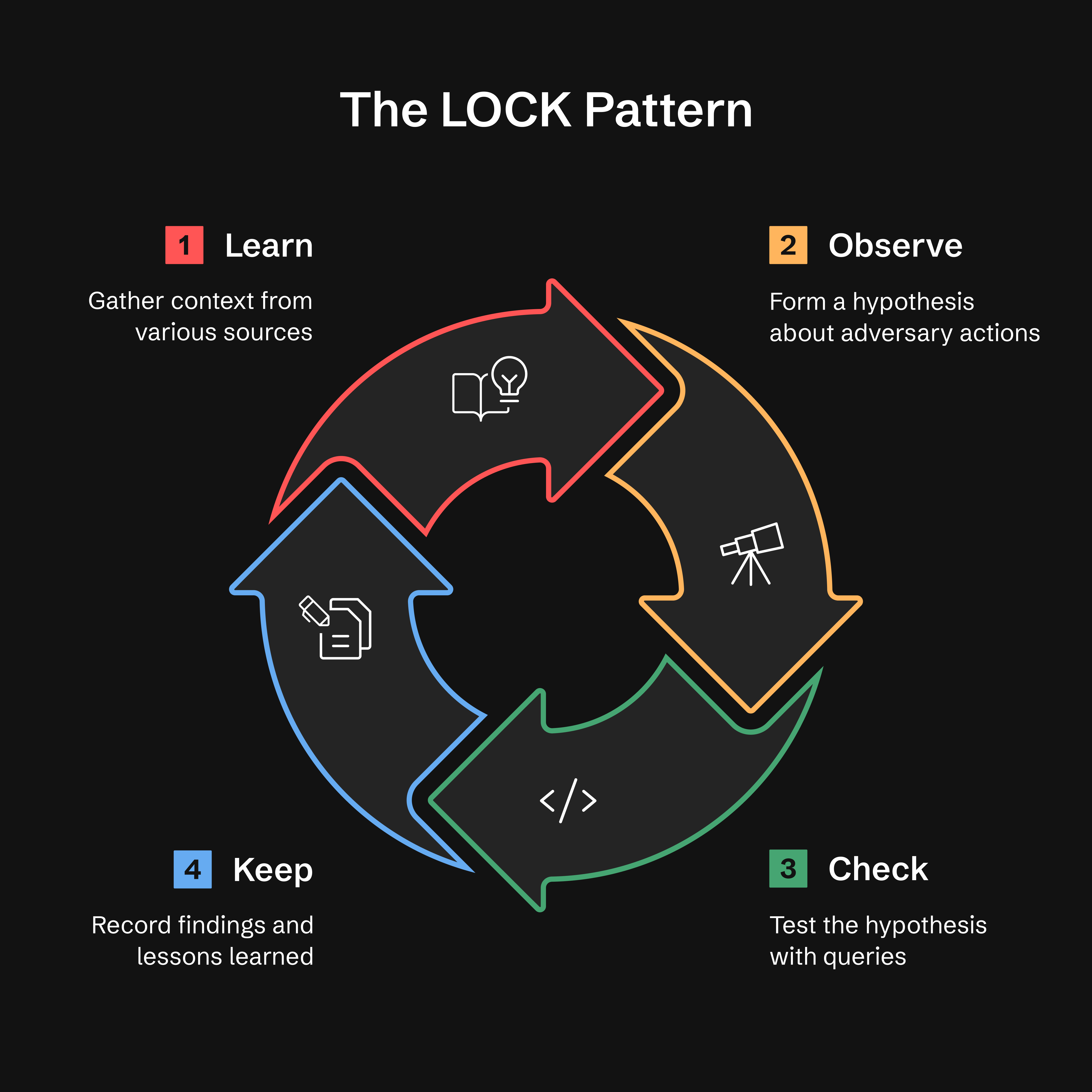
- Learn: 위협 인텔, 경보 또는 이상 징후로부터 컨텍스트 수집
- Observe: 공격자 행동에 대한 가설 수립
- Check: 표적화된 쿼리로 가설 검증
- Keep: 발견 사항과 교훈 기록
왜 LOCK인가? 사용하기에 충분히 작으면서도 에이전트가 해석하기에 충분히 엄격합니다. 모든 헌팅을 이 형식으로 기록함으로써 ATHF는 AI 어시스턴트가 이전 작업을 회상하고 과거 결과를 바탕으로 개선된 쿼리를 제안할 수 있게 합니다.
더 읽어보기: docs/lock-pattern.md
GATES 방법: 헌팅-탐지 승격 검증
헌팅의 KEEP 단계를 완료한 후, GATES 방법은 발견 사항을 프로덕션 탐지, 반복 헌팅 또는 권고 사항으로 승격해야 하는지 검증합니다.
Generalizable(일반화 가능), Additive(추가적), Tunable(조정 가능), Exposure-tested(노출 테스트됨), Sustainable(지속 가능)
참고: GATES는 ATHF 프레임워크와 함께 작동하도록 설계되었으며 해당 컨텍스트에서 광범위하게 테스트되었습니다. 방법론(5가지 BASE 기준, 판정 유형)은 개념적으로 이식 가능하지만, 최상의 결과를 위해 전체 ATHF 워크플로의 일부로 사용할 것을 권장합니다. 전체 통합은
.claude/skills/gates/를 참조하세요.
설치: GATES는 현재
git clone을 통해서만 사용할 수 있습니다.pip install로 설치한 사용자는 GATES에 접근하려면 저장소를 클론해야 합니다. 현재 GATES를 pip 배포에 포함시키기 위해 작업 중입니다 (Issue #21로 추적 중).
GATES는 헌팅에서 도출된 탐지를 2계층 프레임워크로 평가합니다: 5가지 BASE 기준(헌팅 데이터에서 평가)이 배포 후보를 식별하고, 5가지 ADVANCED 기준(프로덕션에서 검증)이 낮은 오탐 및 미탐률을 가진 복원력 있는 탐지를 보장합니다:
| Gate | 질문 | 포착 대상 |
|---|---|---|
| G - Generalizable | 반복 가능한가? | 빠르게 만료되는 IOC 기반 규칙 |
| A - Additive | 커버리지 격차를 채우는가? | 중복되거나 불필요한 탐지 |
| T - Tunable | 공격과 정상을 구분할 수 있는가? | 베이스라인 노이즈 불일치 (최대 오탐 원인) |
| E - Exposure-tested | 회피를 커버했는가? | 단일 차원 탐지 |
| S - Sustainable | 유지 관리할 수 있는가? | 고볼륨, 저TP 규칙 |
판정은 BASE 점수(/5)를 기반으로 합니다. ADVANCED 검증 방법은 .claude/skills/gates/를 참조하세요.
빠른 시작 — 어시스턴트에게 다음과 같이 입력하세요; /gates는 스킬이며 셸 명령이 아닙니다:
/gates --hunt H-0001
판정 유형:
- ✅ PROMOTE (4.0-5.0) - 상시 탐지로 배포
- ⚠️ CONDITIONAL (3.0-3.9) - 전제 조건 충족 후 배포
- ❌ HOLD (0.0-2.9) - 로직은 보존하되 배포하지 않음
- ⏱️ TIME_BOX - 캠페인 한정, 90일마다 갱신
- 🔄 RECURRING_HUNT - 분기별 실행, 24/7 아님
- 🚫 DROP - 탐지할 가치 없음, 재제안되지 않도록 기록
게이트 FAIL은 점수 구간을 무시하며, 두 개의 게이트가 실패하면 다음 순서에서
첫 번째 일치가 우선한다: A→DROP, G→TIME_BOX, E→HOLD, S→RECURRING_HUNT, T→CONDITIONAL.
위의 구간은 게이트가 FAIL하지 않았을 때만 적용된다. 전체 규칙:
.claude/skills/gates/SKILL.md Step 4.
참고: GATES의 "PROMOTE" 판정은 탐지 규칙을 배포하는 것을 의미한다. 이는 헌트 파일을 디렉터리 간에 이동시키는 athf hunt promote와는 다르다.
ADEF(탐지 엔지니어링 프레임워크)와의 통합:
GATES 검증 후, 프로덕션 탐지 엔지니어링을 위해 ADEF로 진행한다:
ATHF Workspace                    ADEF Workspace
──────────────                    ──────────────
Hunt (LOCK)
   ↓
GATES Validate
   ↓
H-XXXX_GATES.yaml  ────────────→  FORGE (F-O-R-G-E)
                                     ↓
                                  Production Rule
전체 워크플로:
-
ATHF 워크스페이스에서 헌트를 검증합니다 — 셸 명령이 아닌 어시스턴트 입력입니다:
/gates --hunt H-0903→
hunt-promotion-analysis/H-0903_GATES.yaml을 작성합니다 (헌트당 파일 하나, 내부에 N개의 후보). 판정이 archival(HOLD,DROP,TIME_BOX,RECURRING_HUNT)인 헌트는 대신.md서술을 출력합니다 — 구축할 규칙이 없으므로 2단계는.yaml출력에만 적용됩니다. -
해당 문서를 ADEF로 가져옵니다:
adef hunt-promote --gates ~/athf-workspace/hunt-promotion-analysis/H-0903_GATES.yaml
# --dry-run first to preview what it would mint
배포 가능한 후보들은 각각
D-XXXX, 카탈로그 레코드, 저널과 함께 Find 단계에 도달하며, 아카이브 대상은 건너뛴 것으로 보고됩니다.cd가 필요 없습니다 — ADEF는ADEF_WORKSPACE(기본값~/work/adef-workspace/)에서 워크스페이스를 확인합니다.adef hunt-promote --help로 ADEF에 이 모드가 있는지 확인하세요.
ADEF Repository: https://github.com/Nebulock-Inc/agentic-detection-engineering-framework
GATES는 알림 피로와 운영상의 마찰을 피하면서 올바른 탐지를 올바른 방식으로 배포할 수 있게 해줍니다.
Read more: .claude/skills/gates/README.md
에이전틱 헌팅의 다섯 단계
ATHF는 단순한 성숙도 모델을 정의합니다. 각 단계는 이전 단계를 기반으로 합니다.
대부분의 팀은 레벨 1–2에 머무릅니다. 그 이상은 모두 선택적인 성숙도입니다.
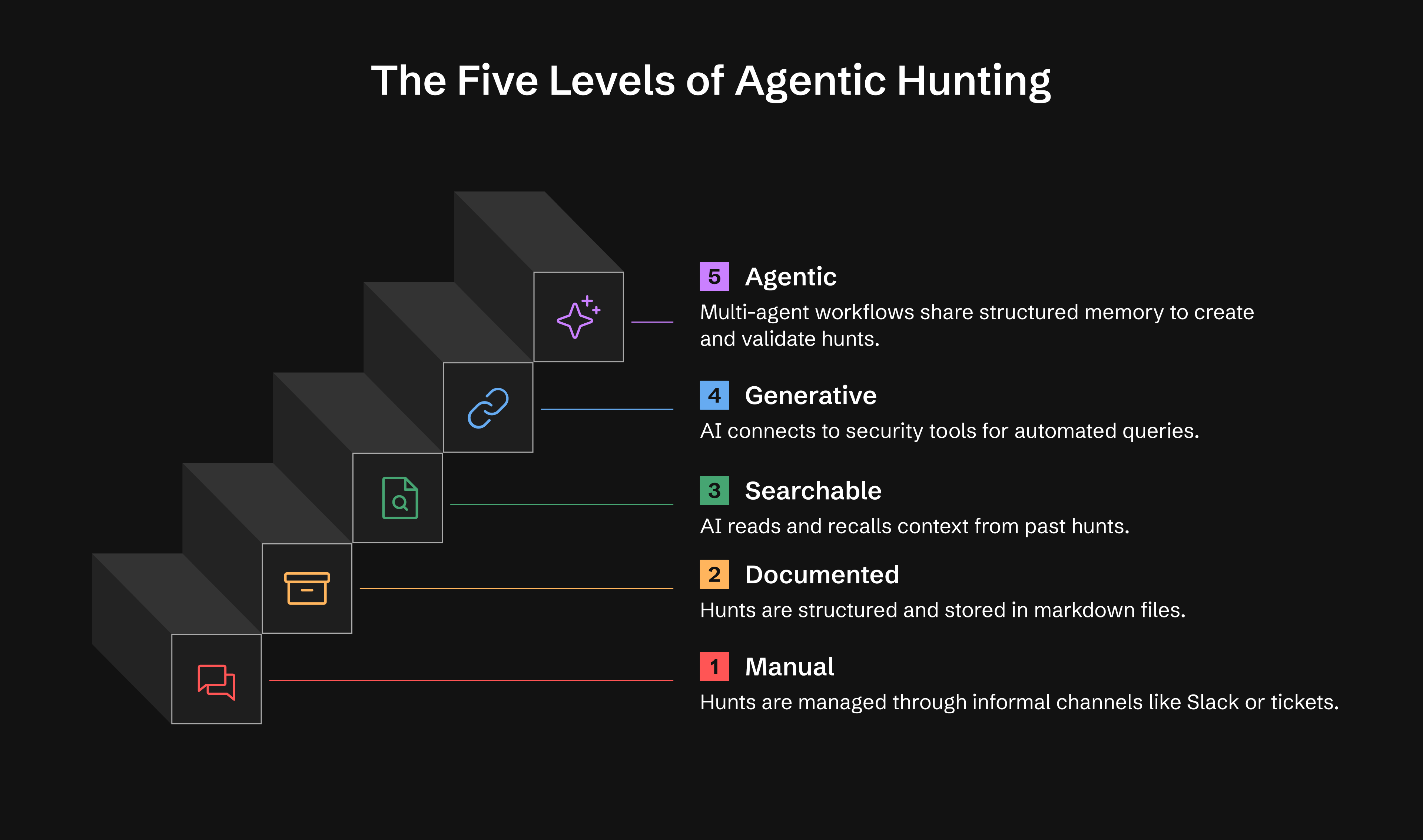
| Level | Capability | What You Get |
|---|---|---|
| 0 | Ad-hoc | Hunts exist in Slack, tickets, or analyst notes |
| 1 | Documented | Persistent hunt records using LOCK |
| 2 | Searchable | AI reads and recalls your hunts |
| 3 | Generative | AI executes queries via MCP tools, conducts research |
| 4 | Agentic | Autonomous agents monitor and act, generate hypotheses |
Level 1: 하루 안에 운영 가능 Level 2: 일주일 안에 운영 가능 Level 3: 2-4주 (선택 사항) Level 4: 1-3개월 (선택 사항)
Read more: docs/maturity-model.md
🚀 빠른 시작
옵션 1: PyPI에서 설치 (권장)
# Install ATHF
pip install agentic-threat-hunting-framework

# Initialize your hunt program
athf init

# NEW: Conduct research before hunting (5-skill methodology)
athf research new --topic "LSASS dumping" --technique T1003.001

# Create your first hunt (link to research)
athf hunt new --technique T1003.001 --title "LSASS Credential Dumping" --research R-0001
옵션 2: 소스에서 설치 (개발)
# Clone and install from source
git clone https://github.com/Nebulock-Inc/agentic-threat-hunting-framework
cd agentic-threat-hunting-framework
pip install -e .

# Initialize and start hunting
athf init
athf hunt new --technique T1003.001
옵션 3: 순수 Markdown (설치 불필요)
# Clone the repository
git clone https://github.com/Nebulock-Inc/agentic-threat-hunting-framework
cd agentic-threat-hunting-framework

# Copy a template and start documenting
mkdir -p hunts
cp athf/data/templates/HUNT_LOCK.md hunts/H-0001.md

# Customize AGENTS.md with your environment
# Add your SIEM, EDR, and data sources
AI 어시스턴트 선택: Claude Code, GitHub Copilot 또는 Cursor - 저장소 파일을 읽을 수 있는 모든 도구.