
ffuf v2.2.1
Go로 작성된 고속 웹 퍼저

ffuf - 더 빨리 퍼징해, 이 바보야
Go로 작성된 빠른 웹 퍼저.
설치
-
릴리스 페이지에서 사전 빌드된 바이너리를 다운로드하여 압축을 풀고 실행하세요!
또는
-
Windows에서 Scoop을 사용한다면 ffuf는 다음과 같이 설치할 수 있습니다:
scoop install ffuf또는
-
Windows에서 Winget을 사용한다면 ffuf는 다음과 같이 설치할 수 있습니다:
winget install ffuf.ffuf또는
-
macOS에서 homebrew를 사용한다면 ffuf는 다음과 같이 설치할 수 있습니다:
brew install ffuf또는
-
최신 go 컴파일러가 설치되어 있다면:
go install github.com/ffuf/ffuf/v2@latest(업데이트에도 동일한 명령어가 사용됩니다)또는
-
git clone https://github.com/ffuf/ffuf ; cd ffuf ; go get ; go build
- Ffuf는 Go 1.20 이상이 필요합니다.
- 체크아웃에서 go build를 하면 태그 대신
git-<date>-<commit>이 표시됩니다. 태그가 지정된 상태에서도 로컬 빌드는 공식 릴리스가 아니며, Go의 내장 빌드 정보는 태그 이름이 아닌 커밋만 제공하므로 빌드된 정확한 커밋을 표시합니다. 공식 버전 바이너리는 릴리스 페이지에 있는 것입니다.
사용 예시
아래의 사용 예시는 ffuf로 수행할 수 있는 가장 간단한 작업만 보여줍니다.
많은 예제와 함께 다양한 기능을 설명하는 더 자세한 문서는 ffuf 위키 https://github.com/ffuf/ffuf/wiki에서 볼 수 있습니다.
실제 사용 예시와 팁이 포함된 더 방대한 문서를 원한다면 Michael Skelton(@codingo)이 작성한 훌륭한 가이드 "Everything you need to know about FFUF"를 꼭 확인하세요.
또한 다양한 레슨과 사용 사례를 제공하는 실제 호스트를 대상으로 ffuf 스캔을 연습할 수 있습니다. 로컬에서는 도커 컨테이너 https://github.com/adamtlangley/ffufme 를 사용하거나, Adam Langley @adamtlangley가 만든 라이브 호스팅 버전 http://ffuf.me 를 이용하면 됩니다.
일반적인 디렉터리 발견
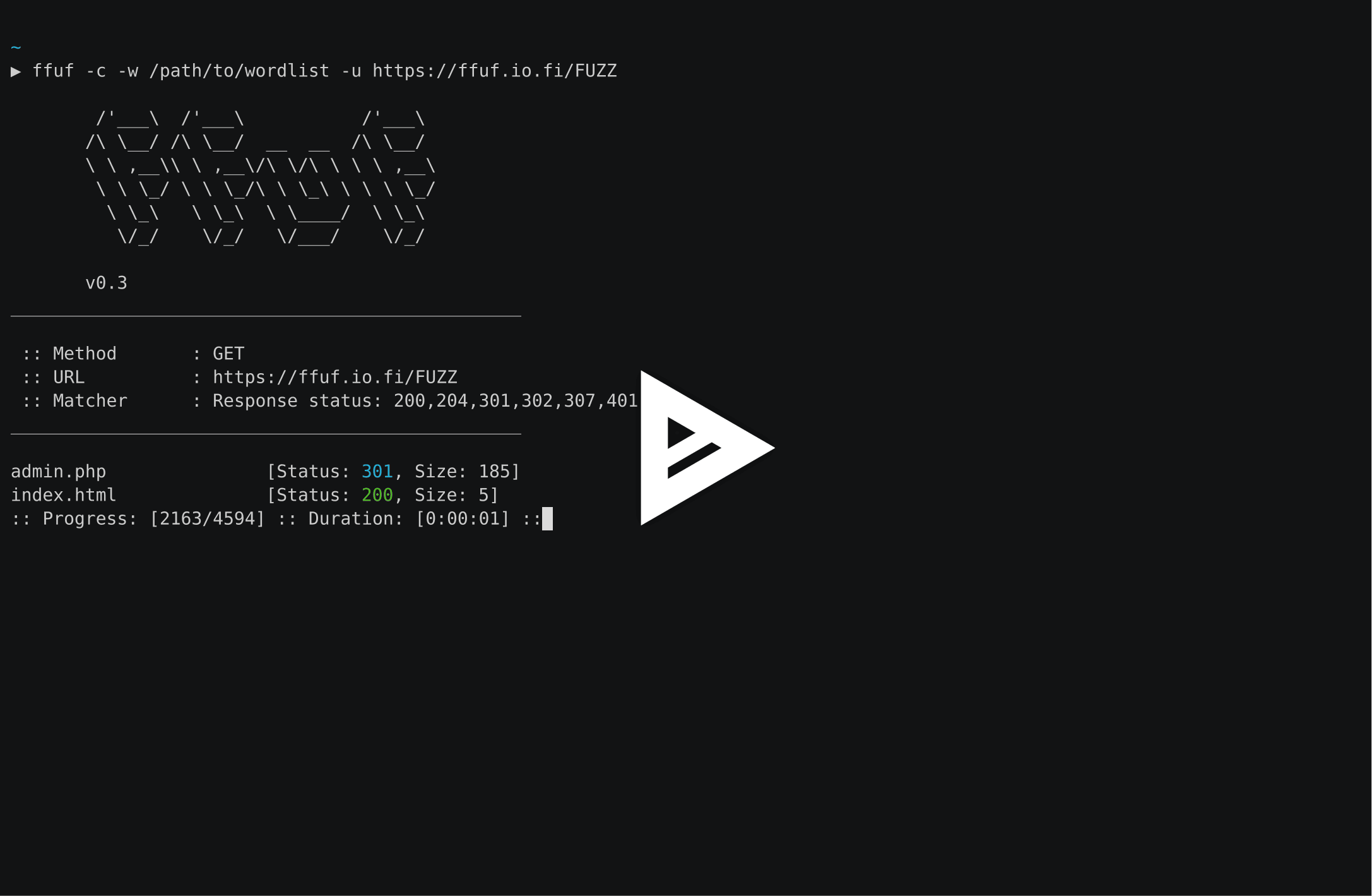
URL(-u) 끝에 FUZZ 키워드를 사용합니다:
ffuf -w /path/to/wordlist -u https://target/FUZZ
가상 호스트 발견 (DNS 레코드 없이)
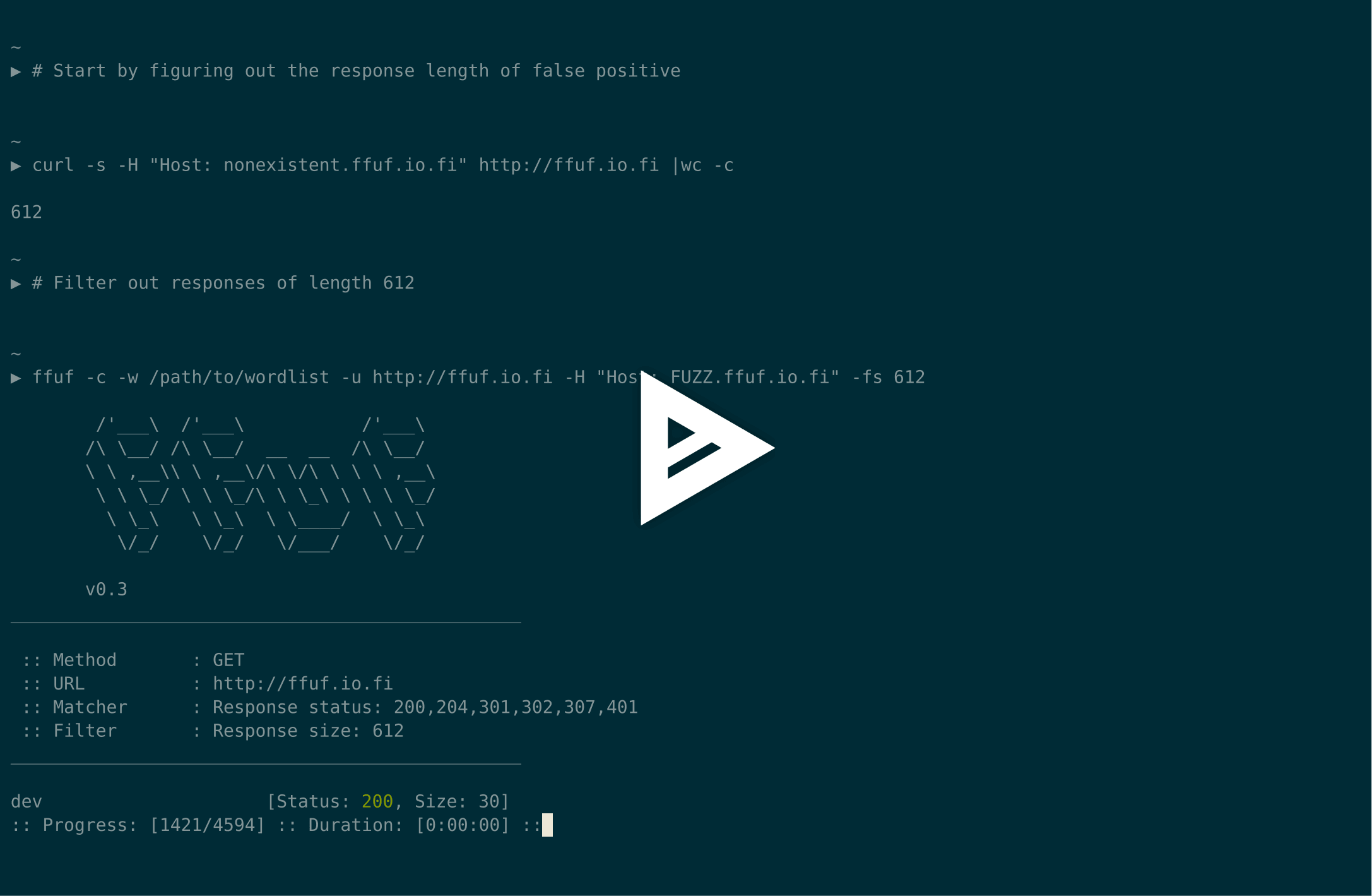
기본 가상 호스트 응답 크기가 4242바이트라고 가정하고, Host 헤더를 퍼징하면서 해당 크기의 모든 응답을 필터링할 수 있습니다(-fs 4242):
ffuf -w /path/to/vhost/wordlist -u https://target -H "Host: FUZZ" -fs 4242
GET 파라미터 퍼징
GET 파라미터 이름 퍼징은 디렉터리 발견과 매우 유사하며, URL의 일부로 FUZZ 키워드를 정의하여 동작합니다. 유효하지 않은 GET 파라미터 이름에 대한 응답 크기도 4242바이트라고 가정합니다.
ffuf -w /path/to/paramnames.txt -u https://target/script.php?FUZZ=test_value -fs 4242
파라미터 이름을 알고 있다면 값을 같은 방식으로 퍼징할 수 있습니다. 이 예시는 잘못된 파라미터 값이 HTTP 응답 코드 401을 반환한다고 가정합니다.
ffuf -w /path/to/values.txt -u https://target/script.php?valid_name=FUZZ -fc 401
POST 데이터 퍼징
이 또한 FUZZ 키워드를 사용하는 매우 간단한 작업입니다. 이 예시는 POST 요청의 일부만 퍼징하며, 401 응답을 다시 필터링합니다.
ffuf -w /path/to/postdata.txt -X POST -d "username=admin\&password=FUZZ" -u https://target/login.php -fc 401
최대 실행 시간
ffuf를 무기한 실행하고 싶지 않다면 -maxtime을 사용할 수 있습니다. 이 옵션은 지정된 시간(초) 후 전체 프로세스를 중지합니다.
ffuf -w /path/to/wordlist -u https://target/FUZZ -maxtime 60
재귀(recursion) 작업 시 -maxtime-job을 사용하여 작업별 최대 시간을 제어할 수 있습니다. 지정된 시간(초) 후 현재 작업을 중지하고 다음 작업을 계속합니다. 재귀 기능이 하위 디렉터리를 감지하면 새 작업이 생성됩니다.
ffuf -w /path/to/wordlist -u https://target/FUZZ -maxtime-job 60 -recursion -recursion-depth 2
두 플래그를 함께 사용하여 작업별 최대 실행 시간과 전체 실행 시간을 모두 제한할 수도 있습니다. 재귀를 사용하지 않으면 두 플래그는 동일하게 동작합니다.
외부 뮤테이터를 사용하여 테스트 케이스 생성
이 예시에서는 POST로 전송되는 JSON 데이터를 퍼징합니다. 뮤테이터로 Radamsa를 사용합니다.
--input-cmd를 사용하면 ffuf는 일치 항목을 위치 값으로 표시합니다. 이 위치 값은 호출되는 프로그램에서 환경 변수 $FFUF_NUM으로 사용할 수 있습니다. 이 위치 값을 뮤테이터의 시드로 사용합니다. example1.txt와 example2.txt 파일에는 유효한 JSON 페이로드가 들어 있습니다. 모든 응답을 매칭하되 응답 코드 400 - Bad request는 필터링합니다:
ffuf --input-cmd 'radamsa --seed $FFUF_NUM example1.txt example2.txt' -H "Content-Type: application/json" -X POST -u https://ffuf.io.fi/FUZZ -mc all -fc 400
물론 페이로드마다 뮤테이터를 호출하는 것은 효율적이지 않으므로, 여전히 Radamsa를 예시로 사용하여 페이로드를 미리 생성할 수도 있습니다:
# Generate 1000 example payloads
radamsa -n 1000 -o %n.txt example1.txt example2.txt
# This results into files 1.txt ... 1000.txt
# Now we can just read the payload data in a loop from file for ffuf
ffuf --input-cmd 'cat $FFUF_NUM.txt' -H "Content-Type: application/json" -X POST -u https://ffuf.io.fi/ -mc all -fc 400
구성 파일
ffuf를 실행하면 먼저 기본 구성 파일이 있는지 확인합니다. ffufrc 파일의 기본 경로는 $XDG_CONFIG_HOME/ffuf/ffufrc입니다. 이 파일에서 하나 이상의 옵션을 구성할 수 있으며, 이후의 모든 ffuf 작업에 적용됩니다. ffufrc 파일의 예시는 여기에서 확인할 수 있습니다.
구성 파일 위치에 대한 자세한 설명은 위키에서 확인할 수 있습니다: https://github.com/ffuf/ffuf/wiki/Configuration
명령줄에서 제공된 구성 옵션은 기본 ffufrc 파일에서 로드된 옵션보다 우선합니다. 참고: 이는 여러 번 제공할 수 있는 CLI 플래그에는 적용되지 않습니다. 그러한 예 중 하나가 -H(헤더) 플래그입니다. 이 경우 명령줄에서 제공된 -H 값은 구성 파일의 값에 _추가_됩니다.
추가로, 다양한 사용 사례에 맞는 여러 구성 파일을 사용하려면 구성 파일 경로를 매개변수로 받는 -config 명령줄 플래그를 사용하여 구성 파일 경로를 지정하면 됩니다.

사용법
ffuf의 테스트 케이스를 정의하려면 URL(-u), 헤더(-H) 또는 POST 데이터(-d)의 어디에든 FUZZ 키워드를 사용하세요.
Fuzz Faster U Fool - v2.1.0
HTTP OPTIONS:
-H Header `"Name: Value"`, separated by colon. Multiple -H flags are accepted.
-X HTTP method to use
-b Cookie data `"NAME1=VALUE1; NAME2=VALUE2"` for copy as curl functionality.
-cc Client cert for authentication. Client key needs to be defined as well for this to work
-ck Client key for authentication. Client certificate needs to be defined as well for this to work
-d POST data
-http2 Use HTTP2 protocol (default: false)
-ignore-body Do not fetch the response content. (default: false)
-r Follow redirects (default: false)
-raw Do not encode URI (default: false)
-recursion Scan recursively. Only FUZZ keyword is supported, and URL (-u) has to end in it. (default: false)
-recursion-depth Maximum recursion depth. (default: 0)
-recursion-strategy Recursion strategy: "default" for a redirect based, and "greedy" to recurse on all matches (default: default)
-replay-proxy Replay matched requests using this proxy.
-sni Target TLS SNI, does not support FUZZ keyword
-timeout HTTP request timeout in seconds. (default: 10)
-u Target URL
-x Proxy URL (SOCKS5 or HTTP). For example: http://127.0.0.1:8080 or socks5://127.0.0.1:8080
GENERAL OPTIONS:
-V Show version information. (default: false)
-ac Automatically calibrate filtering options (default: false)
-acc Custom auto-calibration string. Can be used multiple times. Implies -ac
-ach Per host autocalibration (default: false)
-ack Autocalibration keyword (default: FUZZ)
-acs Custom auto-calibration strategies. Can be used multiple times. Implies -ac
-c Colorize output. (default: false)
-config Load configuration from a file
-json JSON output, printing newline-delimited JSON records (default: false)
-maxtime Maximum running time in seconds for entire process. (default: 0)
-maxtime-job Maximum running time in seconds per job. (default: 0)
-noninteractive Disable the interactive console functionality (default: false)
-p Seconds of `delay` between requests, or a range of random delay. For example "0.1" or "0.1-2.0"
-rate Rate of requests per second (default: 0)
-s Do not print additional information (silent mode) (default: false)
-sa Stop on all error cases. Implies -sf and -se. (default: false)
-scraperfile Custom scraper file path
-scrapers Active scraper groups (default: all)
-se Stop on spurious errors (default: false)
-search Search for a FFUFHASH payload from ffuf history
-sf Stop when > 95% of responses return 403 Forbidden (default: false)
-t Number of concurrent threads. (default: 40)
-v Verbose output, printing full URL and redirect location (if any) with the results. (default: false)
MATCHER OPTIONS:
-mc Match HTTP status codes, or "all" for everything. (default: 200-299,301,302,307,401,403,405,500)
-ml Match amount of lines in response
-mmode Matcher set operator. Either of: and, or (default: or)
-mr Match regexp
-ms Match HTTP response size
-mt Match how many milliseconds to the first response byte, either greater or less than. EG: >100 or <100
-mw Match amount of words in response
FILTER OPTIONS:
-fc Filter HTTP status codes from response. Comma separated list of codes and ranges
-fl Filter by amount of lines in response. Comma separated list of line counts and ranges
-fmode Filter set operator. Either of: and, or (default: or)
-fr Filter regexp
-fs Filter HTTP response size. Comma separated list of sizes and ranges
-ft Filter by number of milliseconds to the first response byte, either greater or less than. EG: >100 or <100
-fw Filter by amount of words in response. Comma separated list of word counts and ranges
INPUT OPTIONS:
-D DirSearch wordlist compatibility mode. Used in conjunction with -e flag. (default: false)
-e Comma separated list of extensions. Extends FUZZ keyword.
-enc Encoders for keywords, eg. 'FUZZ:urlencode b64encode'
-ic Ignore wordlist comments (default: false)
-input-cmd Command producing the input. --input-num is required when using this input method. Overrides -w.
-input-num Number of inputs to test. Used in conjunction with --input-cmd. (default: 100)
-input-shell Shell to be used for running command
-mode Multi-wordlist operation mode. Available modes: clusterbomb, pitchfork, sniper (default: clusterbomb)
-request File containing the raw http request
-request-proto Protocol to use along with raw request (default: https)
-w Wordlist file path and (optional) keyword separated by colon. eg. '/path/to/wordlist:KEYWORD'
OUTPUT OPTIONS:
-debug-log Write all of the internal logging to the specified file.
-o Write output to file
-od Directory path to store matched results to.
-of Output file format. Available formats: json, ejson, html, md, csv, ecsv (or, 'all' for all formats) (default: json)
-or Don't create the output file if we don't have results (default: false)
EXAMPLE USAGE:
Fuzz file paths from wordlist.txt, match all responses but filter out those with content-size 42.
Colored, verbose output.
ffuf -w wordlist.txt -u https://example.org/FUZZ -mc all -fs 42 -c -v
Fuzz Host-header, match HTTP 200 responses.
ffuf -w hosts.txt -u https://example.org/ -H "Host: FUZZ" -mc 200
Fuzz POST JSON data. Match all responses not containing text "error".
ffuf -w entries.txt -u https://example.org/ -X POST -H "Content-Type: application/json" \
-d '{"name": "FUZZ", "anotherkey": "anothervalue"}' -fr "error"
Fuzz multiple locations. Match only responses reflecting the value of "VAL" keyword. Colored.
ffuf -w params.txt:PARAM -w values.txt:VAL -u https://example.org/?PARAM=VAL -mr "VAL" -c
More information and examples: https://github.com/ffuf/ffuf
인터랙티브 모드
ffuf 실행 중 ENTER를 누르면 프로세스가 일시 중지되고 사용자는 셸과 유사한 인터랙티브 모드로 전환됩니다:
entering interactive mode
type "help" for a list of commands, or ENTER to resume.
> help
available commands:
afc [value] - append to status code filter
fc [value] - (re)configure status code filter
afl [value] - append to line count filter
fl [value] - (re)configure line count filter
afw [value] - append to word count filter
fw [value] - (re)configure word count filter
afs [value] - append to size filter
fs [value] - (re)configure size filter
aft [value] - append to time filter
ft [value] - (re)configure time filter
rate [value] - adjust rate of requests per second (active: 0)
queueshow - show job queue
queuedel [number] - delete a job in the queue
queueskip - advance to the next queued job
restart - restart and resume the current ffuf job
resume - resume current ffuf job (or: ENTER)
show - show results for the current job
savejson [filename] - save current matches to a file
help - you are looking at it
>
이 모드에서는 필터를 재구성하고, 큐를 관리하며, 현재 상태를 디스크에 저장할 수 있습니다.
필터를 (재)구성하면 이후에 적용되며, 새로 추가된 필터에 의해 필터링되었을 메모리 속 모든 오탐(false positive) 일치 항목이 삭제됩니다.
새로운 일치 항목 상태는 show 명령으로 출력할 수 있습니다. show는 ffuf가 발견했을 것과 동일한 모든 일치 항목을 출력합니다.
"음성(negative)" 일치 항목은 메모리에 저장되지 않으므로 필터를 완화해도 유실된 일치 항목을 되살릴 수 없습니다. 이러한 상황에서는 restart 명령을 사용할 수 있습니다. 이 명령은 상태를 초기화하고 현재 작업을 처음부터 다시 시작합니다.
기여
버그 신고, 기능 요청, 풀 리퀘스트를 환영합니다. 시작하려면 CONTRIBUTING.md를 확인하고, 아키텍처 및 테스트 문서는 위키의 Contributing 섹션을 참조하세요.
라이선스
ffuf는 MIT 라이선스로 배포됩니다. LICENSE를 참조하세요.