
 telekom-security/tpotce
🍯 T-Pot - オールインワンのマルチハニーポットプラットフォーム 🐝

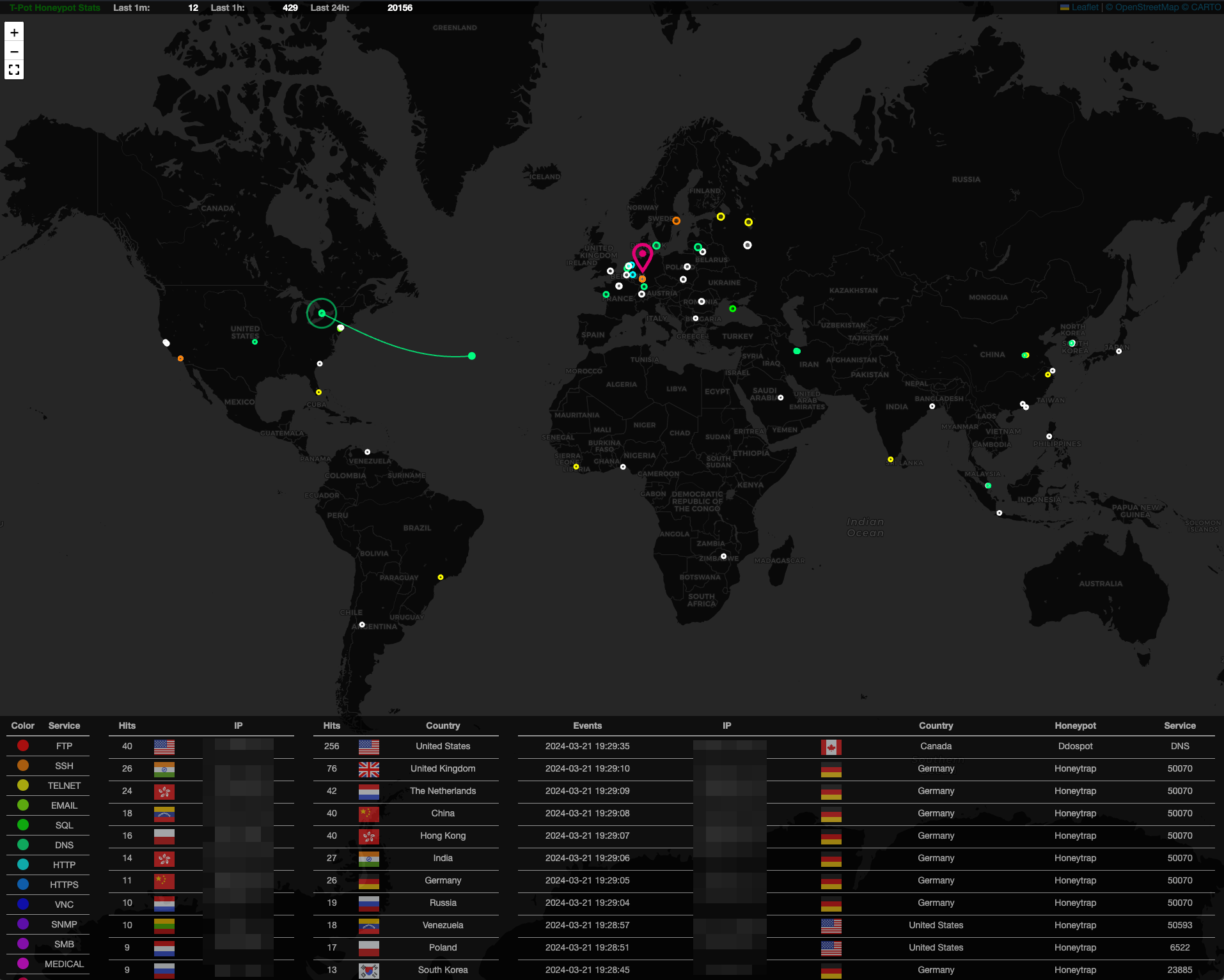
T-Potは、オプションで分散可能なマルチアーキテクチャ(amd64、arm64)のハニーポットプラットフォームであり、20以上のハニーポットと、Elastic Stackを使用した無数の可視化オプション、アニメーションによるライブ攻撃マップ、欺瞞体験をさらに向上させるための多くのセキュリティツールをサポートしています。
sshが必要)curlをインストールします:$ sudo [apt, dnf, zypper] install curl(まだインストールされていない場合)$HOMEから非rootユーザーとしてインストーラーを実行します:```
env bash -c "$(curl -sL https://github.com/telekom-security/tpotce/raw/master/install.sh)"* 指示に従い、メッセージを読み、ポートの競合の可能性を確認し、再起動してください
<!-- TOC -->
- [T-Pot - オールインワンマルチハニーポットプラットフォーム](#t-pot---the-all-in-one-multi-honeypot-platform)
- [TL;DR](#tldr)
- [免責事項](#disclaimer)
- [技術的概念](#technical-concept)
- [ハニーポットとツール](#honeypots-and-tools)
- [技術アーキテクチャ](#technical-architecture)
- [サービス](#services)
- [ユーザータイプ](#user-types)
- [システム要件](#system-requirements)
- [VMでの実行](#running-in-a-vm)
- [ハードウェアでの実行](#running-on-hardware)
- [クラウドでの実行](#running-in-a-cloud)
- [必要なポート](#required-ports)
- [LLMベースのハニーポット](#llm-based-honeypots)
- [Ollama](#ollama)
- [ChatGPT](#chatgpt)
- [システム配置](#system-placement)
- [インストール](#installation)
- [ディストリビューションの選択](#choose-your-distro)
- [Raspberry Pi 4 (8GB) 対応](#raspberry-pi-4-8gb-support)
- [T-Potの入手とインストール](#get-and-install-t-pot)
- [macOS と Windows](#macos--windows)
- [Red Hat Enterprise Linux](#red-hat-enterprise-linux)
- [インストールタイプ](#installation-types)
- [Standard / Hive](#standard--hive)
- [分散](#distributed)
- [T-Potのアンインストール](#uninstall-t-pot)
- [初回起動](#first-start)
- [スタンドアロン初回起動](#standalone-first-start)
- [分散デプロイメント](#distributed-deployment)
- [計画と証明書](#planning-and-certificates)
- [センサーのデプロイ](#deploying-sensors)
- [センサーの削除](#removing-sensors)
- [コミュニティデータ送信](#community-data-submission)
- [オプトイン HPFEEDS データ送信](#opt-in-hpfeeds-data-submission)
- [リモートアクセスとツール](#remote-access-and-tools)
- [SSH](#ssh)
- [T-Pot ランディングページ](#t-pot-landing-page)
- [Kibana ダッシュボード](#kibana-dashboard)
- [攻撃マップ](#attack-map)
- [Cyberchef](#cyberchef)
- [Elasticvue](#elasticvue)
- [Spiderfoot](#spiderfoot)
- [設定](#configuration)
- [T-Pot 設定ファイル](#t-pot-config-file)
- [T-Pot ハニーポットとサービスのカスタマイズ](#customize-t-pot-honeypots-and-services)
- [メンテナンス](#maintenance)
- [一般的な更新](#general-updates)
- [更新スクリプト](#update-script)
- [毎日の再起動](#daily-reboot)
- [既知の問題](#known-issues)
- [Docker イメージのダウンロード失敗](#docker-images-fail-to-download)
- [T-Pot ネットワーク障害](#t-pot-networking-fails)
- [T-Pot の起動](#start-t-pot)
- [T-Pot の停止](#stop-t-pot)
- [T-Pot データフォルダー](#t-pot-data-folder)
- [ログの永続化](#log-persistence)
- [ファクトリーリセット](#factory-reset)
- [コンテナとイメージの表示](#show-containers-and-images)
- [ブラックホール](#blackhole)
- [Nginx (T-Pot WebUI) へのユーザー追加](#add-users-to-nginx-t-pot-webui)
- [Kibana オブジェクトのインポートとエクスポート](#import-and-export-kibana-objects)
- [エクスポート](#export)
- [インポート](#import)
- [トラブルシューティング](#troubleshooting)
- [ログ](#logs)
- [RAM とストレージ](#ram-and-storage)
- [連絡先](#contact)
- [問題](#issues)
- [ディスカッション](#discussions)
- [ライセンス](#licenses)
- [クレジット](#credits)
- [開発者と開発コミュニティ](#the-developers-and-development-communities-of)
- [**以下の企業・組織**](#the-following-companies-and-organizations)
- [**そしてもちろん ***あなた*** コミュニティへの参加に感謝!**](#and-of-course-you-for-joining-the-community)
- [お客様の声](#testimonials)
- [ありがとうございます 💖](#thank-you-)
<!-- TOC -->
<br><br>
# 免責事項
- T-Pot のインストールおよび実行は、お客様の責任において行ってください。システムの侵害は完全には排除できないため、導入方法を慎重に選択してください。
- 迅速な解決のためには、[Issues](https://github.com/telekom-security/tpotce/issues) および [Discussions](https://github.com/telekom-security/tpotce/discussions) を調査してください。
- 本ソフトウェアはベストエフォートで設計・提供されています。コミュニティおよびオープンソースプロジェクトとして、他の多くのオープンソースソフトウェアを利用しており、バグや問題が含まれている可能性があります。責任を持って報告してください。
- ハニーポットは設計上、機密データをホストすべきではありません。機密データを追加しないように注意してください。
- デフォルトでは、お客様のデータは [Sicherheitstacho](https://www.sicherheitstacho.eu/start/main) に送信されます。設定ファイル (`~/tpotce/docker-compose.yml`) の `ewsposter` セクションを [削除](#community-data-submission) することで無効にできます。ただし、その場合は共有がケアであることを忘れないでください。
<br><br>
# 技術的概念
T-Pot の主要コンポーネントは `tpotinit` Docker イメージに移され、T-Pot が複数の Linux ディストリビューション、さらには macOS や Windows (ただし、どちらも Docker Desktop の機能セットに制限されます) をサポートできるようになりました。T-Pot は [docker](https://www.docker.com/) と [docker compose](https://docs.docker.com/compose/) を使用して、可能な限り多くのハニーポットとツールを同時に実行し、ホストのハードウェアを最大限に活用するという目標を達成します。
<br><br>
## ハニーポットとツール
- T-Pot は以下のハニーポット用の Docker イメージを提供しています:<br>
[adbhoney](https://github.com/huuck/ADBHoney)、
[beelzebub](https://github.com/beelzebub-labs/beelzebub)、
[ciscoasa](https://github.com/Cymmetria/ciscoasa_honeypot)、
[citrixhoneypot](https://github.com/MalwareTech/CitrixHoneypot)、
[conpot](http://conpot.org/)、
[cowrie](https://github.com/cowrie/cowrie)、
[ddospot](https://github.com/aelth/ddospot)、
[dicompot](https://github.com/nsmfoo/dicompot)、
[dionaea](https://github.com/DinoTools/dionaea)、
[elasticpot](https://gitlab.com/bontchev/elasticpot)、
[endlessh](https://github.com/skeeto/endlessh)、
[galah](https://github.com/0x4D31/galah)、
[go-pot](https://github.com/ryanolee/go-pot)、
[glutton](https://github.com/mushorg/glutton)、
[h0neytr4p](https://github.com/pbssubhash/h0neytr4p)、
[hellpot](https://github.com/yunginnanet/HellPot)、
[heralding](https://github.com/johnnykv/heralding)、
[honeyaml](https://github.com/mmta/honeyaml)、
[honeypots](https://github.com/qeeqbox/honeypots)、
[honeytrap](https://github.com/armedpot/honeytrap/)、
[ipphoney](https://gitlab.com/bontchev/ipphoney)、
[log4pot](https://github.com/thomaspatzke/Log4Pot)、
[mailoney](https://github.com/phin3has/mailoney)、
[medpot](https://github.com/schmalle/medpot)、
[miniprint](https://github.com/sa7mon/miniprint)、
[redishoneypot](https://github.com/cypwnpwnsocute/RedisHoneyPot)、
[rdphoneypot](https://gitlab.com/bontchev/rdphoneypot)、
[sentrypeer](https://github.com/SentryPeer/SentryPeer)、
[snare](http://mushmush.org/)、
[tanner](http://mushmush.org/)、
[wordpot](https://github.com/gbrindisi/wordpot)
以下のツールと併せて提供されます:
* [Autoheal](https://github.com/willfarrell/docker-autoheal) - ヘルスチェックに失敗したコンテナを自動的に再起動するツール。
* [Cyberchef](https://gchq.github.io/CyberChef/) - 暗号化、エンコーディング、圧縮、データ分析のためのウェブアプリ。
* [Elastic Stack](https://www.elastic.co/videos) - T-Pot が収集したすべてのイベントを美しく可視化します。
* [Elasticvue](https://github.com/cars10/elasticvue/) - Elasticsearch クラスターの参照と操作を行うためのウェブフロントエンド。
* [Fatt](https://github.com/0x4D31/fatt) - pcap ファイルやライブネットワークトラフィックからネットワークメタデータとフィンガープリントを抽出する pyshark ベースのスクリプト。
* [T-Pot-Attack-Map](https://github.com/telekom-security/t-pot-attack-map) - T-Pot 用の美しいアニメーション攻撃マップ。
* [P0f](https://lcamtuf.coredump.cx/p0f3/) - 純粋にパッシブなトラフィックフィンガープリンティングのためのツール。
* [Spiderfoot](https://github.com/smicallef/spiderfoot) - オープンソースインテリジェンス自動化ツール。
* [Suricata](https://suricata.io/) - ネットワークセキュリティ監視エンジン。
... これらにより、可能な限り最高のアウトオブボックス体験と、使いやすいマルチハニーポットシステムを提供します。
<br><br>
## 技術アーキテクチャ
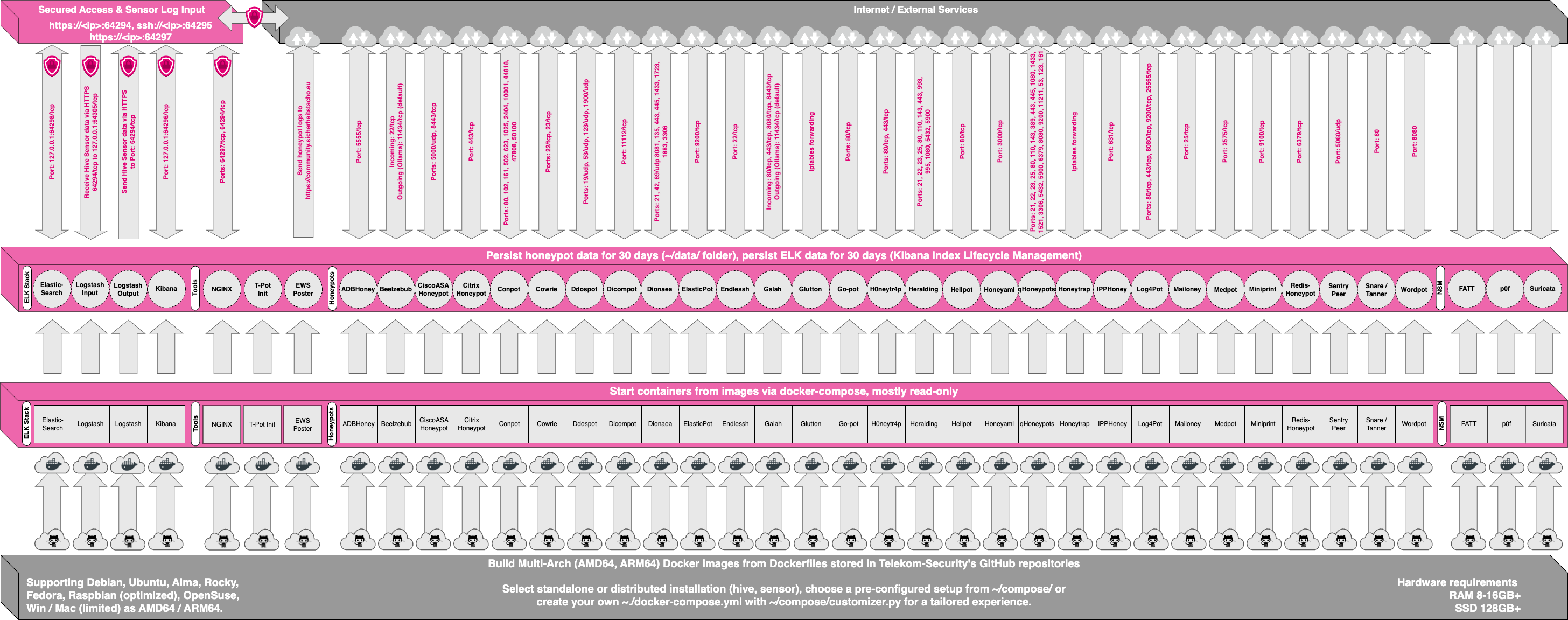
ソースコードと設定ファイルはすべて T-Pot GitHub リポジトリに保存されています。Docker イメージは T-Pot 環境用にビルドされ、事前設定されています。
個々の Dockerfile と設定は [docker フォルダー](https://github.com/telekom-security/tpotce/tree/master/docker) にあります。
<br><br>
