 praetorian-inc/titus
高性能シークレットスキャナ。CLI、Goライブラリ、Burp Suite拡張機能、Chrome拡張機能。487個の検出ルールとライブな認証情報検証。



Titus は、ソースコード、ファイル、git 履歴の中から認証情報、API キー、トークンを検出する高性能シークレットスキャナです。数百のサービスと認証情報タイプをカバーする 487 個の検出ルールを搭載しており、それらは NoseyParker と Kingfisher から取り入れられています。Titus は CLI、Go ライブラリ、Burp Suite 拡張、Chrome ブラウザ拡張として動作し、そのすべてが同じ検出エンジンとルールセットを共有しています。
セキュリティエンジニア、ペネトレーションテスター、DevSecOps チーム向けに設計された Titus は、Hyperscan/Vectorscan による高速化された正規表現マッチングとライブ認証情報検証を組み合わせ、コードベース全体にわたって漏洩したシークレットを発見・検証します。
Releases ページからビルド済みバイナリをダウンロードするか、ソースからビルドしてください:```bash make build
バイナリは `dist/titus` にあります。

## クイックスタート```bash
# Scan a file for secrets
titus scan path/to/file.txt

# Scan a directory for leaked credentials
titus scan path/to/directory

# Scan a public GitHub repository (no token needed)
titus scan github.com/org/repo

# Scan a public GitLab project (no token needed)
titus scan gitlab.com/namespace/project

# Scan git history for secrets in past commits
titus scan --git path/to/repo

# Scan a Docker / OCI image (pulled from a registry — no docker daemon required)
titus scan --docker alpine:latest

# Validate detected secrets against source APIs
titus scan path/to/code --validate
結果はデータストア(デフォルトでは titus.ds)に書き込まれ、コンソールに出力されます。
URL を指定してパブリックリポジトリを直接スキャンできます — API トークンは不要です:```bash
titus scan github.com/kubernetes/kubernetes
titus scan gitlab.com/gitlab-org/cli
titus scan https://github.com/org/repo titus scan https://gitlab.com/namespace/project.git
組織全体またはユーザー全体のスキャンには、専用のサブコマンドを使用します:```bash
# Scan all public repos in a GitHub org
titus github --org kubernetes

# Scan all repos in a GitHub org with a token (private repos + higher rate limits)
titus github --org kubernetes --token $GITHUB_TOKEN

# Scan all repos for a GitHub user
titus github --user octocat

# Scan all projects in a GitLab group
titus gitlab scan --group mygroup --token $GITLAB_TOKEN

# Scan a single repo with git history (finds deleted secrets)
titus github owner/repo --git
トークンはパブリックリポジトリでは任意です。プライベートリポジトリへのアクセスとより高いAPIレート制限には、GITHUB_TOKEN または GITLAB_TOKEN を設定する(あるいは --token を使用する)してください。
コンテナイメージを直接スキャンします — dockerデーモンも docker バイナリも不要です。Titusは任意のOCIレジストリからHTTPS経由でイメージを直接取得するか(~/.docker/config.json の認証情報を使用)、ローカルの docker save tarballまたはOCIイメージレイアウトディレクトリからイメージを読み取ります。その後、イメージのマニフェスト/設定メタデータと、すべてのレイヤー内のすべての通常ファイルをスキャンします。これには、後のレイヤーによって削除された下位レイヤーのファイルも含まれます(イメージ履歴からシークレットが復元可能なまま残ることがあるため)。```bash
titus scan --docker alpine:latest titus scan docker://ghcr.io/owner/repo:tag
titus scan --docker ./my-app.tar
titus scan --docker ./img/
認証には既存の Docker / Podman 設定(`~/.docker/config.json`、`${XDG_RUNTIME_DIR}/containers/auth.json`)が使用されます。新たなログインが必要なプライベートレジストリは、まず `docker login`(または `podman login`、あるいは `crane auth login`)で認証しておく必要があります — titus は認証情報の入力を求めません。

### スキャン結果の表示

`report` を使用して、以前のスキャンから検出結果を再読み込みします:```bash
# Human-readable summary of detected secrets
titus report

# JSON output for programmatic processing
titus report --format json

# SARIF output for CI/CD integration with GitHub Advanced Security
titus report --format sarif

# Report from a specific datastore
titus report --datastore path/to/titus.ds
スキャン時に --format で出力形式を制御することもできます:```bash
titus scan path/to/code --format json
### 検出されたシークレットの検証

スキャン中に `--validate` を渡すと、検出されたシークレットをそのソース API に対して検証できます:```bash
titus scan path/to/code --validate
検証は並行して実行され(デフォルトでは4ワーカー、--validate-workersで設定可能)、各検出結果をconfirmed、denied、またはunknownとしてマークします。
titus rules list
titus scan path/to/code --rules-include "aws,gcp"
titus scan path/to/code --rules-exclude "kingfisher.generic"
titus scan path/to/code --rules path/to/custom-rules.yaml
titus scan path/to/code --include-noisy
### バイナリファイルからのシークレット抽出

Titusはバイナリファイル形式からテキストを抽出し、その内容からシークレットをスキャンできます:```bash
# Extract and scan all supported binary formats
titus scan path/to/files --extract=all

# Target specific formats
titus scan path/to/files --extract=xlsx,docx,pdf,zip
対応フォーマットには、Office ドキュメント(xlsx、docx、pptx、odp、ods、odt)、PDF、Jupyter ノートブック、SQLite データベース、メール(eml、rtf)、アーカイブ(zip、tar、tar.gz、jar、war、ear、apk、ipa、crx、xpi、7z)が含まれます。アーカイブは、設定可能な深さとサイズ制限まで再帰的に展開されます。```bash
titus scan path/to/files --extract=all
--extract-max-size 10MB
--extract-max-total 100MB
--extract-max-depth 5
SQLiteデータベースの場合、Titusはすべてのテーブルからテキストを抽出します(デフォルトではテーブルあたり1000行)。調整するには`--sqlite-row-limit`を使用します:```bash
# Full dump of all SQLite tables (no row limit)
titus scan path/to/files --extract=all --sqlite-row-limit 0

# Custom row limit per table
titus scan path/to/files --extract=all --sqlite-row-limit 5000
Titus が生成するすべての検出結果には、0~100 の数値スコアと重大度ティアが付与されます:
| スコア | 重大度 |
|---|---|
| 0–20 | info |
| 21–40 | low |
| 41–60 | medium |
| 61–80 | high |
| 81–100 | critical |
スコアはルールの base_score から開始し、修飾子 によって調整されます — これは認証情報について判明している情報に基づいてスコアを引き上げたり引き下げたりする条件です:```bash
titus scan path/to/code
titus scan path/to/code --score-scope
titus scan path/to/code --accessibility public # no penalty for public repos titus scan path/to/code --accessibility private # -25 penalty (default for local scans)
Titusには、AWS認証情報、GitHub PAT、Slackトークン用のYAMLスコアラーが同梱されており、さらに`--score-scope`が有効な場合にライブIAMポリシー列挙(AWS)とリポジトリ権限チェック(GitHub fine-grained PAT)を実行するGoベースのSDKスコアラーも含まれています。

完全なリファレンスについては[docs/scoring.md](https://github.com/praetorian-inc/titus/blob/main/docs/scoring.md)を参照してください:重大度ティア、修飾子の種類、組み込みスコアラーの詳細、および独自のYAMLまたはGoスコアラーの書き方。

## シークレット検出用Goライブラリ

TitusはGoライブラリとしてインポートでき、独自のツールやパイプラインにシークレット検出を追加できます。```bash
go get github.com/praetorian-inc/titus
detect_aws_keys — AWS アクセスキー ID (AKIA...、ASIA...) とシークレットアクセスキーを検出します。detect_github_tokens — GitHub の個人アクセストークン (ghp_、github_pat_、gho_、ghu_、ghs_、ghr_) を検出します。detect_slack_tokens — Slack のボット/ユーザー/ワークスペーストークン (xoxb-、xoxp-、xoxa-、xoxr-) を検出します。detect_stripe_keys — Stripe のシークレット/制限付きキー (sk_live_、rk_live_、sk_test_、rk_test_) を検出します。detect_google_api_keys — Google API キー (AIza...) を検出します。detect_private_keys — PEM 形式の秘密鍵ブロック (-----BEGIN ... PRIVATE KEY-----) を検出します。detect_jwt_tokens — JSON Web Token (eyJ... の 3 部構成) を検出します。detect_high_entropy_strings — 高エントロピー文字列 (Shannon エントロピー) を検出します。detect_connection_strings — 認証情報を含むデータベース接続文字列を検出します。detect_credit_cards — クレジットカード番号 (Luhn チェック付き) を検出します。detect_ssn — 米国社会保障番号を検出します。detect_emails — メールアドレスを検出します。detect_phone_numbers — 電話番号を検出します。detect_ip_addresses — IP アドレス (IPv4/IPv6) を検出します。detect_urls — URL を検出します。detect_iban — 国際銀行口座番号 (IBAN) を検出します。detect_crypto_addresses — 暗号通貨ウォレットアドレス (BTC、ETH) を検出します。detect_passport_numbers — パスポート番号を検出します。detect_drivers_license — 運転免許証番号を検出します。detect_national_ids — 各国の国民 ID 番号を検出します。detect_medical_records — 医療記録番号を検出します。detect_api_keys_generic — 汎用的な API キーパターンを検出します。detect_bearer_tokens — Bearer トークンを検出します。detect_basic_auth — Basic 認証ヘッダーを検出します。detect_oauth_tokens — OAuth トークンを検出します。detect_session_ids — セッション ID を検出します。detect_azure_keys — Azure のストレージ/サービスキーを検出します。detect_gcp_service_accounts — GCP サービスアカウントの JSON を検出します。detect_docker_credentials — Docker の認証情報を検出します。detect_npm_tokens — npm のアクセストークンを検出します。detect_pypi_tokens — PyPI の API トークンを検出します。detect_ssh_keys — SSH の秘密鍵を検出します。detect_encryption_keys — 暗号化キーを検出します。detect_webhook_urls — Webhook URL を検出します。detect_internal_urls — 内部 URL を検出します。detect_debug_info — デバッグ情報を検出します。detect_stack_traces — スタックトレースを検出します。detect_error_messages — エラーメッセージを検出します。detect_file_paths — ファイルパスを検出します。detect_environment_variables — 環境変数を検出します。detect_config_secrets — 設定ファイル内のシークレットを検出します。detect_hardcoded_passwords — ハードコードされたパスワードを検出します。detect_weak_passwords — 弱いパスワードを検出します。detect_default_credentials — デフォルトの認証情報を検出します。detect_test_credentials — テスト用の認証情報を検出します。detect_placeholder_secrets — プレースホルダーのシークレットを検出します。detect_base64_secrets — Base64 エンコードされたシークレットを検出します。detect_hex_secrets — 16 進数エンコードされたシークレットを検出します。detect_uuid_secrets — UUID 形式のシークレットを検出します。detect_hash_values — ハッシュ値を検出します。detect_salt_values — ソルト値を検出します。detect_nonce_values — ナンス値を検出します。detect_iv_values — 初期化ベクトル (IV) を検出します。detect_license_keys — ライセンスキーを検出します。detect_serial_numbers — シリアル番号を検出します。detect_product_keys — プロダクトキーを検出します。detect_activation_codes — アクティベーションコードを検出します。detect_qr_codes — QR コードの内容を検出します。detect_barcodes — バーコードの内容を検出します。detect_mac_addresses — MAC アドレスを検出します。detect_imei_numbers — IMEI 番号を検出します。detect_imsi_numbers — IMSI 番号を検出します。detect_geolocation — 位置情報を検出します。detect_coordinates — GPS 座標を検出します。detect_dates_of_birth — 生年月日を検出します。detect_ages — 年齢を検出します。detect_gender — 性別を検出します。detect_ethnicity — 民族性を検出します。detect_religion — 宗教を検出します。detect_political_affiliation — 政治的所属を検出します。detect_sexual_orientation — 性的指向を検出します。detect_health_data — 健康データを検出します。detect_biometric_data — 生体認証データを検出します。detect_genetic_data — 遺伝子データを検出します。detect_face_data — 顔データを検出します。detect_fingerprint_data — 指紋データを検出します。detect_voice_data — 音声データを検出します。detect_iris_data — 虹彩データを検出します。detect_dna_sequences — DNA 配列を検出します。detect_medical_conditions — 病歴を検出します。detect_medications — 薬剤情報を検出します。detect_allergies — アレルギー情報を検出します。detect_insurance_ids — 保険 ID を検出します。detect_prescription_numbers — 処方箋番号を検出します。detect_medical_devices — 医療機器を検出します。detect_clinical_trial_ids — 臨床試験 ID を検出します。detect_patient_ids — 患者 ID を検出します。detect_doctor_ids — 医師 ID を検出します。detect_hospital_ids — 病院 ID を検出します。detect_phi_data — 保護対象医療情報 (PHI) を検出します。detect_pii_data — 個人識別情報 (PII) を検出します。detect_pci_data — カード会員データ (PCI) を検出します。detect_gdpr_data — GDPR 対象データを検出します。detect_ccpa_data — CCPA 対象データを検出します。detect_hipaa_data — HIPAA 対象データを検出します。detect_sox_data — SOX 対象データを検出します。detect_ferpa_data — FERPA 対象データを検出します。detect_coppa_data — COPPA 対象データを検出します。detect_glba_data — GLBA 対象データを検出します。detect_ftc_data — FTC 対象データを検出します。detect_sec_data — SEC 対象データを検出します。detect_finra_data — FINRA 対象データを検出します。detect_osfi_data — OSFI 対象データを検出します。detect_basel_data — バーゼル対象データを検出します。detect_mifid_data — MiFID 対象データを検出します。detect_psd2_data — PSD2 対象データを検出します。detect_open_banking_data — オープンバンキングデータを検出します。detect_aml_data — AML 対象データを検出します。detect_kyc_data — KYC 対象データを検出します。detect_sanctions_data — 制裁対象データを検出します。detect_pep_data — 政治的に重要な人物 (PEP) データを検出します。detect_adverse_media — ネガティブメディアを検出します。detect_watchlist_data — ウォッチリストデータを検出します。detect_blacklist_data — ブラックリストデータを検出します。detect_whitelist_data — ホワイトリストデータを検出します。detect_greylist_data — グレーリストデータを検出します。detect_risk_scores — リスクスコアを検出します。detect_fraud_indicators — 不正の指標を検出します。detect_money_laundering — マネーロンダリングのパターンを検出します。detect_terrorist_financing — テロ資金供与のパターンを検出します。detect_tax_evasion — 脱税のパターンを検出します。detect_bribery — 贈収賄のパターンを検出します。detect_corruption — 汚職のパターンを検出します。detect_embezzlement — 横領のパターンを検出します。detect_insider_trading — インサイダー取引のパターンを検出します。detect_market_manipulation — 市場操作のパターンを検出します。detect_ponzi_schemes — ポンジスキームを検出します。detect_pyramid_schemes — ねずみ講を検出します。detect_phishing — フィッシングの試みを検出します。detect_spear_phishing — スピアフィッシングの試みを検出します。detect_whaling — ホエーリング攻撃を検出します。detect_vishing — ビッシング攻撃を検出します。detect_smishing — スミッシング攻撃を検出します。detect_pharming — ファーミング攻撃を検出します。detect_tabnabbing — タブナビング攻撃を検出します。detect_clickjacking — クリックジャッキング攻撃を検出します。detect_ui_redressing — UI リドレッシング攻撃を検出します。detect_csrf — CSRF 脆弱性を検出します。detect_ssrf — SSRF 脆弱性を検出します。detect_xss — XSS 脆弱性を検出します。detect_sql_injection — SQL インジェクションを検出します。detect_command_injection — コマンドインジェクションを検出します。detect_ldap_injection — LDAP インジェクションを検出します。detect_xpath_injection — XPath インジェクションを検出します。detect_nosql_injection — NoSQL インジェクションを検出します。detect_template_injection — テンプレートインジェクションを検出します。detect_header_injection — ヘッダーインジェクションを検出します。detect_log_injection — ログインジェクションを検出します。detect_email_injection — メールインジェクションを検出します。detect_crlf_injection — CRLF インジェクションを検出します。detect_http_smuggling — HTTP スマグリングを検出します。detect_request_smuggling — リクエストスマグリングを検出します。detect_response_splitting — レスポンス分割を検出します。detect_cache_poisoning — キャッシュポイズニングを検出します。detect_host_header_injection — Host ヘッダーインジェクションを検出します。detect_open_redirect — オープンリダイレクトを検出します。detect_path_traversal — パストラバーサルを検出します。detect_directory_traversal — ディレクトリトラバーサルを検出します。detect_file_inclusion — ファイルインクルージョンを検出します。detect_file_upload — ファイルアップロードの脆弱性を検出します。detect_insecure_deserialization — 安全でないデシリアライゼーションを検出します。detect_xxe — XXE 脆弱性を検出します。detect_xml_bomb — XML 爆弾攻撃を検出します。detect_billion_laughs — Billion Laughs 攻撃を検出します。detect_zip_bomb — Zip 爆弾攻撃を検出します。detect_decompression_bomb — 解凍爆弾攻撃を検出します。detect_regex_dos — ReDoS 攻撃を検出します。detect_algorithmic_complexity — アルゴリズム複雑性攻撃を検出します。detect_resource_exhaustion — リソース枯渇攻撃を検出します。detect_denial_of_service — サービス拒否攻撃を検出します。detect_distributed_dos — 分散型サービス拒否攻撃を検出します。detect_amplification_attacks — 増幅攻撃を検出します。detect_reflection_attacks — 反射攻撃を検出します。detect_dns_tunneling — DNS トンネリングを検出します。detect_dns_spoofing — DNS スプーフィングを検出します。detect_arp_spoofing — ARP スプーフィングを検出します。detect_ip_spoofing — IP スプーフィングを検出します。detect_mac_spoofing — MAC スプーフィングを検出します。detect_email_spoofing — メールスプーフィングを検出します。detect_caller_id_spoofing — 発信者番号スプーフィングを検出します。detect_gps_spoofing — GPS スプーフィングを検出します。detect_face_spoofing — 顔スプーフィングを検出します。detect_voice_spoofing — 音声スプーフィングを検出します。detect_deepfakes — ディープフェイクを検出します。detect_synthetic_media — 合成メディアを検出します。detect_ai_generated_text — AI 生成テキストを検出します。detect_ai_generated_images — AI 生成画像を検出します。detect_ai_generated_audio — AI 生成音声を検出します。detect_ai_generated_video — AI 生成動画を検出します。detect_ai_generated_code — AI 生成コードを検出します。detect_ai_generated_malware — AI 生成マルウェアを検出します。detect_ai_generated_phishing — AI 生成フィッシングを検出します。detect_ai_generated_deepfakes — AI 生成ディープフェイクを検出します。detect_ai_generated_fake_news — AI 生成フェイクニュースを検出します。detect_ai_generated_propaganda — AI 生成プロパガンダを検出します。detect_ai_generated_disinformation — AI 生成偽情報を検出します。detect_ai_generated_misinformation — AI 生成誤情報を検出します。detect_ai_generated_hoaxes — AI 生成デマを検出します。detect_ai_generated_scams — AI 生成詐欺を検出します。detect_ai_generated_fraud — AI 生成不正を検出します。detect_ai_generated_identity_theft — AI 生成個人情報窃取を検出します。detect_ai_generated_synthetic_identities — AI 生成合成アイデンティティを検出します。detect_ai_generated_synthetic_data — AI 生成合成データを検出します。detect_ai_generated_synthetic_documents — AI 生成合成文書を検出します。detect_ai_generated_synthetic_voices — AI 生成合成音声を検出します。detect_ai_generated_synthetic_faces — AI 生成合成顔を検出します。detect_ai_generated_synthetic_videos — AI 生成合成動画を検出します。detect_ai_generated_synthetic_images — AI 生成合成画像を検出します。detect_ai_generated_synthetic_text — AI 生成合成テキストを検出します。detect_ai_generated_synthetic_audio — AI 生成合成音声を検出します。detect_ai_generated_synthetic_code — AI 生成合成コードを検出します。detect_ai_generated_synthetic_malware — AI 生成合成マルウェアを検出します。detect_ai_generated_synthetic_phishing — AI 生成合成フィッシングを検出します。detect_ai_generated_synthetic_deepfakes — AI 生成合成ディープフェイクを検出します。detect_ai_generated_synthetic_fake_news — AI 生成合成フェイクニュースを検出します。detect_ai_generated_synthetic_propaganda — AI 生成合成プロパガンダを検出します。detect_ai_generated_synthetic_disinformation — AI 生成合成偽情報を検出します。detect_ai_generated_synthetic_misinformation — AI 生成合成誤情報を検出します。detect_ai_generated_synthetic_hoaxes — AI 生成合成デマを検出します。detect_ai_generated_synthetic_scams — AI 生成合成詐欺を検出します。detect_ai_generated_synthetic_fraud — AI 生成合成不正を検出します。detect_ai_generated_synthetic_identity_theft — AI 生成合成個人情報窃取を検出します。detect_ai_generated_synthetic_identities — AI 生成合成アイデンティティを検出します。detect_ai_generated_synthetic_data — AI 生成合成データを検出します。detect_ai_generated_synthetic_documents — AI 生成合成文書を検出します。detect_ai_generated_synthetic_voices — AI 生成合成音声を検出します。detect_ai_generated_synthetic_faces — AI 生成合成顔を検出します。detect_ai_generated_synthetic_videos — AI 生成合成動画を検出します。detect_ai_generated_synthetic_images — AI 生成合成画像を検出します。detect_ai_generated_synthetic_text — AI 生成合成テキストを検出します。detect_ai_generated_synthetic_audio — AI 生成合成音声を検出します。detect_ai_generated_synthetic_code — AI 生成合成コードを検出します。detect_ai_generated_synthetic_malware — AI 生成合成マルウェアを検出します。detect_ai_generated_synthetic_phishing — AI 生成合成フィッシングを検出します。detect_ai_generated_synthetic_deepfakes — AI 生成合成ディープフェイクを検出します。detect_ai_generated_synthetic_fake_news — AI 生成合成フェイクニュースを検出します。detect_ai_generated_synthetic_propaganda — AI 生成合成プロパガンダを検出します。detect_ai_generated_synthetic_disinformation — AI 生成合成偽情報を検出します。detect_ai_generated_synthetic_misinformation — AI 生成合成誤情報を検出します。detect_ai_generated_synthetic_hoaxes — AI 生成合成デマを検出します。detect_ai_generated_synthetic_scams — AI 生成合成詐欺を検出します。detect_ai_generated_synthetic_fraud — AI 生成合成不正を検出します。detect_ai_generated_synthetic_identity_theft — AI 生成合成個人情報窃取を検出します。detect_ai_generated_synthetic_identities — AI 生成合成アイデンティティを検出します。detect_ai_generated_synthetic_data — AI 生成合成データを検出します。detect_ai_generated_synthetic_documents — AI 生成合成文書を検出します。detect_ai_generated_synthetic_voices — AI 生成合成音声を検出します。detect_ai_generated_synthetic_faces — AI 生成合成顔を検出します。detect_ai_generated_synthetic_videos — AI 生成合成動画を検出します。detect_ai_generated_synthetic_images — AI 生成合成画像を検出します。detect_ai_generated_synthetic_text — AI 生成合成テキストを検出します。detect_ai_generated_synthetic_audio — AI 生成合成音声を検出します。detect_ai_generated_synthetic_code — AI 生成合成コードを検出します。detect_ai_generated_synthetic_malware — AI 生成合成マルウェアを検出します。detect_ai_generated_synthetic_phishing — AI 生成合成フィッシングを検出します。detect_ai_generated_synthetic_deepfakes — AI 生成合成ディープフェイクを検出します。detect_ai_generated_synthetic_fake_news — AI 生成合成フェイクニュースを検出します。detect_ai_generated_synthetic_propaganda — AI 生成合成プロパガンダを検出します。detect_ai_generated_synthetic_disinformation — AI 生成合成偽情報を検出します。detect_ai_generated_synthetic_misinformation — AI 生成合成誤情報を検出します。detect_ai_generated_synthetic_hoaxes — AI 生成合成デマを検出します。detect_ai_generated_synthetic_scams — AI 生成合成詐欺を検出します。detect_ai_generated_synthetic_fraud — AI 生成合成不正を検出します。detect_ai_generated_synthetic_identity_theft — AI 生成合成個人情報窃取を検出します。detect_ai_generated_synthetic_identities — AI 生成合成アイデンティティを検出します。detect_ai_generated_synthetic_data — AI 生成合成データを検出します。detect_ai_generated_synthetic_documents — AI 生成合成文書を検出します。detect_ai_generated_synthetic_voices — AI 生成合成音声を検出します。detect_ai_generated_synthetic_faces — AI 生成合成顔を検出します。detect_ai_generated_synthetic_videos — AI 生成合成動画を検出します。detect_ai_generated_synthetic_images — AI 生成合成画像を検出します。detect_ai_generated_synthetic_text — AI 生成合成テキストを検出します。detect_ai_generated_synthetic_audio — AI 生成合成音声を検出します。detect_ai_generated_synthetic_code — AI 生成合成コードを検出します。detect_ai_generated_synthetic_malware — AI 生成合成マルウェアを検出します。detect_ai_generated_synthetic_phishing — AI 生成合成フィッシングを検出します。detect_ai_generated_synthetic_deepfakes — AI 生成合成ディープフェイクを検出します。detect_ai_generated_synthetic_fake_news — AI 生成合成フェイクニュースを検出します。detect_ai_generated_synthetic_propaganda — AI 生成合成プロパガンダを検出します。detect_ai_generated_synthetic_disinformation — AI 生成合成偽情報を検出します。detect_ai_generated_synthetic_misinformation — AI 生成合成誤情報を検出します。detect_ai_generated_synthetic_hoaxes — AI 生成合成デマを検出します。detect_ai_generated_synthetic_scams — AI 生成合成詐欺を検出します。detect_ai_generated_synthetic_fraud — AI 生成合成不正を検出します。detect_ai_generated_synthetic_identity_theft — AI 生成合成個人情報窃取を検出します。detect_ai_generated_synthetic_identities — AI 生成合成アイデンティティを検出します。detect_ai_generated_synthetic_data — AI 生成合成データを検出します。detect_ai_generated_synthetic_documents — AI 生成合成文書を検出します。detect_ai_generated_synthetic_voices — AI 生成合成音声を検出します。detect_ai_generated_synthetic_faces — AI 生成合成顔を検出します。detect_ai_generated_synthetic_videos — AI 生成合成動画を検出します。detect_ai_generated_synthetic_images — AI 生成合成画像を検出します。detect_ai_generated_synthetic_text — AI 生成合成テキストを検出します。detect_ai_generated_synthetic_audio — AI 生成合成音声を検出します。detect_ai_generated_synthetic_code — AI 生成合成コードを検出します。detect_ai_generated_synthetic_malware — AI 生成合成マルウェアを検出します。detect_ai_generated_synthetic_phishing — AI 生成合成フィッシングを検出します。detect_ai_generated_synthetic_deepfakes — AI 生成合成ディープフェイクを検出します。detect_ai_generated_synthetic_fake_news — AI 生成合成フェイクニュースを検出します。detect_ai_generated_synthetic_propaganda — AI 生成合成プロパガンダを検出します。detect_ai_generated_synthetic_disinformation — AI 生成合成偽情報を検出します。detect_ai_generated_synthetic_misinformation — AI 生成合成誤情報を検出します。detect_ai_generated_synthetic_hoaxes — AI 生成合成デマを検出します。detect_ai_generated_synthetic_scams — AI 生成合成詐欺を検出します。detect_ai_generated_synthetic_fraud — AI 生成合成不正を検出します。detect_ai_generated_synthetic_identity_theft — AI 生成合成個人情報窃取を検出します。detect_ai_generated_synthetic_identities — AI 生成合成アイデンティティを検出します。detect_ai_generated_synthetic_data — AI 生成合成データを検出します。detect_ai_generated_synthetic_documents — AI 生成合成文書を検出します。detect_ai_generated_synthetic_voices — AI 生成合成音声を検出します。detect_ai_generated_synthetic_faces — AI 生成合成顔を検出します。detect_ai_generated_synthetic_videos — AI 生成合成動画を検出します。detect_ai_generated_synthetic_images — AI 生成合成画像を検出します。detect_ai_generated_synthetic_text — AI 生成合成テキストを検出します。detect_ai_generated_synthetic_audio — AI 生成合成音声を検出します。detect_ai_generated_synthetic_code — AI 生成合成コードを検出します。detect_ai_generated_synthetic_malware —```go
package mainimport ( "fmt" "log"
"github.com/praetorian-inc/titus"
)
func main() { // Initialize the secrets scanner with default rules scanner, err := titus.NewScanner() if err != nil { log.Fatal(err) } defer scanner.Close()
// Scan a string for API keys, tokens, and credentials
matches, err := scanner.ScanString(`aws_access_key_id = AKIAIOSFODNN7EXAMPLE`)
if err != nil {
    log.Fatal(err)
}

for _, match := range matches {
    fmt.Printf("%s (rule: %s) at line %d\n",
        match.RuleName, match.RuleID,
        match.Location.SourceSpan.Start.Line,
    )
}
}
ライブラリはバイト列やファイルのスキャン、検出されたシークレットの検証、カスタムルールの読み込みもサポートしています:```go
// Scan a file for leaked credentials
matches, err := scanner.ScanFile("/path/to/config.json")

// Enable validation to check if detected secrets are live
scanner, err := titus.NewScanner(titus.WithValidation())

// Load custom detection rules for organization-specific secrets
rules, err := titus.LoadRulesFromFile("/path/to/rules.yaml")
scanner, err := titus.NewScanner(titus.WithRules(rules))
完全なAPIリファレンス、並行処理パターン、その他の例については、docs/library-usage.mdを参照してください。
Burp拡張機能は、プロキシトラフィックおよびアクティブペネトレーションテスト中にHTTPレスポンスからシークレットをスキャンします。
make install-burp
次に、Burp Suite の Extensions > Add で `dist/titus-burp-1.0.0-all.jar` をロードします。

#### Windows (Releases からダウンロード)

1. [Releases](../../releases) から `titus-windows-amd64.exe` と `titus-burp-<version>.jar` をダウンロードします
2. Titus ディレクトリを作成し、バイナリをインストールします:   ```powershell
   mkdir %USERPROFILE%\.titus
   copy titus-windows-amd64.exe %USERPROFILE%\.titus\titus.exe
titus-burp-<version>.jar を Releases からダウンロードします:
titus-linux-amd64 または titus-linux-arm64titus-darwin-amd64 または titus-darwin-arm64この拡張機能はバックグラウンドで titus serve プロセスを起動し、NDJSON を使用して stdin/stdout 経由で通信します。検出ルールは起動時に一度だけ読み込まれます。
この拡張機能は Burp に Titus タブを追加し、3 つのサブタブを提供します:
Secrets: 検出されたすべてのシークレットを、種類、ホスト、検証ステータスでフィルタリング可能。
Titus Burp Suite extension secrets tab showing detected API keys and credentials with validation status
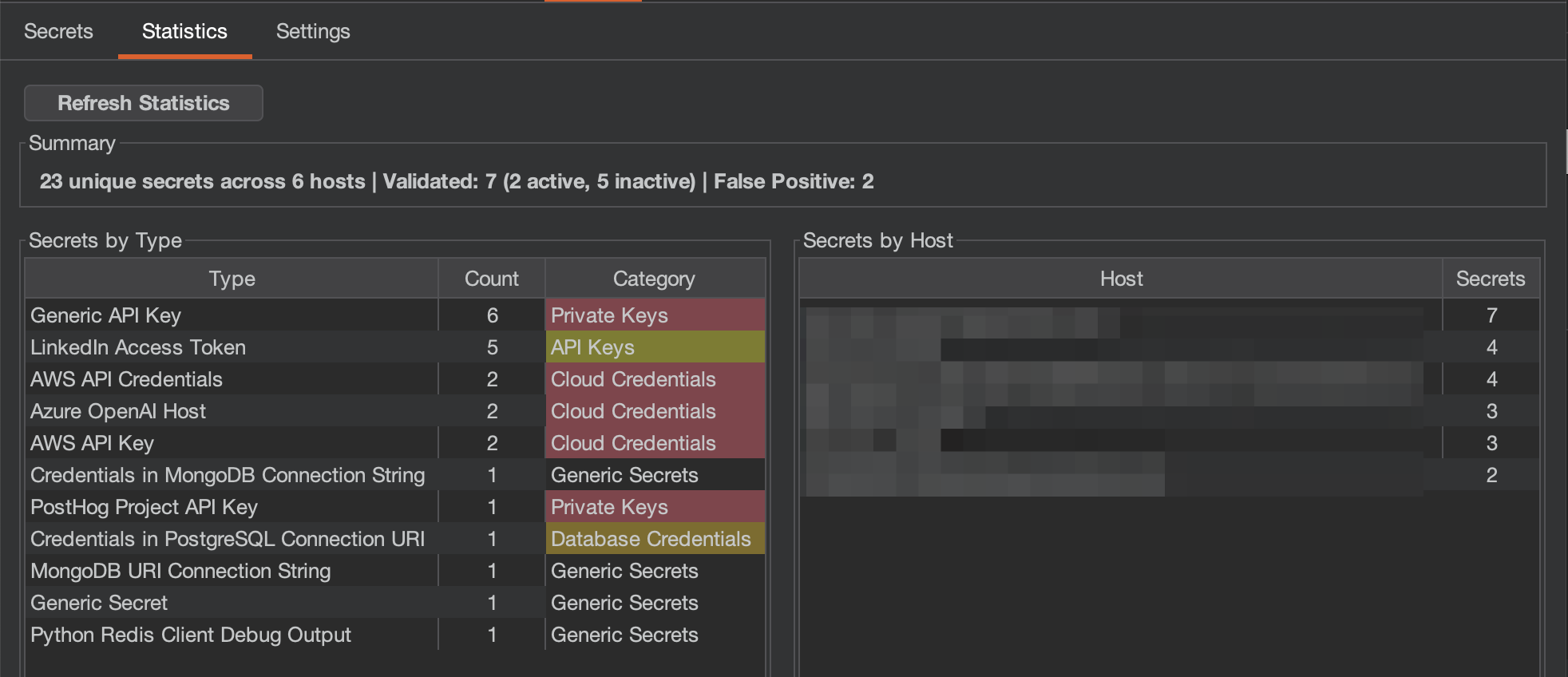
Statistics: 種類とホスト別にグループ化されたシークレットの集計ビュー。
Settings: スキャンオプション、検証、重大度マッピングを設定。
Titus Burp Suite extension settings tab with scan configuration options
Burp でリクエストを表示する際、シークレットが検出されるとレスポンスインスペクタに Titus タブが表示され、メインの Titus タブに切り替えることなく検出結果に素早くアクセスできます。
Titus tab in Burp Suite response inspector highlighting detected secrets in HTTP responses
Chrome 拡張機能は、Web アプリケーションのセキュリティ評価中に Web ページ内のシークレットをスキャンします。
make build-extension
1. `chrome://extensions/` に移動します
2. **Developer mode** を有効にします
3. **Load unpacked** をクリックし、`extension/` ディレクトリを選択します

### ブラウザ拡張機能の機能

- インラインおよび外部の JavaScript とスタイルシートをスキャンして API キーとトークンを検出します
- localStorage と sessionStorage をスキャンして漏洩した認証情報を検出します
- 包括的なシークレット検出のためのオプションのネットワークレスポンスキャプチャ
- 結果はポップアップとダッシュボードに表示されます

<img width="1719" height="958" alt="Titus Chrome extension popup showing detected secrets on a web page" src="https://assets.kitploit.com/production/public/readmes/11969/057a24e2746412ceabe1aac0292a2de463de1efee5bca2489ca34b59d8b0dc2c.png" />

<img width="1744" height="827" alt="Titus Chrome extension dashboard with aggregated secret detection results" src="https://assets.kitploit.com/production/public/readmes/11969/265d972fadcc7f212944d7a1d8fd58a43446e7199d1209900e83b96a546ffb00.png" />

### セキュリティに関する注意

ブラウザ拡張機能は、外部リソースをスキャンするために、訪問したページから Content Security Policy と CORS ヘッダーを削除します。これにより、拡張機能が有効な間、訪問するサイトのセキュリティ態勢が弱まります。**アクティブなセキュリティテスト中にのみ有効にしてください。**

## ソースからのビルド

### 標準ビルド (Vectorscan による高速化)

デフォルトでは、Titus は SIMD で高速化された正規表現マッチングのために [Vectorscan](https://github.com/VectorCamp/vectorscan) (ARM) / [Hyperscan](https://github.com/intel/hyperscan) (x86) を使用してコンパイルされます。これには CGO、C ライブラリ、および `pkg-config` (cgo がライブラリを特定するために使用します) が必要です。`make build` はこれらをチェックし、不足しているものがあれば Homebrew / apt / dnf 経由でインストールを試みます:```bash
# Build the CLI binary with vectorscan acceleration (outputs to dist/titus)
make build

# Build the Burp Suite extension JAR
make build-burp

# Build the Chrome browser extension
make build-extension

# Run unit tests
make test

# Run integration tests
make integration-test
起動時に高速化エンジンが有効な場合、[vectorscan] N/N rules compiled for Hyperscan と表示されます。
自動インストールに頼らず、C ライブラリを自分でインストールするには:```bash
brew install pkg-config vectorscan
sudo apt-get install pkg-config libhyperscan-dev
sudo dnf install pkgconf-pkg-config vectorscan-devel
git clone --depth 1 --branch vectorscan/5.4.11 https://github.com/VectorCamp/vectorscan.git cd vectorscan && cmake -B build -DCMAKE_INSTALL_PREFIX=/usr/local && cmake --build build && sudo cmake --install build
`go build` を直接実行する場合(例えば Titus を埋め込む場合)、タグを渡して CGO を有効にしてください:```bash
# macOS (Homebrew) — adjust PKG_CONFIG_PATH to your installed version
CGO_ENABLED=1 PKG_CONFIG_PATH="$(brew --prefix vectorscan)/lib/pkgconfig" \
  go build -tags vectorscan -o dist/titus ./cmd/titus

# Linux (system-installed)
CGO_ENABLED=1 go build -tags vectorscan -o dist/titus ./cmd/titus
Cライブラリをインストールできない場合、または完全にポータブルな静的バイナリが必要な場合は、代わりにpure-Goエンジンをビルドしてください。vectorscanがコンパイルに含まれていない場合、Titusは実行時に自動的にこれにフォールバックします:```bash
make build-pure
make build-static
#### 自動 Hyperscan データベースキャッシュ

Titus は、正常にコンパイルされた各 Hyperscan データベースを標準ユーザーキャッシュに自動的にシリアライズします。後続のスキャナインスタンスがまったく同じ順序のルールとフラグを持つ場合、再度コンパイルする代わりにそのデータベースをロードします。キャッシュファイルは Hyperscan の `hs_serialize_database` によって生成された未変更のバイトストリームであり、Titus は `hs_deserialize_database` でそれをロードします。

`TITUS_CACHE_DIR` でキャッシュの場所を上書きできます。キャッシュの書き込みはアトミックかつベストエフォートです。キャッシュが利用できない、または読み取り専用であってもスキャンは妨げられません。データベースが存在しない、破損している、互換性がない、またはフィンガープリントが異なる場合は、通常のコンパイルがトリガーされ、可能な場合はキャッシュが更新されます。

シリアライズされたデータベースは、アーキテクチャ、CPU 機能、および Hyperscan のバージョンに固有です。Titus はデシリアライズ中に互換性のないエントリを検出し、現在のランタイム用にコンパイルされたデータベースに置き換えます。

## コントリビューション

コントリビューションを歓迎します!Titus への貢献方法については、[CONTRIBUTING.md](https://github.com/praetorian-inc/titus/blob/main/CONTRIBUTING.md) を参照してください。

## ライセンス

Apache License 2.0 — [LICENSE](https://github.com/praetorian-inc/titus/blob/main/LICENSE) を参照してください。

検出ルールは [NoseyParker](https://github.com/praetorian-inc/noseyparker)(Praetorian Security, Inc.)および [Kingfisher](https://github.com/mongodb/kingfisher)(MongoDB, Inc.)から派生したもので、いずれも Apache 2.0 の下でライセンスされています。完全な帰属情報については [NOTICE](https://github.com/praetorian-inc/titus/blob/main/NOTICE) を参照してください。

