
Skip to content
KitploitKITPLOIT
ツールブログ
提出
ツールブログ
提出

ハッキング、侵入テスト、サイバーセキュリティツールをあなたのセキュリティアーセナルに!

Kitploitはハッキング、サイバーセキュリティ、ペネトレーションテストのツールディレクトリです。最新のプロジェクトアップデートを見つけて、脆弱性の発見、システム分析、テストの自動化、セキュリティの強化を行いましょう。

··フィード·お問い合わせ·プライバシー·© 2026 Kitploit

ツールディレクトリ

カテゴリ

すべてのカテゴリを見る
Loading categories
titus — 高性能シークレットスキャナ。CLI、Goライブラリ、Burp Suite拡張機能、Chrome拡張機能。487個の検出ルールとライブな認証情報検証。 | Kitploit
ツール/GitHubGitHub/praetorian-inc/titus
静的分析脆弱性スキャナーコンテナセキュリティウェブプロキシと傍受コード分析ペネトレーションテストDevSecOpsシークレット検出サプライチェーンセキュリティ
GitHubpraetorian-inc/titus

titus

高性能シークレットスキャナ。CLI、Goライブラリ、Burp Suite拡張機能、Chrome拡張機能。487個の検出ルールとライブな認証情報検証。
6677518日前Kitploit レビュー済み

人気

すべて見る →

コミュニティで最も使われているツールを見つけましょう。

すべてのツールを探索

ツールコレクションを閲覧

すべてのツールを見る →
共有
リポジトリを見る
ウェブサイト
Titus - ソースコード、Git履歴、バイナリファイル向けの高性能機密情報スキャナー

Titus: 高性能機密情報スキャナー

Go License CI

Titusは、ソースコード、ファイル、およびGit履歴から認証情報、APIキー、トークンを検出する高性能な機密情報スキャナーです。487の検出ルールを備え、数百のサービスと認証情報タイプをカバーしています。これらのルールはNoseyParkerとKingfisherから取り込まれました。TitusはCLI、Goライブラリ、Burp Suite拡張機能、Chromeブラウザ拡張機能として動作し、すべて同じ検出エンジンとルールセットを共有します。

セキュリティエンジニア、ペネトレーションテスター、DevSecOpsチーム向けに設計されたTitusは、Hyperscan/Vectorscanによる高速化された正規表現マッチングとライブ認証情報検証を組み合わせ、コードベース全体で漏洩したシークレットを検出・検証します。

目次

  • Titusの特徴
  • インストール
  • クイックスタート
  • スキャンオプション
  • 検出結果のスコアリング
  • Goライブラリ
  • Burp Suite拡張機能
  • ブラウザ拡張機能
  • ソースからのビルド
  • コントリビューション
  • ライセンス

Titusの特徴

  • 高速な機密情報スキャン: 利用可能な場合はHyperscan/Vectorscanにより高速化された正規表現マッチングを、非対応プラットフォームでは純粋なGoのフォールバックにより実現。
  • 幅広い認証情報検出カバレッジ: 487のルールがAWS、GCP、Azure、GitHub、Slack、データベース、CI/CDシステムなど、数百のサービスに対応するAPIキー、トークン、認証情報を検出。
  • ライブ機密情報検証: 検出されたシークレットは、元のAPIに対してアクティブかどうか確認され、誤検出を減らして修正の優先順位付けを支援。
  • リスクベースの重要度スコアリング: すべての検出結果に数値スコア(0~100)と重要度レベル(info → critical)が割り当てられます。スコアは静的なルールメタデータ、コードのアクセス可能性のコンテキスト、および実際のブラスト半径を測定するライブAPI呼び出しによって調整され、最も危険な検出結果が常に最初に表示されます。
  • コンテナイメージスキャン: Dockerデーモンやバイナリを必要とせず、任意のレジストリ、tarball、またはOCIレイアウトディレクトリからDockerおよびOCIイメージを直接スキャン。
  • あらゆるワークフローに対応する複数のインターフェース: CLIからスキャン、Goライブラリとして埋め込み、Burp SuiteでHTTPトラフィックを受動的にスキャン、またはアプリケーションセキュリティテスト中にChromeでWebページをスキャン。
  • バイナリファイル抽出: Office文書、PDF、アーカイブ(zip、tar、7z)、モバイルアプリ(APK、IPA)、ブラウザ拡張機能などからシークレットを抽出してスキャン。

インストール

Releasesページからプリビルドバイナリをダウンロードするか、ソースからビルドします:```bash make build

root@kitploit:~
バイナリは `dist/titus` にあります。

## クイックスタート```bash
# Scan a file for secrets
titus scan path/to/file.txt

# Scan a directory for leaked credentials
titus scan path/to/directory

# Scan a public GitHub repository (no token needed)
titus scan github.com/org/repo

# Scan a public GitLab project (no token needed)
titus scan gitlab.com/namespace/project

# Scan git history for secrets in past commits
titus scan --git path/to/repo

# Scan a Docker / OCI image (pulled from a registry — no docker daemon required)
titus scan --docker alpine:latest

# Validate detected secrets against source APIs
titus scan path/to/code --validate

結果はデータストア(デフォルトではtitus.ds)に書き込まれ、コンソールに出力されます。

スキャンオプション

GitHub & GitLab スキャン

URLから直接パブリックリポジトリをスキャン — APIトークン不要:```bash

Scan a GitHub repository

titus scan github.com/kubernetes/kubernetes

Scan a GitLab project

titus scan gitlab.com/gitlab-org/cli

Full URLs work too

titus scan https://github.com/org/repo titus scan https://gitlab.com/namespace/project.git

root@kitploit:~
組織全体またはユーザー全体のスキャンには、専用のサブコマンドを使用してください:```bash
# Scan all public repos in a GitHub org
titus github --org kubernetes

# Scan all repos in a GitHub org with a token (private repos + higher rate limits)
titus github --org kubernetes --token $GITHUB_TOKEN

# Scan all repos for a GitHub user
titus github --user octocat

# Scan all projects in a GitLab group
titus gitlab scan --group mygroup --token $GITLAB_TOKEN

# Scan a single repo with git history (finds deleted secrets)
titus github owner/repo --git

Tokens are optional for public repositories. Set GITHUB_TOKEN or GITLAB_TOKEN (or use --token) for private repository access and higher API rate limits.

Docker / OCI イメージスキャン

コンテナイメージを直接スキャン — dockerデーモンもdockerバイナリも不要です。Titusは任意のOCIレジストリからHTTPS経由でイメージを直接プルし(~/.docker/config.jsonの認証情報を使用)、またはローカルのdocker save tarballやOCIイメージレイアウトディレクトリからイメージを読み取ります。その後、イメージのマニフェスト/設定メタデータと、各レイヤー内のすべての通常ファイル(後のレイヤーで削除された下層レイヤーのファイルを含む)をスキャンします(秘密はイメージ履歴から復元可能なまま残ることがあるため)。```bash

Pull from a registry and scan

titus scan --docker alpine:latest titus scan docker://ghcr.io/owner/repo:tag

Scan an image saved to a tarball:

docker save my-app:latest -o my-app.tar

podman save my-app:latest -o my-app.tar

titus scan --docker ./my-app.tar

Scan an OCI image layout directory:

docker buildx build --output type=oci,dest=./img/ .

skopeo copy docker://my-app:latest oci:./img:latest

titus scan --docker ./img/

root@kitploit:~
認証は既存のDocker / Podman設定(`~/.docker/config.json`、`${XDG_RUNTIME_DIR}/containers/auth.json`)を使用します。新しいログインが必要なプライベートレジストリは、最初に `docker login`(または `podman login`、または `crane auth login`)で認証する必要があります — titusは認証情報を要求しません。

### スキャン結果の表示

`report`を使用して、以前のスキャンから結果を再読み取りします:```bash
# Human-readable summary of detected secrets
titus report

# JSON output for programmatic processing
titus report --format json

# SARIF output for CI/CD integration with GitHub Advanced Security
titus report --format sarif

# Report from a specific datastore
titus report --datastore path/to/titus.ds

スキャン時に出力形式を制御することもできます: `--format````bash titus scan path/to/code --format json

root@kitploit:~
### 検出されたシークレットの検証

スキャン中に `--validate` を渡すことで、検出されたシークレットをそのソースAPIに対してチェックします:```bash
titus scan path/to/code --validate

検証は同時実行され(デフォルトでは4ワーカー、--validate-workersで設定可能)、各発見を確認済み、拒否、不明としてマークします。

フィルタリング検出ルール```bash

List all available detection rules

titus rules list

Scan with only specific rules (e.g., AWS and GCP credentials)

titus scan path/to/code --rules-include "aws,gcp"

Exclude rules by pattern

titus scan path/to/code --rules-exclude "kingfisher.generic"

Use a custom rules file for organization-specific secrets

titus scan path/to/code --rules path/to/custom-rules.yaml

Opt in to rules marked noisy: true (high false-positive rate, off by default)

titus scan path/to/code --include-noisy

root@kitploit:~
### バイナリファイルからの秘密の抽出

Titusはバイナリファイル形式からテキストを抽出し、その内容をスキャンして秘密を検出できます:```bash
# Extract and scan all supported binary formats
titus scan path/to/files --extract=all

# Target specific formats
titus scan path/to/files --extract=xlsx,docx,pdf,zip

Supported formats include Office documents (xlsx, docx, pptx, odp, ods, odt), PDFs, Jupyter notebooks, SQLite databases, email (eml, rtf), and archives (zip, tar, tar.gz, jar, war, ear, apk, ipa, crx, xpi, 7z). Archives are recursively extracted up to configurable depth and size limits.```bash

Tune extraction limits for large codebases

titus scan path/to/files --extract=all
--extract-max-size 10MB
--extract-max-total 100MB
--extract-max-depth 5

root@kitploit:~
SQLiteデータベースの場合、Titusはすべてのテーブルからテキストを抽出します(デフォルトではテーブルあたり1000行)。調整するには`--sqlite-row-limit`を使用してください:```bash
# Full dump of all SQLite tables (no row limit)
titus scan path/to/files --extract=all --sqlite-row-limit 0

# Custom row limit per table
titus scan path/to/files --extract=all --sqlite-row-limit 5000

Finding Scoring

Every finding Titus produces carries a numeric score from 0–100 and a severity tier:

スコア重大度
0–20情報
21–40低
41–60中
61–80高
81–100重大

Scores start from the rule's base_score and are adjusted by modifiers — conditions that raise or lower the score based on what is known about the credential:```bash

Score findings using static rule metadata only (no network calls)

titus scan path/to/code

Score findings AND make live API calls to verify credential blast radius

(calls AWS STS/IAM and GitHub API for supported credential types)

titus scan path/to/code --score-scope

Override the accessibility context (default: auto-detected from git remote)

titus scan path/to/code --accessibility public # no penalty for public repos titus scan path/to/code --accessibility private # -25 penalty (default for local scans)

root@kitploit:~
Titusには、AWS認証情報、GitHub PAT、Slackトークン用のYAMLスコアラーが同梱されており、さらに`--score-scope`が有効な場合にライブIAMポリシー列挙(AWS)およびリポジトリ権限チェック(GitHub fine-grained PAT)を実行するGoベースのSDKスコアラーも含まれています。

完全なリファレンスについては、[docs/scoring.md](https://github.com/praetorian-inc/titus/blob/HEAD/docs/scoring.md)を参照してください:重大度レベル、修飾子の種類、組み込みスコアラーの詳細、および独自のYAMLまたはGoスコアラーの作成方法について説明しています。

## Goライブラリによるシークレット検出

TitusはGoライブラリとしてインポートでき、独自のツールやパイプラインにシークレット検出機能を追加できます。```bash
go get github.com/praetorian-inc/titus

既知のCVEとの比較

  • スキャン結果をVulners、NVD、exploit-dbなどと比較できます。
  • LFI Xploit V1.0には、対象URLをVulners APIでチェックし、関連するCVEを即座に特定するモジュールが含まれています。

Compare CVEs

  • この機能はメニューのvulnコマンドを使用します。

LFI Xploit CVE Comparer```go package main

import ( "fmt" "log"

root@kitploit:~
"github.com/praetorian-inc/titus"

)

func main() { // Initialize the secrets scanner with default rules scanner, err := titus.NewScanner() if err != nil { log.Fatal(err) } defer scanner.Close()

root@kitploit:~
// Scan a string for API keys, tokens, and credentials
matches, err := scanner.ScanString(`aws_access_key_id = AKIAIOSFODNN7EXAMPLE`)
if err != nil {
    log.Fatal(err)
}

for _, match := range matches {
    fmt.Printf("%s (rule: %s) at line %d\n",
        match.RuleName, match.RuleID,
        match.Location.SourceSpan.Start.Line,
    )
}

}

root@kitploit:~
このライブラリは、バイト列やファイルのスキャン、検出されたシークレットの検証、カスタムルールの読み込みもサポートしています:```go
// Scan a file for leaked credentials
matches, err := scanner.ScanFile("/path/to/config.json")

// Enable validation to check if detected secrets are live
scanner, err := titus.NewScanner(titus.WithValidation())

// Load custom detection rules for organization-specific secrets
rules, err := titus.LoadRulesFromFile("/path/to/rules.yaml")
scanner, err := titus.NewScanner(titus.WithRules(rules))

完全なAPIリファレンス、並行処理パターン、その他の例については、docs/library-usage.md を参照してください。

Burp Suite 拡張機能によるシークレットスキャン

Burp拡張機能は、プロキシトラフィックおよびアクティブな侵入テスト中にHTTPレスポンスをスキャンしてシークレットを検出します。

セットアップ

Linux / macOS (ソースからのビルド)```bash

Build the CLI and Burp extension JAR, install CLI to ~/.titus/

make install-burp

root@kitploit:~
Then load `dist/titus-burp-1.0.0-all.jar` in Burp Suite under Extensions > Add.

#### Windows(リリースからダウンロード)

1. `titus-windows-amd64.exe`と`titus-burp-<version>.jar`を[Releases](https://raw.githubusercontent.com/praetorian-inc/releases)からダウンロードします。
2. Titusディレクトリを作成し、バイナリをインストールします。   ```powershell
   mkdir %USERPROFILE%\.titus
   copy titus-windows-amd64.exe %USERPROFILE%\.titus\titus.exe
  1. Burp Suite の Extensions > Add で JAR を読み込む

Linux / macOS(リリースからダウンロード)

  1. プラットフォームに適したバイナリと titus-burp-<version>.jar を Releases からダウンロードします:
    • Linux 用: titus-linux-amd64 または titus-linux-arm64
    • macOS 用: titus-darwin-amd64 または titus-darwin-arm64
  2. バイナリをインストール: ```bash mkdir -p ~/.titus cp titus- ~/.titus/titus chmod +x ~/.titus/titus
    root@kitploit:~
  3. Burp Suite の Extensions > Add で JAR をロードします。

この拡張機能はバックグラウンドで titus serve プロセスを起動し、stdin/stdout を介して NDJSON で通信します。検出ルールは起動時に一度だけロードされます。

Burp 拡張機能の特徴

  • パッシブシークレットスキャン: Burp を通過するプロキシトラフィックを自動的にスキャンします
  • アクティブシークレットスキャン: 右クリックコンテキストメニューから選択したリクエストをスキャンします
  • 重複排除: 同じシークレットはエンゲージメントごとに一度だけ報告されます
  • 高速パスフィルタリング: バイナリコンテンツ、画像、テキスト以外のレスポンスはスキップされます
  • ライブ認証情報検証: 検出されたシークレットをソース API と照合し、アクティブかどうかを確認します
  • 誤検知管理: 発見事項を誤検知としてマークし、ノイズをフィルタリングします
  • 重要度分類: リスク(High/Medium/Low)に応じて色分けされた発見事項
  • エクスポート: 発見事項を JSON に保存して報告用に出力

Burp 拡張機能のインターフェース

この拡張機能は、Burp に 3 つのサブタブを持つ Titus タブを追加します。

Secrets: タイプ、ホスト、検証ステータスでフィルタリング可能な、検出されたすべてのシークレット

Titus Burp Suite extension secrets tab showing detected API keys and credentials with validation status

  • 検証ステータス: シークレットがチェックされたかどうかを表示(Active/Inactive/Unknown)
  • フィルタリング: Type、Host、Status ボタンをクリックして特定の値でフィルタリング;検索ボックスでテキストと正規表現のマッチング
  • 一括操作: 複数行を選択して一括で検証または誤検知としてマーク
  • シークレット詳細パネル: 発見事項を選択すると表示:
    • 詳細: ルール情報、カテゴリ、シークレットの完全な値、最初に確認されたタイムスタンプ
    • URL: このシークレットが見つかったすべての場所
    • 検証: 詳細を含む検証結果(例:AWS アカウント ID、ARN)
    • リクエスト/レスポンス: シークレットがハイライトされた完全な HTTP トラフィック

Statistics: タイプとホストでグループ化されたシークレットの集計ビュー

Titus Burp Suite extension statistics tab showing secrets by type and host
  • 概要: ユニークなシークレットの総数、スキャンしたホスト数、検証の内訳(アクティブ vs 非アクティブ)、誤検知の数
  • タイプ別シークレット: カテゴリ分類を含む各シークレットタイプの数
  • ホスト別シークレット: ホストごとに見つかったシークレットの数

Settings: スキャンオプション、検証、重要度マッピングの設定

Titus Burp Suite extension settings tab with scan configuration options

  • スキャン設定:
    • パッシブスキャン: すべてのプロキシトラフィックを自動スキャン(デフォルトで有効)
    • リクエストボディスキャン: アプリケーションが送信するシークレットについてリクエストボディもスキャン
    • 検証: シークレットをソース API と照合するために有効化(アウトバウンドリクエストを行い、アラートをトリガーする可能性あり)
  • スキャンパラメータ: ワーカースレッド数、最大ファイルサイズ、コンテキストスニペット長
  • 重要度設定: シークレットカテゴリごとに重要度レベルをカスタマイズ
  • アクション: キャッシュのクリア、設定リセット、発見事項を JSON に保存/エクスポート

Burp で任意のリクエストを表示しているとき、シークレットが検出されるとレスポンスインスペクタに Titus タブが表示され、メインの Titus タブに切り替えずに発見事項に素早くアクセスできます。

Titus tab in Burp Suite response inspector highlighting detected secrets in HTTP responses

シークレットスキャン用 Chrome ブラウザ拡張機能

Chrome 拡張機能は、Web アプリケーションセキュリティ評価中に Web ページからシークレットをスキャンします。

セットアップ```bash

make build-extension

root@kitploit:~
1. `chrome://extensions/` にアクセス
2. **デベロッパーモード**を有効にする
3. **パッケージ化されていない拡張機能を読み込む**をクリックし、`extension/` ディレクトリを選択

### ブラウザ拡張機能の特徴

- インラインおよび外部のJavaScript、スタイルシートをスキャンしてAPIキーやトークンを検出
- localStorage と sessionStorage をスキャンして漏洩した認証情報を検出
- 包括的なシークレット検出のためのオプションのネットワーク応答キャプチャ
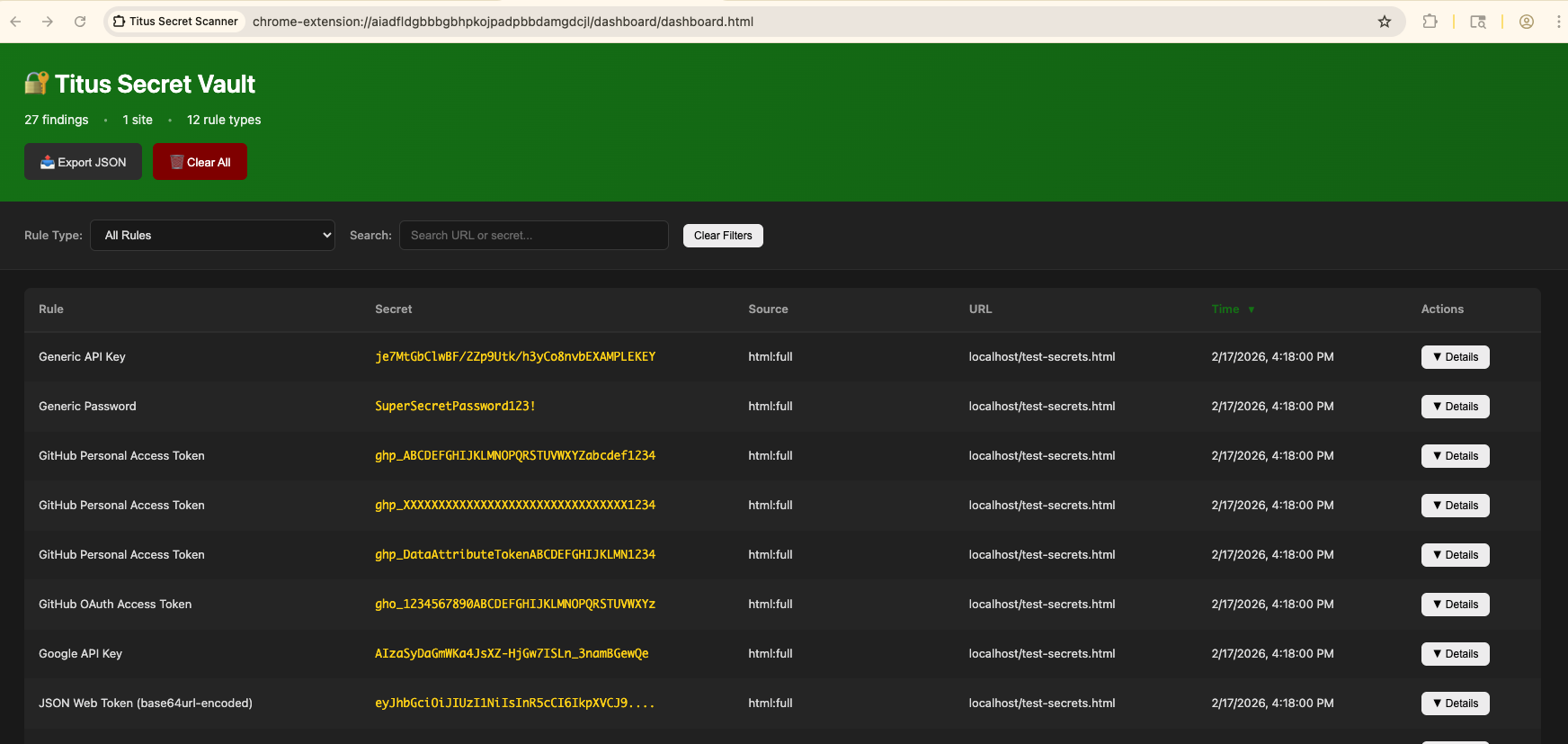
- ポップアップとダッシュボードに結果を表示

<img width="1719" height="958" alt="Titus Chrome拡張機能のポップアップ:Webページで検出されたシークレットを表示" src="https://assets.kitploit.com/production/public/readmes/11969/057a24e2746412ceabe1aac0292a2de463de1efee5bca2489ca34b59d8b0dc2c.png" />

<img width="1744" height="827" alt="Titus Chrome拡張機能のダッシュボード:集約されたシークレット検出結果" src="https://assets.kitploit.com/production/public/readmes/11969/265d972fadcc7f212944d7a1d8fd58a43446e7199d1209900e83b96a546ffb00.png" />

### セキュリティに関する注意事項

ブラウザ拡張機能は、訪問したページからContent Security PolicyヘッダーとCORSヘッダーを削除し、外部リソースをスキャンします。これにより、拡張機能が有効な間、訪問するサイトのセキュリティ体制が弱まります。**アクティブなセキュリティテスト中のみ有効にしてください。**

## ソースからビルドする

### 標準ビルド(Vectorscanアクセラレーション)

デフォルトでは、Titusは [Vectorscan](https://github.com/VectorCamp/vectorscan)(ARM) / [Hyperscan](https://github.com/intel/hyperscan)(x86)を使用してSIMDアクセラレーションによる正規表現マッチングを行います。これにはCGO、Cライブラリ、および`pkg-config`(cgoがライブラリを特定するために使用)が必要です。`make build` はこれらをチェックし、不足している場合はHomebrew / apt / dnf 経由でインストールを試みます。```bash
# Build the CLI binary with vectorscan acceleration (outputs to dist/titus)
make build

# Build the Burp Suite extension JAR
make build-burp

# Build the Chrome browser extension
make build-extension

# Run unit tests
make test

# Run integration tests
make integration-test

You'll see [vectorscan] N/N rules compiled for Hyperscan on startup when the accelerated engine is active.

To install the C library yourself instead of relying on auto-install:```bash

macOS (Homebrew)

brew install pkg-config vectorscan

Ubuntu/Debian

sudo apt-get install pkg-config libhyperscan-dev

Fedora/RHEL

sudo dnf install pkgconf-pkg-config vectorscan-devel

Or build vectorscan from source:

git clone --depth 1 --branch vectorscan/5.4.11 https://github.com/VectorCamp/vectorscan.git cd vectorscan && cmake -B build -DCMAKE_INSTALL_PREFIX=/usr/local && cmake --build build && sudo cmake --install build

root@kitploit:~
直接`go build`を呼び出す場合(例えば、Titusを埋め込む場合)、タグを渡してCGOを有効にしてください:```bash
# macOS (Homebrew) — adjust PKG_CONFIG_PATH to your installed version
CGO_ENABLED=1 PKG_CONFIG_PATH="$(brew --prefix vectorscan)/lib/pkgconfig" \
  go build -tags vectorscan -o dist/titus ./cmd/titus

# Linux (system-installed)
CGO_ENABLED=1 go build -tags vectorscan -o dist/titus ./cmd/titus

Pure-Go ビルド(C 依存関係なし)

Cライブラリをインストールできない場合 — または完全にポータブルで静的なバイナリが必要な場合 — 代わりに pure-Go エンジンをビルドしてください。Titus は、vectorscan がコンパイルされていない場合、実行時に自動的にそれにフォールバックします。```bash

Portable pure-Go binary (no CGO, no vectorscan)

make build-pure

Fully static binary

make build-static

root@kitploit:~
## Contributing

貢献を歓迎します! Titus への貢献方法については、[CONTRIBUTING.md](https://github.com/praetorian-inc/titus/blob/HEAD/CONTRIBUTING.md) をご覧ください。

## License

Apache License 2.0 — [LICENSE](https://github.com/praetorian-inc/titus/blob/HEAD/LICENSE) をご覧ください。

検出ルールは、[NoseyParker](https://github.com/praetorian-inc/noseyparker) (Praetorian Security, Inc.) および [Kingfisher](https://github.com/mongodb/kingfisher) (MongoDB, Inc.) から派生したもので、両者は Apache 2.0 のもとでライセンスされています。完全な帰属については [NOTICE](https://github.com/praetorian-inc/titus/blob/HEAD/NOTICE) をご覧ください。
ツールをダウンロード
