
Skip to content
KitploitKITPLOIT
ツールブログ
提出
ツールブログ
提出

ハッキング、侵入テスト、サイバーセキュリティツールをあなたのセキュリティアーセナルに!

Kitploitはハッキング、サイバーセキュリティ、ペネトレーションテストのツールディレクトリです。最新のプロジェクトアップデートを見つけて、脆弱性の発見、システム分析、テストの自動化、セキュリティの強化を行いましょう。

··フィード·お問い合わせ·プライバシー·© 2026 Kitploit

ツールディレクトリ

カテゴリ

すべてのカテゴリを見る
Loading categories
capa — Rule-based static and dynamic analysis tool that identifies capabilities in PE, ELF, .NET, and shellcode files, mapping them to MITRE ATT&CK techniques for malware triage. | Kitploit
ツール/GitHubGitHub/mandiant/capa
静的分析動的分析 (サンドボックス)リバースエンジニアリングマルウェア分析バイナリ解析脅威インテリジェンス
GitHubmandiant/capa

capa

Rule-based static and dynamic analysis tool that identifies capabilities in PE, ELF, .NET, and shellcode files, mapping them to MITRE ATT&CK techniques for malware triage.

リポジトリを見る
6.1k7142日前Kitploit レビュー済み

人気

すべて見る →

コミュニティで最も使われているツールを見つけましょう。

すべてのツールを探索

ツールコレクションを閲覧

すべてのツールを見る →
共有
ウェブサイト

Webサイト | ダウンロード | Webインターフェース

PyPI - Python Version Last release Number of rules CI status Downloads License


capaは実行可能ファイルの能力を検出します。PE、ELF、.NETモジュール、シェルコードファイル、またはサンドボックスレポートに対して実行すると、プログラムが何をできると考えるかを教えてくれます。例えば、ファイルがバックドアである、サービスをインストールできる、またはHTTPに依存して通信するなどと示唆することがあります。

capaの結果をブラウザで対話的に検査するには、capa Explorer Webを使用してください。

capaルールを検査または記述したい場合は、capa-rulesリポジトリにアクセスしてください。それ以外の場合は、読み続けてください。

以下に、詳細が記載された私たちのcapaブログ記事のリストがあります。

capaの出力例```

$ capa.exe suspicious.exe

+--------------------+------------------------------------------------------------------------+ | ATT&CK Tactic | ATT&CK Technique | |--------------------+------------------------------------------------------------------------| | DEFENSE EVASION | Obfuscated Files or Information [T1027] | | DISCOVERY | Query Registry [T1012] | | | System Information Discovery [T1082] | | EXECUTION | Command and Scripting Interpreter::Windows Command Shell [T1059.003] | | | Shared Modules [T1129] | | EXFILTRATION | Exfiltration Over C2 Channel [T1041] | | PERSISTENCE | Create or Modify System Process::Windows Service [T1543.003] | +--------------------+------------------------------------------------------------------------+

+-------------------------------------------+-------------------------------------------------+ | CAPABILITY | NAMESPACE | |-------------------------------------------+-------------------------------------------------| | read and send data from client to server | c2/file-transfer | | execute shell command and capture output | c2/shell | | receive data (2 matches) | communication | | send data (6 matches) | communication | | connect to HTTP server (3 matches) | communication/http/client | | send HTTP request (3 matches) | communication/http/client | | create pipe | communication/named-pipe/create | | get socket status (2 matches) | communication/socket | | receive data on socket (2 matches) | communication/socket/receive | | send data on socket (3 matches) | communication/socket/send | | connect TCP socket | communication/socket/tcp | | encode data using Base64 | data-manipulation/encoding/base64 | | encode data using XOR (6 matches) | data-manipulation/encoding/xor | | run as a service | executable/pe | | get common file path (3 matches) | host-interaction/file-system | | read file | host-interaction/file-system/read | | write file (2 matches) | host-interaction/file-system/write | | print debug messages (2 matches) | host-interaction/log/debug/write-event | | resolve DNS | host-interaction/network/dns/resolve | | get hostname | host-interaction/os/hostname | | create process | host-interaction/process/create | | create registry key | host-interaction/registry/create | | create service | host-interaction/service/create | | create thread | host-interaction/thread/create | | persist via Windows service | persistence/service | +-------------------------------------------+-------------------------------------------------+

root@kitploit:~
# ダウンロードと使用方法

スタンドアロンのcapaバイナリの安定版リリースは[こちら](https://github.com/mandiant/capa/releases)からダウンロードしてください。インストールせずにスタンドアロンバイナリを実行できます。capaはコマンドラインツールであり、ターミナルから実行する必要があります。

capaをライブラリとして使用したり、他のツールと統合するには、[doc/installation.md](https://github.com/mandiant/capa/blob/master/doc/installation.md)でさらなるセットアップ手順を参照してください。

**ドキュメント:** [使用方法とヒント](https://github.com/mandiant/capa/blob/HEAD/doc/usage.md) · [インストール](https://github.com/mandiant/capa/blob/HEAD/doc/installation.md) · [制限事項](https://github.com/mandiant/capa/blob/HEAD/doc/limitations.md) · [FAQ](https://github.com/mandiant/capa/blob/HEAD/doc/faq.md)

# capa Explorer Web
[capa Explorer Web](https://mandiant.github.io/capa/explorer/) を使用すると、Webブラウザでcapaの結果をインタラクティブに探索できます。オンラインバージョンに加えて、ローカルでのオフライン使用のためにスタンドアロンのHTMLファイルをダウンロードすることもできます。
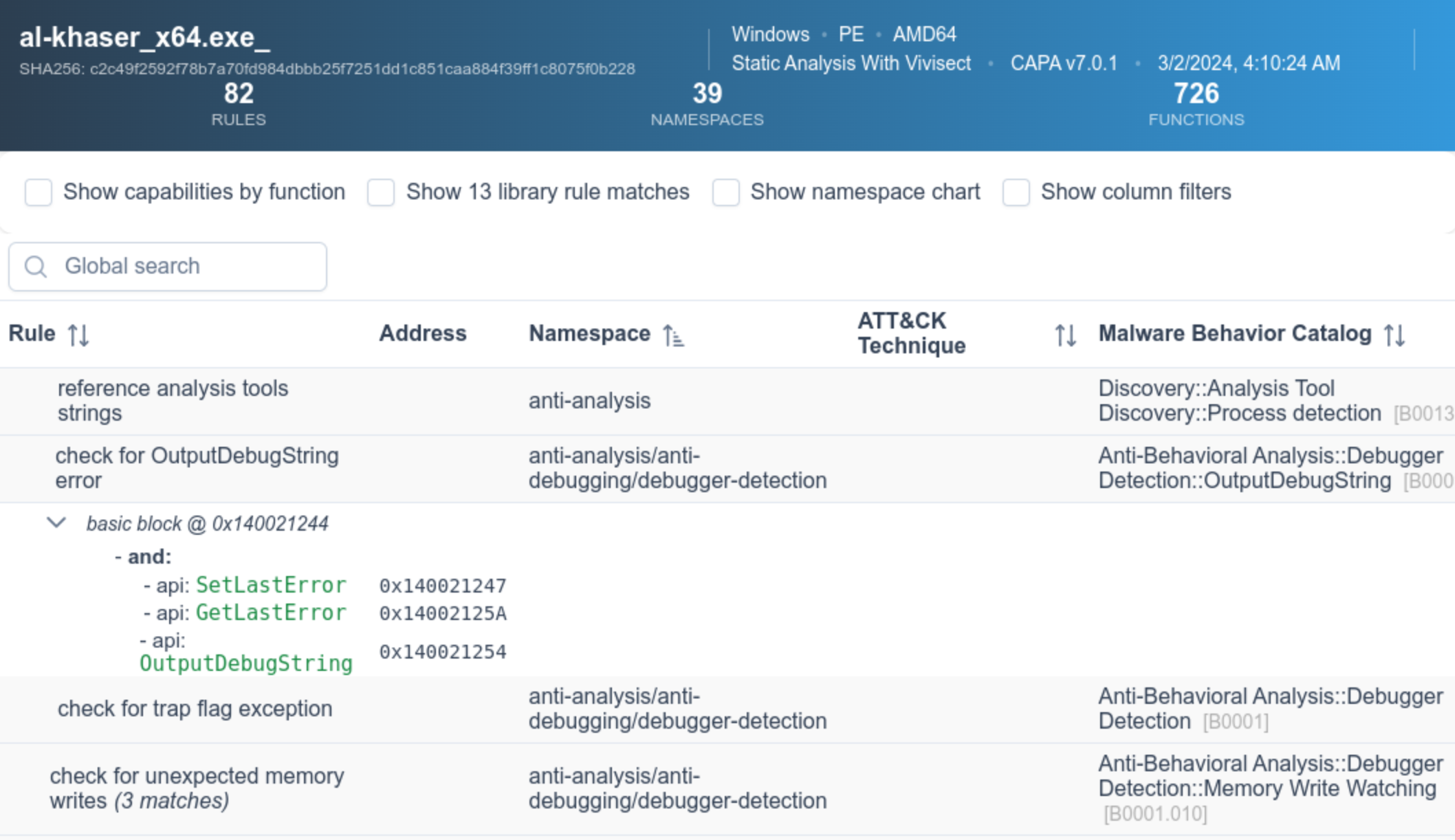
![capa Explorer Webのスクリーンショット](https://raw.githubusercontent.com/mandiant/capa/master/doc/img/capa_web_explorer.png)

Web UIの詳細については、[capa Explorer Web README](https://github.com/mandiant/capa/blob/master/web/explorer/README.md) を参照してください。

# 例

上記のサンプル出力では、未知のバイナリ(`suspicious.exe`)に対してcapaを実行し、ツールはプログラムがHTTPリクエストを送信し、XORとBase64でデータをデコードし、サービスをインストールし、新しいプロセスを生成できることを報告しています。これらを総合すると、`suspicious.exe`は永続的なバックドアである可能性が考えられます。したがって、次の分析ステップとして、`suspicious.exe`をサンドボックスで実行し、コマンド&コントロールサーバーを回復することを試みるかもしれません。

## 詳細な結果

`-vv`フラグ(非常に詳細)を指定すると、capaはこれらの機能の証拠を発見した正確な場所を報告します。これは少なくとも2つの理由で有用です:

  - 結果を信頼すべき理由を説明し、結論を検証できるようにするため
  - 経験豊富なアナリストがIDA Proでバイナリ内のどこを調査すべきかを示すため```
$ capa.exe suspicious.exe -vv
...
execute shell command and capture output
namespace   c2/shell
author      [email protected]
scope       function
att&ck      Execution::Command and Scripting Interpreter::Windows Command Shell [T1059.003]
references  https://docs.microsoft.com/en-us/windows/win32/api/processthreadsapi/ns-processthreadsapi-startupinfoa
function @ 0x4011C0
  and:
    match: create a process with modified I/O handles and window @ 0x4011C0
      and:
        number: 257 = STARTF_USESTDHANDLES | STARTF_USESHOWWINDOW @ 0x4012B8
        or:
          number: 68 = StartupInfo.cb (size) @ 0x401282
        or: = API functions that accept a pointer to a STARTUPINFO structure
          api: kernel32.CreateProcess @ 0x401343
    match: create pipe @ 0x4011C0
      or:
        api: kernel32.CreatePipe @ 0x40126F, 0x401280
    optional:
      match: create thread @ 0x40136A, 0x4013BA
        or:
          and:
            os: windows
            or:
              api: kernel32.CreateThread @ 0x4013D7
        or:
          and:
            os: windows
            or:
              api: kernel32.CreateThread @ 0x401395
    or:
      string: "cmd.exe" @ 0x4012FD
...

動的 capa

capaは、以下のサンドボックスに対する動的機能検出もサポートしています。

  • CAPE(対応レポート形式: .json, .json_, .json.gz)
  • DRAKVUF(対応レポート形式: .log, .log.gz)
  • VMRay(対応レポート形式: 解析アーカイブ .zip)

この機能を使用するには、サポートされているサンドボックスにファイルを送信し、生成されたレポートファイルをダウンロードしてそのファイルに対してcapaを実行します。この機能により、capaはサンドボックスが実行中にキャプチャした動的および静的な特徴に対して機能をマッチングできます。

以下は、パックされたファイルに対してcapaを実行し、その後同じパックされたファイルに対して生成されたCAPEレポートに対してcapaを実行する例です。```yaml $ capa 05be49819139a3fdcdbddbdefd298398779521f3d68daa25275cc77508e42310.exe WARNING:capa.capabilities.common:-------------------------------------------------------------------------------- WARNING:capa.capabilities.common: This sample appears to be packed. WARNING:capa.capabilities.common: WARNING:capa.capabilities.common: Packed samples have often been obfuscated to hide their logic. WARNING:capa.capabilities.common: capa cannot handle obfuscation well using static analysis. This means the results may be misleading or incomplete. WARNING:capa.capabilities.common: If possible, you should try to unpack this input file before analyzing it with capa. WARNING:capa.capabilities.common: Alternatively, run the sample in a supported sandbox and invoke capa against the report to obtain dynamic analysis results. WARNING:capa.capabilities.common: WARNING:capa.capabilities.common: Identified via rule: (internal) packer file limitation WARNING:capa.capabilities.common: WARNING:capa.capabilities.common: Use -v or -vv if you really want to see the capabilities identified by capa. WARNING:capa.capabilities.common:--------------------------------------------------------------------------------

$ capa 05be49819139a3fdcdbddbdefd298398779521f3d68daa25275cc77508e42310.json

┍━━━━━━━━━━━━━━━━━━━━━━━━┯━━━━━━━━━━━━━━━━━━━━━━━━━━━━━━━━━━━━━━━━━━━━━━━━━━━━━━━━━━━━━━━━━━━━━━━━━━━━━━━━━━━━┑ │ ATT&CK Tactic │ ATT&CK Technique │ ┝━━━━━━━━━━━━━━━━━━━━━━━━┿━━━━━━━━━━━━━━━━━━━━━━━━━━━━━━━━━━━━━━━━━━━━━━━━━━━━━━━━━━━━━━━━━━━━━━━━━━━━━━━━━━━━┥ │ CREDENTIAL ACCESS │ Credentials from Password Stores T1555 │ ├────────────────────────┼────────────────────────────────────────────────────────────────────────────────────┤ │ DEFENSE EVASION │ File and Directory Permissions Modification T1222 │ │ │ Modify Registry T1112 │ │ │ Obfuscated Files or Information T1027 │ │ │ Virtualization/Sandbox Evasion::User Activity Based Checks T1497.002 │ ├────────────────────────┼────────────────────────────────────────────────────────────────────────────────────┤ │ DISCOVERY │ Account Discovery T1087 │ │ │ Application Window Discovery T1010 │ │ │ File and Directory Discovery T1083 │ │ │ Query Registry T1012 │ │ │ System Information Discovery T1082 │ │ │ System Location Discovery::System Language Discovery T1614.001 │ │ │ System Owner/User Discovery T1033 │ ├────────────────────────┼────────────────────────────────────────────────────────────────────────────────────┤ │ EXECUTION │ System Services::Service Execution T1569.002 │ ├────────────────────────┼────────────────────────────────────────────────────────────────────────────────────┤ │ PERSISTENCE │ Boot or Logon Autostart Execution::Registry Run Keys / Startup Folder T1547.001 │ │ │ Boot or Logon Autostart Execution::Winlogon Helper DLL T1547.004 │ │ │ Create or Modify System Process::Windows Service T1543.003 │ ┕━━━━━━━━━━━━━━━━━━━━━━━━┷━━━━━━━━━━━━━━━━━━━━━━━━━━━━━━━━━━━━━━━━━━━━━━━━━━━━━━━━━━━━━━━━━━━━━━━━━━━━━━━━━━━━┙

┍━━━━━━━━━━━━━━━━━━━━━━━━━━━━━━━━━━━━━━━━━━━━━━━━━━━━━━┯━━━━━━━━━━━━━━━━━━━━━━━━━━━━━━━━━━━━━━━━━━━━━━━━━━━━━━┑ │ Capability │ Namespace │ ┝━━━━━━━━━━━━━━━━━━━━━━━━━━━━━━━━━━━━━━━━━━━━━━━━━━━━━━┿━━━━━━━━━━━━━━━━━━━━━━━━━━━━━━━━━━━━━━━━━━━━━━━━━━━━━━┥ │ check for unmoving mouse cursor (3 matches) │ anti-analysis/anti-vm/vm-detection │ │ gather bitkinex information │ collection/file-managers │ │ gather classicftp information │ collection/file-managers │ │ gather filezilla information │ collection/file-managers │ │ gather total-commander information │ collection/file-managers │ │ gather ultrafxp information │ collection/file-managers │ │ resolve DNS (23 matches) │ communication/dns │ │ initialize Winsock library (7 matches) │ communication/socket │ │ act as TCP client (3 matches) │ communication/tcp/client │ │ create new key via CryptAcquireContext │ data-manipulation/encryption │ │ encrypt or decrypt via WinCrypt │ data-manipulation/encryption │ │ hash data via WinCrypt │ data-manipulation/hashing │ │ initialize hashing via WinCrypt │ data-manipulation/hashing │ │ hash data with MD5 │ data-manipulation/hashing/md5 │ │ generate random numbers via WinAPI │ data-manipulation/prng │ │ extract resource via kernel32 functions (2 matches) │ executable/resource │ │ interact with driver via control codes (2 matches) │ host-interaction/driver │ │ get Program Files directory (18 matches) │ host-interaction/file-system │ │ get common file path (575 matches) │ host-interaction/file-system │ │ create directory (2 matches) │ host-interaction/file-system/create │ │ delete file │ host-interaction/file-system/delete │ │ get file attributes (122 matches) │ host-interaction/file-system/meta │ │ set file attributes (8 matches) │ host-interaction/file-system/meta │ │ move file │ host-interaction/file-system/move │ │ find taskbar (3 matches) │ host-interaction/gui/taskbar/find │ │ get keyboard layout (12 matches) │ host-interaction/hardware/keyboard │ │ get disk size │ host-interaction/hardware/storage │ │ get hostname (4 matches) │ host-interaction/os/hostname │ │ allocate or change RWX memory (3 matches) │ host-interaction/process/inject │ │ query or enumerate registry key (3 matches) │ host-interaction/registry │ │ query or enumerate registry value (8 matches) │ host-interaction/registry │ │ delete registry key │ host-interaction/registry/delete │ │ start service │ host-interaction/service/start │ │ get session user name │ host-interaction/session │ │ persist via Run registry key │ persistence/registry/run │ │ persist via Winlogon Helper DLL registry key │ persistence/registry/winlogon-helper │ │ persist via Windows service (2 matches) │ persistence/service │ ┕━━━━━━━━━━━━━━━━━━━━━━━━━━━━━━━━━━━━━━━━━━━━━━━━━━━━━━┷━━━━━━━━━━━━━━━━━━━━━━━━━━━━━━━━━━━━━━━━━━━━━━━━━━━━━━┙

root@kitploit:~
# capa ルール
capaは、プログラム内の機能を識別するためのルールのコレクションを使用します。これらのルールは、リバースエンジニアリングに馴染みのない人でも簡単に作成できます。ルールを作成することで、capaが認識できる機能を拡張できます。ある意味では、capaルールはOpenIOC、Yara、YAML形式の混ざったものです。

---

以下は、capaで使用されるルールの例です:```yaml
rule:
  meta:
    name: create TCP socket
    namespace: communication/socket/tcp
    authors:
      - [email protected]
      - [email protected]
      - [email protected]
    scopes:
      static: basic block
      dynamic: call
    mbc:
      - Communication::Socket Communication::Create TCP Socket [C0001.011]
    examples:
      - Practical Malware Analysis Lab 01-01.dll_:0x10001010
  features:
    - or:
      - and:
        - number: 6 = IPPROTO_TCP
        - number: 1 = SOCK_STREAM
        - number: 2 = AF_INET
        - or:
          - api: ws2_32.socket
          - api: ws2_32.WSASocket
          - api: socket
      - property/read: System.Net.Sockets.TcpClient::Client

github.com/mandiant/capa-rules リポジトリには、capa に同梱されている数百の標準ルールが含まれています。 ルールの書き方を学び、マルウェアで興味深い手法を見つけたら、新しいエントリを積極的に投稿してください。

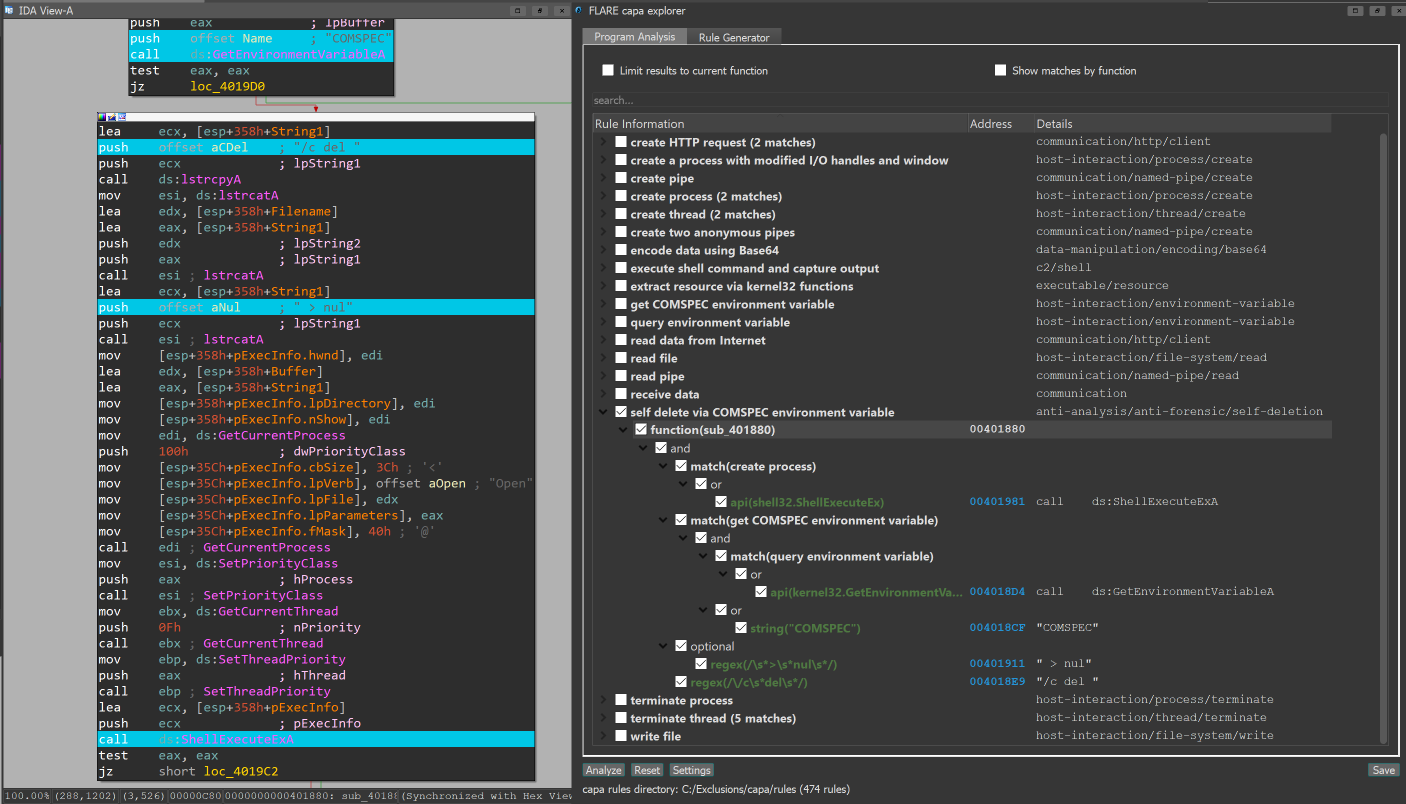
IDA Pro プラグイン: capa explorer

IDA Pro をご利用の場合、capa explorer プラグインを使用できます。 capa explorer は、プログラムの注目すべき領域を特定したり、IDA Pro データベースから直接抽出した機能を使用して新しい capa ルールを構築するのに役立ちます。 また、ローカルの .idb への変更(動的に解決される API アドレスを含むグローバル変数の名前変更など)を利用して、より優れた機能を抽出します。

capa + IDA Pro 統合

Ghidra 統合

capa は、Ghidra(PyGhidra 経由)を機能抽出バックエンドとして使用することをサポートしています。これにより、Ghidra の解析エンジンを使用してバイナリに対して capa を実行できます。

capa explorer for Ghidra を使用して、Ghidra UI 内で capa の結果を表示および実行できます。

また、Ghidra バックエンド を使用してコマンドラインから capa を実行することもできます。

ブログ投稿

  • Riding Dragons: capa Harnesses Ghidra
  • Dynamic capa: Exploring Executable Run-Time Behavior with the CAPE Sandbox
  • capa v4: casting a wider .NET (.NET サポート)
  • ELFant in the Room – capa v3 (ELF サポート)
  • capa 2.0: Better, Stronger, Faster
  • capa: Automatically Identify Malware Capabilities

詳細情報

capa

  • インストール
  • 使用方法
  • 制限事項
  • コントリビューションガイド

capa ルール

  • capa-rules リポジトリ
  • capa-rules ルール形式

capa テストファイル

capa-testfiles リポジトリ には、capa のコードとルールをテストするために使用するデータが含まれています。

メーリングリスト

コミュニティのお知らせを受け取るには、FLARE メーリングリストに登録してください![email protected] に件名 "subscribe" でメールを送信してください。

ツールをダウンロード