
 beelzebub-labs/beelzebub
AIを活用したシステム仮想化のための、セキュアなローコードデセプションランタイムフレームワーク。



デセプションランタイムフレームワーク
Beelzebub は、SSH、HTTP、TCP、TELNET、MCP プロトコルにわたって、適応型で LLM を活用したデコイサービスを展開するオープンソースのデセプションランタイムです。受動的なハニーポットを超え、攻撃者と現実的な対話を積極的に行い、高精度な脅威インテリジェンスを収集し、AI エージェントに対するプロンプトインジェクション攻撃を検出します。
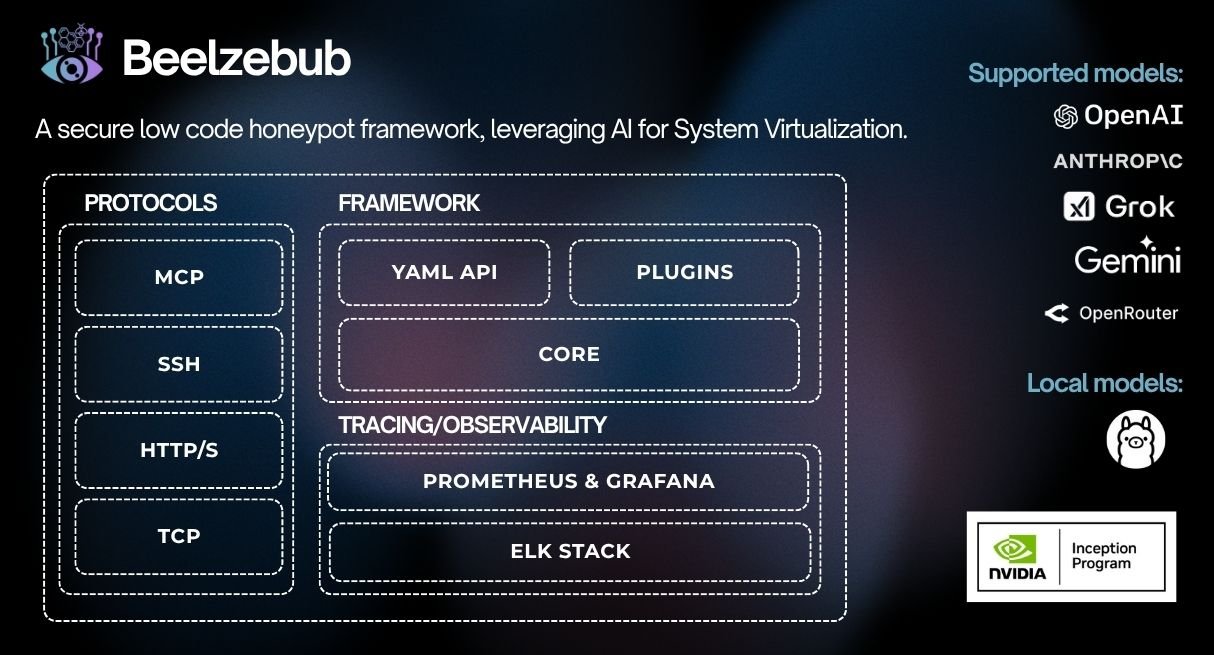
CommandPlugin または HTTPPlugin インターフェースを実装し、init() で登録するだけ — コアの変更は不要です
./install.sh # asks local or Docker, checks prerequisites, and starts it
非対話モード: `./install.sh --local` または `./install.sh --docker`。ローカル
ランタイムを起動せずにインストールとビルドを行うには、`./install.sh --local --no-run` を
使用します。非rootホストでは、デフォルト設定に特権ポートが含まれている場合、ローカルインストールは
自動起動されません。

### ローカル (Go)```bash
make start     # installs any declared plugins, compiles them in, and runs
make docker # builds an image with declared plugins baked in, then runs it
### Helm (Kubernetes) の使用```bash
helm install beelzebub ./beelzebub-chart
# Upgrade:
helm upgrade beelzebub ./beelzebub-chart
Beelzebubには構造化されたCLIが付属しています。beelzebub --helpを実行すると、利用可能なすべてのコマンドを確認できます。
beelzebub run設定されたすべての欺瞞サービスを起動します。```bash beelzebub run [flags]
Flags: -c, --conf-core string Path to core configuration file (default "./configurations/beelzebub.yaml") -s, --conf-services string Path to services configuration directory (default "./configurations/services/") -m, --mem-limit-mib int Memory limit in MiB, -1 to disable (default 100)
### `beelzebub validate`

サービスを起動せずにすべての設定ファイルを解析・検証します。CIパイプラインで有用です。検証アーキテクチャとルールリファレンスについては、[設定検証](https://github.com/beelzebub-labs/beelzebub/blob/main/docs/configuration-validation.md) を参照してください。```bash
beelzebub validate --conf-core ./configurations/beelzebub.yaml --conf-services ./configurations/services/
beelzebub pluginGitHub から取得したプラグインをインストール、一覧表示、削除します。プラグインシステム を参照してください。```bash beelzebub plugin install github.com/your-org/beelzebub-myplugin beelzebub plugin list beelzebub plugin remove myplugin
### `beelzebub version`

バージョン、コミットSHA、ビルド日、Goランタイム情報を出力します。```bash
beelzebub version
Beelzebub は、コアコードを変更せずにデセプションランタイムを拡張するための、安定した公開 SDK を pkg/plugin に公開しています。
// CommandPlugin generates text responses for SSH, TCP, TELNET, and HTTP services. type CommandPlugin interface { Metadata() Metadata Execute(ctx context.Context, req CommandRequest) (string, error) }
// HTTPPlugin generates full HTTP responses with status code, headers, and body. type HTTPPlugin interface { Metadata() Metadata HandleHTTP(r *http.Request) HTTPResponse }
### プラグインの作成```go
package myplugin

import (
    "context"
    "github.com/beelzebub-labs/beelzebub/v3/pkg/plugin"
)

type MyPlugin struct{}

func (p *MyPlugin) Metadata() plugin.Metadata {
    return plugin.Metadata{
        Name:        "MyPlugin",
        Description: "Custom deception response generator",
        Version:     "1.0.0",
        Author:      "your-name",
    }
}

func (p *MyPlugin) Execute(_ context.Context, req plugin.CommandRequest) (string, error) {
    return "simulated response to: " + req.Command, nil
}

func init() {
    plugin.Register(&MyPlugin{})
}
beelzebub plugin install github.com/your-org/myplugin # also appends to the config
make start # local: install declared plugins → build → run (needs Go) make docker # docker: image with plugins baked in → run (needs Docker)
| コマンド | 説明 |
|---|---|
| `plugin install <link>` | プラグインを取得し、配線して再ビルドします。また、`configurations/plugins.yaml` にも追加されます。 |
| `plugin install` | `configurations/plugins.yaml` で宣言されているすべてをインストールします。 |
| `plugin list` | インストール済みプラグインと、バイナリにコンパイル済みのものを表示します。 |
| `plugin update [name]` | 宣言された ref で再取得し、コミットを再固定します。 |
| `plugin remove <name>` | `configurations/plugins.yaml` からプラグインを削除し、配線を解除して、再ビルド手順を表示します。 |

デプロイプラグインのソースは `configurations/plugins.yaml` で設定されています:```yaml
plugins:
  - source: github.com/your-org/myplugin
  - source: github.com/your-org/[email protected]
将来のプラグインごとのランタイム設定は configurations/plugins/ 配下に、
各プラグインにつき1つのYAMLファイルとして配置できます。
各プラグインリポジトリは plugins.yaml マニフェストを同梱し、init() で自己登録する必要があります
(プラグインの作成 を参照):```yaml
name: myplugin
version: 1.0.0
module: github.com/your-org/myplugin # must match its go.mod
entrypoint: . # package that calls plugin.Register (default ".")
min-core-version: v3.8.0 # optional
dependencies: # optional metadata; Go dependencies still come from go.mod
インストールされたプラグインはBeelzebubバイナリにコンパイルされ、ランタイムと同じプロセスで実行されます。信頼できるリポジトリからのみプラグインをインストールしてください。

## 可観測性

### Prometheusメトリクス

Beelzebubは設定されたエンドポイント(デフォルト:`:2112/metrics`)でPrometheusメトリクスを公開します:
