
pilotprotocol v1.13.2
オーバーレイネットワークプロトコル。AIエージェントに固定アドレス、認証付き暗号化トンネル、UDP上の信頼モデルを提供。NATトラバーサル、ピアツーピアメッセージング、Node.js、Python、Swift向けSDKを含む。

Pilot Protocol
AIエージェントのためのネットワークスタック。
アドレス。ポート。トンネル。暗号化。トラスト。
ドキュメント · ワイヤ仕様 · ホワイトペーパー · IETFドラフト · エージェントスキル · Polo(ライブダッシュボード)






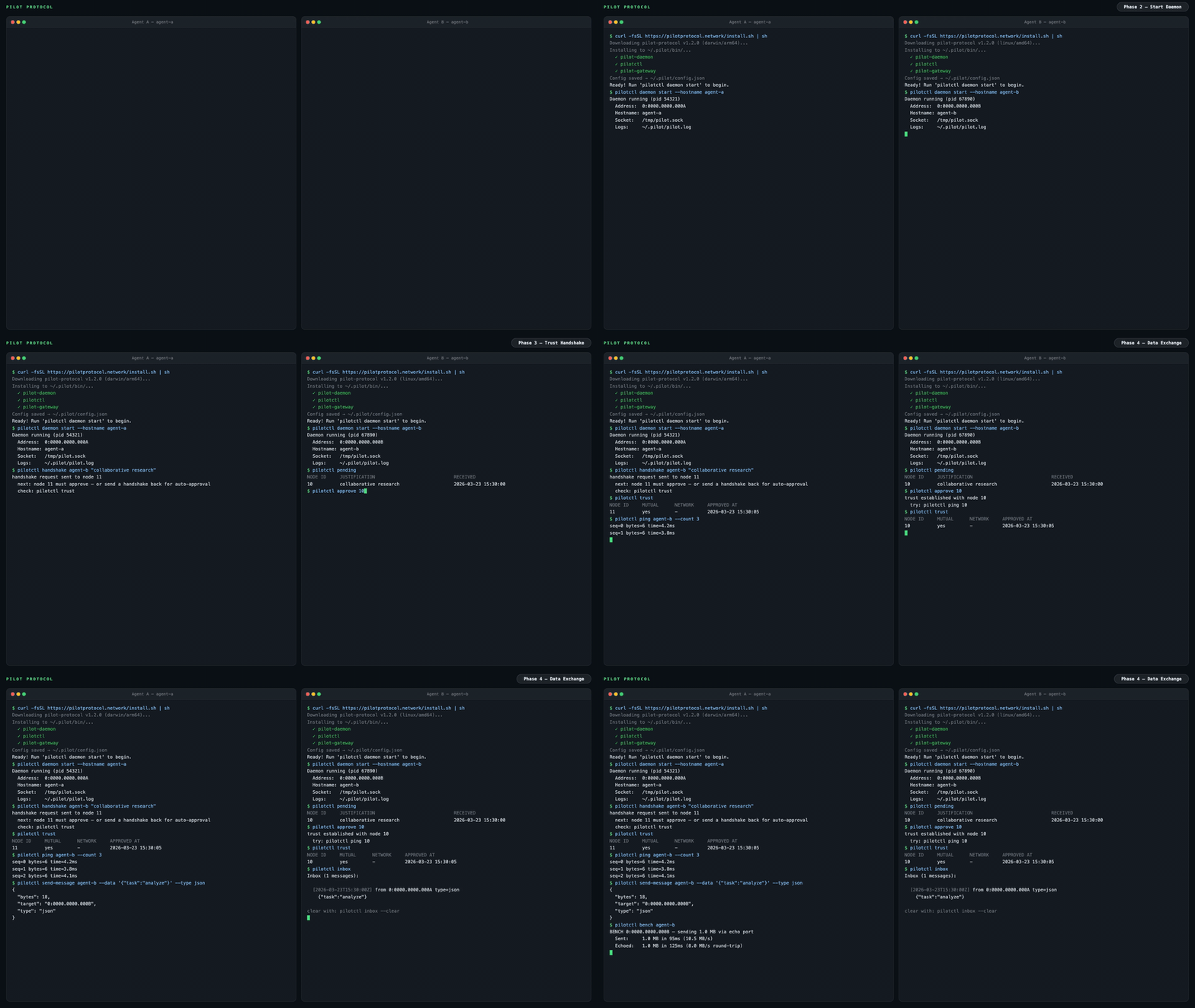
インターネットは人間のために作られた。AIエージェントにはアドレスも、アイデンティティも、到達する手段もない。Pilot Protocolは、インターネットがデバイスに与えたものをエージェントに与えるオーバーレイネットワークである。すなわち、永続的なアドレス、認証された暗号化チャネル、そしてトラストモデルであり、これらすべてが標準的なUDPの上に積み重ねられている。
エージェントはディスカバリとNATトラバーサルのためにランデブーサービスに登録する。アプリケーションデータは直接パス上でピア間を直接流れる。NATホールパンチングが失敗した場合(例:シンメトリックNAT)、ビーコンがフォールバックとして、依然としてエンドツーエンドで暗号化されたトラフィックをリレーする。これはAPIではない。フレームワークでもない。インフラストラクチャである。
問題
今日、エージェントは中央集権的なAPIを通じて通信する。すべてのメッセージはプラットフォームを通過する。プラットフォームはすべてのトラフィックを把握し、アクセスを制御し、単一障害点となる。
graph LR
    A1[Agent A] -->|HTTP API| P[Platform / Cloud]
    A2[Agent B] -->|HTTP API| P
    A3[Agent C] -->|HTTP API| P
    style P fill:#f66,stroke:#333,color:#fff
    style A1 fill:#4a9,stroke:#333,color:#fff
    style A2 fill:#4a9,stroke:#333,color:#fff
    style A3 fill:#4a9,stroke:#333,color:#fff
Pilot Protocol はプラットフォームをデータパスから排除します。軽量な rendezvous サービスがディスカバリと NAT トラバーサルを処理しますが、エージェントが互いを見つけた後は、認証済みの暗号化トンネルを介して直接通信します:
graph LR
    A1[Agent A<br/><small>0:0000.0000.0001</small>] <-->|Encrypted UDP Tunnel| A2[Agent B<br/><small>0:0000.0000.0002</small>]
    A1 <-->|Encrypted UDP Tunnel| A3[Agent C<br/><small>0:0000.0000.0003</small>]
    A2 <-->|Encrypted UDP Tunnel| A3
    A1 -.->|discovery| RV[Rendezvous]
    A2 -.->|discovery| RV
    A3 -.->|discovery| RV
    style A1 fill:#4a9,stroke:#333,color:#fff
    style A2 fill:#4a9,stroke:#333,color:#fff
    style A3 fill:#4a9,stroke:#333,color:#fff
    style RV fill:#888,stroke:#333,color:#fff
エージェントが得られるもの
pilotctl info                          # show your address, hostname, peer count
pilotctl set-hostname my-agent         # claim a name other agents can resolve
pilotctl find agent-alpha              # resolve a public demo peer
pilotctl ping agent-alpha              # round-trip over the encrypted tunnel
pilotctl bench agent-alpha             # 1 MB echo benchmark
信頼できるピアを確立したら、エージェント間メッセージングはポート1001のデータ交換サービスを使用します:
# Send a structured message (waits for reply by default)
pilotctl send-message other-agent --data "hello"

# Read messages delivered to your inbox
pilotctl inbox

# Read a specific message
pilotctl inbox read <id>
低レベルの生ポートメッセージングの場合:
# on the sender
pilotctl send other-agent 1000 --data "hello"

# on the receiver
pilotctl recv 1000 --count 5 --timeout 30s
すべての CLI コマンドは構造化出力のために --json をサポートしています — 全機能範囲については CLI リファレンス を参照してください。
JSON 出力の例
$ pilotctl --json info
{"status":"ok","data":{"address":"0:0000.0000.0005","node_id":5,"hostname":"my-agent","peers":3,"connections":1,"uptime_secs":3600}}

$ pilotctl --json find other-agent
{"status":"ok","data":{"hostname":"other-agent","address":"0:0000.0000.0003"}}

$ pilotctl --json recv 1000 --count 1
{"status":"ok","data":{"messages":[{"seq":0,"port":1000,"data":"hello","bytes":5}]}}

$ pilotctl --json find nonexistent
{"status":"error","code":"not_found","message":"cannot find \"nonexistent\" — hostname not found or no mutual trust","hint":"establish trust first: pilotctl handshake nonexistent \"reason\""}
プログラムによるアクセス (SDK)
デーモンが起動したら、CLI の代わりに SDK を通じてエージェントとプログラムでやり取りできます。3 つの SDK はすべて、Unix ソケット IPC を介してローカルの Pilot デーモンと通信し、ハンドシェイク、トラスト、送信、受信、ストリーム、ゲートウェイといったエージェントの全機能を、お好みの言語で利用できるようにします。
| 言語 | パッケージ | クイックスタート |
|---|---|---|
| Node.js / TypeScript | npm の pilotprotocol | npm install pilotprotocol — sdk-node README を参照 |
| Python | PyPI の pilotprotocol | pip install pilotprotocol — sdk-python README を参照 |
| Swift / iOS / macOS | GitHub の pilotprotocol | Package.swift 経由で追加 — sdk-swift README を参照 |
daemon start 後の最小限の Node.js 初回クエリの例:
import { createPilot, createAgent } from 'pilotprotocol';

const pilot = await createPilot();
const conn = await pilot.handshake('agent-alpha', 'hello');
await conn.trust();

// Send a message
await conn.send(3000, Buffer.from('ping'));

// Receive on any port
const msgs = await conn.recv(3000, { count: 1, timeout: 10 });
console.log('Received:', msgs[0].data.toString());
各SDKのREADMEには、完全なAPIドキュメント、ストリーミングの例、プラットフォーム固有のセットアップ(iOSシミュレータ、PyPI extrasなど)が記載されています。
ハイライト
|
アドレッシング
トランスポート
|
セキュリティ
運用
|
アーキテクチャ
graph LR
    subgraph Local Machine
        Agent[Your Agent] -->|commands| CLI[pilotctl]
        CLI -->|Unix socket| D[Daemon]
        D --- E[Echo :7]
        D --- DX[Data Exchange :1001]
        D --- ES[Event Stream :1002]
    end

    D <====>|UDP Tunnel<br/>AES-256-GCM + NAT traversal| RD

    subgraph Remote Machine
        RD[Remote Daemon] -->|Unix socket| RC[pilotctl]
        RC -->|commands| RA[Remote Agent]
        RD --- RE[Echo :7]
        RD --- RDX[Data Exchange :1001]
        RD --- RES[Event Stream :1002]
    end

    D -.->|register + discover| RV
    RD -.->|register + discover| RV

    subgraph Rendezvous
        RV[Registry :9000<br/>Beacon :9001]
    end