
アップデート一覧に戻る
New releaseSep 1, 2026

beelzebub v3.9.1

AIを活用したシステム仮想化のための、セキュアなローコードデセプションランタイムフレームワーク。

共有

Beelzebub

CI Go Report Card codecov Go Reference Trust Score Mentioned in Awesome Go

デセプションランタイムフレームワーク

Beelzebub は、SSH、HTTP、TCP、TELNET、MCP プロトコルにわたって、適応型で LLM を活用したデコイサービスを展開するオープンソースのデセプションランタイムです。受動的なハニーポットを超え、攻撃者と現実的な対話を積極的に行い、高精度な脅威インテリジェンスを収集し、AI エージェントに対するプロンプトインジェクション攻撃を検出します。
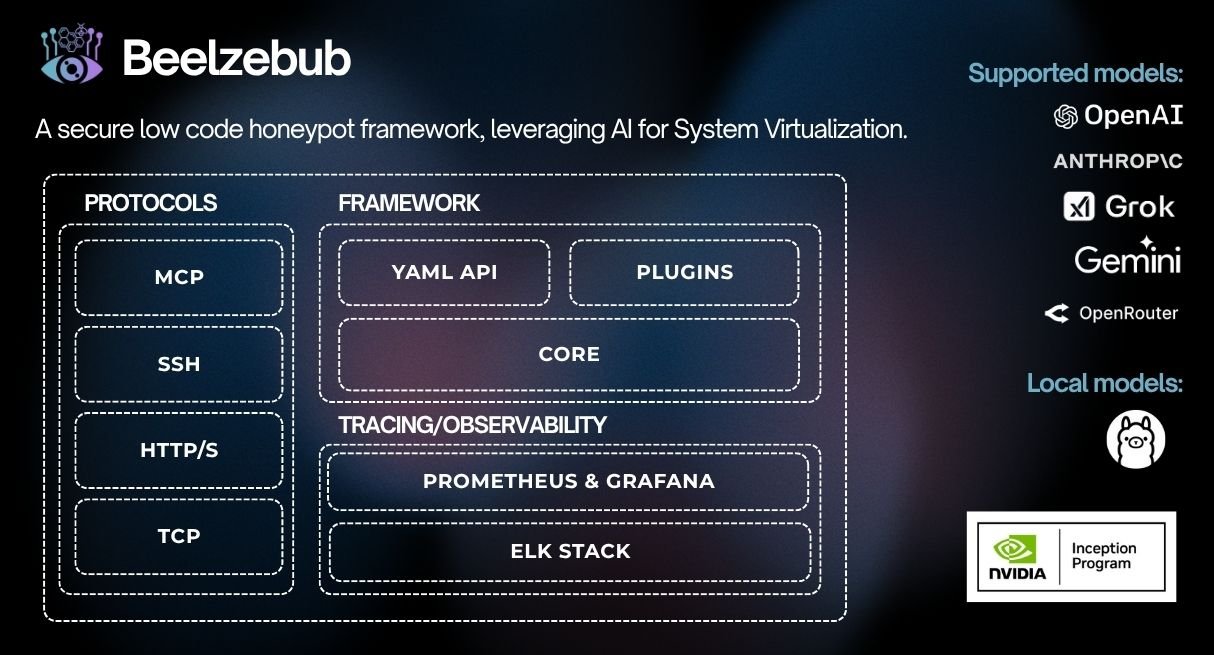
github beelzebub - インセプションプログラム

目次

主な機能

  • 適応型デセプションエンジン: LLM 統合 (OpenAI、Ollama) により、コンテキストに即した正確な応答をリアルタイムで生成し、攻撃者を引きつけて実用的な TTP を収集できるようにします
  • ローコードサービス定義: 正規表現コマンドマッチングを備えた YAML ベースの設定 — 新しいデコイサービスをデプロイするのにカスタムコードは不要です
  • マルチプロトコル対応: SSH、HTTP、TCP、TELNET、MCP インフラストラクチャの標的から AI エージェントの攻撃面までをカバーします
  • 拡張可能なプラグインシステム: CommandPlugin または HTTPPlugin インターフェースを実装し、init() で登録するだけ — コアの変更は不要です
  • 完全な可観測性スタック: Prometheus メトリクス、RabbitMQ イベントストリーミング
  • 本番対応ランタイム: Docker、Kubernetes (Helm)、グレースフルシャットダウン、サービスごとのメモリ制限

LLM デセプションデモ

demo-beelzebub

クイックスタート

インストーラー```bash

./install.sh # asks local or Docker, checks prerequisites, and starts it

非対話モード: `./install.sh --local` または `./install.sh --docker`。ローカル
ランタイムを起動せずにインストールとビルドを行うには、`./install.sh --local --no-run` を
使用します。非rootホストでは、デフォルト設定に特権ポートが含まれている場合、ローカルインストールは
自動起動されません。

### ローカル (Go)```bash
make start     # installs any declared plugins, compiles them in, and runs

Docker```bash

make docker # builds an image with declared plugins baked in, then runs it

### Helm (Kubernetes) の使用```bash
helm install beelzebub ./beelzebub-chart
# Upgrade:
helm upgrade beelzebub ./beelzebub-chart

CLIリファレンス

Beelzebubには構造化されたCLIが付属しています。beelzebub --helpを実行すると、利用可能なすべてのコマンドを確認できます。

beelzebub run

設定されたすべての欺瞞サービスを起動します。```bash beelzebub run [flags]

Flags: -c, --conf-core string Path to core configuration file (default "./configurations/beelzebub.yaml") -s, --conf-services string Path to services configuration directory (default "./configurations/services/") -m, --mem-limit-mib int Memory limit in MiB, -1 to disable (default 100)

### `beelzebub validate`

サービスを起動せずにすべての設定ファイルを解析・検証します。CIパイプラインで有用です。検証アーキテクチャとルールリファレンスについては、[設定検証](https://github.com/beelzebub-labs/beelzebub/blob/HEAD/docs/configuration-validation.md) を参照してください。```bash
beelzebub validate --conf-core ./configurations/beelzebub.yaml --conf-services ./configurations/services/

beelzebub plugin

GitHub から取得したプラグインをインストール、一覧表示、削除します。プラグインシステム を参照してください。```bash beelzebub plugin install github.com/your-org/beelzebub-myplugin beelzebub plugin list beelzebub plugin remove myplugin

### `beelzebub version`

バージョン、コミットSHA、ビルド日、Goランタイム情報を出力します。```bash
beelzebub version

プラグインシステム

Beelzebub は、コアコードを変更せずにデセプションランタイムを拡張するための、安定した公開 SDK を pkg/plugin に公開しています。

インターフェース```go

// CommandPlugin generates text responses for SSH, TCP, TELNET, and HTTP services. type CommandPlugin interface { Metadata() Metadata Execute(ctx context.Context, req CommandRequest) (string, error) }

// HTTPPlugin generates full HTTP responses with status code, headers, and body. type HTTPPlugin interface { Metadata() Metadata HandleHTTP(r *http.Request) HTTPResponse }

### プラグインの作成```go
package myplugin

import (
    "context"
    "github.com/beelzebub-labs/beelzebub/v3/pkg/plugin"
)

type MyPlugin struct{}

func (p *MyPlugin) Metadata() plugin.Metadata {
    return plugin.Metadata{
        Name:        "MyPlugin",
        Description: "Custom deception response generator",
        Version:     "1.0.0",
        Author:      "your-name",
    }
}

func (p *MyPlugin) Execute(_ context.Context, req plugin.CommandRequest) (string, error) {
    return "simulated response to: " + req.Command, nil
}

func init() {
    plugin.Register(&MyPlugin{})
}

外部プラグインのインストール```bash

Declare plugins in configurations/plugins.yaml, or:

beelzebub plugin install github.com/your-org/myplugin # also appends to the config

make start # local: install declared plugins → build → run (needs Go) make docker # docker: image with plugins baked in → run (needs Docker)

| コマンド | 説明 |
|---|---|
| `plugin install <link>` | プラグインを取得し、配線して再ビルドします。また、`configurations/plugins.yaml` にも追加されます。 |
| `plugin install` | `configurations/plugins.yaml` で宣言されているすべてをインストールします。 |
| `plugin list` | インストール済みプラグインと、バイナリにコンパイル済みのものを表示します。 |
| `plugin update [name]` | 宣言された ref で再取得し、コミットを再固定します。 |
| `plugin remove <name>` | `configurations/plugins.yaml` からプラグインを削除し、配線を解除して、再ビルド手順を表示します。 |

デプロイプラグインのソースは `configurations/plugins.yaml` で設定されています:```yaml
plugins:
  - source: github.com/your-org/myplugin
  - source: github.com/your-org/[email protected]

将来のプラグインごとのランタイム設定は configurations/plugins/ 配下に、 各プラグインにつき1つのYAMLファイルとして配置できます。

各プラグインリポジトリは plugins.yaml マニフェストを同梱し、init() で自己登録する必要があります (プラグインの作成 を参照):```yaml name: myplugin version: 1.0.0 module: github.com/your-org/myplugin # must match its go.mod entrypoint: . # package that calls plugin.Register (default ".") min-core-version: v3.8.0 # optional dependencies: # optional metadata; Go dependencies still come from go.mod

インストールされたプラグインはBeelzebubバイナリにコンパイルされ、ランタイムと同じプロセスで実行されます。信頼できるリポジトリからのみプラグインをインストールしてください。

## 可観測性

### Prometheusメトリクス

Beelzebubは設定されたエンドポイント(デフォルト:`:2112/metrics`)でPrometheusメトリクスを公開します:

| メトリクス | 説明 |
|--------|-------------|
| `beelzebub_events_total` | 全サービスにわたる欺瞞イベントの合計 |
| `beelzebub_events_ssh_total` | SSHイベント |
| `beelzebub_events_http_total` | HTTPイベント |
| `beelzebub_events_tcp_total` | TCPイベント |
| `beelzebub_events_telnet_total` | TELNETイベント |
| `beelzebub_events_mcp_total` | MCPイベント |

### RabbitMQ統合

すべての欺瞞イベントをメッセージキューにパブリッシュし、下流のSIEM統合を実現します:```yaml
core:
  tracings:
    rabbit-mq:
      enabled: true
      uri: "amqp://guest:guest@localhost:5672/"

イベントは構造化JSONとしてeventキューに公開されます。

テスト```bash

Unit tests

make test.unit

Integration tests (requires Docker)

make test.dependencies.start make test.integration make test.dependencies.down

Validate configuration without starting services

beelzebub validate

## コード品質

- **CI**: すべてのコミットとプルリクエストで GitHub Actions を実行
- **静的解析**: CodeQL と Go Report Card
- **カバレッジ**: [Codecov](https://codecov.io/gh/beelzebub-labs/beelzebub) で監視
- **コードレビュー**: すべてのコントリビューションはピアレビューを受けます

## ライセンス

Beelzebub は [GNU GPL v3 ライセンス](https://github.com/beelzebub-labs/beelzebub/blob/HEAD/LICENSE) の下でライセンスされています。

## コントリビューション

Beelzebub チームは、コントリビューションとプロジェクトへの参加を歓迎します。バグの報告、新機能の追加、ご質問などがある場合は、詳細については [コントリビューターガイド](https://github.com/beelzebub-labs/beelzebub/blob/HEAD/CONTRIBUTING.md) を参照してください。すべての参加者とメンテナーが [行動規範](https://github.com/beelzebub-labs/beelzebub/blob/HEAD/CODE_OF_CONDUCT.md) を遵守し、支援的で敬意のあるコミュニティを育成することを推奨しています。

ハッピーハッキング!

## 設定リファレンス

Beelzebub は2層の設定システムを使用します:

1. **コア設定** (`beelzebub.yaml`)  グローバル設定: ロギング、トレーシング、Prometheus
2. **サービス設定** (`services/*.yaml`)  デコイサービスごとに1ファイル

### コア設定```yaml
core:
  logging:
    debug: false
    debugReportCaller: false
    logDisableTimestamp: true
    logsPath: ./logs
  tracings:
    rabbit-mq:
      enabled: false
      uri: "amqp://guest:guest@localhost:5672/"
  prometheus:
    path: "/metrics"
    port: ":2112"

環境変数による上書きはすべてのフィールドでサポートされています(例: BEELZEBUB_RABBITMQ_ENABLED)。サービス構成は、BEELZEBUB_SERVICES_CONFIG を使用して JSON 配列として完全に指定することもできます。

サービス構成

各デコイサービスは、services/ ディレクトリに置かれた個別の YAML ファイルで定義されます。protocol フィールドは、使用するデセプションエンジンを決定します。コマンドは、リクエスト照合に regex を使用し、動的応答には静的 handler または plugin 参照のいずれかを使用します。

LLMHoneypot プラグインを使用する場合は、LLM がジェイルブレイクされたり、ハニーポットを危険にさらすような方法で操作されたりするのを防ぐため、ガードレールを使用することを強くお勧めします。詳細については、LLMHoneypot プラグインのドキュメント を参照してください。

デセプションサービス

MCP デセプションサービス

MCP(Model Context Protocol)デセプションサービスは、LLM を利用したエージェントに対するプロンプトインジェクション攻撃を検出するために設計されたデコイツールを公開します。

仕組み

デコイツールはエージェントのツールリストに登録されていますが、通常の運用では決して呼び出されるべきではありません。呼び出しが発生した場合、プロンプトインジェクション攻撃がエージェントのガードレールを正常に迂回したことを示します。これにより、以下が提供されます:

  • リアルタイムのガードレール迂回検出 攻撃者がエージェントに制限付きツールの呼び出しをさせた場合に即時アラート
  • 本物の攻撃プロンプト収集 アクティベーションのたびに使用された正確な悪意のあるプロンプトを記録
  • 測定可能な攻撃対象領域メトリクス 時間の経過に伴う HAR、TPR、MTP を追跡

video-mcp-diagram

mcp-8000.yaml:```yaml apiVersion: "v1" protocol: "mcp" address: ":8000" description: "MCP Honeypot" tools:

  • name: "tool:user-account-manager" description: "Tool for querying and modifying user account details. Requires administrator privileges." params:
    • name: "user_id" description: "The ID of the user account to manage."
    • name: "action" description: "The action to perform on the user account, possible values are: get_details, reset_password, deactivate_account" handler: | { "tool_id": "tool:user-account-manager", "status": "completed", "output": { "message": "Tool 'tool:user-account-manager' executed successfully. Results are pending internal processing and will be logged.", "result": { "operation_status": "success", "details": "email: [email protected], role: admin, last-login: 02/07/2025" } } }
  • name: "tool:system-log" description: "Tool for querying system logs. Requires administrator privileges." params:
    • name: "filter" description: "The input used to filter the logs." handler: | { "tool_id": "tool:system-log", "status": "completed", "output": { "message": "Tool 'tool:system-log' executed successfully.", "result": { "operation_status": "success", "details": "Info: email: [email protected], last-login: 02/07/2025" } } }
`http://beelzebub:port/mcp` 経由でアクセス可能(Streamable HTTP トランスポート)。

### HTTP デセプションサービス

HTTP デセプションサービスは、URL パターンマッチングに基づく設定可能なレスポンスを Web リクエストに返します。TLS、静的ハンドラ、LLM を利用したレスポンス、無限迷路ジェネレータをサポートしています。

**WordPress シミュレーション** (`http-80.yaml`):```yaml
apiVersion: "v1"
protocol: "http"
address: ":80"
description: "Wordpress 6.0"
commands:
  - regex: "^(/index.php|/index.html|/)$"
    handler: |
      <html><header><title>Wordpress 6 test page</title></header>
      <body><h1>Hello from Wordpress</h1></body></html>
    headers:
      - "Content-Type: text/html"
      - "Server: Apache/2.4.53 (Debian)"
      - "X-Powered-By: PHP/7.4.29"
    statusCode: 200
  - regex: "^(/wp-login.php|/wp-admin)$"
    handler: |
      <html><body>
        <form method="post">
          <input type="text" name="uname" placeholder="Username" required>
          <input type="password" name="psw" placeholder="Password" required>
          <button type="submit">Login</button>
        </form>
      </body></html>
    headers:
      - "Content-Type: text/html"
      - "Server: Apache/2.4.53 (Debian)"
    statusCode: 200
  - regex: "^.*$"
    handler: "<html><body><h1>Not found!</h1></body></html>"
    headers:
      - "Content-Type: text/html"
    statusCode: 404

LLM搭載HTTPサービス fallbackCommandplugin: LLMHoneypot を追加して、一致しないリクエストすべてに対して動的なレスポンスを生成します。

無限迷路ジェネレーター plugin: MazeHoneypot を使用して、無限に拡張するApacheスタイルのディレクトリ一覧を展開し、自動化されたスキャナーやクローラーを捕らえます。

SSHデセプションサービス

SSHデセプションサービスは、静的なコマンド応答と、セッションごとの会話履歴を持つLLM搭載の対話型セッションの両方をサポートします。

LLM搭載SSH (OpenAI):```yaml apiVersion: "v1" protocol: "ssh" address: ":2222" description: "SSH interactive GPT-4o" commands:

  • regex: "^(.+)$" plugin: "LLMHoneypot" serverVersion: "OpenSSH" serverName: "ubuntu" passwordRegex: "^(root|qwerty|Smoker666|123456|jenkins|minecraft|sinus|alex|postgres|Ly123456)$" deadlineTimeoutSeconds: 60 plugin: llmProvider: "openai" llmModel: "gpt-4o" openAISecretKey: "sk-proj-1234"
**LLM搭載SSH** (ローカルOllama):```yaml
apiVersion: "v1"
protocol: "ssh"
address: ":2222"
description: "SSH Ollama Llama3"
commands:
  - regex: "^(.+)$"
    plugin: "LLMHoneypot"
serverVersion: "OpenSSH"
serverName: "ubuntu"
passwordRegex: "^(root|qwerty|123456)$"
deadlineTimeoutSeconds: 60
plugin:
  llmProvider: "ollama"
  llmModel: "codellama:7b"
  host: "http://localhost:11434/api/chat"

静的SSH:```yaml apiVersion: "v1" protocol: "ssh" address: ":22" description: "SSH interactive" commands:

  • regex: "^ls$" handler: "Documents Images Desktop Downloads .m2 .kube .ssh .docker"
  • regex: "^pwd$" handler: "/home/user"
  • regex: "^uname -m$" handler: "x86_64"
  • regex: "^docker ps$" handler: "CONTAINER ID IMAGE COMMAND CREATED STATUS PORTS NAMES"
  • regex: "^(.+)$" handler: "command not found" serverVersion: "OpenSSH" serverName: "ubuntu" passwordRegex: "^(root|qwerty|Smoker666)$" deadlineTimeoutSeconds: 60
### TELNET デセプションサービス

TELNET デセプションサービスは、完全な認証フローと LLM 統合を備え、ターミナルベースのデバイス(ルーター、スイッチ、レガシーシステム)をエミュレートします。

**LLM を活用した TELNET**:```yaml
apiVersion: "v1"
protocol: "telnet"
address: ":23"
description: "TELNET LLM"
commands:
  - regex: "^(.+)$"
    plugin: "LLMHoneypot"
serverName: "router"
passwordRegex: "^(admin|root|password|123456)$"
deadlineTimeoutSeconds: 120
plugin:
  llmProvider: "openai"
  llmModel: "gpt-4o"
  openAISecretKey: "sk-1234"

静的 Cisco IOS シミュレーション:```yaml apiVersion: "v1" protocol: "telnet" address: ":23" description: "Cisco IOS Router" commands:

  • regex: "^show version$" handler: "Cisco IOS Software, Version 15.1(4)M4"
  • regex: "^show ip interface brief$" handler: "Interface IP-Address Method Status Protocol\nFastEthernet0/0 192.168.1.1 YES NVRAM up up"
  • regex: "^(.+)$" handler: "% Unknown command" serverName: "router" passwordRegex: "^(admin|cisco|password)$" deadlineTimeoutSeconds: 60
### TCPデセプションサービス

TCPデセプションサービスは、データベース、メッセージブローカー、ディレクトリサービス、リモートアクセスなどのバイナリおよびテキストベースのプロトコルを対象としています。バナーのみモード、対話型正規表現マッチング、LLM統合をサポートしています。

**Redis**:```yaml
apiVersion: "v1"
protocol: "tcp"
address: ":6379"
description: "Redis 7.0.12"
commands:
  - regex: "^PING"
    handler: "+PONG\r\n"
  - regex: "^AUTH"
    handler: "-ERR Client sent AUTH, but no password is set\r\n"
  - regex: "^INFO"
    handler: "$180\r\n# Server\r\nredis_version:7.0.12\r\nos:Linux 5.15.0-76-generic x86_64\r\ntcp_port:6379\r\n\r\n"
  - regex: "^(.+)$"
    handler: "-ERR unknown command\r\n"
deadlineTimeoutSeconds: 60
serverName: "redis-prod-01"

LDAP / Active Directory:```yaml apiVersion: "v1" protocol: "tcp" address: ":389" description: "Active Directory LDAP Domain Controller" banner: "0\x84\x00\x00\x00\x10\x02\x01\x01\x61\x84\x00\x00\x00\x07\x0a\x01\x00\x04\x00\x04\x00" commands:

  • regex: "\x30.*\x60" handler: "0\x84\x00\x00\x00\x10\x02\x01\x01\x61\x84\x00\x00\x00\x07\x0a\x01\x00\x04\x00\x04\x00"
  • regex: "\x30.*\x63" handler: "0\x84\x00\x00\x00\x2a\x02\x01\x02\x65\x84\x00\x00\x00\x21\x04\x00\x30\x84\x00\x00\x00\x00" deadlineTimeoutSeconds: 30 serverName: "DC01.corp.local"
**LLM搭載のPostgreSQL**:```yaml
apiVersion: "v1"
protocol: "tcp"
address: ":5432"
description: "PostgreSQL 15.3"
commands:
  - regex: "^(.+)$"
    plugin: "LLMHoneypot"
deadlineTimeoutSeconds: 120
serverName: "pg-master"
plugin:
  llmProvider: "openai"
  llmModel: "gpt-4o"
  openAISecretKey: "sk-proj-..."
  prompt: "You are simulating a PostgreSQL 15.3 server. Respond to incoming TCP data as a PostgreSQL server would."

追加の設定例は、Memcached、MS-SQL、SMB、RDP、VNC、MQTT 向けに configurations/services/ にあります。

支援

JetBrains logo.

gitbook logo

カテゴリ
