
Skip to content
KitploitKITPLOIT
StrumentiBlog
Invia
StrumentiBlog
Invia

Strumenti di Hacking, PenTest e Cybersecurity per il tuo Arsenale di Sicurezza!

Kitploit è una directory di strumenti di hacking, cybersecurity e pentesting. Scopri gli ultimi aggiornamenti dei progetti per trovare vulnerabilità, analizzare sistemi, automatizzare i test e rafforzare la tua sicurezza.

··Feed·Contatto·Privacy·© 2026 Kitploit

Directory degli strumenti

Categorie

Vedi tutte le categorie
Loading categories
zscan — Zscan un set di strumenti di scansione aggressiva | Kitploit
Strumenti/GitHubGitHub/zyylhn/zscan
RicognizioneScanner di VulnerabilitàMappatura della ReteAttacchi alle PasswordScansione PorteExploitPenetration Testing
GitHubzyylhn/zscan

zscan

Zscan un set di strumenti di scansione aggressiva

Vedi Repository
5397442 anni faRevisionato da Kitploit

Più Popolari

Vedi tutti →

Scopri gli strumenti più utilizzati dalla nostra community.

Esplora tutti gli strumenti

Sfoglia la nostra collezione di strumenti

Vedi tutti gli strumenti →
Condividi

Zscan un set di strumenti di scansione e brute force

Licens Releases go

📄Documento in inglese

Vedi il log per gli aggiornamenti log
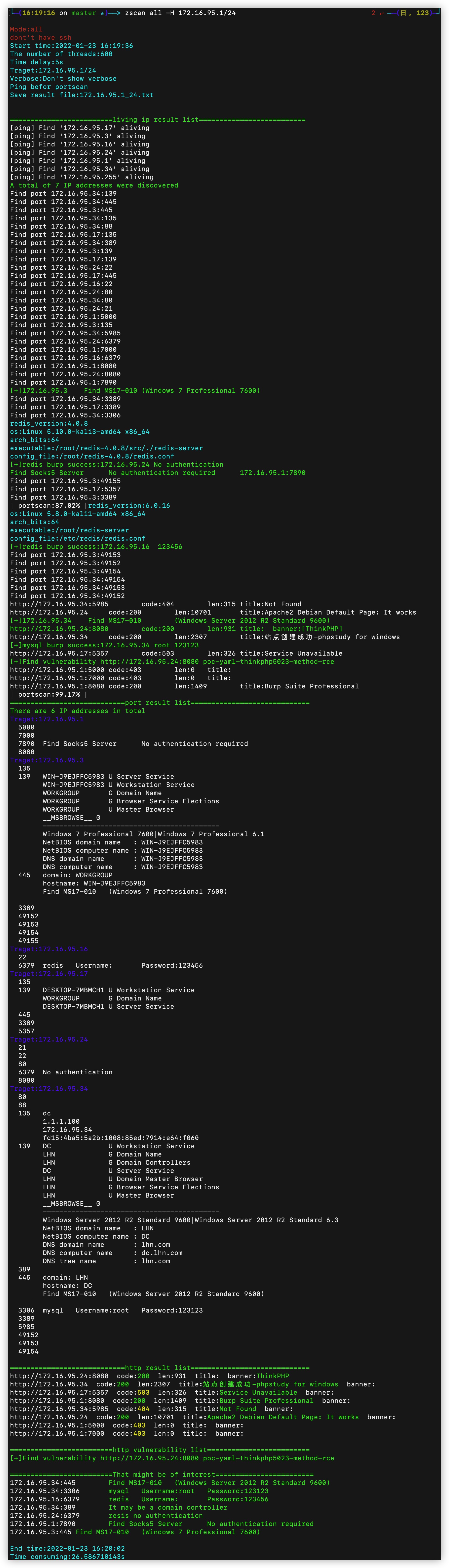
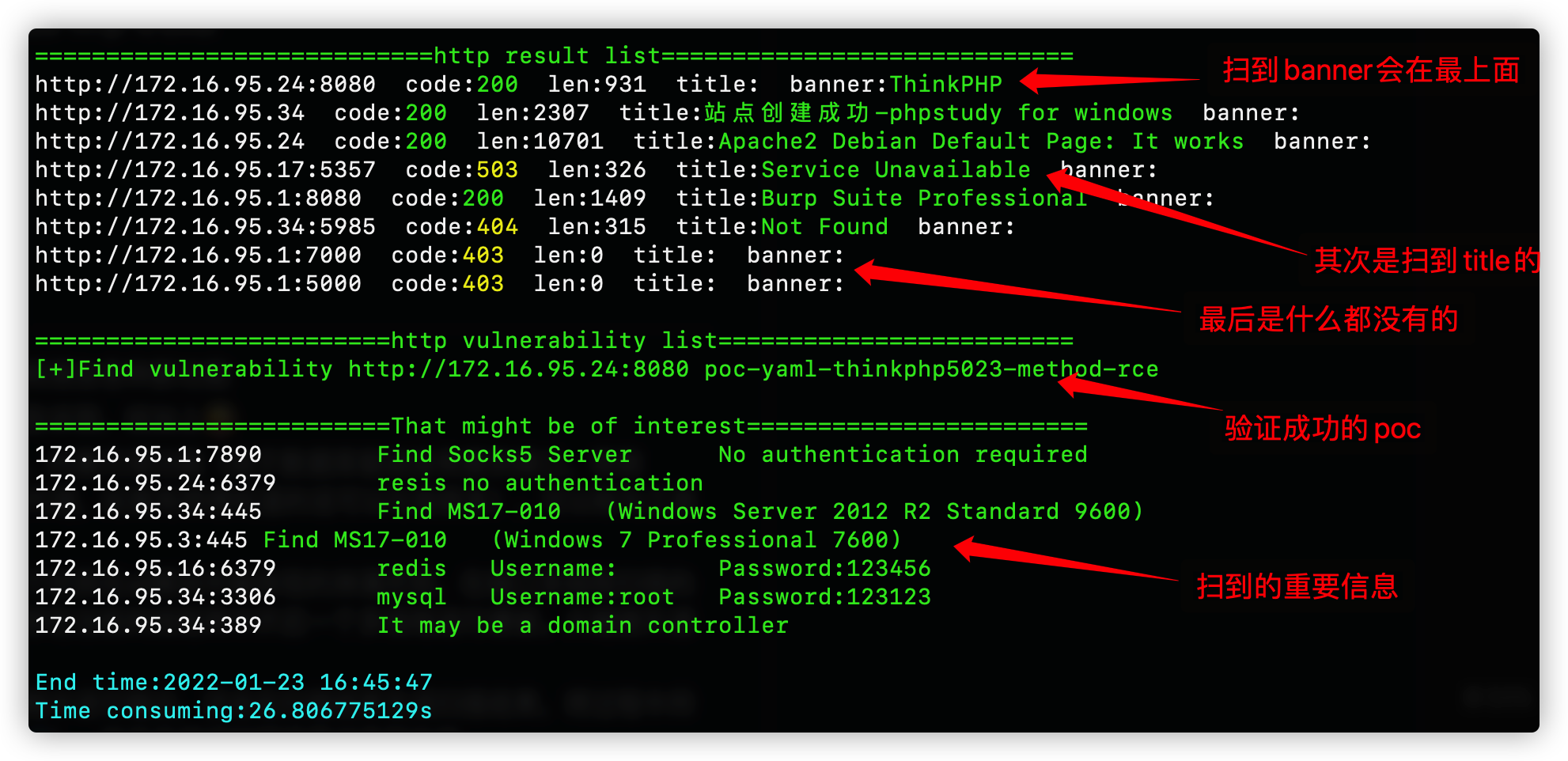
Formato di output dei risultati - Screenshot parziale dei risultati di output, diviso in due fasi: la prima fase è l'output durante la scansione, a partire dalla fine del rilevamento della sopravvivenza dell'host; la seconda fase è l'organizzazione di tutti i risultati della scansione, a partire dall'output "port result list"

Introduzione🎉

​ Zscan è un insieme open source di scanner di rete interna, strumenti di brute force e altre utility, può essere definito un kit di strumenti. Basato sul rilevamento di sottoreti interne, rilevamento host e scansione porte, nel modulo blast può eseguire brute force su servizi come mysql, mssql, redis, mongo, postgres, ftp, ssh, ldap, rdp, smb; nel modulo scan può effettuare scansioni netbios, smb, oxid, socks server (scansione proxy), ms17010, http poc scan, ecc. Per impostazione predefinita, cattura il titolo HTTP e le impronte digitali. Nel modulo server può avviare un server HTTP (caricamento/scaricamento file) e un server socks5 (proxy). Il modulo tools integra piccole utility, per ora solo nc. Recentemente aggiunto il modulo exploit, che può sfruttare servizi con brute force riuscita, supporta login interattivo SSH (nome utente/password o chiave), replica master-slave Redis e fuga sandbox Lua (caricamento file ed esecuzione comandi), query LDAP (con query comuni integrate). C'è anche il modulo all, che durante la scansione richiama tutti i moduli di scansione e brute force. Supporta scansione IPv6, input di dominio e riconoscimento automatico CDN. Di seguito le funzioni specifiche dei moduli

Lo strumento è piuttosto grande, in futuro uscirà una versione ridotta. La progettazione modulare rende facile rimuovere le funzionalità non necessarie``` all 调用所有扫描和爆破模块 ping 主机发现和网段发现 ps 基本的端口扫描和http指纹识别title抓取 scan 扫描模块 --->ms17010扫描 --->poc漏洞扫描(内置380个poc) --->proxyfind内网代理服务器扫描 --->winscan Windows的smb,netbios和oxid扫描 blast 爆破服务模块(包括以下爆破模块) --->ftp --->ldap --->mongo --->mssql --->mysql --->postgres --->rdp --->redis --->smb --->ssh server start http server or socks5 server --->http服务器(可上传下载文件) --->socks5服务器(可启动一个代理服务器,支持身份验证) exploit 漏洞利用模块 --->ldap查询 --->redis组从复制上传文件执行命令,lua沙箱逃逸RCE --->snmp查询 --->ssh登陆 --->sunlogin向日葵RCE tools 实用工具模块 --->nc简单的nc,可以开放端口连接端口 --->searchfile支持多线程正则搜索文件

root@kitploit:~
Formato di utilizzo```
zscan 模块 参数

[No input content provided to translate.]```


/___ \ /\ \ /\ \ /\ __ \ /\ "-.\ \
/
/ /
\ _
\ \ \ _
__ \ \ __ \ \ \ -. \
/_\ /_\ \ ___\ \ _\ _\ \ _\"_\ // // /_____/ //// // //

Usage: zscan [command]

Available Commands: all Use all scan mode blast Common service blasting exploit sshlogin,redisexec help Help about any command ping ping scan to find computer ps Port Scan scan ms17010,proxyfind,snmp,winscan(smb,netbios,oxid),poc server start http server or socks5 server

Flags: -h, --help help for zscan --nobar disable portscan progress bar -o, --output string the path of result file (default "result.txt") --proxy string Connect with a proxy(user:[email protected]:1080 or 172.16.95.1:1080) -T, --thread thread Set thread eg:2000 (default 600) -t, --timeout time Set timeout(s) eg:5s (default 5s) -v, --verbose Show verbose information

root@kitploit:~
I flag all'interno del modulo rappresentano i parametri per il comando corrente, mentre i flag globali sono parametri disponibili per tutti i comandi.  
I flag qui indicati sono globali e possono essere utilizzati da ogni modulo.

- `--log`: abilitando questo parametro, il risultato dell'esecuzione corrente viene scritto in `log.txt` in modalità append (per conservare i risultati di ogni esecuzione).
- `-o` / `--output`: di default il nome del file è `Hosts` nella directory corrente; `-o` specifica un percorso diverso.
- `--proxy`: imposta un proxy, con nome utente e password (`user:pass@ip:port`) oppure senza autenticazione (`ip:port`).
- `-T` / `--thread`: imposta il numero di thread, di default 100.
- `-t` / `--timeout`: imposta il timeout; se la rete è veloce e si vuole maggiore rapidità, lo si può impostare a 1s.
- `-v` / `--verbose`: mostra le informazioni di avanzamento della scansione.

## Moduli funzionali 😈

Moduli attualmente disponibili:

<details>
<summary><b>Modulo ping: con permessi utente normale richiama il ping di sistema, con permessi di root si può scegliere di usare pacchetti ICMP</b></summary>```
zscan ping 

Questo è il file di configurazione principale dello strumento.

Il file di configurazione è in formato YAML e si trova in ~/.config/cloudctl/config.yaml.

Opzioni di configurazione principali

Il file di configurazione principale di cloudctl è composto dalle seguenti sezioni:

Configurazione del cluster Kubernetes

root@kitploit:~
clusters:
  - name: production
    server: https://k8s.example.com:6443
    certificate-authority-data: <base64-ca>

Configurazione dei provider cloud

cloudctl supporta i principali provider cloud come AWS, Azure, GCP e 阿里云. Ogni provider richiede un file di configurazione separato.

Utilizzo da riga di comando

cloudctl fornisce una serie di comandi per gestire le risorse cloud e i cluster Kubernetes.

Sintassi di base

root@kitploit:~
cloudctl [command] [flags]

Ad esempio, per elencare tutti i cluster:``` Usage: zscan ping [flags]

Flags: -d, --discover string Live network segment found,local parameter uses the local NIC information。eg:zscan ping -d local/zscan ping -d 172.18.0.0,172.19.0.0 -h, --help help for ping -H, --host hosts Set hosts(The format is similar to Nmap) --hostfile string Set host file -i, --icmp Icmp packets are sent to check whether the host is alive(need root)

Global Flags: --nobar disable portscan progress bar -o, --output string the path of result file (default "result.txt") --proxy string Connect with a proxy(user:[email protected]:1080 or 172.16.95.1:1080) -T, --thread thread Set thread eg:2000 (default 600) -t, --timeout time Set timeout(s) eg:5s (default 5s) -v, --verbose Show verbose information

root@kitploit:~
必须指定host和hostfile两个参数其中的一个,当有root权限的时候可以使用-i不调用本地的ping而是自己发icmp数据包(线程开的特别高的话几千那种,调用本地ping命令会导致cpu占用过高)

--discover两种网段发现模式,一种是ping网络b段网关,一种是oxid扫描

--discover后面需要给一个参数,如果给local(zscan ping --disconver local)就会读取本地网卡信息,去扫描本地的网络b段,例如读取到本地的两张网卡192.168.13.13和172.16.95.23,那么他就会去ping192.168.0.0/16和172.16.0.0/16这两个b段

还可以给定一个或者多个b段ip例如172.17.0.0或者172.18.0.0,10.10.0.0,多个ip段用逗号隔开

</details>

<details>
<summary><b>ps模块:端口扫描和获取httptitle</b></summary>```
zscan ps
root@kitploit:~
Usage:
  zscan ps [flags]

Flags:
  -b, --banner            Return banner information
  -h, --help              help for ps
  -H, --host hosts        Set hosts(The format is similar to Nmap) eg:192.168.1.1/24,172.16.95.1-100,127.0.0.1
      --hostfile string   Set host file
  -i, --icmp              Icmp packets are sent to check whether the host is alive(need root)
      --noping            not ping discovery before port scanning
      --nowebscan         Whether to perform HTTP scanning (httpTitle and HTTP vulnerabilities)(default on)
  -p, --port port         Set port eg:1-1000,3306,3389 or use " zscan ps -p l" ) to scan less port(thirty port)
  -s, --syn               use syn scan
      --vulscan           Whether to perform HTTP vulnerabilities(default off)

Global Flags:
      --nobar           disable portscan progress bar
  -o, --output string   the path of result file (default "result.txt")
      --proxy string    Connect with a proxy(user:[email protected]:1080 or 172.16.95.1:1080)
  -T, --thread thread   Set thread eg:2000 (default 600)
  -t, --timeout time    Set timeout(s) eg:5s (default 5s)
  -v, --verbose         Show verbose information

```
--host e --hostfile specificano il target

-p specifica la porta, se non specificata usa la porta predefinita, oppure specifica "l" per usare less port (circa trenta porte comuni)

--noping esegue direttamente la scansione di tutti i target senza prima fare ping

--icmp quando si usa ping, utilizza pacchetti ICMP per la scoperta degli host

--nowebscan parametro per disabilitare la scansione web, eseguendo solo la scansione delle porte

--vulscan parametro per abilitare il rilevamento PoC (può essere usato solo quando la scansione web è attiva, altrimenti non ha senso)

--syn utilizza la scansione SYN (richiede privilegi elevati)

</details>

<details>
<summary><b>modulo all: richiama tutti i moduli di scansione e brute force per eseguire la scansione</b></summary>```
zscan all
```

Usage: zscan all [flags]

Flags: -h, --help help for all -H, --host hosts Set hosts(The format is similar to Nmap) eg:192.168.1.1/24,172.16.95.1-100,127.0.0.1 --hostfile string Set host file -i, --icmp Icmp packets are sent to check whether the host is alive(need root) --noburp Set postgres passworddict path --noping Not ping before port scanning --novulscan disable http vulnerability scan --passdict string Set postgres passworddict path -P, --password string Set postgres password -p, --port port Set port eg:1-1000,3306,3389 or use " zscan all -p l" ) to scan less port(thirty port) -U, --username string Set user name

Global Flags: --nobar disable portscan progress bar -o, --output string the path of result file (default "result.txt") --proxy string Connect with a proxy(user:[email protected]:1080 or 172.16.95.1:1080) -T, --thread thread Set thread eg:2000 (default 600) -t, --timeout time Set timeout(s) eg:5s (default 5s) -v, --verbose Show verbose information

root@kitploit:~
all模块本质是和ps模块基本相同,只不过all模块扫到对应的端口的时候会在当前线程中进行指纹识别或者用户名密码爆破

all模块参数和ps模块相同,就多了一个密码字典,是用来设置扫到需要爆破的端口时候的字典,其他都一样

--notburp 不进行爆破只进行扫描

--novulscan 由于all模块会调用所有模块,这个参数用于禁止漏洞扫描

</details>

<details>
<summary><b>blast:爆破模块,包括常见服务的爆破功能</b></summary>```
zscan blast

Indice

  • Panoramica delle funzionalità
  • Guida all'installazione
  • Avvio rapido
  • Opzioni di configurazione
  • Documentazione API
  • Domande frequenti
  • Guida ai contributi
  • Licenza``` Usage: zscan blast [command]

Available Commands: ftp burp ftp username and password ldap burp ldap username and password mongo burp mongodb username and password mssql burp mssql username and password mysql burp mysql username and password postgres burp postgres username and password rdp burp remote desktop(3389) redis burp redis password smb burp smb usernamae and password ssh burp ssh username password or traverse the key

Flags: -h, --help help for blast

Global Flags: --nobar disable portscan progress bar -o, --output string the path of result file (default "result.txt") --proxy string Connect with a proxy(user:[email protected]:1080 or 172.16.95.1:1080) -T, --thread thread Set thread eg:2000 (default 600) -t, --timeout time Set timeout(s) eg:5s (default 5s) -v, --verbose Show verbose information

root@kitploit:~
Fondamentalmente, tutti i moduli di brute force vengono utilizzati allo stesso modo: è sufficiente specificare nome utente e password, oppure un dizionario di nomi utente e password. È inoltre possibile specificare il numero di thread per il brute force. Questo thread è diverso dal thread specificato con `-T`. Il thread `-T` rappresenta il numero di obiettivi scansionati in modo concorrente (l'obiettivo è una combinazione di IP e porta, ogni concorrenza equivale all'invio di un pacchetto dati all'obiettivo). `burptheard` indica che, quando nel singolo thread della scansione concorrente sopra menzionata viene scoperta la nostra porta obiettivo, ad esempio MySQL, verrà avviato un brute force multi-thread nel thread di scansione corrente (qui l'obiettivo viene sostituito da una porta specifica su un IP specifico). A questo punto è necessario limitare la velocità, poiché una velocità troppo elevata potrebbe rendere il servizio obiettivo non disponibile.

</details>

<details>
<summary><b>Modulo scan: moduli di scansione comuni</b></summary>```
Usage:
  zscan scan [command]

Available Commands:
  ms17010     MS17_010 scan
  poc         poc check
  proxyfind   Scan proxy
  snmp        snmp scan
  winscan     netbios、smb、oxid scan

Flags:
  -h, --help   help for scan

Global Flags:
      --nobar           disable portscan progress bar
  -o, --output string   the path of result file (default "result.txt")
      --proxy string    Connect with a proxy(user:[email protected]:1080 or 172.16.95.1:1080)
  -T, --thread thread   Set thread eg:2000 (default 600)
  -t, --timeout time    Set timeout(s) eg:5s (default 5s)
  -v, --verbose         Show verbose information


Modulo proxyfind: scansiona i proxy nella rete, attualmente supporta socks4/5, in seguito aggiungerà http``` zscan scan proxyfind ``` ## Iscrizione Iscriviti per ricevere gli aggiornamenti.``` Usage: zscan proxyfind [flags]

Flags: -h, --help help for proxyfind -H, --host hosts Set hosts(The format is similar to Nmap) eg:192.168.1.1/24,172.16.95.1-100,127.0.0.1 --hostfile string Set host file -p, --ports port Set port eg:1-1000,3306,3389 (default "1080,1089,8080,7890,10808") --type string Set the scan proxy type(socks4/socks5/http) (default "socks5")

Global Flags: --log Record the scan results in chronological order,Save path./log.txt -O, --output Whether to enter the results into a file(default ./result.txt),can use --path set --path string the path of result file (default "result.txt") -T, --thread thread Set thread eg:2000 (default 100) -t, --timeout time Set timeout(s) eg:5s (default 3s) -v, --verbose Show verbose information

root@kitploit:~
扫描内网中的代理服务器

-H 指定目标,-p指定端口,--type指定扫描的代理协议类型(目前支持socks4/5,其他协议还在努力中)
</details>

<details>
<summary><b>ms17010模块:ms17010漏洞批量扫描</b></summary>```
Usage:
  zscan scan ms17010 [flags]

Flags:
  -h, --help              help for ms17010
  -H, --host string       Set target
      --hostfile string   Set host file

Global Flags:
      --log             Record the scan results in chronological order,Save path./log.txt
  -O, --output          Whether to enter the results into a file(default ./result.txt),can use --path set
      --path string     the path of result file (default "result.txt")
  -T, --thread thread   Set thread eg:2000 (default 100)
  -t, --timeout time    Set timeout(s) eg:5s (default 3s)
  -v, --verbose         Show verbose information

Basta specificare il target

Modulo winscan: include funzioni di scansione oxid, smb, netbios``` Usage: zscan scan winscan [flags]

Flags: -h, --help help for winscan -H, --host string Set target --hostfile string Set host file --netbios netbios scan --oxid oxid scan --smb smb scan

Global Flags: --log Record the scan results in chronological order,Save path./log.txt -O, --output Whether to enter the results into a file(default ./result.txt),can use --path set --path string the path of result file (default "result.txt") -T, --thread thread Set thread eg:2000 (default 100) -t, --timeout time Set timeout(s) eg:5s (default 3s) -v, --verbose Show verbose information

root@kitploit:~
Se si fornisce direttamente il target, verranno scansionati contemporaneamente netbios, oxid e smb. È possibile utilizzare -- per specificare di usarne solo uno.

</details>

<details>
<summary><b>poc模块: è sia un modulo indipendente che una funzione richiamata da altri moduli</b></summary>```
poc check

Usage:
  zscan scan poc [flags]

Flags:
  -h, --help             help for poc
  -l, --listpoc          List built in poc
      --pocname string   set the poc name
      --pocpath string   set target url
      --pocthread int    set poc scan thread (default 500)
  -u, --url string       set target url
      --urlfile string   set target file

Global Flags:
      --nobar           disable portscan progress bar
  -o, --output string   the path of result file (default "result.txt")
      --proxy string    Connect with a proxy(user:[email protected]:1080 or 172.16.95.1:1080)
  -T, --thread thread   Set thread eg:2000 (default 600)
  -t, --timeout time    Set timeout(s) eg:5s (default 5s)
  -v, --verbose         Show verbose information

-l/--list:elenca i poc integrati nello strumento

--pocname:in realtà è un'opzione di filtro, che filtra i poc il cui nome contiene il campo specificato (disponibile sia per scansione che per visualizzazione)

modulo server: avvia il modulo server``` Usage: zscan server [command]

Available Commands: httpserver Start an authentication HTTP server socks5 Create a socks5 server

Flags: -h, --help help for server

Global Flags: --nobar disable portscan progress bar -o, --output string the path of result file (default "result.txt") --proxy string Connect with a proxy(user:[email protected]:1080 or 172.16.95.1:1080) -T, --thread thread Set thread eg:2000 (default 600) -t, --timeout time Set timeout(s) eg:5s (default 5s) -v, --verbose Show verbose information

root@kitploit:~
<details>
<summary><b>Modulo socks5: avvia un server socks5</b></summary>```
zscan socks5

Riferimenti al Progetto - Il Progetto si basa su

    • Progetto VuCSA: Node.js Project
  • https://github.com/wisec/vulnerable-nodejs-app``` Usage: zscan server socks5 [flags]

Flags: -a, --addr string Specify the IP address and port of the Socks5 service (default "0.0.0.0:1080") -h, --help help for socks5 -P, --password string Set the socks5 service authentication password -U, --username string Set the socks5 service authentication user name

Global Flags: --log Record the scan results in chronological order,Save path./log.txt -O, --output Whether to enter the results into a file(default ./result.txt),can use --path set --path string the path of result file (default "result.txt") -T, --thread thread Set thread eg:2000 (default 100) -t, --timeout time Set timeout(s) eg:5s (default 3s) -v, --verbose Show verbose information

root@kitploit:~

È possibile utilizzare -a per specificare l'IP e la porta su cui il servizio socks5 ascolta

-p e -u specificano il nome utente e la password del proxy

Modulo httpserver: avvia un server HTTP, supporta l'autenticazione e il caricamento di file `````` Usage: zscan server httpserver [flags]

Flags: -a, --addr string set http server addr (default "0.0.0.0:7001") -d, --dir string set HTTP server root directory (default ".") -h, --help help for httpserver -P, --pass string Set the authentication password -U, --user string Set the authentication user

Global Flags: --log Record the scan results in chronological order,Save path./log.txt -O, --output Whether to enter the results into a file(default ./result.txt),can use --path set --path string the path of result file (default "result.txt") -T, --thread thread Set thread eg:2000 (default 100) -t, --timeout time Set timeout(s) eg:5s (default 3s) -v, --verbose Show verbose information

root@kitploit:~
Avvia un semplice server HTTP, in grado di scaricare e caricare file; per caricare file è necessario utilizzare il parametro -u

-a specifica l'indirizzo IP e la porta in ascolto

-d specifica la directory radice del server HTTP

-P e -U impostano nome utente e password per l'autenticazione
</details>

</details>

<details>
<summary><b>Modulo tools: integra strumenti comuni</b></summary>```
Usage:
  zscan tools [command]

Available Commands:
  nc          A easy nc

Flags:
  -h, --help   help for tools

Global Flags:
      --nobar           disable portscan progress bar
  -o, --output string   the path of result file (default "result.txt")
      --proxy string    Connect with a proxy(user:[email protected]:1080 or 172.16.95.1:1080)
  -T, --thread thread   Set thread eg:2000 (default 600)
  -t, --timeout time    Set timeout(s) eg:5s (default 5s)
  -v, --verbose         Show verbose information
nc modulo: un semplice nc, può aprire porte e connettersi a porte``` zscan nc ``` 当然可以。不过您似乎忘记粘贴需要翻译的文本内容了。请提供中文原文,我将严格按照要求进行翻译。``` Usage: zscan nc [flags]

Flags: -a, --addr string listen/connect host address eg(listen):-a 0.0.0.0:4444 eg(connect):-a 172.16.95.1:4444 -h, --help help for nc -l, --listen listen mode(default connect)

Modulo exploit: modulo di utilizzo dopo la riuscita del brute force del servizio``` Usage: zscan exploit [command]

Available Commands: ldap Ldap queries redis Redis utilizes modules snmp snmp scan sshlogin Login using a user name, password, or key sunlogin sunlogin RCE CNVD-2022-10270

Flags: -h, --help help for exploit

Global Flags: --nobar disable portscan progress bar -o, --output string the path of result file (default "result.txt") --proxy string Connect with a proxy(user:[email protected]:1080 or 172.16.95.1:1080) -T, --thread thread Set thread eg:2000 (default 600) -t, --timeout time Set timeout(s) eg:5s (default 5s) -v, --verbose Show verbose information

root@kitploit:~
<details>
<summary><b>modulo snmp: scansione snmp</b></summary>```
Usage:
  zscan exploit snmp [flags]
sshlogin: può eseguire l'accesso SSH tramite password e chiave``` Usage: zscan exploit sshlogin [flags]

Flags: -h, --help help for sshlogin -H, --host string Set ssh server host -d, --keypath string Set public key path -k, --login_key Use public key login -P, --password string Set ssh password -p, --port int Set ssh server port (default 22) -U, --username string Set ssh username

Global Flags: --nobar disable portscan progress bar -o, --output string the path of result file (default "result.txt") --proxy string Connect with a proxy(user:[email protected]:1080 or 172.16.95.1:1080) -T, --thread thread Set thread eg:2000 (default 600) -t, --timeout time Set timeout(s) eg:5s (default 5s) -v, --verbose Show verbose information

root@kitploit:~
​	Login con nome utente e password: ./zscan exploit ssh -H 172.16.95.24 -U root -P 123456

​	Login con chiave pubblica: ./zscan exploit ssh -H 172.16.95.24 -U root -k 

​	Per impostazione predefinita, il login con chiave pubblica cerca la chiave privata in ~/.ssh, è possibile specificare un percorso diverso per la chiave privata con -d/--keypath

</details>

<details>
<summary><b>redis: modulo di sfruttamento redis</b></summary>```
Usage:
  zscan exploit redis [flags]

Flags:
  -c, --command string    Set the command you want to execute eg:(zscan exploit redis -H 172.16.95.16 -P 123456 -c "keys *")
      --dstpath string    set target path
      --exec              use execute the command mode
  -h, --help              help for redis
  -H, --host string       Set redis server host
      --lhost string      set listen host(!!!Make sure the target has access!!!)
      --lport int         set listen port(!!!Make sure the target has access!!!) (default 20001)
      --lua               use CVE-2022-0543 to attack
  -P, --password string   Set redis password
  -p, --port int          Set redis server port (default 6379)
      --so string         set .so file path
      --srcpath string    set upload file path
      --upload            use upload mode

Global Flags:
      --nobar           disable portscan progress bar
  -o, --output string   the path of result file (default "result.txt")
      --proxy string    Connect with a proxy(user:[email protected]:1080 or 172.16.95.1:1080)
  -T, --thread thread   Set thread eg:2000 (default 600)
  -t, --timeout time    Set timeout(s) eg:5s (default 5s)
  -v, --verbose         Show verbose information
sunlogin模块:向日葵RCE的利用模块``` sunlogin RCE CNVD-2022-10270

Usage: zscan exploit sunlogin [flags]

Flags: -c, --command string command you want to execute -h, --help help for sunlogin -H, --host string Set redis server host -p, --port int Set RCE port

Global Flags: --nobar disable portscan progress bar -o, --output string the path of result file (default "result.txt") --proxy string Connect with a proxy(user:[email protected]:1080 or 172.16.95.1:1080) -T, --thread thread Set thread eg:2000 (default 600) -t, --timeout time Set timeout(s) eg:5s (default 5s) -v, --verbose Show verbose information

root@kitploit:~
漏洞发现可以使用ps模块或者all模块对40000-65535进行扫描,可以自动识别出漏洞端口

可以使用`-c`执行一条命令,不使用`-c`进入交互式(伪交互式)按照输入执行命令

`-p`指定端口

</details>

</details>

## Esempi di utilizzo🤪

<details>
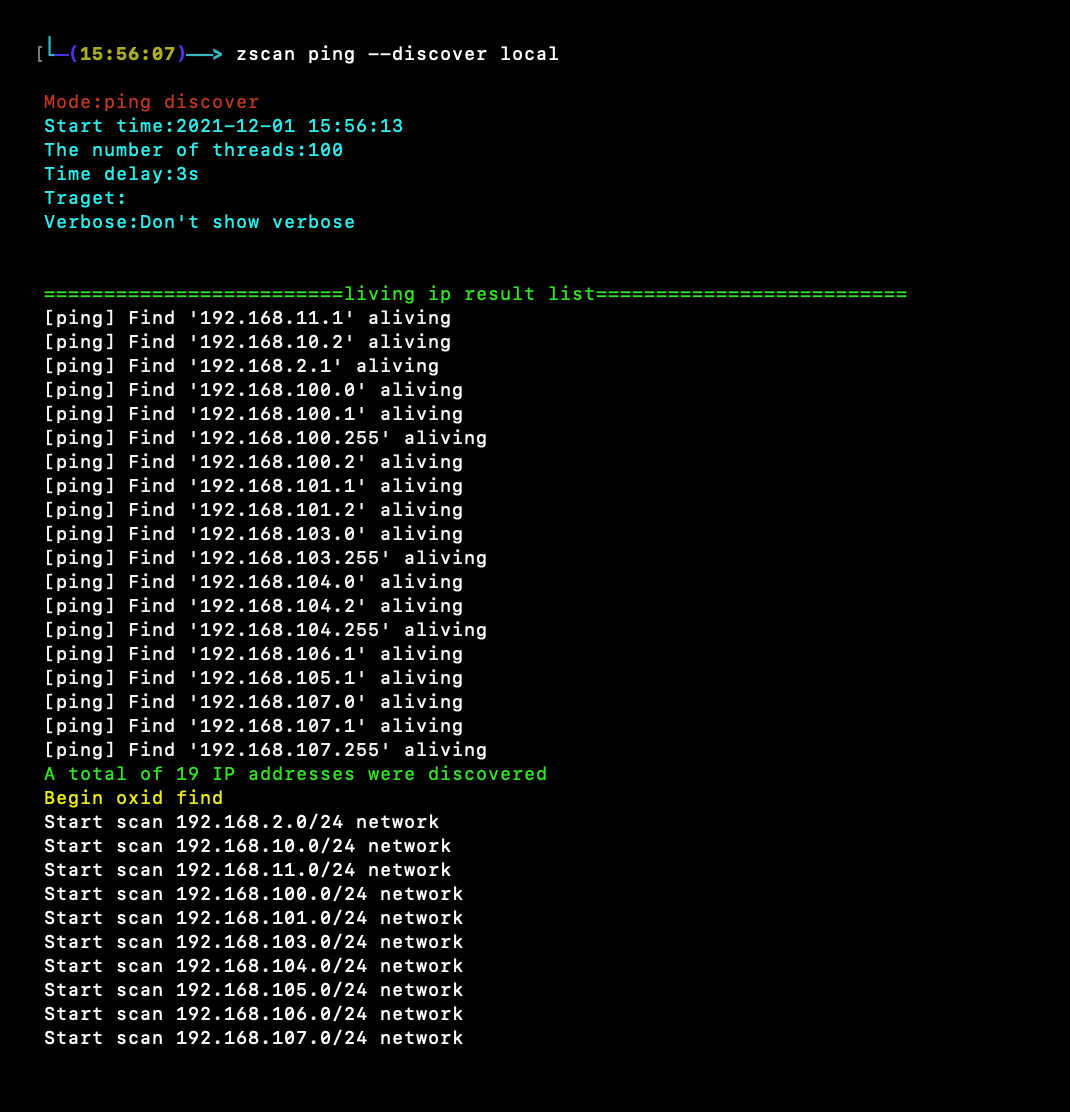
<summary><b>Scansione di sottoreti con ping: `zscan ping --discover local`</b></summary>```
zscan ping --discover local或者
zscan ping --discover 192.168.0.0

ps scansione delle porte: zscan ps -H ip``` zscan ps -H 172.16.95.1-30 [--noping禁用ping] zscan ps -H 172.16.95.1-30 --vulsacn //扫描完http banner之后进行poc探测 zscan ps -H 172.16.95.1-30 --nowebscan //只扫描端口,不进行http探测 ``` ![](https://assets.kitploit.com/production/public/readmes/5177/abda5c86b9152f1cbaa2bf48453657a948970a1d197fc6b37f55612db639032c.jpg) ![](https://assets.kitploit.com/production/public/readmes/5177/cd58bdc53b1644a3681763fe0bb3ffb0c5144c4e86fcd05ad72c6a6ac82f9611.jpg) ![](https://assets.kitploit.com/production/public/readmes/5177/1b2134fb3d91c5065923862db6eeaf838befb73a0ca0d5c9f3ffe20d817fabbe.jpg)
Modulo ssh: bruteforce / login ``` 爆破 zscan blast ssh -H 172.16.95.24 登录 zscan exploit ssh -H 172.16.95.24 -U root -P 123123 ``` ![](https://assets.kitploit.com/production/public/readmes/5177/b7c12e48ab63ea4592a1a8b37b39d35aa305f5dcec44a61a0e03eb83b766c7c0.jpg)
Modulo redis: bruteforce/esecuzione comandi``` 爆破 zscan blast redis -H 172.16.95.1-30 登录 zscan exploit redis -H 172.16.95.16 -c cmd ``` ![](https://assets.kitploit.com/production/public/readmes/5177/c105a39b6a4230ee42485b8e3b6fe93624b6ff77a13e061450361946712c5c0a.jpg)

modulo winscan:zscan scan winscan -H ip``` zscan scan winscan -H 172.16.95.1-33 ``` ![](https://assets.kitploit.com/production/public/readmes/5177/4741150f5ed9a47d1770e04ab344b459e3624ad02634648d4c08a92f9b58397b.jpg)
Richiama tutti i moduli di scansione e cracking: zscan all -H ip``` zscan all -H 172.16.95.1-30 zscan all -H 172.16.95.1-30 --novulscan //不进行poc探测 ``` ![](https://assets.kitploit.com/production/public/readmes/5177/35c973af3de607d1483c3d657b5573ae82d27735bc22e64cb033c56c2635fff2.jpg)
modulo di scansione POC:zscan scan poc -u url``` zscan scan poc -l //列出所有内置poc zscan scan poc -l --pocname weblogic //列出内置和weblogic有关的poc zscan scan poc -u http://172.16.95.24:8080 //使用所有内置poc扫描目标 zscan scan poc -u http://172.16.95.24:8080 --pocname weblogic //只使用weblogic的poc zscan scan poc -U http://172.16.95.24:8080 --pocpath /root/pocs //使用整个pocs目录下的poc zscan scan poc --urlfile url.txt --pocpath /root/pocs/weblogic.yml //使用单个poc批量扫描目标 ```

Vantaggi dello strumento🚀

  • Comandi semplici e comodi, moduli funzionali chiari e facili da richiamare, facili da estendere per aggiungere nuove funzionalità, e anche facili da rimuovere moduli non necessari
  • Funzione unica di scoperta di sottoreti, se qualcuno ha metodi migliori per la scoperta, può farmelo sapere, li aggiungerò😜
  • Non è solo uno scanner, ma integra anche varie funzionalità pratiche comuni, con proxy integrato (poiché il driver del database non fornisce interfacce, mssql, mongo e postgres non possono passare attraverso il proxy per brute force e comandi, se qualche esperto lo sa, può contattarmi), può essere chiamato un kit di strumenti.
  • Integrazione perfetta tra scansione delle porte e brute force, aumentando notevolmente la velocità di scansione: questo vantaggio è pienamente riflesso nel modulo 'all'. Durante la scansione multithread delle porte, vengono identificate le porte aperte; se una porta può essere sottoposta a brute force, viene immediatamente avviato un nuovo thread multithread per eseguire il brute force. Ciò aumenta notevolmente la velocità, eliminando il passaggio intermedio di ottenere prima le porte aperte e poi eseguire il brute force.
  • Formato di output esteticamente gradevole e leggibile: differenziazione tramite colori, non solo output durante il processo, ma anche generazione dei risultati di scansione al termine, mostrando tutti i risultati delle scansioni e dei brute force eseguiti durante il processo (formato di output sopra l'introduzione), e supporta la registrazione dei risultati di scansione su file.
  • Non solo brute force per i servizi, ma anche esecuzione di comandi in caso di successo; in futuro verranno aggiunte anche funzionalità di sfruttamento con un clic.
  • In fase di sviluppo, se qualche esperto trova bug o ha idee per funzionalità nuove e interessanti, può contattarmi.

Compilazione del codice sorgente👨

Si consiglia di compilare da soli, le release potrebbero non essere sempre aggiornate. Per qualche motivo, ora non vengono forniti zscan precompilati, il comando di compilazione è qui sotto.``` go get github.com/zyylhn/zscan go bulid 或者docker编译 docker pull golang docker run -v "$GOPATH":/go -v "$PWD":/go/src/zscan -w /go/src/zscan -e GOOS="darwin" -e GOARC H="amd64" golang go build -v -ldflags="-s -w" -trimpath -o zscan_mac_x64 docker run -v "$GOPATH":/go -v "$PWD":/go/src/zscan -w /go/src/zscan -e GOOS="windows" -e GOAR CH="amd64" golang go build -v -ldflags="-s -w" -trimpath -o zscan_x64.exe docker run -v "$GOPATH":/go -v "$PWD":/go/src/zscan -w /go/src/zscan -e GOOS="linux" -e GOARCH ="amd64" golang go build -v -ldflags="-s -w" -trimpath -o zscan_linux_x64

root@kitploit:~
## Dichiarazione di esonero di responsabilità🧐

Questo strumento è destinato esclusivamente a **comportamenti di costruzione della sicurezza aziendale legalmente autorizzati**. Se hai bisogno di testare la funzionalità di questo strumento, ti preghiamo di configurare autonomamente un ambiente di destinazione.

Quando utilizzi questo strumento per eseguire rilevamenti, devi assicurarti che tale attività sia conforme alle leggi e ai regolamenti locali e di aver ottenuto un'autorizzazione adeguata. **Non eseguire scansioni su obiettivi non autorizzati.**

Se durante l'utilizzo di questo strumento commetti atti illegali, dovrai assumerti le conseguenze corrispondenti. Non ci assumiamo alcuna responsabilità legale o connessa.

Prima di installare e utilizzare questo strumento, ti preghiamo di **leggere attentamente e comprendere appieno ogni clausola**. Le clausole relative a limitazioni, esclusioni di responsabilità o altri aspetti che coinvolgono diritti fondamentali potrebbero essere evidenziate in grassetto o sottolineate per attirare la tua attenzione. A meno che tu non abbia letto, compreso e accettato integralmente tutte le clausole del presente accordo, ti preghiamo di non installare o utilizzare questo strumento. L'uso dello strumento o qualsiasi altra forma di accettazione esplicita o implicita del presente accordo costituirà la tua accettazione di essere vincolato da questo accordo.

## Link di riferimento👀

https://github.com/shadow1ng/fscan

https://github.com/k8gege/LadonGo

## Stato degli aggiornamenti💪

### Moduli funzionali

- [x] Modulo ping: rilevamento host tramite ping
  - [x] Invocazione del ping di sistema
  - [x] Invio di pacchetti ICMP
  - [x] Rilevamento di sottoreti LAN
    - [x] Ping del gateway della sottorete di classe B
    - [x] Scansione OXID
- [x] Modulo di scansione porte
  - [x] Acquisizione del titolo HTTP e del codice di stato
  - [x] Riconoscimento delle impronte digitali HTTP
  - [x] Verifica POC HTTP
  - [x] Restituzione delle informazioni del banner
  - [x] Prima ping, poi scansione
- [x] Modulo all: chiama tutti i moduli
- [x] Modulo blast
    - [x] Modulo SSH
    - [x] Modulo FTP
    - [x] Modulo MySQL
    - [x] MSSQL
    - [x] Modulo MongoDB
    - [x] Modulo Redis
    - [x] Modulo PostgreSQL
    - [x] LDAP
    - [x] SMB
    - [x] RDP
- [x] Modulo scan
    - [x] Modulo di scansione del server proxy
        - [x] Scansione del server proxy SOCKS5
    - [x] Modulo winscan @https://github.com/shenzhibuqins
        - [x] Funzione di scansione SMB
        - [x] Funzione di scansione OXID
        - [x] Funzione di scansione NetBIOS
    - [x] Modulo di scansione 17010
    - [x] POC
        - [x] Supporto per xray v1
        - [ ] Supporto per xray v2

- [x] Modulo server
  - [x] Modulo server SOCKS
    - [x] Autenticazione nome utente e password
  - [x] Modulo server HTTP
      - [x] Funzione di autenticazione
      - [x] Funzione di caricamento file

- [x] Modulo tool
    - [x] Modulo NC
        - [x] Funzione di ascolto su porta
        - [x] Funzione di connessione a porta

    - [x] Funzione di ricerca file
        - [x] Ricerca simultanea di più file, multi-thread
        - [x] Ricerca tramite espressioni regolari
        - [ ] Ricerca del contenuto dei file
    - [ ] Funzione di compressione delle cartelle

- [x] Modulo exploit
    - [x] Modulo SSHlogin
        - [x] Funzione di login con nome utente e password (interattiva)
        - [x] Funzione di login con chiave (interattiva)
    - [x] Modulo Redis
        - [x] Esecuzione di comandi Redis
        - [x] Exploit di evasione dalla sandbox Lua
        - [x] RCE tramite replica master-slave
    - [x] Query LDAP
    - [ ] Query SNMP
    - [ ] Modulo WMI

- [ ] ..........

### Funzionalità dello strumento stesso

- [x] Output dei risultati su file
- [x] Registrazione dei log di ogni esecuzione
- [x] Impostazione del numero di thread (la scansione supporta thread molto elevati)
- [x] Impostazione del timeout
- [x] Funzione proxy
	- [ ] Funzione proxy per il protocollo UDP
	- [x] Funzione proxy per il protocollo TCP
	- [x] Funzione proxy per esecuzione di brute force e comandi
		- [x] MySQL
		- [ ] MSSQL
		- [x] Redis
		- [x] MongoDB
		- [ ] PostgreSQL
		- [x] SSH
		- [x] FTP
- [x] Lettura degli obiettivi da file
- [x] Supporto per dizionari molto grandi nel brute force
- [ ] ..........

### Obiettivi futuri

- [ ] Completare i moduli di brute force per i vari server nella versione corrente, supportare più comandi, raggiungere un uso dei comandi senza ostacoli e aggiungere moduli di sfruttamento dei database (sfruttamento dopo il successo del brute force)
  - [ ] MySQL
  - [ ] MSSQL
  - [ ] PostgreSQL
  - [ ] MongoDB
  - [ ] FTP
- [ ] Rilasciare una versione ridotta di zscan
  - [ ] Rimuovere tutti i driver dei database per ridurre le dimensioni, al costo di non poter eseguire comandi
  - [ ] Rimuovere i moduli di database non comunemente usati o inutili

Grazie per le stelle, amici🥳

Benvenuti a segnalare problemi👏

Benvenuti a condividere impronte digitali web e POC

Se ti piace scrivere strumenti in Go, puoi unirti a noi: [email protected]😃
Scarica lo strumento

--pocpth:se si specifica una directory, verranno utilizzati tutti i poc in quella directory; se si specifica un singolo poc, verrà utilizzato solo quel poc

--pocthread:thread della scansione poc

--url/--urlfile:specifica il target, -u/--url specifica un singolo target, è possibile eseguire scansioni batch specificando un file txt

Global Flags: --log Record the scan results in chronological order,Save path./log.txt -O, --output Whether to enter the results into a file(default ./result.txt),can use --path set --path string the path of result file (default "result.txt") -T, --thread thread Set thread eg:2000 (default 100) -t, --timeout time Set timeout(s) eg:5s (default 3s) -v, --verbose Show verbose information

-a指定地址,不使用-l的话代表连接目标,使用-l为监听端口

root@kitploit:~
</details>

<details>
<summary><b>modulo searchfile: ricerca file multithread, con supporto per regex</b></summary>```
Search files that support regular matching

Usage:
  zscan tools searchfile [flags]

Flags:
  -d, --dir string           set search base Dir
  -f, --file stringArray     set filename eg:zscan tools searchfile -d ./ -f pass.txt -f user.txt
  -h, --help                 help for searchfile
  -r, --regexp stringArray   Specifies the re matching parameters
      --walk int             Traversal turns on multithreading depth(Try not to go above 5) (default 3)

Global Flags:
      --nobar           disable portscan progress bar
  -o, --output string   the path of result file (default "result.txt")
      --proxy string    Connect with a proxy(user:[email protected]:1080 or 172.16.95.1:1080)
  -T, --thread thread   Set thread eg:2000 (default 600)
  -t, --timeout time    Set timeout(s) eg:5s (default 5s)
  -v, --verbose         Show verbose information

-d specifica la directory radice per la ricerca. Su Linux si possono usare percorsi relativi, su Windows servono percorsi assoluti

-f specifica i nomi di file da cercare. Si possono usare -f nomefile1 -f nomefile2 per cercare più file

-r usa le espressioni regolari. In realtà anche -f usa regex internamente, ma le trasforma in ^nomefile$

--walk indica la profondità di directory per cui avviare thread: logicamente, sotto la directory data conta quante sottodirectory ci sono e avvia un thread per ognuna. Non impostare una profondità troppo alta: più è profonda, più veloce, ma causerà un uso elevato della CPU (già tre livelli sono molto intensivi, quindi in scenari particolari si consiglia 1)

Indicatore tecnicoDescrizione funzione
Mascheramento della firmaIl catturatore analizza la crittografia HTTPS, supporta la forzatura di un percorso di firma contraffatto, mascherando le informazioni come file di sistema per il rilevamento da parte del server.
Ricostruzione TCP/UDPSupporta la ricostruzione dei flussi di dati tra protocolli per contrastare l'offuscamento del protocollo.
Rilevamento anomalieL'algoritmo della finestra scorrevole dinamica calcola lo scostamento delle caratteristiche del traffico in tempo reale; se P<0.05 viene considerato anomalo.
Grafo di conoscenzaIntegra il database CVE e il framework ATT&CK, costruendo automaticamente le relazioni di correlazione dei percorsi di attacco.
Analisi visualeFornisce visualizzazioni come il grafo topologico della catena di attacco, la mappa di calore, il diagramma temporale, ecc. tramite Gephi SDK.
Flags:
root@kitploit:~
  --burpthread int        Set burp password thread(recommend not to change) (default 100)
  --get string            set an oid

-h, --help help for snmp -H, --host string Set target --hostfile string Set host file -l, --listoid List commonly used OIDs --password string set a password (default "public") --passwordfile string passwords dict file, eg: ./dict/password.txt -p, --port port Set port (default 161) --version string specifies SNMP version to use. 1|2c|3 (default "2c") --walk string set an oid

Global Flags: --log Record the scan results in chronological order,Save path./log.txt -O, --output Whether to enter the results into a file(default ./result.txt),can use --path set --path string the path of result file (default "result.txt") -T, --thread thread Set thread eg:2000 (default 100) -t, --timeout time Set timeout(s) eg:5s (default 3s) -v, --verbose Show verbose information

root@kitploit:~
--listoid elenca le informazioni di query comuni```
0: 系统基本信息         SysDesc                 GET     1.3.6.1.2.1.1.1.0
1: 监控时间             sysUptime               GET     1.3.6.1.2.1.1.3.0
2: 系统联系人           sysContact              GET     1.3.6.1.2.1.1.4.0
3: 获取机器名           SysName                 GET     1.3.6.1.2.1.1.5.0
4: 机器所在位置         SysLocation             GET     1.3.6.1.2.1.1.6.0
5: 机器提供的服务       SysService              GET     1.3.6.1.2.1.1.7.0
6: 系统运行的进程列表   hrSWRunName             WALK    1.3.6.1.2.1.25.4.2.1.2
7: 系统安装的软件列表   hrSWInstalledName       WALK    1.3.6.1.2.1.25.6.3.1.2
8: 网络接口列表         ipAdEntAddr             WALK    1.3.6.1.2.1.4.20.1.1

Puoi eseguire query utilizzando --walk e --get

Se non viene specificata una password, per impostazione predefinita viene usata 'public'

-c用来执行普通的redis命令模式

--exec:使用主从复制执行命令模式

--upload:使用主从复制的上传文件模式

--lua:使用lua沙箱逃逸漏洞模式

以上四个参数必须需要其中一个

--detpath:用来指定主从复制将文件上传到目标的绝对路径

--lport:主从复制时主节点(也就是zscan)监听的端口,默认20001

--lhost:主从复制时主节点(也就是zscan)监听的地址,必须要保证目标redis能访问到

--so:主从复制执行命令的时候上传到目标上的so文件

--srcpath:主从复制上传文件的源文件