 xcapri/subdosec
Scanner veloce e preciso per la rilevazione di takeover di sottodomini, con zero falsi positivi. Rileva sottodomini vulnerabili, raccoglie metadati (IP, CNAME, titolo, codice di stato) e fornisce un'analisi assistita dall'IA per la ricognizione.

Subdosec
Scanner e strumento di ricognizione per takeover di sottodomini.
Installazione • Utilizzo • Basato sul web • Contributo • Scansione online • Riconoscimenti
Subdosec è uno scanner per takeover di sottodomini veloce e accurato, senza falsi positivi, con un database pubblico di sottodomini vulnerabili e metadati dettagliati non vulnerabili (IP, CNAME, titolo e codice di stato) per la ricognizione.
Installa o aggiorna subdosec
pipx install git+https://github.com/xcapri/subdosec.git
pipx upgrade subdosec
Quindi esegui questo comando ogni volta che avvii una nuova sessione terminale (finché non viene visualizzato “server started successfully”).
$ subdosec -ins

Starting Node.js server...
Node.js server started successfully.
[AVVISO] Non effettuare il takeover di tutti i sottodomini in test.txt, lascia che tutti lo usino per le demo.
[INFO] Controlla anche la sezione Release. Puoi trovare informazioni interessanti.
$ subdosec -h
   _____       __        __
  / ___/__  __/ /_  ____/ /___  ________  _____
  \__ \/ / / / __ \/ __  / __ \/ ___/ _ \/ ___/
 ___/ / /_/ / /_/ / /_/ / /_/ (__  )  __/ /__
/____/\__,_/_.___/\__,_/\____/____/\___/\___/


usage: subdosec [-h] [-mode {private,public}] [-initkey INITKEY] [-vo] [-pe] [-ins] [-pf PF] [-subfng SUBFNG] [-lf LF] [-sfid] [-ks] [-o O] [-su] [-lu LU] [-lm] [-uf] [-unai UNAI] [-v] [-t THREADS]

Subdomain takeover scanner.

options:
  -h, --help            show this help message and exit
  -mode {private,public}
                        Mode of operation (private/public)
  -initkey INITKEY      Initialize the API key
  -vo                   VULN Only: Hide UNDETECT messages
  -pe                   Print Error: When there are problems detecting your target
  -ins                  Prepar node & start server
  -pf PF                Private Fingerprint: uses your local fingerprint. Example: -pf /path/to/tko.json
  -subfng SUBFNG        Submit fingerprint: submit local fingerprint to admin. Example: -subfng localfinger.json
  -lf LF                Fingerprint lock: to focus on one or multiple fingerprints. (-lf github.io,surge.sh) and leave this arg to scan all fingerprints
  -sfid                 To view all available fingerprint ids.
  -ks                   To shut down the server node if you want to not use subdosec for a long time.
  -o O                  Save result locally to the specified path. Example: -o /path/to/dir
  -su                   Skip undetect will not stored to server (https://subdosec.vulnshot.com/result/undetected)
  -lu LU                Undetec stored localy to the specified path. Example: -lu /path/to/dir
  -lm                   Local Mode: Save vuln and undetect to default inside tools directory (auto -su)
  -uf                   Update Fingerprint
  -unai UNAI            Analyze undetected subdomains using AI. Example: -unai /path/to/undetect.json
  -v, --verbose         Show progress count (e.g. [1/10])
  -t THREADS, --threads THREADS
                        Number of threads to use for scanning (default: 10)
Prepara la lista
Supporto senza protocollo
cat list

https://careers.rotacloud.com
http://creators.thinkorion.com
https://docs.polygon-nightfall.technology
a.anchorsawaytpt.com
help.oceges.com
CMD 1
Salta la memorizzazione di undetect sul server e salva in locale
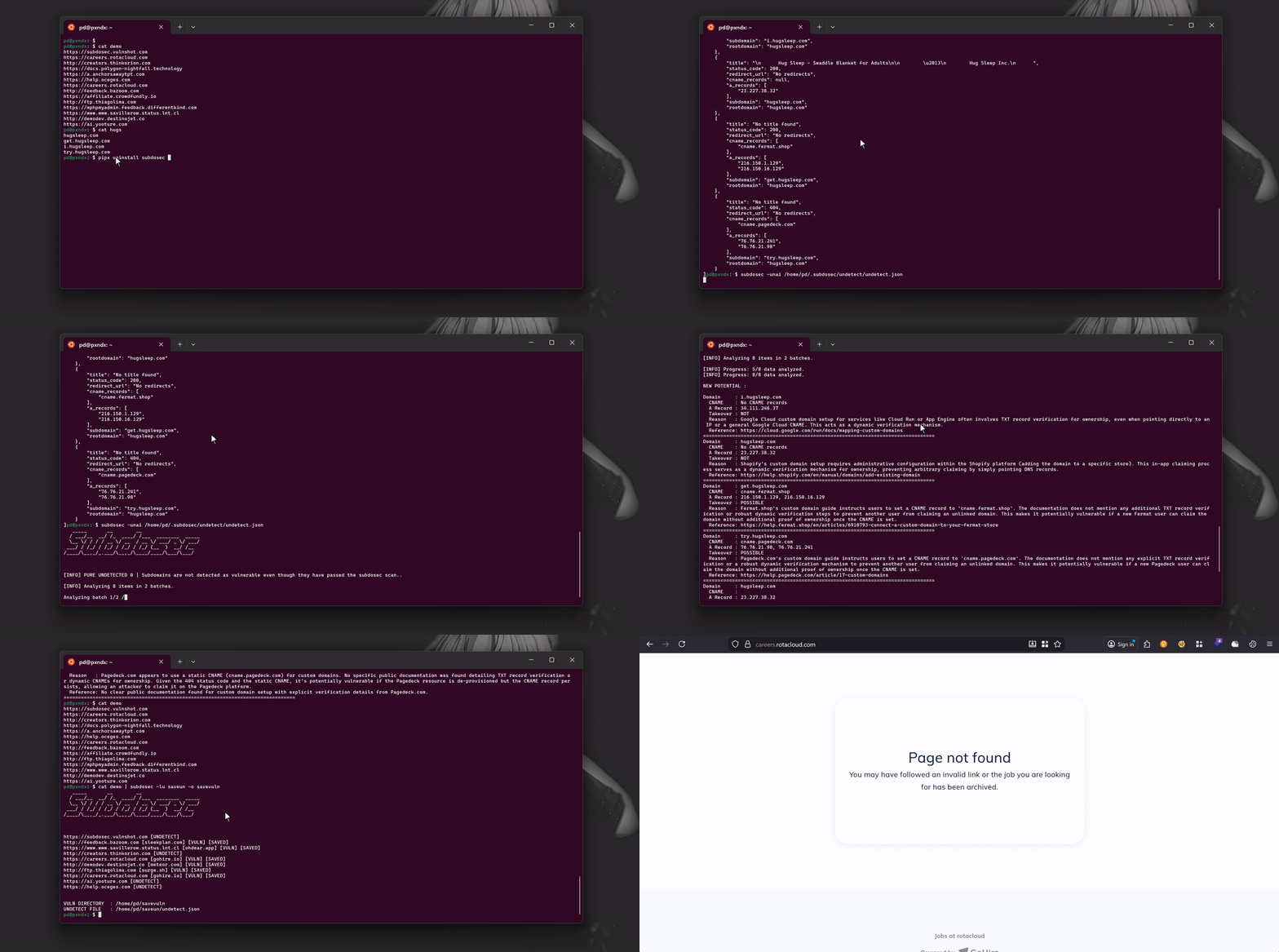
cat test.txt | subdosec -lm

https://subdosec.vulnshot.com [UNDETECT]
http://feedback.bazoom.com [sleekplan.com] [VULN] [SAVED]
http://demodev.destinojet.co [meteor.com] [VULN] [SAVED]
http://creators.thinkorion.com [UNDETECT]
https://www.www.savillerow.status.lnt.cl [ohdear.app] [VULN] [SAVED]
https://careers.rotacloud.com [gohire.io] [VULN] [SAVED]
https://careers.rotacloud.com [gohire.io] [VULN] [SAVED]
https://ai.yooture.com [UNDETECT]
https://help.oceges.com [UNDETECT]
http://ftp.thiagolima.com [surge.sh] [VULN] [SAVED]


VULN DIRECTORY  : /home/alice/.subdosec/vulns
UNDETECT FILE   : /home/alice/.subdosec/undetect/undetect.json
Leggi output
~$ ls /home/alice/.subdosec/vulns
gohire.io_tko.txt  meteor.com_tko.txt  ohdear.app_tko.txt  sleekplan.com_tko.txt  surge.sh_tko.txt
~$ cat /home/alice/.subdosec/vulns/gohire.io_tko.txt
careers.rotacloud.com
Leggi undetect e analizza automaticamente nuove potenziali vulnerabilità con -unai
cat /home/alice/.subdosec/undetect/undetect.json
[
    {
        "title": "No title found",
        "status_code": 404,
        "redirect_url": "No redirects",
        "cname_records": [
            "cname.redacted.com"
        ],
        "a_records": [
            "76.76.21.98",
            "76.76.21.241"
        ],
        "subdomain": "try.redacted.com",
        "rootdomain": "redacted.com"
    },
    {
        "title": "No title found",
        "status_code": 200,
        "redirect_url": "No redirects",
        "cname_records": [
            "cname.fermat.shop"
        ],
        "a_records": [
            "216.150.16.129",
            "216.150.1.129"
        ],
        "subdomain": "get.redacted.com",
        "rootdomain": "redacted.com"
    }
]
subdosec -unai /home/pd/.subdosec/undetect/undetect.json

[INFO] PURE UNDETECTED 0 | Subdomains are not detected as vulnerable even though they have passed the subdosec scan..

[INFO] Analyzing 8 items in 2 batches.

[INFO] Progress: 5/8 data analyzed.

NEW POTENTIAL :


Domain     : try.redacted.com
  CNAME    : cname.redacted-service.com
  A Record : 76.76.21.98, 76.76.21.241
  Takeover : NOT
  Reason   : The redacted-service custom domain setup guide explicitly states the requirement of adding a TXT record (e.g., 'redacted-service-verification=<your_site_id>') for domain ownership verification. The presence of a TXT record verification step makes it not vulnerable.
  Reference: https://www.redacted-service.com/blog/how-to-setup-custom-domain/
================================================================================
Domain     : get.redacted.com
  CNAME    : cname.fermat.shop
  A Record : 216.150.16.129, 216.150.1.129
  Takeover : POSSIBLE
  Reason   : The service uses a static CNAME (cname.fermat.shop) for custom domain setup. Publicly available documentation for Fermat's custom domain setup does not clearly specify a requirement for a TXT record or any dynamic verification method for domain ownership. Without such verification, a static CNAME makes the subdomain potentially vulnerable if the corresponding Fermat account is deleted or becomes unlinked.
  Reference: https://fermat.shop/
================================================================================
CMD 2
Utilizzando il dominio principale e tool di ricerca sottodomini in pipe come (subfinder, assetfinder, amass, ecc.)
cat list
example.com
cat list | subfinder -silent | subdosec -lm

https://subdosec.vulnshot.com [UNDETECT]
http://feedback.bazoom.com [sleekplan.com] [VULN] [SAVED]
http://demodev.destinojet.co [meteor.com] [VULN] [SAVED]
http://creators.thinkorion.com [UNDETECT]
https://www.www.savillerow.status.lnt.cl [ohdear.app] [VULN] [SAVED]
https://careers.rotacloud.com [gohire.io] [VULN] [SAVED]
https://careers.rotacloud.com [gohire.io] [VULN] [SAVED]
https://ai.yooture.com [UNDETECT]
https://help.oceges.com [UNDETECT]
http://ftp.thiagolima.com [surge.sh] [VULN] [SAVED]
