
Aggrega dettagli CVE, database di exploit e punteggi EPSS con valutazione del rischio basata su AI e importazione da scanner di vulnerabilità per una priorizzazione delle patch.
SploitScan è uno strumento potente e facile da usare progettato per semplificare il processo di identificazione degli exploit per vulnerabilità note e la relativa probabilità di sfruttamento. Potenzia i professionisti della cybersecurity con la capacità di identificare e applicare rapidamente exploit noti e testati. È particolarmente prezioso per chi cerca di migliorare le proprie misure di sicurezza o sviluppare strategie di rilevamento robuste contro le minacce emergenti.
Recupero informazioni CVE
Recupera informazioni dettagliate sulle vulnerabilità.
Integrazione EPSS
Verifica la probabilità di sfruttamento con i dati dell'Exploit Prediction Scoring System.
Aggregazione exploit pubblici
Raccoglie dati di exploit pubblicamente disponibili per aiutarti a comprendere il contesto di ogni vulnerabilità.
Integrazione CISA KEV
Scopri rapidamente se una vulnerabilità è elencata nel catalogo Known Exploited Vulnerabilities di CISA.
Valutazione del rischio basata su IA
Ottieni valutazioni del rischio utilizzando più fornitori di IA (OpenAI ChatGPT, Google Gemini, Grok AI o DeepSeek) che spiegano i rischi potenziali e offrono idee per la mitigazione.
Report HackerOne
Scopri se una vulnerabilità è stata coinvolta in report di bug bounty su HackerOne, incluse informazioni di base su ranking e gravità.
Sistema di priorità di correzione
Ricevi una valutazione di priorità semplice per la correzione basata su CVSS, EPSS e informazioni sugli exploit disponibili.
Supporto multi-CVE e opzioni di esportazione
Lavora con più CVE contemporaneamente ed esporta i risultati in formato HTML, JSON o CSV.
Importazione scanner di vulnerabilità
Importa i risultati delle scansioni da scanner di vulnerabilità popolari (Nessus, Nexpose, OpenVAS, Docker) per cercare direttamente exploit noti. Supporta ora l'importazione basata su directory con --input-dir per l'elaborazione batch di più report.
Selezione granulare dei metodi
Scegli quali metodi specifici di recupero dati eseguire (come CISA, EPSS, HackerOne, IA, ecc.) per ottenere solo le informazioni necessarie.
Aggiornamento e clonazione del database CVE locale
Mantieni una copia locale del repository CVE List V5. Questo ti consente di aggiornare l'intero set di dati CVE sulla tua macchina per l'uso offline e la ricerca.
Ricerca CVE per parole chiave su più fonti
Cerca CVE per parole chiave (ad esempio "Apple") sia nel database locale che in fonti remote come CISA e Nuclei Templates.
Usa la modalità veloce per visualizzare solo le informazioni CVE di base, saltando ricerche aggiuntive per risultati più rapidi.

git clone https://github.com/xaitax/SploitScan.git cd sploitscan pip install -r requirements.txt
### pip```shell
pip install --user sploitscan
apt install sploitscan
### Ottenere le chiavi API
- **VulnCheck**: Registrati per un account gratuito su [VulnCheck](https://vulncheck.com/) per ottenere la tua chiave API.
- **OpenAI**: Crea un account e ottieni una chiave API su [OpenAI](https://platform.openai.com/signup/).
- **Google Gemini**: Crea un account e ottieni una chiave API su [Google AI Studio](https://aistudio.google.com/app/apikey).
- **xAI Grok**: Crea un account e ottieni una chiave API su [xAI](https://x.ai/api).
- **DeepSeek**: Crea un account e ottieni una chiave API su [DeepSeek](https://platform.deepseek.com/api_keys).
### File di configurazione
SploitScan cerca un file `config.json` in più posizioni per impostazione predefinita. Caricherà il primo file valido che trova, in questo ordine:
1. **Percorso personalizzato passato tramite `--config` o `-c`**
2. **Variabile d'ambiente**: `SPLOITSCAN_CONFIG_PATH`
3. **Posizioni locali e standard dei file di configurazione**:
- Directory di lavoro corrente
- `~/.sploitscan/config.json`
- `~/.config/sploitscan/config.json`
- `~/Library/Application Support/sploitscan/config.json` (macOS)
- `%APPDATA%/sploitscan/config.json` (Windows)
- `/etc/sploitscan/config.json`
> **Nota**: Viene caricato un solo file — il primo trovato nella sequenza sopra. Puoi posizionare il tuo `config.json` in uno qualsiasi di questi percorsi.
Un tipico `config.json` potrebbe assomigliare a questo:```json
{
"vulncheck_api_key": "",
"openai_api_key": "",
"google_ai_api_key": "",
"grok_api_key": "",
"deepseek_api_key": ""
}
$ python .\sploitscan.py -h
███████╗██████╗ ██╗ ██████╗ ██╗████████╗███████╗ ██████╗ █████╗ ███╗ ██╗ ██╔════╝██╔══██╗██║ ██╔═══██╗██║╚══██╔══╝██╔════╝██╔════╝██╔══██╗████╗ ██║ ███████╗██████╔╝██║ ██║ ██║██║ ██║ ███████╗██║ ███████║██╔██╗ ██║ ╚════██║██╔═══╝ ██║ ██║ ██║██║ ██║ ╚════██║██║ ██╔══██║██║╚██╗██║ ███████║██║ ███████╗╚██████╔╝██║ ██║ ███████║╚██████╗██║ ██║██║ ╚████║ ╚══════╝╚═╝ ╚══════╝ ╚═════╝ ╚═╝ ╚═╝ ╚══════╝ ╚═════╝╚═╝ ╚═╝╚═╝ ╚═══╝ v0.14.0 / Alexander Hagenah / @xaitax / [email protected]
usage: sploitscan.py [-h] [-e {json,csv,html}] [-t {nessus,nexpose,openvas,docker}] [--ai {openai,google,grok,deepseek}] [-k KEYWORDS [KEYWORDS ...]] [-local] [-f] [-m METHODS] [-i IMPORT_FILE] [-c CONFIG] [-d] [cve_ids ...]
SploitScan: Retrieve and display vulnerability and exploit data for specified CVE ID(s).
positional arguments: cve_ids Enter one or more CVE IDs (e.g., CVE-YYYY-NNNNN). This is optional if an import file is provided via -i.
options: -h, --help show this help message and exit -e {json,csv,html}, --export {json,csv,html} Export the results in the specified format ('json', 'csv', or 'html'). -t {nessus,nexpose,openvas,docker}, --type {nessus,nexpose,openvas,docker} Specify the type of the import file ('nessus', 'nexpose', 'openvas', or 'docker'). --ai {openai,google,grok,deepseek} Select the AI provider for risk assessment (e.g., 'openai', 'google', 'grok', or 'deepseek'). -k KEYWORDS [KEYWORDS ...], --keywords KEYWORDS [KEYWORDS ...] Search for CVEs related to specific keywords (e.g., product name). -local, --local-database Download the cvelistV5 repository into the local directory. Use the local database over online research if available. -f, --fast-mode Enable fast mode: only display basic CVE information without fetching additional exploits or data. -m METHODS, --methods METHODS Specify which methods to run, separated by commas (e.g., 'cisa,epss,hackerone,ai,prio,references'). -i IMPORT_FILE, --import-file IMPORT_FILE Path to an import file. When provided, positional CVE IDs can be omitted. The file should be a plain text list with one CVE per line. --input-dir INPUT_DIR Path to a directory containing vulnerability reports to scan for CVE IDs. -c CONFIG, --config CONFIG Path to a custom configuration file. -d, --debug Enable debug output.
### Query CVE Singola```bash
sploitscan CVE-2024-1709
sploitscan CVE-2024-1709 CVE-2024-21413
### Aggiornamento del database CVE locale
Ora puoi aggiornare (o clonare inizialmente) l'intero repository CVE List V5 localmente usando l'opzione `--local`. Nota che questo repository è grande diversi GB, quindi il download potrebbe richiedere del tempo. Per esempio:```bash
sploitscan -local
███████╗██████╗ ██╗ ██████╗ ██╗████████╗███████╗ ██████╗ █████╗ ███╗ ██╗
██╔════╝██╔══██╗██║ ██╔═══██╗██║╚══██╔══╝██╔════╝██╔════╝██╔══██╗████╗ ██║
███████╗██████╔╝██║ ██║ ██║██║ ██║ ███████╗██║ ███████║██╔██╗ ██║
╚════██║██╔═══╝ ██║ ██║ ██║██║ ██║ ╚════██║██║ ██╔══██║██║╚██╗██║
███████║██║ ███████╗╚██████╔╝██║ ██║ ███████║╚██████╗██║ ██║██║ ╚████║
╚══════╝╚═╝ ╚══════╝ ╚═════╝ ╚═╝ ╚═╝ ╚══════╝ ╚═════╝╚═╝ ╚═╝╚═╝ ╚═══╝
v0.14.0 / Alexander Hagenah / @xaitax / [email protected]
📥 Cloning CVE List V5 into 'C:\Users\ah/.sploitscan\cvelistV5'.
⚠️ Warning: The repository is several GB in size and the download may take a while.
🔄 Progress: 100.00% - 940.62 MiB | 4.97 MiB/s
✅ CVE List V5 cloned successfully.
Cerca CVE per parole chiave (ad esempio "Apple") nel database locale, CISA e Nuclei Templates.
[!TIP] Questo può più o meno sostituire searchsploit poiché ExploitDB non viene più aggiornato regolarmente.```bash sploitscan -k "Outlook Express"
███████╗██████╗ ██╗ ██████╗ ██╗████████╗███████╗ ██████╗ █████╗ ███╗ ██╗ ██╔════╝██╔══██╗██║ ██╔═══██╗██║╚══██╔══╝██╔════╝██╔════╝██╔══██╗████╗ ██║ ███████╗██████╔╝██║ ██║ ██║██║ ██║ ███████╗██║ ███████║██╔██╗ ██║ ╚════██║██╔═══╝ ██║ ██║ ██║██║ ██║ ╚════██║██║ ██╔══██║██║╚██╗██║ ███████║██║ ███████╗╚██████╔╝██║ ██║ ███████║╚██████╗██║ ██║██║ ╚████║ ╚══════╝╚═╝ ╚══════╝ ╚═════╝ ╚═╝ ╚═╝ ╚══════╝ ╚═════╝╚═╝ ╚═╝╚═╝ ╚═══╝ v0.14.0 / Alexander Hagenah / @xaitax / [email protected]
┌───[ 🕵️ Searching local database for keywords: outlook express ] Processing CVE files: 100%|████████████████████████████████████████████████████████████████████████████████████████████████████████████████████████████████████| 282372/282372 [04:38<00:00, 1013.92it/s]
╔═══════════════════════════════════════════╗ ║ Found 48 CVE(s) matching: Outlook Express ║ ╚═══════════════════════════════════════════╝
CVE-1999-0967, CVE-1999-1016, CVE-1999-1033, CVE-2000-0036, CVE-2000-0105, CVE-2000-0415, CVE-2000-0524, CVE-2000-0567, CVE-2000-0621, CVE-2000-0653, CVE-2001-0145, CVE-2001-0149, CVE-2001-0945, CVE-2001-0999, CVE-2001-1088, CVE-2001-1325, CVE-2001-1547, CVE-2002-0152, CVE-2002-0285, CVE-2002-0637, CVE-2002-0862, CVE-2002-1121, CVE-2002-1179, CVE-2002-2164, CVE-2002-2202, CVE-2003-0301, CVE-2003-1105, CVE-2003-1378, CVE-2004-0215, CVE-2004-0380, CVE-2004-0526, CVE-2004-2137, CVE-2004-2694, CVE-2005-1213, CVE-2005-2226, CVE-2005-4840, CVE-2006-0014, CVE-2006-2111, CVE-2006-2386, CVE-2006-2766, CVE-2007-2225, CVE-2007-2227, CVE-2007-3897, CVE-2007-4040, CVE-2008-1448, CVE-2008-5424, CVE-2010-0816, CVE-2024-1187
╔═══════════════════════╗ ║ CVE ID: CVE-2001-1547 ║ ╚═══════════════════════╝
┌───[ 🔍 Vulnerability information ] | ├ Published: 2005-07-14 ├ Base Score: N/A (N/A) ├ Vector: N/A └ Description: Outlook Express 6.0, with "Do not allow attachments to be saved or opened that could potentially be a virus" enabled, does not block email attachments from forwarded messages, which could allow remote attackers to execute arbitrary code. [...]
### Modalità Veloce
Abilita la modalità veloce per visualizzare solo le informazioni CVE di base (saltando ulteriori ricerche).```bash
sploitscan CVE-2024-1709 --fast-mode
Specifica il tipo: 'nessus', 'nexpose', 'openvas', o 'docker' e fornisci il percorso del file.```bash sploitscan --import-file path/to/yourfile.nessus --type nessus
### Importa dalla directory
Scansiona ricorsivamente un'intera directory alla ricerca di report di vulnerabilità ed estrai gli ID CVE da tutti i file.```bash
sploitscan --input-dir path/to/reports/directory
Per eseguire solo metodi specifici di recupero dati (ad es., CISA, EPSS, valutazione del rischio AI), usa l'argomento -m:```bash
sploitscan CVE-2024-1709 -m cisa,epss
### Esporta risultati
Specifica il formato di esportazione: 'json', 'csv', o 'html'.```bash
sploitscan CVE-2024-1709 -e html
Assicurati di avere Docker installato. Per le istruzioni di installazione, consulta la guida ufficiale di Docker.
Per buildare ed eseguire SploitScan in Docker:```shell docker build -t sploitscan . docker run --rm sploitscan CVE-2024-1709
Con un volume montato dalla directory corrente
#### Windows (Powershell)```shell
docker run -v ${PWD}:/app --rm sploitscan CVE-2024-1709 -e JSON
docker run -v $(pwd):/app --rm sploitscan CVE-2024-1709 -e JSON
## 🤖 Valutazione del Rischio basata sull'AI
Seleziona un provider di AI per la valutazione del rischio (OpenAI ChatGPT, Google Gemini, Grok AI e DeepSeek).
SploitScan si integra con OpenAI per fornire una valutazione completa del rischio basata sull'AI per ogni CVE. Questa funzionalità include:
- **Valutazione Dettagliata del Rischio**: Comprendi la natura della vulnerabilità e il suo impatto aziendale.
- **Scenari di Attacco Potenziali**: Ottieni descrizioni di possibili scenari di attacco che sfruttano la vulnerabilità.
- **Raccomandazioni per la Mitigazione**: Ricevi raccomandazioni specifiche e attuabili per mitigare il rischio.
- **Riepilogo Esecutivo**: Un riassunto conciso accessibile a stakeholder non tecnici, che evidenzia l'impatto aziendale e l'urgenza.
### Esempio di output```text
$ sploitscan.py --ai openai CVE-2024-21413
[...]
┌───[ 🤖 AI-Powered Risk Assessment ]
|
| 1. Risk Assessment
| -------------------
| The vulnerability identified by CVE-2024-21413 is a critical remote code execution flaw in
| Microsoft Outlook with a CVSS score of 9.8. The impact on business operations can be severe due to
| its high potential to be exploited over a network without any user interactions or elevated
| privileges. This unvalidated input vulnerability (CWE-20) could allow an attacker to execute
| arbitrary code on the target system, thereby compromising the confidentiality, integrity, and
| availability of critical business data and systems. Given its critical rating and the existence of
| multiple exploits on public repositories like GitHub, the likelihood of exploitation is very high.
| This necessitates immediate attention from the security teams to mitigate the risks associated.
|
| 2. Potential Attack Scenarios
| ------------------------------
| An attacker could exploit this vulnerability by sending a specially crafted email to a victim
| using Microsoft Outlook. Once the email is opened or previewed, the malicious payload would
| execute, allowing the attacker to gain control over the victim's system. The process involves: 1.
| Crafting a malicious email leveraging the specific flaw in email handling within Microsoft
| Outlook. 2. Sending the email to the intended victim. 3. Upon opening or previewing the email, the
| victim’s system executes the malicious code. The potential outcomes of this attack include theft
| of sensitive information, installation of malware or ransomware, and compromising other systems
| within the same network due to lateral movement capabilities.
|
| 3. Mitigation Recommendations
| ------------------------------
| Immediate mitigation recommendation includes: 1. Applying the latest security patches provided by
| Microsoft. Reference: https://msrc.microsoft.com/update-guide/vulnerability/CVE-2024-21413 2.
| Implementing network-level protections such as email filtering and network segmentation to limit
| the spread of potential infections. 3. Conducting regular security awareness training for users to
| recognize phishing and malicious emails. 4. Monitoring network and system activity for signs of
| suspicious behavior and unauthorized execution. 5. Regularly backing up critical data and ensuring
| the integrity of backups.
|
| 4. Executive Summary
| ---------------------
| CVE-2024-21413, a critical remote code execution vulnerability in Microsoft Outlook, poses a
| significant risk to businesses due to its potential to be exploited without user interaction.
| Multiple exploit proofs are publicly available, increasing the likelihood of attacks.
| Organizations must act swiftly by applying the necessary patches from Microsoft, enhancing their
| email security protocols, and educating their staff to identify potential phishing attempts.
| Mitigating this vulnerability is essential to protect sensitive information, maintain business
| integrity, and ensure system availability, thus preventing potential financial and reputational
| damage. Immediate action is crucial to safeguard the organization against this severe threat.
|
└────────────────────────────────────────
Il sistema di prioritizzazione delle patch in SploitScan fornisce un approccio strategico per dare priorità alle patch di sicurezza in base alla gravità e alla sfruttabilità delle vulnerabilità. È influenzato dal modello di CVE Prioritizer, con miglioramenti per la gestione degli exploit disponibili pubblicamente. Questo sistema aiuta gli utenti a prendere decisioni informate su quali vulnerabilità correggere per prime, considerando sia il loro potenziale impatto che la probabilità di sfruttamento. Le soglie possono essere modificate in base alle esigenze aziendali. Ecco come funziona:
Se per una vulnerabilità non già classificata come A+ esiste un exploit pubblico, la sua priorità viene aumentata di due livelli. Ad esempio:
Ciò garantisce che le vulnerabilità con potenziale di sfruttamento noto vengano affrontate con l'urgenza appropriata.
I contributi sono benvenuti! Che si tratti di correggere bug, aggiungere nuove funzionalità o migliorare la documentazione, sentiti libero di fare un fork del repository e inviare una pull request. Puoi anche segnalare problemi o suggerire miglioramenti attraverso il tracker dei problemi di GitHub.
Un ringraziamento speciale a:
Per un elenco dettagliato di aggiornamenti, correzioni e nuove funzionalità, consulta il Registro delle modifiche.
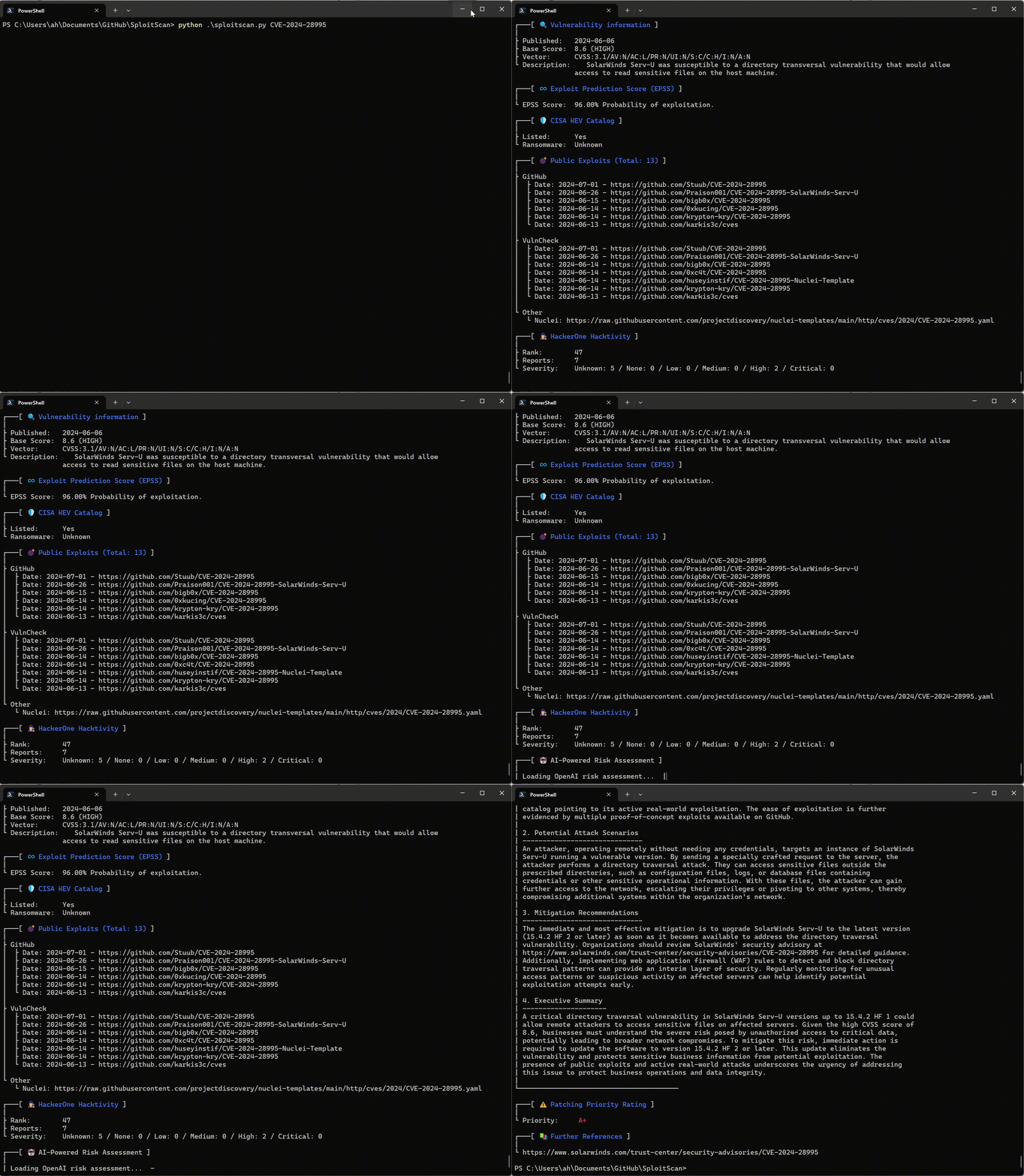
Interfaccia intuitiva
Goditi un'interfaccia chiara e semplice che presenta tutte le informazioni in un formato facile da leggere.