 usbarmory/gotee-example
GoTEE - applicazione di esempio

Introduzione ============ Il framework [GoTEE](https://github.com/usbarmory/GoTEE) implementa l'istanziazione concorrente di unikernel basati su [TamaGo](https://github.com/usbarmory/tamago) in modalità privilegiata e non privilegiata, che interagiscono tra loro tramite la modalità monitor e chiamate di sistema personalizzate. Con queste capacità GoTEE implementa Ambienti di Esecuzione Fidati (TEE) basati su [TamaGo](https://github.com/usbarmory/tamago), portando la sicurezza della memoria, la praticità e le capacità di Go all'esecuzione bare metal all'interno dell'ARM TrustZone Secure World o degli Ambienti di Esecuzione Supervisor RISC-V. GoTEE può supervisionare Trusted Applet freestanding basati su Go, Rust o C puri, che implementano l'API GoTEE, nonché qualsiasi sistema operativo in grado di eseguire in ARM TrustZone Normal World o in modalità S RISC-V, come Linux. <img src="https://assets.kitploit.com/production/public/readmes/47994/62f182f70e80d04fd4d3d580d3389efa981c0fa7b3cc3eddc036175deb4676cd.jpg" width="350"> Caratteristiche ======== * [Contesti di esecuzione isolati](https://github.com/usbarmory/GoTEE/wiki/Trusted-OS-and-Applet-execution) per la modalità utente ARM, TrustZone Normal World o la modalità Supervisor RISC-V * [Soft lockstep opportunistico per il rilevamento dei guasti](https://github.com/usbarmory/GoTEE/wiki/Examples#opportunistic-soft-lockstep) * [API per l'implementazione del Trusted OS](https://github.com/usbarmory/GoTEE/wiki/System-Calls#gotee-system-calls) (Syscall, JSON-RPC e gestori di eccezioni) Documentazione ============= [](https://pkg.go.dev/github.com/usbarmory/GoTEE) La documentazione principale, che include un tutorial, è disponibile sulla [wiki del progetto](https://github.com/usbarmory/GoTEE/wiki). La documentazione API del pacchetto è disponibile su [pkg.go.dev](https://pkg.go.dev/github.com/usbarmory/GoTEE). Hardware supportato ================== La tabella seguente riassume i SoC e le board attualmente supportati. | SoC | Board | Pacchetto SoC | Pacchetto Board | |--------------|--------------------------------------------------------------------------------------------------------------------------------------------------------------------------------------|---------------------------------------------------------------------------|--------------------------------------------------------------------------------------| | NXP i.MX6ULZ | [USB armory Mk II](https://github.com/usbarmory/usbarmory/wiki) | [imx6ul](https://github.com/usbarmory/tamago/tree/master/soc/nxp/imx6ul) | [usbarmory/mk2](https://github.com/usbarmory/tamago/tree/master/board/usbarmory) | | NXP i.MX6ULL | [MCIMX6ULL-EVK](https://www.nxp.com/design/development-boards/i-mx-evaluation-and-development-boards/evaluation-kit-for-the-i-mx-6ull-and-6ulz-applications-processor:MCIMX6ULL-EVK) | [imx6ul](https://github.com/usbarmory/tamago/tree/master/soc/nxp/imx6ul) | [mx6ullevk](https://github.com/usbarmory/tamago/tree/master/board/nxp/mx6ullevk) | | SiFive FU540 | [QEMU sifive_u](https://www.qemu.org/docs/master/system/riscv/sifive_u.html) | [fu540](https://github.com/usbarmory/tamago/tree/master/soc/sifive/fu540) | [qemu/sifive_u](https://github.com/usbarmory/tamago/tree/master/board/qemu/sifive_u) | Applicazione di esempio =================== Nella nomenclatura TEE, l'unikernel privilegiato è comunemente indicato come Trusted OS, mentre quello non privilegiato rappresenta un Trusted Applet. L'[esempio](https://github.com/usbarmory/GoTEE-example) GoTEE dimostra il funzionamento concorrente di unikernel Go che agiscono come Trusted OS, Trusted Applet e Main OS. > [!WARNING] > Il Main OS può essere qualsiasi OS "ricco" (ad es. Linux); TamaGo è utilizzato semplicemente per un esempio autonomo. Lo stesso vale per il Trusted Applet, che può essere qualsiasi applicazione bare metal in grado di eseguire in modalità utente e di implementare l'API GoTEE, come programmi C o Rust freestanding. > > Un [esempio](https://github.com/usbarmory/GoTEE-example/tree/master/trusted_applet_rust) in Rust può essere utilizzato sostituendo `trusted_applet_go` con `trusted_applet_rust` in fase di compilazione. La combinazione trusted OS/applet di esempio esegue test di base sull'esecuzione concorrente di tre unikernel [TamaGo](https://github.com/usbarmory/tamago) a diversi livelli di privilegio: * Trusted OS (ARM: modalità sistema TZ Secure World, RISC-V: modalità M) * Trusted Applet (ARM: modalità utente TZ Secure World, RISC-V: modalità S) * Main OS (ARM: modalità sistema TZ Normal World, RISC-V: modalità S) Il Main OS restituisce il controllo con una chiamata al monitor. Il Trusted Applet dorme per 5 secondi prima di tentare di leggere la memoria del Trusted OS, il che innesca un'eccezione gestita dal supervisor che termina il Trusted Applet. L'interfaccia [syscall](https://github.com/usbarmory/GoTEE/blob/master/syscall/syscall.go) di GoTEE è implementata per la comunicazione tra Trusted OS e Trusted Applet. Quando viene avviata sulla [USB armory Mk II](https://github.com/usbarmory/usbarmory/wiki), l'applicazione di esempio è raggiungibile via SSH tramite [Ethernet over USB](https://github.com/usbarmory/usbarmory/wiki/Host-communication) (protocollo ECM, supportato su host Linux e macOS): ``` $ ssh [email protected] tamago/arm • TEE security monitor (Secure World system/monitor) allgptr # memory forensics of applet goroutines csl # show config security levels (CSL) csl <periph> <slave> <hex csl> # set config security level (CSL) dbg # show ARM debug permissions exit, quit # close session gotee # TrustZone example w/ TamaGo unikernels help # this help linux <uSD|eMMC> # boot NonSecure USB armory Debian base image lockstep <fault %> # tandem applet example w/ fault injection peek <hex offset> <size> # memory display (use with caution) poke <hex offset> <hex value> # memory write (use with caution) reboot # reset device sa # show security access (SA) sa <id> <secure|nonsecure> # set security access (SA) stack # stack trace of current goroutine stackall # stack trace of all goroutines > ``` L'esempio può essere avviato con il comando `gotee`, che genera due istanze del Main OS per dimostrare il comportamento prima e dopo l'attivazione delle restrizioni TrustZone, utilizzando periferiche hardware reali. Inoltre, il comando `linux` può essere utilizzato per avviare l'[immagine base Debian per USB armory](https://github.com/usbarmory/usbarmory-debian-base_image) come Main OS Non-secure. > [!NOTE] > Solo le release >= 20211129 dell'immagine base Debian per USB armory sono supportate per il funzionamento Non-secure. 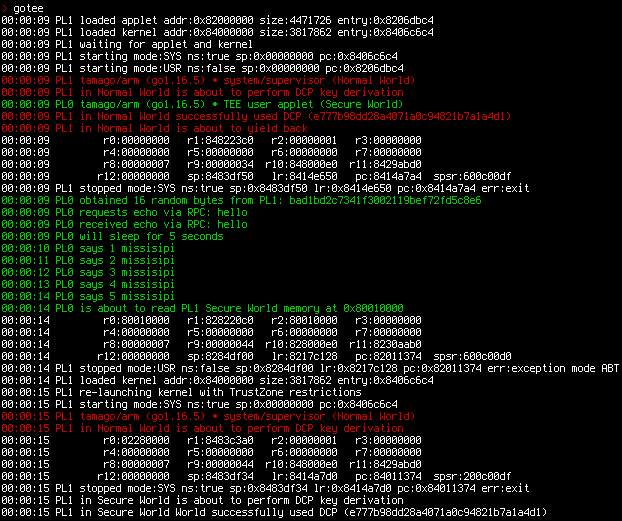 L'esempio può essere eseguito anche tramite emulazione QEMU. > [!NOTE] > Le esecuzioni emulate eseguono test parziali a causa della mancanza del pieno supporto TrustZone/PMP da parte di QEMU. ``` make qemu ... > gotee 00:00:00 tamago/arm • TEE security monitor (Secure World system/monitor) 00:00:00 SM loaded applet addr:0x9c000000 entry:0x9c072740 size:4940275 00:00:00 SM loaded kernel addr:0x80000000 entry:0x8007100c size:4577643 00:00:00 SM waiting for applet and kernel 00:00:00 SM starting mode:USR sp:0x9e000000 pc:0x9c072740 ns:false 00:00:00 SM starting mode:SYS sp:0x00000000 pc:0x8007100c ns:true 00:00:00 tamago/arm (go1.19.1) • TEE user applet 00:00:00 tamago/arm (go1.19.1) • system/supervisor (Non-secure) 00:00:00 supervisor is about to yield back 00:00:00 SM stopped mode:SYS sp:0x8146bf54 lr:0x801937a4 pc:0x80193884 ns:true err:exit 00:00:00 applet obtained 16 random bytes from monitor: b4cc4764dd30291a52545b182313003c 00:00:00 applet requests echo via RPC: hello 00:00:00 applet received echo via RPC: hello 00:00:00 applet will sleep for 5 seconds 00:00:01 applet says 1 mississippi ... 00:00:05 applet says 5 mississippi 00:00:05 applet is about to read secure memory at 0x98010000 00:00:05 r0:98010000 r1:9c8240c0 r2:98010000 r3:00000000 00:00:05 r4:00000000 r5:00000000 r6:00000000 r7:9c86bec8 00:00:05 r8:00000007 r9:0000003d r10:9c8020f0 r11:9c342f41 cpsr:600001d7 (ABT) 00:00:05 r12:00000061 sp:9c86bf08 lr:9c1b1be8 pc:9c011330 spsr:600001d0 (USR) 00:00:05 SM stopped mode:USR sp:0x9c86bf08 lr:0x9c1b1be8 pc:0x9c011330 ns:false err:ABT ``` Compilazione del compilatore ===================== Il [compilatore TamaGo](https://github.com/usbarmory/tamago-go) viene scaricato e compilato automaticamente come `go tool` dal `Makefile`. In alternativa, la variabile d'ambiente `TAMAGO` può essere sovrascritta per utilizzare l'[ultima release binaria](https://github.com/usbarmory/tamago-go/releases/latest): ```sh wget https://github.com/usbarmory/tamago-go/archive/refs/tags/latest.zip unzip latest.zip cd tamago-go-latest/src && ./all.bash cd ../bin && export TAMAGO=`pwd`/go ``` Compilazione ed esecuzione su target ARM ===================================== Compila gli eseguibili del Trusted Applet di esempio e del kernel come segue: ``` git clone https://github.com/usbarmory/GoTEE-example cd GoTEE-example && export TARGET=usbarmory && make nonsecure_os_go && make trusted_applet_go && make trusted_os ``` > [!NOTE] > Sostituisci `trusted_applet_go` con `trusted_applet_rust` per un esempio TA in Rust; questo richiede Rust nightly e la toolchain `armv7a-none-eabi`. Gli eseguibili finali vengono creati nella sottodirectory `bin`; `trusted_os_usbarmory.imx` deve essere utilizzato per l'esecuzione nativa. Sono disponibili i seguenti target: | `TARGET` | Board | Esecuzione e debug | |-------------|------------------|----------------------------------------------------------------------------------------------------------| | `usbarmory` | USB armory Mk II | [usbarmory](https://github.com/usbarmory/tamago/tree/master/board/usbarmory#executing-and-debugging) | I target supportano l'esecuzione nativa (vedi i relativi link alla documentazione nella tabella sopra) e quella emulata (ad es. `make qemu`). Compilazione ed esecuzione su target RISC-V ======================================== Compila gli eseguibili del Trusted Applet di esempio e del kernel come segue: ``` git clone https://github.com/usbarmory/GoTEE-example cd GoTEE-example && export TARGET=sifive_u && make nonsecure_os_go && make trusted_applet_go && make trusted_os ``` > [!NOTE] > Sostituisci `trusted_applet_go` con `trusted_applet_rust` per un esempio TA in Rust; questo richiede Rust nightly e la toolchain `riscv64gc-unknown-none-elf`. Gli eseguibili finali vengono creati nella sottodirectory `bin`. Target disponibili: | `TARGET` | Board | Esecuzione e debug | |-------------|------------------|----------------------------------------------------------------------------------------------------------| | `sifive_u` | QEMU sifive_u | [sifive_u](https://github.com/usbarmory/tamago/tree/master/board/qemu/sifive_u#executing-and-debugging) | Il target è stato testato solo con esecuzione emulata (ad es. `make qemu`) Applicazioni che utilizzano GoTEE ======================== * [ArmoredWitness](https://github.com/transparency-dev/armored-witness) - rete di witness tra ecosistemi Autori ======= Andrea Barisani [email protected] Andrej Rosano [email protected] Licenza ======= GoTEE | https://github.com/usbarmory/GoTEE Copyright (c) Gli autori GoTEE. Tutti i diritti riservati. Questi file sorgente sono distribuiti sotto la licenza di tipo BSD riportata nel file [LICENSE](https://github.com/usbarmory/GoTEE-example/blob/master/LICENSE).
