 target/halogen
Crea automaticamente regole YARA da documenti malevoli.

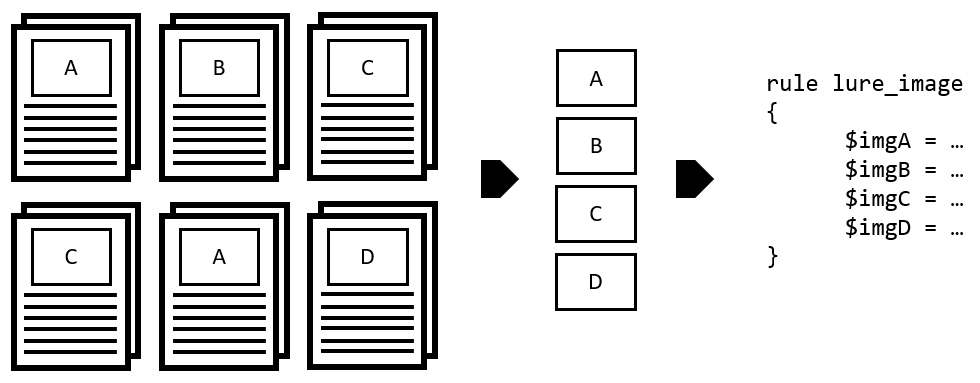
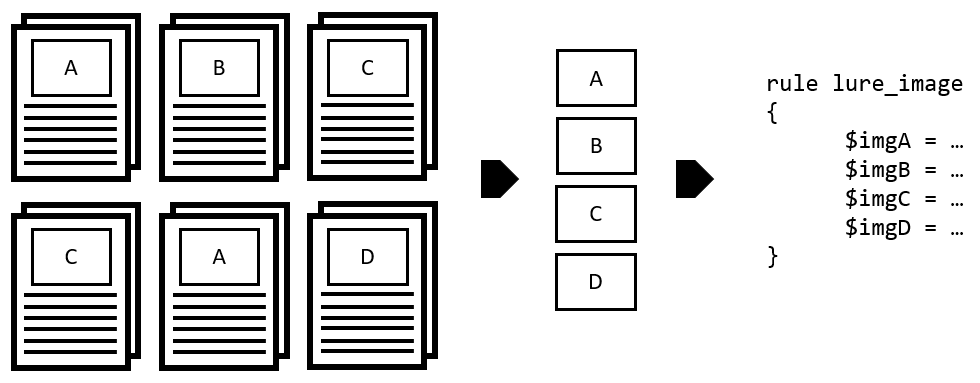
Halogen è uno strumento per automatizzare la creazione di regole yara basate sui file immagine incorporati in un documento malevolo. Questo può aiutare i professionisti della sicurezza informatica a scrivere regole di rilevamento per minacce informatiche, nonché assistere i responder nell'identificare la specifica minaccia con cui hanno a che fare. Attualmente, Halogen è in grado di creare regole basate su file JPG e PNG.
python3 halogen.py -h
usage: halogen.py [-h] [-f FILE] [-d DIR] [-n NAME] [--png-idat] [--jpg-sos] [--jpg-sof2sos] [--jpg-jump] [-c CONTAINER] [--clam] [--rprefix RPREFIX]

Halogen: Automatically create yara rules based on images embedded in office documents.

optional arguments:
  -h, --help            show this help message and exit
  -f FILE, --file FILE  File to parse
  -d DIR, --directory DIR
                        directory to scan for image files.
  -n NAME, --rule-name NAME
                        specify a custom name for the rule file
  --png-idat            For PNG matches, instead of starting with the PNG file header, start with the IDAT chunk.
  --jpg-sos             For JPG matches, skip over the header and look for the Start of Scan marker, and begin the match there.
  --jpg-sof2sos         for JPG matches, skip over the header and match the SOF all the way to the SOS + 45 bytes of the data within the SOS.
  --jpg-jump            for JPG matches, skip over the header and identify the sof, the sos and then read the actual image data take that data and look for repeated bytes. Skip those bytes and then
                        create 45 bytes of raw image data.
  -c CONTAINER, --container CONTAINER
                        specify a clamav container type defaults to CL_TYPE_MSOLE2, CL_TYPE_OOXML_WORD, CL_TYPE_OOXML_XL, CL_TYPE_OOXML_PPT
  --clam                generate a clam rule instead of a yara rule
  --rprefix RPREFIX     specify a clamav ruleset prefix
Abbiamo incluso alcuni file di documenti di test con immagini incorporate per permetterti di provare lo strumento. Eseguendo python3 halogen/halogen.py -d tests/ > /tmp/halogen_test.yara verrà prodotto il file yara di test contenente tutte le immagini trovate nei file all'interno della directory tests/.
Da qui puoi eseguire yara -d /tmp/halogen_test.yara tests/ e osservare quali immagini corrispondono a quali file.
--png-idat puoi iniziare dal chunk IDAT trovato all'interno di un file PNG. Abbiamo anche ridotto i byte restituiti quando si fa corrispondere sul chunk IDAT.--jpg-sos.--jpg-sof2sos, che legge il marker Start of Frame (SOF) fino a quando non viene trovato il SOS, e poi legge altri 45 byte. Questo è utile se il flag standard --jpg-sos sta dando falsi positivi.--jpg-jump che legge i dati dell'immagine compressa e crea un salto esadecimale nell'output yara se trova byte ripetuti dell'immagine. Questo ci permette di corrispondere sul SOF e SOS del file, così come su alcuni dei dati più unici nell'immagine.Si prega di contribuire con pull request in python3 e di segnalare eventuali bug trovati come issue.
