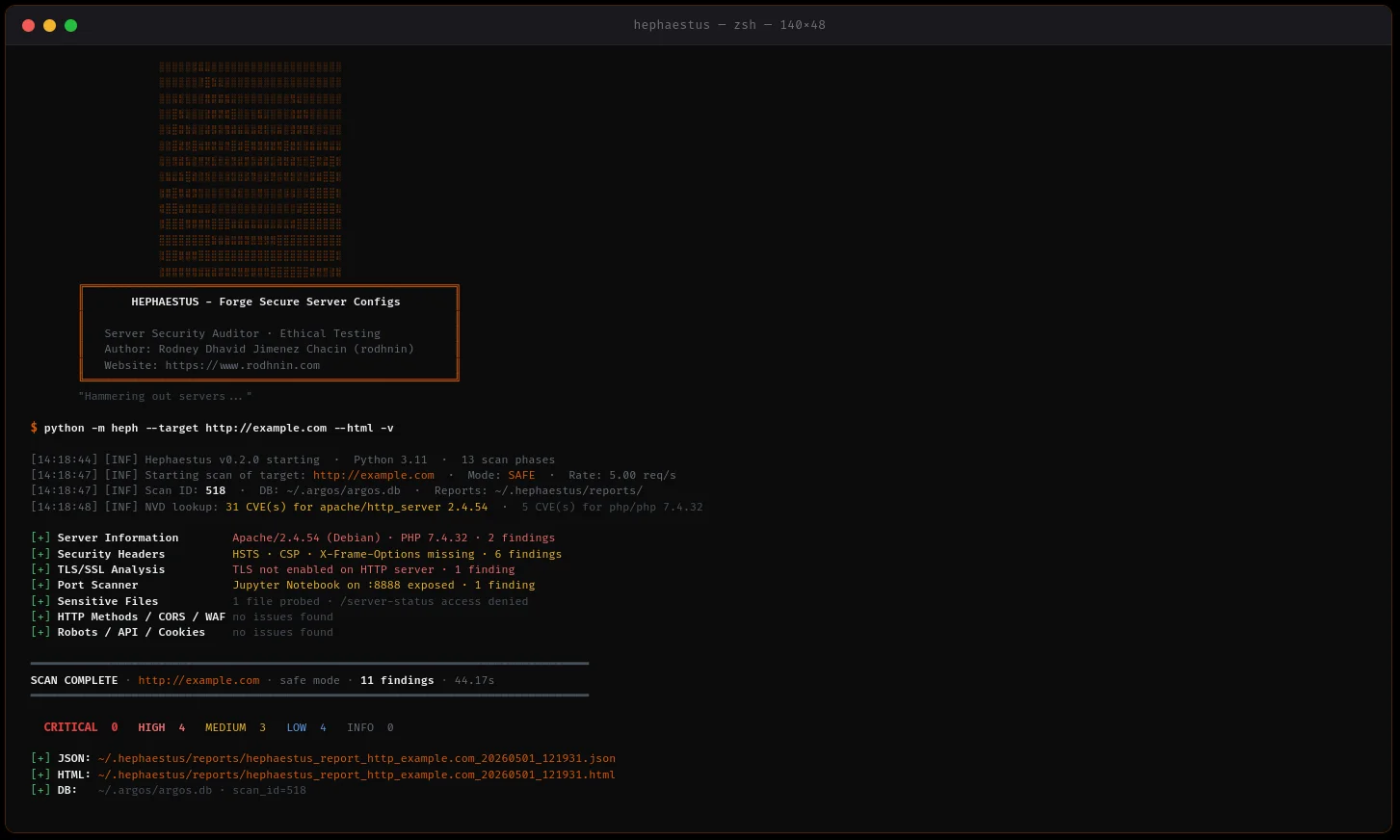

auditor di sicurezza del server che analizza configurazioni di Apache, Nginx e IIS con guide di hardening basate sull'IA e reporting professionale.
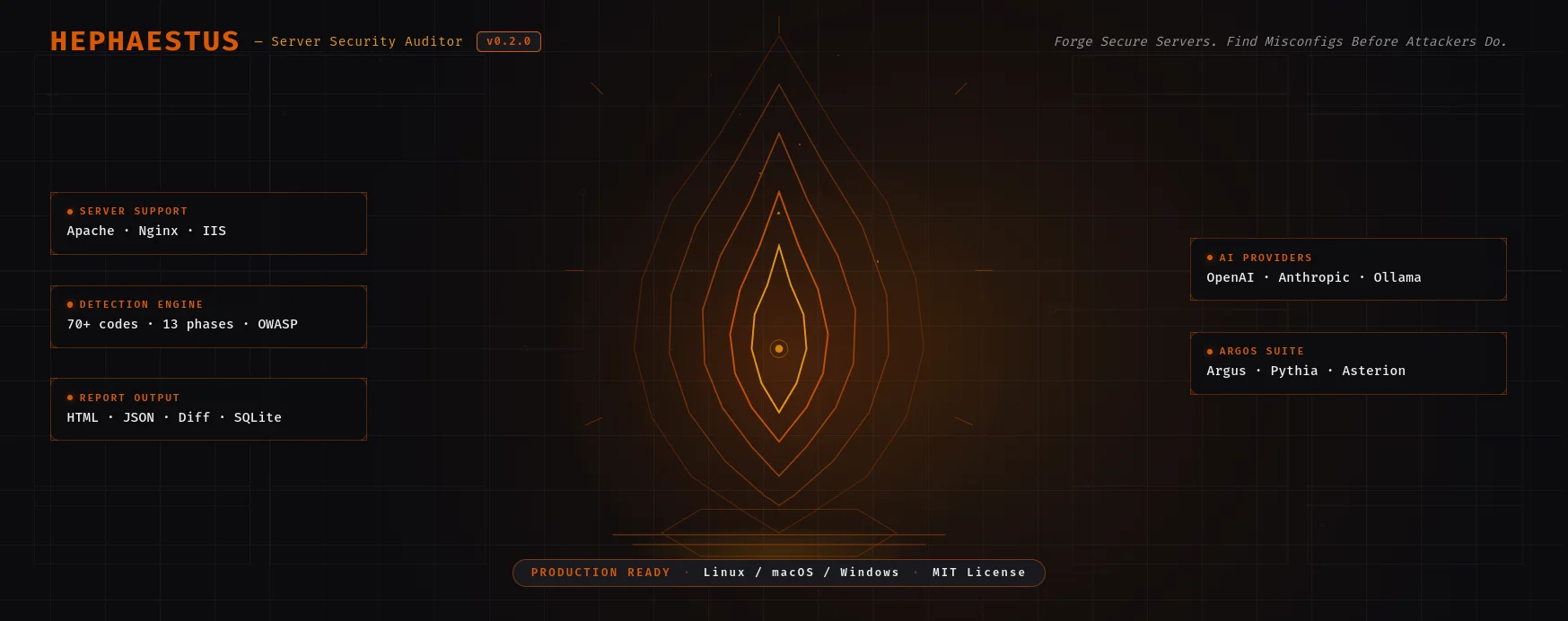
Auditor di sicurezza server per Apache, Nginx & IIS — 13 fasi di scansione, 70+ codici di verifica, guide di hardening basate su AI.
Guida Rapida · Documentazione · Docker · Analisi AI ·
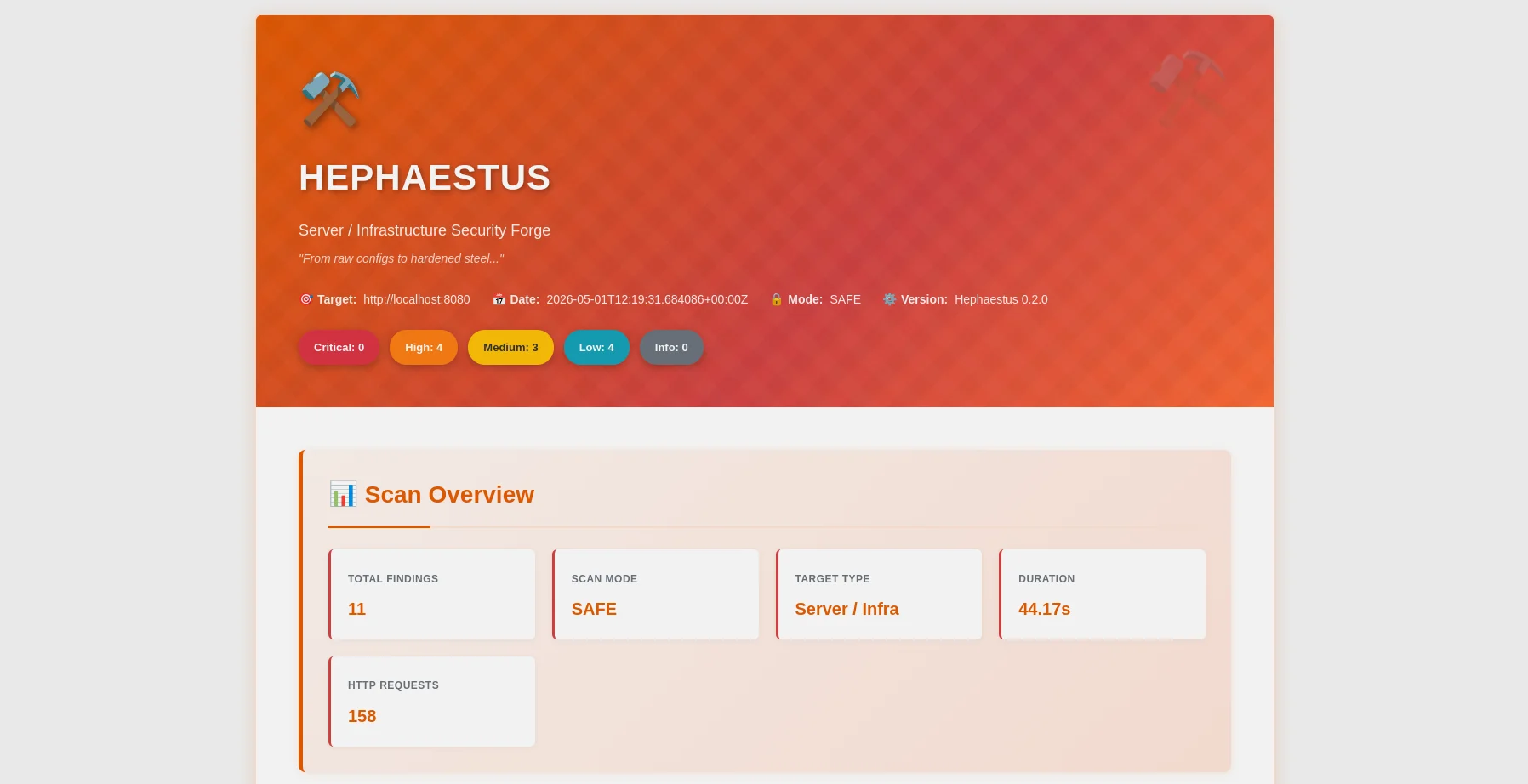
Report HTML — ripartizione per gravità, mappatura OWASP, barra di filtro |
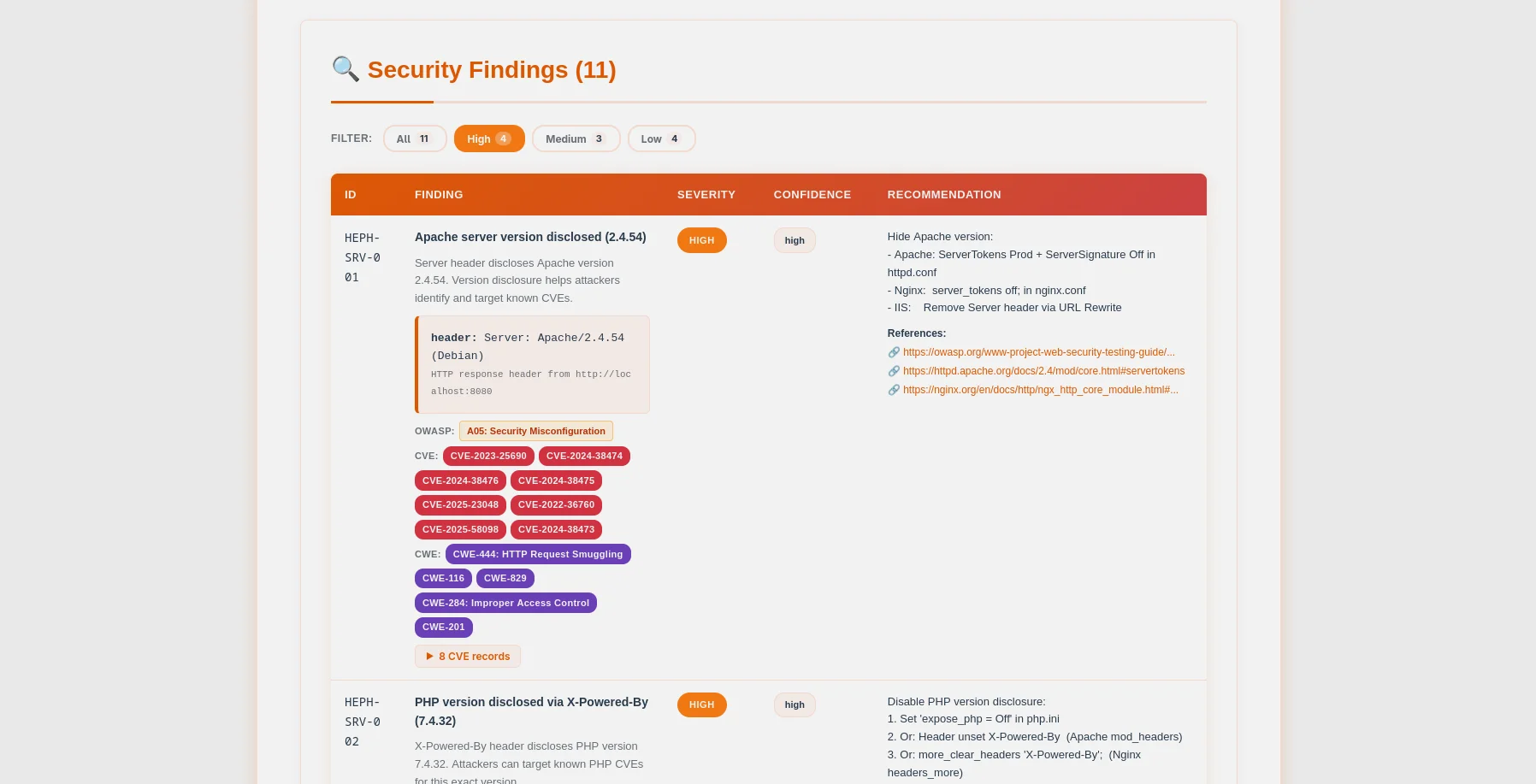
Tabella risultati — badge CVE/CWE, evidenze espandibili, snippet di configurazione |
Efesto è un auditor di sicurezza server pronto per la produzione che mette l'etica al primo posto. Progettato per amministratori di sistema, ingegneri DevOps e penetration tester, esegue scansioni delle configurazioni dei server web (Apache, Nginx, IIS) per identificare configurazioni errate critiche prima che gli aggressori le sfruttino.
~/.argos/argos.db)| Categoria di Controllo | Dettagli |
|---|---|
| Informazioni Server | Divulgazione versione Apache/Nginx/IIS tramite header e pagine di errore |
| File Sensibili | .env, .git, phpinfo.php, server-status, backup, file di configurazione (70+ percorsi) |
| Metodi HTTP | Metodi non sicuri (PUT, DELETE, TRACE, OPTIONS) |
| Header di Sicurezza | HSTS, CSP, X-Frame-Options, X-Content-Type-Options, Referrer-Policy, Permissions-Policy |
| Configurazione TLS/SSL | Analisi approfondita: suite di cifratura, versioni protocollo, validità certificato, correlazione CVE |
| Elenco Directory | Autoindex Apache/Nginx abilitato su directory sensibili |
| Rilevamento CORS | Wildcard, null-origin, probe di riflessione (COR-001 a COR-006) |
| Robots.txt | Analisi percorsi disabilitati, probe di accessibilità live in modalità aggressiva |
| Rilevamento WAF | 13 firme tra cui Cloudflare, Sucuri, ModSecurity, AWS WAF, Imperva |
| Scoperta API | Esposizione specifica Swagger/OpenAPI, introspezione GraphQL, endpoint non autenticati |
| Sicurezza Cookie | Analisi per-cookie HttpOnly/Secure/SameSite su percorsi autenticati |
| Analisi phpinfo() | 9 impostazioni PHP pericolose: display_errors, allow_url_include, open_basedir, e altro |
| Parser File di Configurazione | Analisi offline di httpd.conf / nginx.conf per configurazioni errate |
| Scansione Porte | 37 porte comuni con banner grabbing e arricchimento CVE |
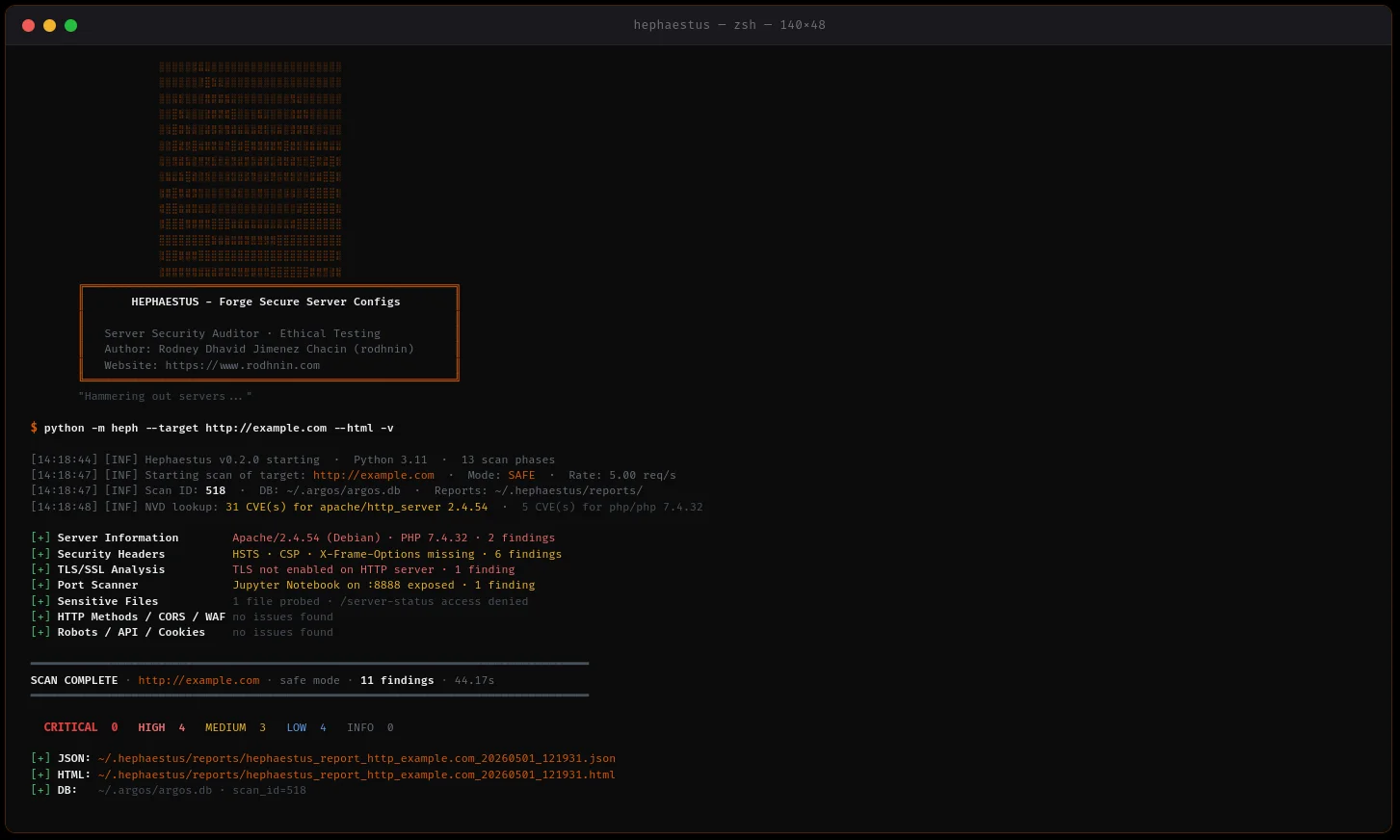
python -m heph --target https://example.com --html
- **Supporto Multi-Server**: Rilevamento e hardening di Apache, Nginx, IIS
- **Scansione Concorrente**: Pool di thread + limitazione velocità per scansioni veloci e rispettose
- **Raccolta Prove**: Risposte HTTP, header, contenuti dei file preservati
- **Gestione Errori Elegante**: Timeout, fallimenti DNS, connessione rifiutata gestiti in modo robusto
### 🤖 Guide di Hardening Basate su IA
Scegli il tuo provider AI in base alle tue esigenze:
| Provider | Ideale per | Velocità | Costo | Privacy |
| -------------------- | -------------------- | ---------------- | -------------- | --------------- |
| **OpenAI GPT-4** | Qualità di produzione | ⚡ Veloce (35s) | 💰 $0.25/scan | 🔒 Standard |
| **Anthropic Claude** | Orientato alla privacy | ⚡ Veloce (45s) | 💰 $0.30/scan | 🔒 Avanzato |
| **Ollama (Locale)** | Privacy completa | 🐢 Lento (28min) | 💰 Gratuito | 🔐 100% Offline |
**Due Modalità di Analisi:**
- **Tecnica**: Frammenti di configurazione Apache/Nginx, comandi CLI, hardening passo-passo
- **Esecutiva**: Valutazione del rischio in linguaggio semplice per stakeholder e management
### 📊 Reportistica Professionale
**Report JSON** (Leggibili dalla Macchina)```json
{
"tool": "hephaestus",
"version": "0.2.0",
"target": "https://example.com",
"mode": "safe",
"summary": {
"critical": 3,
"high": 2,
"medium": 5,
"low": 3,
"info": 0
},
"findings": [...],
"diff": {...}
}
Report HTML (Leggibili)
La scansione aggressiva e l'analisi AI richiedono prova di proprietà:```bash
python -m heph --gen-consent example.com
echo "verify-abc123..." > .well-known/verify-abc123.txt
python -m heph --verify-consent http --domain example.com --token verify-abc123
python -m heph --target https://example.com --aggressive --use-ai
### 💾 Persistenza del Database
Database SQLite **CONDIVISO con la suite Argos** (`~/.argos/argos.db`):
- **Cronologia delle scansioni**: Data, durata, conteggio dei reperti, ripartizione della gravità
- **Repository dei reperti**: Database di vulnerabilità ricercabile (oltre 1159 reperti memorizzati)
- **Domini verificati**: Tracciamento dei token di consenso con scadenza
- **Integrazione tra strumenti**: Funziona perfettamente con Argus, Pythia e strumenti futuri```bash
# Query recent scans
sqlite3 ~/.argos/argos.db "SELECT * FROM scans WHERE tool='hephaestus' ORDER BY scan_id DESC LIMIT 10"
# Find critical issues
sqlite3 ~/.argos/argos.db "SELECT * FROM findings WHERE severity='critical' AND tool='hephaestus'"
Hephaestus v0.2.0 è stato validato empiricamente utilizzando laboratori vulnerabili controllati basati su Docker (Apache e Nginx).
| Metrica | Risultato |
|---|---|
| Suite di Test | 55/55 test superati (13 fasi) |
| Rilevamento Apache | 42 risultati in tutte le 13 fasi di scansione |
| Rilevamento Nginx | 25 risultati in tutte le 13 fasi di scansione |
| Precisione | 100% (zero falsi positivi) |
| Recall | 100% (zero falsi negativi) |
| F1-Score | 100% (bilanciamento perfetto) |
| Durata Media Scansione | 30-35 secondi |
| Operazioni Database | 80 scansioni tracciate, 1159+ risultati memorizzati |
Copertura dei Test (13 fasi):
Risultati Chiave:
--diff last) funzionanti nella cronologia delle scansioniVerdetto: Hephaestus è pronto per la produzione per valutazioni di sicurezza dei server.
1. Clona il repository```bash git clone https://github.com/rodhnin/hephaestus-server-forger.git cd hephaestus-server-forger
**2. (Opzionale) Installa `venv` se non già disponibile**```bash
# Debian/Ubuntu
sudo apt update && sudo apt install -y python3-venv
# Fedora/RHEL
sudo dnf install python3-virtualenv
# macOS (via Homebrew)
brew install [email protected]
3. Crea e attiva l'ambiente virtuale```bash python3 -m venv .venv source .venv/bin/activate
**4. Aggiorna pip**```bash
python -m pip install --upgrade pip
5. Installa le dipendenze```bash python -m pip install -r requirements.txt
**6. Configura le chiavi API (se si utilizza AI cloud)**```bash
# OpenAI
export OPENAI_API_KEY="sk-..."
# Anthropic
export ANTHROPIC_API_KEY="sk-ant-..."
7. Verifica dell'installazione```bash python -m heph --version
### La tua prima scansione```bash
# Basic scan (safe mode, no consent required)
python -m heph --target https://example.com
# With HTML report
python -m heph --target https://example.com --html
# With AI hardening guide (requires consent)
python -m heph --target https://example.com --use-ai --html
cd docker && ./deploy.sh
docker compose exec hephaestus python -m heph --target http://vulnerable-apache
🎉 Successo! Controlla ~/.hephaestus/reports/ per i tuoi report.
python -m heph --target https://example.com
python -m heph --target https://example.com --html
python -m heph --target https://example.com -vv
python -m heph --target https://example.com -q
### Scansione Avanzata```bash
# Control scan speed (1-20 req/s)
python -m heph --target https://example.com --rate 10
# Control concurrency (1-20 threads)
python -m heph --target https://example.com --threads 8
# Custom timeout (useful for slow servers)
python -m heph --target https://example.com --timeout 60
# Custom output directory
python -m heph --target https://example.com --report-dir ./my-reports
# Custom User-Agent
python -m heph --target https://example.com --user-agent "MyBot/1.0"
# Disable SSL verification (testing only)
python -m heph --target https://self-signed.badssl.com --no-verify-ssl
Passo 1: Configura il tuo provider
Modifica config/defaults.yaml:```yaml
ai:
langchain:
provider: "openai" # Options: openai, anthropic, ollama
model: "gpt-4o-mini-2024-07-18"
temperature: 0.3
**Passaggio 2: Verifica la tua configurazione**```bash
# Verify AI provider works
python -m heph.core.ai openai
Passo 3: Esegui scansione basata su IA```bash
python -m heph --target https://example.com
--use-ai
--ai-tone technical
--html
python -m heph --target https://example.com
--use-ai
--ai-tone non_technical
--html
python -m heph --target https://example.com
--use-ai
--ai-tone both
--html
python -m heph --target https://example.com
--use-ai
--ai-stream
--html
python -m heph --target https://example.com
--use-ai
--ai-compare openai,anthropic
--html
python -m heph --target https://example.com
--use-ai
--ai-agent
--html
python -m heph --target https://example.com
--use-ai
--ai-budget 0.50
--html
### Modalità Aggressiva (Richiede Consenso)```bash
# Step 1: Generate consent token
python -m heph --gen-consent example.com
# Output: Token: verify-a3f9b2c1d8e4...
# Step 2: Place token on your server
# Create: https://example.com/.well-known/verify-a3f9b2c1d8e4.txt
# Content: verify-a3f9b2c1d8e4
# Step 3: Verify consent
python -m heph --verify-consent http \
--domain example.com \
--token verify-a3f9b2c1d8e4
# Step 4: Run aggressive scan (deeper checks, higher rate limit)
python -m heph --target https://example.com --aggressive
Hephaestus utilizza LangChain 1.0.0 con supporto per più provider AI.
Migliore per: Uso in produzione
#### Anthropic Claude
**Migliore per: Privacy potenziata**
- ⭐ Qualità: Eccellente (5/5)
- ⚡ Velocità: ~45 secondi
- 💰 Costo: ~$0,30 per scansione
- 🔒 Privacy: Potenziata (approccio privacy-first di Anthropic)```bash
export ANTHROPIC_API_KEY="sk-ant-..."
python -m pip install langchain-anthropic==1.0.0
Migliore per: Privacy completa
ollama pull llama3.2 python -m pip install "langchain-ollama>=0.3.0,<0.4.0"
### Privacy & Sicurezza
**Sanitizzazione Automatica**
Prima di inviare ai provider AI, Hephaestus rimuove automaticamente:
- ✅ Token di consenso
- ✅ Chiavi API e credenziali
- ✅ Chiavi private e certificati
- ✅ Indirizzi IP interni
- ✅ Credenziali del database
**Solo su Adesione Volontaria**
- L'analisi AI richiede il flag esplicito `--use-ai`
- La scansione aggressiva richiede un token di consenso verificato
- Tu controlli quale provider vede i tuoi dati
**Per la Massima Privacy**: Usa Ollama localmente.
---
## 🧪 Laboratori di Test Sicuri
**⚠️ NON eseguire MAI scansioni su siti in produzione senza autorizzazione scritta!**
Usa i nostri laboratori Docker per esercitarti in sicurezza:
### Configura Ambiente di Test
### Opzione 1: Script Interattivo (Consigliato)```bash
# Run the interactive deployment script
cd docker && ./deploy.sh
Lo script fornisce 5 opzioni:
Solo laboratorio di test:```bash
docker compose -f docker/compose.testing.yml up -d
sleep 15
docker compose -f docker/compose.testing.yml ps curl -I http://localhost:8080 # Apache curl -I http://localhost:8081 # Nginx
**Scanner di produzione:**```bash
# Start Hephaestus scanner service
docker compose -f docker/compose.yml up -d
# Run a scan
docker compose -f docker/compose.yml exec hephaestus heph --target https://example.com
# View reports
ls -lh docker/reports/
Entrambi gli ambienti:```bash
docker compose -f docker/compose.yml up -d docker compose -f docker/compose.testing.yml up -d
python -m heph --target http://localhost:8080 --html python -m heph --target http://localhost:8081 --html
### Scansiona i Lab```bash
# Scan Apache lab (from host)
python -m heph --target http://localhost:8080 --html
# Scan Nginx lab (from host)
python -m heph --target http://localhost:8081 --html
# AI-powered analysis (requires OPENAI_API_KEY)
python -m heph --target http://localhost:8080 --use-ai --html
# OR from inside production container (using container name)
docker compose -f docker/compose.yml exec hephaestus python -m heph --target http://hephaestus-vulnerable-apache --html
Apache Lab (localhost:8080):
Nginx Lab (localhost:8081):
Ferma i servizi:```bash
cd docker && ./deploy.sh # Choose option 4 (Stop All)
docker compose -f docker/compose.yml down docker compose -f docker/compose.testing.yml down
**Rimuovi tutto (ATTENZIONE: cancella dati e report):**```bash
# Using script (with confirmation)
cd docker && ./deploy.sh # Choose option 5 (Remove All)
# OR manually
docker compose -f docker/compose.yml down -v
docker compose -f docker/compose.testing.yml down -v
rm -rf docker/data docker/reports
Hephaestus fornisce due opzioni di distribuzione Docker:
Servizio Scanner di Produzione:```bash
docker compose -f docker/compose.yml up -d
docker compose -f docker/compose.yml exec hephaestus heph --target https://example.com --html
ls -lh docker/reports/
docker compose -f docker/compose.yml down
**Laboratorio di test (Server vulnerabili):**```bash
# Start Apache + Nginx vulnerable servers
docker compose -f docker/compose.testing.yml up -d
# Scan from host
python -m heph --target http://localhost:8080 --html
# Stop lab
docker compose -f docker/compose.testing.yml down
Script di distribuzione interattivo:```bash
cd docker && ./deploy.sh
### Opzione 2: Esecuzione Diretta di Docker
**Costruisci l'immagine:**```bash
docker build -f docker/Dockerfile -t hephaestus:0.2.0 .
Esegui una scansione unica:```bash
docker run --rm
-v $(pwd)/docker/reports:/reports
-v $(pwd)/docker/data:/data
hephaestus:0.2.0
--target https://example.com
--html
**Con l'analisi AI:**```bash
docker run --rm \
-v $(pwd)/docker/reports:/reports \
-e OPENAI_API_KEY="$OPENAI_API_KEY" \
hephaestus:0.2.0 \
--target https://example.com \
--use-ai \
--ai-tone both \
--html
Scansiona il laboratorio di test locale:```bash
docker compose -f docker/compose.testing.yml up -d
docker run --rm
--network hephaestus-lab
hephaestus:0.2.0
--target http://hephaestus-vulnerable-apache
## 📊 Comprendere i Rapporti
### Struttura del Report```
~/.hephaestus/
├── reports/
│ ├── hephaestus_report_example_20251021_143022.json
│ └── hephaestus_report_example_20251021_143022.html
└── (shared with Argos)
~/.argos/
├── argos.db # Shared database
└── logs/
└── hephaestus.log
HEPH-SRV-001: Server version disclosed (Apache/Nginx/IIS) HEPH-SRV-004: Server disclosed in error page HEPH-SRV-016: PHP version disclosed in Server header HEPH-SRV-017: OpenSSL version disclosed in Server header HEPH-FILE-001: Environment file exposed (.env) HEPH-FILE-002: Git repository exposed HEPH-FILE-003: PHP information page exposed HEPH-FILE-004: Apache server-status exposed HEPH-HTTP-003: Unsafe HTTP method in OPTIONS (TRACE) HEPH-HTTP-008: TRACE method enabled (XST vulnerability) HEPH-HDR-001: Missing security header: HSTS HEPH-HDR-002: Missing security header: CSP HEPH-HDR-003: Missing security header: X-Frame-Options HEPH-HDR-004: Missing security header: X-Content-Type-Options HEPH-HDR-005: Missing security header: Referrer-Policy HEPH-HDR-006: Missing security header: Permissions-Policy HEPH-CFG-001: Directory listing enabled HEPH-TLS-000: TLS not enabled HEPH-TLS-001: Weak TLS protocol (SSLv3, TLS 1.0) HEPH-TLS-002: Weak cipher suite enabled COR-001 to COR-006: CORS misconfiguration findings ROB-001/002/003: Robots.txt intelligence findings WAF-001/002: WAF detection findings API-001 to API-005: API discovery findings COO-001 to COO-005: Cookie security findings PHP-001 to PHP-009: phpinfo() dangerous settings
### Mappatura della gravità
- **CRITICAL**: .env esposto, .git accessibile, phpinfo, server-status, dump SQL
- **HIGH**: Versione del server divulgata, TLS debole, TLS mancante, metodi HTTP non sicuri
- **MEDIUM**: Intestazioni importanti mancanti (HSTS, CSP, X-Frame-Options), elenco directory, divulgazione pagine di errore
- **LOW**: Intestazioni minori (X-Content-Type-Options, Referrer-Policy, Permissions-Policy)
- **INFO**: Risultati informativi (server rilevato, TLS 1.2 OK)
---
## 📁 Struttura del progetto```
hephaestus-server-forger/
│
├── heph/ # Main application package
│ ├── checks/ # Security check modules (13 phases)
│ │ ├── __init__.py
│ │ ├── api_discovery.py # Phase 11: Swagger/OpenAPI/GraphQL exposure
│ │ ├── config.py # Phase 5: Directory listing detection
│ │ ├── config_file.py # Phase 14: Offline httpd.conf/nginx.conf parser
│ │ ├── cookies.py # Phase 12: HttpOnly/Secure/SameSite analysis
│ │ ├── cors.py # Phase 8: CORS wildcard & reflection probes
│ │ ├── files.py # Phase 2: 70+ sensitive file paths
│ │ ├── headers.py # Phase 4: Security headers analysis
│ │ ├── http_methods.py # Phase 3: Unsafe HTTP methods (PUT/DELETE/TRACE)
│ │ ├── phpinfo.py # Phase 13: phpinfo() dangerous settings
│ │ ├── ports.py # Phase 7: 37-port scanner with banner grabbing
│ │ ├── robots.py # Phase 9: robots.txt disallowed path analysis
│ │ ├── server_info.py # Phase 1: Apache/Nginx/IIS fingerprinting
│ │ ├── tls.py # Phase 6: Deep TLS/SSL + CVE correlation
│ │ └── waf.py # Phase 10: 13 WAF signatures detection
│ │
│ ├── core/ # Core infrastructure
│ │ ├── __init__.py
│ │ ├── ai.py # LangChain AI (GPT-4/Claude/Ollama) + cost tracking
│ │ ├── config.py # Configuration loader
│ │ ├── consent.py # Consent token system (HTTP + DNS)
│ │ ├── cve_lookup.py # NVD CVE API integration
│ │ ├── db.py # SQLite — shared with Argos suite (~/.argos/argos.db)
│ │ ├── diff.py # Scan diff engine (--diff last / --diff <id>)
│ │ ├── http_client.py # Token-bucket rate-limited HTTP client
│ │ ├── logging.py # Structured logging
│ │ ├── owasp.py # HEPH-* code → OWASP Top 10 2021 mapper
│ │ └── report.py # JSON + HTML report generation
│ │
│ ├── __init__.py # Package metadata
│ ├── __main__.py # Entry point
│ ├── cli.py # CLI (30+ flags incl. --use-ai, --diff, --config-file)
│ └── scanner.py # Orchestrator — 13 parallel phases
│
├── assets/
│ └── ascii.txt # Hephaestus braille ASCII art
│
├── config/ # Configuration files
│ ├── defaults.yaml # Default settings
│ └── prompts/ # AI prompt templates
│ ├── technical.txt # Technical hardening prompt
│ └── non_technical.txt # Executive summary prompt
│
├── db/
│ └── migrate.sql # Shared database schema (Argos suite)
│
├── docker/ # Docker deployment
│ ├── vulnerable-apache/ # Vulnerable Apache lab (port 8080/8443)
│ │ └── docker-entrypoint.sh
│ ├── vulnerable-nginx/ # Vulnerable Nginx lab (port 8081/8444)
│ │ └── docker-entrypoint.sh
│ ├── compose.yml # Production stack
│ ├── compose.testing.yml # Vulnerable lab stack
│ ├── deploy.sh # Interactive deployment script
│ └── Dockerfile # Production image
│
├── docs/ # Documentation
│ ├── media/ # README visual assets
│ │ ├── hephaestus-banner.webp # Banner 1280×400
│ │ ├── hephaestus-hero.webp # Hero 1600×640
│ │ ├── console.webp # Terminal scan output
│ │ ├── report_html.webp # HTML report header
│ │ └── report_findings.webp # Findings table with CVE badges
│ ├── AI_INTEGRATION.md # AI providers setup guide
│ ├── CONSENT.md # Consent system details
│ ├── DATABASE_GUIDE.md # Shared database reference
│ ├── ETHICS.md # Ethical use guidelines
│ ├── REPORT_FORMAT.md # JSON/HTML report specification
│ ├── ROADMAP.md # v0.3.0 tickets and priorities
│ └── TESTING_GUIDE.md # Safe testing practices
│
├── schema/
│ └── report.schema.json # JSON report schema (OWASP + CVE fields)
│
├── scripts/
│ └── cli-examples.md # CLI usage examples
│
├── templates/
│ └── report.html.j2 # HTML report template — forge theme
│
├── CHANGELOG.md # Version history
├── CODE_OF_CONDUCT.md # Community guidelines
├── CONTRIBUTING.md # Contribution guide
├── LICENSE # MIT License
├── README.md # This file
├── requirements.txt # Python dependencies
└── setup.py # Package installer
Stato: 🎉 Rilasciato (sostituito da v0.2.0)
~/.argos/argos.db)Stato: 🎉 Rilasciato
--config-file): analisi offline di httpd.conf/nginx.conf--ai-budget): limiti di budget, costs.json, tabella ai_costs--ai-stream): output token per token in tempo reale--ai-compare): esegui due fornitori in parallelo--ai-agent): agente LangChain con ricerca CVE NVD--diff last / --diff SCAN_ID): riscontri nuovi/risolti/persistentiFocus: Usabilità, scalabilità, AI interattiva
heph --show-options, heph --set)heph db scans list, heph db findings search)Focus: ML, automazione, AI avanzata
Prodotto commerciale per aziende
IN CORSO
Per descrizioni dettagliate delle funzionalità, consulta ROADMAP.md
Esegui scansioni solo su sistemi di tua proprietà o per cui hai ricevuto esplicita autorizzazione scritta per testarli.
Hephaestus implementa controlli tecnici per prevenire abusi:
| Modalità | Controlli | Consenso Richiesto | Limite di Richieste |
|---|---|---|---|
| Sicura | Non intrusivo | ❌ No | 5 req/s |
| Aggressiva | Sondaggio profondo | ✅ Sì | 12 req/s |
| Analisi AI | Guida all'hardening | ✅ Sì | N/A |
L'accesso non autorizzato ai sistemi informatici è illegale nella maggior parte delle giurisdizioni:
Per linee guida etiche complete, consulta docs/ETHICS.md
Accogliamo con favore i contributi! Che si tratti di:
git checkout -b feature/amazing-feature)git commit -m 'Add amazing feature')git push origin feature/amazing-feature)git clone https://github.com/YOUR-USERNAME/hephaestus-server-forger.git cd hephaestus-server-forger
python -m pip install -r requirements.txt python -m pip install pytest black flake8 mypy
black heph/
flake8 heph/ mypy heph/
pytest tests/
### Segnalazione di Problemi
Trovato un bug? Hai una richiesta di funzionalità?
**Apri un ticket**: https://github.com/rodhnin/hephaestus-server-forger/issues
Per favore includi:
- Versione di Hephaestus (`python -m heph --version`)
- Versione di Python (`python --version`)
- Sistema operativo
- Passi per riprodurre (per bug)
- Comportamento atteso vs effettivo
---
## 📚 Documentazione
Documentazione completa disponibile nella directory `docs/`:
| Documento | Descrizione |
| -------------------------------------------- | ---------------------------------------------------- |
| [AI_INTEGRATION.md](https://github.com/rodhnin/hephaestus-server-forger/blob/main/docs/AI_INTEGRATION.md) | Guida completa alla configurazione AI (tutti e 3 i provider) |
| [CONSENT.md](https://github.com/rodhnin/hephaestus-server-forger/blob/main/docs/CONSENT.md) | Dettagli tecnici del sistema dei token di consenso |
| [DATABASE_GUIDE.md](https://github.com/rodhnin/hephaestus-server-forger/blob/main/docs/DATABASE_GUIDE.md) | Schema SQLite, query, gestione |
| [ETHICS.md](https://github.com/rodhnin/hephaestus-server-forger/blob/main/docs/ETHICS.md) | Quadro legale e linee guida etiche |
| [REPORT_FORMAT.md](https://github.com/rodhnin/hephaestus-server-forger/blob/main/docs/REPORT_FORMAT.md) | Schema JSON e specifiche HTML |
| [TESTING_GUIDE.md](https://github.com/rodhnin/hephaestus-server-forger/blob/main/docs/TESTING_GUIDE.md) | Test sicuri con laboratori Docker |
| [ROADMAP.md](https://github.com/rodhnin/hephaestus-server-forger/blob/main/docs/ROADMAP.md) | Funzionalità future e piani di sviluppo |
### Collegamenti rapidi
- **Registro delle modifiche**: [CHANGELOG.md](https://github.com/rodhnin/hephaestus-server-forger/blob/main/CHANGELOG.md)
- **Licenza**: [LICENSE](https://github.com/rodhnin/hephaestus-server-forger/blob/main/LICENSE)
- **Esempi CLI**: [scripts/cli-examples.md](https://github.com/rodhnin/hephaestus-server-forger/blob/main/scripts/cli-examples.md)
---
## ⚖️ Licenza
Questo progetto è concesso in licenza con la **Licenza MIT** - consulta il file [LICENSE](https://github.com/rodhnin/hephaestus-server-forger/blob/main/LICENSE) per i dettagli.```
MIT License
Copyright (c) 2026 Rodney Dhavid Jimenez Chacin
Permission is hereby granted, free of charge, to any person obtaining a copy
of this software and associated documentation files (the "Software"), to deal
in the Software without restriction, including without limitation the rights
to use, copy, modify, merge, publish, distribute, sublicense, and/or sell
copies of the Software, and to permit persons to whom the Software is
furnished to do so, subject to the following conditions:
The above copyright notice and this permission notice shall be included in all
copies or substantial portions of the Software.
THE SOFTWARE IS PROVIDED "AS IS", WITHOUT WARRANTY OF ANY KIND, EXPRESS OR
IMPLIED, INCLUDING BUT NOT LIMITED TO THE WARRANTIES OF MERCHANTABILITY,
FITNESS FOR A PARTICULAR PURPOSE AND NONINFRINGEMENT.
IMPORTANTE: Questo strumento è solo per test di sicurezza autorizzati.
Utilizzando Hephaestus, riconosci e accetti che:
Se scopri vulnerabilità utilizzando Hephaestus:
Non scansionare. Se non sei sicuro di avere il permesso, probabilmente non ce l'hai.
Hephaestus poggia sulle spalle dei giganti:
Un ringraziamento speciale a tutti i ricercatori di sicurezza che praticano e promuovono l'hacking etico.
Rodney Dhavid Jimenez Chacin (rodhnin)
Per domande, feedback o richieste di collaborazione, visita rodhnin.com per contattarmi.
Creato con ❤️ per hacker etici e sysadmin di tutto il mondo
⭐ Metti una stella a questo repo se lo trovi utile! ⭐
Segnala un bug • Richiedi una funzionalità • Documentazione
Hephaestus v0.2.0 — Maggio 2026