
Auditor di sicurezza di rete e dominio che scansiona Windows Active Directory, sistemi Linux e infrastrutture di rete con guide di hardening basate su IA e report professionali.
Auditor di sicurezza di rete etico — oltre 50 controlli su SMB, RDP, LDAP, SSH, Kerberos e altro, con analisi CVE basata su intelligenza artificiale e mappatura della conformità OWASP/CIS/NIST.
Avvio Rapido · Documentazione · Docker · Funzionalità AI · Metti Stella su GitHub
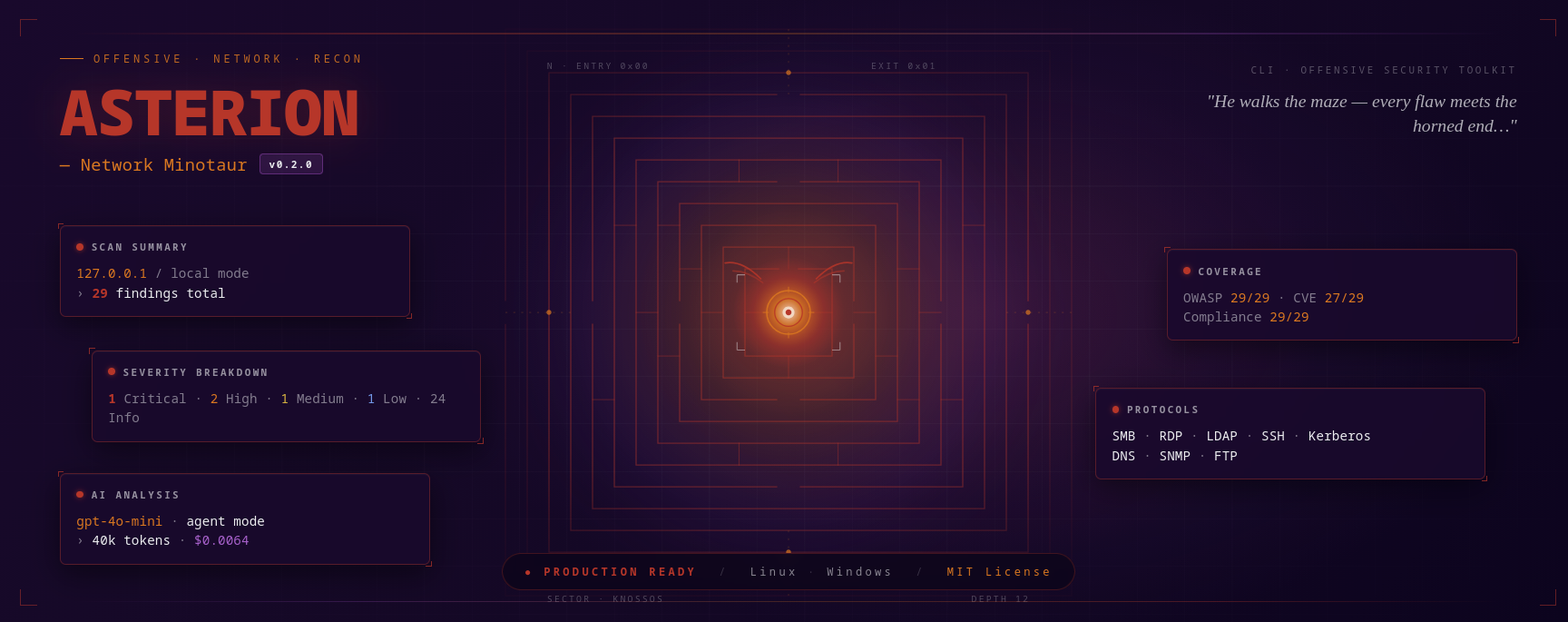
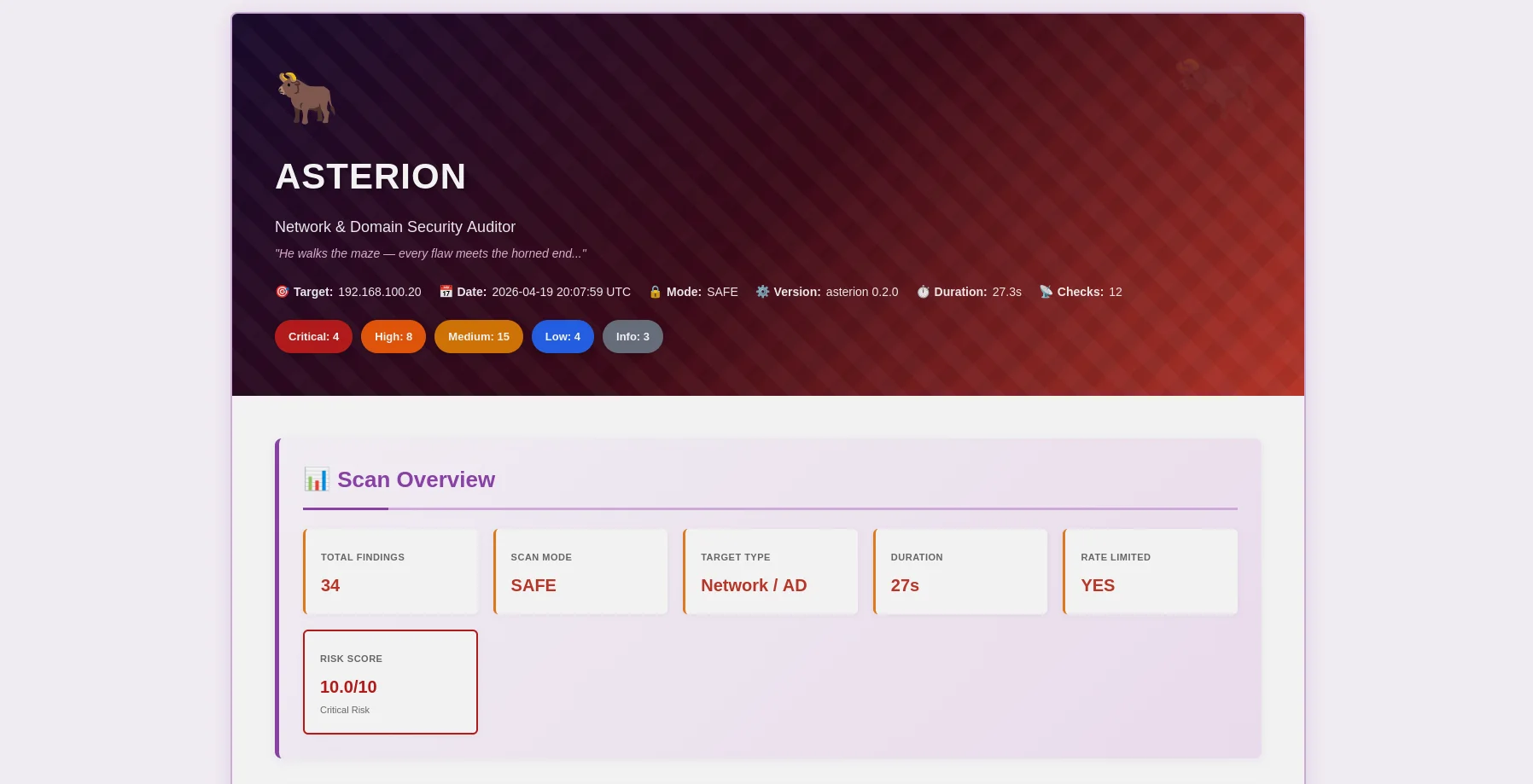
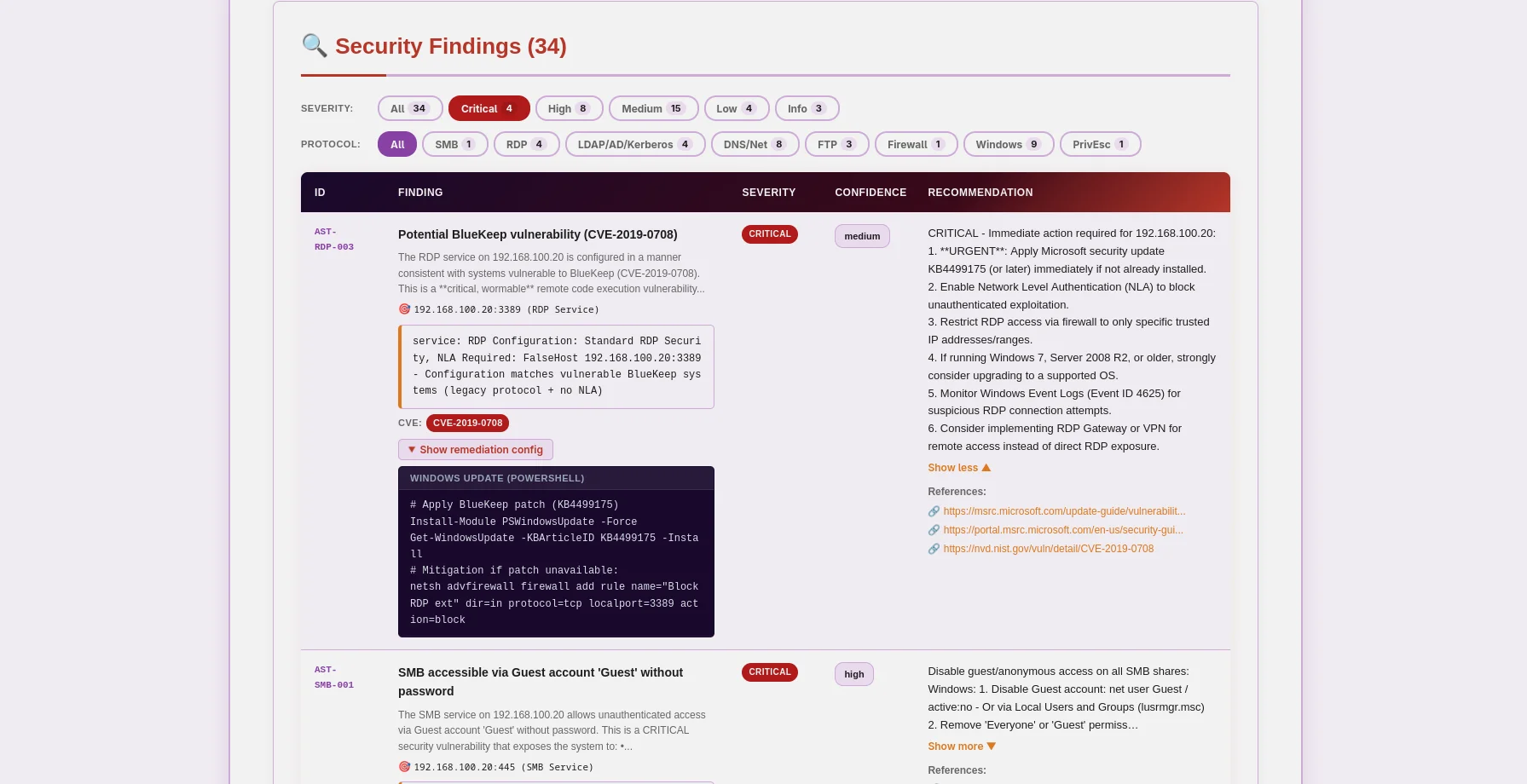
Report HTML a tema Minotauro — badge di gravità, prove espandibili, correzioni AI |
Report JSON — mappatura OWASP/CIS/NIST/PCI, dati CVE, leggibile da macchina |
Asterion è un auditor di sicurezza di rete e dominio pronto per la produzione che mette l'etica al primo posto. Realizzato per penetration tester, ricercatori di sicurezza e team di sicurezza aziendale, combina la scansione tradizionale delle vulnerabilità con un'analisi all'avanguardia basata su intelligenza artificiale per fornire approfondimenti concreti per Windows Active Directory, sistemi Linux e infrastrutture di rete.
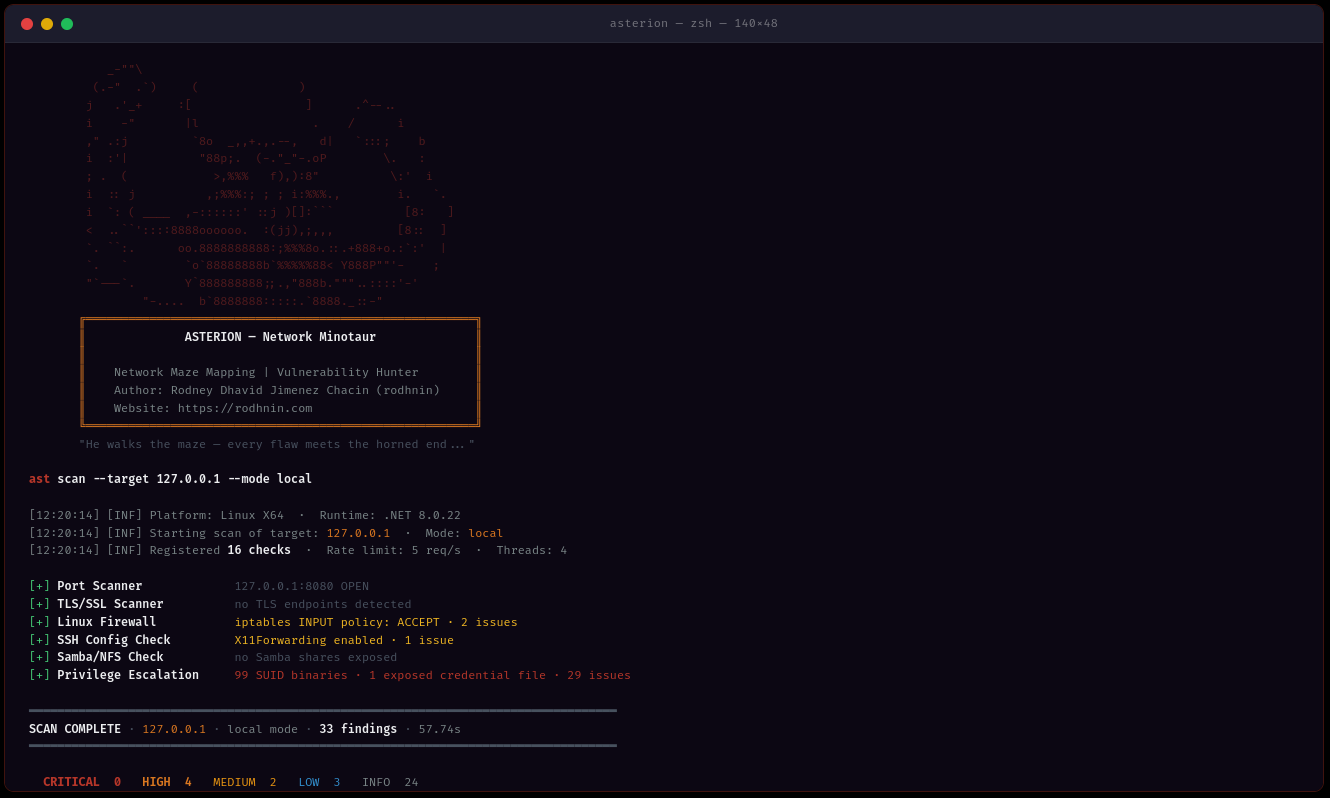
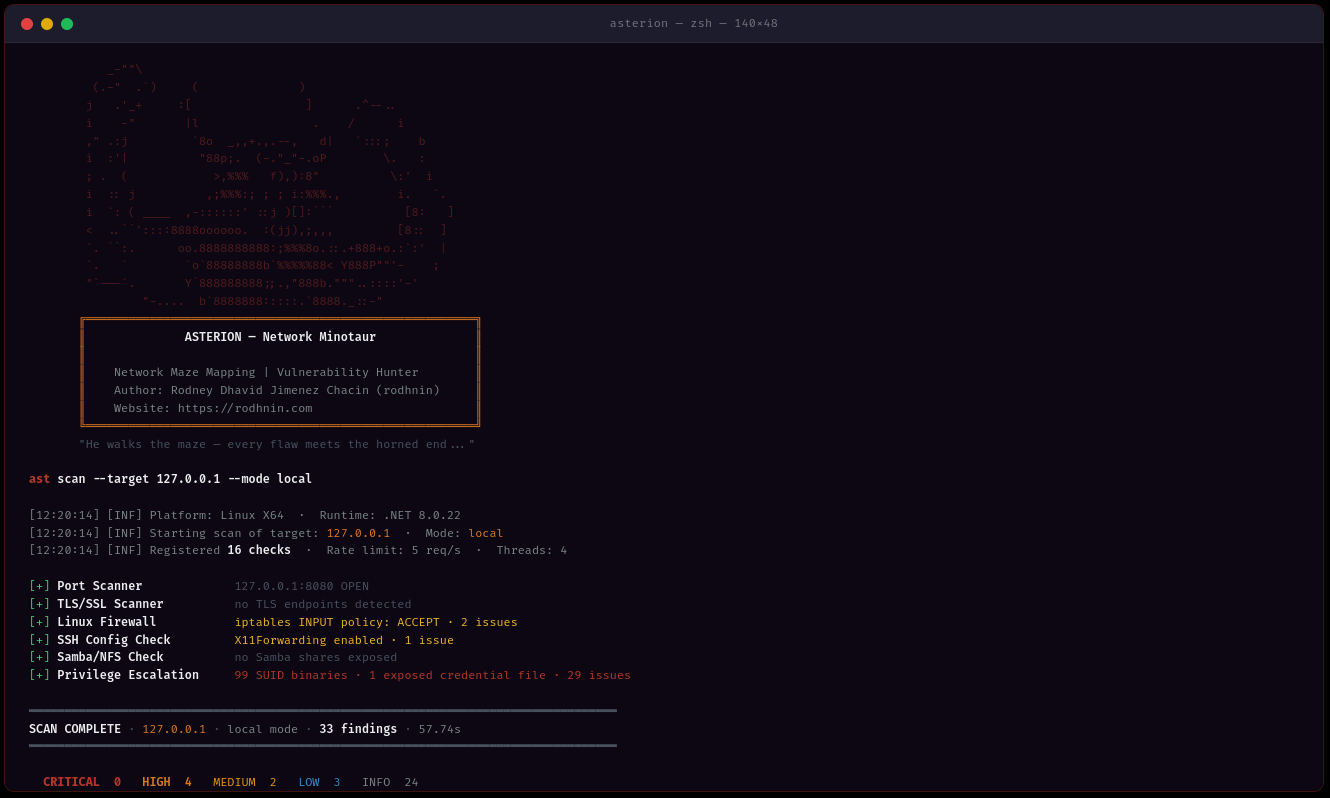
ast scan --target 10.0.0.0/24 --output html
- **Rilevamento multi-metodo**: Analisi dei protocolli SMB, RDP, LDAP, Kerberos, SSH, FTP, DNS, SNMP
- **Multi-threading**: Scansione concorrente con 1-20 thread di lavoro
- **Limitazione intelligente della velocità**: Limitazione configurabile delle richieste (1-20 req/s) per evitare il rilevamento
- **Raccolta delle prove**: Condivisioni SMB, query LDAP, output PowerShell preservati
### 🤖 Analisi basata su IA
Scegli il tuo provider IA in base alle tue esigenze:
| Provider | Ideale per | Velocità | Costo | Privacy |
| -------------------- | ------------------ | --------------- | ------------- | --------------- |
| **OpenAI GPT-4** | Qualità da produzione | ⚡ Veloce (40s) | 💰 $0.30/scan | 🔒 Standard |
| **Anthropic Claude** | Orientato alla privacy | ⚡ Veloce (50s) | 💰 $0.35/scan | 🔒 Migliorato |
| **Ollama (Locale)** | Privacy completa | 🐢 Lento (30min) | 💰 Gratuito | 🔐 100% Offline |
**Due modalità di analisi:**
- **Tecnica**: Risoluzione passo-passo con comandi PowerShell/GPO e frammenti di configurazione
- **Esecutiva**: Riepiloghi in linguaggio semplice per stakeholder e management
### 📊 Reportistica professionale
**Report JSON** (leggibili da macchina)```json
{
"tool": "asterion",
"version": "0.2.0",
"target": "192.168.1.10",
"riskScore": 10.0,
"summary": {
"critical": 3,
"high": 8,
"medium": 16,
"low": 5,
"info": 2
},
"findings": [
{
"id": "AST-SMB-003",
"title": "SMBv1 protocol enabled (EternalBlue vector)",
"severity": "high",
"owasp": { "id": "A06", "name": "Vulnerable and Outdated Components" },
"vulnerabilities": [
{
"cve_id": "CVE-2017-0143",
"cvss_score": 9.8,
"cwe_id": "CWE-119"
}
],
"cvss": 9.8
}
],
"attackChains": [...],
"diff": { "refScanId": 41, "new": [...], "fixed": [...], "persisting": [...] }
}
Report HTML (Leggibili)
Asterion impone l'hacking etico attraverso la tecnologia. La scansione aggressiva e l'analisi AI richiedono prova di proprietà:```bash
ast consent generate --domain corp.local
ast consent verify --method http --domain corp.local --token verify-abc123
ast scan --target corp.local --mode aggressive --use-ai
### 💾 Persistenza del database
Database SQLite condiviso con Argos Suite tiene traccia di tutto:
- **Cronologia scansioni**: Data, durata, conteggio delle scoperte, suddivisione per gravità
- **Repository delle scoperte**: Database di vulnerabilità ricercabile in tutti gli strumenti Argos
- **Domini verificati**: Tracciamento dei token di consenso con scadenza
- **Analisi delle tendenze**: Confronta scansioni nel tempo```bash
# Query recent scans (works for all Argos Suite tools)
sqlite3 ~/.argos/argos.db "SELECT * FROM scans WHERE tool='asterion' ORDER BY started_at DESC LIMIT 10"
# Find critical issues
sqlite3 ~/.argos/argos.db "SELECT * FROM v_critical_findings WHERE tool='asterion'"
Tutte le piattaforme:
Opzionale:
git clone https://github.com/rodhnin/asterion-network-minotaur.git cd asterion-network-minotaur
chmod +x scripts/setup.py python3 scripts/setup.py
**Lo script eseguirà:**
1. ✅ Verifica dei prerequisiti (.NET, Python)
2. ✅ Installazione delle dipendenze Python
3. ✅ Configurazione del database condiviso di Argos Suite
4. ✅ Compilazione di Asterion in modalità Release
5. ✅ Creazione delle directory (~/.asterion, ~/.argos)
6. ✅ Creazione dello script wrapper `/usr/local/bin/ast` (opzionale)
#### Windows (PowerShell)```powershell
# Clone repository
git clone https://github.com/rodhnin/asterion-network-minotaur.git
cd asterion-network-minotaur
# Run setup (right-click PowerShell > Run as Administrator)
.\scripts\setup.ps1
Lo script farà:
Se gli script automatici non funzionano sul tuo sistema, segui questi passaggi:
git clone https://github.com/rodhnin/asterion-network-minotaur.git cd asterion-network-minotaur
#### Passaggio 2: Installa le dipendenze
**Linux/macOS:**```bash
pip3 install -r scripts/requirements.txt
Windows (Prompt dei comandi):```cmd pip install -r scripts\requirements.txt
#### Passaggio 3: Configurazione del database
**Linux/macOS:**```bash
python3 scripts/db_migrate.py
Windows:```cmd python scripts\db_migrate.py
#### Passaggio 4: Costruisci Asterion
**Tutte le piattaforme:**```bash
dotnet build -c Release
Linux/macOS:```bash mkdir -p ~/.asterion/reports mkdir -p ~/.asterion/consent-proofs mkdir -p ~/.argos
**Windows (PowerShell):**```powershell
New-Item -ItemType Directory -Force -Path "$env:USERPROFILE\.asterion\reports" | Out-Null
New-Item -ItemType Directory -Force -Path "$env:USERPROFILE\.asterion\consent-proofs" | Out-Null
New-Item -ItemType Directory -Force -Path "$env:USERPROFILE\.argos" | Out-Null
sudo nano /usr/local/bin/ast
#!/bin/bash exec dotnet "$(cd "$(dirname "${BASH_SOURCE[0]}")/.." && pwd)/src/Asterion/bin/Release/net8.0/Asterion.dll" "$@"
sudo chmod +x /usr/local/bin/ast
#### Passo 7: Configurare la chiave API (opzionale)
Una singola variabile d'ambiente funziona per tutti i provider AI (OpenAI, Anthropic):
**Linux/macOS:**```bash
export AI_API_KEY="sk-proj-..." # OpenAI key
# or
export AI_API_KEY="sk-ant-..." # Anthropic key
# Add to ~/.bashrc or ~/.zshrc to make permanent
Windows (PowerShell):```powershell $env:AI_API_KEY = "sk-proj-..."
[Environment]::SetEnvironmentVariable("AI_API_KEY", "sk-proj-...", [System.EnvironmentVariableTarget]::User)
#### Passaggio 8: Verifica dell'installazione
**Linux/macOS (se è stato creato un symlink):**```bash
ast version
Windows o invocazione diretta:```cmd .\src\Asterion\bin\Release\net8.0\ast.exe version
dotnet .\src\Asterion\bin\Release\net8.0\Asterion.dll version
### La Tua Prima Scansione
#### Scansione Automatica della Rete Locale
**Asterion può rilevare e scansionare automaticamente la tua rete locale!**
**Windows (PowerShell) — Dopo la Configurazione (Consigliato):**```powershell
# Test on localhost (simple)
ast scan --target localhost --output html
# Scan local subnet with AI analysis
ast scan --target 192.168.1.0/24 --output both --threads 10 --rate 5 --use-ai --ai-tone both
# Domain scan with authentication
ast scan --target corp.local --auth "CORP\admin:Password123" --use-ai
Windows (PowerShell) — Senza configurazione PATH:```powershell
.\src\Asterion\bin\Release\net8.0\ast.exe scan --target localhost
--output html --use-ai
--ai-tone both
.\src\Asterion\bin\Release\net8.0\ast.exe scan --target 192.168.1.0/24
--output both --threads 10
--rate 5
**Linux/macOS:**```bash
# Scan localhost
ast scan --target localhost \
--output html \
--use-ai \
--ai-tone both
# Scan local subnet (e.g., 192.168.1.0/24)
ast scan --target 192.168.1.0/24 \
--output both \
--threads 10 \
--rate 5
# Scan domain
ast scan --target corp.local \
--auth "CORP\admin:Password123" \
--output html \
--use-ai
Asterion supporta tre formati di output usando --output:
Controlla come l'analisi AI viene formattata usando --ai-tone:
| Tono | Caso d'uso | Output |
|---|---|---|
| technical |
Scansione di rete semplice (senza autenticazione):```bash ast scan --target 10.0.0.0/24
**Con report HTML:**```bash
ast scan --target 192.168.1.0/24 --output html
Scansione autenticata (dominio Windows):```bash
ast scan --target dc01.corp.local
--auth "CORP\Administrator:P@ssw0rd"
--output html
**Con analisi AI (tecnica + esecutiva):**```bash
ast scan --target 10.0.0.0/24 \
--use-ai \
--ai-tone both \
--output html
Scansione veloce (10 thread, 10 req/s):```bash
ast scan --target 10.0.0.0/24
--threads 10
--rate 10
--output json
#### Posizioni dei Report
**Installazione Nativa:**
- Reports: `~/.asterion/reports/`
- Database: `~/.argos/argos.db`
**Windows:**
- Reports: `%USERPROFILE%\.asterion\reports\`
- Database: `%USERPROFILE%\.argos\argos.db`
**Deployment Docker:**
- Reports: `docker/reports/`
- Database: `docker/data/argos.db`
**🎉 Successo!** Controlla la directory dei report per i file di output JSON e HTML.
---
### Esecuzione su Docker
**Deployment Automatico:**```bash
cd docker
./deploy.sh # Linux/macOS
.\deploy.ps1 # Windows
Distribuzione manuale di Docker:```bash
docker compose up -d
docker compose exec asterion dotnet /app/ast.dll scan
--target 192.168.1.0/24
--output html
docker compose logs -f asterion
docker compose down
---
## 📘 Guida all'uso
### Struttura dei comandi```bash
ast <command> [options]
Comandi disponibili:
scan — Esegue una scansione di sicurezzaconsent — Gestisce i token di consensoversion — Mostra le informazioni sulla versioneast scan --target 192.168.1.0/24
ast scan --target 192.168.1.0/24 --output html
ast scan --target 10.0.0.5 --output both
#### Targeting di Rete```bash
# CIDR notation
ast scan --target 10.0.0.0/24
# IP range
ast scan --target 192.168.1.10-50
# Domain name
ast scan --target corp.local
# Single host
ast scan --target 192.168.1.1
ast scan --target 10.0.0.0/24 --threads 3 --rate 2
ast scan --target 10.0.0.0/24 --threads 15 --rate 15
ast scan --target 10.0.0.0/24 --ports 445,3389,22,139
#### Scansione del Dominio Windows```bash
# Network + LDAP/Kerberos/AD checks
ast scan --target dc01.corp.local \
--auth "CORP\Administrator:P@ssw0rd"
# WinRM: remote firewall, registry, services, privesc
ast scan --target 192.168.1.10 \
--winrm "CORP\admin:P@ssw0rd"
# Full Windows audit: auth + WinRM + AI + HTML
ast scan --target 192.168.1.10 \
--auth "CORP\admin:P@ssw0rd" \
--winrm "CORP\admin:P@ssw0rd" \
--use-ai --ai-tone technical -o both -v
# With NTLM hash (Pass-the-Hash)
ast scan --target 10.0.0.5 \
--auth-ntlm "admin:aad3b435b51404eeaad3b435b51404ee:8846f7eaee8fb117ad06bdd830b7586c"
# Diff against last scan (track security changes)
ast scan --target 192.168.1.10 --winrm "CORP\admin:P@ssw0rd" --diff last -o both
ast scan --target 10.0.0.25 --ssh "admin:password"
ast scan --target 10.0.0.25 --ssh "admin:password" --sudo-password "sudopass"
ast scan --target 10.0.0.25 --ssh-key "admin:~/.ssh/id_rsa"
ast scan --target internal.corp.local
--bastion "bastion.corp.local:jumpuser:~/.ssh/bastion_key"
--ssh "admin:password"
ast scan --target 10.0.0.25
--ssh "root:toor"
--use-ai --ai-tone technical -o both -v
#### Analisi basata sull'IA```bash
# Technical remediation (default, for security teams)
ast scan --target 10.0.0.5 \
--ssh "root:pass" \
--use-ai --ai-tone technical -o html
# Executive summary (for management)
ast scan --target 10.0.0.5 \
--use-ai --ai-tone non_technical -o html
# Both formats + streaming output
ast scan --target 10.0.0.5 --use-ai --ai-tone both --ai-stream -o both
# Agent mode (NVD CVE lookup tool enabled)
ast scan --target 10.0.0.5 --ssh "root:pass" --use-ai --ai-agent -v
# Compare two models
ast scan --target 10.0.0.5 --use-ai \
--ai-compare "openai/gpt-4o-mini-2024-07-18,anthropic/claude-3-5-haiku-20241022"
# Enforce cost budget
ast scan --target 10.0.0.5 --winrm "admin:pass" --use-ai --ai-budget 0.05
ast scan --target 10.0.0.5 -v
ast scan --target 10.0.0.5 -v --timeout 20
ast scan --target 10.0.0.5 --timeout 5
### Gestione del Token di Consenso
#### Genera Token di Consenso```bash
ast consent generate --domain corp.local

# Output: Token: verify-a3f9b2c1d8e4f5a6
HTTP Method (posiziona il file sul server web):```bash
ast consent verify
--method http
--domain corp.local
--token verify-a3f9b2c1d8e4f5a6
**Metodo DNS** (aggiungi record TXT):```bash
# 1. Add DNS TXT record: corp.local = "asterion-verify=verify-a3f9b2c1d8e4f5a6"
# 2. Verify:
ast consent verify \
--method dns \
--domain corp.local \
--token verify-a3f9b2c1d8e4f5a6
Metodo SSH (crea file sul sistema):```bash
ast consent verify
--method ssh
--domain corp.local
--token verify-a3f9b2c1d8e4f5a6
--ssh "user:password"
#### Esegui Modalità Aggressiva```bash
# After verifying consent token:
ast scan --target corp.local --mode aggressive
ast scan --target 192.168.1.0/24 --output html --threads 10 --rate 10
#### Scenario 2: Audit Completo del Dominio```bash
# Complete Windows AD assessment with AI analysis
ast scan --target corp.local \
--auth "CORP\admin:P@ssw0rd" \
--use-ai \
--ai-tone both \
--output both \
--threads 8 \
--rate 8
ast scan --target 10.0.0.0/24
--threads 2
--rate 1
--timeout 20
--output json
#### Scenario 4: Test di Penetrazione```bash
# Generate consent first
ast consent generate --domain internal.corp
# Place token and verify
ast consent verify --method http --domain internal.corp --token <token>
# Run aggressive assessment
ast scan --target internal.corp \
--mode aggressive \
--auth "CORP\pentest:P@ssw0rd" \
--use-ai \
--output both
Asterion utilizza LangChain 1.0.0 con supporto per più provider IA tramite bridge Python, offrendoti flessibilità in base ai tuoi requisiti di sicurezza, privacy e budget.
Ideale per: Uso in produzione
#### Anthropic Claude
**Ideale per: Privacy avanzata**
- ⭐ Qualità: Eccellente (5/5)
- ⚡ Velocità: ~50–70 secondi
- 💰 Costo: ~$0.007–0.015 per scansione (claude-3-5-haiku)
- 🔒 Privacy: Avanzata (approccio privacy-first di Anthropic)```bash
export AI_API_KEY="sk-ant-..." # Same variable, Anthropic key format
Migliore per: Privacy totale
ollama pull llama3.2
### Privacy & Security
**Sanificazione Automatica**
Prima di inviare dati ai provider AI, Asterion rimuove automaticamente:
- ✅ Token di consenso
- ✅ Credenziali di dominio (password, hash NTLM)
- ✅ Informazioni Personalmente Identificabili (PII)
- ✅ Indirizzi IP interni (quando richiesto)
- ✅ Percorsi di condivisione SMB con dati sensibili
**Solo su Richiesta Esplicita**
- L'analisi AI richiede il flag esplicito `--use-ai`
- La scansione aggressiva richiede un token di consenso verificato
- Controlli tu quale provider vede i tuoi dati
**Per la Massima Privacy**
Usa Ollama in locale. Sebbene più lento e meno accurato, i tuoi dati di scansione non lasciano mai la tua macchina.
### Cambiare Provider
**Metodo Attuale (v0.2.0):** Modifica `config/defaults.yaml````yaml
ai:
langchain:
provider: "ollama" # Changed from "openai"
model: "llama3.2" # Ollama model
ollama_base_url: "http://localhost:11434"
In arrivo nella v0.3.0: Menu di configurazione interattivo (in stile Metasploit)```bash
ast --show-options ast --set ai.provider=anthropic ast --save-profile privacy-mode
---
## 🧪 Laboratorio di Test Sicuro
**⚠️ NON eseguire mai scansioni su reti di produzione senza autorizzazione scritta!**
Utilizza il nostro laboratorio Docker per esercitarti in sicurezza:
### Configurazione dell'Ambiente di Test```bash
# Navigate to docker directory
cd docker
# Deploy vulnerable network lab
docker-compose -f compose.testing.yml up -d
# Wait for services to start (~60 seconds)
docker-compose -f compose.testing.yml logs -f
# Create vulnerable conditions
docker-compose -f compose.testing.yml exec windows-target powershell -c "Disable-NetFirewallProfile -All"
cd ..
ast scan --target 172.20.0.0/24 --output html
ast scan --target 172.20.0.2 --auth "LAB\admin:P@ssw0rd123" --output both
ast scan --target 172.20.0.0/24 --use-ai --output html
### Pulizia```bash
cd docker
docker-compose -f compose.testing.yml down -v # -v removes all data
Per scenari di test dettagliati, consulta docs/TESTING_GUIDE.md
Scansiona solo reti e sistemi di tua proprietà o per i quali hai esplicita autorizzazione scritta a testare.
Asterion implementa controlli tecnici per prevenire abusi:
L'accesso non autorizzato a sistemi informatici è illegale nella maggior parte delle giurisdizioni:
Per linee guida etiche complete, consulta docs/ETHICS.md
Asterion fornisce script di deploy multipiattaforma:
Linux/macOS:```bash cd docker ./deploy.sh
**Windows (PowerShell):**```powershell
cd docker
.\deploy.ps1
Opzioni di distribuzione:
Linux/macOS:```bash cd docker docker compose up -d
docker compose exec asterion dotnet /app/ast.dll scan --target 10.0.0.0/24
docker compose logs -f asterion
docker compose down
**Windows (PowerShell):**```powershell
cd docker
docker compose up -d
# Execute scans (note the dotnet wrapper)
docker compose exec asterion dotnet /app/ast.dll scan --target 10.0.0.0/24
# View logs
docker compose logs -f asterion
# Stop service
docker compose down
Dati persistenti:
./reports/ → host directory docker/reports/./data/argos.db → host directory docker/data/argos.db (DB condiviso di Argos Suite)./logs/asterion.log → host directory docker/logs/asterion.logNota: Asterion rileva automaticamente l'ambiente Docker tramite la variabile d'ambiente ASTERION_IN_DOCKER.
Per la documentazione Docker completa (Linux/Windows), vedi: docker/README.md
Installazione nativa:``` ~/.asterion/ ├── reports/ │ ├── asterion_report_10_0_0_0_24_20260419_143000.json # Machine-readable │ └── asterion_report_10_0_0_0_24_20260419_143000.html # Human-friendly (Minotaur-themed) └── consent-proofs/ └── corp_local_verify-abc123_20260419.txt
~/.argos/ ├── argos.db # Shared Argos Suite database └── logs/ └── argos.log # Shared log file
**Distribuzione Docker:**```
asterion-network-minotaur/
├── docker/
│ ├── reports/
│ │ ├── asterion_report_10_0_0_0_24_20260419_143000.json
│ │ └── asterion_report_10_0_0_0_24_20260419_143000.html
│ ├── data/
│ │ └── argos.db # Shared Argos Suite database (Docker)
│ ├── logs/
│ │ └── asterion.log
│ └── workspace/
│ └── consent-proofs/
Nota: L'ambiente Docker viene rilevato automaticamente tramite la variabile d'ambiente ASTERION_IN_DOCKER.
{ "tool": "asterion", "version": "0.2.0", "target": "10.0.0.0/24", "date": "2026-04-13T14:30:00Z", "mode": "safe", "summary": { "critical": 12, "high": 8, "medium": 15, "low": 5, "info": 20 }, "findings": [ { "id": "AST-SMB-003", "title": "SMBv1 enabled (EternalBlue vulnerability)", "severity": "critical", "confidence": "high", "description": "SMBv1 is enabled on this system. This protocol is vulnerable to EternalBlue (CVE-2017-0143), a critical remote code execution vulnerability exploited by WannaCry ransomware.", "evidence": { "type": "smb", "value": "SMBv1 negotiated successfully", "context": "Port 445/tcp open, SMB signing not required" }, "recommendation": "URGENT - Disable SMBv1 immediately:\n\nPowerShell:\nDisable-WindowsOptionalFeature -Online -FeatureName SMB1Protocol -NoRestart\n\nGroup Policy:\nComputer Configuration → Administrative Templates → MS Security Guide\n→ Configure SMBv1 client driver startup = Disabled\n→ Configure SMBv1 server = Disabled\n\nVerify:\nGet-SmbServerConfiguration | Select EnableSMB1Protocol", "references": [ "https://docs.microsoft.com/en-us/windows-server/storage/file-server/troubleshoot/detect-enable-and-disable-smbv1-v2-v3", "https://nvd.nist.gov/vuln/detail/CVE-2017-0143" ], "affected_component": "SMB Server" }, { "id": "AST-LDAP-001", "title": "LDAP anonymous bind allowed", "severity": "high", "confidence": "high", "description": "LDAP server allows anonymous bind, permitting unauthenticated enumeration of domain users, groups, and configuration.", "evidence": { "type": "ldap", "value": "Anonymous bind successful to port 389/tcp", "context": "Retrieved domain base DN: DC=corp,DC=local" }, "recommendation": "Disable LDAP anonymous bind:\n\nGroup Policy:\nComputer Configuration → Policies → Windows Settings → Security Settings → Local Policies → Security Options\n→ Network access: Allow anonymous SID/Name translation = Disabled\n→ Network access: Do not allow anonymous enumeration of SAM accounts = Enabled\n→ Network access: Do not allow anonymous enumeration of SAM accounts and shares = Enabled\n\nRegistry:\nreg add "HKLM\SYSTEM\CurrentControlSet\Control\Lsa" /v RestrictAnonymous /t REG_DWORD /d 1 /f", "affected_component": "LDAP Server" }, { "id": "AST-RDP-001", "title": "RDP without Network Level Authentication (NLA)", "severity": "high", "confidence": "high", "description": "Remote Desktop Protocol (RDP) is configured without Network Level Authentication (NLA). This allows unauthenticated attackers to reach the login screen and attempt brute-force attacks.", "evidence": { "type": "rdp", "value": "RDP port 3389/tcp open, NLA not required", "context": "Encryption level: High" }, "recommendation": "Enable Network Level Authentication:\n\nPowerShell:\n(Get-WmiObject -class Win32_TSGeneralSetting -Namespace root\cimv2\terminalservices -Filter "TerminalName='RDP-tcp'").SetUserAuthenticationRequired(1)\n\nGroup Policy:\nComputer Configuration → Administrative Templates → Windows Components → Remote Desktop Services → Remote Desktop Session Host → Security\n→ Require user authentication for remote connections by using Network Level Authentication = Enabled", "affected_component": "RDP Server" } ], "notes": { "scan_duration_seconds": 67.5, "targets_scanned": 12, "rate_limit_applied": true, "scope_limitations": "Scan limited to network services. Local system checks require SSH/WinRM credentials.", "false_positive_disclaimer": "Manual verification recommended for all findings before remediation." }, "aiAnalysis": { "executiveSummary": "The network scan identified 12 critical security vulnerabilities requiring immediate attention...", "technicalRemediation": "### Critical Issues\n\n1. \n - Affected systems: 10.0.0.5, 10.0.0.10\n - Remediation: Disable SMBv1...", "generatedAt": "2026-04-19T14:35:00Z", "modelUsed": "gpt-4o-mini-2024-07-18", "provider": "openai" } }
### Funzionalità del Report HTML
- **📊 Dashboard Esecutiva**: Carte riassuntive con conteggi di gravità e branding Minotaur
- **🤖 Analisi AI**: Sezioni espandibili per approfondimenti esecutivi e tecnici
- **🔍 Risultati Dettagliati**: Organizzati per gravità con comandi di remediation PowerShell/GPO
- **📋 Evidenze**: Condivisioni SMB, query LDAP, configurazioni RDP, output PowerShell
- **🔗 Riferimenti Esterni**: Collegamenti a CVE, documentazione Microsoft, guide OWASP
- **📱 Mobile Responsive**: Funziona su tutti i dispositivi
- **🎨 Tema Minotaur**: Schema colori rosso/arancione/viola
---
## 📁 Struttura del Progetto```
asterion-network-minotaur/
│
├── src/
│ ├── Asterion/ # Main C# application
│ │ ├── Asterion.csproj # .NET project file
│ │ │
│ │ ├── Checks/ # Security check modules
│ │ │ ├── ICheck.cs # Check interface
│ │ │ ├── BaseCheck.cs # Abstract base class (350 lines)
│ │ │ ├── CheckCategory.cs # Check category enum
│ │ │ │
│ │ │ ├── CrossPlatform/ # Network service scanners (work from any OS)
│ │ │ │ ├── PortScanner.cs # TCP port scanning
│ │ │ │ ├── SmbScanner.cs # SMB/CIFS security (42KB)
│ │ │ │ ├── RdpScanner.cs # RDP configuration (24KB)
│ │ │ │ ├── LdapScanner.cs # LDAP/AD security (38KB)
│ │ │ │ ├── KerberosScanner.cs # Kerberos security (22KB)
│ │ │ │ ├── SnmpScanner.cs # SNMP vulnerabilities (21KB)
│ │ │ │ ├── DnsScanner.cs # DNS misconfigurations (14KB)
│ │ │ │ ├── FtpScanner.cs # FTP security (27KB)
│ │ │ │ ├── TlsScanner.cs # TLS/SSL certificate checks
│ │ │ │ ├── SysvolCheck.cs # SYSVOL/GPP password exposure
│ │ │ │ ├── AdAggressiveCheck.cs # AS-REP roasting, delegation, weak ACLs
│ │ │ │ └── WinRmChecks.cs # Remote Windows audit via WS-Man
│ │ │ │
│ │ │ ├── Windows/ # Local Windows system checks
│ │ │ │ ├── WinFirewallCheck.cs # Firewall configuration
│ │ │ │ ├── WinRegistryCheck.cs # Registry security
│ │ │ │ ├── AdPolicyCheck.cs # Active Directory policies
│ │ │ │ ├── WinServicesCheck.cs # Service misconfigurations
│ │ │ │ └── PrivEscCheckWin.cs # Windows privilege escalation
│ │ │ │
│ │ │ └── Linux/ # Local/remote Linux checks (via SSH)
│ │ │ ├── LinuxFirewallCheck.cs # iptables/nftables/ufw
│ │ │ ├── SshConfigCheck.cs # SSH hardening
│ │ │ ├── SambaNfsCheck.cs # Samba/NFS security
│ │ │ └── PrivEscCheckLinux.cs # SUID, sudo misconfig
│ │ │
│ │ ├── Core/ # Core infrastructure
│ │ │ ├── Orchestrator.cs # Main execution engine (1,243 lines)
│ │ │ ├── Config.cs # YAML configuration loader
│ │ │ ├── ScanOptions.cs # Scan configuration
│ │ │ ├── Database.cs # SQLite operations
│ │ │ ├── ConsentValidator.cs # Consent token verification
│ │ │ ├── SshConnectionManager.cs # SSH.NET wrapper (password/key/bastion)
│ │ │ ├── WinRmConnectionManager.cs # WS-Man HTTP/NTLM (Linux → Windows)
│ │ │ ├── AttackChainAnalyzer.cs # Multi-step attack chain correlation
│ │ │ ├── NtlmSpnego.cs # NTLM/SPNEGO auth implementation
│ │ │ ├── NtlmV2Auth.cs # NTLMv2 auth implementation
│ │ │ │
│ │ │ ├── Output/
│ │ │ │ └── ReportBuilder.cs # Report generation (risk score, labels)
│ │ │ │
│ │ │ └── Utils/
│ │ │ ├── NetworkUtils.cs # Network operations
│ │ │ ├── CidrParser.cs # CIDR/IP range parsing
│ │ │ ├── AuthenticationManager.cs # Credential handling
│ │ │ └── OsDetector.cs # Per-target OS detection (SSH/SMB/TTL)
│ │ │
│ │ ├── Models/ # Data models
│ │ │ ├── Report.cs # Main report structure
│ │ │ ├── Finding.cs # Security finding (OWASP/CVE/Compliance)
│ │ │ ├── Evidence.cs # Finding proof
│ │ │ ├── ConsentInfo.cs # Consent verification
│ │ │ └── AiAnalysis.cs # AI-generated content (cost tracking)
│ │ │
│ │ ├── Program.cs # Application entry point
│ │ └── Cli.cs # CLI argument parser (all flags)
│ │
│ └── Asterion.sln # Visual Studio solution
│
├── scripts/ # Python bridge scripts
│ ├── ai_analyzer.py # LangChain AI integration (stream/agent/compare)
│ ├── cve_lookup.py # NVD API v2 CVE enrichment
│ ├── owasp.py # OWASP Top 10 mapping (139 entries)
│ ├── compliance.py # CIS/NIST/PCI mapping (95 entries)
│ ├── db_migrate.py # Database setup
│ ├── render_html.py # HTML report generation (Jinja2)
│ ├── setup.sh # Linux/macOS installation script
│ ├── setup.ps1 # Windows PowerShell setup
│ └── requirements.txt # Python dependencies
│
├── config/ # Configuration files
│ ├── defaults.yaml # Default settings
│ └── prompts/ # AI prompt templates
│ ├── technical.txt # Technical remediation prompts
│ └── non_technical.txt # Executive summary prompts
│
├── db/
│ └── migrate.sql # Database schema (shared with Argos Suite)
│
├── docker/ # Docker deployment
│ ├── Dockerfile # Production image
│ ├── docker-compose.yml # Production deployment
│ ├── compose.testing.yml # Vulnerable lab environment
│ ├── .dockerignore
│ ├── .env.example
│ └── README.md # Docker instructions
│
├── docs/ # Documentation
│ ├── AI_INTEGRATION.md # AI setup guide
│ ├── CONSENT.md # Consent token system
│ ├── DATABASE_GUIDE.md # SQLite schema and queries
│ ├── ETHICS.md # Ethical guidelines
│ ├── NETWORK_CHECKS.md # Complete check catalog (50+ checks)
│ └── ROADMAP.md # Development roadmap
│
├── schema/
│ └── report.schema.json # Argos Suite unified schema
│
├── templates/
│ └── report.html.j2 # HTML report template (35KB, Minotaur-themed)
│
├── assets/
│ └── ascii.txt # Minotaur ASCII art banner
│
├── CHANGELOG.md # Version history
├── README_PATTERN.md # README visual branding guide
├── LICENSE # MIT License
└── README.md # This file
Statistiche:
Stato: 🎉 Rilasciata
--winrm)--ssh-key, --bastion, --sudo-password)--diff last / --diff <id> — monitoraggio della regressione di sicurezza--creds-file credentials.yaml--ai-budget, costi salvati nel DB + costs.jsonFocus: Usabilità, scala, AI interattiva
--show-options, --set)ast db scans list, ast db findings search)Focus: Remediation automatizzata, rilevamento ML, scansione distribuita
Per descrizioni dettagliate delle funzionalità, vedere docs/ROADMAP.md
Accogliamo con piacere contributi! Sia per:
git checkout -b feature/amazing-feature)git commit -m 'Add amazing feature')git push origin feature/amazing-feature)git clone https://github.com/YOUR-USERNAME/asterion-network-minotaur.git cd asterion-network-minotaur
pip install -r scripts/requirements.txt dotnet restore
dotnet build
dotnet run --project src/Asterion -- scan --target 192.168.1.1 -v
### Code Style
- **C# Formattazione**: Seguire le convenzioni di codifica C# di Microsoft
- **Python Formattazione**: Usiamo [Black](https://github.com/psf/black) (lunghezza riga: 88)
- **Documentazione XML**: Richiesta per tutte le classi/metodi pubblici
- **Commenti del codice**: Usare `//` per commenti inline, `///` per documentazione XML
### Segnalazione Problemi
Trovato un bug? Hai una richiesta di funzionalità?
**Apri un issue**: https://github.com/rodhnin/asterion-network-minotaur/issues
Per favore includi:
- Versione di Asterion (`ast version`)
- Versione .NET (`dotnet --version`)
- Versione Python (`python --version`)
- Sistema operativo
- Passaggi per riprodurre (per bug)
- Comportamento atteso vs effettivo
---
## 📚 Documentazione
Documentazione completa disponibile nella directory `docs/`:
| Documento | Descrizione |
| ------------------------------------------ | --------------------------------------------------------------- |
| [AI_INTEGRATION.md](https://github.com/rodhnin/asterion-network-minotaur/blob/main/docs/AI_INTEGRATION.md) | Guida completa alla configurazione AI (tutti e 3 i provider) |
| [CONSENT.md](https://github.com/rodhnin/asterion-network-minotaur/blob/main/docs/CONSENT.md) | Dettagli tecnici del sistema di token di consenso |
| [DATABASE_GUIDE.md](https://github.com/rodhnin/asterion-network-minotaur/blob/main/docs/DATABASE_GUIDE.md) | Schema SQLite, query, gestione |
| [ETHICS.md](https://github.com/rodhnin/asterion-network-minotaur/blob/main/docs/ETHICS.md) | Quadro legale e linee guida etiche |
| [NETWORK_CHECKS.md](https://github.com/rodhnin/asterion-network-minotaur/blob/main/docs/NETWORK_CHECKS.md) | Catalogo completo di oltre 50 controlli di sicurezza |
| [ROADMAP.md](https://github.com/rodhnin/asterion-network-minotaur/blob/main/docs/ROADMAP.md) | Funzionalità future e piani di sviluppo |
### Collegamenti Veloci
- **Changelog**: [CHANGELOG.md](https://github.com/rodhnin/asterion-network-minotaur/blob/main/CHANGELOG.md)
- **Licenza**: [LICENSE](https://github.com/rodhnin/asterion-network-minotaur/blob/main/LICENSE)
- **ASCII Art**: [assets/ascii.txt](https://github.com/rodhnin/asterion-network-minotaur/blob/main/assets/ascii.txt)
---
## 🤝 Parte di Argos Suite
Asterion è il quarto componente della **Argos Security Suite**:
| Strumento | Linguaggio | Target | Stato |
| --------------- | ----------- | ----------------------- | ------------ |
| **Argus** | Python | WordPress | ✅ Stabile |
| **Hephaestus** | Python | Server (Linux/Windows) | ✅ Stabile |
| **Pythia** | Python | SQL Injection | ✅ Stabile |
| **Asterion** | C# + Python | Reti/Domini/AD | 🎉 Rilasciato |
**Infrastruttura Condivisa:**
- Database SQLite (`~/.argos/argos.db`)
- Schema report JSON unificato
- Sistema di token di consenso
- Analisi AI tramite LangChain
---
## ⚖️ Licenza
Questo progetto è concesso in licenza secondo i termini della **Licenza MIT** - vedere il file [LICENSE](https://github.com/rodhnin/asterion-network-minotaur/blob/main/LICENSE) per i dettagli.```
MIT License
Copyright (c) 2025-2026 Rodney Dhavid Jimenez Chacin
Permission is hereby granted, free of charge, to any person obtaining a copy
of this software and associated documentation files (the "Software"), to deal
in the Software without restriction, including without limitation the rights
to use, copy, modify, merge, publish, distribute, sublicense, and/or sell
copies of the Software, and to permit persons to whom the Software is
furnished to do so, subject to the following conditions:
The above copyright notice and this permission notice shall be included in all
copies or substantial portions of the Software.
THE SOFTWARE IS PROVIDED "AS IS", WITHOUT WARRANTY OF ANY KIND, EXPRESS OR
IMPLIED, INCLUDING BUT NOT LIMITED TO THE WARRANTIES OF MERCHANTABILITY,
FITNESS FOR A PARTICULAR PURPOSE AND NONINFRINGEMENT.
IMPORTANTE: Questo strumento è destinato esclusivamente a test di sicurezza autorizzati.
Utilizzando Asterion, riconosci e accetti che:
Se scopri vulnerabilità utilizzando Asterion:
Non scansionare. Se non sei sicuro di avere il permesso, probabilmente non ce l'hai.
Asterion si erge sulle spalle di giganti:
Un ringraziamento speciale a tutti i ricercatori di sicurezza che praticano e promuovono l'hacking etico.
Rodney Dhavid Jimenez Chacin (rodhnin)
Per domande, feedback o richieste di collaborazione, visita rodhnin.com
Realizzato con ❤️ per professionisti della sicurezza e amministratori di rete aziendali in tutto il mondo
⭐ Fai una star a questo repo se lo trovi utile! ⭐
Segnala un Bug • Richiedi una Funzionalità • Documentazione
🐂 Asterion — Navigare nel Labirinto di Rete 🐂
Asterion v0.2.0 — Maggio 2026
Realizzato con ❤️ da rodhnin | Parte della Argos Security Suite
| Categoria di Controllo | Dettagli |
|---|
| Sicurezza SMB/CIFS | Condivisioni anonime, firma SMB, SMBv1 (EternalBlue), NTLMv1, condivisioni scrivibili |
| Sicurezza RDP | Autenticazione a livello di rete (NLA), livelli di crittografia, RDP esposto |
| LDAP/Active Directory | Bind anonimo, firma LDAP, politiche password, pre-autenticazione Kerberos |
| Sicurezza Kerberos | AS-REP roasting, Kerberoasting, durata eccessiva dei ticket |
| SNMP | Stringhe community predefinite, SNMPv1/v2c, accesso in scrittura |
| DNS/NetBIOS | Trasferimenti di zona (AXFR), avvelenamento LLMNR/NetBIOS, mDNS |
| Sistemi Windows | Firewall, Registro (UAC, LSA), servizi, escalation dei privilegi |
| Sistemi Linux | iptables/nftables, SSH, Samba/NFS, binari SUID, configurazione errata di sudo |
| Formato | Comando | Output |
|---|
| JSON | --output json | Report leggibili dalla macchina (default) |
| HTML | --output html | Report con tema Minotauro |
| Entrambi | --output both | Genera sia JSON che HTML |
| Team di sicurezza |
| Remediation passo-passo con comandi PowerShell/GPO |
| non_technical | Riepilogo esecutivo | Descrizioni in linguaggio semplice per la direzione |
| both | Analisi completa | Formati sia tecnici che esecutivi |
| Opzione | Valori | Default | Descrizione |
|---|
--target, -t | IP/CIDR/dominio | Obbligatorio | Target(s): 192.168.1.0/24, 10.0.0.1, corp.local, lista separata da virgole |
--mode, -m | safe, aggressive | safe | Modalità di scansione (aggressiva richiede token di consenso) |
--output, -o | json, html, both | json | Formato di output |
--ports, -p | elenco porte | Auto-rilevamento | Porte da scansionare (es. 22,80,443 o 8000-9000) |
--threads | 1-20 | 5 | Numero di thread concorrenti |
--rate | 1-20 | 5 | Limite di velocità delle richieste (req/s) |
--timeout | secondi | 10 | Timeout di connessione |
--verify-ssl | flag | true | Verifica certificati SSL/TLS (disabilita per certificati autofirmati) |
--verbose, -v | flag | false | Abilita registrazione dettagliata |
--diff | last / scan_id | - | Confronta con la scansione precedente (--diff last o --diff 42) |
--creds-file | percorso YAML | - | Carica tutte le credenziali da file YAML |
| Opzione | Valori | Descrizione |
|---|
--auth | DOMINIO\utente:password | Credenziali di dominio per controlli LDAP/Kerberos/SMB/AD |
--auth-ntlm | utente:hash | Autenticazione NTLM Pass-the-hash |
--kerberos | utente:password@REALM | Credenziali Kerberos |
--winrm | DOMINIO\utente:password | Controlli Windows remoti WinRM (firewall, registro, servizi, AD) |
--ssh | utente:password | Autenticazione con password SSH per controlli Linux remoti |
--ssh-key | utente:/percorso/chiave | Autenticazione basata su chiave SSH |
--sudo-password | password | Password di elevazione sudo per controlli privilegiati Linux |
--bastion | host:utente:chiave | Host jump/bastion per SSH multi-hop |
| Opzione | Valori | Default | Descrizione |
|---|
--use-ai | flag | false | Abilita analisi basata su IA |
--ai-tone | technical, non_technical, both | technical | Formato analisi IA |
--ai-provider | openai, anthropic, ollama | openai | Fornitore IA |
--ai-model | nome modello | gpt-4o-mini-2024-07-18 | Modello IA da utilizzare |
--ai-budget | importo USD | - | Interrompi IA se il costo stimato supera questo valore |
--ai-stream | flag | false | Trasmetti token IA a stdout in tempo reale |
--ai-agent | flag | false | Modalità agente LangChain con strumento di ricerca NVD CVE |
--ai-compare | prov/modello,prov/modello | - | Confronto multi-modello |
| Modalità | Controlli | Consenso Richiesto | Limite di Richieste |
|---|
| Sicura | Controlli di rete non intrusivi | ❌ No | 5 req/s |
| Aggressiva | Test approfonditi di AD/sistema | ✅ Sì | 10 req/s |
| Analisi AI | Analisi delle vulnerabilità | ✅ Sì | N/D |
--ai-stream--ai-agent--ai-compare