 punk-security/dnsreaper
Veloce scanner per subdomain takeover con oltre 50 firme, con supporto per integrazioni con provider cloud (AWS, Azure, Cloudflare) e modalità pipeline CI/CD per test di sicurezza automatizzati.




DNS Reaper è un altro strumento per il subdomain takeover, ma con un'enfasi su precisione, velocità e il numero di firme nel nostro arsenale!
Possiamo scansionare circa 50 sottodomini al secondo, testando ciascuno con oltre 50 firme di takeover. Ciò significa che la maggior parte delle organizzazioni può scansionare l'intero patrimonio DNS in meno di 10 secondi.
Per facilitare l'avvio, abbiamo creato una simpatica versione web che può scansionare un file di zona DNS, un elenco separato da virgole o fino a 100 sottodomini che troviamo da ProjectDiscovery.
Dai un'occhiata: dnsreaper web
Naturalmente lo strumento CLI è molto più EPICO, e più veloce.
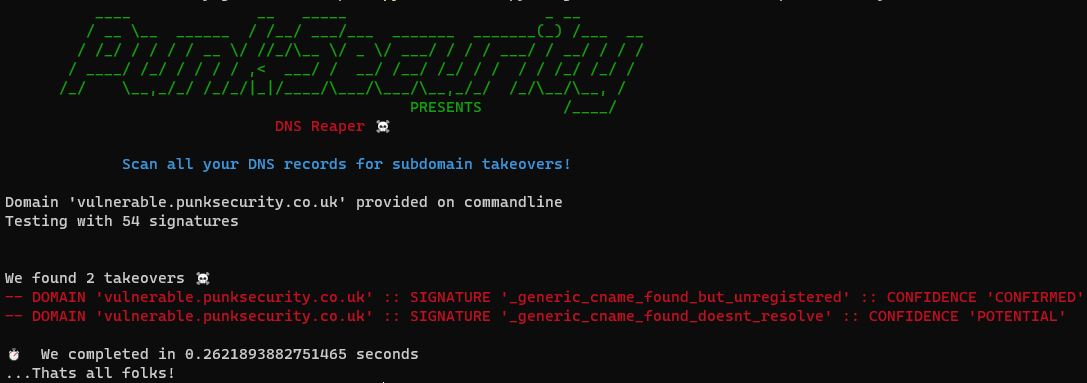
Puoi eseguirlo fornendo un elenco di domini in un file, o un singolo dominio dalla riga di comando. DNS Reaper scansionerà quindi i domini con tutte le sue firme, producendo un file CSV.
Puoi eseguirlo facendogli recuperare i tuoi record DNS! Sì, hai capito bene, puoi eseguirlo con le credenziali e testare tutta la configurazione dei tuoi domini in modo rapido e semplice. DNS Reaper si collegherà al provider DNS, recupererà tutti i tuoi record e poi li testerà.
Attualmente supportiamo AWS Route53, Cloudflare e Azure. La documentazione su come aggiungere il tuo provider si trova qui
Punk Security è un'azienda DevSecOps, e DNS Reaper affonda le sue radici nelle migliori pratiche di sicurezza moderne.
Puoi eseguire DNS Reaper in una pipeline, fornendogli un elenco di domini che intendi predisporre, e terminerà con codice di uscita diverso da zero se rileva che un takeover è possibile. Puoi prevenire i takeover prima ancora che siano possibili!
Per eseguire DNS Reaper, puoi usare l'immagine Docker o eseguirlo con Python 3.11.
I risultati vengono restituiti nell'output e maggiori dettagli sono forniti in un file locale "results.csv". Supportiamo anche l'output JSON come opzione.
docker run punksecurity/dnsreaper --help
[!IMPORTANTE] La versione minima di Python supportata da dnsReaper è 3.9, ma 3.11 è raccomandata. Tentiamo di mantenere il supporto per versioni stabili di Python che non siano giunte a fine vita. Non forniremo supporto né accetteremo pull request per problemi che riguardano versioni di Python a fine vita. Vedi Stato delle versioni Python per maggiori informazioni.
Quando esegui localmente, raccomandiamo di usare un ambiente virtuale (venv) per evitare conflitti di dipendenze. Istruzioni disponibili Qui.
pip install -r requirements.txt
python main.py --help
Scansiona account AWS:
docker run punksecurity/dnsreaper aws --aws-access-key-id <key> --aws-access-key-secret <secret>
Per maggiori informazioni, vedi la documentazione per il provider aws
Scansiona tutti i domini da file:
docker run -it --rm -v $(pwd):/etc/dnsreaper punksecurity/dnsreaper file --filename /etc/dnsreaper/<filename>
Scansiona un singolo dominio
docker run -it --rm punksecurity/dnsreaper single --domain <domain>
Scansiona un singolo dominio e invia output su stdout:
Dovresti reindirizzare l'output stderr o salvare l'output stdout con >
docker run -it --rm punksecurity/dnsreaper single --domain <domain> --out stdout --out-format=json > output
          ____              __   _____                      _ __
         / __ \__  ______  / /__/ ___/___  _______  _______(_) /___  __
        / /_/ / / / / __ \/ //_/\__ \/ _ \/ ___/ / / / ___/ / __/ / / /
       / ____/ /_/ / / / / ,<  ___/ /  __/ /__/ /_/ / /  / / /_/ /_/ /
      /_/    \__,_/_/ /_/_/|_|/____/\___/\___/\__,_/_/  /_/\__/\__, /
                                             PRESENTS         /____/
                              DNS Reaper ☠️

             Scan all your DNS records for subdomain takeovers!

usage:
main.py provider [options]

output:
  findings output to screen and (by default) results.csv

help:
main.py --help

providers:
  > aws - Scan multiple domains by fetching them from AWS Route53
  > azure - Scan multiple domains by fetching them from Azure DNS services
  > bind - Read domains from a dns BIND zone file, or path to multiple
  > cloudflare - Scan multiple domains by fetching them from Cloudflare
  > digitalocean - Scan multiple domains by fetching them from Digital Ocean
  > file - Read domains from a file (or folder of files), one per line
  > godaddy - Scan multiple domains by fetching them from GoDaddy
  > googlecloud - Scan multiple domains by fetching them from Google Cloud. Requires GOOGLE_APPLICATION_CREDENTIALS environment variable.
  > projectdiscovery - Scan multiple domains by fetching them from ProjectDiscovery
  > securitytrails - Scan multiple domains by fetching them from Security Trails
  > single - Scan a single domain by providing a domain on the commandline
  > zonetransfer - Scan multiple domains by fetching records via DNS zone transfer

positional arguments:
  {aws,azure,bind,cloudflare,digitalocean,file,godaddy,googlecloud,projectdiscovery,securitytrails,single,zonetransfer}

options:
  -h, --help            Show this help message and exit
  --out OUT             Output file (default: results) - use 'stdout' to stream out
  --out-format {csv,json}
  --resolver RESOLVER   Provide a custom DNS resolver
  --parallelism PARALLELISM
                        Number of domains to test in parallel - too high and you may see odd DNS results (default: 30)
  --disable-probable    Do not check for probable conditions
  --enable-unlikely     Check for more conditions, but with a high false positive rate
  --signature SIGNATURE
                        Only scan with this signature (multiple accepted)
  --exclude-signature EXCLUDE_SIGNATURE
                        Do not scan with this signature (multiple accepted)
  --pipeline            Exit Non-Zero on detection (used to fail a pipeline)
  -v, --verbose         -v for verbose, -vv for extra verbose
  --nocolour            Turns off coloured text

aws:
  Scan multiple domains by fetching them from AWS Route53
