 paolomonti42/salt
SALT - SLUB ALlocator Tracer per il kernel Linux

Benvenuto in salt, uno strumento per analizzare e comprendere la gestione della memoria heap del kernel. Può essere utile per sviluppare exploit, eseguire il debug del tuo codice del kernel e, più importantemente, per giocare con le allocazioni dell'heap del kernel e impararne il funzionamento interno.
Questo strumento aiuta a tracciare le allocazioni e lo stato corrente dell'allocatore SLUB nei kernel Linux moderni.
È scritto come un plugin per gdb e ti permette di tracciare e registrare le allocazioni di memoria e di filtrarle per nome del processo o per cache. Lo strumento può anche scaricare l'elenco delle cache attive e stampare informazioni rilevanti.
Questo repository include anche un modulo del kernel caricabile playground che può attivare allocazioni e deallocazioni a volontà, per fungere sia da strumento di debug che da strumento di apprendimento per comprendere meglio come funziona l'allocatore.
Maggiori informazioni sul funzionamento interno dell'allocatore SLUB, su come iniziare, la documentazione dettagliata del plugin e note sul modulo playground si trovano nella cartella docs.
Ecco l'elenco completo dei comandi:
> salt help
Possible commands:

filter -- manage filtering features by adding with one of the following arguments
       enable -- enable filtering. Only information about filtered processes will be displayed
       disable -- disable filtering. Information about all processes will be displayed.
       status -- display current filtering parameters
       add process/cache <arg>-- add one or more filtering conditions
       remove process/cache <arg>-- remove one or more filtering conditions
       set -- specify complex filtering rules. The supported syntax is "salt filter set (cache1 or cache2) and (process1 or process2)".
       Some variations might be accepted. Checking with "salt filter status" is recommended. For simpler rules use "salt filter add".


record -- manage recording features by adding with one of the following arguments
       on -- enable recording. Information about filtered processes will be added to the history
       off -- disable recording.
       show -- display the recorded history
       clear -- delete the recorded history

trace <proc name> -- reset all filters and configure filtering for a specific process

walk -- navigate all active caches and print relevant information

walk_html -- navigate all active caches and generate relevant information in html format

walk_json -- navigate all active caches and generate relevant information in json format

help -- display this message
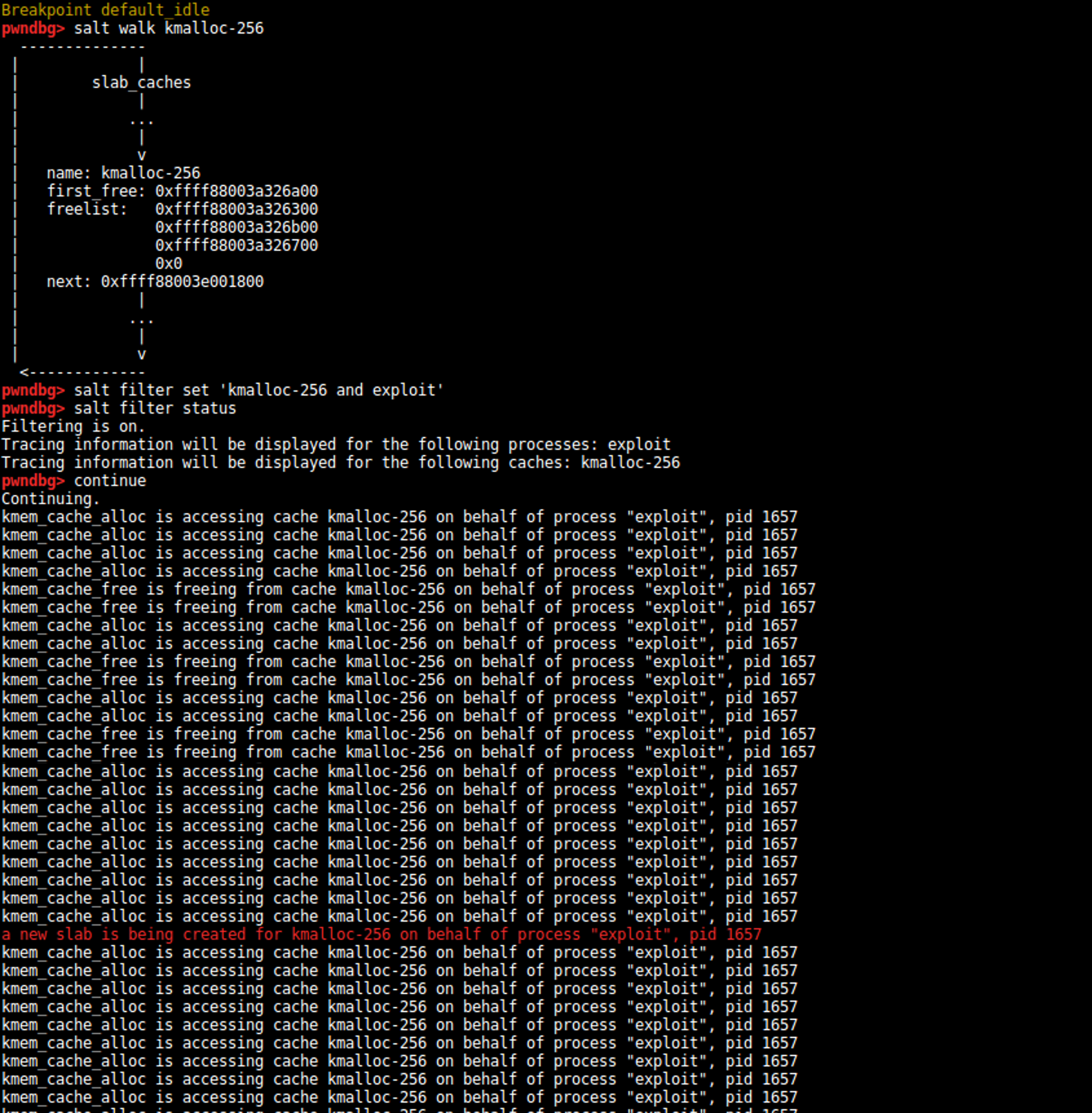
E qui puoi vedere salt in azione:
Questo progetto è stato sviluppato presso EURECOM come progetto semestrale per la primavera 2018.
Un ringraziamento speciale ai miei supervisori Yanick, Fabio, Emanuele, Dario, Marius e a tutto il resto del team S3 che mi ha aiutato e seguito.
Come parte del mio progetto, ho anche tenuto una presentazione al team di sicurezza di EURECOM. Le slide sono disponibili qui.
Perla E, Oldani M (2010) - A Guide to Kernel Exploitation: Attacking the Core
