
Utilizza ChatGPT API, Bard API e Llama2, Python-Nmap, DNS Recon, PCAP e moduli JWT recon e utilizza il modello GPT3 per creare report di vulnerabilità basati sui dati di scansione Nmap e informazioni di scansione DNS. Può anche eseguire l'enumerazione dei sottodomini in larga misura.
Questa è un'applicazione Proof Of Concept che dimostra come l'IA possa essere utilizzata per generare risultati accurati per l'analisi delle vulnerabilità e permette anche un ulteriore utilizzo del già utilissimo ChatGPT realizzato utilizzando i moduli Python openai-api, python-nmap, dnsresolver e anche customtkinter e tkinter per la versione GUI del codice. Questo progetto ha anche un'interfaccia CLI e GUI, ed è in grado di eseguire analisi delle vulnerabilità di rete, enumerazione DNS e anche enumerazione dei sottodomini.
cd package && pip3/pip install .
Importa semplicemente uno qualsiasi dei 3 pacchetti, quindi definisci le variabili di conseguenza.```python
from GVA.scanner import NetworkScanner
from GVA.dns_recon import DNSRecon
from GVA.geo import geo_ip_recon
from GVA.jwt import JWTAnalyzer
from GVA.menus import Menus
from GVA.packet_analysis import PacketAnalysis
from GVA.ai_models import NMAP_AI_MODEL
from GVA.ai_models import DNS_AI_MODEL
from GVA.ai_models import JWT_AI_MODEL
from GVA.assets import Assets
from GVA.subdomain import sub_enum
from GVA import gui
# The components defined
dns_enum = DNSRecon()
geo_ip = geo_ip_recon()
p_ai_models = NMAP_AI_MODEL()
dns_ai_models = DNS_AI_MODEL()
port_scanner = NetworkScanner()
jwt_analizer = JWTAnalyzer()
sub_recon = sub_enum()
asset_codes = Assets()
packet_analysis = PacketAnalysis()
# KEEP IT BLANK IF YOU HAVE NO CLUE THE MENU WILL ASK TO FILL IT ONCE ACTIVE
lkey = "LLAMA API KEY"
lendpoint = "LLAMA ENDPOINT"
keyset = "AI API KEY"
output_loc = "OUTPUT LOCATION FOR PCAP"
threads = 200 # Default INT 200 but can be increased.
target_ip_hostname_or_token = "TARGET IP, HOSTNAME OR TOKEN"
profile_num = "PROFILE FOR NMAP SCAN"
ai_set = "AI OF CHOICE"
akey_set = "OPENAI API KEY"
bkey_set = "BARD API KEY"
ai_set_args = "" # Keep it blank at any cost
llamakey = "LLAMA RUNPOD API KEY"
llamaendpoint = "LLAMA RUNPOD ENDPOINT"
Menus(
lamma_key=lkey,
llama_api_endpoint=lendpoint,
initial_keyset=keyset,
threads=threads,
output_loc=output_loc,
target=target_ip_hostname,
profile_num=profile_num,
ai_set=ai_set,
openai_akey_set=akey_set,
bard_key_set=bkey_set,
ai_set_args=ai_set_args,
llama_runpod_key=llamakey,
llama_endpoint=llamaendpoint
)
gui.application()
L'aggiornamento per passcracker nel pacchetto e la GUI sono ancora in corso.
.envllama-api o specificamente l'opzione di distribuzione dell'endpoint serverless llama runpod è necessario inserire l'ID dell'endpoint serverless da runpod e anche la tua `CHIAVE API RUNPOD````python
GEOIP_API_KEY = ''
OPENAI_API_KEY = ''
BARD_API_KEY = ''
RUNPOD_ENDPOINT_ID = ''
RUNPOD_API_KEY = ''- secondo, installa i pacchetti```bash
pip3 install -r requirements.txt
or
pip install -r requirements.txt
python gpt_vuln.py --help
python gpt_vuln.py --r help
python gpt_vuln.py --target <IP/hostname/token> --attack dns/nmap/jwt
python gpt_vuln.py --target <IP/hostname/token> --attack nmap --profile <1-13> (Default:1)
python gpt_vuln.py --target <IP/hostname/token> --attack dns
python gpt_vuln.py --target --attack sub
python gpt_vuln.py --target --attack sub --sub_list
python gpt_vuln.py --target --attack geo
python gpt_vuln.py --target --attack pcap --output --thread NUM of threads <200:default>
python gpt_vuln.py --target --attack nmap --profile <1-5> --ai llama /llama-api /bard / openai
python gpt_vuln.py --target --attack dns --ai llama /llama-api /bard / openai
python gpt_vuln.py --target --attack jwt --ai llama /llama-api /bard / openai
python gpt_vuln.py --password_hash --wordlist_file --algorithm --parallel --complexity
python gpt_vuln.py --menu True
#### Opzione dell'Interfaccia CLI```bash
________________________
| GVA Usage in progress... |
========================
\
\
^__^
(oo)\_______
(__)\ )\/\
||----w |
|| ||
┏━━━━━━━━━┳━━━━━━━━━━━━━━━━┓
┃ Options ┃ Utility ┃
┡━━━━━━━━━╇━━━━━━━━━━━━━━━━┩
│ 1 │ Nmap Enum │
│ 2 │ DNS Enum │
│ 3 │ Subdomain Enum │
│ 4 │ GEO-IP Enum │
| 5 | JWT Analysis |
| 6 | PCAP Analysis |
| 6 | Hash Cracker |
│ q │ Quit │
└─────────┴────────────────┘
Enter your choice:
L'interfaccia CLI ha alcune cose da notare.
.env funzionano con le opzioni degli argomentiÈ uguale a OpenAI GPT3.5 ma più veloce. Può generare la stessa risposta ma con il doppio della velocità.
Profili:
Il profilo è il tipo di scansione che verrà eseguito dal sottoprocesso nmap. L'IP o il target verranno forniti tramite argparse. Inizialmente, viene eseguita la scansione nmap personalizzata che ha tutti gli argomenti cruciali per proseguire la scansione. Successivamente, i dati della scansione vengono estratti dall'enorme quantità di dati generati da nmap. L'oggetto "scan" ha un elenco di sottodati sotto "tcp", ciascuno etichettato in base alle porte aperte. Una volta estratti, i dati vengono inviati al modello Davinci dell'API OpenAI tramite un prompt. Il prompt richiede specificamente un output JSON e che i dati vengano utilizzati in un certo modo.
L'intera struttura della richiesta da inviare all'API OpenAI è progettata nella sezione di completamento del programma.```python class NetworkScanner(): profile_arguments = { 1: '-Pn -sV -T4 -O -F', 2: '-Pn -T4 -A -v', 3: '-Pn -sS -sU -T4 -A -v', 4: '-Pn -p- -T4 -A -v', 5: '-Pn -sS -sU -T4 -A -PE -PP -PY -g 53 --script=vuln', 6: '-Pn -sV -p- -A', 7: '-Pn -sS -sV -O -T4 -A', 8: '-Pn -sC', 9: '-Pn -p 1-65535 -T4 -A -v', 10: '-Pn -sU -T4', 11: '-Pn -sV --top-ports 100', 12: '-Pn -sS -sV -T4 --script=default,discovery,vuln', 13: '-Pn -F' }
def scanner(self, ip: Optional[str], profile: int, akey: Optional[str],
bkey: Optional[str], lkey, lendpoint, AI: str) -> str:
nm.scan(ip, arguments=self.profile_arguments.get(profile))
json_data = nm.analyse_nmap_xml_scan()
analyze = json_data["scan"]
try:
ai_methods = {
'openai': lambda: AIModels.GPT_AI(akey, analyze),
'bard': lambda: AIModels.BardAI(bkey, analyze),
'llama': lambda: AIModels.Llama_AI(analyze, "local", lkey, lendpoint),
'llama-api': lambda: AIModels.Llama_AI(analyze, "runpod", lkey, lendpoint)
}
if AI in ai_methods and (akey or bkey):
response = ai_methods[AI]()
else:
raise ValueError("Invalid AI type or missing keys")
except KeyboardInterrupt:
print("Bye")
quit()
return str(response)
# Regex
Usiamo le espressioni regolari per estrarre solo le informazioni importanti dal prompt personalizzato fornito, riducendo così la quantità totale di dati indesiderati.
Il codice dell'IA definisce un formato di output e comanda all'IA di seguire alcune regole predefinite per aumentare la precisione.
Il codice di estrazione regex esegue l'estrazione e successivamente la funzione principale li organizza in tabelle.
## Utilizzo di Bard AI
Per utilizzare Bard AI è necessario iscriversi alla MakerSuit Palm API per l'accesso sviluppatore e generare la propria chiave API da lì. Per i link e come funziona, puoi utilizzare questo video [MakerSuit](https://www.youtube.com/watch?v=Ce1AOchQMzA&t=128s)
Una volta ottenuta l'API, basta aggiungerla al file `.env` e sei a posto.
## Vecchia implementazione di LLama2
Usare LLama2 è una delle migliori opzioni offline e gratuite disponibili. Attualmente è in fase di miglioramento; sto lavorando a un prompt che incorporerà meglio la prospettiva della cybersecurity nell'IA.
Devo ringraziare **@thisserand** e il suo repository [llama2_local](https://github.com/thisserand/llama2_local) e anche il suo video YT [YT_Video](https://youtu.be/WzCS8z9GqHw). Sono state ottime risorse. Per essere sincero, il codice di llama2 è per il 95% suo; io ho solo preso il codice e aggiunto una funzionalità API Flask.
La precisione dell'IA offline e al di fuori dei test del codice era ottima e aveva la stessa precisione di openai o bard, ma all'interno del codice presentava alcuni problemi a causa del prompting e altro. Cercherò di risolverli.
La velocità dipende dal tuo sistema e dalle configurazioni di GPU e CPU che hai. Attualmente utilizza il modello `TheBloke/Llama-2-7B-Chat-GGML` e può essere cambiato tramite i file `portscanner` e `dnsrecon`.
Per ora, il codice llama e le scansioni sono gestiti diversamente. Dopo alcuni test, ho scoperto che llama necessita di un po' di addestramento per funzionare come intendevo, quindi richiede un po' di tempo. Eventuali suggerimenti su come farlo possono essere aggiunti alle discussioni di questo repository [Discussions Link](https://github.com/morpheuslord/GPT_Vuln-analyzer/discussions). Per ora, l'output non sarà un elenco suddiviso di tutti i dati, ma una spiegazione della vulnerabilità o dei problemi scoperti dall'IA.
Il prompt per l'utilizzo del modello è il seguente:```prompt
[INST] <<SYS>> {user_instruction}<</SYS>> NMAP Data to be analyzed: {user_message} [/INST]
Le istruzioni sono le seguenti:```prompt Do a NMAP scan analysis on the provided NMAP scan information. The NMAP output must return in a asked format accorging to the provided output format. The data must be accurate in regards towards a pentest report. The data must follow the following rules: 1) The NMAP scans must be done from a pentester point of view 2) The final output must be minimal according to the format given. 3) The final output must be kept to a minimal. 4) If a value not found in the scan just mention an empty string. 5) Analyze everything even the smallest of data. 6) Completely analyze the data provided and give a confirm answer using the output format. 7) mention all the data you found in the output format provided so that regex can be used on it. 8) avoid unnecessary explaination. 9) the critical score must be calculated based on the CVE if present or by the nature of the services open 10) the os information must contain the OS used my the target. 11) the open ports must include all the open ports listed in the data[tcp] and varifying if it by checking its states value. you should not negect even one open port. 12) the vulnerable services can be determined via speculation of the service nature or by analyzing the CVE's found. The output format: critical score: - Give info on the criticality "os information": - List out the OS information "open ports and services": - List open ports - List open ports services "vulnerable service": - Based on CVEs or nature of the ports opened list the vulnerable services "found cve": - List the CVE's found and list the main issues.
Utilizzando il set di istruzioni e i dati forniti tramite il prompt, l'AI llama genera il suo output.
Per l'uso più comune, suggerisco di creare un deployment di endpoint serverless runpod di llama; puoi fare riferimento a questo tutorial per quello [tutorial](https://www.youtube.com/watch?v=Ftb4vbGUr7U). Puoi seguire il tutorial per un uso migliore.
### Llama2 Ollama
Quest'ultimo aggiornamento utilizza un'immagine docker ollama per implementare il sistema llama localizzato e questo aumenta l'accuratezza dell'output per qualche motivo, forse dovuto a una configurazione migliore o qualcosa del genere. Non entrerò nei dettagli su questo, ma lavorerò sulla parte di integrazione GPU del codice per questo, in modo da poter aggiungere potenza GPU all'elaborazione e renderla più efficiente. Grazie a @andr6 per aver avviato la discussione, se qualcuno ha una migliore comprensione di questa implementazione, sentiti libero di improvvisare e creare una PR.
### Output
#### JWT Output:```
GVA Report for JWT
┏━━━━━━━━━━━━━━━━━━━━━┳━━━━━━━━━━━━━━━━━━━━━━━━━━━━━━━━━━━━━━━━━━━━━━━━━━━━━━━━━━━━━━━━━━━━━━━━━━━━━━━━━━┓
┃ Variables ┃ Results ┃
┡━━━━━━━━━━━━━━━━━━━━━╇━━━━━━━━━━━━━━━━━━━━━━━━━━━━━━━━━━━━━━━━━━━━━━━━━━━━━━━━━━━━━━━━━━━━━━━━━━━━━━━━━━┩
│ Algorithm Used │ HS256 │
│ Header │ eyJhbGciOiAiSFMyNTYiLCAidHlwIjogIkpXVCJ9 │
│ Payload │ eyJzdWIiOiAiMTIzNDU2Nzg5MCIsICJuYW1lIjogIkpvaG4gRG9lIiwgImlhdCI6IDE1MTYyMzkwMjJ9 │
│ Signature │ │
│ PossibleAttacks │ None identified │
│ VulnerableEndpoints │ Unable to determine without additional information │
└─────────────────────┴──────────────────────────────────────────────────────────────────────────────────┘
┏━━━━━━━━━━━━━━━━━━━━┳━━━━━━━━━━━━━━━━━━━━━━━━━━━━━━━━━━━━━━━━━━━━━━━━━━━━━┓ ┃ Elements ┃ Results ┃ ┡━━━━━━━━━━━━━━━━━━━━╇━━━━━━━━━━━━━━━━━━━━━━━━━━━━━━━━━━━━━━━━━━━━━━━━━━━━━┩ │ critical score │ High │ │ os information │ Microsoft Windows 11 21H2 │ │ open ports │ 80, 22, 445, 902, 912 │ │ open services │ http, ssh, microsoft-ds, vmware-auth, vmware-auth │ │ vulnerable service │ OpenSSH │ │ found cve │ CVE-2023-28531 │ └────────────────────┴─────────────────────────────────────────────────────┘
##### LLama2```table
╭───────────────────────────────────────────── The GVA LLama2 ──────────────────────────────────────────────╮
│ │
│ │
│ │
│ Based on the provided NMAP data, I have conducted a thorough analysis of the target system's open ports │
│ and services, vulnerabilities, and operating system information. Here is my findings: Critical Score: │
│ The critical score for this target system is 7 out of 10. The system has several open ports that could │
│ potentially be exploited, including port 80 (HTTP), port 135 (RPC), and port 445 (Microsoft DS). While │
│ These ports are not necessarily vulnerable, they do indicate that the system is running services that │
│ could be targeted by attackers. Additionally, the system has an outdated version of Microsoft IIS │
│ running on port 80, which could be a potential vulnerability. OS Information: The target system is │
│ running Microsoft Windows 10 1607. Open Ports and Services: The target system has the following open │
│ ports: │
│ │
│ • Port 80: HTTP (Microsoft IIS httpd) │
│ • Port 135: RPC (Microsoft Windows RPC) │
│ • Port 445: Microsoft DS │
│ • Port 8000: Splunkd httpd All of these ports are currently open and have a state of "open". │
│ Vulnerable Services: Based on the CVEs found in the NMAP data, there are several potential │
│ vulnerabilities in the target system's services. These include: │
│ • CVE-2019-1489: An elevation of privilege vulnerability in Microsoft IIS that could be exploited by │
│ an attacker to gain control of the system. This vulnerability is related to the outdated version of │
│ Microsoft IIS running on port 80. │
│ • CVE-2017-0143: A remote code execution vulnerability in Microsoft Windows RPC that could be │
│ exploited by an attacker to execute arbitrary code on the target system. This vulnerability is │
│ related to the outdated version of Microsoft Windows RPC running on port 135. │
│ • CVE-2020-1362: A remote code execution vulnerability in Microsoft DS that could be exploited by an │
│ attacker to execute arbitrary code on the target system. This vulnerability is related to the │
│ outdated version of Microsoft DS running on port 445. Found CVEs: The following C │
│ │
╰───────────────────────────────────────────────────────────────────────────────────────────────────────────╯
il target è jainuniversity.ac.in```table ┏━━━━━━━━━━┳━━━━━━━━━━━━━━━━━━━━━━━━━━━━━━━━━━━━━━━━━━━━━━━━━━━━━━━━━━━━━━━━━━━━━━━━━━━━━━━━━━━━━━━━━━━━━━━━━━━━━━━━━━━━━━━━━━━┓ ┃ Elements ┃ Results ┃ ┡━━━━━━━━━━╇━━━━━━━━━━━━━━━━━━━━━━━━━━━━━━━━━━━━━━━━━━━━━━━━━━━━━━━━━━━━━━━━━━━━━━━━━━━━━━━━━━━━━━━━━━━━━━━━━━━━━━━━━━━━━━━━━━━┩ │ A │ 172.67.147.95", "104.21.41.132 │ │ AAA │ │ │ NS │ mia.ns.cloudflare.com.","paul.ns.cloudflare.com. │ │ MX │ 30 aspmx5.googlemail.com.","30 aspmx4.googlemail.com.","20 alt2.aspmx.l.google.com.","30 │ │ │ aspmx3.googlemail.com.","30 aspmx2.googlemail.com.","20 alt1.aspmx.l.google.com.","10 aspmx.l.google.com. │ │ PTR │ │ │ SOA │ mia.ns.cloudflare.com. dns.cloudflare.com. 2309618668 10000 2400 604800 3600 │ │ TXT │ atlassian-sending-domain-verification=5b358ce4-5ad3-404d-b4b4-005bf933603b","include:_spf.atlassian.net │ └──────────┴───────────────────────────────────────────────────────────────────────────────────────────────────────────────────┘
#### Output della geolocalizzazione:```table
┏━━━━━━━━━━━━━━━━━━━━━━━━━━━━━┳━━━━━━━━━━━━━━━━━━━━━━━━━━━━━━━━━━━━━━━━━━━━━━━━━━━━━━━━━━━━━━━━━━━━━━━━━┓
┃ Identifiers ┃ Data ┃
┡━━━━━━━━━━━━━━━━━━━━━━━━━━━━━╇━━━━━━━━━━━━━━━━━━━━━━━━━━━━━━━━━━━━━━━━━━━━━━━━━━━━━━━━━━━━━━━━━━━━━━━━━┩
│ ip │ █████████████ │
│ continent_code │ AS │
│ continent_name │ Asia │
│ country_code2 │ IN │
│ country_code3 │ IND │
│ country_name │ India │
│ country_capital │ New Delhi │
│ state_prov │ Haryana │
│ state_code │ IN-HR │
│ district │ │
│ city │ Gurugram │
│ zipcode │ 122003 │
│ latitude │ 28.44324 │
│ longitude │ 77.05501 │
│ is_eu │ False │
│ calling_code │ +91 │
│ country_tld │ .in │
│ languages │ en-IN,hi,bn,te,mr,ta,ur,gu,kn,ml,or,pa,as,bh,sat,ks,ne,sd,kok,doi,mni,… │
│ country_flag │ https://ipgeolocation.io/static/flags/in_64.png │
│ geoname_id │ 9148991 │
│ isp │ Bharti Airtel Limited │
│ connection_type │ │
│ organization │ Bharti Airtel Limited │
│ currency.code │ INR │
│ currency.name │ Indian Rupee │
│ currency.symbol │ ₹ │
│ time_zone.name │ Asia/Kolkata │
│ time_zone.offset │ 5.5 │
│ time_zone.current_time │ 2023-07-11 17:08:35.057+0530 │
│ time_zone.current_time_unix │ 1689075515.057 │
│ time_zone.is_dst │ False │
│ time_zone.dst_savings │ 0 │
└─────────────────────────────┴─────────────────────────────────────────────────────────────────────────┘
Collecting Json Data Extracting IP details... Extracting DNS details... Extracting EAPOL details... Extracting TCP STREAMS details... TCP streams can take some time.. Total Streams combination: 252 Number of workers in progress: 250 Completed GVA Report for PCAP ┏━━━━━━━━━━━━━━━━━━━━━━━━━━━━━━━━━━━━┳━━━━━━━━━━━━━━━━━━━━━━━━━━━━━━━━━━━━━━━━━━━━━━━━━━━━━━━━━━━━━━━━━━━━━━━━━━━━━━━━━━━━━━━━━━━━━━━━━━━━┓ ┃ Identifiers ┃ Data ┃ ┡━━━━━━━━━━━━━━━━━━━━━━━━━━━━━━━━━━━━╇━━━━━━━━━━━━━━━━━━━━━━━━━━━━━━━━━━━━━━━━━━━━━━━━━━━━━━━━━━━━━━━━━━━━━━━━━━━━━━━━━━━━━━━━━━━━━━━━━━━━┩ │ PacketAnalysis.Services │ ['49943', '49958', '49934', '49944', '49931', '443', '49957'] │ │ PacketAnalysis.TCP Streams │ ['1', '4', '5', '2', '0', '3'] │ │ PacketAnalysis.Sources Address │ ['█████████████', '1.1.1.1', '█████████████', '█████████████', '█████████████', '█████████████'] │ │ PacketAnalysis.Destination Address │ ['█████████████', '1.1.1.1', '█████████████', '█████████████', '█████████████', '█████████████'] │ │ PacketAnalysis.DNS Resolved │ [] │ │ PacketAnalysis.DNS Query │ ['oneclient.sfx.ms'] │ │ PacketAnalysis.DNS Response │ ['oneclient.sfx.ms.edgekey.net', 'e9659.dspg.akamaiedge.net', 'oneclient.sfx.ms'] │ │ PacketAnalysis.EAPOL Data │ [] │ │ PacketAnalysis. Total Streams Data │ 126 │ └────────────────────────────────────┴────────────────────────────────────────────────────────────────────────────────────────────────────┘
#### Output del Password Cracker```
________________________
| GVA Usage in progress... |
========================
\
\
^__^
(oo)\_______
(__)\ )\/\
||----w |
|| ||
Cracking... ━━━━━━━━━━━━━━━━━━━━━━━━━━━━━━━━━━━━━━━━ 100% 0:00:00
╭────────────────────────────────────────────── The GVA Password Cracker ──────────────────────────────────────────────╮ │ │ │ │
│ Password Cracked! Password: legion │
│ │
╰───────────────────────────────────────────────────────────────────────────────────────────────────────────────────────╯
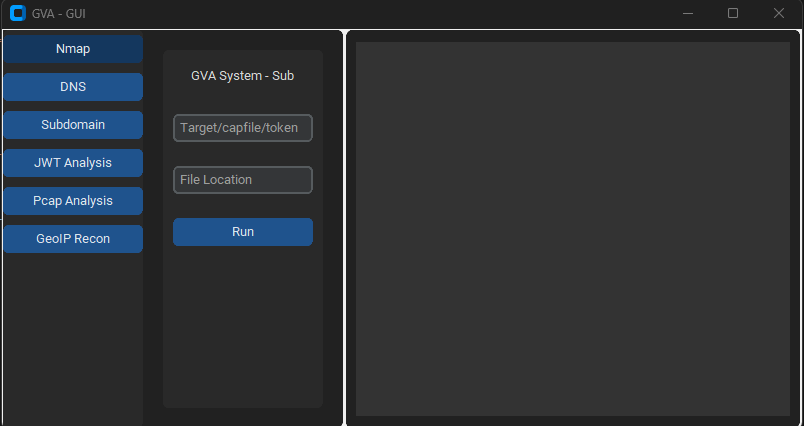
La GUI utilizza customtkinter per l'esecuzione del codice. L'interfaccia è semplice, l'unica cosa da ricordare è:
### Finestra iniziale

### Finestra NMAP

### Finestra DNS

### Finestra GEOIP

### Finestra PCAP

### Finestra SUBDOMAIN

### Finestra JWT

| Preview | Codice | Nome | Stato funzionamento | Stato OpenAI | Stato Bard | Stato LLama2 |
|---|
![]() | LIN | GNU/Linux | ✅ | ✅ | ✅ | ❌ [non testato] |
![]() | WIN | Windows | ✅ | ✅ | ✅ | ✅ |
| Parametro | Dati restituiti | Descrizione | Comando Nmap |
|---|
p1 | json | Scansione efficace | -Pn -sV -T4 -O -F |
p2 | json | Scansione semplice | -Pn -T4 -A -v |
p3 | json | Scansione a basso consumo | -Pn -sS -sU -T4 -A -v |
p4 | json | Scansione intensa parziale | -Pn -p- -T4 -A -v |
p5 | json | Scansione intensa completa | -Pn -sS -sU -T4 -A -PE -PP -PY -g 53 --script=vuln |
p6 | json | Rilevamento completo della versione del servizio | -Pn -sV -p- -A |
p7 | json | Scansione aggressiva con rilevamento del SO | -Pn -sS -sV -O -T4 -A |
p8 | json | Scansione script per vulnerabilità comuni | -Pn -sC |
p9 | json | Scansione intensa, tutte le porte TCP | -Pn -p 1-65535 -T4 -A -v |
p10 | json | Scansione UDP | -Pn -sU -T4 |
p11 | json | Rilevamento servizio e versione per le prime porte | -Pn -sV --top-ports 100 |
p12 | json | Scansione aggressiva con script NSE per vulnerabilità | -Pn -sS -sV -T4 --script=default,discovery,vuln |
p13 | json | Scansione rapida per porte comuni | -Pn -F |