 l4rm4nd/pyadrecon
Implementazione in Python3 di ADRecon con supporto per autenticazione NTLM e Kerberos per interrogare LDAP. Genera singoli file CSV e un unico report XSLX + HTML sul tuo dominio AD.


Implementazione in Python3 di un ADRecon migliorato per Pentesters e Blue Teams.
ADRecon è uno strumento che raccoglie informazioni su MS Active Directory e genera un report XSLX per fornire un quadro completo dello stato attuale dell'ambiente AD di destinazione.
[!TIP] Se sei un Red Team, puoi dare un'occhiata a ADRecon-ADWS invece.
# stable release from pypi
pipx install pyadrecon

# latest commit from github
pipx install git+https://github.com/l4rm4nd/PyADRecon
Poi verifica l'installazione:
pyadrecon --version
[!TIP] Per Windows, puoi leggere questo. Supportati NTLM + Kerberos.
usage: pyadrecon.py [-h] [--version] [--generate-excel-from CSV_DIR] [-dc DOMAIN_CONTROLLER] [-u USERNAME] [-p [PASSWORD]] [-d DOMAIN] [--auth {ntlm,kerberos}] [--tgt-file TGT_FILE] [--tgt-base64 TGT_BASE64]
                    [--ssl] [--port PORT] [-o OUTPUT] [--page-size PAGE_SIZE] [--threads THREADS] [--dormant-days DORMANT_DAYS] [--password-age PASSWORD_AGE] [--only-enabled] [--collect COLLECT]
                    [--no-excel] [-v]

PyADRecon - Python Active Directory Reconnaissance Tool

options:
  -h, --help            show this help message and exit
  --version             show program's version number and exit
  --generate-excel-from CSV_DIR
                        Generate Excel report from CSV directory (standalone mode, no AD connection needed)
  --generate-dashboard-from CSV_DIR
                        Generate HTML dashboard from existing CSV files (standalone mode)
  -dc, --domain-controller DOMAIN_CONTROLLER
                        Domain Controller IP or hostname
  -u, --username USERNAME
                        Username for authentication
  -p, --password [PASSWORD]
                        Password for authentication (optional if using TGT)
  -d, --domain DOMAIN   Domain name (e.g., DOMAIN.LOCAL) - Required for Kerberos auth
  --auth {ntlm,kerberos}
                        Authentication method (default: ntlm)
  --tgt-file TGT_FILE   Path to Kerberos TGT ccache file (for Kerberos auth)
  --tgt-base64 TGT_BASE64
                        Base64-encoded Kerberos TGT ccache (for Kerberos auth)
  --ssl                 Force SSL/TLS (LDAPS). No LDAP fallback allowed.
  --port PORT           LDAP port (default: 389, use 636 for LDAPS)
  -o, --output OUTPUT   Output directory (default: PyADRecon-Report-<timestamp>)
  --page-size PAGE_SIZE
                        LDAP page size (default: 500)
  --dormant-days DORMANT_DAYS
                        Days for dormant account threshold (default: 90)
  --password-age PASSWORD_AGE
                        Days for password age threshold (default: 180)
  --only-enabled        Only collect enabled objects
  --collect COLLECT     Comma-separated modules to collect (default: all)
  --workstation WORKSTATION
                        Explicitly spoof workstation name for NTLM authentication (default: empty string, bypasses userWorkstations restrictions)
  --no-excel            Skip Excel report generation
  --no-dashboard        Skip interactive HTML dashboard generation
  -v, --verbose         Verbose output

Examples:
  # Basic usage with NTLM authentication
  pyadrecon.py -dc 192.168.1.1 -u admin -p password123 -d DOMAIN.LOCAL

  # With Kerberos authentication (bypasses channel binding)
  pyadrecon.py -dc dc01.domain.local -u admin -p password123 -d DOMAIN.LOCAL --auth kerberos

  # With Kerberos using TGT from file (bypasses channel binding)
  pyadrecon.py -dc dc01.domain.local -u admin -d DOMAIN.LOCAL --auth kerberos --tgt-file /tmp/admin.ccache

  # With Kerberos using TGT from base64 string (bypasses channel binding)
  pyadrecon.py -dc dc01.domain.local -u admin -d DOMAIN.LOCAL --auth kerberos --tgt-base64 BQQAAAw...

  # Only collect specific modules
  pyadrecon.py -dc 192.168.1.1 -u admin -p pass -d DOMAIN.LOCAL --collect users,groups,computers

  # Output to specific directory
  pyadrecon.py -dc 192.168.1.1 -u admin -p pass -d DOMAIN.LOCAL -o /tmp/adrecon_output

  # Generate Excel report from existing CSV files (standalone mode)
  pyadrecon.py --generate-excel-from /path/to/CSV-Files -o report.xlsx
[!TIP] PyADRecon prova sempre LDAPS su TCP/636 per primo.
Se il flag
--sslnon viene utilizzato, LDAP su TCP/389 può essere provato come fallback.
[!WARNING] Se il binding del canale LDAP è abilitato, questo script fallirà con
automatic bind not successful - strongerAuthRequired, poiché ldap3 non lo supporta (vedi qui). Devi invece usare l'autenticazione Kerberos.Se usi l'autenticazione Kerberos su Linux, per favore crea un file
/etc/krb5.confvalido e una voce del nome host del DC in/etc/hosts. Puoi leggere questo. Se sei su Windows, assicurati di avere ticket Kerberos validi. Puoi leggere questo. Nota che puoi fornire un ticket TGT già esistente allo script tramite--tgt-fileo--tgt-base64. Ad esempio, ottenuto da Netexec tramitenetexec smb <TARGET> <ARGS> --generate-tgt <FILEMAME>.
C'è anche un'immagine Docker disponibile su GHCR.IO.
docker run --rm -v /etc/krb5.conf:/etc/krb5.conf:ro -v /etc/hosts:/etc/hosts:ro -v ./:/tmp/pyadrecon_output ghcr.io/l4rm4nd/pyadrecon:latest -dc dc01.domain.local -u admin -p password123 -d DOMAIN.LOCAL -o /tmp/pyadrecon_output
Di default, PyADRecon esegue tutti i moduli di raccolta. Sono indicati come default o all.
Puoi comunque selezionare liberamente la tua raccolta di moduli da eseguire:
| Icona | Significato |
|---|---|
| 🛑 | Richiede privilegi amministrativi di dominio (es. Domain Admins) |
| ✅ | Richiede privilegi di dominio regolari (es. Authenticated Users) |
| 💥 | Nuovo modulo di raccolta in stato beta. I risultati potrebbero essere errati. |
Foresta e Dominio
forest ✅domain ✅trusts ✅sites ✅subnets ✅schema o schemahistory ✅Controller di Dominio
dcs o domaincontrollers ✅Utenti e Gruppi
users ✅userspns ✅groups ✅groupmembers ✅protectedgroups ✅💥krbtgt ✅asreproastable ✅kerberoastable ✅Computer e Stampanti
computers ✅computerspns ✅printers ✅OU e Criteri di Gruppo
ous ✅gpos ✅gplinks ✅Password e Credenziali
passwordpolicy ✅fgpp o finegrainedpasswordpolicy 🛑laps 🛑bitlocker 🛑💥Account di Servizio Gestiti
gmsa o groupmanagedserviceaccounts ✅💥dmsa o delegatedmanagedserviceaccounts ✅💥
Certificati
adcs o certificates ✅💥
DNS
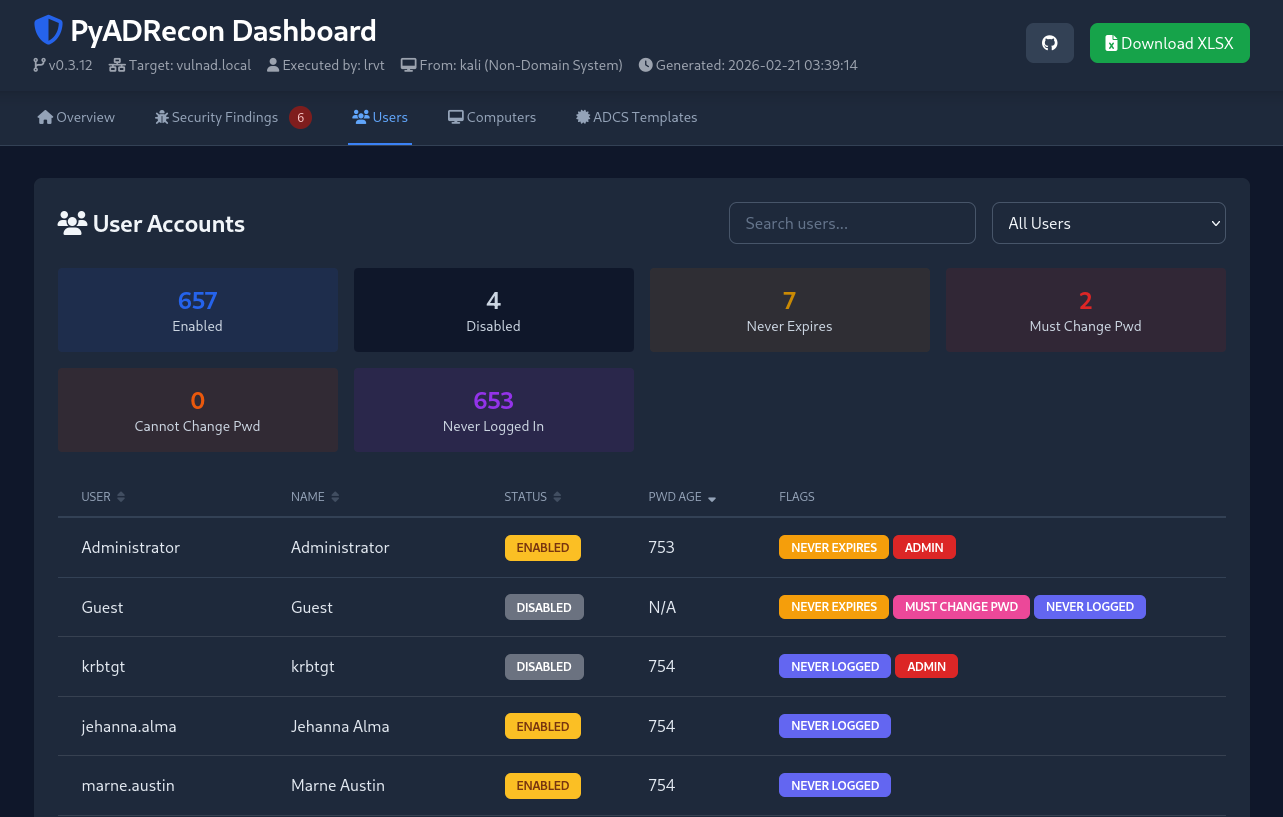
dnszones ✅dnsrecords ✅PyADRecon genera automaticamente una dashboard HTML contenente statistiche chiave e risultati di sicurezza quando vengono eseguiti tutti i moduli di raccolta.
Se necessario, puoi disabilitare la creazione della dashboard durante la raccolta dati iniziale usando --no-dashboard. La dashboard può essere successivamente generata dai file CSV esistenti con --generate-dashboard-from <CSV_DIR>.
