
Skip to content
KitploitKITPLOIT
StrumentiBlog
Invia
StrumentiBlog
Invia

Strumenti di Hacking, PenTest e Cybersecurity per il tuo Arsenale di Sicurezza!

Kitploit è una directory di strumenti di hacking, cybersecurity e pentesting. Scopri gli ultimi aggiornamenti dei progetti per trovare vulnerabilità, analizzare sistemi, automatizzare i test e rafforzare la tua sicurezza.

··Feed·Contatto·Privacy·© 2026 Kitploit

Directory degli strumenti

Categorie

Vedi tutte le categorie
Loading categories
kin — The system of record for AI-written software. A persistent graph of entities, relationships, changes, and provenance, so humans and AI agents see what a change touches before it merges. Beside Git today. | Kitploit
Strumenti/GitHubGitHub/firelock-ai/kin
Static AnalysisCode AnalysisDevSecOpsSupply Chain SecurityLearning & EducationCurated ResourcesAI Security
GitHubfirelock-ai/kin

kin

The system of record for AI-written software. A persistent graph of entities, relationships, changes, and provenance, so humans and AI agents see what a change touches before it merges. Beside Git today.

Vedi Repository
444116h 30m faRevisionato da Kitploit

Più Popolari

Vedi tutti →

Scopri gli strumenti più utilizzati dalla nostra community.

Esplora tutti gli strumenti

Sfoglia la nostra collezione di strumenti

Vedi tutti gli strumenti →
Condividi
Sito web
Contenuto non disponibile nella lingua richiesta. Visualizzazione della versione inglese.

Kin, the semantic system of record for AI-written software

The diff is not the change.

License: Apache-2.0 Latest release kinlab.ai

AI agents can write a change faster than a team can establish what it touches, whether it reverses an earlier fix, and how far its consequences reach. Git records files and line history. Kin records the software itself as a graph of entities, relations, changes, and provenance, then gives humans and agents one semantic authority to query and review. What a change touches shows up before it merges, and agents work from exact context instead of re-reading the repository.

Kin is the semantic system of record for AI-written software. It is a public alpha, usable today as a local CLI, daemon, MCP server, review surface, and graph-backed filesystem projection. It is pre-1.0, so expect rough edges and breaking changes. See the latest stable release and the current limitations before adopting it in a critical workflow.

See it on a real repository

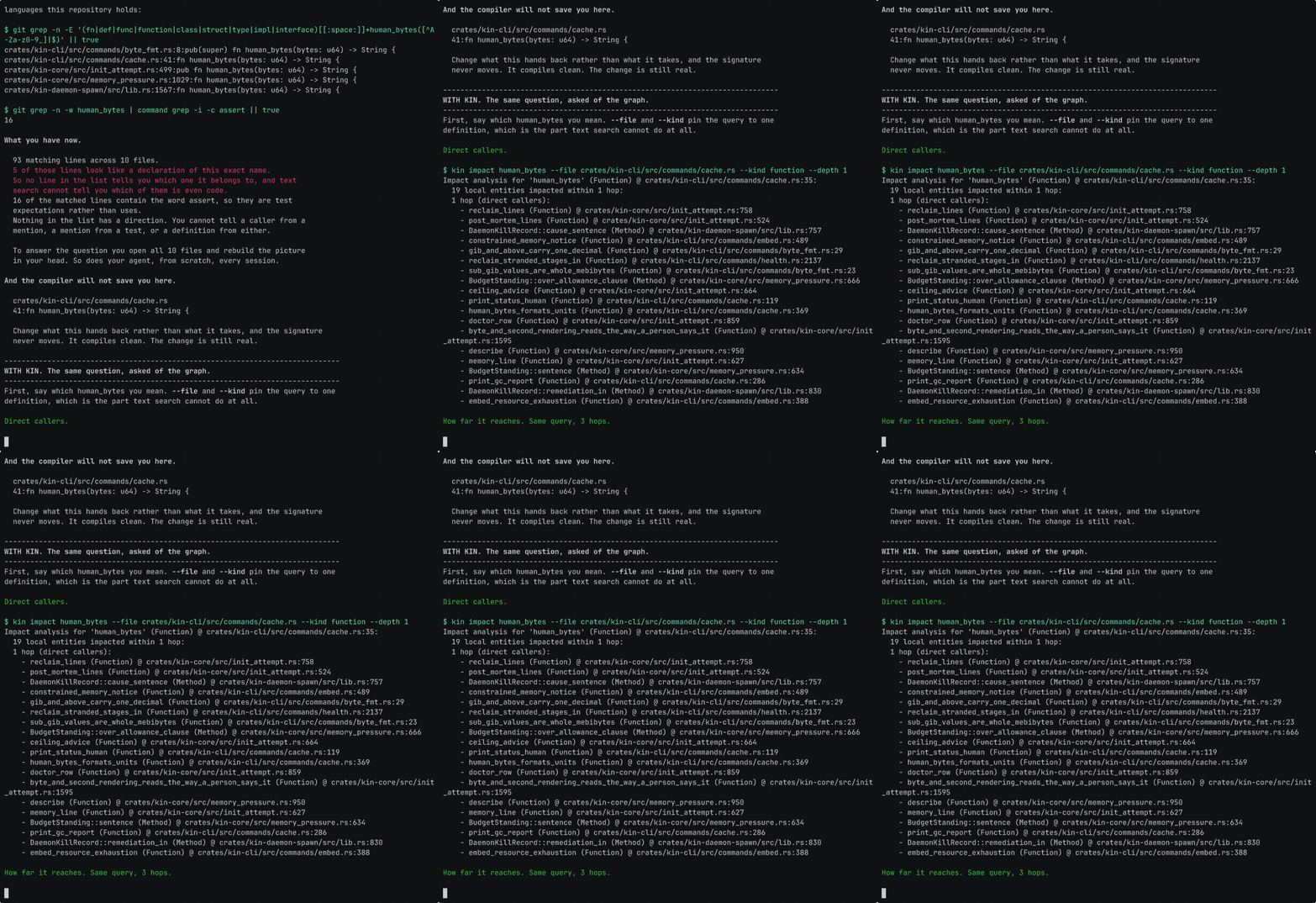
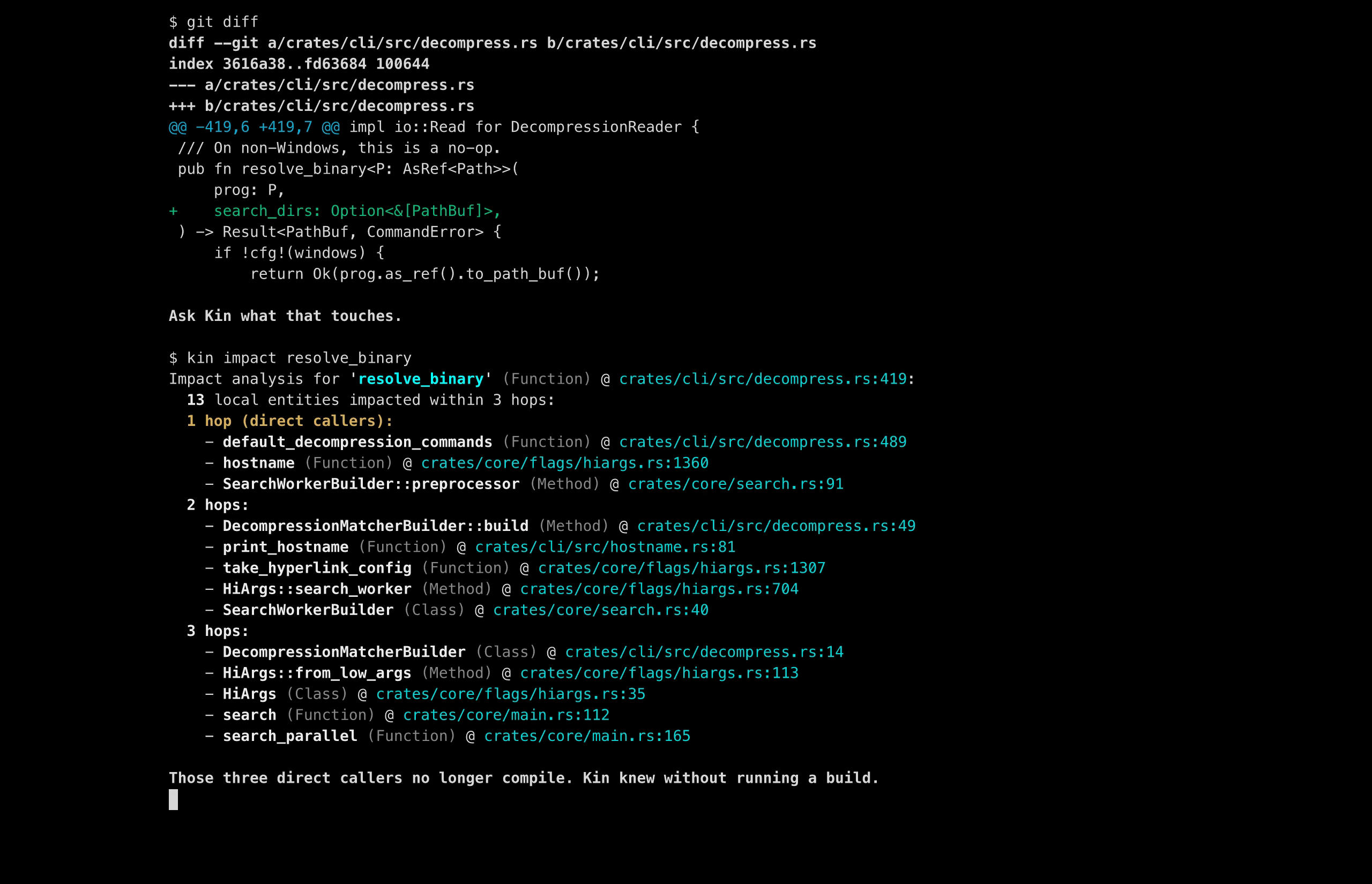
A one-line signature change in ripgrep looks harmless in the diff. Ask kin impact about it, before any compiler runs, and it names what the edit reaches. The callers of the changed signature come first, then everything those callers pull in behind them.

kin impact on ripgrep: a one-line signature edit, and Kin surfaces the entities it affects before a compiler runs

Recorded against a prepared graph at ripgrep commit e89fff89ac9af12e8d4ce9d5fd07beb408ca730f. A one-line signature edit, and Kin surfaces the entities it affects before a compiler runs. The graph was built beforehand. No compiler ran. Exact commands: kinlab.ai/proof. The raw run directory is not public yet, so this is a recipe you can re-run, not a trace you can audit.

Kin surfaces what the change touches. Whether the change is correct stays with your compiler, tests, and review. The graph is built beforehand by kin init, and building it is the expensive part; after that, impact questions are answered from graph truth, not from re-reading the tree.

The stack

Kin is one system with a few clear public surfaces:

How the pieces fit

Kin is the semantic system of record for AI-written software, and everything in the map below either reaches that authority or supports it. Humans and AI agents come in through the CLI, the bundled MCP server, or the VS Code extension. All three ask the same daemon, and the daemon answers from graph authority rather than by re-reading the tree. kin-vfs projects that same graph back through ordinary filesystem calls, so editors, compilers, and build systems keep seeing files. Git sits beside the graph as an import and export boundary rather than as an answer path, and KinLab is the hosted layer over the same authority.

root@kitploit:~
flowchart TD
    people["Humans and AI agents"]

    subgraph surfaces["Access surfaces"]
        cli["kin CLI"]
        mcp["Kin MCP server"]
        editor["kin-editor for VS Code"]
    end

    daemon["kin daemon"]
    authority["Graph authority<br/>entities, relations, changes, provenance"]
    db["kin-db<br/>graph storage, snapshots,<br/>index, text and vector search"]
    prims["kin-model, kin-blobs, kin-search,<br/>kin-vector, kin-infer, kin-lsp"]
    vfs["kin-vfs<br/>transparent file projection"]
    tools["Editors, compilers, build systems"]
    git["Git<br/>import and export boundary"]
    kinlab["KinLab<br/>hosted collaboration and control plane"]

    people --> cli
    people --> mcp
    people --> editor
    cli --> daemon
    mcp --> daemon
    editor --> daemon
    daemon --> authority
    authority --> db
    db --> prims
    authority <-->|"kin init imports, kin git export"| git
    authority -->|"publish and sync"| kinlab
    authority --> vfs
    vfs --> tools

Underneath those surfaces are the layers the system is built from:

These are implementation layers of one system, not separate products a new user needs to assemble. None of them is installed separately.

Open source and the Kin ecosystem

The core of Kin is open source under Apache-2.0: kin, kin-db, kin-vfs, and kin-editor, plus the supporting libraries kin-model, kin-blobs, kin-search, kin-vector, kin-infer, kin-lsp, and kin-actions.

KinLab is a proprietary product built on this open core: the hosted collaboration and control-plane layer described above.

The same boundary applies to how benchmark work is shared. The benchmark specification and a standalone, dependency-free bundle verifier are public, so a claim can be checked without access to the system that produced it. The runner and proof infrastructure that produce sealed evidence bundles (the orchestration, the pinned-release proof gate, and the hosted measurement environment) remain private for now. The spec and verifier open first; the runner can open later.

Shortest graph-backed path

1. Install and configure Kin

On macOS or Linux:

root@kitploit:~
curl -fsSL https://get.kinlab.dev/install | sh
exec "$SHELL" -l
kin setup --intent agent

The installer resolves the latest stable release, verifies its published SHA-256 checksum, installs the managed binaries under ~/.kin, and launches setup. Running the explicit agent intent configures the built-in MCP server for detected supported clients. Use --intent local for CLI and filesystem use without MCP configuration, or --intent editor for the VS Code path.

To remove only setup-managed integrations, run kin setup uninstall. For the default managed root (~/.kin), kin setup uninstall --all also stops all Kin daemons, removes exact legacy installer PATH blocks, and recursively deletes the managed install (--dry-run previews it). A custom KIN_HOME is never removed recursively: first run the ledger-scoped uninstall, then review and remove that directory explicitly. Modified setup-owned slices block full removal unless you add --force, so uninstall never silently overwrites a user's edited client or shell configuration. On Windows, the CLI schedules its locked install directory for deletion immediately after the running process exits. Windows intentionally retains one inert, current-user-only sibling authority sidecar; keeping that lock identity stable prevents a crash or concurrent future install from creating two independent mutation authorities. The CLI and JSON result disclose this retained coordination metadata rather than claiming zero residual bytes.

For manual installation, each archive and its .sha256 file is published under https://github.com/firelock-ai/kin/releases/latest/download/. The moving asset names are kin-macos-aarch64, kin-macos-x86_64, kin-linux-aarch64, kin-linux-x86_64, and kin-windows-x86_64; use the .tar.gz suffix for the macOS and Linux archives and the .zip suffix for Windows, as shown on the latest release page. The Windows zip is also what the PowerShell installer and the npm launcher fetch.

The npm entry point resolves the same public release channel:

root@kitploit:~
npm install -g @kinlab/kin@latest

A Homebrew tap tracks the same release channel:

root@kitploit:~
brew install firelock-ai/kin/kin

The tap's formula is generated rather than hand-maintained. Its version and its per-platform SHA-256 are regenerated from each Kin release by update-formula.yml in the tap repository, on a dispatch the release itself sends, with a six-hourly reconcile that self-heals a missed one. That is why the checksum Homebrew verifies is the one published beside the archive rather than a separately curated copy of it. Confirm what you installed with kin --version, as you should on any install path.

On Windows, run irm https://get.kinlab.dev/install.ps1 | iex in PowerShell. Native Windows x86_64 support is early. Repository admission works: kin init imports a Git repository and publishes graph authority, and graph, lexical, and daemon-backed queries answer natively. Transparent filesystem projection is not shipped on Windows, and the end-to-end install proof does not yet cover MCP or review workflows there, so WSL2 remains the recommended path for the full Kin experience. Read Platform and maturity below before choosing a Windows install path.

2. Admit an existing repository as graph truth

root@kitploit:~
cd /path/to/your/repository
kin init .

In a detected Git repository, kin init atomically admits complete reachable history, refs, raw objects, the exact workspace tree, and admission policy into repository-v6 graph authority. A worktree with uncommitted edits, staged changes, or untracked files still admits: kin init admits the committed state and discloses what it did not admit. It never substitutes an exact-HEAD snapshot or raw-filesystem semantic rebuild. Supported repository-local remote URLs, refspecs, branch tracking, and push defaults are sealed into Kin's Git coexistence configuration; unsafe, ambiguous, or unsupported transfer settings fail closed before publication.

Admission also derives the semantic entity and relation layer for every supported entity-source file in that history, and kin init reports the durable, generation-bound counts it committed. kin status reports that repository authority view; kin graph status separately reports the daemon's mutable live query graph, which may include later derived enrichment. Query surfaces consume graph-owned enrichment when it exists and report its absence instead of hiding the gap behind raw file search.

Which files become entities

"Supported entity-source file" means a file one of Kin's language adapters claims. The adapter registry is the whole set, and every file in a repository resolves through it:

A .h header is read as C++ when its contents say so, so a C++ project does not lose namespaces and templates to the C grammar.

Everything else is admitted as content and stays queryable as history and text, but is not parsed into entities and relations. That includes Markdown, HTML and CSS, SQL, YAML, JSON and TOML, shell scripts, Objective-C, Scala, Elixir, Dart, Lua, R, Zig, Haskell, and Nix. If your language is on that list, locate and refs will not find symbols in it.

3. Ask the graph a real question

root@kitploit:~
kin locate "where are webhook retries handled"
kin refs ExactEntityName
kin trace ExactEntityName

Replace ExactEntityName with a symbol returned by locate. locate finds the entities relevant to an intent, refs shows graph-owned callers/importers and references, and trace returns the focal entity plus nearby semantic context. Once embeddings are complete, your configured AI agent can use the vector-backed semantic_locate tool; get_context_pack, find_references, and trace_data_flow expose the graph neighborhood directly.

Admission derives the semantic entities, not their vectors. Run kin embed to add local vector similarity over them, and confirm coverage with kin graph status.

Works with your agent

Kin ships its own agent, and it is the path we recommend for agent work. kin agent run drives any OpenAI-compatible endpoint, so a local model in LM Studio, Ollama, llama.cpp or vLLM works from the same flags as a hosted one, and it reaches the graph over the same MCP server every other client uses.

root@kitploit:~
kin agent run --task "Find where the retry backoff is computed and document it" \
  --model qwen/qwen3.6-35b-a3b --base-url http://localhost:1234/v1

What makes it different from pointing another agent at the MCP server is that the rule is enforced inside the agent rather than borrowed from a vendor's permission layer. It has Kin's tools plus exactly two local ones, edit_file and write_file. There is no shell, no grep and no file-reading tool, so it cannot answer a repository question from raw file search, and a tool it invents is refused by name. When Kin reports that an empty result cannot be trusted, the agent is told the answer is unknown and given the named gap instead of concluding the thing does not exist. Every edit runs inside a Kin transaction under a Kin session, so the change carries provenance naming the agent. Run kin agent doctor --base-url <url> first to check both halves answer. See the CLI reference for the full surface.

Working with Claude Code, Codex, Cursor, Gemini and anything else that speaks MCP stays first class. kin setup --intent agent configures every client it detects in one pass. These are the per-client one-liners when you would rather install Kin directly.

Claude Code, from inside a session:

root@kitploit:~
/plugin marketplace add firelock-ai/kin
/plugin install kin@kin

Codex:

root@kitploit:~
codex plugin marketplace add firelock-ai/kin
codex plugin add kin@kin

Gemini CLI:

root@kitploit:~
gemini extensions install https://github.com/firelock-ai/kin

Cursor takes a one-click install link. Paste this into Cursor or into your browser's address bar:

root@kitploit:~
cursor://anysphere.cursor-deeplink/mcp/install?name=kin&config=eyJjb21tYW5kIjoibnB4IiwiYXJncyI6WyIteSIsIkBraW5sYWIva2luLW1jcCJdfQ==

Kiro takes the same thing as a web link: Add Kin to Kiro.

Cline takes the standard entry below rather than a one-liner. Its CLI reads ~/.cline/mcp.json. In the VS Code extension, open the MCP Servers panel, then the Configure tab, then Configure MCP Servers, and add the entry there.

Every other client that reads a standard MCP config takes this entry:

root@kitploit:~
{
  "mcpServers": {
    "kin": { "command": "npx", "args": ["-y", "@kinlab/kin-mcp"] }
  }
}

The wrapper needs Node 20 or newer, and on its first run it downloads the matching Kin release, verifies its published SHA-256, and caches the binaries per user. Codex CLI wants the same thing as TOML under [mcp_servers.kin].

One caveat worth repeating: these tools answer from the graph, so the repository has to be admitted with kin init . and embedded with kin embed before semantic_locate can rank anything. llms-install.md is that whole path written so an agent can follow it unattended, from a bare machine to a first verified tool call.

Review an AI-written change

AI writes code. Kin proves what changed.

Run kin init on the branch you want to review so the relevant Git history is in the graph, then pass explicit commit SHAs to the report-only shadow gate:

root@kitploit:~
kin review shadow "$(git rev-parse main)..$(git rev-parse HEAD)"

The result is PASS, NEEDS ATTENTION, or WOULD BLOCK, and it comes with the impact Kin derived from the graph, the context needed to repair it, and the evidence behind both. Authorship is declared, not verified. The command will not block your merge or change graph state. It hands evidence to a human or a CI policy and stops there.

How Kin relates to Git

Beside Git today. Repository authority over time. During brownfield adoption, Git remains an explicit import/export interoperability boundary; it never answers Kin runtime queries or repairs missing graph truth.

  • kin init imports complete reachable Git history and exact parent edges. Kin deliberately has no partial-history or snapshot-only initialization mode.
  • After import, Kin's graph owns repository identity, tree state, history, refs, and semantic relations. Filesystem and Git views are projections.
  • kin git export --output ../repo.git writes a new bare Git projection from one graph-owned authority generation. It does not consult working files or an ambient .git/ object store, and it refuses an existing or in-repository destination. Objects, refs, and directories are flushed before the no-replace destination publication is acknowledged. Capability-anchored publication is currently available on Unix hosts; other hosts refuse before creating the export.

This lets a team migrate an existing repository without giving up its editor, compiler, build system, or Git interoperability while Kin becomes authoritative.

Platform and maturity

The core runtime and the filesystem projection have different support boundaries:

The graph is the authority in every case above. The shim, an NFS mount, a FUSE mount, and Windows ProjFS are four ways to see that truth as files, and Kin picks between them by probing what this host can run: a mount where one is available, because the kernel serves it and no process can have it stripped, with the injected shim as the compatibility fallback on macOS and Linux and ProjFS leading on Windows, where no shim exists. kin vfs on engages the chosen one, kin vfs off disengages it, and kin doctor carries a row saying which is in force and whether it is working. Where a mode is missing, Kin prints the exact line that installs or enables it for your platform. docs/projection.md has the full per-platform table.

First indexing reads the entire reachable Git history, so kin init on a large or long-lived repository takes minutes, not seconds, before embedding begins. After init returns, the daemon continues preparing in the background, and the first agent calls on a large repository can take noticeably longer to answer.

Bounded arm64 testing found the core graph and lexical path usable at 512 MB, but full embedding downloads a roughly 522 MB model and currently needs 2 GB as the safe operating floor; 1 GB is an unsafe edge and 512 MB can terminate during embedding. These are observed alpha constraints, not universal sizing promises.

A successful kin --version establishes only that the core binary runs. It does not establish VFS compatibility or a live graph-backed projection. On a supported Unix host, use kin vfs status, which probes each projection mode and prints what is actually in force, then kin setup status and a real kin-vfs exec --workspace . -- <command> launch. The VFS launcher includes an interposition canary and reports when the operating system strips the shim. The kin-vfs README contains the full boundary.

Release assets are checksum-published and the release workflow runs anonymous installation, daemon/MCP, embedding, and real graph-backed VFS projection checks across its supported runner matrix. The workflow itself is public: Install Proof. A green release establishes those exact artifacts and environments; it is not a claim that every distribution, tool, or repository shape is already covered.

Proof posture

The published preregistered Multi-SWE-Bench Go proof package is pinned to an older build, not the moving latest release, and does not establish a broad speed, token-savings, or category-win claim. Comparative results are withheld here pending independent verification.

Read the methodology, task set, build identity, and artifacts in the public proof package. Treat claims outside that measured scope as hypotheses until they have their own reproducible proof.

Learn and contribute

  • Quickstart and advanced configuration
  • Store size and what drives it
  • MCP tool reference
  • Language support and what each tier extracts
  • Environment variable reference
  • Graph-first thesis
  • Write-authority model and its transitional state
  • GitHub Discussions
  • Bug reports and feature requests
  • Contributing guide
  • Private security reporting

License

Apache-2.0.

Software that remembers itself.

Scarica lo strumento
SurfaceWhat it does
kinSemantic system of record: CLI, daemon, graph lifecycle, MCP, review, provenance, and Git coexistence.
kin-vfsProjects graph-owned files through normal filesystem calls so existing tools can keep using files.
kin-editorVS Code access to the entity explorer, semantic search, trace, review, and rename surfaces.
Kin MCPTyped graph tools for AI agents, bundled into kin and launched with kin mcp start.
KinLabHosted collaboration and control plane. Public repository connection is not a first-run flow yet.
LayerRole
kin-dbGraph storage, snapshots, indexing, text search, and vector search.
kin-modelCanonical types and domain models shared across the stack.
kin-blobsContent-addressable blob storage.
kin-searchLexical search primitives and staged retrieval.
kin-vectorVector and nearest-neighbor substrate.
kin-inferInference and embedding substrate.
kin-lspLanguage-server enrichment feeding the semantic layer.
LanguageExtensions
TypeScript.ts, .tsx
JavaScript.js, .jsx, .mjs, .cjs
Python.py, .pyi
Go.go
Java.java
Rust.rs
C.c, .h
C++.cpp, .hpp, .cc, .cxx
C#.cs
Ruby.rb
PHP.php
Swift.swift
Kotlin.kt, .kts
HCL / Terraform.tf, .tfvars
PlatformCore Kin runtimekin-vfs projection
macOS, Apple Silicon and IntelNative graph, vector, daemon, setup, MCP, and review surfaces ship in the release archive.Shipped and exercised on both architectures. It uses DYLD_INSERT_LIBRARIES; SIP-protected or hardened programs may reject injection.
Linux x86_64 and arm64kin and kin-daemon are static musl builds intended to run on glibc and musl distributions.The public VFS executable and shim are GNU/glibc builds, not musl builds. They are built against a pinned glibc floor of 2.31 and link OpenSSL 3, so a projection host needs both; Debian 12 loads them, and Alpine and other musl distributions are not supported projection hosts. The release refuses to publish a Linux archive whose binaries ask for more glibc than that floor. The arm64 release proof runs on Ubuntu 24.04.
Native Windows x86_64Early support: repositories admit and graph and lexical queries answer natively, but MCP and review workflows are not yet covered end to end by the install proof. WSL2 remains the recommended path for full Kin.Not shipped. Use WSL2 with a Linux distribution that meets the glibc boundary for projection.