红/蓝队环境自动化部署工具 | Strumento di automazione per la distribuzione di ambienti per team Red/Blue
Un nuovissimo strumento di deployment automatizzato IaC RedC, basato su Terraform + interfaccia grafica Wails per il deployment multi-cloud automatizzato e l'orchestrazione dei progetti: provalo!

Inizio • Opzioni • Esempio • FAQ • Licenza




Inglese | 简体中文
All'interno dello stack Infra di WgpSec, f8x è il livello di provisioning software lato host. Può essere utilizzato in modo indipendente o distribuito da remoto tramite RedC agli host cloud come motore di esecuzione per lo store di software, l'installazione batch di strumenti e i flussi di bootstrap dei nodi. Nello stesso stack, redc-template fornisce risorse di scenari e template, mentre RedC gestisce l'orchestrazione multi-cloud, la gestione del ciclo di vita, l'accesso SSH, i plugin e le operazioni guidate dall'IA.
Scarica
EdgeOne Pages Link
wget -O f8x https://f8x.wgpsec.org/f8xcurl -o f8x https://f8x.wgpsec.org/f8xgithub raw
wget -O f8x https://raw.githubusercontent.com/ffffffff0x/f8x/main/f8xcurl -o f8x https://raw.githubusercontent.com/ffffffff0x/f8x/main/f8xUtilizzo
bash f8x -h
Consigliato aggiungere alle variabili d'ambiente
wget -O f8x https://raw.githubusercontent.com/ffffffff0x/f8x/main/f8x && mv --force f8x /usr/local/bin/f8x && chmod +x /usr/local/bin/f8x
f8x -hcurl -o f8x https://raw.githubusercontent.com/ffffffff0x/f8x/main/f8x && mv --force f8x /usr/local/bin/f8x && chmod +x /usr/local/bin/f8x
f8x -hDipendenze di sistema
f8x fondamentalmente non richiede dipendenze, è fatto per aiutarti a installare varie dipendenze😁
f8x-ctf
Questo script viene utilizzato per distribuire ambienti CTF (Web、Misc、Crypto、Pwn、Iot)
wget -O f8x-ctf https://raw.githubusercontent.com/ffffffff0x/f8x/main/f8x-ctf
bash f8x-ctf -helpcurl -o f8x-ctf https://raw.githubusercontent.com/ffffffff0x/f8x/main/f8x-ctf
bash f8x-ctf -helpf8x-dev
Deployment di middleware, database (apache、nginx、tomcat、Database、php)
wget -O f8x-dev https://raw.githubusercontent.com/ffffffff0x/f8x/main/f8x-dev
bash f8x-dev -helpcurl -o f8x-dev https://raw.githubusercontent.com/ffffffff0x/f8x/main/f8x-dev
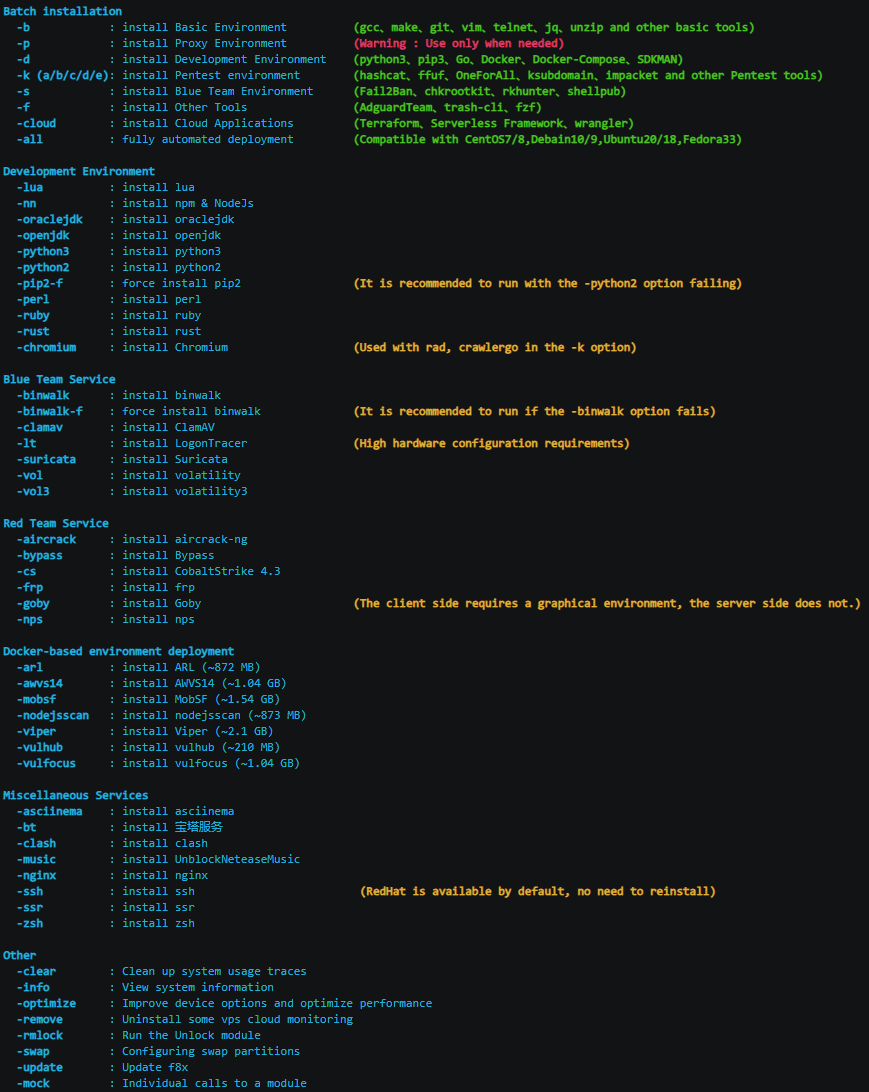
bash f8x-dev -helpLe seguenti opzioni sono attualmente supportate da f8x
Installazione batch
-b : Installa ambiente base (gcc、make、git、vim、telnet、jq、unzip e altri strumenti di base)-p : Installa ambiente proxy (Attenzione: utilizzare solo quando necessario)-d : Installa ambiente di sviluppo (python3、pip3、Go、Docker、Docker-Compose、SDKMAN)-k (a/b/c/d/e): Installa ambiente Pentest (hashcat、ffuf、OneForAll、ksubdomain、impacket e altri strumenti Pentest)-s : Installa ambiente Blue Team (Fail2Ban、chkrootkit、rkhunter、shellpub)-f : Installa altri strumenti (AdguardTeam、trash-cli、fzf)-cloud : Installa applicazioni cloud (Terraform、Serverless Framework、wrangler)-all : Deployment completamente automatizzato (Compatibile con CentOS7/8,Debain10/9,Ubuntu20/18,Fedora33)Ambiente di sviluppo
-docker : Installa docker-lua : Installa lua-nn : Installa npm & NodeJs-go : Installa go-oraclejdk(8/11): Installa oraclejdk-openjdk : Installa openjdk-py3(7/8/9/10) : Installa python3-py2 : Installa python2-pip2-f : Forza installazione pip2 (Si consiglia di eseguire se l'opzione -python2 fallisce)-perl : Installa perl-ruby : Installa ruby-rust : Installa rust-code : Installa code-server-chromium : Installa Chromium (Usato con rad, crawlergo nell'opzione -k)-phantomjs : Installa PhantomJSServizi Blue Team
-binwalk : Installa binwalk-binwalk-f : Forza installazione binwalk (Si consiglia di eseguire se l'opzione -binwalk fallisce)-clamav : Installa ClamAV-lt : Installa LogonTracer (Richiede hardware potente)-suricata : Installa Suricata-vol : Installa volatility-vol3 : Installa volatility3Servizi Red Team
-aircrack : Installa aircrack-ng-bypass : Installa Bypass-goby : Installa Goby (Il client richiede un ambiente grafico, il server no.)-wpscan : Installa wpscan-yakit : Installa yakitInfrastruttura Red Team
-awvs14 : Installa AWVS14 (~1.04 GB)-cs : Installa CobaltStrike 4.3-cs45 : Installa CobaltStrike 4.5-frp : Installa frp-interactsh : Installa interactsh (https://github.com/projectdiscovery/interactsh)-merlin : Installa merlin (https://github.com/Ne0nd0g/merlin)-msf : Installa Metasploit-nps : Installa nps-pupy : Installa pupy (https://github.com/n1nj4sec/pupy)-rg : Installa RedGuard (https://github.com/wikiZ/RedGuard)-sliver : Installa sliver-server && client (https://github.com/BishopFox/sliver)-sliver-client : Installa sliver-client-sps : Installa SharPyShell (https://github.com/antonioCoco/SharPyShell)-viper : Installa Viper (~2.1 GB)Deployment di ambienti basati su Docker
-arl : Installa ARL (~872 MB)-mobsf : Installa MobSF (~1.54 GB)-nodejsscan : Installa nodejsscan (~873 MB)-vulhub : Installa vulhub (~210 MB)-vulfocus : Installa vulfocus (~1.04 GB)-TerraformGoat: Installa TerraformGoatServizi vari
-asciinema : Installa asciinema-bt : Installa servizio 宝塔-clash : Installa clash (https://github.com/juewuy/ShellClash)-nginx : Installa nginx-ssh : Installa ssh (RedHat è disponibile di default, non serve reinstallare)-ssr : Installa ssr-zsh : Installa zshGestione strumenti AI-friendly
-install <tool> : Installa un singolo strumento per nome (es. -install nuclei, -install nmap)--list-tools : Elenca tutti i 117 strumenti disponibili in formato JSON (per parsing AI Agent)--list-tools table : Elenca tutti gli strumenti disponibili in una tabella leggibile--search <keyword> : Ricerca fuzzy degli strumenti per nome (es. --search scan)Nota:
--list-toolse--searchnon richiedono privilegi di root.