 evyatarmeged/raccoon
Uno strumento di sicurezza offensiva ad alte prestazioni per ricognizione e scansione delle vulnerabilità.







Raccoon è uno strumento creato per ricognizione e raccolta informazioni con un'enfasi sulla semplicità.
Farà di tutto, dal recupero dei record DNS, al recupero delle informazioni WHOIS, all'ottenimento dei dati TLS, al rilevamento della presenza di WAF fino al dir busting multi-thread e all'enumerazione dei sottodomini. Ogni scansione produce output in un file corrispondente.
Poiché la maggior parte delle scansioni di Raccoon sono indipendenti e non si basano sui risultati reciproci, utilizza asyncio di Python per eseguire la maggior parte delle scansioni in modo asincrono.
Raccoon supporta Tor/proxy per il routing anonimo. Utilizza wordlist predefinite (per fuzzing URL e scoperta sottodomini) dal fantastico repository SecLists ma è possibile passare elenchi diversi come argomenti.
Per più opzioni - vedere "Utilizzo".
Per l'ultima versione stabile:
pip install raccoon-scanner
# To run:
raccoon [OPTIONS]
Nota: Raccoon richiede Python3.5+ quindi potrebbe essere necessario usare pip3 install raccoon-scanner.
Puoi anche clonare il repository GitHub per le ultime funzionalità e modifiche:
git clone https://github.com/evyatarmeged/Raccoon.git
cd Raccoon
python setup.py install # Subsequent changes to the source code will not be reflected in calls to raccoon when this is used
# Or
python setup.py develop # Changes to code will be reflected in calls to raccoon. This can be undone by using python setup.py develop --uninstall
# Finally
raccoon [OPTIONS] [TARGET]
Per supportare Raccoon su macOS è necessario avere gtimeout sulla macchina.
gtimeout può essere installato eseguendo brew install coreutils.
# Build the docker image
docker build -t evyatarmeged/raccoon .
# Run a scan, As this a non-root container we need to save the output under the user's home which is /home/raccoon
docker run --name raccoon evyatarmeged/raccoon:latest  example.com -o /home/raccoon
Raccoon utilizza Nmap per scansionare le porte e utilizza anche altri script e funzionalità di Nmap. È obbligatorio averlo installato prima di eseguire Raccoon.
OpenSSL viene utilizzato anche per le scansioni TLS/SSL e dovrebbe essere installato anch'esso.
Usage: raccoon [OPTIONS] TARGET

Options:
  --version                      Show the version and exit.
  -d, --dns-records TEXT         Comma separated DNS records to query.
                                 Defaults to: A,MX,NS,CNAME,SOA,TXT
  --tor-routing                  Route HTTP traffic through Tor (uses port
                                 9050). Slows total runtime significantly
  --proxy-list TEXT              Path to proxy list file that would be used
                                 for routing HTTP traffic. A proxy from the
                                 list will be chosen at random for each
                                 request. Slows total runtime
  -c, --cookies TEXT             Comma separated cookies to add to the
                                 requests. Should be in the form of key:value
                                 Example: PHPSESSID:12345,isMobile:false
  --proxy TEXT                   Proxy address to route HTTP traffic through.
                                 Slows total runtime
  -w, --wordlist TEXT            Path to wordlist that would be used for URL
                                 fuzzing
  -T, --threads INTEGER          Number of threads to use for URL
                                 Fuzzing/Subdomain enumeration. Default: 25
  --ignored-response-codes TEXT  Comma separated list of HTTP status code to
                                 ignore for fuzzing. Defaults to:
                                 302,400,401,402,403,404,503,504
  --subdomain-list TEXT          Path to subdomain list file that would be
                                 used for enumeration
  -sc, --scripts                 Run Nmap scan with -sC flag
  -sv, --services                Run Nmap scan with -sV flag
  -f, --full-scan                Run Nmap scan with both -sV and -sC
  -p, --port TEXT                Use this port range for Nmap scan instead of
                                 the default
  --vulners-nmap-scan            Perform an NmapVulners scan. Runs instead of
                                 the regular Nmap scan and is longer.
  --vulners-path TEXT            Path to the custom nmap_vulners.nse script.If
                                 not used, Raccoon uses the built-in script it
                                 ships with.
  -fr, --follow-redirects        Follow redirects when fuzzing. Default: False
                                 (will not follow redirects)
  --tls-port INTEGER             Use this port for TLS queries. Default: 443
  --skip-health-check            Do not test for target host availability
  --no-url-fuzzing               Do not fuzz URLs
  --no-sub-enum                  Do not bruteforce subdomains
  --skip-nmap-scan               Do not perform an Nmap scan
  -q, --quiet                    Do not output to stdout
  -o, --outdir TEXT              Directory destination for scan output
  --help                         Show this message and exit.
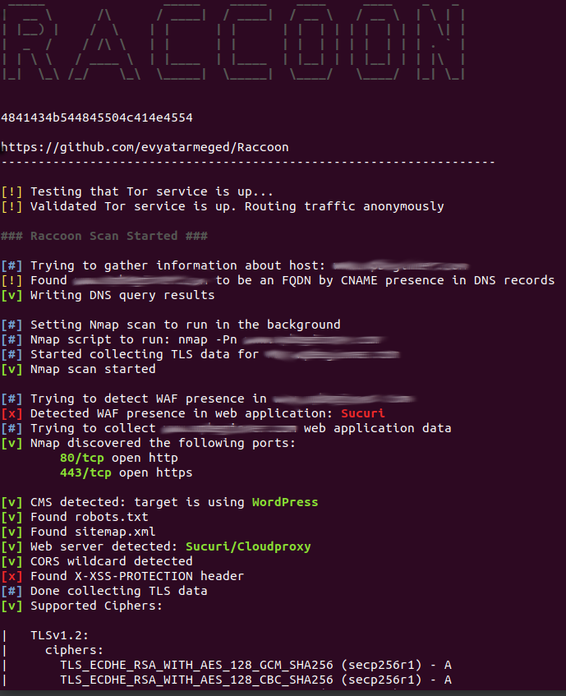
Dati dell'applicazione web inclusi bucket S3 vulnerabile:

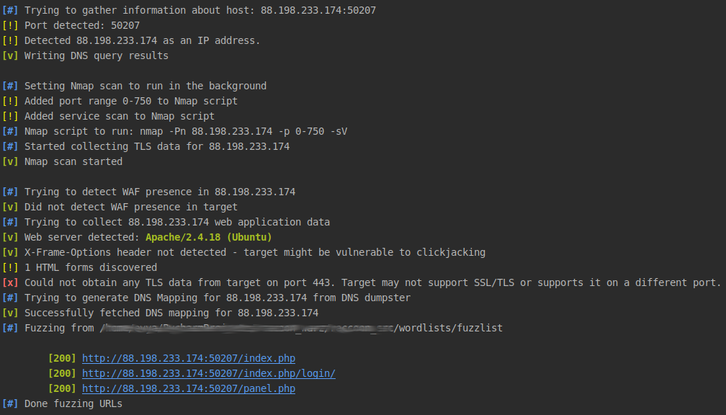
Esempio di scansione della sfida HTB: