
Skip to content
KitploitKITPLOIT
StrumentiBlog
Invia
StrumentiBlog
Invia

Strumenti di Hacking, PenTest e Cybersecurity per il tuo Arsenale di Sicurezza!

Kitploit è una directory di strumenti di hacking, cybersecurity e pentesting. Scopri gli ultimi aggiornamenti dei progetti per trovare vulnerabilità, analizzare sistemi, automatizzare i test e rafforzare la tua sicurezza.

··Feed·Contatto·Privacy·© 2026 Kitploit

Directory degli strumenti

Categorie

Vedi tutte le categorie
Loading categories
karma_v2 — ⡷⠂𝚔𝚊𝚛𝚖𝚊 𝚟𝟸⠐⢾ è un framework di Ricognizione Automatizzata di Intelligence Open Source (OSINT) Passivo. | Kitploit
Strumenti/GitHubGitHub/dheerajmadhukar/karma_v2
OSINT (Open Source Intelligence)RicognizioneAnalisi delle VulnerabilitàEnumerazione DNS e SottodominiRaccolta InformazioniEnumerazione SottodominiCrawler
GitHubdheerajmadhukar/karma_v2

karma_v2

⡷⠂𝚔𝚊𝚛𝚖𝚊 𝚟𝟸⠐⢾ è un framework di Ricognizione Automatizzata di Intelligence Open Source (OSINT) Passivo.


Vedi Repository
1.0k18552 anni faRevisionato da Kitploit

Più Popolari

Vedi tutti →

Scopri gli strumenti più utilizzati dalla nostra community.

Esplora tutti gli strumenti

Sfoglia la nostra collezione di strumenti

Vedi tutti gli strumenti →
Condividi
Sito web

karma_v2

⡷⠂𝚔𝚊𝚛𝚖𝚊 𝚟𝟸⠐⢾

𝚔𝚊𝚛𝚖𝚊 𝚟𝟸 è un framework di ricognizione automatizzata di Open Source Intelligence (OSINT) passiva

Follow on Twitter Version Build Build Donate

𝚔𝚊𝚛𝚖𝚊 𝚟𝟸 può essere utilizzato da ricercatori di sicurezza informatica, penetration tester, bug hunter per trovare informazioni approfondite, più risorse, IP bypassati da WAF/CDN, infrastrutture interne/esterne, fughe di dati esposte pubblicamente e molto altro riguardanti il loro target. È necessaria una chiave API Premium di Shodan per utilizzare questa automazione. L'output di 𝚔𝚊𝚛𝚖𝚊 𝚟𝟸 viene visualizzato a schermo e salvato in file/directory.

ℹ Riguardo all'API Premium di Shodan, visita il sito Shodan per maggiori informazioni.

Sito Shodan: Shodan Website API : Developer API

Caratteristiche

  • Risultati potenti e flessibili tramite Shodan Dorks
  • Ricerca tramite checksum/fingerprint SSL SHA1
  • Solo IP in-scope
  • Verifica di ogni IP con corrispondenza RegEx del certificato SSL/TLS emittente
  • Fornisce IP fuori dallo scope
  • Trova tutte le porte, incluse quelle note, inusuali/dinamiche
  • Recupera tutte le vulnerabilità del target relative a CVE
  • Banner grab per ogni IP, prodotto, OS, servizi e organizzazione, ecc.
  • Recupera le icone dei favicon
  • Genera hash del favicon utilizzando il modulo python3 mmh3
  • Rilevamento tecnologia favicon tramite template custom nuclei
  • Scansione ASN
  • Vicini BGP
  • Prefissi IPv4 e IPv6 per ASN
  • Fughe interessanti come Indexing, NDMP, SMB, Login, SignUp, OAuth, SSO, Status 401/403/500, VPN, Citrix, Jfrog, Dashboard, OpenFire, Pannelli di controllo, Wordpress, Laravel, Jetty, S3 Buckets, Cloudfront, Jenkins, Kubernetes, Node Exports, Grafana, RabbitMQ, Container, GitLab, MongoDB, Elastic, FTP anonimo, Memcached, Recursione DNS, Kibana, Prometheus, Password predefinite, Oggetti protetti, Moodle, Spring Boot, Django, Jira, Ruby, Secret Key e molti altri...

Installazione

1. Clona il repository

root@kitploit:~
# git clone https://github.com/Dheerajmadhukar/karma_v2.git

2. Installa i moduli python shodan e mmh3

root@kitploit:~
# python3 -m pip install shodan mmh3

3. Installa JSON Parser [JQ]

root@kitploit:~
# apt install jq -y

4. Installa httprobe @tomnomnom per sondare le richieste

root@kitploit:~
# go install -v github.com/tomnomnom/httprobe@master

5. Installa Interlace @codingo per multithread [Segui le istruzioni del repo codingo interlace]

root@kitploit:~
# git clone https://github.com/codingo/Interlace.git e installa di conseguenza. 

6. Installa nuclei @projectdiscovery

root@kitploit:~
# go install -v github.com/projectdiscovery/nuclei/v2/cmd/nuclei@latest

7. Installa lolcat

root@kitploit:~
# apt install lolcat -y

8. Installa anew

root@kitploit:~
# go install -v github.com/tomnomnom/anew@master

Ok, come lo uso?

root@kitploit:~
# cat > .token
SHODAN_PREMIUM_API_HERE

Utilizzo

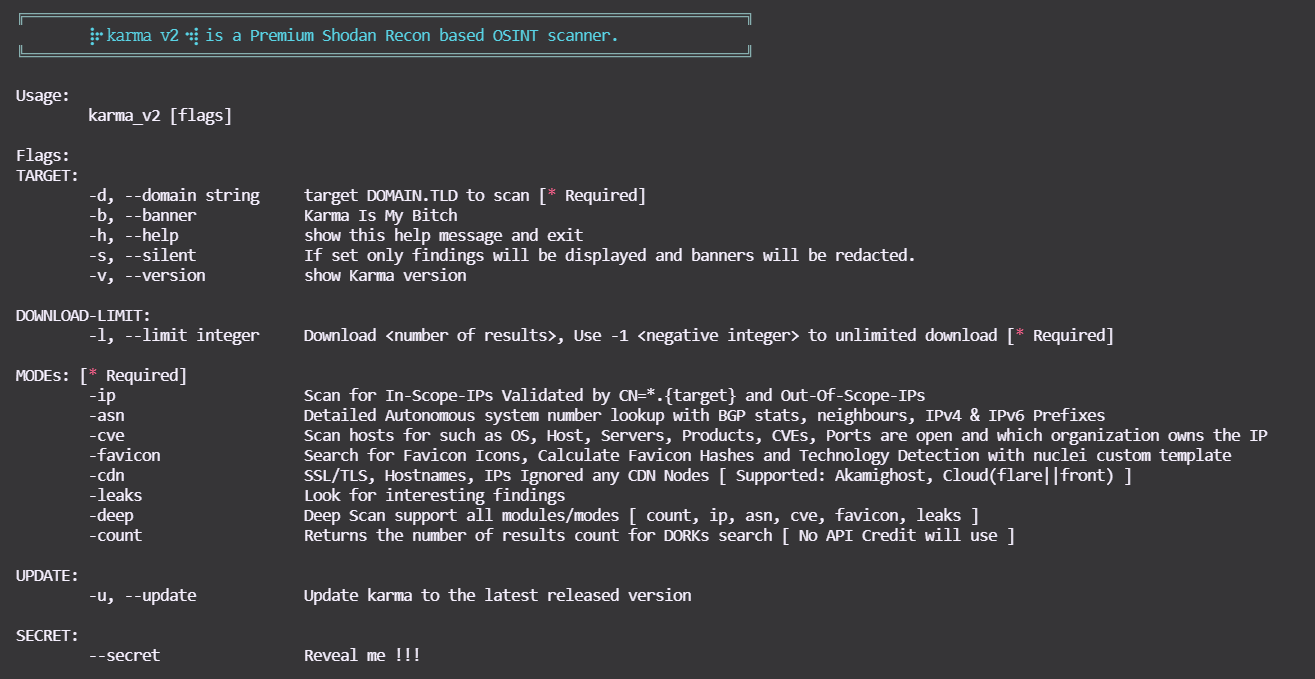
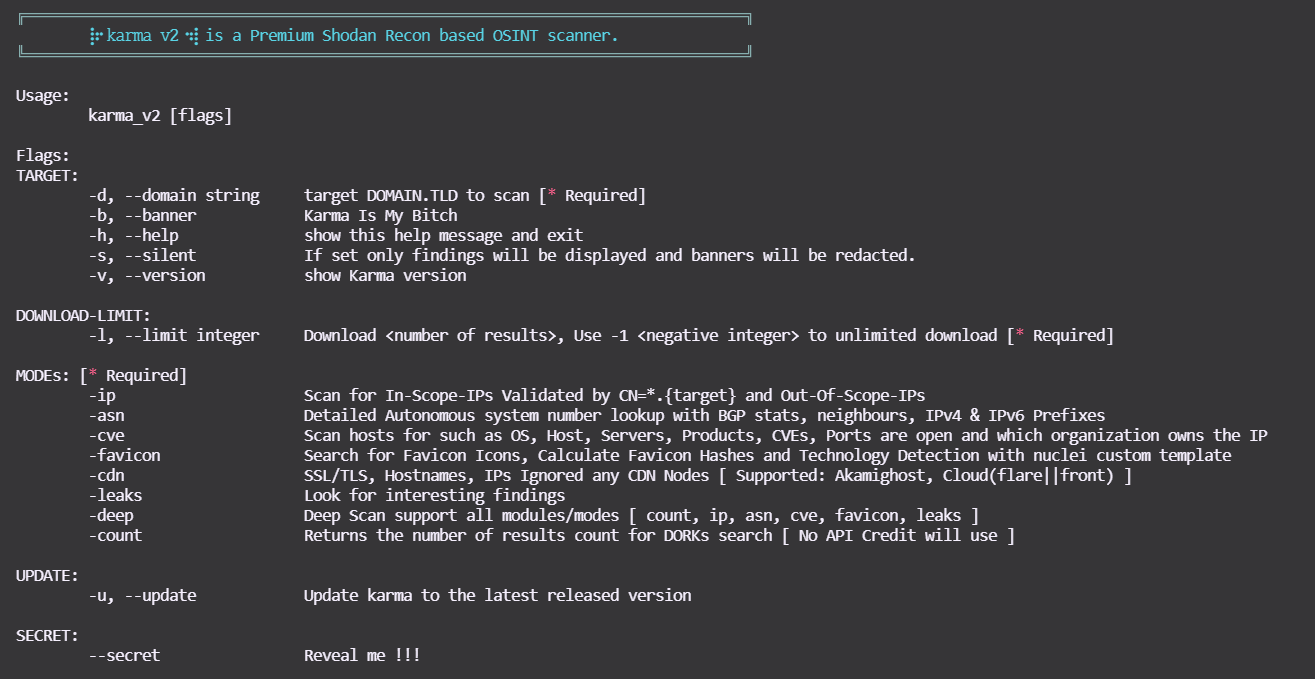
Puoi usare questo comando per vedere l'aiuto:

root@kitploit:~
$ bash karma_v2 -h
karma_v2

MODALITÀ

Demo

  • karma_v2 [modalità -ip] asciicast

  • karma_v2 [modalità -asn] asciicast

  • karma_v2 [modalità -cve] asciicast

  • karma_v2 [modalità -favicon] asciicast

  • karma_v2 [modalità -leaks]

asciicast


  • karma_v2 [modalità -deep]

-deep supporta tutte le modalità sopra, ad esempio -count, -ip, -asn, -favicon, -cve, -leaks !


Output

root@kitploit:~
output/bugcrowd.com-AAAA-MM-GG/ 

.
├── ASNs_Detailed_bugcrowd.com.txt
├── Collect
│   ├── host_domain_domain.tld.json.gz
│   ├── ssl_SHA1_12289a814...83029f8944b6088d60204a92e_domain.tld.json.gz
│   ├── ssl_SHA1_17537bf84...73cb1d684a495db7ea5aa611b_domain.tld.json.gz
│   ├── ssl_SHA1_198d6d4ec...681b77585190078b07b37c5e1_domain.tld.json.gz
│   ├── ssl_SHA1_26a9c5618...d60eae2947b42263e154d203f_domain.tld.json.gz
│   ├── ssl_SHA1_3da3825a2...3b852a42470410183adc3b9ee_domain.tld.json.gz
│   ├── ssl_SHA1_4d0eab730...68cf11d2db94cc2454c906532_domain.tld.json.gz
│   ├── ssl_SHA1_8907dab4c...12fdbdd6c445a4a8152f6b7b7_domain.tld.json.gz
│   ├── ssl_SHA1_9a9b99eba...5dc5106cea745a591bf96b044_domain.tld.json.gz
│   ├── ssl_SHA1_a7c14d201...b6fd4bc4e95ab2897e6a0bsfd_domain.tld.json.gz
│   ├── ssl_SHA1_a90f4ddb0...85780bdb06de83fefdc8a612d_domain.tld.json.gz
│   ├── ssl_domain_domain.tld.json.gz
│   ├── ssl_subjectCN_domain.tld.json.gz
│   └── ssl_subject_domain.tld.json.gz
|   └── . . .
├── IP_VULNS
│   ├── 104.x.x.x.json.gz
│   ├── 107.x.x.x.json.gz
│   └── 99.x.x.x.json.gz
|   └── . . .
├── favicons_domain.tld.txt
├── host_enum_domain.tld.txt
├── ips_inscope_domain.tld.txt
├── main_domain.tld.data
├── . . . 

Shodan Dorks Nuovi Aggiunti in karma_v2

  • SonarQube
  • Apache hadoop node
  • Directory Listing
  • Oracle Business intelligence
  • Oracle Web Login
  • Docker Exec
  • Apache Status
  • Apache-Coyote/1.1 Tomcat-5.5
  • Swagger UI
  • H-SPHERE
  • Splunk
  • JBoss
  • phpinfo
  • ID_VC
  • Confluence
  • TIBCO_Jaspersoft
  • Shipyard_Docker_management
  • Symfony PHP info AWS creds
  • Ignored-by_CDNs
  • Django_Exposed
  • Cluster_Node_etcd
  • SAP_NetWeaver_Application

Shodan Dorks Supportati da 𝚔𝚊𝚛𝚖𝚊 𝚟𝟸

Shodan Dorks Nuovi Aggiunti in 𝚔𝚊𝚛𝚖𝚊 𝚟𝟸

Supporto

Se ti piace ⡷⠂𝚔𝚊𝚛𝚖𝚊 𝟸⠐⢾ e ti aiuta nel lavoro, nel denaro/bounty, nel penetration testing, nel recon o ti dà semplicemente soddisfazione, mostra il tuo supporto! 🛑 Per favore evita di aprire issue GitHub per richieste di supporto o domande! comprami una birra per tenermi carico :)

Buy Me A Beer

Scarica lo strumento
MODALITÀEsempi
-ip bash karma_v2 -d <DOMINIO.TLD> -l <INTERO> -ip
-asn bash karma_v2 -d <DOMINIO.TLD> -l <INTERO> -asn
-cve bash karma_v2 -d <DOMINIO.TLD> -l <INTERO> -cve
-cveid bash karma_v2 -d <DOMINIO.TLD> -l <INTERO> -cveid CVE-2021-34473
-favicon bash karma_v2 -d <DOMINIO.TLD> -l <INTERO> -favicon
-leaks bash karma_v2 -d <DOMINIO.TLD> -l <INTERO> -leaks
-deep bash karma_v2 -d <DOMINIO.TLD> -l <INTERO> -deep
-count bash karma_v2 -d <DOMINIO.TLD> -l <INTERO> -count
DORKsDORKsDORKs
ssl.cert.fingerprinthttp.status:"302" oauth"Server: Jetty"
sslhttp.status:"302" ssoX-Amz-Bucket-Region
orgtitle:"401 Authorization Required""development" org:"Amazon.com"
hostnamehttp.html:"403 Forbidden""X-Jenkins" "Set-Cookie: JSESSIONID" http.title:"Jenkins [Jenkins]"
ssl.cert.issuer.cnhttp.html:"500 Internal Server Error"http.favicon.hash:81586312 200
ssl.cert.subject.cnssl.cert.subject.cn:*vpn*product:"Kubernetes" port:"10250, 2379"
ssl.cert.expired:truetitle:"citrix gateway"port:"9100" http.title:"Node Exporter"
ssl.cert.subject.commonNamehttp.html:"JFrog"http.title:"Grafana"
http.title:"Index of /""X-Jfrog"http.title:"RabbitMQ"
ftp port:"10000"http.title:"dashboard"HTTP/1.1 307 Temporary Redirect "Location: /containers"
"Authentication: disabled" port:445 product:"Samba"http.title:"Openfire Admin Console"http.favicon.hash:1278323681
title:"Login - Adminer"http.title:"control panel""MongoDB Server Information" port:27017 -authentication
http.title:"sign up"http.html:"* The wp-config.php creation script uses this file"port:"9200" all:"elastic indices"
http.title:"LogIn"clockwork"220" "230 Login successful." port:21
port:"11211" product:"Memcached""port: 53" Recursion: Enabledtitle:"kibana"
port:9090 http.title:"Prometheus Time Series Collection and Processing Server""default password"title:protected
http.component:Moodlehttp.favicon.hash:116323821html:"/login/?next=" title:"Django"
html:"/admin/login/?next=" title:"Django"title:"system dashboard" html:jirahttp.component:ruby port:3000
html:"secret_key_base"I will add more soon. . .
DORKsDORKsDORKs
"netweaver"port:"2379" product:"etcd"http.title:"DisallowedHost"
ssl:"${target}" "-AkamaiGHost" "-GHost"ssl:"${target}" "-Cloudflare"ssl:"${target}" "-Cloudfront"
"X-Debug-Token-Link" port:443http.title:"shipyard" HTTP/1.1 200 OK Accept-Ranges: bytes Content-Length: 5664http.title:"TIBCO Jaspersoft:" port:"443" "1970"
"Confluence"http.title:"SonarQube"html:"jmx?qry=Hadoop:*"
http.title:"Directory Listing"http.title:"H-SPHERE"http.title:"Swagger UI - "
Server: Apache-Coyote/1.1 Tomcat-5.5"port:2375 product:"Docker"http.title:"phpinfo()"
http.title:"ID_VC_Welcome""x-powered-by" "jboss"jboss http.favicon.hash:-656811182
http.title:"Welcome to JBoss"port:"8089, 8000" "splunkd"http.favicon.hash:-316785925
title:"splunkd" org:"Amazon.com"http.title:"oracle business intelligence sign in"http.title:"Oracle WebLogic Server Administration Console"
http.title:"Apache Status"I will add more soon. . .